
ClickWhale Link Pages let you display important links, website content, social profiles, forms, and other resources on one page hosted on your WordPress website.
You can share your Link Page through Instagram, TikTok, YouTube, email campaigns, QR codes, and other channels where you want to direct visitors to several destinations from one link.
This guide explains how to create a Link Page and configure its Settings, Contents, Styles, SEO, and Social Profiles.
Before You Begin #
Install and activate ClickWhale on your WordPress website. If you have not installed the plugin, follow the How to Install ClickWhale guide before continuing.
Create a New Link Page #
From your WordPress dashboard:
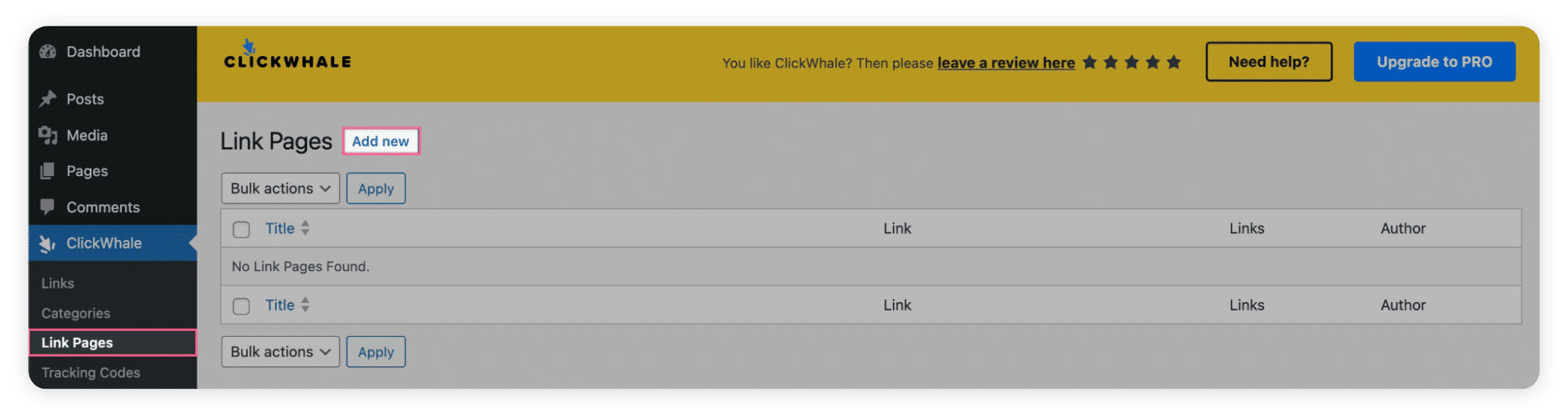
- Go to ClickWhale.
- Select Link Pages.
- Click Add New.
ClickWhale will open the Link Page builder.
The builder contains five tabs:
- Settings
- Contents
- Styles
- SEO
- Social Profiles
You can return to these tabs whenever you need to update your Link Page.
Configure the Link Page Settings #
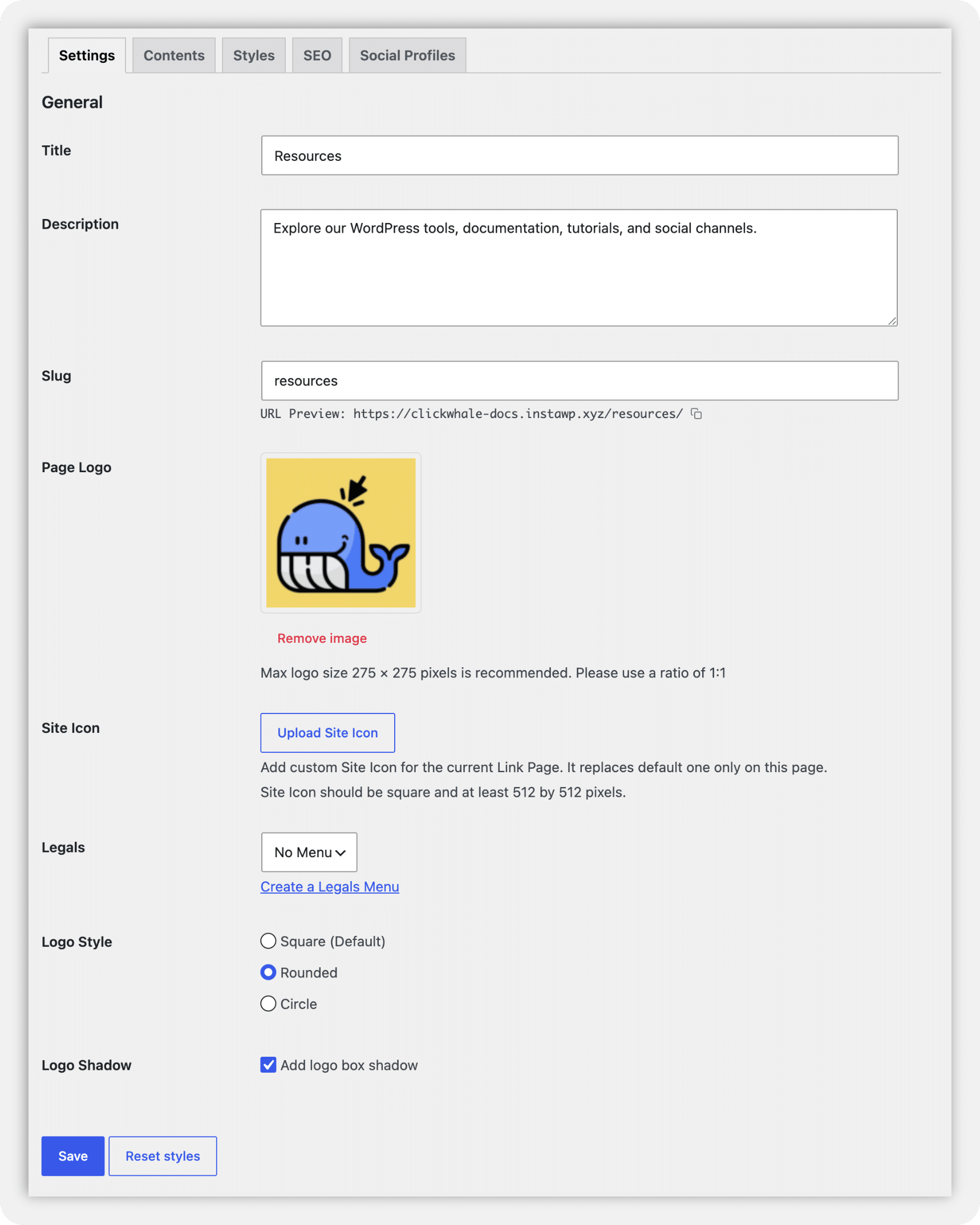
Open the Settings tab and complete the basic information for your Link Page.
Title
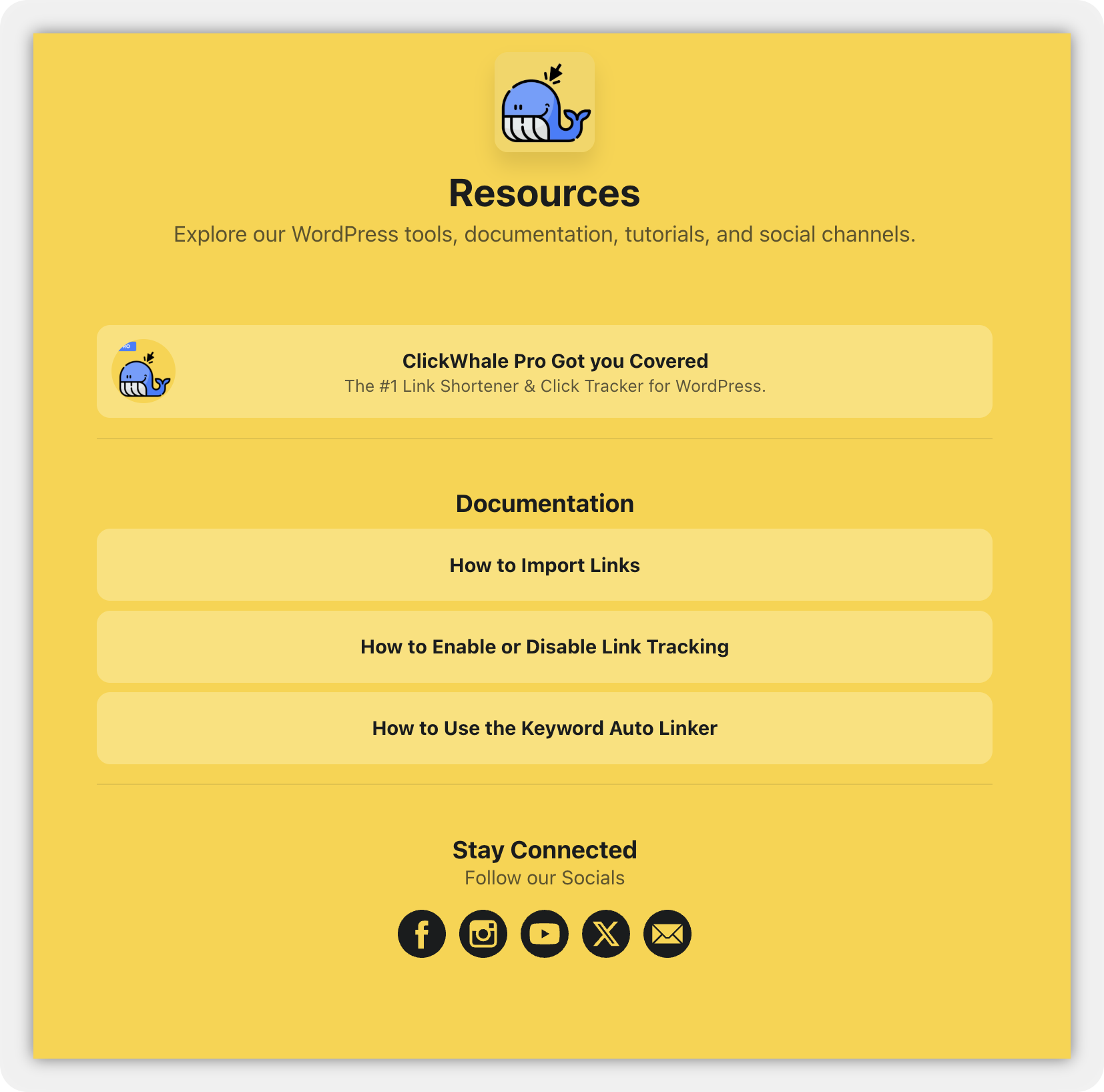
Enter the main title of your Link Page. This title appears in the page header.
Example: ClickWhale Resources
Description
Add a short introduction that tells visitors what they can find on the page.
Example: Explore our WordPress tools, documentation, tutorials, and social channels.
Slug
Enter the final part of the Link Page URL.
For example, entering “resources” may create a URL similar to:
https://example.com/resourcesThe URL Preview below the field shows the page address. Choose a short, readable slug that describes the page.
Page Logo
Click Upload image to add a logo or profile image to the Link Page.
Recommended specifications:
- Maximum dimensions: 275 × 275 pixels
- Aspect ratio: 1:1
Site Icon
Click Upload Site Icon to assign a browser icon to this Link Page.
The custom site icon replaces the website’s default site icon on this page. Use a square image that is at least 512 × 512 pixels.
Legals
Use the Legals menu to display links to relevant legal pages, such as:
- Privacy Policy
- Legal Disclosure
- Terms and Conditions
If you do not have a suitable menu, select Create a Legals Menu and configure one in WordPress.
Logo Style
Choose how the Page Logo appears:
- Square
- Rounded
- Circle
Square is the default option.
Logo Shadow
Select Add logo box shadow if you want to display a shadow around the Page Logo.
Click Save when you finish configuring the Settings tab.
Add Content to the Link Page #
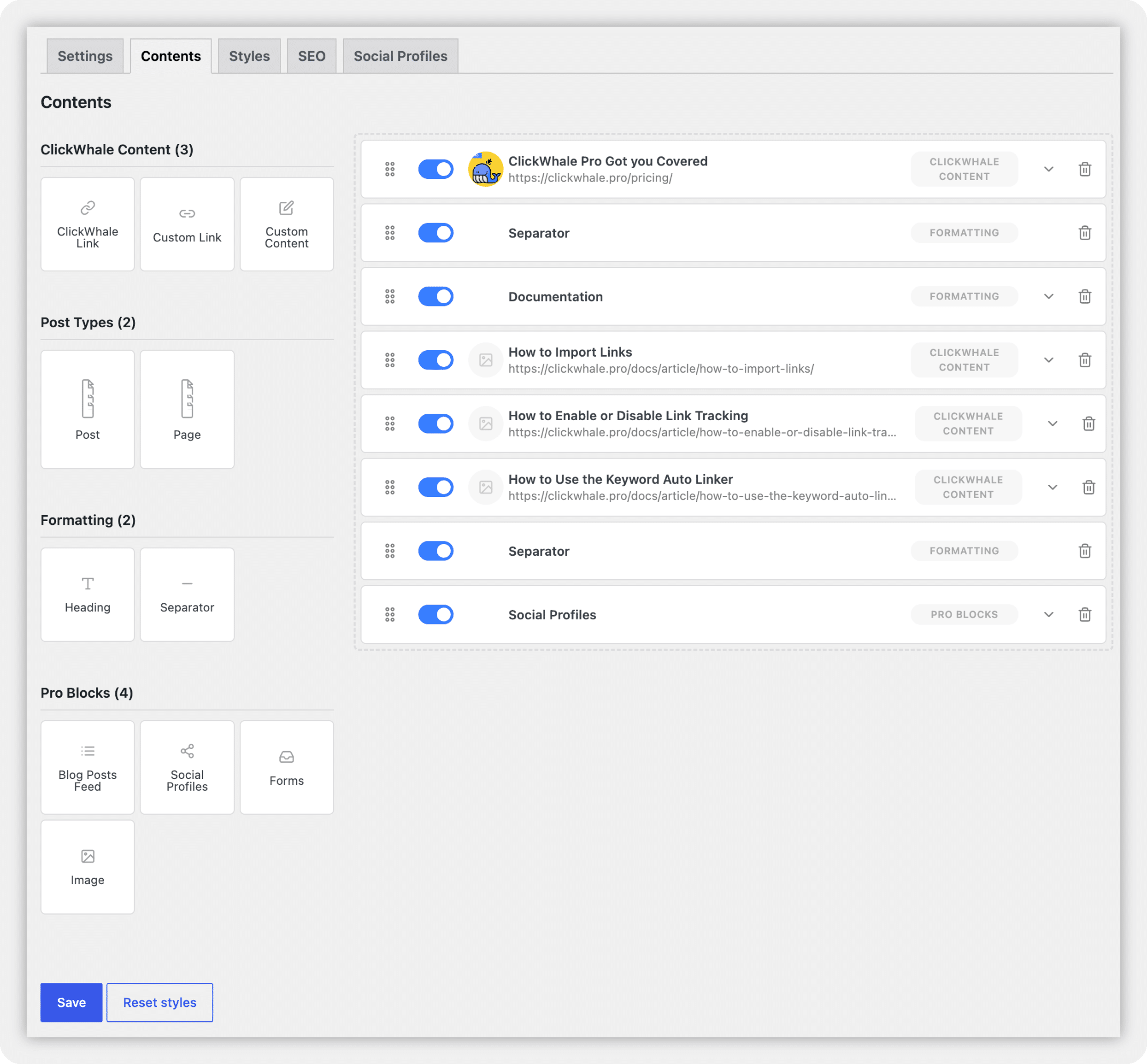
Open the Contents tab to build the main content area.
Drag a block from the left panel and drop it into the content area on the right. Arrange the blocks in the order you want them to appear.
ClickWhale Content #
ClickWhale Link: Add a link that you have already created in the ClickWhale Link Manager. This block lets you reuse and manage an existing ClickWhale link.
Custom Link: Add a direct link without selecting an existing Link Manager entry. Use this block when you want to link to an external website or another destination.
Custom Content: Add your own text or other supported custom content to the Link Page.
Post Types #
Post: Add a published WordPress post to the Link Page.
Page: Add a published WordPress page to the Link Page.
Formatting #
Heading: Add a heading to introduce or organize a group of links.
Example: Latest Resources
Separator: Add a visual divider between content sections.
Pro Blocks #
ClickWhale Pro provides more content options for your Link Pages.
Blog Posts Feed: Display a feed of WordPress blog posts on the Link Page.
Social Profiles: Display the accounts configured under the Social Profiles tab.
Forms: Embed a form created with a supported WordPress form plugin.
ClickWhale works with:
- Contact Form 7
- Fluent Forms
- Ninja Forms
- WPForms
See the Forms Block on Link Pages documentation for detailed instructions.
Image: Add a standalone image to the Link Page.
After adding your content blocks:
- Arrange the blocks in your preferred order.
- Review the information inside each block.
- Remove any unused or duplicate blocks.
- Click Save.
Customize the Link Page Design #
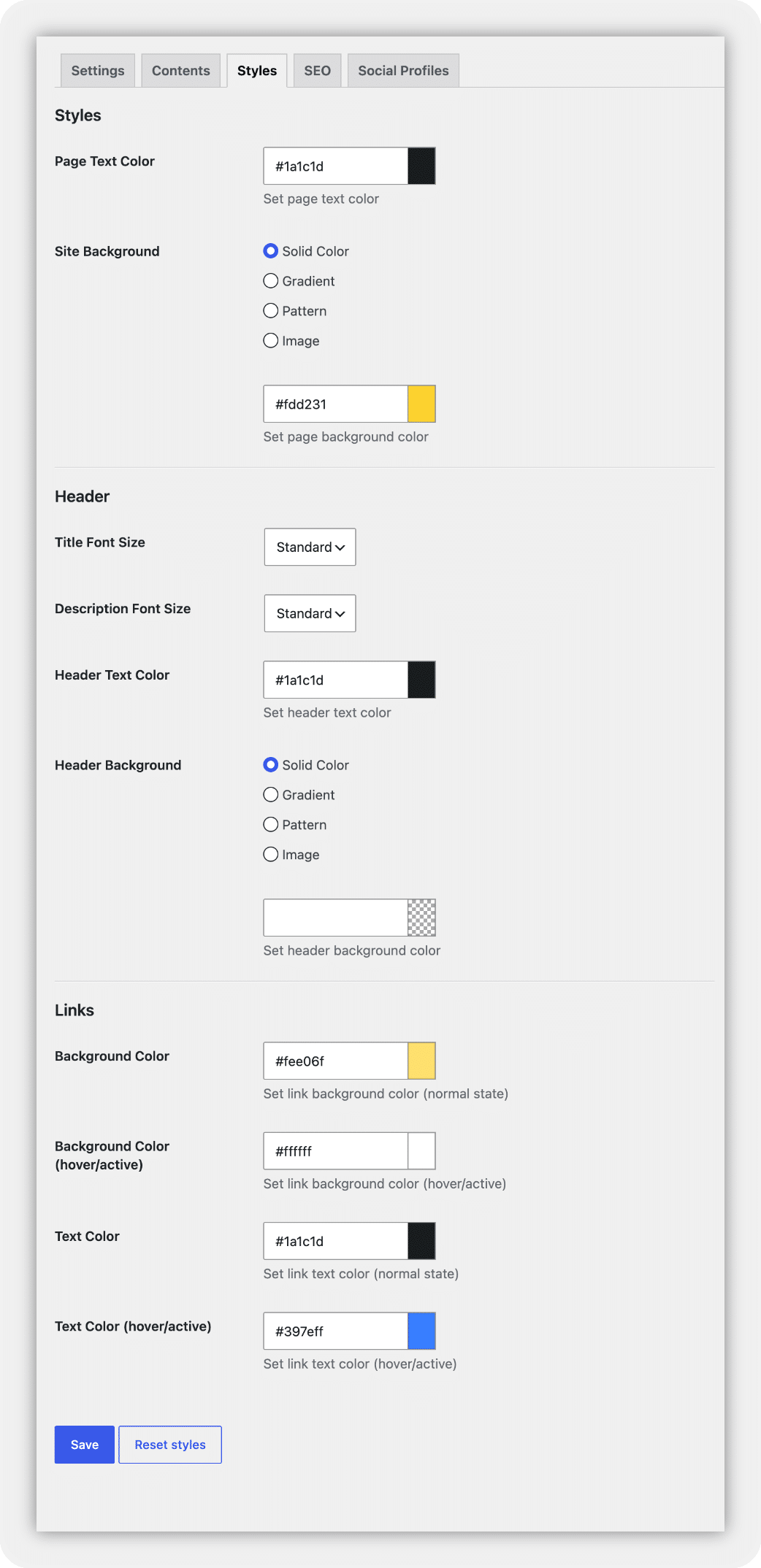
Open the Styles tab to change the appearance of the Link Page.
A mobile preview appears beside the style controls. Use it to review your changes while configuring the page.
Page Styles #
Page Text Color: Select the default color used for text on the page.
Site Background: The available settings change based on the selected background type.
Choose a background type:
- Solid Color
- Gradient
- Pattern
- Image
Header Styles #
Title Font Size: Select the font size used for the Link Page title.
Description Font Size: Select the font size used for the page description.
Header Text Color: Choose the color used for the title and description.
Header Background
Choose a background type for the header:
- Solid Color
- Gradient
- Pattern
- Image
Link Styles #
Background Color: Choose the normal background color of the link buttons.
Background Color, Hover/Active: Choose the button background color shown when a visitor hovers over or activates a link.
Text Color: Choose the normal link text color.
Text Color, Hover/Active: Choose the link text color shown when a visitor hovers over or activates a link.
Make sure the text and background colors have enough contrast to remain readable on mobile devices.
Click Save when the design is ready.
To return the styling to its default values, click Reset styles. Review the page before saving after a reset.
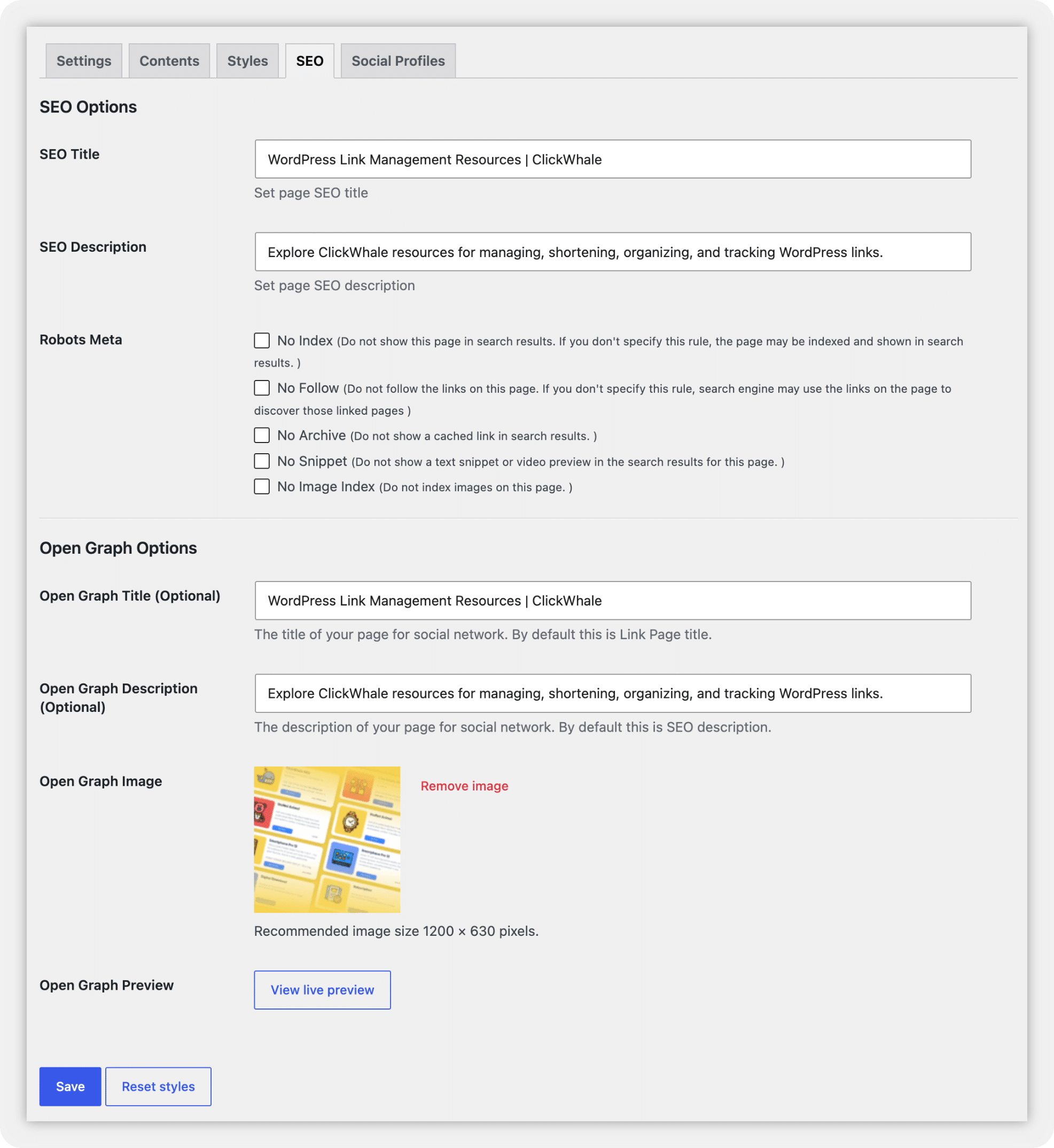
Configure the Link Page SEO #
Open the SEO tab to control how search engines and social platforms interpret the page.
SEO Options #
SEO Title: Enter a descriptive title for the Link Page.
Example: WordPress Link Management Resources | ClickWhale
SEO Description: Write a short description that explains the content and purpose of the page.
Example: Explore ClickWhale resources for managing, shortening, organizing, and tracking WordPress links.
Robots Meta: Use the Robots Meta options when you need to restrict how search engines handle the Link Page.
Available options include:
- No Index: Requests that search engines exclude the page from search results.
- No Follow: Requests that search engines do not follow links on the page.
- No Archive: Requests that search engines do not show a cached copy of the page.
- No Snippet: Requests that search engines do not show a text snippet or video preview.
- No Image Index: Requests that search engines do not index images from the page.
Leave these options unchecked if you want search engines to index the page normally.
Leaving No Index unchecked allows indexing, but it does not guarantee that a search engine will index or rank the page.
Open Graph Options #
Open Graph information controls how the Link Page may appear when someone shares it through a supported social platform or messaging service.
Open Graph Title: Enter the title you want displayed when someone shares the Link Page. This field is optional. ClickWhale uses the Link Page title when you do not provide a separate Open Graph title.
Open Graph Description: Enter the description you want displayed when someone shares the page. This field is optional. ClickWhale uses the SEO description when you leave this field empty.
Open Graph Image: Click Upload image and select the image that should appear in the social preview. The recommended image size is 1200 × 630 pixels.
Open Graph Preview: Save the Link Page before opening the Open Graph Preview. After saving the page, click View live preview to review its sharing information.
Click Save after completing the SEO settings.
Add Social Profiles #
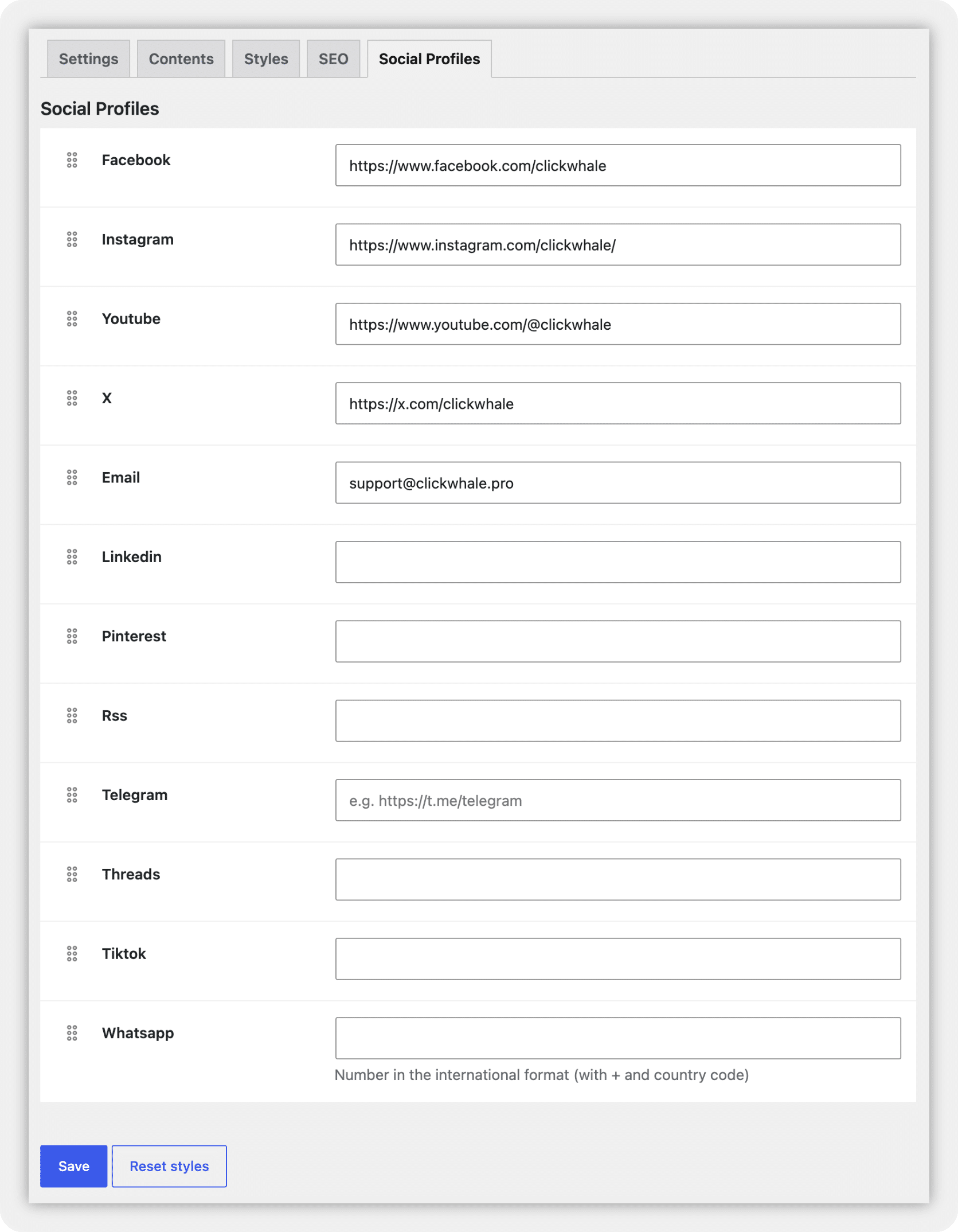
Open the Social Profiles tab to connect the Link Page with your social accounts.
The available fields include:
- RSS
- Telegram
- Threads
- TikTok
- YouTube
- X
Enter the complete profile URL in each applicable field.
Leave the fields empty for platforms you do not want to include.
Use the drag handles beside the platform names to arrange the social profiles in your preferred order.
To display these accounts on the Link Page, add the Social Profiles block through the Contents tab.
Click Save when finished.
Preview and Test the Link Page #
Click View page at the top of the builder to open the Link Page on the front end.
Review the page on desktop and mobile devices.
Check the following:
- The title and description display correctly.
- The logo and site icon are clear.
- Every link opens the intended destination.
- Posts, pages, images, and forms load correctly.
- The text remains readable against the background.
- Hover and active colors remain visible.
- Social profile icons open the correct accounts.
- Legal links work correctly.
- The page does not contain empty sections.
- The Open Graph information matches the page content.
Return to the appropriate tab if you need to make changes. Save and test the page again after making updates.
Share the Link Page #
After testing the page, copy its URL and add it wherever you want visitors to access your links.
Common placements include:
- Instagram bio
- TikTok bio
- YouTube channel
- Facebook profile or Page
- X profile
- Email signature
- Newsletter
- QR code
- Printed marketing materials
Review Link Page Performance #
ClickWhale includes Basic Statistics with the free version. ClickWhale Pro provides Detailed Statistics and other advanced reporting features.
After sharing the Link Page, review its performance regularly to identify which links attract the most interest.
FAQs #
Can I create more than one Link Page?
Yes. Go to ClickWhale > Link Pages and click Add New to create another page.
Can I change the Link Page URL?
Yes. Update the Slug field under the Settings tab.
If you have already shared the old URL, test it after changing the slug and update it wherever it appears.
Can I add WordPress posts and pages?
Yes. Use the Post or Page block under the Contents tab.
Can I add a form to a Link Page?
Yes. ClickWhale Pro includes a Forms block that works with Contact Form 7, Fluent Forms, Ninja Forms, and WPForms.
Can I prevent search engines from indexing my Link Page?
Yes. Open the SEO tab and enable No Index under Robots Meta.
How do I display my social profile links?
Enter your account information under the Social Profiles tab. Then add the Social Profiles block through the Contents tab.
Why can’t I see the Open Graph preview?
Save the Link Page first. The View live preview option becomes available after you save the page.
Why are some content blocks marked as Pro?
Blog Posts Feed, Social Profiles, Forms, and Image appear under Pro Blocks and require ClickWhale Pro.
You may want to try the pro version to test the full potential.


