# ClickWhale
> The #1 Link Shortener, Click Tracker & Bio Link Pages Plugin for WordPress
With ClickWhale, the best WordPress link manager, you can easily manage, shorten, & analyze links on your WordPress website, all while using your own domain!
---
# How-To Enable or Disable Link Tracking
Source: https://clickwhale.pro/docs/article/how-to-enable-or-disable-link-tracking/
Link tracking records clicks on your ClickWhale links. This feature helps you understand how users interact with your content and how your links perform.
ClickWhale enables link tracking by default because it provides important performance data. The collected data appears in the Statistics tab of the plugin.
You can disable tracking if you do not want ClickWhale to record link clicks.
Before you begin, make sure that:
- You have administrator access to the WordPress dashboard
## Where to Enable or Disable Link Tracking
You can control link tracking from the ClickWhale settings page.
- Log in to your WordPress Dashboard.
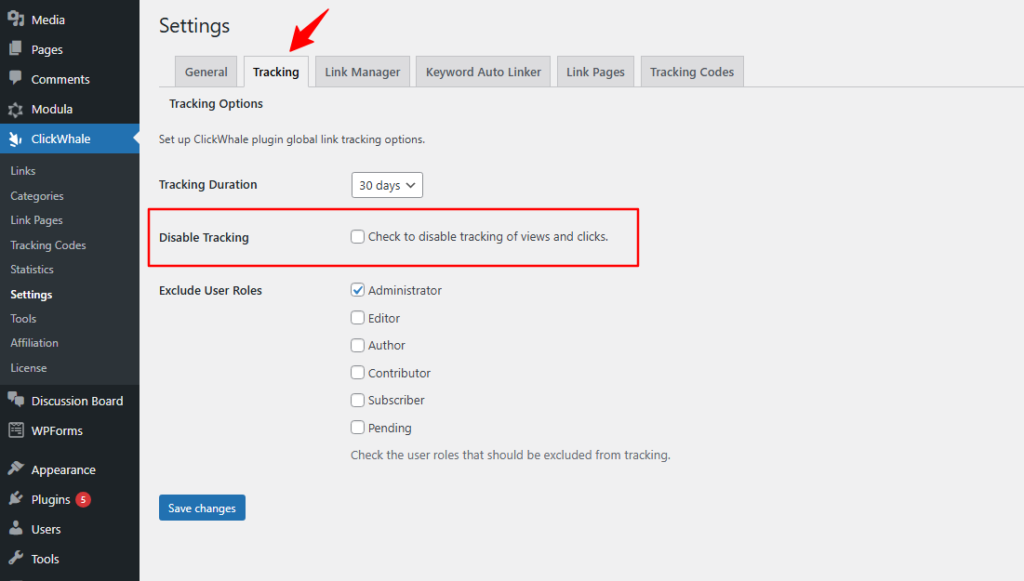
- Navigate to ClickWhale > Settings.
- Open the Tracking tab.
- Locate the Disable Tracking option.
### Enable Link Tracking
Link tracking remains active when the Disable Tracking option is turned off.
Steps
- Go to ClickWhale > Settings.
- Open the Tracking tab.
- Make sure the Disable Tracking option is not enabled or unchecked.
- Save your settings if changes were made.
Once enabled, ClickWhale will record every click on your links.
### Disable Link Tracking
If you disable tracking, ClickWhale will stop recording clicks for your links.
Steps
- Go to ClickWhale > Settings.
- Open the Tracking tab.
- Enable the Disable Tracking option by ticking the checkbox.
- Save your settings.
After disabling this feature, the plugin will no longer record click activity.
## Where to View Link Click Data
To view your click data:
- Go to your WordPress Dashboard.
- Navigate to ClickWhale > Statistics.
Here you can review the performance of your tracked links.
## How Link Tracking Works
When a visitor clicks a ClickWhale link, the plugin records the click automatically. These clicks appear in the Statistics tab of the ClickWhale dashboard.
The statistics help you understand how your links perform and how users interact with your content.
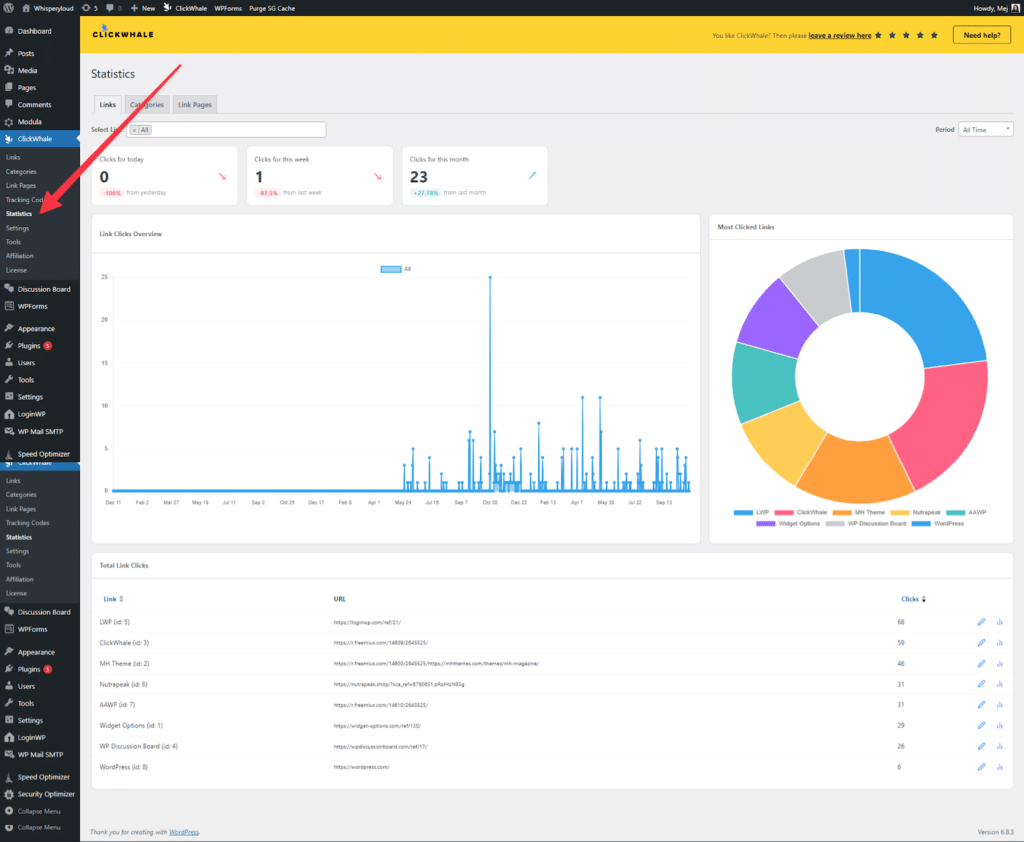
Using the statistics, you can:
• Monitor total link clicks
• Measure click through activity
• Identify which links receive the most engagement
This information helps you evaluate campaigns and improve your link strategy.
---
# Provide Temporary Dashboard Access to Our Support Team
Source: https://clickwhale.pro/docs/article/provide-temporary-dashboard-access-to-our-support-team/
Our support team is here to help you resolve any technical issues quickly and effectively. While many problems can be addressed through email, some situations may require us to access your WordPress admin panel directly. Granting temporary access ensures faster diagnosis and resolution, all while keeping your site secure. You can remove access at any time.
Here are two secure ways to provide limited-time access:
## Option 1: Use a Plugin for Instant Temporary Access
One of the easiest methods is by using the [Temporary Login Without Password](https://wordpress.org/plugins/temporary-login-without-password/) plugin.
This plugin lets you generate a secure, one-time login URL that expires after a set period. It's ideal for developers and support staff because it doesn’t require you to create a permanent user account. You can control the access level, set an expiration date, and revoke access whenever needed.
Setup Guide:
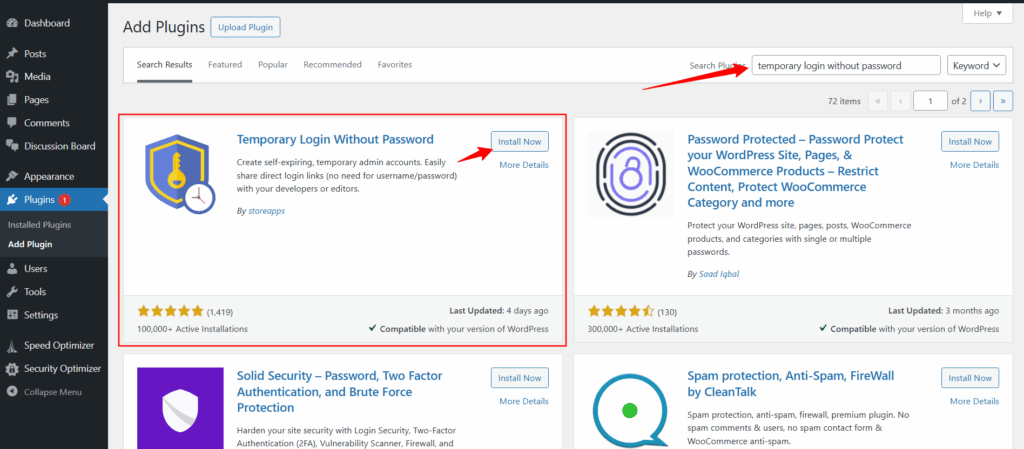
Go to your WordPress Dashboard → Plugins → Add New.
Search for “Temporary Login Without Password” and click Install → Activate.
-
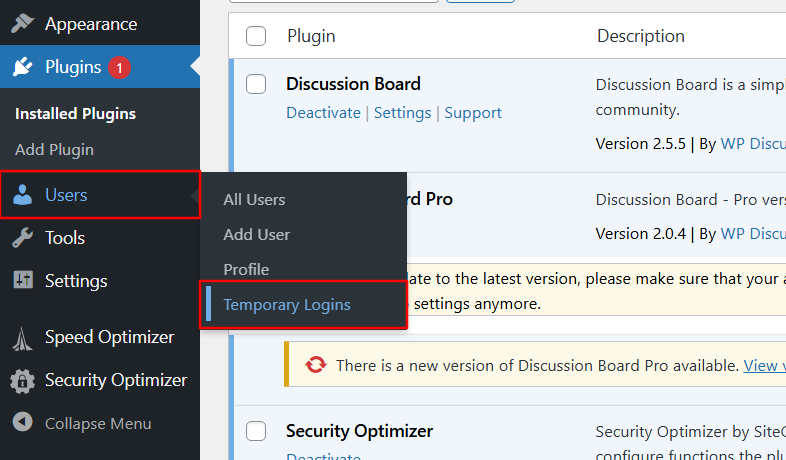
Once activated, navigate to Users → Temporary Logins.
Click Create New and configure with the following:
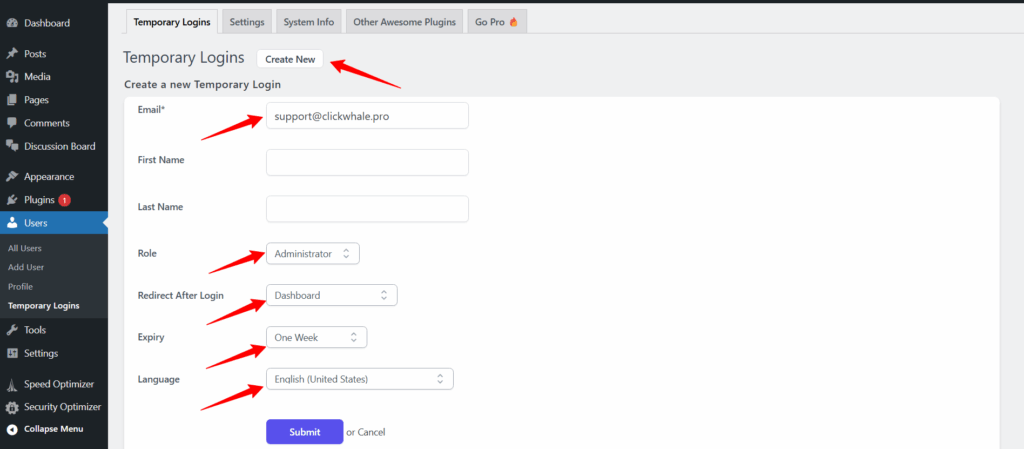
a. Email: [support@clickwhale.pro](mailto:support@clickwhale.pro)
b. Role: Administrator
c. Redirect After Login: Dashboard or specific page
d. Expiry: 1 week
e. Language: English (US)
Once done, a temporary login link will be generated. Please send this URL to our support team securely.
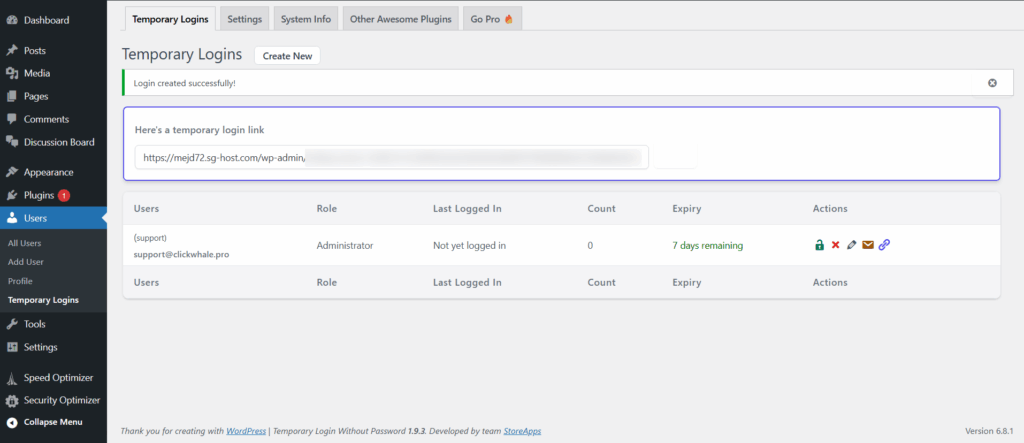
🔐 Security Tip: After we've completed our work, be sure to delete the temporary login link to maintain your site’s safety.
## Option 2: Create an Admin Account Manually
If you prefer, you can also set up a temporary admin account manually:
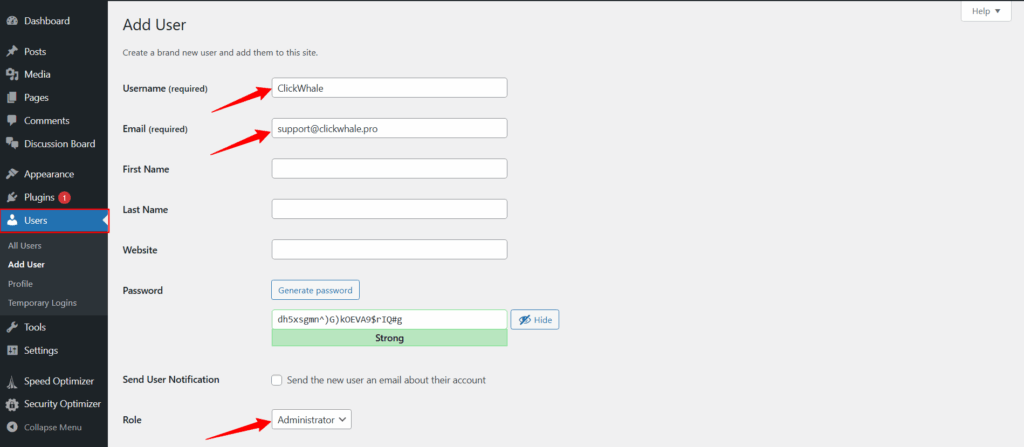
Steps:
Navigate to Users → Add New from your WordPress Dashboard.
Fill in the details:
a. Username: ClickWhale
b. Email: [support@clickwhale.pro](mailto:support@clickwhale.pro)
c. Set the Role to Administrator
d. Share the login details securely with our team
🔔 Reminder: Don’t forget to remove the temporary user once the support task is completed to protect your site.
Granting short-term access allows us to troubleshoot more effectively and deliver quicker results, without compromising the security of your WordPress site.
---
# How-To Create QR codes for Links
Source: https://clickwhale.pro/docs/article/how-to-create-qr-codes-for-links/
You now have the awesome ability to generate a QR code for any of your ClickWhale links. Easier than ever to share them offline, in print, or anywhere a scan is more convenient than a click.
## What is a QR Code?
A QR code (short for Quick Response code) is a square barcode that can be scanned using a smartphone camera. Once scanned, it instantly directs users to a specific URL—like your ClickWhale short link. It’s perfect for print materials, packaging, posters, event flyers, menus, business cards, and more.
## Why Use QR Codes with ClickWhale Links?
QR codes offer a fast and user-friendly way to:
📱 Let people scan and visit your link instantly—no typing required
🎯 Share links in physical environments (print ads, booths, packaging, etc.)
📈 Track and manage all your traffic through ClickWhale analytics
## How to Generate a QR Code in ClickWhale
It only takes a few clicks:
- Log in to your website dashboard
- Navigate to the ClickWhale > Links tab
- Edit the link you want to generate a QR code for
- Click the Generate QR Code button at the upper right corner of the General tab.
- Download or save the QR code by right-clicking on it.

-
You can now use your QR code anywhere you’d like to share that link visually—on posters, business cards, social media graphics, product labels, and more.
## Best Practices for Using ClickWhale QR Codes
✅ **Always test before sharing****
** Scan your QR code with multiple devices to ensure it directs to the correct link.
🎨 **Maintain high contrast****
** ClickWhale QR codes use bold, high-contrast colors (like black on yellow), which are generally very scannable. Just make sure the background where you place it doesn’t interfere—avoid placing it on busy or low-contrast backgrounds.
📏 **Use proper sizing****
** For print, your QR code should be at least **2 x 2 cm (0.8 x 0.8 inches)**. For posters or signage, go larger to ensure it can be scanned from a distance.
🖼️ **Give it breathing room****
** Leave enough white (or background-colored) space around your QR code—at least 4 modules (the tiny black squares) on each side—to avoid scanning errors.
🖨️ **Print on non-reflective surfaces****
** For best results, avoid glossy paper or reflective materials which may interfere with scanning.
---
# How-to Use the Keyword Auto Linker
Source: https://clickwhale.pro/docs/article/how-to-use-the-keyword-auto-linker/
The Keyword Auto Linker feature allows you to create links within ClickWhale and define keywords that will be automatically replaced with those links throughout posts, pages, and custom post types, if preferred.
🎥 **Prefer to watch instead?**
Here’s a quick video tutorial showing how to use ClickWhale’s Keyword Auto Linker — from setup to seeing it in action:
https://youtu.be/wD_wgfp334k?si=hSXmVsY758TUgV__
Whether you prefer watching or reading, here’s a complete guide to help you use ClickWhale’s Keyword Auto Linker. 👇
## Setup Keywords for Links
Add the keywords by navigating to **ClickWhale > Links**. Once you created a link, go to the ‘**Keyword Auto Linker**’ tab and proceed adding the keywords. Make sure to click the ‘Save link’ button once you are done.

You may add up to 10 keywords. Click ‘**Add More**’ to add more keywords.
## Quick view of Keywords Linked
The **Links Overview Page** will show you the set-up keywords for every link. To go there, hover to **ClickWhale** and click **Links**. You will be redirected to the link overview page.

## How it goes
Below is the sample article that has the keyword auto linker.

## Global settings for the Keyword Auto Linker
Adjust the keyword auto linker based on your requirements.
Navigate to ClickWhale > Settings >> Keyword Auto Linker tab.
Configure the settings according to your requirements, such as disabling the auto linker, setting the replacement limit, choosing the link target, and specifying whether to replace keywords in HTML, Archive pages, Front page, blog page, and post types. Once done, click 'Save changes'.

---
# Forms Block on Link Pages
Source: https://clickwhale.pro/docs/article/linkpages-forms-block/
Forms are essential tools for collecting user input and data on a website. They serve various purposes, such as contact forms, registration forms, surveys, feedback forms, and more. On interactive websites, especially WordPress sites, forms are crucial for enhancing user engagement, collecting data, and facilitating communication.
ClickWhale has introduced a new feature that allows users to easily embed forms from popular plugins.
## How to Place Forms on Link Pages
Navigate to ClickWhale > Link Pages. Add a [new link page](https://clickwhale.pro/docs/article/creating-your-first-link-page/) or edit the existing one.
Go to the **Contents **tab.

Then, drag and drop the Forms block into the content area box on the right.
Now, choose a form plugin installed on your WordPress website and ensure that a form is created.

In the example, we used a forms plugin named Contact Form 7.
This is what it looks like on the front end. You can optimize the page by updating the styles in the Styles tab or by adding custom CSS based on your UX/UI requirements.

## What WordPress Forms Plugins Does ClickWhale Support?
ClickWhale supports various form plugins, including popular ones like:
- Contact Form 7
- Fluent Forms
- Ninja Forms
- WP Forms
Check out [all forms integrations](https://clickwhale.pro/integrations/).
---
Using a forms plugin we haven't integrated with yet? Please [reach out to us](https://clickwhale.pro/contact/), and we'll gladly consider adding it.
---
# How-To Cancel your Subscription (Auto-renewal)
Source: https://clickwhale.pro/docs/article/how-to-cancel-your-subscription-auto-renewal/
In this article, we will provide an easy guide on how to cancel your auto-renewal subscription for ClickWhale pro.
If you purchased a ClickWhale annual license, an auto-renewal is set by default. You will receive an email reminder a week before your upcoming payment.
If you’d prefer to cancel your subscription, start by logging into your [Freemius account](https://users.freemius.com/).
After you log in, click the **Renewals & Billing** in the sidebar menu. Then select your ClickWhale subscription, and your subscription information will appear on the right side of your screen, click the **Cancel Auto-Renew** link.

Remember that once your license expires, you will lose the following benefits:
**Price Lock:** The price at which you initially purchase ClickWhale Pro will remain the same, even if prices increase.
**Automatic Renewal**: You won’t have to worry about forgetting to renew your license.
**Continuous Updates**: You will always have access to the latest updates.
---
# How-To Delete My Account
Source: https://clickwhale.pro/docs/article/how-to-delete-my-account/
If you no longer wish to use your ClickWhale Pro account and want to delete it, you can easily do so via the [Freemius dashboard](https://users.freemius.com/).
Go to the [Freemius login page](https://users.freemius.com/) and log in to your account. Once logged in, navigate to the sidebar menu and click on **My Profile**. Scroll to the bottom of the My Profile page and click on the **Close Account** button.

## Important Reminder
Before proceeding with account deletion, make sure to cancel all active subscriptions. This step is essential to prevent any unexpected charges or disruptions.
---
# How-To Renew your License
Source: https://clickwhale.pro/docs/article/how-to-renew-your-license/
When you purchase a **ClickWhale Pro license**, you’ll receive a **license key valid for one year** from the date of purchase. ClickWhale Pro operates on an **annual subscription model**, similar to many popular premium WordPress plugins. Even if your license expires, **your data remains fully accessible**, ensuring uninterrupted access to your existing links, stats, and settings
You can **renew your ClickWhale Pro license** at any time after it expires to regain access to updates and priority support.
## How to renew my license?
If your **ClickWhale Pro license key** is nearing its expiration date, you'll receive an **email reminder** with a direct link and step-by-step **instructions on how to renew your license**.
If you don’t receive the renewal email or accidentally delete it, you can still **renew your ClickWhale Pro license** by logging into your [**Freemius account**](https://clickwhale.pro/account/).
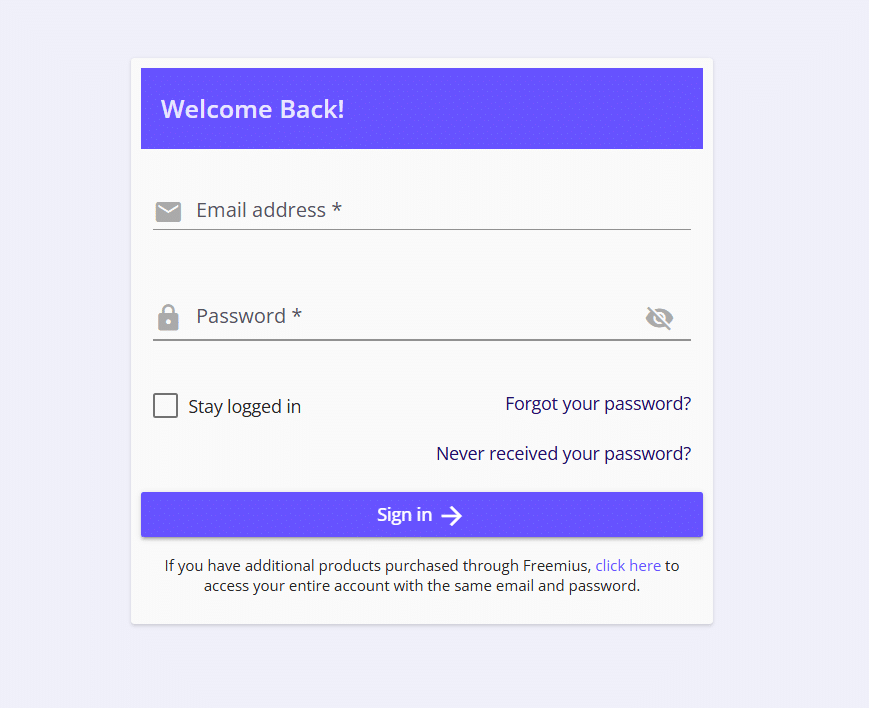
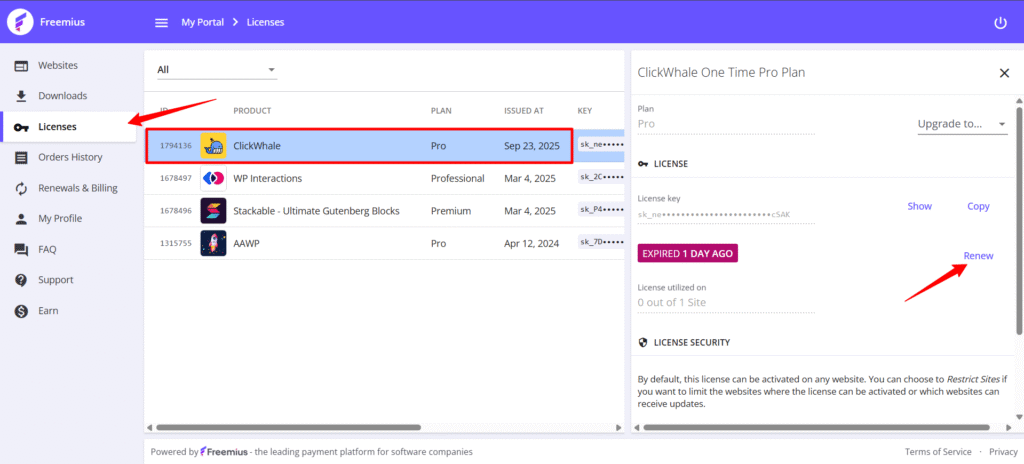
Once logged in, click on **"Licenses"** in the sidebar menu. Locate the subscription you want to renew, then click the **"Renew"** button in the subscription details on the right side of the screen.
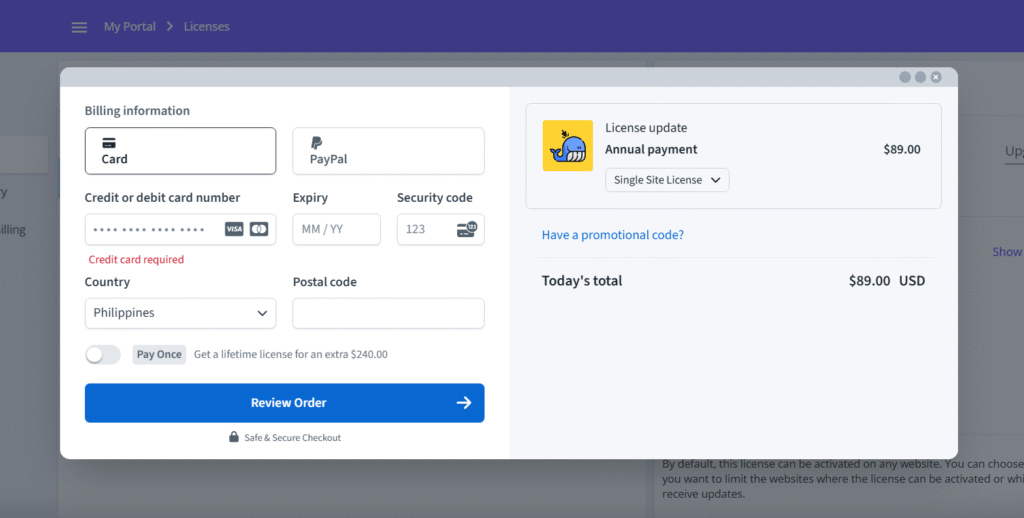
Complete the renewal process by entering your billing information, review your order, and complete the checkout process.
## What happens if my license expires?
Once your **ClickWhale Pro license** expires, the plugin will continue to function with its existing features. However, you will **no longer receive plugin updates** or have access to **priority email support** until the license is renewed.
For example, if you're using the **latest version of ClickWhale Pro** and your premium subscription expires today, you'll still retain access to all current features. However, if a new version is released next month with enhancements or features you’d like to use, you'll need to **renew your license** to update the plugin. Renewing your license grants you access to **all future updates**, **new features**, and continued **priority email support** for the next year.
## What are the auto-renewal benefits?
#### Benefits of Enabling Automatic License Renewal for ClickWhale Pro
By choosing to **automatically renew your ClickWhale Pro license**, you gain the following benefits:
- **Price Lock Guarantee**: Secure the original price of your ClickWhale Pro plan—even if future prices increase.
- **Hassle-Free Renewal**: No need to worry about missing renewal deadlines—your license renews automatically each year.
- **Continuous Access to Updates**: Stay up to date with the **latest ClickWhale Pro features, improvements, and security updates** without interruption.
## Does ClickWhale offer a lifetime license?
Yes, ClickWhale offers a lifetime license. To purchase or upgrade your license to a lifetime license, follow our guide on [how-to upgrade your license here](https://clickwhale.pro/docs/article/how-to-upgrade-your-license/).
A lifetime license works exactly the way it sounds; you only need to pay once and get ClickWhale Pro and all future updates for life. There are no subscription or hidden costs.
---
# How-To Upgrade your License
Source: https://clickwhale.pro/docs/article/how-to-upgrade-your-license/
Upgrading your license to include more sites or switch from an annual subscription to a lifetime license is easy. The good thing is, no settings and customization made previously will be lost.
Upgrade options are available in your account area or on the pricing page. Here’s how:
## Option 1: Upgrade Through Your Account
Start by visiting the [Account page](https://clickwhale.pro/account/) and clicking the “Click here to Login Now” button. A new page will open in a new tab with the Freemius login form. Log in your email address and password to sign in to your dashboard.

Within your customer account, navigate to **'Licenses'** and select the row corresponding to the license you wish to upgrade.

A form with the information of your current plan will appear on the right side. Click on the **'Upgrade** **to'** dropdown menu and select either 3 sites or 10 sites, depending on the number of sites you will be using the license for. This will open the checkout modal form.

Within the checkout modal, select either an annual or lifetime license, and the appropriate discount will be applied automatically.

Lastly, enter your billing information, review your order, and complete the checkout process.
## Option 2: Upgrade Through Pricing Page
Start by visiting the [Pricing page](https://clickwhale.pro/pricing/). Toggle between **yearly** and **lifetime** options to choose the type of license you want. Click the '**Get Started**' button under your desired tier to open the checkout modal.

In the checkout modal, click the link labeled '**Enter license key**'.

A text field will appear. Enter your license key and click **'Apply'**. The appropriate discount will be applied automatically.
Finally, enter your billing information, review your order, and complete the checkout process.
---
# How-To Install and Activate ClickWhale Pro
Source: https://clickwhale.pro/docs/article/how-to-install-activate-clickwhale-pro/
*This feature is only available in the Pro version of ClickWhale.*
In this article, we will provide a straightforward guide on how to install and activate the premium version of ClickWhale.
## Download the plugin
After checking out, you will receive a purchase receipt email with your download link, license key, license usage and guides to get started.

## Upload the plugin to your site
It's time to upload the ClickWhale Pro plugin to your site. To do this, follow these steps:
Login to your site, navigate to **Plugins**, and select **Add New Plugin**.
It will then prompt you to the **Add Plugin** page, and from there, click the **Upload Plugin **button at the top of the page (next to “Add Plugin”).
On the uploader form that appears on the same page, choose the **clickwhale-pro.zip** file and click the **Install Now** button.

Once the installation is complete, you’ll see this page, click the **Activate Plugin** button to proceed with the activation.
After installing and activating the plugin, the final step is to activate your license key.
## Enter your license key
After you click the Activate Plugin button in the previous step, you will see a page requesting your license key.

Copy your license key from the purchase receipt email.

Return to the ClickWhale license form, key in your license key and click the **Activate License** button.
You will then be redirected to your ClickWhale dashboard indicating that the plugin activation is completed.
---
# How-To Install ClickWhale
Source: https://clickwhale.pro/docs/article/how-to-install-clickwhale/
It is simple to install ClickWhale on your site. This article will serve as your guide on how to install it.
The easiest way to install ClickWhale is via the *Plugins* menu in your site’s admin dashboard.
Start by hovering over **Plugins** > **Add New** Plugin.

Search “ClickWhale” in the search bar on the upper right side.
You should see **ClickWhale** appear at the top of the search result. Then click the “**Install Now**” button to begin the installation.

The button will change to **Activate **after a few seconds. Click the **Activate** button to finish the installation.

Once the activation is complete, you’ll see ClickWhale on the left side navigation of your site’s dashboard. Click **ClickWhale** and a prompt will appear with an “**Allow & Continue**” and “**Skip**” buttons. Click your preference button to start using the ClickWhale.

And you’re done! You may now start adding links, categories, link pages and more.

---
# How-To Import Links
Source: https://clickwhale.pro/docs/article/how-to-import-links/
Got a bunch of links to track? No problem — import them with ease!
Here’s how.
Locate **ClickWhale** in the sidebar navigation and open the **'Tools' **admin pageand select the **'Import'** from the Tab-Navigation.
## Upload CSV file
Choose the CSV file to import and proceed by clicking the **'Upload Import File**' button.

## Column mapping
Once your file is uploaded, you will be taken to the **Column Mapping.** Here, you can customize which columns should be mapped to which fields. When you're satisfied with your customization, click Continue.

## Edit fields
You will then be taken to the **Edit Fields**. From there, you can edit or delete the links
For instance, you need to set the link to nofollow and sponsored. You can do so by ticking the checkbox.
Upon completing all customizations and selections, click the **Run Importer** button.

## Import
A list of the successfully uploaded links will be displayed.
And you’re done. You may return to the Links tab and review all the uploaded links. Just click the ‘**Go To Links**’ button.
---
# How-To Add Google Tag Manager To WordPress with ClickWhale
Source: https://clickwhale.pro/docs/article/add-google-tag-manager-to-wordpress/
Tracking customer behavior and having the right data are vital for your website’s success.
This is because being able to access accurate data will let you **see what your customers do on your website, what they like, and what you should change** to maximize conversions and improve the user experience.
**[Google Tag Manager](https://tagmanager.google.com/) **is one of **the best tools to get this data, offering several benefits:**
- **User behavior tracking. **Track clicks on specific buttons, form submissions, and video views.
- **Event tracking.** Track downloads, scroll depth, and other specific user interactions.
- **Ecommerce tracking.** Monitor product views, cart additions, and purchases.
In this post, you’ll discover everything about adding Google Tag Manager to your WordPress website with ClickWhale. By using ClickWhale you can **skip the long and complicated process of adding it directly to your site’s code.**
## What Is Google Tag Manager?
Google Tag Manager is a free tool that **enables you to install, store, and manage tags** – small snippets of code that track user actions and collect data.
The most common tag you will almost certainly have previously encountered is the one used to install Google Analytics:

Other popular examples include **Google Ads conversion scripts, Meta Pixel code, and remarketing tags.** You need to place such tags in your website code for Google Analytics and other platforms to function and collect data.
## How to Install Google Tag Manager With ClickWhale
The problem with the usual approach to **installing GTM is that it’s complicated and requires some technical knowledge.**
This is because you need to **access your website’s code and add it there directly.**

If you aren’t a very technical person, this might present a great challenge. It also **increases the risk of code not working properly** (if you fail to put it into the right place).
**The ClickWhale approach eliminates all of these issues.**
You don’t need to access your site’s code, nor have any technical knowledge. You just **add the Google Tag Manager to our platform, and we will do everything for you!**
*Let’s now look at the step-by-step process of what to do to add Google Tag Manager to your WordPress site with ClickWhale.*
### #1: Install ClickWhale
**Head over to your **[**WordPress Plugin**](https://ppopotamus-haka.instawp.xyz/wp-admin/plugin-install.php?s=clickwhale&tab=search&type=term)** menu or **[**https://clickwhale.pro/**](https://clickwhale.pro/), download and install the ClickWhale plugin, and then activate it.

### #2: Create a New Google Tag Manager Account / Log In
The next step is to set up your Google Tag Manager account. **Head over to the **[**Tag Manager website**](https://tagmanager.google.com/#/home)** and click on the ‘Create Account’ button.**
You will then need to **fill in your Account Name, Country, Container Name** (the name of your website inside GTM), and **target platform**.

Hit ‘**Create**’, agree with the terms and conditions, and then click the ‘**Yes**’ button.

### #3: Get Your GTM Codes
After you finish creating your account, you will see **a pop-up for installing Google Tag Manager on your website. **

In case you inadvertently close this pop-up, you can always just **head over to Admin and select ‘Install Google Tag Manager’.**
We’re going to paste this code directly into ClickWhale in order to add Google Tag Manager and its functionality to your site.
### #4: Add Google Tag Manager Into ClickWhale
Head over to your site’s WordPress menu, select **ClickWhale**, go to the **‘Tracking Codes’**, and click on the **‘Add New’ **button.

You will now need to fill in the following fields:
- **The title.** The name of the tracking code inside ClickWhale.
- **Code.** The actual code you will paste from Google Tag Manager.
- **Code position.** Where you want to add the code.
- **The pages.** Which pages to add the code to.
- **User roles. **The user roles for which the script should **not **be executed *(you don’t want to track behaviors of the website’s admins or you)*.
Let’s now quickly go over how to fill these fields in.
#### Creating The Title
**The title of this tracking code should be ‘Google Tag Manager’.**

#### Adding The Code
Now it’s time to paste the code from your GTM account.
Head over to your Google Tag Manager page, **copy the first code**, and **paste it into the ‘code’ section inside the ClickWhale plugin**.

You will now need to **select the position of your code** – which should be** ‘Before ’**.

#### Selecting Pages And User Roles
After that, you will need to **select which pages should run GTM, and which user roles’ behaviors** you’re looking NOT to track.
To select specific pages, **select the ‘Specific Page’ option, and then add pages into the section ‘Include Pages’:**

*(If you’re looking to run GTM on your whole site, select the ‘**Whole website**’ option.)*
You can also **select the user roles you want to exclude from tracking.** As we said earlier, this can be particularly useful to avoid tracking your own behavior, or the behavior of the site’s admins and content creators.

The last step is to **check the ‘Enable Tracking Code’ and hit ‘Save’.**

### #5: Adding the “Second Code”
It’s also vital to **add the second code from Google Tag Manager to your website.**

You might notice that even though you haven’t added it yet, your GTM still works. However, there are a few rare instances where JavaScript isn’t working.** If you don’t add the second code to your website, GTM won’t work in such instances.**
To add the second code, follow the same process as we did in the previous step. **The only thing that is different is the position of your code.**

You want to **add this code into the ‘After ’ portion of the code.**
The rest should be kept the same.
## That’s It!
You have now successfully added Google Tag Manager to your website.
There are a lot of behaviors you can track with GTM. However, if you’re looking for just basic click tracking, then there may be no need to install Google Tag Manager at all, since **ClickWhale lets you track your clicks on any links on your website.**
Here are a few **additional resources you might find super helpful.**
- [ClickWhale Analytics Data: How to Use It To Make A Profit](https://clickwhale.pro/blog/clickwhale-analytics-data-how-to-use-it-to-make-a-profit/)
- [Why You Might Need a Bio Link Page on Your WordPress Website?](https://clickwhale.pro/blog/bio-link-page-for-wordpress-for-free/)
- [5 Reasons Why You Need to be Using ClickWhale](https://clickwhale.pro/blog/5-reasons-why-you-need-to-be-using-clickwhale/)
If you have any questions or need anything, you can always **reach us **[**at our website**](https://clickwhale.pro/contact/)**, where we are always happy to help!**
---
# Creating Your First Link Page
Source: https://clickwhale.pro/docs/article/creating-your-first-link-page/
Link pages are a great way to **promote multiple links to your website,** **lead magnet, and social media all in one place.** A well-designed link page can help you stay organized and massively simplify the navigation for your customers…
…and of course, on some platforms, **you’re only allowed to share just one link, so a link page is vital for your success.**

Link pages fix this “one link” problem, and allow you to connect with your social media audience the right way.
In this guide, you’ll discover **the step-by-step process of creating link pages** using the [free ClickWhale plugin](https://clickwhale.pro/free-download/) for WordPress.
## 1. Install and Activate a WP Plugin
**Head over to your WordPress Plugin menu**, download and install the [ClickWhale plugin](https://wordpress.org/plugins/clickwhale/), and activate it.

## 2. Create a New Landing Page
Now it’s time to start creating your first link page!
**Head over to the ClickWhale plugin settings and select the ‘Link Pages’ tab.** In this view, you’ll be able to see all your created link pages (once you’ve made them!). To create a new link page (or your first), **click on the ‘Add New’ button.**

You will now have to **fill in all important information such as the title, slug, and the links you want to promote.**
This particular plugin allows you to **add up to 10 links to each page**, so you can promote all of the essential pages of your business in one single place.

## 3. Customize Your Link Page
This step is all about **structuring your link page and making it more appealing** to potential customers, and maximizing your impact.
### Build Your Link Page
To build your link page, **click on the ‘Contents’ tab.**

From there, you can use **ClickWhale’s drag-and-drop editor to add elements** such as a link, a post, or a heading to your link page.

Once you’re done, it’s time to make your new link page more appealing.
### Customize the Colors of Your Landing Page
There are plenty of elements you can adjust the color for, such as:
- Site background
- Page text
- Link text color
- Link button background color
- Link text hover color
- Link button hover color

**Having consistent branding across all channels is essential** for making your brand more professional – and a link page is no different.
### Optimize the SEO of Your Page
Your link page will be a part of your website.
And search engines want to understand your link page, so it can **be properly indexed and recommended to visitors. **That’s why, like any other page on your website, it’s good practice to optimize the page to ensure the title, meta description, and slug are all included and structured correctly.

## 4. Preview the Link Page
Once you’ve finished customizing the page, we recommend previewing it. To do so, **click on the 'View Page’ button.**

This will make sure you view the page and** see how it looks (and check that there are no unexpected errors.) **

## 5. Get Analytics to Your Link in Bio Page
Analytics is a key part of your link page tracking.
**ClickWhale gives you the option to track the views and clicks from each page**, so you can gather insight into your link page’s performance.
*(Analytics are turned on automatically, so there’s no need to set them up.)*

## You’re All Set!
You’ve now created your first link page for **free **with **ClickWhale**.
You can now share it with your audience, empowering them to connect with you and find all your important links in one place.
Learn more about link pages here:
- [ClickWhale Analytics Data: How to Use It To Make A Profit](https://clickwhale.pro/blog/clickwhale-analytics-data-how-to-use-it-to-make-a-profit/)
- [Curious About The New Link Page Builder Tool From ClickWhale?](https://clickwhale.pro/blog/new-link-page-builder-tool-from-clickwhale/)
- [Why You Might Need a Bio Link Page on Your WordPress Website?](https://clickwhale.pro/blog/bio-link-page-for-wordpress-for-free/)
If you have any questions or need anything, you can always **reach us **[**at our website**](https://clickwhale.pro/contact/)**, where we are always happy to help!**
---
# How-To Shorten Links & Create Redirects
Source: https://clickwhale.pro/docs/article/how-to-shorten-links-and-create-redirects/
**Super-complex, overwhelming links aren’t a good look.**

Using such long links will only make your website look unprofessional and unorganized. Fortunately, we have the perfect tool to let you solve this issue, which will also indirectly help you:
- **Increase trust.** People don’t trust long URLs since they look suspicious.
- **Improve engagement.** On most social media sites, adding long URLs is not possible.
Here’s how you can achieve such benefits in less than five minutes.
**Note: **If you haven’t already, install & activate the [ClickWhale plugin](https://wordpress.org/plugins/clickwhale/).
## 2. Add Your Long Link
Now it’s time to **choose a link you want to shorten and customize.**
We highly recommend shortening and customizing every link you share with your audience, whether on social media or anywhere else.
After you choose a link you want to shorten, **head over to your WordPress dashboard, select the ClickWhale plugin, and click on ‘Add New’. **

## 3. Create a Redirect
You will see a **menu for customizing and shortening your links:**

In case you’re unfamiliar with some of these fields, here is a bit more information about them.
- **Title. **The name of your link (just for your own use, but really helpful for finding it inside ClickWhale).
- **Slug. **The custom URL to your link. The slug is the end part of a URL after the backslash (“/”).
- **Target URL. **The URL you want to shorten and customize.
- **Nofollow. **The nofollow tag tells search engines to ignore that link.
- **Sponsored. **Indicates links that result from advertisements or paid placements.
- **Description. **A small description of your link (only visible to you, not your audience).
- **Category. **A category of your link for better organization in ClickWhale
Of course, **some of these fields are just for organizational purposes** inside ClickWhale. If you’re looking to keep it as simple as possible, all you need is to fill in the **title, slug, target URL, and redirection type.**

### The Redirection Type
There are several redirection types we allow you to use with your links.

It’s important to **choose the right one for the best user experience and SEO.** We’ll now go briefly over each of the redirection types.
- **301 redirect: Moved Permanently. **The URL has been permanently moved to a new URL where a user is automatically redirected.
- **302 redirect: Found / Move Temporarily. **The URL has been temporarily moved to a different URL where a user is automatically redirected.
- **303 redirect: See Other. **The redirects don't link to the URL itself but to another page (such as a confirmation page).
- **307 redirect: Temporarily Redirect. **The URL has been temporarily moved to another location. If accurate click tracking is more important than SEO, and you expect to change your URL periodically, 307 temporary redirects are the way to go.
- **308 redirect: Permanent Redirect. **The URL you are trying to access has been permanently moved to a new URL. If it is permanent and you are sending data using a POST request, then use this.
After you **choose the redirection type and fill in all details, click the ‘Save link’ button.**

## 4. Test & Preview the Link
You will now see your newly added link in your ClickWhale Links menu.

It’s important you **preview a link and test it before you share it with your audience.** We’ve never experienced any problems with our custom links but, just to be sure everything works fine, it’s **always a good idea to double-check it**.
## You Can Now Shorten Links & Improve Engagement!
Creating custom links will **elevate your site and allow you to stand out** from competitors.
But there are a lot of **additional things you can do to thrive and get ahead even faster.** Here are some of our resources you should definitely check.
- [How To Use ClickWhale in WordPress to Add Affiliate Links](https://clickwhale.pro/blog/how-to-use-clickwhale-in-wordpress-to-add-affiliate-links/)
- [ClickWhale Analytics Data: How to Use It To Make A Profit](https://clickwhale.pro/blog/clickwhale-analytics-data-how-to-use-it-to-make-a-profit/)
- [5 Reasons Why You Need to be Using ClickWhale](https://clickwhale.pro/blog/5-reasons-why-you-need-to-be-using-clickwhale/)
Custom links combined with the tips you find in the links above will make your website look more professional, while also helping you capture more potential customers and drive higher engagement.
If you have any questions or need anything, you can always **reach us **[**at our website**](https://clickwhale.pro/contact/)**, where we are always happy to help!**
---
# Independent Analytics
Source: https://clickwhale.pro/integrations/independent-analytics/
---
# Koko Analytics
Source: https://clickwhale.pro/integrations/koko-analytics/
---
# FireBox
Source: https://clickwhale.pro/integrations/firebox/
---
# Conversion Bridge
Source: https://clickwhale.pro/integrations/conversion-bridge/
---
# WP Fusion
Source: https://clickwhale.pro/integrations/wp-fusion/
---
# Uncanny Automator
Source: https://clickwhale.pro/integrations/uncanny-automator/
---
# OttoKit
Source: https://clickwhale.pro/integrations/ottokit/
---
# InstaWP
Source: https://clickwhale.pro/integrations/instawp/
---
# WPForms
Source: https://clickwhale.pro/integrations/wpforms/
---
# Ninja Forms
Source: https://clickwhale.pro/integrations/ninja-forms/
---
# Fluent Forms
Source: https://clickwhale.pro/integrations/fluent-forms/
---
# Contact Form 7
Source: https://clickwhale.pro/integrations/contact-form-7/
---
# Pretty Links
Source: https://clickwhale.pro/integrations/pretty-links/
---
# ThirstyAffiliates
Source: https://clickwhale.pro/integrations/thirstyaffiliates/
---
# BetterLinks
Source: https://clickwhale.pro/integrations/betterlinks/
---
# Advanced Ads
Source: https://clickwhale.pro/integrations/advanced-ads/
---
# AAWP
Source: https://clickwhale.pro/integrations/aawp/
---
# Satisfaction Survey 2025
Source: https://clickwhale.pro/satisfaction-survey/
# Satisfaction Survey 2025
Helps us to improve ClickWhale: Tell us what you love, what’s missing & suggest new features.
*If you experience any problems submitting the form, please feel free to email us directly to [support@clickwhale.pro](mailto:support@clickwhale.pro).*
---
# WordPress Services
Source: https://clickwhale.pro/wordpress-services/
# WordPress Services
Our WordPress services and experts are happy to help you get the job done right.
### Further services!
In addition, we also offer WordPress Speed Optimization, WordPress Website Emergency Fixes and much more.
[Read More](https://fdmedia.dev/services/?utm_source=clickwhale.com&utm_medium=website&utm_campaign=wordpress_services&utm_content=button&utm_term=info_box)
---
# WordPress Hosting
Source: https://clickwhale.pro/wordpress-hosting/
# WordPress Hosting
WordPress Hosting: Everything You Need to Know Before Choosing a Provider
## Explore Our WordPress Hosting Partnerships 🔎
ClickWhale Pro collaborates with leading WordPress hosting providers through strong partnerships, allowing us to recommend reliable solutions that match different website needs — from beginner-friendly shared hosting to enterprise-level managed hosting.
We have been active in the WordPress industry for many years, both as a provider and as a user. Here you will find our top recommendations for WordPress hosting for your websites.
## What Is WordPress Hosting? 🤓
WordPress hosting is web hosting designed and optimized specifically for WordPress websites. Unlike standard web hosting, WordPress hosting comes with pre-configured servers, security measures, and support built around the needs of WordPress users.
Today, WordPress powers over 43% of all websites online. With its popularity, hosting companies have developed specialized solutions. ClickWhale Pro is no different, as it highlights these trusted options through our WordPress hosting partnerships.
If you’re comparing different WordPress hosting partners, understanding the basics will help you choose the right plan for your site.
## Types of WordPress Hosting 👇
- **Shared WordPress Hosting** – Budget-friendly option, where multiple websites share server resources. Perfect for beginners or small blogs. Many of our entry-level hosting partners offer this option.
- **Managed WordPress Hosting** – Premium hosting with automatic updates, enhanced security, caching, and expert support. Our managed hosting partnerships are ideal for businesses and creators who want a hassle-free experience.
- **VPS WordPress Hosting** – Offers more dedicated resources and control than shared hosting, ideal for growing websites. Several of our VPS hosting partners provide scalable solutions for sites on the rise.
- **Dedicated WordPress Hosting** – A full server exclusively for your site. Best for high-traffic websites that demand top performance. We work with dedicated hosting providers who specialize in enterprise-level reliability.
- **Cloud WordPress Hosting** – A Flexible and scalable solution that spreads your site across multiple servers. Through our cloud hosting partnerships, you can access cutting-edge technology with excellent uptime.
## Key Features of the Best WordPress Hosting Providers 🧩
When evaluating hosting companies, look for these essential features (and check which of our partners provide them):
- **Performance & Speed** – Fast loading times, SSD storage, caching, and CDN integration.
- **Security** – SSL certificates, malware scanning, firewalls, and proactive monitoring.
- **Automatic Updates & Backups** – Ensures your site stays secure and recoverable.
- **Expert WordPress Support** – 24/7 help from specialists who know WordPress inside out.
- **Uptime Guarantee** – At least 99.9% uptime to keep your site online.
## Why Choosing the Right WordPress Hosting Matters 💡
- **Better SEO Rankings** – Google rewards fast-loading websites with higher rankings.
- **Improved User Experience** – Visitors stay longer on sites that load quickly and run smoothly.
- **Scalability & Growth** – Reliable hosting ensures your site can handle traffic increases without downtime.
Our partnerships with top WordPress hosting providers make it easier to find a plan that balances performance, price, and long-term growth.
## Common Mistakes to Avoid When Picking WordPress Hosting ❌
- **Only Choosing the Cheapest Plan** – Entry-level plans may lack the power your site will need later.
- **Ignoring Security Features** – Backups, SSL, and malware protection are essential.
- **Overlooking Support** – Quality support can save hours of frustration when issues arise.
By choosing from our trusted hosting partners, you can avoid many of these pitfalls.
---
# Partner
Source: https://clickwhale.pro/partner/
This page is for partners.
---
# Sven at BlogGiraffe recommends the ClickWhale Link Manager Plugin
Source: https://clickwhale.pro/partner/bloggiraffe/
---
# Romuald Fons recommends the ClickWhale Link Manager Plugin
Source: https://clickwhale.pro/partner/romuald-fons/
---
# Creatives
Source: https://clickwhale.pro/affiliates/creatives/
[Download Creatives](https://clickwhale.pro/link/affiliates-creatives-download/)
*By clicking on the button, you will be taken to a Google Drive folder where you can find all the files.*
---
# Black Friday 2026
Source: https://clickwhale.pro/black-friday/
---
# UTM Builder
Source: https://clickwhale.pro/utm-builder-tool/
## What are UTM Parameters?
In the digital marketing landscape, understanding user behavior and tracking campaign performance is paramount for success. One powerful tool in this arena is UTM parameters, which allow marketers to collect valuable data about how visitors interact with their online content. UTM, or Urchin Tracking Module, parameters are snippets of text added to the end of a URL, enabling the tracking of specific campaigns, sources, mediums, and more. By using UTM parameters, marketers can gain insights into the effectiveness of their promotional efforts, identify which channels drive the most traffic, and ultimately refine their strategies for better ROI. As businesses strive to optimize their marketing campaigns in an increasingly competitive environment, mastering UTM parameters becomes essential for data-driven decision-making and enhanced online visibility. In this article, we will explore the significance of UTM parameters, how to implement them effectively, and the best practices to maximize their potential.
**UTM parameters** are snippets of text added to a **URL** that help you track the effectiveness of your online marketing efforts. They provide valuable data about the source, medium, and campaign name, which can be analyzed through various **analytics tools** such as **Google Analytics**. By using **UTM tracking**, marketers can gain insights into how users interact with their content, which channels are driving traffic, and how successful their **marketing campaigns** are overall.
## How do UTM Parameters work?
**UTM parameters** work by appending specific tags to a **URL**. When a user clicks on a link with these tags, the data is sent back to your **analytics tool** (like **Google Analytics**), which records the information. Each **UTM parameter**provides different information, such as the source of the traffic (e.g., Facebook, email), the medium (e.g., organic, paid), and the campaign name. This helps you understand which efforts are effective in driving users to your site.
## What are the different types of UTM Parameters?
There are five main types of **UTM parameters** you can use:
- **utm_source**
- **utm_medium**
- **utm_campaign**
- **utm_term**
- **utm_content**
**utm_source** identifies the source of traffic (e.g., newsletter, Google)
**utm_medium** describes the medium (e.g., email, CPC)
**utm_campaign** names the specific campaign
**utm_term** tracks paid search keywords,
and **utm_content** differentiates ads or links that point to the same URL. This allows you to analyze performance in a granular way.
## How can I create UTM links?
You can **create UTM links** using a **campaign URL builder** or a **free UTM builder**. Simply enter the **URL** you want to track, along with the relevant **UTM parameters** such as source, medium, and campaign name. The tool will generate a tracking **URL** that you can use in your **marketing campaigns**. This process helps you easily add campaign
---
# Integrations
Source: https://clickwhale.pro/integrations/
---
# Account
Source: https://clickwhale.pro/account/
## Welcome back! 👋
**With your purchase, we've emailed you with a username and password for managing your purchase via Freemius.**
The following options are available to you:
- Download the latest version of our plugin
- Access your personal license key
- Manage your subscription for automatic license renewal
- Create invoices for your previous purchases
- Activate or deactivate your sites
- Edit your customer details
Please use the form below to receive a secure login link via email.
*If you have any account-related questions, feel free to [contact us](https://clickwhale.pro/contact/) anytime.*
---
# Upgrade to ClickWhale Pro
Source: https://clickwhale.pro/upgrade/
## Do it like our customers - you won't regret it 🤩
#### Many free users have upgraded and got even more out of their websites. Now it's your turn!
---
# BetterLinks Alternative
Source: https://clickwhale.pro/betterlinks-alternative-2/
---
# Lasso Alternative
Source: https://clickwhale.pro/lasso-alternative/
---
# Events: Free 1-Year License of ClickWhale Pro
Source: https://clickwhale.pro/event-license/
## Validate your invitation and grab ClickWhale Pro
If you have any problems or questions about redeeming your free license, please [contact us](https://clickwhale.pro/contact/).
Click here to grab your license
---
# Free 1-Year License of ClickWhale Pro
Source: https://clickwhale.pro/free-1-year-license/
## Validate your invitation and grab ClickWhale Pro
If you have any problems or questions about redeeming your free license, please [contact us](https://clickwhale.pro/contact/).
Click here to grab your license
---
# DealMirror Code Redemption
Source: https://clickwhale.pro/dealmirror-code-redemption/
## Validate your purchase and grab ClickWhale Pro
If you have any problems or questions about redeeming your code, please [contact us](https://clickwhale.pro/contact/).
---
# Join our Affiliate Program
Source: https://clickwhale.pro/affiliates/join/
# Join our Affiliate Program
Recommend ClickWhale to your audience and earn 30% commission on every sale you refer
## Application Form
---
# Landing Page: ClickWhale PRO Discount FB Ads
Source: https://clickwhale.pro/lp-pro-discount-fb/
---
# Landing Page: Link Manager FB Ads
Source: https://clickwhale.pro/lp-link-manager-fb/
---
# Landing Page: Link Manager Google Ads
Source: https://clickwhale.pro/lp-link-manager-ga/
---
# ClickWhale Free Download
Source: https://clickwhale.pro/free-download/
---
# Changelog
Source: https://clickwhale.pro/changelog/
# Changelog
ClickWhale - the best Link Shortener & Click Tracker for WordPress.
And completely free of charge!
---
# Pricing
Source: https://clickwhale.pro/pricing/
---
# Thanks
Source: https://clickwhale.pro/black-friday/thanks/
## What's next? 🙌
**We’ve emailed you with a link to confirm your email address.** Please check your spam folder** **if you don’t see it come in the next couple of minutes.
Once you completed the confirmation, **you will be notified as soon as our Black Friday deal is available!**
### Stay in touch with us! 📲
We recommend that you follow our social media channels if you don't want to miss any news about ClickWhale:
- [Twitter / X](https://twitter.com/clickwhale)
- [Instagram](https://www.instagram.com/clickwhale/)
- [YouTube](https://www.youtube.com/channel/UC5O3hVqgoS9MGg_BJ32qShA)
- [Facebook](https://www.facebook.com/clickwhale)
---
# Download
Source: https://clickwhale.pro/free-download/your-download/
## Get Started with ClickWhale 🚀
We really appreciate that you want to level up your site with our WordPress plugin.
To download ClickWhale, just click the button below 👇
[**Start Download Now**](https://clickwhale.pro/?fluentcrm=1&route=smart_url&slug=sbe1u9)
### Stay in touch with us! 📲
We recommend that you follow our social media channels if you don't want to miss any news about ClickWhale:
- [Twitter / X](https://twitter.com/clickwhale)
- [Instagram](https://www.instagram.com/clickwhale/)
- [YouTube](https://www.youtube.com/channel/UC5O3hVqgoS9MGg_BJ32qShA)
- [Facebook](https://www.facebook.com/clickwhale)
---
# Thanks
Source: https://clickwhale.pro/free-download/thanks/
## What's next? 🙌
**We’ve emailed you with a link to confirm your email address.** Please check your spam folder** **if you don’t see it come in the next couple of minutes.
Once you completed the confirmation, you can download ClickWhale for free right away!
### Stay in touch with us! 📲
We recommend that you follow our social media channels if you don't want to miss any news about ClickWhale:
- [Twitter / X](https://twitter.com/clickwhale)
- [Instagram](https://www.instagram.com/clickwhale/)
- [YouTube](https://www.youtube.com/channel/UC5O3hVqgoS9MGg_BJ32qShA)
- [Facebook](https://www.facebook.com/clickwhale)
---
# Thanks!
Source: https://clickwhale.pro/free-1-year-license/thanks/
## What's next? 🙌
Your free 1-year license of ClickWhale Pro will be created in the background.
**We will email you including your personal license key and download link.** Please check your spam folder** **if you don’t see it come in the next couple of minutes.
Once you activated your license by entering your license key into the plugin settings, you can manage your active sites and account details on [Freemius](https://users.freemius.com/login).
### Stay in touch with us! 📲
We recommend that you follow our social media channels if you don't want to miss any news about ClickWhale:
- [Twitter / X](https://twitter.com/clickwhale)
- [Instagram](https://www.instagram.com/clickwhale/)
- [YouTube](https://www.youtube.com/channel/UC5O3hVqgoS9MGg_BJ32qShA)
- [Facebook](https://www.facebook.com/clickwhale)
---
# Thanks for Your Purchase
Source: https://clickwhale.pro/purchase-confirmation/
## What's next? 🙌
**We’ve emailed you with a username and password, as well as your personal license key and download link.** Please check your spam folder** **if you don’t see it come in the next couple of minutes.
You can download ClickWhale Pro from [your account](https://users.freemius.com/login). You can also manage your active sites and subscriptions there, update your account information, and generate an invoice for your purchase.
### Stay in touch with us! 📲
We recommend that you follow our social media channels if you don't want to miss any news about ClickWhale:
- [Twitter / X](https://twitter.com/clickwhale)
- [Instagram](https://www.instagram.com/clickwhale/)
- [YouTube](https://www.youtube.com/channel/UC5O3hVqgoS9MGg_BJ32qShA)
- [Facebook](https://www.facebook.com/clickwhale)
---
# Link Manager
Source: https://clickwhale.pro/link-manager/
---
# Affiliate Program
Source: https://clickwhale.pro/affiliates/
# Affiliate Program
Recommend ClickWhale to your audience and earn 30% commission on every sale you refer
## Your Affiliate Benefits
- Earn **30% commission** on every new license you refer
- Selection of modern banners
- Access to the latest numbers, such as: Referred visitors, customers, your conversion rate, campaigns or payouts.
- 30 days cookie duration and to increased chances for commissions
- Payouts are available after passing the minimum amount of $100 in commission
- Receive payouts via PayPal
View our [affiliate terms](https://freemius.com/theme/14600/mh-magazine/legal/eula/) for more information.
[Become an Affiliate](https://clickwhale.pro/affiliates/join/)
Already an affiliate? [Log in now](https://users.freemius.com/affiliation/)
---
# Wonderlink alternative
Source: https://clickwhale.pro/wonderlink-alternative/
---
# Blog
Source: https://clickwhale.pro/blog/
---
# Tracking Codes
Source: https://clickwhale.pro/tracking-codes/
---
# Linktree alternative – for free
Source: https://clickwhale.pro/linktree-alternative/
---
# Free Pretty Links alternative
Source: https://clickwhale.pro/pretty-links-alternative/
## Why ClickWhale? 🐳
Pretty Links costs money. We offer you all the features for free! For example beautiful Link Pages, simple and reliable click tracking…and that is not all!
---
# Link Pages
Source: https://clickwhale.pro/linkpages/
---
# The Best Link Shortener & Click Tracker for WordPress
Source: https://clickwhale.pro/
---
# Legal Disclosure
Source: https://clickwhale.pro/legal-disclosure/
# Legal Disclosure
## Information pursuant to Sect. 5 German Telemedia Act (TMG)
fdmedia GmbH
Altrottstraße 31
69190 Walldorf
Commercial Register: HRB 747759
Registration court: Amtsgerichts Mannheim
**Represented by:**
Florian Daugalies
## Contact
Phone: +49 6227 8991526 (No Support)
E-mail: mail@clickwhale.pro
## VAT ID
Sales tax identification number according to Sect. 27 a of the Sales Tax Law:
DE362121047
## Information regarding professional liability insurance
**Name and registered office of the insurer:**
exali GmbH
Franz-Kobinger-Strasse 9
86157 Augsburg
## Person responsible for editorial
Florian Daugalies
c/o fdmedia GmbH
Altrottstraße 31
69190 Walldorf
Germany
## EU dispute resolution
The European Commission provides a platform for online dispute resolution (ODR): [https://ec.europa.eu/consumers/odr/](https://ec.europa.eu/consumers/odr/).
Our e-mail address can be found above in the site notice.
## Dispute resolution proceedings in front of a consumer arbitration board
We are not willing or obliged to participate in dispute resolution proceedings in front of a consumer arbitration board.
---
# Documentation
Source: https://clickwhale.pro/docs/
This is the archive page for the default knowledge base
---
# Contact
Source: https://clickwhale.pro/contact/
# Contact
If you have any questions or problems, contact us! We are always here to help!
> **Please note: **Our support team will also be taking some time off over Christmas and New Year. 🎄
>
>
>
>
>
> Nevertheless, we will do our best to respond to incoming emails as quickly as possible. We therefore ask for your understanding if our response takes a little longer than usual. 🙏
>
>
>
>
>
> Our support team will be available as usual again from Monday, January 5, 2026.
*If you experience any problems submitting the form, please feel free to email us directly to [support@clickwhale.pro](mailto:support@clickwhale.pro).*
---
# Privacy Policy
Source: https://clickwhale.pro/privacy-policy/
# Privacy Policy
## 1. An overview of data protection
### General information
The following information will provide you with an easy to navigate overview of what will happen with your personal data when you visit this website. The term “personal data” comprises all data that can be used to personally identify you. For detailed information about the subject matter of data protection, please consult our Data Protection Declaration, which we have included beneath this copy.
### Data recording on this website
#### Who is the responsible party for the recording of data on this website (i.e., the “controller”)?
The data on this website is processed by the operator of the website, whose contact information is available under section “Information about the responsible party (referred to as the “controller” in the GDPR)” in this Privacy Policy.
#### How do we record your data?
We collect your data as a result of your sharing of your data with us. This may, for instance be information you enter into our contact form.
Other data shall be recorded by our IT systems automatically or after you consent to its recording during your website visit. This data comprises primarily technical information (e.g., web browser, operating system, or time the site was accessed). This information is recorded automatically when you access this website.
#### What are the purposes we use your data for?
A portion of the information is generated to guarantee the error free provision of the website. Other data may be used to analyze your user patterns.
#### What rights do you have as far as your information is concerned?
You have the right to receive information about the source, recipients, and purposes of your archived personal data at any time without having to pay a fee for such disclosures. You also have the right to demand that your data are rectified or eradicated. If you have consented to data processing, you have the option to revoke this consent at any time, which shall affect all future data processing. Moreover, you have the right to demand that the processing of your data be restricted under certain circumstances. Furthermore, you have the right to log a complaint with the competent supervising agency.
Please do not hesitate to contact us at any time if you have questions about this or any other data protection related issues.
### Analysis tools and tools provided by third parties
There is a possibility that your browsing patterns will be statistically analyzed when your visit this website. Such analyses are performed primarily with what we refer to as analysis programs.
For detailed information about these analysis programs please consult our Data Protection Declaration below.
## 2. Hosting and Content Delivery Networks (CDN)
We are hosting the content of our website at the following provider:
### External Hosting
This website is hosted externally. Personal data collected on this website are stored on the servers of the host. These may include, but are not limited to, IP addresses, contact requests, metadata and communications, contract information, contact information, names, web page access, and other data generated through a web site.
The external hosting serves the purpose of fulfilling the contract with our potential and existing customers (Art. 6(1)(b) GDPR) and in the interest of secure, fast, and efficient provision of our online services by a professional provider (Art. 6(1)(f) GDPR). If appropriate consent has been obtained, the processing is carried out exclusively on the basis of Art. 6 (1)(a) GDPR and § 25 (1) TTDSG, insofar the consent includes the storage of cookies or the access to information in the user's end device (e.g., device fingerprinting) within the meaning of the TTDSG. This consent can be revoked at any time.
Our host(s) will only process your data to the extent necessary to fulfil its performance obligations and to follow our instructions with respect to such data.
We are using the following host(s):
onRocket.com, LLC
ATTN: Data Protection Officer
126 Bayberry Cir
Jupiter, FL 33458
#### Data processing
We have concluded a data processing agreement (DPA) for the use of the above-mentioned service. This is a contract mandated by data privacy laws that guarantees that they process personal data of our website visitors only based on our instructions and in compliance with the GDPR.
### Cloudflare
We use the “Cloudflare” service provided by Cloudflare Inc., 101 Townsend St., San Francisco, CA 94107, USA. (hereinafter referred to as “Cloudflare”).
Cloudflare offers a content delivery network with DNS that is available worldwide. As a result, the information transfer that occurs between your browser and our website is technically routed via Cloudflare’s network. This enables Cloudflare to analyze data transactions between your browser and our website and to work as a filter between our servers and potentially malicious data traffic from the Internet. In this context, Cloudflare may also use cookies or other technologies deployed to recognize Internet users, which shall, however, only be used for the herein described purpose.
The use of Cloudflare is based on our legitimate interest in a provision of our website offerings that is as error free and secure as possible (Art. 6(1)(f) GDPR).
Data transmission to the US is based on the Standard Contractual Clauses (SCC) of the European Commission. Details can be found here: [https://www.cloudflare.com/privacypolicy/](https://www.cloudflare.com/privacypolicy/).
For more information on Cloudflare’s security precautions and data privacy policies, please follow this link: [https://www.cloudflare.com/privacypolicy/](https://www.cloudflare.com/privacypolicy/).
The company is certified in accordance with the “EU-US Data Privacy Framework” (DPF). The DPF is an agreement between the European Union and the US, which is intended to ensure compliance with European data protection standards for data processing in the US. Every company certified under the DPF is obliged to comply with these data protection standards. For more information, please contact the provider under the following link: [https://www.dataprivacyframework.gov/s/participant-search/participant-detail?contact=true&id=a2zt0000000GnZKAA0&status=Active](https://www.dataprivacyframework.gov/s/participant-search/participant-detail?contact=true&id=a2zt0000000GnZKAA0&status=Active)
#### Data processing
We have concluded a data processing agreement (DPA) for the use of the above-mentioned service. This is a contract mandated by data privacy laws that guarantees that they process personal data of our website visitors only based on our instructions and in compliance with the GDPR.
## 3. General information and mandatory information
### Data protection
The operators of this website and its pages take the protection of your personal data very seriously. Hence, we handle your personal data as confidential information and in compliance with the statutory data protection regulations and this Data Protection Declaration.
Whenever you use this website, a variety of personal information will be collected. Personal data comprises data that can be used to personally identify you. This Data Protection Declaration explains which data we collect as well as the purposes we use this data for. It also explains how, and for which purpose the information is collected.
We herewith advise you that the transmission of data via the Internet (i.e., through e-mail communications) may be prone to security gaps. It is not possible to completely protect data against third-party access.
### Information about the responsible party (referred to as the “controller” in the GDPR)
The data processing controller on this website is:
Florian Daugalies
c/o fdmedia GmbH
Altrottstraße 31
69190 Walldorf
Germany
Phone: +49 6227 8991526 (No Support)
E-mail: mail@clickwhale.pro
The controller is the natural person or legal entity that single-handedly or jointly with others makes decisions as to the purposes of and resources for the processing of personal data (e.g., names, e-mail addresses, etc.).
### Storage duration
Unless a more specific storage period has been specified in this privacy policy, your personal data will remain with us until the purpose for which it was collected no longer applies. If you assert a justified request for deletion or revoke your consent to data processing, your data will be deleted, unless we have other legally permissible reasons for storing your personal data (e.g., tax or commercial law retention periods); in the latter case, the deletion will take place after these reasons cease to apply.
### General information on the legal basis for the data processing on this website
If you have consented to data processing, we process your personal data on the basis of Art. 6(1)(a) GDPR or Art. 9 (2)(a) GDPR, if special categories of data are processed according to Art. 9 (1) DSGVO. In the case of explicit consent to the transfer of personal data to third countries, the data processing is also based on Art. 49 (1)(a) GDPR. If you have consented to the storage of cookies or to the access to information in your end device (e.g., via device fingerprinting), the data processing is additionally based on § 25 (1) TTDSG. The consent can be revoked at any time. If your data is required for the fulfillment of a contract or for the implementation of pre-contractual measures, we process your data on the basis of Art. 6(1)(b) GDPR. Furthermore, if your data is required for the fulfillment of a legal obligation, we process it on the basis of Art. 6(1)(c) GDPR. Furthermore, the data processing may be carried out on the basis of our legitimate interest according to Art. 6(1)(f) GDPR. Information on the relevant legal basis in each individual case is provided in the following paragraphs of this privacy policy.
### Information on the data transfer to third-party countries that are not secure under data protection law and the transfer to US companies that are not DPF-certified
We use, among other technologies, tools from companies located in third-party countries that are not safe under data protection law, as well as US tools whose providers are not certified under the EU-US Data Privacy Framework (DPF). If these tools are enabled, your personal data may be transferred to and processed in these countries. We would like you to note that no level of data protection comparable to that in the EU can be guaranteed in third countries that are insecure in terms of data protection law.
We would like to point out that the US, as a secure third-party country, generally has a level of data protection comparable to that of the EU. Data transfer to the US is therefore permitted if the recipient is certified under the “EU-US Data Privacy Framework” (DPF) or has appropriate additional assurances. Information on transfers to third-party countries, including the data recipients, can be found in this Privacy Policy.
### Recipients of personal data
In the scope of our business activities, we cooperate with various external parties. In some cases, this also requires the transfer of personal data to these external parties. We only disclose personal data to external parties if this is required as part of the fulfillment of a contract, if we are legally obligated to do so (e.g., disclosure of data to tax authorities), if we have a legitimate interest in the disclosure pursuant to Art. 6 (1)(f) GDPR, or if another legal basis permits the disclosure of this data. When using processors, we only disclose personal data of our customers on the basis of a valid contract on data processing. In the case of joint processing, a joint processing agreement is concluded.
### Revocation of your consent to the processing of data
A wide range of data processing transactions are possible only subject to your express consent. You can also revoke at any time any consent you have already given us. This shall be without prejudice to the lawfulness of any data collection that occurred prior to your revocation.
### Right to object to the collection of data in special cases; right to object to direct advertising (Art. 21 GDPR)
IN THE EVENT THAT DATA ARE PROCESSED ON THE BASIS OF ART. 6(1)(E) OR (F) GDPR, YOU HAVE THE RIGHT TO AT ANY TIME OBJECT TO THE PROCESSING OF YOUR PERSONAL DATA BASED ON GROUNDS ARISING FROM YOUR UNIQUE SITUATION. THIS ALSO APPLIES TO ANY PROFILING BASED ON THESE PROVISIONS. TO DETERMINE THE LEGAL BASIS, ON WHICH ANY PROCESSING OF DATA IS BASED, PLEASE CONSULT THIS DATA PROTECTION DECLARATION. IF YOU LOG AN OBJECTION, WE WILL NO LONGER PROCESS YOUR AFFECTED PERSONAL DATA, UNLESS WE ARE IN A POSITION TO PRESENT COMPELLING PROTECTION WORTHY GROUNDS FOR THE PROCESSING OF YOUR DATA, THAT OUTWEIGH YOUR INTERESTS, RIGHTS AND FREEDOMS OR IF THE PURPOSE OF THE PROCESSING IS THE CLAIMING, EXERCISING OR DEFENCE OF LEGAL ENTITLEMENTS (OBJECTION PURSUANT TO ART. 21(1) GDPR).
IF YOUR PERSONAL DATA IS BEING PROCESSED IN ORDER TO ENGAGE IN DIRECT ADVERTISING, YOU HAVE THE RIGHT TO OBJECT TO THE PROCESSING OF YOUR AFFECTED PERSONAL DATA FOR THE PURPOSES OF SUCH ADVERTISING AT ANY TIME. THIS ALSO APPLIES TO PROFILING TO THE EXTENT THAT IT IS AFFILIATED WITH SUCH DIRECT ADVERTISING. IF YOU OBJECT, YOUR PERSONAL DATA WILL SUBSEQUENTLY NO LONGER BE USED FOR DIRECT ADVERTISING PURPOSES (OBJECTION PURSUANT TO ART. 21(2) GDPR).
### Right to log a complaint with the competent supervisory agency
In the event of violations of the GDPR, data subjects are entitled to log a complaint with a supervisory agency, in particular in the member state where they usually maintain their domicile, place of work or at the place where the alleged violation occurred. The right to log a complaint is in effect regardless of any other administrative or court proceedings available as legal recourses.
### Right to data portability
You have the right to have data that we process automatically on the basis of your consent or in fulfillment of a contract handed over to you or to a third party in a common, machine-readable format. If you should demand the direct transfer of the data to another controller, this will be done only if it is technically feasible.
### Information about, rectification and eradication of data
Within the scope of the applicable statutory provisions, you have the right to demand information about your archived personal data, their source and recipients as well as the purpose of the processing of your data at any time. You may also have a right to have your data rectified or eradicated. If you have questions about this subject matter or any other questions about personal data, please do not hesitate to contact us at any time.
### Right to demand processing restrictions
You have the right to demand the imposition of restrictions as far as the processing of your personal data is concerned. To do so, you may contact us at any time. The right to demand restriction of processing applies in the following cases:
- In the event that you should dispute the correctness of your data archived by us, we will usually need some time to verify this claim. During the time that this investigation is ongoing, you have the right to demand that we restrict the processing of your personal data. - If the processing of your personal data was/is conducted in an unlawful manner, you have the option to demand the restriction of the processing of your data instead of demanding the eradication of this data. - If we do not need your personal data any longer and you need it to exercise, defend or claim legal entitlements, you have the right to demand the restriction of the processing of your personal data instead of its eradication. - If you have raised an objection pursuant to Art. 21(1) GDPR, your rights and our rights will have to be weighed against each other. As long as it has not been determined whose interests prevail, you have the right to demand a restriction of the processing of your personal data. If you have restricted the processing of your personal data, these data – with the exception of their archiving – may be processed only subject to your consent or to claim, exercise or defend legal entitlements or to protect the rights of other natural persons or legal entities or for important public interest reasons cited by the European Union or a member state of the EU.
### SSL and/or TLS encryption
For security reasons and to protect the transmission of confidential content, such as purchase orders or inquiries you submit to us as the website operator, this website uses either an SSL or a TLS encryption program. You can recognize an encrypted connection by checking whether the address line of the browser switches from “http://” to “https://” and also by the appearance of the lock icon in the browser line.
If the SSL or TLS encryption is activated, data you transmit to us cannot be read by third parties.
### Encrypted payment transactions on this website
If you are under an obligation to share your payment information (e.g. account number if you give us the authority to debit your bank account) with us after you have entered into a fee-based contract with us, this information is required to process payments.
Payment transactions using common modes of paying (Visa/MasterCard, debit to your bank account) are processed exclusively via encrypted SSL or TLS connections. You can recognize an encrypted connection by checking whether the address line of the browser switches from “http://” to “https://” and also by the appearance of the lock icon in the browser line.
If the communication with us is encrypted, third parties will not be able to read the payment information you share with us.
### Rejection of unsolicited e-mails
We herewith object to the use of contact information published in conjunction with the mandatory information to be provided in our Site Notice to send us promotional and information material that we have not expressly requested. The operators of this website and its pages reserve the express right to take legal action in the event of the unsolicited sending of promotional information, for instance via SPAM messages.
## 4. Recording of data on this website
### Cookies
Our websites and pages use what the industry refers to as “cookies.” Cookies are small data packages that do not cause any damage to your device. They are either stored temporarily for the duration of a session (session cookies) or they are permanently archived on your device (permanent cookies). Session cookies are automatically deleted once you terminate your visit. Permanent cookies remain archived on your device until you actively delete them, or they are automatically eradicated by your web browser.
Cookies can be issued by us (first-party cookies) or by third-party companies (so-called third-party cookies). Third-party cookies enable the integration of certain services of third-party companies into websites (e.g., cookies for handling payment services).
Cookies have a variety of functions. Many cookies are technically essential since certain website functions would not work in the absence of these cookies (e.g., the shopping cart function or the display of videos). Other cookies may be used to analyze user behavior or for promotional purposes.
Cookies, which are required for the performance of electronic communication transactions, for the provision of certain functions you want to use (e.g., for the shopping cart function) or those that are necessary for the optimization (required cookies) of the website (e.g., cookies that provide measurable insights into the web audience), shall be stored on the basis of Art. 6(1)(f) GDPR, unless a different legal basis is cited. The operator of the website has a legitimate interest in the storage of required cookies to ensure the technically error-free and optimized provision of the operator’s services. If your consent to the storage of the cookies and similar recognition technologies has been requested, the processing occurs exclusively on the basis of the consent obtained (Art. 6(1)(a) GDPR and § 25 (1) TTDSG); this consent may be revoked at any time.
You have the option to set up your browser in such a manner that you will be notified any time cookies are placed and to permit the acceptance of cookies only in specific cases. You may also exclude the acceptance of cookies in certain cases or in general or activate the delete-function for the automatic eradication of cookies when the browser closes. If cookies are deactivated, the functions of this website may be limited.
Which cookies and services are used on this website can be found in this privacy policy.
### Real Cookie Banner
Our website uses Real Cookie Banner’s consent technology to obtain your consent for the storage of certain cookies on your device or for the use of specific technologies and to document the former in a data protection compliant manner. The provider of this technology is devowl.io GmbH, Tannet 12, 94539 Grafling, Germany (hereinafter referred to as “Real Cookie Banner”).
Real Cookie Banner is installed locally on our servers, which ensures that a connection with Real Cookie Banner provider’s servers is not established. Real Cookie Banner stores a cookie in your browser to be able to allocate the consent you have granted or revoked. The data recorded in this manner will be stored until you ask us to delete them, revoke your consent to the archiving of your data or until the purpose of archiving the data no longer exists (e.g., upon completion of the processing of your inquiry). This does not affect mandatory statutory provisions – in particular those governing retention periods.
We use Real Cookie Banner to obtain the consent required by law for the use of cookies from site visitors. The legal basis for this is Art. 6(1)(c) GDPR.
### Server log files
The provider of this website and its pages automatically collects and stores information in so-called server log files, which your browser communicates to us automatically. The information comprises:
- The type and version of browser used - The used operating system - Referrer URL - The hostname of the accessing computer - The time of the server inquiry - The IP address This data is not merged with other data sources.
This data is recorded on the basis of Art. 6(1)(f) GDPR. The operator of the website has a legitimate interest in the technically error free depiction and the optimization of the operator’s website. In order to achieve this, server log files must be recorded.
### Contact form
If you submit inquiries to us via our contact form, the information provided in the contact form as well as any contact information provided therein will be stored by us in order to handle your inquiry and in the event that we have further questions. We will not share this information without your consent.
The processing of these data is based on Art. 6(1)(b) GDPR, if your request is related to the execution of a contract or if it is necessary to carry out pre-contractual measures. In all other cases the processing is based on our legitimate interest in the effective processing of the requests addressed to us (Art. 6(1)(f) GDPR) or on your agreement (Art. 6(1)(a) GDPR) if this has been requested; the consent can be revoked at any time.
The information you have entered into the contact form shall remain with us until you ask us to eradicate the data, revoke your consent to the archiving of data or if the purpose for which the information is being archived no longer exists (e.g., after we have concluded our response to your inquiry). This shall be without prejudice to any mandatory legal provisions, in particular retention periods.
### Request by e-mail, telephone, or fax
If you contact us by e-mail, telephone or fax, your request, including all resulting personal data (name, request) will be stored and processed by us for the purpose of processing your request. We do not pass these data on without your consent.
These data are processed on the basis of Art. 6(1)(b) GDPR if your inquiry is related to the fulfillment of a contract or is required for the performance of pre-contractual measures. In all other cases, the data are processed on the basis of our legitimate interest in the effective handling of inquiries submitted to us (Art. 6(1)(f) GDPR) or on the basis of your consent (Art. 6(1)(a) GDPR) if it has been obtained; the consent can be revoked at any time.
The data sent by you to us via contact requests remain with us until you request us to delete, revoke your consent to the storage or the purpose for the data storage lapses (e.g. after completion of your request). Mandatory statutory provisions - in particular statutory retention periods - remain unaffected.
### Registration on this website
You have the option to register on this website to be able to use additional website functions. We shall use the data you enter only for the purpose of using the respective offer or service you have registered for. The required information we request at the time of registration must be entered in full. Otherwise, we shall reject the registration.
To notify you of any important changes to the scope of our portfolio or in the event of technical modifications, we shall use the e-mail address provided during the registration process.
We shall process the data entered during the registration process on the basis of your consent (Art. 6(1)(a) GDPR).
The data recorded during the registration process shall be stored by us as long as you are registered on this website. Subsequently, such data shall be deleted. This shall be without prejudice to mandatory statutory retention obligations.
### The comment function on this website
When you use the comment function on this website, information on the time the comment was generated and your e-mail-address and, if you are not posting anonymously, the username you have selected will be archived in addition to your comments.
#### Subscribing to comments
As a user of this website, you have the option to subscribe to comments after you have registered. You will receive a confirmation e-mail, the purpose of which is to verify whether you are the actual holder of the provided e-mail address. You can deactivate this function at any time by following a respective link in the information e-mails. The data entered in conjunction with subscriptions to comments will be deleted in this case. However, if you have communicated this information to us for other purposes and from a different location (e.g., when subscribing to the newsletter), the data shall remain in our possession.
#### Storage period for comments
Comments and any affiliated information shall be stored by us and remain on this website until the content the comment pertained to has been deleted in its entirety or if the comments had to be deleted for legal reasons (e.g., insulting comments).
#### Legal basis
Comments are stored on the basis of your consent (Art. 6(1)(a) GDPR). You have the right to revoke at any time any consent you have already given us. To do so, all you are required to do is sent us an informal notification via e-mail. This shall be without prejudice to the lawfulness of any data collection that occurred prior to your revocation.
## 5. Analysis tools and advertising
### Clarity
This website uses Clarity. The provider is the Microsoft Ireland Operations Limited, One Microsoft Place, South County Business Park, Leopardstown, Dublin 18, Ireland, [https://docs.microsoft.com/en-us/clarity/](https://docs.microsoft.com/en-us/clarity/) (hereinafter referred to as “Clarity”).
Clarity is a tool to analyze user patterns on this website. Clarity records in particular cursor movements and compiles graphics that show on which parts of the website users are scrolling with great frequency (heatmaps). Clarity can also record sessions so that we can watch the use of the site in the form of videos. Moreover, we receive information on the general user conduct within our website.
Clarity uses technologies that make it possible to recognize users for the purpose of analyzing user patterns (e.g., cookies or use of device fingerprinting). Your personal data will be archived on Microsoft servers (Microsoft Azure Cloud Service) in the United States.
If your approval (consent) has been obtained the use of the abovementioned service shall occur on the basis of Art. 6(1)(a) GDPR and § 25 TTDSG (German Telecommunications Act). Such consent may be revoked at any time. If your consent was not obtained, the use of the service will occur on the basis of Art. 6(1)(f) GDPR; the website operator has a legitimate interest in the effective analysis of user patterns.
For more details on Clarity’s data privacy policy, please see: [https://docs.microsoft.com/en-us/clarity/faq](https://docs.microsoft.com/en-us/clarity/faq).
The company is certified in accordance with the “EU-US Data Privacy Framework” (DPF). The DPF is an agreement between the European Union and the US, which is intended to ensure compliance with European data protection standards for data processing in the US. Every company certified under the DPF is obliged to comply with these data protection standards. For more information, please contact the provider under the following link: [https://www.dataprivacyframework.gov/s/participant-search/participant-detail?contact=true&id=a2zt0000000KzNaAAK&status=Active](https://www.dataprivacyframework.gov/s/participant-search/participant-detail?contact=true&id=a2zt0000000KzNaAAK&status=Active)
#### Data processing
We have concluded a data processing agreement (DPA) for the use of the above-mentioned service. This is a contract mandated by data privacy laws that guarantees that they process personal data of our website visitors only based on our instructions and in compliance with the GDPR.
### Meta Pixel (formerly Facebook Pixel)
To measure conversion rates, this website uses the visitor activity pixel of Facebook/Meta. The provider of this service is Meta Platforms Ireland Limited, 4 Grand Canal Square, Dublin 2, Ireland. According to Facebook’s statement the collected data will be transferred to the USA and other third-party countries too.
This tool allows the tracking of page visitors after they have been linked to the website of the provider after clicking on a Facebook ad. This makes it possible to analyze the effectiveness of Facebook ads for statistical and market research purposes and to optimize future advertising campaigns.
For us as the operators of this website, the collected data is anonymous. We are not in a position to arrive at any conclusions as to the identity of users. However, Facebook archives the information and processes it, so that it is possible to make a connection to the respective user profile and Facebook is in a position to use the data for its own promotional purposes in compliance with the Facebook Data Usage Policy ([https://www.facebook.com/about/privacy/](https://www.facebook.com/about/privacy/)). This enables Facebook to display ads on Facebook pages as well as in locations outside of Facebook. We as the operator of this website have no control over the use of such data.
The use of these services occurs on the basis of your consent pursuant to Art. 6(1)(a) GDPR and § 25(1) TTDSG. You may revoke your consent at any time.
Within the meta pixel, we are using the expanded alignment function.
The expanded alignment allows us to transfer to Meta (Facebook) different types of data (e.g., place of residence, federal state, zip code, hashed email addresses, names, gender, date of birth or phone number) of our customers and prospects we collect through our website. As a result of this activation, we can tailor the offers presented in our advertising campaigns on Facebook to individuals interested in what we offer even more precisely. Moreover, this expanded alignment optimizes the allocation of website conversions and expands custom audiences.
Insofar as personal data is collected on our website with the help of the tool described here and forwarded to Facebook, we and Meta Platforms Ireland Limited, 4 Grand Canal Square, Grand Canal Harbour, Dublin 2, Ireland are jointly responsible for this data processing (Art. 26 DSGVO). The joint responsibility is limited exclusively to the collection of the data and its forwarding to Facebook. The processing by Facebook that takes place after the onward transfer is not part of the joint responsibility. The obligations incumbent on us jointly have been set out in a joint processing agreement. The wording of the agreement can be found under: [https://www.facebook.com/legal/controller_addendum](https://www.facebook.com/legal/controller_addendum). According to this agreement, we are responsible for providing the privacy information when using the Facebook tool and for the privacy-secure implementation of the tool on our website. Facebook is responsible for the data security of Facebook products. You can assert data subject rights (e.g., requests for information) regarding data processed by Facebook directly with Facebook. If you assert the data subject rights with us, we are obliged to forward them to Facebook.
Data transmission to the US is based on the Standard Contractual Clauses (SCC) of the European Commission. Details can be found here: [https://www.facebook.com/legal/EU_data_transfer_addendum](https://www.facebook.com/legal/EU_data_transfer_addendum) and [https://de-de.facebook.com/help/566994660333381](https://de-de.facebook.com/help/566994660333381).
In Facebook’s Data Privacy Policies, you will find additional information about the protection of your privacy at: [https://www.facebook.com/about/privacy/](https://www.facebook.com/about/privacy/).
You also have the option to deactivate the remarketing function “Custom Audiences” in the ad settings section under [https://www.facebook.com/ads/preferences/?entry_product=ad_settings_screen](https://www.facebook.com/ads/preferences/?entry_product=ad_settings_screen). To do this, you first have to log into Facebook.
If you do not have a Facebook account, you can deactivate any user-based advertising by Facebook on the website of the European Interactive Digital Advertising Alliance: [http://www.youronlinechoices.com/de/praferenzmanagement/](http://www.youronlinechoices.com/de/praferenzmanagement/).
The company is certified in accordance with the “EU-US Data Privacy Framework” (DPF). The DPF is an agreement between the European Union and the US, which is intended to ensure compliance with European data protection standards for data processing in the US. Every company certified under the DPF is obliged to comply with these data protection standards. For more information, please contact the provider under the following link: [https://www.dataprivacyframework.gov/s/participant-search/participant-detail?contact=true&id=a2zt0000000GnywAAC&status=Active](https://www.dataprivacyframework.gov/s/participant-search/participant-detail?contact=true&id=a2zt0000000GnywAAC&status=Active)
### Facebook Custom Audiences
We use Facebook Custom Audiences. The provider of this service is Meta Platforms Ireland Limited, 4 Grand Canal Square, Dublin 2, Ireland.
Whenever you visit or use our website and apps, utilize our portfolio (e.g., participation in sweepstakes), transfer data to us or interact with the Facebook content of our company, we record related personal data. In the event that you have given us your consent to the use of Facebook Custom Audiences, we will share these data with Facebook to put Facebook in a position to send you compatible ads. These data may also be used to defined target audiences (Lookalike Audiences).
Facebook processes these data as our contract processor. For details, please consult the user agreement of Facebook: [https://www.facebook.com/legal/terms/customaudience](https://www.facebook.com/legal/terms/customaudience).
The use of these services occurs on the basis of your consent pursuant to Art. 6(1)(a) GDPR and § 25(1) TTDSG. You may revoke your consent at any time.
The transfer of date to the USA is based on the standard contract clauses of the EU Commission. For details please see: [https://www.facebook.com/legal/terms/customaudience](https://www.facebook.com/legal/terms/customaudience) and [https://www.facebook.com/legal/terms/dataprocessing](https://www.facebook.com/legal/terms/dataprocessing).
The company is certified in accordance with the “EU-US Data Privacy Framework” (DPF). The DPF is an agreement between the European Union and the US, which is intended to ensure compliance with European data protection standards for data processing in the US. Every company certified under the DPF is obliged to comply with these data protection standards. For more information, please contact the provider under the following link: [https://www.dataprivacyframework.gov/s/participant-search/participant-detail?contact=true&id=a2zt0000000GnywAAC&status=Active](https://www.dataprivacyframework.gov/s/participant-search/participant-detail?contact=true&id=a2zt0000000GnywAAC&status=Active)
## 6. Newsletter
### Newsletter data
If you would like to subscribe to the newsletter offered on this website, we will need from you an e-mail address as well as information that allow us to verify that you are the owner of the e-mail address provided and consent to the receipt of the newsletter. No further data shall be collected or shall be collected only on a voluntary basis. We shall use such data only for the sending of the requested information and shall not share such data with any third parties.
The processing of the information entered into the newsletter subscription form shall occur exclusively on the basis of your consent (Art. 6(1)(a) GDPR). You may revoke the consent you have given to the archiving of data, the e-mail address, and the use of this information for the sending of the newsletter at any time, for instance by clicking on the “Unsubscribe” link in the newsletter. This shall be without prejudice to the lawfulness of any data processing transactions that have taken place to date.
The data deposited with us for the purpose of subscribing to the newsletter will be stored by us until you unsubscribe from the newsletter or the newsletter service provider and deleted from the newsletter distribution list after you unsubscribe from the newsletter or after the purpose has ceased to apply. We reserve the right to delete or block e-mail addresses from our newsletter distribution list at our own discretion within the scope of our legitimate interest in accordance with Art. 6(1)(f) GDPR.
Data stored for other purposes with us remain unaffected.
After you unsubscribe from the newsletter distribution list, your e-mail address may be stored by us or the newsletter service provider in a blacklist, if such action is necessary to prevent future mailings. The data from the blacklist is used only for this purpose and not merged with other data. This serves both your interest and our interest in complying with the legal requirements when sending newsletters (legitimate interest within the meaning of Art. 6(1)(f) GDPR). The storage in the blacklist is indefinite. **You may object to the storage if your interests outweigh our legitimate interest.**
## 7. Plug-ins and Tools
### Google Fonts (local embedding)
This website uses so-called Google Fonts provided by Google to ensure the uniform use of fonts on this site. These Google fonts are locally installed so that a connection to Google’s servers will not be established in conjunction with this application.
For more information on Google Fonts, please follow this link: [https://developers.google.com/fonts/faq](https://developers.google.com/fonts/faq) and consult Google’s Data Privacy Declaration under: [https://policies.google.com/privacy?hl=en](https://policies.google.com/privacy?hl=en).
### Font Awesome (local embedding)
This website uses Font Awesome to ensure the uniform use of fonts on this site. Font Awesome is locally installed so that a connection to Fonticons, Inc.’s servers will not be established in conjunction with this application.
For more information on Font Awesome, please and consult the Data Privacy Declaration for Font Awesome under: [https://fontawesome.com/privacy](https://fontawesome.com/privacy).
### Zapier
We have integrated Zapier on this website. The provider is Zapier Inc, Market St. #62411, San Francisco, CA 94104-5401, USA (hereinafter “Zapier”).
Zapier allows us to link and synchronize various functionalities, databases, and tools with our website. In this way, it is possible, for example, to automatically play out content that we publish on our website on our social media channels or to export content from marketing and analysis tools. Depending on the functionality, Zapier may also collect various personal data in the process.
The use of Zapier is based on Art. 6(1)(f) GDPR. The website operator has a legitimate interest on the most effective integration of the tools used. If appropriate consent has been obtained, the processing is carried out exclusively on the basis of Art. 6(1)(a) GDPR and § 25 (1) TTDSG, insofar the consent includes the storage of cookies or the access to information in the user’s end device (e.g., device fingerprinting) within the meaning of the TTDSG. This consent can be revoked at any time.
Data transfer to the USA is based on the standard contractual clauses of the EU Commission. You can find details here: [https://zapier.com/tos](https://zapier.com/tos).
#### Data processing
We have concluded a data processing agreement (DPA) for the use of the above-mentioned service. This is a contract mandated by data privacy laws that guarantees that they process personal data of our website visitors only based on our instructions and in compliance with the GDPR.
## 8. eCommerce and payment service providers
### Processing of Customer and Contract Data
We collect, process, and use personal customer and contract data for the establishment, content arrangement and modification of our contractual relationships. Data with personal references to the use of this website (usage data) will be collected, processed, and used only if this is necessary to enable the user to use our services or required for billing purposes. The legal basis for these processes is Art. 6(1)(b) GDPR.
The collected customer data shall be deleted upon completion of the order or termination of the business relationship and upon expiration of any existing statutory archiving periods. This shall be without prejudice to any statutory archiving periods.
### Data transfer upon closing of contracts for online stores, retailers, and the shipment of merchandise
Whenever you order merchandise from us, we will share your personal data with the transportation company entrusted with the delivery as well as the payment service commissioned to handle the payment transactions. Only the data these respective service providers require to meet their obligations will be shared. The legal basis for this sharing is Art. 6 (1)(b) GDPR, which permits the processing of data for the fulfillment of contractual or pre-contractual obligations. If you give us your respective consent pursuant to Art. 6 (1)(a) GDPR, we will share your email address with the transportation company entrusted with the delivery so that this company can notify you on the shipping status for your order via email. You have the option to revoke your consent at any time.
### Data transfer upon closing of contracts for services and digital content
We share personal data with third parties only if this is necessary in conjunction with the handling of the contract; for instance, with the financial institution tasked with the processing of payments.
Any further transfer of data shall not occur or shall only occur if you have expressly consented to the transfer. Any sharing of your data with third parties in the absence of your express consent, for instance for advertising purposes, shall not occur.
The basis for the processing of data is Art. 6(1)(b) GDPR, which permits the processing of data for the fulfilment of a contract or for pre-contractual actions.
---
## Additional services
In addition, the following services are used to serve our website and store:
### Postmark
In order to ensure that e-mails relating to the ordering process and customer care arrive reliably at the recipient, we use Postmark, a service of Wildbit, LLC, 225 Chestnut St., Philadelphia, PA, 19106, USA. In this case, customer data can be transmitted with the exception of the payment data. More information about the privacy details of Postmark can be found here: [https://wildbit.com/privacy-policy](https://wildbit.com/privacy-policy).
Completion of a data processing agreement
We have entered into a data processing agreement with Postmark, in which we require Postmark to protect the data of our customers and not to disclose said data to third parties.
---
# Why Pretty Links are Essential for Affiliate Marketing (and Why ClickWhale is The Ultimate Plugin)
Source: https://clickwhale.pro/blog/why-pretty-links-are-essential-for-affiliate-marketing-and-why-clickwhale-is-the-ultimate-plugin/
Affiliate marketing is all about driving traffic, building trust, and increasing conversions. This means that whether you're promoting products, services, or digital content, one of the most effective tools in your affiliate marketing strategy is link management. Among the most popular methods for managing your affiliate links is the use of “pretty links”. This term refers to clean, branded URLs that look professional and help boost click-through rates (CTR) and improve the overall user experience.
Though many know the brand with matching wording to create shortened links, today, we’d like to explore why the use of “pretty links” is essential for managing affiliate campaigns and how you can track clicks effectively. What’s more, we’ll discuss [how ClickWhale’s link management tool stands out as a Pretty Links alternative](https://clickwhale.pro/pretty-links-alternative/), offering the ease of use and advanced features that WordPress users need to maximize their affiliate marketing efforts.
## Why Pretty Links Matter in Affiliate Marketing 👇
As previously mentioned, affiliate marketing relies heavily on trust and reliability. At the very least, if your audience can’t trust the links you’re sharing, they won’t click them; plain and simple. This is where customized pretty links from ClickWhale come in. They transform long, unattractive, and often suspicious-looking URLs into clean, branded links that provide a more trustworthy experience and [increase your chances of generating clicks](https://getaawp.com/blog/boost-clicks-and-conversions-with-aawps-amazon-bestseller-lists/).
For example, Amazon affiliate marketers know the importance of creating clean links that represent the products they’re promoting, rather than using generic, unwieldy URLs from affiliate networks. Instead of sending users to links like:
### 1. “Pretty Links” Make Your Links Look Professional
When you use clean, branded URLs, you present a professional image to your audience. A well-crafted, pretty link doesn’t look like spam or an afterthought. Instead, it’s a clear, concise, and easily recognizable URL that users are more likely to trust.
For example, a URL like:
`[https://www.example.com/product12345?affid=5678](https://www.example.com/product12345?affid=5678)`
... can be transformed into something like this:
`[https://www.yourbrand.com/product-name](https://www.yourbrand.com/product-name)`
Which link do you think looks more trustworthy? We agree with you that the second one does. It's clean, easy to read, and reinforces your brand identity.
### 2. “Pretty Links” Help Build Brand Recognition
In affiliate marketing, your goal is not just to drive clicks but to build brand recognition. When you create a branded pretty link using ClickWhale, you’re embedding your brand in the link itself. Over time, as your audience becomes familiar with your branded links, they will begin to associate those links with your expertise and trustworthiness.
For instance, if your audience keeps seeing links with your domain name and a friendly, recognizable format, they’ll start clicking on them more confidently. At that point, you’re not just promoting an affiliate product or service, you’re promoting yourself as a trusted authority.
### 3. “Pretty Links” Are Easier to Share
When it comes to social media, emails, or even printed materials, [sharing links that are clean, branded, and easy to understand can make a huge difference in how your audience interacts with them](https://clickwhale.pro/blog/boost-your-affiliate-marketing-with-a-custom-linkedin-url/). Unattractive or long URLs are less likely to be shared because they seem suspicious or cumbersome.
On social media, a clean link is more likely to get shared and re-shared, which increases the reach of your affiliate offers. This is especially important in the world of affiliate marketing because viral sharing can dramatically increase your CTR and conversions.
### 4. “Pretty Links” Build Trust
Finally, “pretty links” build trust with your audience. Whether you’re promoting products, services, or affiliate programs, the look of your link will subconsciously influence how your audience perceives the offer. If the link looks untrustworthy or messy, people are more likely to avoid clicking it. Clean, branded links, on the other hand, signal professionalism, making users more likely to click and convert.
In short, pretty links are not just about aesthetics; they serve a functional role in building relationships and boosting conversions.
## The Challenges with the Traditional PrettyLink Plugin 🤔
Although the concept of “pretty links” is widely embraced, many affiliate marketers still face challenges when using traditional link shorteners or plugins like Pretty Links. While it offers the basic ability to create branded links, PrettyLinks (and many other similar tools) don’t always provide the flexibility or power needed for advanced affiliate marketing strategies.
Here are a few issues affiliate marketers often face with traditional pretty link plugins:
### 1. Limited Customization Options
While PrettyLinks allows you to create branded URLs, it doesn’t offer extensive customization options. For example, if you want to add redirects, [advanced tracking codes](https://clickwhale.pro/tracking-codes/), or custom tags, your ability to do so with Pretty Links is limited.
Customization is key when managing a large number of affiliate links. Without full control over how your links behave, you can miss out on opportunities to fine-tune your campaigns and drive better results. Marketers need flexibility; the ability to create personalized, unique links for each campaign, audience segment, or specific offer.
### 2. Inconsistent Link Performance
Another common frustration with traditional link shorteners is inconsistent performance. Affiliate marketers rely on their links to be live and functional at all times. If your pretty links stop working or experience downtime, it can result in lost traffic and commissions.
When using a free or low-quality link shortener, you may encounter delays or broken links, which can seriously harm your affiliate marketing efforts. Having unreliable tools on your side is like setting yourself up for failure.
### 3. Subpar Analytics
Analytics are crucial for understanding which campaigns and strategies are working. However, many pretty link tools, including Pretty Links, offer limited analytics, which makes it difficult for marketers to fully assess the performance of their affiliate links.
For example, while you may know how many clicks your links are getting, you might not have access to advanced analytics that reveal which geographic regions, devices, or traffic sources are driving the most clicks. Without this insight, it’s harder to refine your strategies and boost conversions.
## Why ClickWhale is the Ultimate Alternative to PrettyLinks 🐳
Suppose you’re tired of the limitations of PrettyLinks and other link shorteners. It’s time to explore ClickWhale, [the ultimate alternative for affiliate marketers who want more control, better analytics, and enhanced link performance](https://clickwhale.pro/).
ClickWhale offers an advanced link-shortening platform designed to cater specifically to affiliate marketers. Let’s dive into some of the key features that make ClickWhale the go-to solution.
### 1. Unmatched Customization
ClickWhale offers unmatched customization capabilities. With ClickWhale, you can:
- **Create branded links** that include your business name, keywords, or any custom text you desire.
- **Add redirects to your links**, ensuring that users are directed to the right page.
- **Attach tracking codes** to measure campaign performance.
- **Use customizable URL slugs** to tailor your links to specific promotions, audiences, or campaigns.
This level of customization allows you to fine-tune your links to better meet your marketing goals and optimize your campaigns.
### 2. Advanced Analytics & Insights
One of the biggest selling points of ClickWhale is its advanced analytics. ClickWhale provides real-time, detailed data for every link you create. Here are some of the key features of ClickWhale’s analytics:
- **Geographic data**: See where your clicks are coming from around the world.
- **Device & platform breakdowns**: Understand which devices (mobile, desktop, tablet) and platforms (iOS, Android, etc.) are driving the most clicks.
- **Traffic sources**: Know exactly where your traffic is coming from, whether it’s social media, search engines, email, or other sources.
- **Detailed performance reports**: Dive deep into metrics like click-through rates (CTR), conversion rates, and revenue generation.
With ClickWhale’s robust analytics, you can optimize your affiliate marketing strategies to achieve the best possible results.
### 3. Reliability & Speed
In affiliate marketing, your links are your business. That’s why ClickWhale was designed with reliability and speed in mind. Unlike other link shorteners, ClickWhale’s infrastructure is built to ensure your links are always live, even under high traffic conditions. You won’t have to worry about downtime affecting your conversions or sales.
### 4. Scalable Solutions for Growing Businesses
As your affiliate marketing business grows, so do your needs. Whether you’re managing a few links or thousands, ClickWhale is built to scale. With bulk import features, automated reporting, and other scalability options, ClickWhale is the perfect tool for both small and large affiliate marketers.
If you’re looking for an easy way to scale your affiliate marketing efforts while maintaining control over your links and data, ClickWhale is the solution you’ve been searching for.
## Everything You Need to Know About Pretty Links, Link Shortening, and Affiliate Plugins 👇
### What are pretty links, and why are they important for affiliate marketing?
“Pretty links” are customized, clean, and branded URLs used to promote affiliate offers. These links are essential for creating a professional appearance, boosting trust with your audience, and maximizing your affiliate commission. When you use a shortened link that clearly reflects your brand, it builds credibility, making it easier for users to click on and trust your recommendations. A WordPress plugin designed for affiliate marketers can help you create easy affiliate links and manage your campaigns effectively.
### Why should I consider ClickWhale as the best PrettyLinks alternative?
[ClickWhale is the best PrettyLinks alternative](https://clickwhale.pro/pretty-links-alternative/) because it offers a range of features that are specifically designed to help affiliate marketers. Not only can you shorten links and create easy affiliate links, but you can also track links with real-time analytics from your WordPress dashboard. ClickWhale’s affiliate plugin is easy to use and provides the best affiliate tracking capabilities, helping you organize, manage, and analyze your affiliate relationships effectively. It’s perfect for anyone looking to migrate from Pretty Links to a tool that performs best for affiliate marketing.
### Can I use ClickWhale with Easy Digital Downloads or other affiliate tools?
Yes! [ClickWhale seamlessly integrates with various marketing tools and affiliate plugins](https://clickwhale.pro/integrations/) like Easy Digital Downloads, Post Affiliate Pro, and more. This allows you to manage your affiliate links with ease, track affiliate commissions, and view detailed performance analytics directly from your WordPress site. Whether you are using easy affiliate link plugins or WordPress plugins for your affiliate website, ClickWhale provides the perfect solution to add affiliate links and track how each one is performing.
### How does ClickWhale help with affiliate tracking and link tracking?
ClickWhale’s link tracking capabilities are second to none. It provides detailed insights into which referral links are working and which aren’t, so you can refine your targeted marketing strategies. With ClickWhale, you can easily see which links are performing best based on various metrics such as click-through rates (CTR), geographical location, device type, and more. The affiliate dashboard makes it easy to organize links, manage affiliate links, and get a clear view of your link performance at a glance.
### How can ClickWhale improve my email marketing strategy?
ClickWhale enhances email marketing by allowing you to send easy affiliate links to your subscribers without worrying about link clutter. It helps you shorten links, making them cleaner and more clickable. By using short links in your emails, you can track clicks more effectively, seeing which affiliate URL gets the most engagement. This data allows you to fine-tune your email campaigns and maximize your affiliate commissions by understanding your audience’s behavior better.
### Can I use ClickWhale to manage affiliate links from multiple affiliate networks?
Yes! ClickWhale is a versatile tool designed to help you manage links from a range of affiliate networks seamlessly. Whether you’re managing Amazon affiliate links, Post Affiliate Pro, or other platforms, ClickWhale allows you to organize links efficiently. It’s particularly useful for WordPress users who want to manage their affiliate links in one easy-to-use platform.
### What are the benefits of using ClickWhale over other affiliate plugins?
ClickWhale stands out as an affiliate plugin because of its robust link tracking, easy integration with WordPress, and powerful affiliate tools. It also provides a comprehensive affiliate portal that allows you to view detailed reports about how your affiliate links are performing across different campaigns and platforms. Unlike other plugins, ClickWhale is designed for affiliate marketers who need a reliable, scalable solution for managing affiliate links and tracking performance.
### How does ClickWhale compare to Pretty Links for WordPress users?
ClickWhale offers several advantages over Pretty Links, making it the best free affiliate plugin for WordPress users. While Pretty Links excels at creating easy affiliate links, ClickWhale goes a step further by offering advanced tracking and detailed analytics from a single WordPress dashboard. ClickWhale also integrates with a wider range of affiliate tools and provides free alternatives to Pretty Links, giving you a more user-friendly experience with added features like link management, referral tracking, and the ability to migrate from Pretty Links without losing data.
### Can I use ClickWhale to track affiliate commissions?
Yes, ClickWhale allows you to track affiliate commissions by linking your affiliate links with detailed performance data. You can easily track clicks and see which affiliate URL is generating revenue, making it easier to focus on the campaigns that are driving the most profit. With ClickWhale’s affiliate tracking feature, you can quickly adjust your marketing strategies to ensure that you’re getting the most out of your affiliate relationships.
### How can I see which links are performing the best with ClickWhale?
ClickWhale provides a comprehensive dashboard where you can see detailed reports on your tracking links, including clicks, conversions, and revenue generated. The WordPress plugin allows you to monitor how each link is performing in real-time, so you can make adjustments to optimize your affiliate links and focus on the affiliate programs that are delivering the best results. This feature ensures that you’re always in control of your affiliate marketing efforts, helping you scale and maximize your affiliate commissions.
## Ready to Improve Your Affiliate Marketing? Try ClickWhale Today!
If you're tired of the limitations of Pretty Links and other link shorteners, it’s time to explore what ClickWhale has to offer. With advanced features, better performance, and deeper insights into your affiliate link data, you’ll be in a stronger position to increase conversions and revenue.
Don’t settle for less when it comes to your affiliate marketing.[ Check out ClickWhale's link shortener and see how it can boost your affiliate marketing strategy](https://clickwhale.pro/pretty-links-alternative/).
---
# The Smart Way to Win at Pay-Per-Click Advertising
Source: https://clickwhale.pro/blog/the-smart-way-to-win-at-pay-per-click-advertising/
Pay-per-click advertising has transformed how affiliates and bloggers generate income, yet mastering PPC requires more than launching ads and hoping every click converts. Especially as an affiliate marketer or blogger looking for powerful ways to drive traffic to your website and scale revenue.
But while PPC marketing can deliver fast results, it also introduces complexity. Managing links, tracking performance, optimizing each keyword, and understanding where every click comes from can quickly become overwhelming.
[ClickWhale gives you a measurable edge](https://clickwhale.pro/blog/how-to-master-pay-per-click-ppc-advertising-fast/), turning each click into insight you can use to scale profitably. If you’re running a PPC campaign, managing affiliate links, or trying to improve your click-through rate, ClickWhale gives you the infrastructure to do it efficiently and profitably.
If you’re investing time and budget into pay-per-click advertising, this guide will help you uncover how ClickWhale makes it easier to track performance, optimize every click, and get more from your PPC efforts.
## What Is Pay-Per-Click Advertising and How Does PPC Advertising Work? 🤔
Pay-per-click advertising is an online advertising model where advertisers pay a fee each time someone clicks on one of their ads. Instead of earning traffic organically, you pay for the ads that drive visitors to your landing page.
In a typical PPC advertising system, an advertiser selects a keyword, creates ad copy, and bids on how much they are willing to pay. When a user performs a search on a search engine like Google, ads that match the query appear at the top of the search engine results page.
Each time an ad appears, and someone clicks on it, the advertiser pays a cost per click. This cost depends on competition, ad rank, and overall advertising costs within that niche.
Popular PPC platforms include Google Ads and Microsoft Advertising, where PPC ads appear in both search ads and display ads formats. These ads are designed to drive traffic, generate conversions, and promote a product or service.
According to [Google Economic Impact data](https://economicimpact.google/), businesses make an average of $2 in revenue for every $1 spent on Google Ads. That alone shows why PPC marketing continues to dominate digital marketing strategies.
## Why PPC Marketing Matters for Affiliate Marketers and Bloggers 👇
For affiliate marketers, PPC marketing isn’t just another traffic source. It is a scalable form of marketing that allows you to control exactly how and where your ads will appear.
Unlike organic search engine marketing, where rankings can fluctuate, PPC gives you immediate visibility. Your ads are displayed in front of your target audience the moment your campaign goes live.
Here is why this matters:
- You can test keyword variations quickly
- You can optimize ad groups based on performance
- You can refine your landing page for better conversions
- You can control your average cost per click
Statista reports that global digital advertising spending surpassed $600 billion in 2024, with paid search accounting for a significant share. This reinforces how essential paid search ads have become for advertisers across industries.
However, success in pay-per-click marketing depends heavily on tracking, optimization, and link management. that’s where many marketers lose efficiency and revenue.
## The Role of Keywords in a Successful PPC Campaign 💡
Every PPC campaign is built on keyword targeting. Choosing the right keyword determines whether your ads reach the right audience or waste your budget.
A strong PPC strategy includes:
- High intent keyword selection
- Structured ad groups
- Continuous optimization based on performance
- Monitoring click-through rate and conversions
When you use pay-per-click advertising, you’re essentially bidding on visibility. The better your keyword targeting, the more efficient your advertising campaign becomes. According to Google, improving your Quality Score can reduce your cost per click and improve ad placement. That means better keyword alignment leads directly to better ROI.
But tracking how each keyword performs across multiple links and campaigns can be difficult without the right tools.
## How ClickWhale Transforms PPC Advertising for Better Results ⭐️
If you’re running pay-per-click advertising as an affiliate marketer, you already know the pressure behind every click. you’re paying upfront, hoping your landing page converts, and trying to make sense of scattered data across multiple tools. So, when your income depends on affiliate links, every click carries weight.
ClickWhale isn’t just [a link management plugin](https://clickwhale.pro/link-manager/). It is a performance-focused tool designed for affiliate marketers who rely on clicks, conversions, and data. Whether you’re managing PPC campaigns, testing keyword variations, or optimizing your landing page, you need more than basic tracking. You need clarity.
Our plugin goes beyond simple link management by giving affiliate marketers like yourself a clear view of what happens after the click, so you can stop guessing, double down on what works, and scale your pay-per-click advertising with confidence.
ClickWhale is built to help you turn your PPC traffic into consistent, measurable revenue, and here´s how:
### 1. Centralized Link Management
ClickWhale allows you to organize all your affiliate links in one place. Whether you’re promoting multiple offers or running several PPC ads, you can manage everything without confusion.
This is critical when you’re scaling campaigns across different keyword sets and ad groups.
### 2. Advanced Click Tracking
ClickWhale provides detailed insights into every click. You can track:
- Where the click originated
- Which keyword triggered it
- Which campaign performed best
This level of visibility helps you refine your PPC strategy and focus on what drives revenue.
### 3. Clean and Optimized Links
Long, messy affiliate links can reduce trust and hurt your click-through rate. ClickWhale lets you create clean, branded links that improve user experience and increase engagement.
A cleaner link often leads to better performance of your ads and landing page.
## Types of PPC Ads and Where ClickWhale Fits In
There are several types of PPC ads you can run:
- Search ads that appear on search engine results
- Display ads, such as banner ads
- Social ads on platforms like Facebook and Instagram
- Paid search ads across different advertising networks
ClickWhale works across all these formats because it focuses on what happens after the click. Regardless of the type of ad, [ClickWhale ensures you track and optimize the journey from click to conversion](https://clickwhale.pro/tracking-codes/).
## Data-Driven PPC Strategy for Affiliate Success
A data-driven PPC strategy is essential if you want to scale your campaigns. According to Think with Google, 63 percent of people have clicked on a Google ad. This highlights for you how often users engage with PPC ads when they are relevant.
ClickWhale helps you capitalize on this behavior by giving you actionable insights:
- Identify high-performing keyword segments
- Optimize your ad copy and ad placement
- Improve your click-through rate
- Maximize revenue per click
By combining ClickWhale with tools like Google Analytics, you can build a complete picture of your traffic to your website and improve your overall digital advertising performance.
## Reducing Advertising Costs While Increasing ROI 👇
One of the biggest challenges in pay-per-click advertising is maintaining profitability over time. As an affiliate marketer, you’re operating within tight margins. Every click has a cost attached to it, and if that click does not convert, it eats directly into your bottom line.
ClickWhale helps you move away from reactive decision-making and toward a more controlled, data-driven approach. Instead of letting budget leak into underperforming links or broad keyword targeting, you gain clarity on exactly which paths lead to conversions and which ones quietly drain your spend. This level of visibility allows you to reallocate budget with precision, doubling down on what works while cutting what does not.
ClickWhale helps you:
- Eliminate underperforming links
- Focus on high-converting keyword opportunities
- Reduce wasted spend on ineffective campaigns
When you understand where every click goes, you can pay less per click while increasing your returns. This is especially important in competitive niches where the rate you pay for each keyword can quickly rise.
Over time, this has a compounding effect. Lower wasted spend means you can afford to stay in competitive auctions longer, test more keyword variations, and refine your campaigns without constantly increasing your budget. For niches where the cost per click continues to rise, this efficiency is what keeps your campaigns viable.
## Why ClickWhale Is Essential for Affiliate Marketers 🚀
As a performance-driven model, affiliates aren´t paid for impressions or visibility; they´re paid when traffic converts. That makes clarity and control over links absolutely critical, especially when combining affiliate strategies with PPC campaigns.
[ClickWhale becomes essential because it connects the dots](https://clickwhale.pro/blog/clickwhale-features-that-will-change-your-affiliate-game/) that are often missing in a typical setup. Instead of relying on fragmented tools or surface-level analytics, you gain a unified view of how your links perform across campaigns, keywords, and traffic sources. This means you’re no longer guessing which content, offer, or path is generating revenue
ClickWhale offers:
- Real-time tracking of user clicks
- Simplified link management for multiple campaigns
- Better insights into your PPC advertising performance
- Tools to improve conversion rates across your landing page
Unlike generic tools, ClickWhale is built specifically for marketers who rely on affiliate links. It aligns perfectly with the needs of bloggers and digital marketers who want to scale their income. More importantly, it allows you to operate with confidence as you scale.
When you know which links convert and why, you can expand your campaigns, test new offers, and invest more into pay-per-click advertising without increasing your risk blindly. you’ren´t just driving traffic, you´re building a system that consistently turns clicks into income.
For bloggers and affiliate marketers who rely on link-based monetization, this level of insight is what separates inconsistent results from predictable growth. ClickWhale isn’t just a convenience tool; it is a core part of a sustainable affiliate marketing operation.
## What You Might Be Wondering About Pay-Per-Click Advertising and ClickWhale
### Is PPC advertising too expensive for beginners?
Not necessarily. You can start with a small budget and test different keyword strategies. ClickWhale helps you avoid wasted spend by tracking which links and campaigns perform best.
### How do I know which keyword is driving conversions?
ClickWhale provides detailed click tracking so you can see which keywords lead to actual results. This allows you to refine your PPC campaign effectively.
### Can ClickWhale improve my click-through rate?
Yes. By using clean, optimized links and analyzing user behavior, ClickWhale helps improve trust and engagement, which can increase your click-through rate.
### Do I need technical skills to use ClickWhale?
No. ClickWhale is designed for ease of use. Even beginners can manage links, track clicks, and optimize campaigns without advanced technical knowledge.
### How does ClickWhale compare to other tools?
Most tools focus only on analytics. ClickWhale combines link management, tracking, and optimization into a single platform, making it more practical for affiliate marketers running PPC ads.
## Start Winning at PPC Advertising with ClickWhale
If you want to succeed in pay-per-click advertising, you need more than just a good PPC platform or a well-structured PPC campaign. You need visibility, control, and actionable data.
ClickWhale gives you exactly that.
It helps you manage every click, optimize every keyword, and improve the performance of your PPC marketing efforts. Whether you’re running Google Ads, experimenting with paid search, or scaling your advertising campaign, ClickWhale ensures you’re making data-driven decisions.
Take control of your pay-per-click marketing today. Start using ClickWhale to track, optimize, and grow your revenue with smarter PPC advertising strategies.
[Try ClickWhale now](https://clickwhale.pro/pricing/) and turn every click into measurable success.
---
# How to Master Pay-Per-Click (PPC) Advertising Fast
Source: https://clickwhale.pro/blog/how-to-master-pay-per-click-ppc-advertising-fast-2/
Pay-per-click advertising has become one of the most effective ways to generate targeted traffic, scale affiliate revenue, and compete in crowded niches. For affiliate marketers and bloggers, it offers a measurable, controllable path to visibility on the search engine results page without waiting months for search engine optimization to take effect.
This guide breaks down how pay-per-click advertising works, how to build a high-performing campaign, and how[ tools like ClickWhale help maximize every click](https://clickwhale.pro/docs/), every keyword, and every campaign dollar.
## What Is Pay-Per-Click Advertising and How Does It Work? 🤔
At its core, pay-per-click advertising is an online advertising model where advertisers pay each time a user clicks on their ad. Instead of paying for impressions like traditional advertising, the advertiser pays only when engagement occurs.
In a typical pay-per-click marketing setup, an advertiser selects a keyword, sets a bid, and creates a search ad. When a user enters that keyword into a search engine like Google, the ad appears among the search results. If the user clicks, the advertiser pays a cost per click based on the auction dynamics of that keyword.
This advertising model works because it aligns intent with visibility. When someone searches for a product or service, your PPC Ad can appear at the exact moment of interest. That is why pay-per-click ads often appear at the top of the search engine results page.
According to[ Google Economic Impact data](https://economicimpact.google/), businesses earn an average of $2 in revenue for every $1 spent on Google Ads, highlighting the strong return on investment potential when campaigns are optimized correctly.
## Why PPC Advertising Matters for Affiliate Marketers ☝️
Affiliate marketers operate in a performance-driven environment where every click must justify its cost. PPC advertising gives you the ability to control targeting, messaging, and spend with precision.
Unlike organic traffic, which depends on search engine optimization and long-term content marketing strategy, a ppc campaign can start driving traffic to your website within hours. This immediacy is especially valuable when testing new offers or scaling profitable funnels.
A few key advantages:
- Immediate visibility on the search engine results page
- Precise keyword targeting for high-intent audiences
- Scalable campaigns based on performance data
- Clear attribution through tools such as Google Analytics
Research from Statista shows that search advertising spending worldwide surpassed $190 billion, demonstrating how central paid search has become to digital marketing.
## Key Components of a Successful PPC Campaign 🧩
To build an effective campaign, you need to understand the mechanics that drive performance. Every click you pay for should have a purpose, whether that’s driving traffic to a high-converting landing page, testing a new offer, or scaling a proven funnel. That means understanding not just the mechanics, but how each element of your campaign directly impacts your revenue, your margins, and your ability to grow sustainably.
Here´s how we recommend you build an effective PPC advertising campaign:
### 1. Keyword Research and Targeting
Every campaign starts with a keyword. Choosing the right keyword determines whether your ad reaches a relevant audience or wastes budget.
High-performing keyword strategies include:
- Targeting long-tail keyword phrases with lower competition
- Aligning keyword intent with your landing page
- Grouping keyword sets into tightly themed ad groups
Your keyword list should reflect what your audience is actively searching for on a search engine, not just what you think they want.
### 2. Bidding and Cost Per Click
In a ppc advertising system, you set the maximum bid you are willing to pay per click. However, your actual cost per click depends on competition, quality score, and ad relevance.
An advertiser with a higher quality score can often pay less per click while still outranking competitors. This makes optimization just as important as the budget.
WordStream reports that the average cost per click across industries on Google Ads is approximately $2.69 for search, though this varies widely by niche.
### 3. Ad Copy and Click-Through Rate
Your ppc ad must capture attention and drive action. A strong click-through rate indicates that your messaging resonates with users.
Effective ad copy includes:
- Clear value proposition
- Keyword alignment
- Strong call to action
- Relevance to the search query
When users click on your ad, they expect a seamless transition to a relevant landing page.
### 4. Landing Page Optimization
Your landing page is where conversions happen. If your page does not match user intent, your conversion rate will suffer.
Key factors include:
- Fast load speed
- Clear messaging
- Strong affiliate offer integration
- Mobile optimization
Google data shows that as page load time increases from 1 second to 5 seconds, the probability of bounce increases by 90 percent. That directly impacts campaign performance.
## Types of PPC Ads You Can Use 💡
Understanding the types of ppc ads helps you diversify your advertising channel and maximize reach.
- **Search Ads:** Search ads appear in search engine results when users enter a keyword. These are the most common forms of paid search and often deliver high-intent traffic.
- **Display Ads**: Display ads are visual ads that appear across an advertising network of websites. They are useful for retargeting and brand awareness.
- **Shopping Ads:** Shopping ads showcase product listings directly in search results, making them ideal for e-commerce affiliate marketers.
- **Social Ads and Paid Social:** Platforms like Instagram ads and other social media platforms offer ppc advertising options where you can target users based on interests and behavior.
- **Microsoft Advertising and Alternative Platforms: **Beyond Google Ads, platforms like Microsoft Advertising and Amazon Advertising offer additional opportunities to reach different audiences and diversify traffic sources.
## How PPC Advertising Works & Fits Into Your Marketing Strategy ⭐️
PPC advertising work should not exist in isolation. It complements other marketing strategies such as SEO and content marketing.
While search engine optimization builds long-term organic visibility, pay-per-click campaigns provide immediate traffic and data insights. Combining both creates a balanced digital marketing approach.
For example:
- Use ppc campaign data to identify high-converting keyword opportunities
- Apply those insights to your content marketing strategy
- Strengthen your search engine presence across both paid and organic channels
This integrated approach improves overall search engine results and reduces reliance on a single traffic source.
## Challenges Affiliate Marketers Face with PPC Advertising 😎
Despite its clear advantages, many affiliate marketers and bloggers like you still hesitate to fully embrace pay-per-click advertising. Maybe you’ve been burned by rising costs, struggled to track which clicks actually convert, or felt overwhelmed trying to manage multiple campaigns and affiliate links at once.
If you’ve ever worried about wasting budget, missing out on profitable keyword opportunities, or not having full visibility into your campaign performance, you’re not alone. Here´s what to look out for:
### Rising Advertising Costs
In competitive niches, the cost per click can increase significantly. Without proper optimization, advertising costs can quickly erode profit margins.
### Tracking and Attribution Complexity
Understanding which click leads to a conversion is not always straightforward, especially when using multiple platforms and campaigns.
### Link Management Issues
Affiliate links can be long, messy, and difficult to track. Managing multiple links across campaigns often leads to inefficiencies.
### Scaling Without Losing Profitability
Scaling a campaign requires careful monitoring of bid adjustments, targeting, and performance metrics.
This is where a dedicated tool becomes essential.
## How ClickWhale Helps Maximize PPC Campaign Performance 📈
ClickWhale is designed specifically to address the real, day-to-day operational challenges affiliate marketers and bloggers face when running pay-per-click advertising campaigns, giving you a smarter, more streamlined way to manage, track, and optimize every click so you can focus on scaling what actually works and maximizing your revenue with confidence.
Here´s how ClickWhale does this for you:
### 1. Centralized Link Management
ClickWhale allows you to organize, shorten, and manage all your affiliate links in one platform. Instead of juggling multiple URLs, you can streamline your campaign structure and improve efficiency.
### 2. Advanced Click Tracking
Understanding how users interact with your links is critical. ClickWhale provides detailed insights into click behavior, helping you identify which keyword, campaign, or platform drives the most engagement.
This level of visibility enables smarter decision-making and better targeting.
### 3. Conversion-Focused Link Optimization
ClickWhale helps you optimize links for a higher conversion rate performance by ensuring your traffic reaches the most relevant landing page.
For affiliate marketers, this directly impacts revenue.
### 4. Seamless Integration with PPC Platforms
Whether you are running campaigns on platforms like Google Ads or other ppc platform options, ClickWhale integrates seamlessly into your workflow.
This allows you to maintain consistent tracking across multiple advertising channel environments.
### 5. A/B Testing and Performance Insights
ClickWhale enables you to test variations of your links and landing pages, helping you refine your ppc strategy based on real data rather than assumptions.
### 6. Clean and Branded Links
Short, branded links improve user trust and click-through rate. Instead of generic affiliate URLs, you present a professional, cohesive brand experience.
## Best Practices for Affiliate Marketers Using PPC Advertising
Here´s the reality: Every click you pay for needs to move you closer to a conversion, and without a clear strategy, it’s easy to burn through your budget without seeing results. By following a few proven best practices, you can target the right audience, improve your click-through rate, and turn more of your traffic into real revenue.
To maximize success, affiliate marketers should follow these best practices:
- **Focus on High-Intent Keywords**: Choose keyword phrases that indicate strong purchase intent rather than broad informational queries.
- **Optimize for Quality Score**: Improve ad relevance, landing page experience, and expected click-through rate to lower your cost per click.
- **Monitor and Adjust Bids:** Regularly evaluate your bid strategy to ensure you are not overpaying for traffic.
- **Leverage Data from Google Analytics: **Use tools such as Google Analytics to understand user behavior and refine your campaign targeting.
- **Continuously Test and Iterate:** Successful ppc marketing requires constant experimentation with ad copy, keyword targeting, and landing page design.
## Got Questions? We’ve Got Your Answers! ☝️
### Is pay-per-click advertising too expensive for beginners?
Not necessarily. While some niches have high cost per click rates, beginners can start with low-budget campaigns targeting long-tail keyword opportunities. Proper optimization often reduces costs over time.
### How long does it take to see results from a PPC campaign?
Unlike search engine optimization, a ppc campaign can generate traffic almost immediately. However, achieving consistent profitability may take several iterations and data analysis.
### Can affiliate marketers use Google Ads for direct affiliate links?
In many cases, Google Ads policies require a dedicated landing page rather than direct affiliate links. Using a well-optimized landing page improves both compliance and conversion rate.
### What is the biggest mistake in PPC advertising?
One of the most common mistakes is poor keyword targeting. Choosing irrelevant keyword phrases leads to wasted budget and low-quality traffic.
### How does ClickWhale improve PPC performance?
ClickWhale enhances performance by providing better tracking, cleaner links, and actionable insights. This allows affiliate marketers to optimize campaigns more effectively and scale with confidence.
## Your Next Step in Pay-Per-Click Advertising 🚀
Pay-per-click advertising remains one of the most powerful forms of digital advertising for affiliate marketers and bloggers who want to drive traffic, generate revenue, and scale efficiently. From keyword targeting to campaign optimization, every click represents an opportunity to grow your business.
However, success in PPC advertising depends on more than just running ads. It requires precise tracking, intelligent optimization, and a reliable platform to manage your links and performance data.
ClickWhale empowers you to take full control of your pay-per-click marketing efforts. Simplifying link management, enhancing click tracking, and optimizing every campaign touchpoint, it helps you maximize your return on investment across platforms like Google Ads and beyond.
If you are ready to elevate your PPC advertising strategy, reduce wasted spend, and turn every click into measurable value,[ now is the time to try ClickWhale](https://clickwhale.pro/pricing/) and transform how your pay-per-click campaigns perform.
---
# The Smart Way to Become an Amazon Affiliate Marketer
Source: https://clickwhale.pro/blog/the-smart-way-to-become-an-amazon-affiliate-marketer/
If you want to become an Amazon affiliate marketer in 2025, the opportunity is still very real, but the rules are tighter, the competition is smarter, and original content matters more than ever.
The good news is that beginners can still qualify, get accepted into the Amazon Affiliate Program, and build steady commission income if they approach it strategically.
The challenge is that many affiliates don’t fail because the program works poorly. They fail because they skip compliance, publish thin content, or use messy affiliate link management that hurts trust and conversion rates.
That is where ClickWhale changes the game.
As one of the best link management tools for affiliate marketers, bloggers, and content creators, [ClickWhale helps you organize, track, optimize, and scale your affiliate strategy while staying compliant with Amazon’s requirements](https://clickwhale.pro/).
In fact, the affiliate marketing industry continues to grow rapidly. Grand View Research reports the global affiliate marketing platform market was valued at $22.5 billion in 2025, showing just how valuable performance-based marketing has become for brands and creators alike.
If your goal is to become an Amazon affiliate marketer, this guide will break down everything you need to know, including how to qualify, how the Amazon Associates Program works, and how ClickWhale helps maximize earnings.
## Amazon Affiliate Marketing for Beginners 🚀
Amazon affiliate marketing for beginners starts with understanding one simple concept: you promote products on Amazon, and when someone clicks your affiliate link and makes a purchase, you earn money.
This is called the [Amazon Associates Program](https://affiliate-program.amazon.com/), also known as the Amazon Affiliate Program.
It is an affiliate advertising program designed to provide a means for website owners, bloggers, influencers, and content creators to earn commissions by linking to Amazon.com.
Whether you run a website or blog, a YouTube channel, TikTok content, or even an active website supported by email marketing, Amazon gives you the ability to share products with your audience and get a commission.
Amazon’s own business keeps growing as well. In Q4 2025 alone, Amazon reported $213.4 billion in net sales, showing the enormous buying intent already built into the platform. That is why becoming an Amazon associate remains one of the most practical entry points into affiliate marketing.
This is how you can get yourself started, one step at a time.
## Step-by-Step: How to Become an Amazon Affiliate Marketer 👇
### Step 1: Build an Active Website or Mobile App
Before joining the Amazon Associates Program, you need an active website, website or mobile app, or a social media presence with original content.
Amazon requires that your platform is not “under construction,” filled with placeholder text, or missing a clear value for visitors. Your content must contain helpful, relevant content that is genuinely useful and content relevant to the products you plan to promote.
This could include:
- Product reviews
- Buying guides
- Tutorials for beginners
- Comparison articles
- YouTube demonstrations
- Product recommendations
- Niche educational content
If your page says “under construction” or is filled with placeholder content, Amazon evaluates that negatively. Your content that’s published should show trust, expertise, and consistency.
### Step 2: Join the Amazon Associates Program 🎯
The next step is joining the Amazon Associates Program directly from Amazon’s affiliate portal.
To join the Amazon Associates Program, you will create your affiliate account, add your website or mobile app details, and explain how you plan to promote products.
You will also disclose your traffic sources, such as:
- Organic SEO
- Pinterest
- YouTube
- TikTok
- Email marketing
- WordPress blog traffic
This is where many people wonder if affiliates don’t need traffic before applying. The answer is yes, you need real traffic signals, but you do not need massive traffic to qualify. You simply need a legitimate platform with content and a clear affiliate relationship strategy.
### Step 3: Meet Amazon Affiliate Requirements ☝️
To remain part of the Amazon Affiliate Program, you need to meet the Amazon affiliate requirements.
One of the biggest requirements is three sales. Specifically, you must generate three qualifying sales within approximately 60 days, or more precisely, sales in 180 days, depending on the region and review cycle.
If you fail to meet this requirement, your Amazon affiliate account may be closed, and you may need to reapply. This is why your launch strategy matters. Do not wait until after approval to start publishing. Prepare content before applying so you can drive sales within that early window.
## Understanding Amazon Affiliate Commission Rate 📈
Your commission rate depends on the product category. Amazon’s commission structure is fixed by category, which means rates can range from 1% to significantly higher percentages depending on the niche.
For example:
- Luxury beauty may offer stronger returns
- Home improvement may differ
- Electronics often have lower rates
- Fashion and premium categories may perform better
Your current commission depends on what your audience buys, not just what they click.
This is why successful Amazon affiliate marketers focus on conversion rates and buyer intent, not just traffic volume.
Someone clicks because they are interested. They convert because your recommendation feels trustworthy. That trust starts with original content.
## Why Original Content Helps You Qualify Faster 💡
Amazon requires authenticity.
Simply copying product descriptions, reposting manufacturer text, or relying only on generic AI content is not enough. You need to upload original content that helps people make real decisions.
That could mean:
- Real product testing
- Comparison breakdowns
- Experience-based tutorials
- Problem-solving blog posts
- Video reviews for the world on YouTube
This is especially important for content creators and influencers.
If you want to become an Amazon affiliate and stay compliant, your content should feel useful, not promotional. Affiliates who focus on trust consistently outperform those who focus only on product links.
Industry-wide, affiliate channels drive strong business impact. Reports show affiliate channels contribute meaningfully to ecommerce growth and remain one of the highest-ROI performance channels for brands. Grand View Research also notes that physical products account for over 50% of affiliate marketing platform revenue share, which makes Amazon’s ecosystem especially powerful.
## How ClickWhale Helps Affiliate Marketers Thrive 🐳
If you are serious about affiliate marketing, managing links manually becomes a problem fast.
Broken product links, poor tracking, messy URLs, and compliance issues can quietly destroy performance. This is where ClickWhale becomes essential.
[ClickWhale is more than a plugin](https://clickwhale.pro/blog/clickwhale-features-that-will-change-your-affiliate-game/). It is a complete affiliate link management system built for WordPress users who want clean workflows and stronger conversions.
### 1. Smart Affiliate Link Management
Instead of pasting long, unattractive affiliate links everywhere, ClickWhale helps you create branded, clean, trackable links.
This improves trust and makes linking to Amazon.com far more professional. It also simplifies managing product links across dozens or hundreds of pages. Better links create better clicks.
### 2. Centralized Linking Tools for Scale
Many affiliates use multiple affiliate programs beyond Amazon.
ClickWhale allows you to manage your entire affiliate stack from one place. That means fewer mistakes, easier updates to price workflows, and faster optimization. When Amazon updates policies or product URLs change, centralized control matters.
This is especially useful for [bloggers using AAWP](https://getaawp.com/blog/wordpress-amazon-affiliate-site-seo-tips-to-grow-traffic-and-revenue/), Amazon’s API integrations, or custom product recommendations systems.
### 3. Better Click Tracking and Conversion Insights
Knowing where traffic comes from helps maximize earnings.
ClickWhale gives you powerful click tracking so you can understand:
- Which content drives the most clicks
- Which affiliate link performs best
- Which product recommendations convert
- Which landing pages need improvement
Without data, optimization becomes guesswork. With ClickWhale, it becomes a strategy.
### 4. Improved Compliance and Disclosure Support
To comply with Amazon’s operating agreement, transparency matters. Your affiliate relationship should be clear.
As a participant in the Amazon Services LLC Associates Program, proper disclosure is not optional. ClickWhale helps structure your affiliate content cleanly so compliance becomes easier to maintain across your site.
That protects both your revenue and your credibility.
### 5. Faster Content Publishing for WordPress Users
If your business runs on WordPress, speed matters.
ClickWhale helps streamline linking workflows so you can publish relevant content faster without manually rebuilding links every time. This is critical for bloggers scaling affiliate marketing.
Time saved becomes revenue earned.
## SiteStripe, Amazon’s API, and Smarter Product Promotion 🤔
Amazon provides SiteStripe, a built-in toolbar that allows quick affiliate link generation.
It is useful for fast link creation, but it is not enough for scaling. Many affiliates combine SiteStripe with [stronger link management systems like ClickWhale](https://clickwhale.pro/link-manager/) for better organization.
Some advanced users also use Amazon’s API for dynamic pricing and product display systems.
This is where tools like AAWP and ClickWhale work beautifully together. AAWP helps display products. ClickWhale helps manage and optimize the affiliate infrastructure behind them.
That combination creates a far stronger long-term strategy.
## Frequently Asked Questions About Becoming an Amazon Affiliate Marketer 💡
### Do I need a website to become an Amazon affiliate?
Not always.
You can also apply using a mobile app, YouTube channel, or a qualifying social platform. However, an active website or blog still gives the strongest long-term control and SEO potential.
### How many sales do I need to stay accepted into the Amazon Affiliate Program?
You need three qualifying sales within the review period, often referred to as sales in 180 days, depending on your region and approval timeline.
This helps Amazon evaluate whether your account is legitimate.
### Can I use email marketing for Amazon affiliate links?
Yes, but you must follow Amazon’s policies carefully and ensure your disclosures are clear.
Always review the operating agreement before using affiliate links in campaigns.
### Is affiliate marketing still worth starting in 2025?
Absolutely.
The affiliate industry remains massive. Grand View Research valued the market at over $22 billion in 2025, and brands continue investing heavily in performance-based channels.
The winners are those who create trust-driven original content.
### Why should I use ClickWhale instead of managing links manually?
Because manual link management breaks at scale.
ClickWhale improves tracking, compliance, optimization, and workflow efficiency so you can focus on content instead of fixing links.
## Start Your Amazon Affiliate Journey with ClickWhale
If your goal is to become an Amazon affiliate marketer, success comes down to three things: original content, strategic affiliate marketing, and better systems.
The Amazon Affiliate Program rewards creators who help users make confident buying decisions. But to qualify, stay compliant, and grow commission income, you need more than affiliate links. You need structure.
ClickWhale gives affiliate marketers, bloggers, and Amazon affiliate marketing for beginners the exact tools they need to meet Amazon affiliate requirements, improve conversion rates, manage affiliate links, and build a successful Amazon affiliate business that lasts.
Whether you are just becoming an Amazon associate, trying to get accepted into the Amazon Associates Program, or scaling a full affiliate marketing strategy across WordPress, YouTube, TikTok, and email marketing, ClickWhale helps you do it smarter.
[Try ClickWhale today](https://clickwhale.pro/pricing/) and turn your affiliate content into a real growth engine. Build trust, share products with your audience, and create an affiliate system designed to provide a means for long-term success.
---
# How to Master Pay-Per-Click (PPC) Advertising Fast
Source: https://clickwhale.pro/blog/how-to-master-pay-per-click-ppc-advertising-fast/
Pay-per-click advertising has become one of the most effective ways to generate targeted traffic, scale affiliate revenue, and compete in crowded niches. For affiliate marketers and bloggers, it offers a measurable, controllable path to visibility on the search engine results page without waiting months for search engine optimization to take effect.
This guide breaks down how pay-per-click advertising works, how to build a high-performing campaign, and how[ tools like ClickWhale help maximize every click](https://clickwhale.pro/docs/), every keyword, and every campaign dollar.
## What Is Pay-Per-Click Advertising and How Does It Work? 🤔
At its core, pay-per-click advertising is an online advertising model where advertisers pay each time a user clicks on their ad. Instead of paying for impressions like traditional advertising, the advertiser pays only when engagement occurs.
In a typical pay-per-click marketing setup, an advertiser selects a keyword, sets a bid, and creates a search ad. When a user enters that keyword into a search engine like Google, the ad appears among the search results. If the user clicks, the advertiser pays a cost per click based on the auction dynamics of that keyword.
This advertising model works because it aligns intent with visibility. When someone searches for a product or service, your PPC Ad can appear at the exact moment of interest. That is why pay-per-click ads often appear at the top of the search engine results page.
According to[ Google Economic Impact data](https://economicimpact.google/), businesses earn an average of $2 in revenue for every $1 spent on Google Ads, highlighting the strong return on investment potential when campaigns are optimized correctly.
## Why PPC Advertising Matters for Affiliate Marketers 👇
Affiliate marketers operate in a performance-driven environment where every click must justify its cost. PPC advertising gives you the ability to control targeting, messaging, and spend with precision.
Unlike organic traffic, which depends on search engine optimization and long-term content marketing strategy, a ppc campaign can start driving traffic to your website within hours. This immediacy is especially valuable when testing new offers or scaling profitable funnels.
A few key advantages:
- Immediate visibility on the search engine results page
- Precise keyword targeting for high-intent audiences
- Scalable campaigns based on performance data
- Clear attribution through tools such as Google Analytics
Research from Statista shows that search advertising spending worldwide surpassed $190 billion, demonstrating how central paid search has become to digital marketing.
## Key Components of a Successful PPC Campaign 🧩
To build an effective campaign, you need to understand the mechanics that drive performance. Every click you pay for should have a purpose, whether that’s driving traffic to a high-converting landing page, testing a new offer, or scaling a proven funnel. That means understanding not just the mechanics, but how each element of your campaign directly impacts your revenue, your margins, and your ability to grow sustainably.
Here´s how we recommend you build an effective PPC advertising campaign:
### 1. Keyword Research and Targeting
Every campaign starts with a keyword. Choosing the right keyword determines whether your ad reaches a relevant audience or wastes budget.
High-performing keyword strategies include:
- Targeting long-tail keyword phrases with lower competition
- Aligning keyword intent with your landing page
- Grouping keyword sets into tightly themed ad groups
Your keyword list should reflect what your audience is actively searching for on a search engine, not just what you think they want.
### 2. Bidding and Cost Per Click
In a ppc advertising system, you set the maximum bid you are willing to pay per click. However, your actual cost per click depends on competition, quality score, and ad relevance.
An advertiser with a higher quality score can often pay less per click while still outranking competitors. This makes optimization just as important as the budget.
WordStream reports that the average cost per click across industries on Google Ads is approximately $2.69 for search, though this varies widely by niche.
### 3. Ad Copy and Click-Through Rate
Your ppc ad must capture attention and drive action. A strong click-through rate indicates that your messaging resonates with users.
Effective ad copy includes:
- Clear value proposition
- Keyword alignment
- Strong call to action
- Relevance to the search query
When users click on your ad, they expect a seamless transition to a relevant landing page.
### 4. Landing Page Optimization
Your landing page is where conversions happen. If your page does not match user intent, your conversion rate will suffer.
Key factors include:
- Fast load speed
- Clear messaging
- Strong affiliate offer integration
- Mobile optimization
Google data shows that as page load time increases from 1 second to 5 seconds, the probability of bounce increases by 90 percent. That directly impacts campaign performance.
## Types of PPC Ads You Can Use 💡
Understanding the types of ppc ads helps you diversify your advertising channel and maximize reach.
- **Search Ads:** Search ads appear in search engine results when users enter a keyword. These are the most common forms of paid search and often deliver high-intent traffic.
- **Display Ads**: Display ads are visual ads that appear across an advertising network of websites. They are useful for retargeting and brand awareness.
- **Shopping Ads:** Shopping ads showcase product listings directly in search results, making them ideal for e-commerce affiliate marketers.
- **Social Ads and Paid Social:** Platforms like Instagram ads and other social media platforms offer ppc advertising options where you can target users based on interests and behavior.
- **Microsoft Advertising and Alternative Platforms: **Beyond Google Ads, platforms like Microsoft Advertising and Amazon Advertising offer additional opportunities to reach different audiences and diversify traffic sources.
## How PPC Advertising Works & Fits Into Your Marketing Strategy 🎯
PPC advertising work should not exist in isolation. It complements other marketing strategies such as SEO and content marketing.
While search engine optimization builds long-term organic visibility, pay-per-click campaigns provide immediate traffic and data insights. Combining both creates a balanced digital marketing approach.
For example:
- Use ppc campaign data to identify high-converting keyword opportunities
- Apply those insights to your content marketing strategy
- Strengthen your search engine presence across both paid and organic channels
This integrated approach improves overall search engine results and reduces reliance on a single traffic source.
## Challenges Affiliate Marketers Face with PPC Advertising 💡
Despite its clear advantages, many affiliate marketers and bloggers like you still hesitate to fully embrace pay-per-click advertising. Maybe you’ve been burned by rising costs, struggled to track which clicks actually convert, or felt overwhelmed trying to manage multiple campaigns and affiliate links at once.
If you’ve ever worried about wasting budget, missing out on profitable keyword opportunities, or not having full visibility into your campaign performance, you’re not alone. Here´s what to look out for:
### Rising Advertising Costs
In competitive niches, the cost per click can increase significantly. Without proper optimization, advertising costs can quickly erode profit margins.
### Tracking and Attribution Complexity
Understanding which click leads to a conversion is not always straightforward, especially when using multiple platforms and campaigns.
### Link Management Issues
Affiliate links can be long, messy, and difficult to track. Managing multiple links across campaigns often leads to inefficiencies.
### Scaling Without Losing Profitability
Scaling a campaign requires careful monitoring of bid adjustments, targeting, and performance metrics.
This is where a dedicated tool becomes essential.
## How ClickWhale Helps Maximize PPC Campaign Performance 🐳
ClickWhale is designed specifically to address the real, day-to-day operational challenges affiliate marketers and bloggers face when running pay-per-click advertising campaigns, giving you a smarter, more streamlined way to manage, track, and optimize every click so you can focus on scaling what actually works and maximizing your revenue with confidence.
Here´s how ClickWhale does this for you:
### 1. Centralized Link Management
ClickWhale allows you to organize, shorten, and manage all your affiliate links in one platform. Instead of juggling multiple URLs, you can streamline your campaign structure and improve efficiency.
### 2. Advanced Click Tracking
Understanding how users interact with your links is critical. ClickWhale provides detailed insights into click behavior, helping you identify which keyword, campaign, or platform drives the most engagement.
This level of visibility enables smarter decision-making and better targeting.
### 3. Conversion-Focused Link Optimization
ClickWhale helps you optimize links for a higher conversion rate performance by ensuring your traffic reaches the most relevant landing page.
For affiliate marketers, this directly impacts revenue.
### 4. Seamless Integration with PPC Platforms
Whether you are running campaigns on platforms like Google Ads or other ppc platform options, ClickWhale integrates seamlessly into your workflow.
This allows you to maintain consistent tracking across multiple advertising channel environments.
### 5. A/B Testing and Performance Insights
ClickWhale enables you to test variations of your links and landing pages, helping you refine your ppc strategy based on real data rather than assumptions.
### 6. Clean and Branded Links
Short, branded links improve user trust and click-through rate. Instead of generic affiliate URLs, you present a professional, cohesive brand experience.
## Best Practices for Affiliate Marketers Using PPC Advertising 👇
Here´s the reality: Every click you pay for needs to move you closer to a conversion, and without a clear strategy, it’s easy to burn through your budget without seeing results. By following a few proven best practices, you can target the right audience, improve your click-through rate, and turn more of your traffic into real revenue.
To maximize success, affiliate marketers should follow these best practices:
- **Focus on High-Intent Keywords**: Choose keyword phrases that indicate strong purchase intent rather than broad informational queries.
- **Optimize for Quality Score**: Improve ad relevance, landing page experience, and expected click-through rate to lower your cost per click.
- **Monitor and Adjust Bids:** Regularly evaluate your bid strategy to ensure you are not overpaying for traffic.
- **Leverage Data from Google Analytics: **Use tools such as Google Analytics to understand user behavior and refine your campaign targeting.
- **Continuously Test and Iterate:** Successful ppc marketing requires constant experimentation with ad copy, keyword targeting, and landing page design.
## Got Questions? We’ve Got Your Answers! 💡
### Is pay-per-click advertising too expensive for beginners?
Not necessarily. While some niches have high cost per click rates, beginners can start with low-budget campaigns targeting long-tail keyword opportunities. Proper optimization often reduces costs over time.
### How long does it take to see results from a PPC campaign?
Unlike search engine optimization, a ppc campaign can generate traffic almost immediately. However, achieving consistent profitability may take several iterations and data analysis.
### Can affiliate marketers use Google Ads for direct affiliate links?
In many cases, Google Ads policies require a dedicated landing page rather than direct affiliate links. Using a well-optimized landing page improves both compliance and conversion rate.
### What is the biggest mistake in PPC advertising?
One of the most common mistakes is poor keyword targeting. Choosing irrelevant keyword phrases leads to wasted budget and low-quality traffic.
### How does ClickWhale improve PPC performance?
ClickWhale enhances performance by providing better tracking, cleaner links, and actionable insights. This allows affiliate marketers to optimize campaigns more effectively and scale with confidence.
## Your Next Step in Pay-Per-Click Advertising
Pay-per-click advertising remains one of the most powerful forms of digital advertising for affiliate marketers and bloggers who want to drive traffic, generate revenue, and scale efficiently. From keyword targeting to campaign optimization, every click represents an opportunity to grow your business.
However, success in PPC advertising depends on more than just running ads. It requires precise tracking, intelligent optimization, and a reliable platform to manage your links and performance data.
ClickWhale empowers you to take full control of your pay-per-click marketing efforts. Simplifying link management, enhancing click tracking, and optimizing every campaign touchpoint, it helps you maximize your return on investment across platforms like Google Ads and beyond.
If you are ready to elevate your PPC advertising strategy, reduce wasted spend, and turn every click into measurable value,[now is the time to try ClickWhale](https://clickwhale.pro/pricing/) and transform how your pay-per-click campaigns perform.Pay-per-click advertising has become one of the most effective ways to generate targeted traffic, scale affiliate revenue, and compete in crowded niches. For affiliate marketers and bloggers, it offers a measurable, controllable path to visibility on the search engine results page without waiting months for search engine optimization to take effect.
This guide breaks down how pay-per-click advertising works, how to build a high-performing campaign, and how[ tools like ClickWhale help maximize every click](https://clickwhale.pro/docs/), every keyword, and every campaign dollar.
## What Is Pay-Per-Click Advertising and How Does It Work?
At its core, pay-per-click advertising is an online advertising model where advertisers pay each time a user clicks on their ad. Instead of paying for impressions like traditional advertising, the advertiser pays only when engagement occurs.
In a typical pay-per-click marketing setup, an advertiser selects a keyword, sets a bid, and creates a search ad. When a user enters that keyword into a search engine like Google, the ad appears among the search results. If the user clicks, the advertiser pays a cost per click based on the auction dynamics of that keyword.
This advertising model works because it aligns intent with visibility. When someone searches for a product or service, your PPC Ad can appear at the exact moment of interest. That is why pay-per-click ads often appear at the top of the search engine results page.
According to[ Google Economic Impact data](https://economicimpact.google/), businesses earn an average of $2 in revenue for every $1 spent on Google Ads, highlighting the strong return on investment potential when campaigns are optimized correctly.
## Why PPC Advertising Matters for Affiliate Marketers
Affiliate marketers operate in a performance-driven environment where every click must justify its cost. PPC advertising gives you the ability to control targeting, messaging, and spend with precision.
Unlike organic traffic, which depends on search engine optimization and long-term content marketing strategy, a ppc campaign can start driving traffic to your website within hours. This immediacy is especially valuable when testing new offers or scaling profitable funnels.
A few key advantages:
- Immediate visibility on the search engine results page
- Precise keyword targeting for high-intent audiences
- Scalable campaigns based on performance data
- Clear attribution through tools such as Google Analytics
Research from Statista shows that search advertising spending worldwide surpassed $190 billion, demonstrating how central paid search has become to digital marketing.
## Key Components of a Successful PPC Campaign
To build an effective campaign, you need to understand the mechanics that drive performance. Every click you pay for should have a purpose, whether that’s driving traffic to a high-converting landing page, testing a new offer, or scaling a proven funnel. That means understanding not just the mechanics, but how each element of your campaign directly impacts your revenue, your margins, and your ability to grow sustainably.
Here´s how we recommend you build an effective PPC advertising campaign:
### 1. Keyword Research and Targeting
Every campaign starts with a keyword. Choosing the right keyword determines whether your ad reaches a relevant audience or wastes budget.
High-performing keyword strategies include:
- Targeting long-tail keyword phrases with lower competition
- Aligning keyword intent with your landing page
- Grouping keyword sets into tightly themed ad groups
Your keyword list should reflect what your audience is actively searching for on a search engine, not just what you think they want.
### 2. Bidding and Cost Per Click
In a ppc advertising system, you set the maximum bid you are willing to pay per click. However, your actual cost per click depends on competition, quality score, and ad relevance.
An advertiser with a higher quality score can often pay less per click while still outranking competitors. This makes optimization just as important as the budget.
WordStream reports that the average cost per click across industries on Google Ads is approximately $2.69 for search, though this varies widely by niche.
### 3. Ad Copy and Click-Through Rate
Your ppc ad must capture attention and drive action. A strong click-through rate indicates that your messaging resonates with users.
Effective ad copy includes:
- Clear value proposition
- Keyword alignment
- Strong call to action
- Relevance to the search query
When users click on your ad, they expect a seamless transition to a relevant landing page.
### 4. Landing Page Optimization
Your landing page is where conversions happen. If your page does not match user intent, your conversion rate will suffer.
Key factors include:
- Fast load speed
- Clear messaging
- Strong affiliate offer integration
- Mobile optimization
Google data shows that as page load time increases from 1 second to 5 seconds, the probability of bounce increases by 90 percent. That directly impacts campaign performance.
## Types of PPC Ads You Can Use
Understanding the types of ppc ads helps you diversify your advertising channel and maximize reach.
- **Search Ads:** Search ads appear in search engine results when users enter a keyword. These are the most common forms of paid search and often deliver high-intent traffic.
- **Display Ads**: Display ads are visual ads that appear across an advertising network of websites. They are useful for retargeting and brand awareness.
- **Shopping Ads:** Shopping ads showcase product listings directly in search results, making them ideal for e-commerce affiliate marketers.
- **Social Ads and Paid Social:** Platforms like Instagram ads and other social media platforms offer ppc advertising options where you can target users based on interests and behavior.
- **Microsoft Advertising and Alternative Platforms: **Beyond Google Ads, platforms like Microsoft Advertising and Amazon Advertising offer additional opportunities to reach different audiences and diversify traffic sources.
## How PPC Advertising Works & Fits Into Your Marketing Strategy
PPC advertising work should not exist in isolation. It complements other marketing strategies such as SEO and content marketing.
While search engine optimization builds long-term organic visibility, pay-per-click campaigns provide immediate traffic and data insights. Combining both creates a balanced digital marketing approach.
For example:
- Use ppc campaign data to identify high-converting keyword opportunities
- Apply those insights to your content marketing strategy
- Strengthen your search engine presence across both paid and organic channels
This integrated approach improves overall search engine results and reduces reliance on a single traffic source.
## Challenges Affiliate Marketers Face with PPC Advertising
Despite its clear advantages, many affiliate marketers and bloggers like you still hesitate to fully embrace pay-per-click advertising. Maybe you’ve been burned by rising costs, struggled to track which clicks actually convert, or felt overwhelmed trying to manage multiple campaigns and affiliate links at once.
If you’ve ever worried about wasting budget, missing out on profitable keyword opportunities, or not having full visibility into your campaign performance, you’re not alone. Here´s what to look out for:
### Rising Advertising Costs
In competitive niches, the cost per click can increase significantly. Without proper optimization, advertising costs can quickly erode profit margins.
### Tracking and Attribution Complexity
Understanding which click leads to a conversion is not always straightforward, especially when using multiple platforms and campaigns.
### Link Management Issues
Affiliate links can be long, messy, and difficult to track. Managing multiple links across campaigns often leads to inefficiencies.
### Scaling Without Losing Profitability
Scaling a campaign requires careful monitoring of bid adjustments, targeting, and performance metrics.
This is where a dedicated tool becomes essential.
## How ClickWhale Helps Maximize PPC Campaign Performance
ClickWhale is designed specifically to address the real, day-to-day operational challenges affiliate marketers and bloggers face when running pay-per-click advertising campaigns, giving you a smarter, more streamlined way to manage, track, and optimize every click so you can focus on scaling what actually works and maximizing your revenue with confidence.
Here´s how ClickWhale does this for you:
### 1. Centralized Link Management
ClickWhale allows you to organize, shorten, and manage all your affiliate links in one platform. Instead of juggling multiple URLs, you can streamline your campaign structure and improve efficiency.
### 2. Advanced Click Tracking
Understanding how users interact with your links is critical. ClickWhale provides detailed insights into click behavior, helping you identify which keyword, campaign, or platform drives the most engagement.
This level of visibility enables smarter decision-making and better targeting.
### 3. Conversion-Focused Link Optimization
ClickWhale helps you optimize links for a higher conversion rate performance by ensuring your traffic reaches the most relevant landing page.
For affiliate marketers, this directly impacts revenue.
### 4. Seamless Integration with PPC Platforms
Whether you are running campaigns on platforms like Google Ads or other ppc platform options, ClickWhale integrates seamlessly into your workflow.
This allows you to maintain consistent tracking across multiple advertising channel environments.
### 5. A/B Testing and Performance Insights
ClickWhale enables you to test variations of your links and landing pages, helping you refine your ppc strategy based on real data rather than assumptions.
### 6. Clean and Branded Links
Short, branded links improve user trust and click-through rate. Instead of generic affiliate URLs, you present a professional, cohesive brand experience.
## Best Practices for Affiliate Marketers Using PPC Advertising
Here´s the reality: Every click you pay for needs to move you closer to a conversion, and without a clear strategy, it’s easy to burn through your budget without seeing results. By following a few proven best practices, you can target the right audience, improve your click-through rate, and turn more of your traffic into real revenue.
To maximize success, affiliate marketers should follow these best practices:
- **Focus on High-Intent Keywords**: Choose keyword phrases that indicate strong purchase intent rather than broad informational queries.
- **Optimize for Quality Score**: Improve ad relevance, landing page experience, and expected click-through rate to lower your cost per click.
- **Monitor and Adjust Bids:** Regularly evaluate your bid strategy to ensure you are not overpaying for traffic.
- **Leverage Data from Google Analytics: **Use tools such as Google Analytics to understand user behavior and refine your campaign targeting.
- **Continuously Test and Iterate:** Successful ppc marketing requires constant experimentation with ad copy, keyword targeting, and landing page design.
## Got Questions? We’ve Got Your Answers!
### Is pay-per-click advertising too expensive for beginners?
Not necessarily. While some niches have high cost per click rates, beginners can start with low-budget campaigns targeting long-tail keyword opportunities. Proper optimization often reduces costs over time.
### How long does it take to see results from a PPC campaign?
Unlike search engine optimization, a ppc campaign can generate traffic almost immediately. However, achieving consistent profitability may take several iterations and data analysis.
### Can affiliate marketers use Google Ads for direct affiliate links?
In many cases, Google Ads policies require a dedicated landing page rather than direct affiliate links. Using a well-optimized landing page improves both compliance and conversion rate.
### What is the biggest mistake in PPC advertising?
One of the most common mistakes is poor keyword targeting. Choosing irrelevant keyword phrases leads to wasted budget and low-quality traffic.
### How does ClickWhale improve PPC performance?
ClickWhale enhances performance by providing better tracking, cleaner links, and actionable insights. This allows affiliate marketers to optimize campaigns more effectively and scale with confidence.
## Your Next Step in Pay-Per-Click Advertising
Pay-per-click advertising remains one of the most powerful forms of digital advertising for affiliate marketers and bloggers who want to drive traffic, generate revenue, and scale efficiently. From keyword targeting to campaign optimization, every click represents an opportunity to grow your business.
However, success in PPC advertising depends on more than just running ads. It requires precise tracking, intelligent optimization, and a reliable platform to manage your links and performance data.
ClickWhale empowers you to take full control of your pay-per-click marketing efforts. Simplifying link management, enhancing click tracking, and optimizing every campaign touchpoint, it helps you maximize your return on investment across platforms like Google Ads and beyond.
If you are ready to elevate your PPC advertising strategy, reduce wasted spend, and turn every click into measurable value,[ now is the time to try ClickWhale](https://clickwhale.pro/pricing/) and transform how your pay-per-click campaigns perform.
---
# 10 ClickWhale Features That Will Change Your Affiliate Game
Source: https://clickwhale.pro/blog/clickwhale-features-that-will-change-your-affiliate-game/
Affiliate marketing is one of the most scalable monetization models online, but only if your infrastructure is optimized. In the world of affiliate marketing, link performance, tracking precision, and management efficiency directly impact revenue.
[ClickWhale was designed for affiliate professionals, bloggers, and growth marketers](https://clickwhale.pro/link-manager/). This powerful WordPress plugin functions as a full-stack link manager, click tracker, and link shortener built to increase your affiliate revenue while simplifying operations.
In this comprehensive ClickWhale review post, we will explore the top 10 ClickWhale features affiliates need, why these are true affiliate marketing gamechangers, and how they outperform typical tools. If you are managing your affiliate links manually or juggling multiple platforms, you are leaving money on the table.
## Why ClickWhale Is the Best WordPress Link Manager for Affiliate Marketing 👇
Affiliate marketing is no longer guesswork. According to[ Statista](https://www.statista.com/), affiliate marketing spending in the United States surpassed 8.2 billion dollars, proving how competitive and lucrative the space has become. Meanwhile, Rakuten Advertising reports that 81 percent of brands run affiliate programs, meaning affiliates need smarter tools to stand out.
That is why ClickWhale is not just another plugin for WordPress. It is a precision-engineered link management plugin designed for affiliate marketers who want clean URLs, detailed analytics, and centralized control within the WordPress dashboard.
Whether you are running niche blogs, comparison sites, or full-scale affiliate marketing campaigns, ClickWhale helps manage your affiliate operations efficiently.
## Top 10 ClickWhale Features Affiliates Need to Boost Revenue 🎯
### 1. Smart Link Cloaking for Higher Click Through Rates
ClickWhale allows you to create branded, trustworthy links instead of long affiliate URLs filled with tracking parameters. Clean links increase trust and click probability, especially since BrightEdge data shows organic search drives 53 percent of website traffic. First impressions matter, and professional links outperform raw ones.
### 2. Advanced Click Tracking and Analytics Dashboard
ClickWhale provides detailed click tracking so you can see exactly which affiliate links properly convert. You can analyze click volume, referrer sources, device type, and geographic performance. This click tracker ensures you are tracking affiliate performance with precision and refining your affiliate marketing strategy based on data rather than assumptions.
### 3. Centralized Link Management System
Managing affiliate links across posts can become chaotic. ClickWhale link manager centralizes every affiliate link inside one interface within your WordPress dashboard. Instead of hunting through posts, you can manage your affiliate assets instantly. This feature alone can save hours weekly for any affiliate marketer running multiple campaigns.
### 4. Automated Link Page Builder
ClickWhale allows you to create a branded link page that is perfect for creators, influencers, or bloggers who want a single destination for all affiliate products. This built-in link page feature replaces third-party bio link tools and keeps traffic inside your WordPress website ecosystem.
### 5. Built-in Link Shortener and Click Tracker Combo
Many tools offer shortening. Others provide analytics. ClickWhale combines both into a single shortener and click tracker solution. That is why ClickWhale is the best link shortener for affiliate professionals who need functionality without tool overload.
### 6. Bulk Link Editing for Scaling Affiliate Campaigns
Scaling affiliate marketing efforts means handling dozens or hundreds of links. ClickWhale supports bulk editing so you can update, swap, or redirect multiple affiliate URLs instantly, which is ideal when affiliate programs change tracking links or offers expire.
### 7. Seamless Integration With WordPress Plugins
Unlike standalone SaaS tools, the ClickWhale WordPress plugin integrates directly with your existing workflow. It can even import links from other WordPress plugins, making migration painless.
### 8. Smart Redirect Rules
ClickWhale ensures your traffic goes where it should. Advanced redirect logic lets you send users to different affiliate destinations based on conditions such as device or location. This is perfect for managing different affiliate offers globally.
### 9. Performance Insights for Optimization
ClickWhale helps identify your highest converting affiliate URLs so you can prioritize profitable content. This is crucial when you consider Litmus reports email marketing return on investment averages 36 to 1, proving optimization dramatically affects returns across digital channels, including affiliate funnels.
### 10. Free Version Plus Pro Upgrade Options
ClickWhale offers a free version for beginners and a premium ClickWhale plugin upgrade for power users. Compare ClickWhale free vs Pro, and you will find scalable features for every stage of your affiliate marketing journey. The version of ClickWhale you choose grows alongside your affiliate marketing business.
## Using ClickWhale for Affiliate Link Management Success 🐳
If you are an affiliate marketer juggling multiple offers, managing your affiliate links manually can quickly become inefficient. Using ClickWhale transforms that workflow.
Here is how a successful affiliate typically uses ClickWhale
- Install the plugin from the WordPress repository
- Import or add affiliate links
- Organize links into categories
- Track performance metrics
- Optimize based on results
That is why ClickWhale helps streamline affiliate link management while keeping everything inside your WordPress site.
## Get Started With ClickWhale on Your WordPress Website
[Getting started with ClickWhale takes minutes](https://clickwhale.pro/blog/complete-clickwhale-setup-guide-for-wordpress-bloggers/).
- Download ClickWhale
- Install the plugin for WordPress
- Configure settings
- Start adding affiliate links
Because everything operates within your WordPress dashboard, there is no external platform learning curve.
## Features of ClickWhale That Make It the Best Affiliate Tool 💡
Let us recap why ClickWhale is worth considering for anyone managing affiliate campaigns.
- It is designed for affiliate workflows
- Built specifically for WordPress users
- Includes advanced features normally found only in enterprise tools
- Offers a clean interface inside the ClickWhale dashboard
- Supports various affiliate programs and networks.
Whether ClickWhale is used by bloggers, niche site builders, or agencies, its architecture supports serious growth. Our plugin provides a rare combination of usability, analytics, and automation.
## Why ClickWhale Is a Gamechanger for Affiliate Marketers 🚀
Affiliate marketing today requires performance data, strategic placement, conversion tracking, and optimization cycles. ClickWhale is not just a link shortener. It is infrastructure. It transforms how affiliate marketers manage affiliate links, monitor results, and scale campaigns. That is why ClickWhale is the best choice for anyone serious about affiliate revenue growth.
### ClickWhale Pricing and Value
If you visit the ClickWhale pricing page, you will notice flexible tiers tailored to different affiliate needs. It offers a 30-day refund policy on premium plans, allowing users to test advanced features risk-free. The ClickWhale free plugin is ideal for beginners, while ClickWhale Pro unlocks advanced automation and analytics for high-volume affiliate campaigns.
### ClickWhale Supports Every Stage of Your Affiliate Journey
Whether you are just starting or scaling, this plugin allows you to manage affiliate links efficiently, shorten affiliate links professionally, track performance accurately, and optimize campaigns continuously. Few tools offer this level of control inside a WordPress link manager environment.
## ClickWhale Is the Best Link Management Plugin for WordPress Affiliates
After a comprehensive ClickWhale review, the conclusion is clear. ClickWhale is a great platform for anyone serious about affiliate marketing success. It combines the functionality of a link manager, analytics tool, redirect system, and link page builder into one streamlined solution.
ClickWhale is[ the best link management plugin](https://clickwhale.pro/blog/best-free-tools-for-affiliate-marketers-on-wordpress/) because it focuses specifically on what affiliates need most, which includes performance insights, automation, and simplicity. If you want to scale your affiliate business, increase your affiliate conversions, and manage your affiliate assets like a professional, try ClickWhale today and take control of your revenue engine.
## Your ClickWhale Questions Answered for Affiliate Marketers 🤔
### Is ClickWhale suitable for beginners in affiliate marketing?
Yes. ClickWhale offers a free version with an intuitive interface, making it accessible for beginners while still powerful enough for advanced users.
### Does ClickWhale slow down a WordPress site?
No. The ClickWhale plugin is optimized for performance and designed to run efficiently within your WordPress website without affecting speed.
### Can ClickWhale replace third-party link shorteners?
Yes. ClickWhale functions as the best link shortener and click tracker inside WordPress, eliminating the need for external services.
### Is ClickWhale compatible with affiliate programs like Amazon?
Yes. It works with virtually any affiliate program and can function as an Amazon affiliate plugin for managing product links.
### What makes ClickWhale different from other link management tools?
ClickWhale is designed for affiliate professionals. Its specialized analytics, bulk editing, and automation features make it one of the top features to boost affiliate revenue efficiently.
## Take Control of Your Affiliate Growth Today
Success in affiliate marketing depends on precision, efficiency, and the ability to adapt quickly to performance data. With the right tools in place, you can streamline your workflow, improve tracking accuracy, and unlock new opportunities to increase revenue. ClickWhale brings all of these advantages together in one powerful platform designed specifically for WordPress users who want to manage links smarter, not harder.
By centralizing your link management, enhancing your analytics, and simplifying optimization, ClickWhale empowers you to scale confidently and turn every click into measurable progress. Ready to upgrade your affiliate link management?[ Download ClickWhale now and start optimizing every click](https://clickwhale.pro/pricing/).
---
# Make More Money: 11 Successful Affiliate Marketing Website Examples
Source: https://clickwhale.pro/blog/make-more-money-successful-affiliate-marketing-website-examples/
Affiliate marketing remains one of the best ways to make money online—especially if you know how to do it right. Beginners and seasoned marketers alike should seek to learn from successful affiliate marketing website examples to help optimize strategy. Studying what makes these websites successful can reveal key tactics like effective content creation, targeted niches, and smart link management. By applying these proven strategies, you can increase your conversions, drive more traffic, and maximize your affiliate revenue.
To help you with this, we’re providing you with 11 examples of affiliate websites that are crushing it for you to get inspired. Then, we’ll discuss the strategies that make them profitable, and show you how tools like [ClickWhale](https://clickwhale.pro/), the ultimate WordPress plugin for link management, can help boost your earnings.
## What Makes an Affiliate Website Profitable? 🤔
Before we look at specific affiliate marketing website examples, let's discuss what makes an affiliate website truly profitable. There are a few key elements that top-earning sites often have in common:
- **Quality content** is the backbone of any successful affiliate site. It draws in readers, answers their questions, and guides them toward products or services through genuine recommendations.
- Ranking high in search engines brings organic traffic, which means more clicks and conversions. **Strong SEO practices** help affiliate websites get discovered by the right audience.
- **Focusing on a specific niche** allows you to become an expert and gain the trust of your audience. When people trust your recommendations, they’re more likely to buy through your affiliate links.
- **Managing affiliate links** can be a challenge, but tools like [ClickWhale](https://clickwhale.pro/) make it easier. This plugin for WordPress helps track clicks, manage redirects, and optimize links for maximum earnings.
- A well-placed CTA can mean the difference between a click and a missed opportunity. Successful sites **make their CTAs clear**, persuasive, and relevant.
Now, let’s get into some real-world affiliate marketing website examples to see how these elements come into play.
## 11 Successful Affiliate Marketing Website Examples 👇
### 1. Wirecutter: High-Quality Reviews and Comparisons
**Strategy**: [*Wirecutter*](https://www.nytimes.com/wirecutter/), now owned by The New York Times, is known for in-depth reviews and product comparisons. They focus on providing detailed, well-researched content for products in various categories like electronics, home appliances, and outdoor gear.
**How they profit**: By providing valuable content and guiding readers to make informed purchasing decisions, Wirecutter earns commissions through affiliate links placed within their reviews. Their credibility and detailed guides attract readers looking for trustworthy recommendations.
### 2. NerdWallet: Financial Affiliate Marketing Done Right
**Strategy**: [*NerdWallet*](https://www.nerdwallet.com/) specializes in financial products like credit cards, loans, and insurance. They create detailed articles comparing various financial products, helping users choose the best one for their needs.
**How they profit**: They earn through affiliate partnerships with banks and credit card companies. Each time a reader signs up for a credit card or financial service through one of their links, NerdWallet earns a commission. Their SEO optimization helps them rank for high-value financial keywords, bringing in steady traffic.
### 3. Healthline: Affiliate Marketing in the Health Niche
**Strategy**: [*Healthline*](https://www.healthline.com/) is a go-to site for health and wellness information, offering in-depth articles, product guides, and reviews related to supplements, fitness gear, and wellness products.
**How they profit**: By embedding affiliate links to products like supplements and fitness equipment within their content, Healthline earns commissions when users make purchases. Their focus on reliable, science-backed content helps them build trust with their audience.
### 4. The Points Guy: Travel Hacking with Affiliate Links
**Strategy**: [*The Points Guy*](https://thepointsguy.com/) is a popular travel site that helps users maximize their travel rewards and credit card points. They provide guides, tips, and reviews of travel credit cards.
**How they profit**: Through affiliate partnerships with travel credit card companies, they earn commissions when readers sign up for cards using their links. Their niche expertise and engaging content keep readers coming back, which leads to more conversions.
### 5. This Is Why I'm Broke: Curated Product Collections
**Strategy**: [*This Is Why I'm Broke*](https://www.thisiswhyimbroke.com/) showcases quirky and unique products with brief descriptions and links to purchase. They focus on creating a fun, easy-to-browse experience for visitors.
**How they profit**: The site earns commissions through affiliate links to online marketplaces like Amazon. By curating a wide range of interesting products, they attract impulse buyers and drive traffic to their affiliate partners.
### 6. PC Part Picker: Building a Profitable Community
**Strategy**: [*PC Part Picker*](https://pcpartpicker.com/) helps users build custom PCs by comparing parts and prices from different online retailers. It provides compatibility checks and user reviews, making it a valuable resource for tech enthusiasts.
**How they profit**: The site earns commissions through affiliate links to retailers selling computer parts. Their user-generated content and helpful community features make them a go-to destination for PC builders, increasing their affiliate revenue.
### 7. OutdoorGearLab: Niche Product Reviews for Outdoor Enthusiasts
**Strategy**: [*OutdoorGearLab*](https://www.outdoorgearlab.com/) focuses on outdoor products like tents, sleeping bags, and hiking gear. They perform hands-on testing and provide detailed reviews.
**How they profit**: By linking to products on online retailers like Amazon, OutdoorGearLab earns commissions when readers make purchases. Their hands-on approach and expertise help them stand out in the crowded affiliate marketing space.
### 8. Smart Passive Income: Teaching Affiliate Marketing
**Strategy**: [*Smart Passive Income*](https://www.smartpassiveincome.com/), created by Pat Flynn, is an educational blog that teaches people how to make money online through affiliate marketing, blogging, and digital products.
**How they profit**: Pat Flynn shares tools and platforms that he personally uses, earning affiliate commissions when readers sign up through his links. By offering valuable insights and transparency, he builds trust with his audience, which leads to higher conversion rates.
### 9. BabyGearLab: Helping Parents with Product Choices
**Strategy**: [*BabyGearLab*](https://www.babygearlab.com/) offers in-depth reviews of baby products like strollers, car seats, and baby monitors. They test and review each product, providing parents with reliable recommendations.
**How they profit**: The site uses affiliate links to retailers like Amazon and earns a commission when parents purchase through their links. Their focus on detailed testing and comparisons makes them a trusted source for parents.
### 10. Top Ten Reviews: Ranking Products to Drive Sales
**Strategy**:[ *Top Ten Reviews*](https://www.toptenreviews.com/) compares a wide range of products in different categories, from software to household items. Their articles often feature ranked lists of the best products in each category.
**How they profit**: Through affiliate links to online retailers, Top Ten Reviews earns commissions when readers purchase recommended products. Their easy-to-digest rankings and concise summaries make it simple for readers to choose a product.
### 11. TechRadar: Technology Product Recommendations
**Strategy**: [*TechRadar*](https://www.techradar.com/) is a leading tech news site that reviews gadgets, software, and digital services like VPNs. Their guides and product reviews cater to tech enthusiasts and everyday users alike.
**How they profit**: *TechRadar* includes affiliate links in their product reviews and buying guides. They earn commissions when readers purchase through those links. Their focus on SEO and timely content helps them capture high search engine rankings, driving consistent traffic to their website.
## How ClickWhale Can Make Affiliates More Money 🐳
ClickWhale is a WordPress plugin designed specifically for affiliate marketers who want to make the most out of their link management. Managing affiliate links manually can be time-consuming and complex, especially if you have multiple campaigns running at once. ClickWhale simplifies this process with powerful features like:
- **Link Tracking**: Our sophisticated plugin helps [track clicks](https://clickwhale.pro/tracking-codes/) on your affiliate links, giving you valuable insights into which links are performing best. This data allows you to focus on high-converting links and optimize those that aren't doing as well.
- **Automatic Link Cloaking:** Our plugin makes affiliate links look cleaner and more professional by automatically cloaking them. This can increase trust among users, leading to higher click-through rates.
- **A/B Testing:** Test different variations of your affiliate links to see which ones drive more clicks and conversions. With ClickWhale, you can split-test links and optimize your strategy for better results.
- **Centralized Link Management:** No more searching through your site to update links. With our plugin, you can [manage all your affiliate links in one place](https://clickwhale.pro/link-manager/), making it easy to update, add, or remove links as needed.
Now you can streamline your affiliate marketing efforts and focus on what matters most—growing your revenue. By simplifying link management, tracking performance, and optimizing your links for higher conversions, this plugin gives you the competitive edge you need to boost your earnings. [Start using ClickWhale today](https://clickwhale.pro/pricing/) and watch your affiliate income reach new heights.
## Learn from the Best Affiliate Marketing Website Examples & Start Earning More 💡
Affiliate marketing can be a lucrative way to earn passive income, but it takes time, effort, and the right tools. By learning from successful affiliate marketing website examples like those above, you can discover the strategies that work best for your niche. Remember, focus on creating valuable content, optimizing your site for SEO, and using tools like [ClickWhale](https://clickwhale.pro/) to manage your links efficiently.
With the right approach, you can turn your website into a profitable affiliate marketing business. Whether you are just getting started or looking to take your earnings to the next level, ClickWhale can help you streamline your link management and track your progress—making it easier than ever to maximize your affiliate earnings.
---
# PrettyLinks vs ClickWhale: The Best Link Management Plugin for Affiliate Marketers on WordPress
Source: https://clickwhale.pro/blog/prettylinks-vs-clickwhale-the-best-link-management-plugin-for-affiliate-marketers-on-wordpress/
When it comes to link management in WordPress, two names frequently dominate the conversation: PrettyLinks and ClickWhale. Both tools promise cleaner URLs, better tracking, and improved performance for affiliate marketing, but only one delivers a modern, analytics-driven experience built specifically for today’s digital marketer.
In this in-depth comparison of PrettyLinks vs ClickWhale, we’ll explore how each link shortener plugin works, where they differ, and[ why ClickWhale stands out as the best link shortener plugin for WordPress](https://clickwhale.pro/), especially if you’re serious about affiliate link management, branded link management, and actionable analytics.
If you’re currently using PrettyLinks or searching for a PrettyLinks alternative for better link shortening, this guide will help you decide which tool truly optimizes the performance of your links.
## What Is PrettyLinks and Why Has It Been Popular? 🤔
PrettyLinks has long been a familiar WordPress plugin for link shortening. It allows users to shorten long affiliate URLs into readable, branded URLs that look cleaner and more trustworthy. Research shows that branded short links—links that look clean and align with your domain—can increase click-through rates by up to 39% compared to generic links.[ ](https://lyttl.in/blog/why-branded-short-urls-build-b2b-trust-recognition/?utm_source=chatgpt.com)
**Why this matters:** Better CTRs directly impact affiliate link engagement and monetization—one of ClickWhale’s competitive advantages over generic URL shortening tools.
For years, PrettyLinks has been used by bloggers and affiliate marketers to create a custom link, manage an affiliate link, and cloak affiliate URLs. It’s especially common among those running older WordPress websites who need a basic plugin for WordPress to shorten links quickly.
### Limitations of PrettyLinks for Modern Affiliate Marketers
While PrettyLinks still works, many users are now searching for a PrettyLinks alternative. Why?
- Limited analytics compared to modern tools
- Dated user experience
- Minimal insight into link performance
- Less flexibility for organizing large volumes of links
For an affiliate marketer managing hundreds or thousands of URLs, these limitations can quickly become a bottleneck.
## Meet ClickWhale: A Smarter Link Management Plugin for WordPress 👇
ClickWhale is a powerful link management plugin designed specifically for affiliate marketers, influencers, and content creators who want clarity, not just shortened links.
Unlike older tools, ClickWhale comes with advanced features that help you manage all your links, monitor click counts, and optimize your affiliate marketing strategy directly from your WordPress dashboard.
### Why ClickWhale Is a Leading PrettyLinks Alternative
If you’re looking for[ a link alternative for better link performance](https://clickwhale.pro/pretty-links-alternative/), ClickWhale offers:
- Advanced analytics with real-time click tracking
- Clean, readable URLs
- Simple organization with links into categories
- One-click tools to optimize and manage your affiliate assets
In short, ClickWhale offers everything PrettyLinks does, and more.
## PrettyLinks vs ClickWhale: Feature-by-Feature Comparison 💡
### Link Shortening and Branded Links
Both tools allow you to shorten long affiliate URLs. However,[ ClickWhale takes link shortening further by emphasizing branded link management and customization](https://clickwhale.pro/blog/the-best-link-building-tools-for-seo-success/).
With ClickWhale, every shortened link becomes a strategic asset, not just a redirect.
- **PrettyLinks: **Basic shortening
- **ClickWhale**: Branded link creation with analytics
This alone makes ClickWhale the best link solution for professionals.
## ClickWhale Analytics: The Game-Changer 🐳
One of the biggest differences in PrettyLinks vs ClickWhale is analytics.
### Why Analytics Matter in Affiliate Marketing
Without analytics, you’re guessing. ClickWhale’s detailed analytics show:
- Click counts per affiliate URL
- Performance of your links over time
- Which content drives a single click or multiple conversions
ClickWhale’s analytics help you optimize content, improve SEO, and understand exactly how users interact with one of the links on your site.
PrettyLinks simply can’t compete here.
## ClickWhale as a WordPress Plugin: A Major Bonus ⭐️
Because ClickWhale is a WordPress plugin, everything happens inside your site—no third-party dashboards or disconnected tools.
### Benefits of ClickWhale’s Native WordPress Experience
- [Seamless integration](https://clickwhale.pro/integrations/) with your WordPress website
- Familiar UI consistent with other WordPress plugins
- Faster workflow for content creators
For anyone running affiliate campaigns, this native tool for WordPress is a massive advantage.
## Affiliate Link Management Made Easy 🔗
ClickWhale excels at[ affiliate link management](https://clickwhale.pro/link-manager/).
You can:
- Organize links by campaign or category
- Track which links may underperform
- Identify broken links instantly
- Ensure links contain affiliate links properly
This level of control makes ClickWhale a superior plugin for affiliate use compared to older plugins like PrettyLinks or even tools such as ThirstyAffiliates.
## Import and Migrate from PrettyLinks in One Click ↔
Already invested in PrettyLinks? No problem.
ClickWhale allows you to import links effortlessly. You can:
- Import existing links
- Migrate from PrettyLinks
- Import links from other plugins
This one-click import feature ensures zero downtime and no lost data during the transition.
## Link Pages, Link in Bio, and Modern Use Cases 🔗
ClickWhale isn’t just a link shortener; it’s built for modern marketing.
### Create a Link Page or Link in Bio
Perfect for social media influencers and content creators, ClickWhale supports:
- [A clean link page](https://clickwhale.pro/linkpages/)
- A powerful link in bio alternative to Linktree
- QR codes for offline campaigns
This makes ClickWhale ideal for influencers running an affiliate program across platforms.
## Free vs Pro: What Does ClickWhale Offer? 👇
When comparing free vs pro, ClickWhale offers flexibility.
### Free Version
The free version is perfect for beginners testing affiliate marketing.
### Pro Version
The[ pro version](https://clickwhale.pro/pricing/) unlocks:
- Unlimited link creation
- Advanced features
- Deeper analytics
- Unlimited link management
This scalable pricing makes ClickWhale accessible for beginners and professionals alike.
## Set Up ClickWhale in Minutes ⏰
Getting started is easy.
To set up ClickWhale:
- Download ClickWhale
- Install it like any WordPress plugin
- Start creating shortened links instantly
You can also visit the ClickWhale website for documentation and support.
## SEO, Readable URLs, and User Experience 🎯
ClickWhale helps improve SEO with clean, readable URLs that users trust.
Better URLs mean:
- Higher click-through rates
- Better user experience
- Improved affiliate disclosure compliance
PrettyLinks simply doesn’t offer this level of refinement.
## Your Top Questions About PrettyLinks vs ClickWhale, Answered!
### Is ClickWhale a good PrettyLinks alternative for affiliate marketers?
Yes, ClickWhale is a powerful PrettyLinks alternative** **for better link shortening, especially for affiliate marketers who rely on data. Unlike PrettyLinks, ClickWhale offers advanced analytics, detailed click counts, and deeper insights into link performance, making it easier to optimize affiliate links and improve conversions directly from your WordPress dashboard.
### Can I migrate from PrettyLinks to ClickWhale without losing my links?
Absolutely. ClickWhale allows you to migrate from PrettyLinks using a simple one-click import feature. You can transfer your existing links, including affiliate URLs and shortened links, without breaking links or impacting your site’s SEO. It also supports importing links from other plugins, making the transition smooth and risk-free.
### What makes ClickWhale the best link shortener plugin for WordPress?
ClickWhale stands out as the best link shortener plugin because it combines link shortening, branded link management, and analytics into a single WordPress plugin. Its clean interface, readable URLs, and powerful reporting tools help affiliate marketers and content creators manage all their links efficiently while tracking real performance data.
### Does ClickWhale offer better analytics than Pretty Links?
Yes. One of the biggest differences in PrettyLinks vs ClickWhale is analytics. ClickWhale provides detailed insights such as click counts, link performance over time, and which links drive engagement. PrettyLinks offers limited tracking, while ClickWhale’s analytics help marketers optimize campaigns and improve ROI.
### Is ClickWhale suitable for influencers and link-in-bio pages?
Definitely. ClickWhale is ideal for influencers and social media marketers because it supports** **link-in-bio pages, link pages, and QR codes. This makes it a strong alternative to tools like Linktree, while still offering full affiliate link management and tracking inside WordPress.
## Why ClickWhale Wins
In the debate of PrettyLinks vs ClickWhale, the winner is clear.
ClickWhale is the PrettyLinks alternative for better link shortening, analytics, and affiliate growth.
Whether you’re an affiliate marketer, influencer, or digital marketer, ClickWhale helps you:
- Optimize your links
- Track link performance
- Manage your affiliate strategy with confidence
If you’re ready to move beyond basic link shortening and embrace a smarter, data-driven approach,[ download ClickWhale today](https://clickwhale.pro/pretty-links-alternative/) and experience the future of link management.
---
# 10 Steps to Become a Successful Amazon Affiliate Marketer
Source: https://clickwhale.pro/blog/become-a-successful-amazon-affiliate-marketer/
If you want to become an affiliate marketer with Amazon, you are stepping into one of the most accessible and scalable ways to monetize content online. The Amazon affiliate ecosystem, formally known as the Amazon Services LLC Associates Program, is an affiliate advertising program designed to provide a means for content creators to earn commission by linking to products on Amazon.com.
This step-by-step tutorial is crafted for bloggers, influencers, and digital marketers who want to build sustainable commission income while using[ ClickWhale](https://clickwhale.pro/link-manager/) to manage and optimize affiliate links effectively.
## Why the Amazon Affiliate Program Still Dominates Affiliate Marketing 📈
The Amazon affiliate program remains one of the most trusted ecosystems for affiliate marketing. With millions of products across every product category, it allows you to promote items relevant to the products your audience already wants.
Here are a few data points that explain its continued dominance:
- According to Statista, global affiliate marketing spending is projected to exceed $15 billion, highlighting the rapid growth of the industry.
- Amazon reported that third-party sellers, many of whom rely on affiliate traffic, accounted for over 60 percent of total sales.
- A report by [PwC ](https://www.pwc.com/gx/en.html)indicates that 82 percent of consumers trust recommendations from content creators, which directly supports affiliate conversion rates.
- Salesforce data shows that personalized product recommendations can drive up to 26 percent of revenue in eCommerce.
These statistics reinforce why becoming an Amazon affiliate is a strategic move for content creators aiming to monetize effectively.
## Step 1: Understand How the Amazon Associates Program Works 1️⃣
Before you[ join the Amazon Associates program](https://affiliate-program.amazon.com/), you need to understand how the program works. The system allows you to earn from qualifying purchases made through your affiliate links.
Once accepted into the Amazon Associates program, you will gain access to tools like SiteStripe, APIs, and reporting dashboards inside Amazon.com Associates Central. These tools help you track clicks, conversion rates, and commission rate performance.
ClickWhale enhances this by giving you a centralized dashboard to manage all your Amazon affiliate links inside WordPress.
## Step 2: Meet Amazon Affiliate Requirements 2️⃣
To qualify, Amazon requires that you meet specific eligibility requirements. This includes:
- An active website with original content or a mobile app
- A website or blog that provides value
- Clear disclosure of your affiliate relationship
- Valid tax information, including your social security number where applicable
You must also generate at least three qualifying purchases within the first 180 days, your affiliate account may be closed. ClickWhale helps ensure compliance by[ organizing your affiliate links and tracking performance](https://clickwhale.pro/tracking-codes/) so you can meet Amazon’s requirements more efficiently.
## Step 3: Create High-Quality Original Content 3️⃣
Affiliate marketing for beginners often fails because creators do not focus on original content. To succeed, you need to upload original content that builds trust with your audience.
Your website content should:
- Be relevant to the products you promote
- Provide genuine value, such as tutorials for beginners
- Include comparisons, reviews, and case studies
When promoting Amazon products, authenticity is essential. Readers can easily detect forced recommendations. ClickWhale allows you to organize affiliate links within content so that your recommendations feel natural rather than intrusive.
## Step 4: Choose the Right Product Category 4️⃣
Not every product category offers the same commission rate. Depending on the product category, your earnings can vary significantly.
When selecting a niche:
- Focus on products with consistent demand
- Choose items aligned with your audience's interests
- Consider price points and conversion rates
For example, tech gadgets often convert well, while luxury items may generate higher commission income per sale. ClickWhale enables you to categorize affiliate links, making it easier to track which niches perform best.
## Step 5: Set Up Your Affiliate Account and Tools 5️⃣
To begin, you must create your Amazon affiliate account and link it to your content platform.
Key setup steps include:
- Register via Amazon.com; Associates Central
- Submit your website or mobile app details
- Provide tax information
- Generate your first Amazon affiliate links using SiteStripe
[ClickWhale integrates seamlessly with WordPress](https://clickwhale.pro/integrations/), allowing you to cloak, manage, and monitor links without relying on Amazon’s limited interface.
## Step 6: Use ClickWhale to Optimize Affiliate Links 6️⃣
Managing affiliate links manually can quickly become overwhelming. ClickWhale solves this by offering:
- Link cloaking for cleaner URLs
- Click tracking and analytics
- Centralized affiliate link management
- Automated link categorization
This is especially important when scaling affiliate marketing strategies across multiple blog posts or an email list. [By using ClickWhale, you ensure that every affiliate link is optimized for performance and easy to update](https://clickwhale.pro/blog/underrated-click-tracking-reports-in-clickwhale-you-should-be-using/).
## Step 7: Build Trust with Your Audience 7️⃣
Trust is the foundation of successful Amazon affiliate marketing. You need to clearly disclose that you are a participant in the Amazon Services Affiliate Program.
Ways to build trust include:
- Honest product reviews
- Transparent affiliate relationship disclosures
- Recommending only products with your audience in mind
Content creators who prioritize trust often see higher conversion rates and repeat traffic.
ClickWhale supports this by helping you maintain consistency in how affiliate links are presented across your site.
## Step 8: Leverage Email Marketing and Traffic Channels 8️⃣
While SEO is important, relying solely on search traffic limits your growth. Expanding into email marketing and social platforms helps diversify income.
Build an email list and:
- Share curated product recommendations
- Send newsletters with affiliate links
- Promote time-sensitive deals
ClickWhale allows you to track which links perform best across channels, helping refine your marketing strategies.
## Step 9: Track Performance and Scale What Works 9️⃣
Affiliate marketing is data-driven. You need to regularly analyze performance metrics such as:
- Click-through rates
- Conversion rates
- Commission income per post
ClickWhale provides real-time analytics so you can identify top-performing links and replicate success across your website content.
This is essential for scaling your affiliate marketing program and increasing revenue.
## Step 10: Stay Compliant with Amazon’s Policies 🔟
To remain in the program, you must comply with Amazon’s policies. Amazon’s requirements include:
- Proper affiliate disclosures
- No misleading claims
- Avoiding link manipulation that violates guidelines
Failure to meet this requirement can result in account suspension.
ClickWhale helps you maintain compliance by giving you full control over your links and ensuring proper formatting when linking to Amazon.com.
## Common Mistakes When Becoming an Amazon Affiliate 🚨
Many beginners struggle due to avoidable mistakes:
- Not generating sales in 180 days
- Promoting irrelevant products
- Ignoring analytics
- Overloading content with affiliate links
Using ClickWhale reduces these risks by providing structure and visibility into your affiliate strategy.
## Questions Every Amazon Affiliate Marketer Asks Before Getting Started
### Do I need a website or mobile app to join the Amazon Affiliate Program?
Yes, you need an active website with original content or a mobile app. Amazon requires a legitimate platform where you can promote products.
### How long does it take to get accepted into the Amazon Associates program?
Approval is usually quick, but you must generate at least three qualifying purchases within the first 180 days to remain active.
### How much can I earn as an Amazon affiliate?
Earnings depend on your traffic, niche, and commission rate. Some affiliates earn a few dollars per month, while others scale to a full-time income.
### Can beginners succeed in affiliate marketing?
Yes, Amazon affiliate marketing for beginners is achievable with consistent effort, strong content, and effective tools like ClickWhale.
### Why should I use ClickWhale instead of managing links manually?
ClickWhale simplifies affiliate link management, improves tracking, and increases efficiency, allowing you to focus on content and growth.
## Why ClickWhale Is the Best Choice for Affiliate Marketers
ClickWhale stands out as the best WordPress plugin for affiliate marketers who want to scale efficiently. It is built specifically for managing affiliate links, optimizing performance, and simplifying workflows.
With ClickWhale, you can:
- Manage all affiliate links in one place
- Improve conversion rates with optimized URLs
- Track performance across your entire site
- Scale your affiliate marketing strategies without complexity
If you are serious about becoming a successful Amazon associate, using the right tools is not optional. It is essential.
## Start Your Affiliate Journey Today
Choosing to become an affiliate marketer with Amazon is one of the most practical ways to monetize your content. By following this step-by-step approach and leveraging ClickWhale, you can build a scalable and profitable affiliate business.
The key is consistency, data-driven decisions, and using tools that streamline your workflow.
[Download and install ClickWhale today](https://clickwhale.pro/pricing/) to take control of your affiliate links, maximize your commission income, and accelerate your journey toward becoming a successful affiliate marketer.
---
# Make More Money: 11 Successful Affiliate Marketing Website Examples
Source: https://clickwhale.pro/blog/successful-affiliate-marketing-website-examples/
Affiliate marketing remains one of the best ways to make money online—especially if you know how to do it right. Beginners and seasoned marketers alike should seek to learn from successful affiliate marketing website examples to help optimize strategy. Studying what makes these websites successful can reveal key tactics like effective content creation, targeted niches, and smart link management. By applying these proven strategies, you can increase your conversions, drive more traffic, and maximize your affiliate revenue.
To help you with this, we’re providing you with 11 examples of affiliate websites that are crushing it for you to get inspired. Then, we’ll discuss the strategies that make them profitable, and show you how tools like [ClickWhale](https://clickwhale.pro/), the ultimate WordPress plugin for link management, can help boost your earnings.
## What Makes an Affiliate Website Profitable?🤔
Before we look at specific affiliate marketing website examples, let's discuss what makes an affiliate website truly profitable. There are a few key elements that top-earning sites often have in common:
- **Quality content** is the backbone of any successful affiliate site. It draws in readers, answers their questions, and guides them toward products or services through genuine recommendations.
- Ranking high in search engines brings organic traffic, which means more clicks and conversions. **Strong SEO practices** help affiliate websites get discovered by the right audience.
- **Focusing on a specific niche** allows you to become an expert and gain the trust of your audience. When people trust your recommendations, they’re more likely to buy through your affiliate links.
- **Managing affiliate links** can be a challenge, but tools like [ClickWhale](https://clickwhale.pro/) make it easier. This plugin for WordPress helps track clicks, manage redirects, and optimize links for maximum earnings.
- A well-placed CTA can mean the difference between a click and a missed opportunity. Successful sites **make their CTAs clear**, persuasive, and relevant.
Now, let’s get into some real-world affiliate marketing website examples to see how these elements come into play.
## 11 Successful Affiliate Marketing Website Examples 👇
### 1. Wirecutter: High-Quality Reviews and Comparisons
**Strategy**: [*Wirecutter*](https://www.nytimes.com/wirecutter/), now owned by The New York Times, is known for in-depth reviews and product comparisons. They focus on providing detailed, well-researched content for products in various categories like electronics, home appliances, and outdoor gear.
**How they profit**: By providing valuable content and guiding readers to make informed purchasing decisions, Wirecutter earns commissions through affiliate links placed within their reviews. Their credibility and detailed guides attract readers looking for trustworthy recommendations.
### 2. NerdWallet: Financial Affiliate Marketing Done Right
**Strategy**: [*NerdWallet*](https://www.nerdwallet.com/) specializes in financial products like credit cards, loans, and insurance. They create detailed articles comparing various financial products, helping users choose the best one for their needs.
**How they profit**: They earn through affiliate partnerships with banks and credit card companies. Each time a reader signs up for a credit card or financial service through one of their links, NerdWallet earns a commission. Their SEO optimization helps them rank for high-value financial keywords, bringing in steady traffic.
### 3. Healthline: Affiliate Marketing in the Health Niche
**Strategy**: [*Healthline*](https://www.healthline.com/) is a go-to site for health and wellness information, offering in-depth articles, product guides, and reviews related to supplements, fitness gear, and wellness products.
**How they profit**: By embedding affiliate links to products like supplements and fitness equipment within their content, Healthline earns commissions when users make purchases. Their focus on reliable, science-backed content helps them build trust with their audience.
### 4. The Points Guy: Travel Hacking with Affiliate Links
**Strategy**: [*The Points Guy*](https://thepointsguy.com/) is a popular travel site that helps users maximize their travel rewards and credit card points. They provide guides, tips, and reviews of travel credit cards.
**How they profit**: Through affiliate partnerships with travel credit card companies, they earn commissions when readers sign up for cards using their links. Their niche expertise and engaging content keep readers coming back, which leads to more conversions.
### 5. This Is Why I'm Broke: Curated Product Collections
**Strategy**: [*This Is Why I'm Broke*](https://www.thisiswhyimbroke.com/) showcases quirky and unique products with brief descriptions and links to purchase. They focus on creating a fun, easy-to-browse experience for visitors.
**How they profit**: The site earns commissions through affiliate links to online marketplaces like Amazon. By curating a wide range of interesting products, they attract impulse buyers and drive traffic to their affiliate partners.
### 6. PC Part Picker: Building a Profitable Community
**Strategy**: [*PC Part Picker*](https://pcpartpicker.com/) helps users build custom PCs by comparing parts and prices from different online retailers. It provides compatibility checks and user reviews, making it a valuable resource for tech enthusiasts.
**How they profit**: The site earns commissions through affiliate links to retailers selling computer parts. Their user-generated content and helpful community features make them a go-to destination for PC builders, increasing their affiliate revenue.
### 7. OutdoorGearLab: Niche Product Reviews for Outdoor Enthusiasts
**Strategy**: [*OutdoorGearLab*](https://www.outdoorgearlab.com/) focuses on outdoor products like tents, sleeping bags, and hiking gear. They perform hands-on testing and provide detailed reviews.
**How they profit**: By linking to products on online retailers like Amazon, OutdoorGearLab earns commissions when readers make purchases. Their hands-on approach and expertise help them stand out in the crowded affiliate marketing space.
### 8. Smart Passive Income: Teaching Affiliate Marketing
**Strategy**: [*Smart Passive Income*](https://www.smartpassiveincome.com/), created by Pat Flynn, is an educational blog that teaches people how to make money online through affiliate marketing, blogging, and digital products.
**How they profit**: Pat Flynn shares tools and platforms that he personally uses, earning affiliate commissions when readers sign up through his links. By offering valuable insights and transparency, he builds trust with his audience, which leads to higher conversion rates.
### 9. BabyGearLab: Helping Parents with Product Choices
**Strategy**: [*BabyGearLab*](https://www.babygearlab.com/) offers in-depth reviews of baby products like strollers, car seats, and baby monitors. They test and review each product, providing parents with reliable recommendations.
**How they profit**: The site uses affiliate links to retailers like Amazon and earns a commission when parents purchase through their links. Their focus on detailed testing and comparisons makes them a trusted source for parents.
### 10. Top Ten Reviews: Ranking Products to Drive Sales
**Strategy**:[ *Top Ten Reviews*](https://www.toptenreviews.com/) compares a wide range of products in different categories, from software to household items. Their articles often feature ranked lists of the best products in each category.
**How they profit**: Through affiliate links to online retailers, Top Ten Reviews earns commissions when readers purchase recommended products. Their easy-to-digest rankings and concise summaries make it simple for readers to choose a product.
### 11. TechRadar: Technology Product Recommendations
**Strategy**: [*TechRadar*](https://www.techradar.com/) is a leading tech news site that reviews gadgets, software, and digital services like VPNs. Their guides and product reviews cater to tech enthusiasts and everyday users alike.
**How they profit**: *TechRadar* includes affiliate links in their product reviews and buying guides. They earn commissions when readers purchase through those links. Their focus on SEO and timely content helps them capture high search engine rankings, driving consistent traffic to their website.
## How ClickWhale Can Make Affiliates More Money 🐳
ClickWhale is a WordPress plugin designed specifically for affiliate marketers who want to make the most out of their link management. Managing affiliate links manually can be time-consuming and complex, especially if you have multiple campaigns running at once. ClickWhale simplifies this process with powerful features like:
- **Link Tracking**: Our sophisticated plugin helps [track clicks](https://clickwhale.pro/tracking-codes/) on your affiliate links, giving you valuable insights into which links are performing best. This data allows you to focus on high-converting links and optimize those that aren't doing as well.
- **Automatic Link Cloaking:** Our plugin makes affiliate links look cleaner and more professional by automatically cloaking them. This can increase trust among users, leading to higher click-through rates.
- **A/B Testing:** Test different variations of your affiliate links to see which ones drive more clicks and conversions. With ClickWhale, you can split-test links and optimize your strategy for better results.
- **Centralized Link Management:** No more searching through your site to update links. With our plugin, you can [manage all your affiliate links in one place](https://clickwhale.pro/link-manager/), making it easy to update, add, or remove links as needed.
Now you can streamline your affiliate marketing efforts and focus on what matters most—growing your revenue. By simplifying link management, tracking performance, and optimizing your links for higher conversions, this plugin gives you the competitive edge you need to boost your earnings. [Start using ClickWhale today](https://clickwhale.pro/pricing/) and watch your affiliate income reach new heights.
## Learn from the Best Affiliate Marketing Website Examples & Start Earning More 🎯
Affiliate marketing can be a lucrative way to earn passive income, but it takes time, effort, and the right tools. By learning from successful affiliate marketing website examples like those above, you can discover the strategies that work best for your niche. Remember, focus on creating valuable content, optimizing your site for SEO, and using tools like [ClickWhale](https://clickwhale.pro/) to manage your links efficiently.
With the right approach, you can turn your website into a profitable affiliate marketing business. Whether you are just getting started or looking to take your earnings to the next level, ClickWhale can help you streamline your link management and track your progress—making it easier than ever to maximize your affiliate earnings.
---
# 5 Underrated Click Tracking Reports In ClickWhale You Should Be Using
Source: https://clickwhale.pro/blog/underrated-click-tracking-reports-in-clickwhale-you-should-be-using/
When it comes to successful digital marketing, the ability to track and optimize your marketing efforts is essential for success. Whether you're running paid ads, affiliate marketing campaigns, or managing your blog traffic, the ability to make data-driven decisions is what sets successful campaigns apart. For WordPress users, having the best click tracking reports in WordPress at your fingertips can make all the difference.
This is where [our plugin, ClickWhale](https://clickwhale.pro/), comes in. As one of the smartest and most detailed WordPress plugins for digital marketers, this plugin brings you advanced click tracking analytics and tracking code capabilities that go far beyond what basic Google Analytics dashboard reports offer. From tracking features for link clicks to helping you pinpoint high-converting affiliate links, ClickWhale is your go-to tool for monitoring campaign performance and maximizing results.
Allow us to discuss more about the importance of click tracking, explore how ClickWhale provides the best click tracking reports in WordPress, and why it's a must-have plugin for your digital marketing toolbox.
## The Importance of Detailed Analytics for Digital Marketers 📈
Our modern digital landscape is fast-moving, and understanding how your audience interacts with your content is more crucial than ever. As a digital marketer, having access to the best click tracking reports in WordPress can completely transform how you optimize your campaigns. While many marketers rely on the Google Analytics plugin for WordPress for basic website insights, tools like ClickWhale go deeper, providing comprehensive analytics that help you understand every user interaction, from affiliate link clicks to form submissions.
### The Power of Click Tracking in Digital Campaigns
In the digital marketing landscape, click tracking is vital for understanding your audience's behavior. Whether you're monitoring clicks on an affiliate link, an outbound link, or tracking conversion actions, the insights gained from understanding user interactions can shape your entire marketing strategy.
Most marketers rely on tools like Google Analytics to track website visitors and gather basic metrics such as page views, bounce rates, and session durations. However, Google Analytics falls short when it comes to tracking granular actions, like clicks on specific links or buttons. This is where ClickWhale steps in, offering more in-depth data that’s often missing in other analytics tools.
With ClickWhale, digital marketers can get detailed click tracking reports that break down each link click, allowing you to:
- Track affiliate link clicks to see which partnerships are generating revenue.
- Monitor clicks on calls to action (CTAs) to gauge engagement with your offers.
- Track link clicks in emails, blog posts, and across your WordPress site to identify high-performing content.
This kind of data is crucial for optimizing your strategies and making smarter decisions that drive better results. Integrating Google Analytics tracking with your WordPress site is essential, but for those looking to take their tracking efforts even further, ClickWhale’s ability to track link clicks directly within your WordPress dashboard offers a level of detail that traditional Google Analytics plugins or the GA Google Analytics plugin simply can’t match. With ClickWhale, marketers don’t just get data; they get actionable insights that lead to smarter decisions, better conversion tracking, and, ultimately, more successful campaigns.
## ClickWhale: The Best Click Tracking Plugin for WordPress 🐳
By seamlessly integrating with Google Analytics, ClickWhale enhances your ability to capture Google Analytics data and track user interactions directly within your WordPress admin area. This integration allows digital marketers to leverage advanced form conversion tracking and WordPress analytics plugins without needing additional external tools, providing a comprehensive view of performance right on their WordPress site.
Whether you're using Google Analytics 4 or an older version, [ClickWhale ensures that all your click data is fully integrated](https://clickwhale.pro/integrations/) and easy to analyze within your WordPress site, making it the ideal alternative to Google Analytics for those who need deeper, more granular insights.
### Leveraging ClickWhale’s Detailed Analytics in WordPress
This plugin is designed for seamless integration, making it an indispensable part of your marketing toolkit. It's built with the needs of digital marketers in mind, offering advanced features that standard Google Analytics plugins lack.
- **Comprehensive Tracking
**It doesn't just track clicks — it provides a wealth of data around every interaction. With [ClickWhale’s analytics tool](https://clickwhale.pro/blog/the-right-link-tracking-tool-can-unlock-your-affiliate-marketing-profits/), you get a deeper understanding of user behavior, including the number of clicks on outbound links, which can directly influence your affiliate marketing and paid campaigns.
- **Conversion Tracking****
**Take things further by tracking conversions directly within your WordPress site. Whether it's form submissions, product purchases, or newsletter sign-ups, ClickWhale can track the entire user journey, making it easy to connect clicks with actual outcomes.
- **Actionable Reports****
**Gone are the days of sifting through endless data with little actionable insight. We present data in easy-to-read reports, allowing you to monitor** **link clicks, analyze traffic sources, and optimize campaigns based on real-time performance.
### Seamless Integration with Google Analytics
One of the standout features is ClickWhale's ability to integrate smoothly with Google Analytics. By combining its click tracking with Google Analytics, digital marketers get the best of both worlds: detailed click tracking reports inside their WordPress dashboard, coupled with the power of Google Analytics to understand overall site performance.
This plugin essentially acts as an enhanced layer over Google Analytics, giving you deeper insights that allow you to:
- Track website visitors and understand where they are clicking.
- Monitor outbound link clicks and identify which external sites are getting the most traction from your audience.
- Understand how specific pages or content types are contributing to affiliate link clicks or other conversions.
With ClickWhale, you don't have to toggle between multiple tools or dashboards. The data you need is accessible directly from your WordPress dashboard, streamlining the process and enabling you to act quickly.
## Why ClickWhale is the Smartest Option for Long-Term Success 🎯
### Detailed Click Tracking for Long-Term Growth
One of the most overlooked aspects of digital marketing is the ability to make strategic decisions based on the long-term behavior of your audience. By continuously monitoring click behavior [with ClickWhale’s tracking plugin](https://clickwhale.pro/tracking-codes/), you gain insights that are crucial for refining your approach over time.
#### Monitoring Link Clicks Over Time
Its ability to track link clicks across multiple campaigns gives marketers the flexibility to experiment with different strategies. You can A/B test multiple headlines, calls to action, and affiliate placements to see which versions get the most engagement. Over time, these insights help you refine your strategy and improve overall campaign performance.
#### Tracking User Behavior Across Channels
Marketing isn't just limited to your WordPress website. You might be running campaigns via social media, emails, or affiliate networks. ClickWhale can track clicks on all of these channels, providing you with a comprehensive view of how your audience interacts with your content across different touchpoints. This holistic data is essential for long-term marketing success, as it allows you to tailor your approach for maximum impact.
## Getting Started with the Powerhouse Plugin: A Beginner's Guide 👇
### How to Install ClickWhale on Your WordPress Site
Getting started with our plugin's features is simple. Here’s a step-by-step guide to installing the plugin:
- **Install the ClickWhale Plugin**:
Head to the WordPress dashboard, navigate to the Plugins section, and search for ClickWhale. Once you find it, click “Install Now” and activate it.
- **Set Up Google Analytics Integration**:
Once the plugin is installed, you can integrate it with Google Analytics by connecting your Google Analytics account to ClickWhale. This integration ensures you can track both clicks and site performance in one place.
- **Configure Link Tracking**:
Start tracking the** **link clicks you care about most. Whether it's an affiliate link or a CTA, you can specify which URLs you want to monitor in detail.
- **Generate Click Reports**:
ClickWhale offers a suite of pre-built reports that allow you to analyze your campaigns right from the WordPress dashboard. You can view metrics like click-through rates (CTR), conversion rates, and more.
## Why Choose ClickWhale Over Other Tracking Tools? 🙌
Many digital marketers rely on plugins like MonsterInsights or Google Analytics plugins for WordPress. While these tools are excellent, they often lack the granular click tracking that ClickWhale offers. For marketers looking to dive deep into link click behavior and conversion tracking, it provides the best click tracking reports in WordPress.
While MonsterInsights is a solid plugin for general website analytics, it doesn’t offer the same level of detail when it comes to click tracking. [ClickWhale, on the other hand, is purpose-built for marketers](https://clickwhale.pro/link-manager/) who want to track and optimize every click on their site, from affiliate links to outbound clicks.
## The Smart Choice for Digital Marketers
Knowledge is power. By leveraging ClickWhale’s powerful click tracking capabilities, you’re not just tracking random metrics — you're gathering actionable insights that can directly impact your bottom line. With this plugin, you gain access to the best click tracking reports in WordPress, detailed analytics, and an intuitive dashboard that puts everything in one place.
For digital marketers serious about their craft, ClickWhale is the smartest investment you can make. It’s time to move beyond basic Google Analytics reports and start tracking the data that truly matters. [Download and install ClickWhale today!](https://clickwhale.pro/pricing/)
---
# Affiliate Marketing In WordPress: How ClickWhale Makes Link Tracking Easy
Source: https://clickwhale.pro/blog/affiliate-marketing-in-wordpress-how-clickwhale-makes-link-tracking-easy/
Affiliate marketers and bloggers know that success rarely comes from traffic alone. Real growth happens when you understand how visitors interact with every affiliate link, referral link, and campaign you launch. That is why mastering affiliate marketing in WordPress requires more than a content strategy. It requires precision analytics, streamlined workflows, and tools that simplify decision-making.
This guide explores affiliate marketing 101 for modern creators, explains why link tracking for success is essential, and shows[ how ClickWhale link tracking makes it easy for anyone running a WordPress website](https://clickwhale.pro/link-manager/). By the end, you will understand why serious marketers choose a dedicated link management plugin to optimize affiliate traffic and scale revenue.
## Understanding Affiliate Marketing in WordPress 💡
Affiliate marketing is a performance-based model where publishers promote affiliate products and earn commission for each referral or sale. WordPress dominates this space because it is flexible, customizable, and compatible with countless plugins for monetization.
According to Statista, affiliate marketing spending in the United States alone is projected to exceed 13 billion dollars in 2026, highlighting how rapidly the channel is growing.[ HubSpot](https://www.hubspot.com/) reports that over 80 percent of brands run an affiliate program, demonstrating how widespread referral partnerships have become. These numbers show why affiliate marketing in WordPress is not just popular. It is essential for digital entrepreneurs.
A typical WordPress affiliate workflow looks like this:
- Join an affiliate program or wordpress.com affiliate platform
- Generate a referral link or affiliate coupon
- Add links to posts or landing pages
- Track clicks and conversions in a dashboard
- Optimize campaigns based on affiliate data
Without proper affiliate tracking, marketers cannot see which affiliate campaigns produce revenue. That is where specialized WordPress affiliate marketing plugins enter the picture.
## Why Link Tracking for Success Matters 👇
Link tracking is the backbone of every profitable affiliate system. If you cannot track their performance, you cannot scale what works or fix what fails.
Salesforce research shows that data-driven organizations are 23 times more likely to acquire customers than those that rely on guesswork. Adobe Analytics research similarly notes that companies using real-time data insights increase marketing ROI by up to 20 percent. These statistics make one thing clear. Tracking is not optional. It is a strategic infrastructure.
Key reasons marketers need advanced affiliate tracking:
- Identify top converting affiliate link placements
- Detect broken links or conflicts with other plugins
- Measure payout accuracy
- Understand which referral sources generate affiliate traffic
- Preventing affiliate fraud or invalid clicks
If your WordPress dashboard does not show these insights clearly, your affiliate program’s growth is limited.
## Affiliate Marketing 101 for Bloggers and Creators ⭐️
Before diving into tools, it helps to revisit fundamentals. Many affiliate marketers focus on traffic first and optimization later. Professionals reverse that approach.
### Core components of a high-performing affiliate system
- Strategic content that attracts intent-driven visitors
- Clear calls to action that encourage users to join the program or purchase
- Reliable affiliate tracking infrastructure
- Transparent commission structure
- Continuous testing and campaign iteration
This structure applies whether you run a blog, wordpress ecommerce store, or a membership platform.
### Common beginner mistakes
- Using raw affiliate links without a link management plugin
- Failing to customize referral link slugs for branding
- Ignoring analytics inside the affiliate dashboard
- Running too many affiliate accounts without organization
Even experienced marketers struggle when managing many affiliate links manually. This is why tools designed specifically for affiliate management are becoming standard.
## What Makes the Best Affiliate Marketing Plugins Stand Out 🙌
Not all WordPress plugins deliver equal value.[ The best affiliate marketing plugins](https://clickwhale.pro/blog/best-free-tools-for-affiliate-marketers-on-wordpress/) offer automation, clear reporting, and seamless integration with existing systems.
When evaluating an affiliate plugin for WordPress, look for:
- A unified dashboard for all affiliate data
- Click level tracking
- Link cloaking or customization
- Integration for WooCommerce, e-commerce, and membership plugins
- Real-time performance insights
- Customer support that understands affiliate workflows
Some marketers search endlessly, looking for the best affiliate option, comparing features across platforms. While many affiliate tools exist, few focus specifically on simplifying link management inside WordPress. That niche is where ClickWhale excels.
## How ClickWhale Makes Link Tracking Easy 🚀
[ClickWhale is a powerful WordPress link management plugin](https://clickwhale.pro/tracking-codes/) built for creators who want complete visibility into their affiliate links without complicated setup. Instead of juggling spreadsheets or multiple tracking services, marketers can manage everything from one streamlined interface.
### 1. Centralized dashboard control
ClickWhale provides a clean dashboard that displays clicks, referral sources, and performance metrics in one place. This eliminates the need to switch between analytics platforms and affiliate program panels.
### 2. Intelligent link organization
The plugin handles categorization automatically, so marketers can group affiliate links by campaign, product, or partner. This structure helps when you start creating affiliate campaigns at scale.
### 3. Real-time analytics
Real-time tracking lets users monitor how each referral link performs immediately after publishing content. This is especially useful during product launches or seasonal promotions.
### 4. Customizable link branding
Custom slugs increase trust and clickthrough rates. Instead of long, unattractive URLs, marketers can customize branded links that match their WordPress site identity.
### 5. Broken link monitoring
Nothing kills revenue faster than a broken affiliate link. ClickWhale detects errors instantly so you can fix issues before they affect commission.
### 6. Lightweight performance design
Many affiliate marketing plugins for WordPress slow down sites. ClickWhale is engineered for speed, so websites using it maintain fast load times and strong SEO performance.
## WordPress Affiliate Plugin Integration Advantages ⚡️
Integration determines whether a plugin truly enhances workflow or becomes another tool to manage. [ClickWhale integrates smoothly with common WordPress plugins](https://clickwhale.pro/integrations/), ecommerce platforms, and marketing systems.
Supported integrations include:
- WooCommerce stores that track affiliate products
- Email marketing tools for campaign attribution
- Landing page builders for conversion testing
- Analytics platforms for deeper reporting
This flexibility allows marketers to launch their affiliate program or expand existing campaigns without technical friction.
## Comparing ClickWhale with Traditional Affiliate Management Tools 👇
Many marketers consider platforms like AffiliateWP when searching for solutions. Some even claim AffiliateWP is the best for certain use cases. However, most traditional affiliate management plugin options focus on managing affiliates rather than optimizing links.
ClickWhale specializes in link-level intelligence. That difference matters because link performance often determines whether campaigns succeed.
| **Feature** | **Traditional tools** | **ClickWhale** |
| ----------- | --------------------- | -------------- |
| Affiliate registration systems | Yes | No |
| Link performance tracking | Limited | Advanced |
| Real-time analytics | Rare | Yes |
| Custom link branding | Partial | Full |
| Dashboard simplicity | Moderate | High |
| Setup complexity | Technical | Beginner friendly |
For marketers whose primary goal is maximizing affiliate revenue rather than running a full affiliate area, ClickWhale provides a sharper advantage.
## Launch an Affiliate Program in WordPress with Precision 🎯
If you[ want to start an affiliate strategy or create an affiliate partnership network](https://clickwhale.pro/blog/complete-clickwhale-setup-guide-for-wordpress-bloggers/), you need reliable tracking from day one. Launching without proper infrastructure can lead to inaccurate payout calculations or lost referrals.
Steps to launch an affiliate program in WordPress effectively:
- Choose a stable WordPress plugin for affiliate marketing analytics
- Configure link tracking rules
- Set commission and payout structures
- Test referral links before publishing
- Monitor affiliate data inside your dashboard
Using ClickWhale during setup ensures every link is trackable from the start, which prevents reporting gaps later.
## Advanced Features Serious Affiliate Marketers Need 🧩
Professional affiliates require more than basic click counts. They need advanced features that reveal behavioral patterns.
Essential capabilities include:
- Geographic click tracking
- Device-level analytics
- Campaign segmentation
- Historical performance reports
- Exportable datasets
These insights help marketers refine strategy and allocate resources toward top-performing channels.
## Why WordPress Is the Best Platform for Affiliate Growth 💡
WordPress powers over 43 percent of all websites globally, according to W3Techs. Its open architecture allows marketers to customize nearly every aspect of their WordPress website.
Advantages for affiliate marketers include:
- Massive WordPress community support
- Thousands of plugins for your WordPress workflow
- Full design control
- Scalable hosting options
- Compatibility with ecommerce and membership platforms
Because WordPress is so adaptable, combining it with a dedicated link management plugin creates a high-performance marketing environment.
## Use Cases Where ClickWhale Excels 👇
### Bloggers managing many affiliate links
Content creators who publish reviews or tutorials often handle hundreds of links. ClickWhale simplifies organization, so links remain searchable and editable.
### Agencies running multiple campaigns
Agencies that manage client affiliate campaigns need consolidated reporting. A single dashboard view saves time and improves decision-making.
### Ecommerce brands tracking referrals
Brands using WooCommerce benefit from integration for WooCommerce analytics that connects click data with purchase behavior.
### Influencers scaling partnerships
Influencers who join many affiliate programs can monitor all referral link performance in one place rather than checking each partner platform.
## Practical Strategies to Increase Affiliate Revenue 📈
Having the right plugin is only part of the equation. Smart strategy multiplies results.
High-impact tactics include:
- Place affiliate links near decision points in content
- Use comparison tables to highlight affiliate products
- Test multiple calls to action
- Analyze which referral sources convert best
- Refresh outdated content regularly
With ClickWhale tracking every click, marketers gain the insights needed to refine these strategies continuously.
## Choosing the Best WordPress Affiliate Solution 🐳
If you are evaluating options and looking for[ the best affiliate tool](https://clickwhale.pro/), consider what matters most for your workflow. Some users need a full affiliate management suite with registration portals. Others primarily need accurate link tracking.
ClickWhale focuses on the latter, delivering a specialized solution designed to optimize performance rather than complicate it. For bloggers, creators, and performance marketers, that focus translates into higher efficiency and better ROI.
## What WP Affiliate Marketers Ask Before Choosing a Link Tracking Plugin (FAQs)
### Is ClickWhale suitable for beginners?
Yes. The interface is intuitive, and the dashboard presents metrics clearly, making it ideal for users new to affiliate marketing 101.
### Will it conflict with other plugins I use?
ClickWhale is designed for compatibility with most WordPress plugins. Its lightweight architecture minimizes conflicts with other plugins.
### Can I track multiple affiliate programs at once?
Absolutely. You can manage many affiliate links from different programs within one interface, making organization simple.
### Does it support WooCommerce tracking?
Yes. The integration for WooCommerce allows ecommerce site owners to analyze referral performance alongside sales data.
### Do I need technical skills to set it up?
No advanced skills are required. Installation works like any popular WordPress plugin, and most settings can be configured in minutes.
## Why ClickWhale Is the Best Choice for Affiliate Profit Growth
Affiliate marketing success depends on precision. Every click, referral, and conversion tells a story about user behavior. Tools that reveal those insights empower marketers to make smarter decisions. For anyone serious about affiliate marketing in WordPress, the conclusion is straightforward.
ClickWhale is the best WordPress affiliate plugin for maximizing profits through intelligent link management. It removes technical barriers while providing detailed analytics that professionals require. From customizable links to real-time reporting, the plugin provides everything needed to track affiliate campaigns effectively.
If your goal is measurable growth, better attribution, and streamlined campaign management, ClickWhale delivers the infrastructure you need to turn affiliate links into predictable revenue.[ Download and install ClickWhale today to start earning more from every link you share](https://clickwhale.pro/pricing/).
---
# Link Management in WordPress – A beginner’s Guide to ClickWhale
Source: https://clickwhale.pro/blog/link-management-in-wordpress-a-beginners-guide-to-clickwhale/
Managing WordPress links effectively helps affiliate marketers, creators, and small business owners drive engagement, avoid broken links, and measure impact. Sadly, many businesses view their website as a set-it-and-forget-it type of investment.
This can, unfortunately, lead to several problems:
- **No data.** You can’t see how many users clicked on your links (so you have no clue which links are driving traffic to your website and which ones are being ignored).
- **Dead links.** Your links might not work, or worse, they could redirect users to *404 Not Found* pages (aka not good!) without you even realizing it.
- **No custom URLs.** You’re stuck with long, generic links that may look suspicious, discourage clicks, and even damage your brand image.
Facing these issues makes it difficult to make data-driven decisions that could accelerate your growth and significantly boost profitability. [ClickWhale](https://clickwhale.pro/), the leading WordPress plugin for digital marketers, has emerged as a standout solution. It’s reliable, intuitive, and continually expanding in features.
This updated guide walks you through the essentials of link management, explains why this specific WordPress plugin stands out, and demonstrates how its latest tools serve users like you better than ever.
## What Is Link Management in WordPress & Why It Matters 👇
At its core, link management means organizing, tracking, and optimizing the links on your WordPress website, whether that’s affiliate URLs, internal anchors, bio links, or CTAs. Beyond simply “keeping links tidy,” strong link management also ensures that every URL you share is working as hard as possible for you.
**Critical reasons to manage links properly:**
- **Avoid dead ends:** Prevent broken or conflicting URLs that frustrate visitors.
- **Boost trust:** Short, branded links improve your credibility, especially on social platforms.
- **Drive data-driven decisions:** Click stats inform what resonates with your audience and where to optimize.
Proper link management allows you to spot high-performing links, retire underperforming ones, and uncover patterns in user behavior that can directly shape smarter marketing campaigns. Without effective management, you risk losing clicks, damaging SEO efforts, and missing opportunities to inform your content strategy.
## Why ClickWhale Stands Out 🐳
Managing links isn’t just about avoiding broken URLs; it’s about creating a smoother, more profitable digital experience for both you and your audience. ClickWhale transforms link management into a smooth, benefits-first experience for affiliate marketers, creators, and entrepreneurs.
Here’s how:
- **Affiliate marketers** can automatically link their most profitable keywords, track conversions with precision, and ensure every affiliate URL is clean, branded, and trustworthy. This means less time chasing broken links and more time focusing on building revenue.
- **Content creators** can keep their audience journeys seamless, whether sharing bio links, social promos, or YouTube descriptions, while QR codes make it simple to connect offline audiences to online content.
- **Small business owners** gain a professional way to organize all their product, service, or campaign links in one place, with enhanced tracking that delivers the insights needed to double down on what’s working.
Instead of juggling multiple tools or wasting hours manually checking links, each user type gets a system that saves time, strengthens branding, and turns link management in WordPress into a true growth driver.
## ClickWhale Features That Drive Clicks, Sales & Simplicity 🤩
WordPress plugins like ours are designed to solve the everyday challenges that affiliate marketers, content creators, and small businesses face when managing links. Instead of juggling multiple tools or dealing with clunky workarounds, you get a streamlined set of tools that work together seamlessly.
Each feature below has been built with a clear purpose: to save time, prevent errors, and help you get more clicks, conversions, and trust from every link you share.
### 1. Effortless Link Creation & Management
Create branded short links with clean slugs that inspire trust and protect your brand image.
- **Affiliate marketers**: Keep your affiliate URLs clean and reliable, so you never miss a commission due to broken or suspicious-looking links.
- **Small businesses**: Present trustworthy, branded links across campaigns, making your brand look more professional.
### 2. Automated Linking & Bio Pages
With the Auto Keyword Linker (Pro), automatically convert selected keywords into links across your site without editing posts manually. This ensures your most valuable keywords always point to the right destinations, improving monetization, internal linking, and SEO consistency.
- **Affiliate marketers**: Save hours of manual linking while ensuring your most profitable keywords are always monetized.
- **Creators**: Offer followers a “one link, many destinations” hub for content, products, and social channels.
**How to use:**
Choose a keyword, assign a destination URL, and ClickWhale applies it site-wide. You can adjust rules, limit frequency, or exclude specific posts to maintain full control.
### 3. Cross-Channel Sharing Made Simple
Generate scannable QR codes instantly for any link, making it effortless to connect offline audiences with online content. This is ideal for print campaigns, packaging, business cards, or event signage.
- **Creators**: Promote your YouTube channel, merch, or podcast through scannable links at live events.
- **Small businesses**: Drive offline customers to online stores, booking pages, or promotions with ease.
**How to use:**
Open any link inside ClickWhale and select Generate QR Code. Download or embed it wherever you promote your content offline.
### 4. Seamless Migration & Script Management
Switching from another tool? Import links from Pretty Links, BetterLinks, and others with a single click. Plus, add tracking scripts (like pixels, analytics tags, or remarketing codes) to pages without touching code.
- **Affiliate marketers**: Transition without losing old slugs or click history.
- **Small businesses**: Run ad campaigns or track specific landing pages without hiring a developer.
### 5. Insightful Tracking & Reporting
From basic click stats to advanced UTM tracking, campaign reports, and even WooCommerce or EDD conversion insights (Pro), ClickWhale equips you with the data to understand performance at a glance.
- **Affiliate marketers**: See exactly which links drive the most revenue and refine your strategy.
- **Creators**: Track engagement from bio links or QR codes to identify your most responsive audiences.
- **Small businesses**: Monitor campaign ROI across channels and double down on what works.
### 6. Built-In Link Scanner for Healthier Affiliate & Content Links
The integrated link scanner continuously checks your URLs for errors, redirects, or failures so you can fix issues before visitors encounter them. This protects your credibility, preserves SEO equity, and prevents lost commissions.
- **Affiliate marketers**: Safeguard commissions by instantly identifying broken or outdated affiliate links before they cost you conversions and income.
- **Creators**: Keep content polished and reader-friendly with fully functional links that enhance credibility, SEO performance, and long-term content value.
Run a scan from the dashboard to review flagged links. ClickWhale highlights affected URLs so you can update, replace, or remove them in seconds.
### 7. REST API for Seamless Third-Party Integration
ClickWhale’s API enables programmatic access to links, analytics, and settings, allowing teams to integrate link management into custom apps, automation pipelines, or external dashboards.
- **Web developers**: Build custom dashboards, automate campaigns, or connect ClickWhale with CRMs, headless frontends, and internal tools using a clean, developer-friendly API.
- **Agencies & SaaS teams**: Centralize link management across multiple projects and platforms, reducing manual work while delivering scalable, integration-ready solutions for clients.
Generate API credentials in settings, connect your external system, and send secure requests to create, edit, or retrieve link data automatically.
## From Setup to Smart Strategy: Step-by-Step with ClickWhale 🎯
### Step 1: Install ClickWhale and Migrate Your Existing Links
Get started by installing ClickWhale on your WordPress site. If you’re already using a link manager like Pretty Links, ThirstyLinks, or BetterLinks, use the Migration tool to import your existing links safely. This ensures you retain your data and link history while unlocking ClickWhale’s advanced features.
### Step 2: Create Branded Short URLs
Once your links are in ClickWhale, create short, branded URLs with clean, descriptive slugs. Categorize your links thoughtfully to stay organized. This helps both you and your audience navigate your content easily and keeps your brand looking professional.
### Step 3: Activate the Auto Keyword Linker (Pro)
Set up the Auto Keyword Linker to automatically link specific keywords across your content. Affiliate marketers can instantly monetize high-value keywords, creators can ensure consistent internal linking, and small businesses can promote products or services without spending hours manually updating links.
### Step 4: Audit Links with Slug Validation and the Link Scanner
Use ClickWhale’s slug validation during link importation and a link scanner to detect duplicates, broken links, or conflicts. This keeps your links error-free, protects your SEO, and ensures that every click leads to the right destination.
### Step 5: Generate QR Codes for Offline or Cross-Channel Sharing
Turn any link into a scannable QR code; perfect for printed materials, events, product packaging, or in-person promotions. This feature makes it easy for your audience to access content offline, helping creators and small businesses bridge physical and digital marketing seamlessly.
### Step 6: Embed Tracking Scripts Strategically
Add tracking pixels, analytics scripts, or other codes directly to specific links or pages without touching your website’s code. This allows affiliate marketers to monitor conversions, creators to track engagement, and small businesses to measure campaign performance accurately.
### Step 7: Upgrade to Pro for Advanced Analytics
With ClickWhale Pro, you unlock deeper insights like UTM tracking, detailed campaign reports, and e-commerce conversion data (WooCommerce or Easy Digital Downloads). Use these analytics to see what’s working, optimize your strategy, and maximize ROI from every link.
## Already Using a Link Manager Plugin? ClickWhale Makes Switching Easy
If you’re already using a link management tool like Pretty Links, ThirstyLinks, or BetterLinks, ClickWhale lets you seamlessly import your existing links, so you don’t lose any data or hard work. But switching isn’t just about migration; it’s about unlocking more powerful features that help you get the most from every link:
- **Affiliate marketers** gain access to detailed click insights, UTM tracking, and conversion data, making it easier to see which links are driving revenue.
- **Content creators** can create dedicated link pages or bio hubs, perfect for guiding audiences to multiple destinations from a single URL.
- **Small business owners** can embed tracking scripts and add QR codes to links, helping bridge offline and online marketing efforts.
When importing links from another plugin, ClickWhale preserves your structure while also letting you attach tracking scripts or pixels to specific links or pages. This means you don’t just migrate, you upgrade your tracking capabilities instantly.
**How to use:**
Migrating your existing links in WordPress to ClickWhale is simple. From your *WordPress dashboard*, navigate to the ClickWhale page, open the *Tools* menu, and select the *Migration tab*. Click *Start Migration*, and in moments, all your links will be imported and ready to take advantage of ClickWhale’s enhanced features.
After running migration from the Tools tab, open any imported link and add scripts directly inside its settings. Changes apply immediately without editing site code. You’ll even see a success message once the process is complete, giving you peace of mind that everything has transferred safely. How great is that?
## Take Control of Your Links & Your Growth 📈
ClickWhale isn't just a link manager; it’s a practical, solution-first tool designed for real-world users. From affiliate marketers to creators and small businesses, it helps you automate, optimize, and amplify your link strategy; easily, efficiently, and effectively.
Ready to master link management in WordPress with this powerful tool for clicks, conversions, and brand trust? With plugins like ClickWhale, managing, tracking, and optimizing your links has never been easier. [Try ClickWhale today](https://clickwhale.pro/pricing/) and see how effortless smarter link management can be, whether you’re an affiliate marketer, creator, or small business owner.
---
# The Ultimate ClickWhale Feature Cheat Sheet Every Marketer Needs
Source: https://clickwhale.pro/blog/the-ultimate-clickwhale-feature-cheat-sheet-every-marketer-needs/
If you manage affiliate links on a WordPress website, you already know how quickly things can get messy. Between long URLs, inconsistent tracking, and scattered data, link optimization often becomes an afterthought. This guide is designed to change that.
In this in-depth ClickWhale feature cheat sheet, we’ll explore how[ Clickwhale simplifies link management for affiliate marketers and bloggers](https://clickwhale.pro/), why it makes affiliate marketing easy, and how each feature helps you scale your business without adding complexity. This Clickwhale review also includes practical use cases for affiliate marketers and bloggers who rely on affiliate links to generate revenue.
Affiliate marketing continues to grow at a rapid pace. Over 80 percent of brands now run affiliate programs, and publishers increasingly depend on affiliate revenue as a primary income stream. According to WebFX, affiliate marketing spending in the US alone continues to climb year over year, reflecting how critical link performance and tracking have become for modern marketers.
## What is Clickwhale & Why Does it Matter for WordPress Users
ClickWhale is a WordPress plugin built specifically for link management, click tracking, and link page creation. Unlike generic tools, Clickwhale is designed to work entirely inside your WordPress dashboard, giving you full control over every affiliate link, branded URL, and tracking option.
This is an all-in-one solution that lets you shorten links, track clicks, organize URLs, and build link pages without relying on external platforms. For anyone serious about affiliate marketing or content monetization, this level of integration matters.
ClickWhale is a free WordPress plugin at its core, with advanced features available in ClickWhale Pro. This makes it accessible for beginners while remaining powerful enough for experienced affiliate marketers.
PFQIV
## Get Started with Clickwhale on Your WordPress Website
### Installing the ClickWhale WordPress plugin
Getting started with Clickwhale is straightforward. After installing the free plugin from the WordPress repository, you’ll see a new Clickwhale plugin page in WordPress. From here, everything happens within the WordPress admin area.
ClickWhale comes with an easy-to-install setup process and a clean dashboard. You don’t need technical experience or external tools to begin managing links in WordPress.
Once activated, Clickwhale enables you to add and manage links immediately, using your own domain for better brand trust and seo consistency.
### Creating Your First Affiliate Link
To create a link, paste your original affiliate link into the Clickwhale interface, assign a slug, and add a link title for reference. You can also add a description for the link, which is helpful when managing multiple affiliate products.
This new link becomes a link that you can copy and use across blog posts, emails, or social media. If the destination ever changes, you update it once, and all existing links remain intact.
This is a major advantage for affiliate marketers working with Amazon affiliate links or other networks that frequently rotate offers.
## Hands-On with Clickwhale: Core Features Explained
### Click Tracking and Click Tracker for WordPress
Click tracking is the backbone of affiliate success, and thisplugin lets you track your links directly inside WordPress without relying on external dashboards.
Every click is recorded and displayed in your Clickwhale dashboard. You can analyze links based on total clicks, date ranges, and performance trends. This gives you important information – the link that converts best, the content that drives traffic, and the placement that works.
According to Wifitalents, data-driven affiliate marketers are significantly more likely to scale profitably. Without reliable click tracking, optimization becomes guesswork.
ClickWhale lets you track clicks across different campaigns, blog posts, and link pages, making it an effective click tracker for WordPress users.
### Tracking Options and Analytics Integration
ClickWhale provides flexible tracking options, including[ the ability to add a tracking code](https://clickwhale.pro/tracking-codes/) and connect with Google Analytics. This allows you to analyze links on your WordPress site in the context of broader user behavior.
You can see which affiliate links generate engagement, how visitors move through your site after clicking, and which pages support conversions best.
Easy integration of tracking codes ensures accurate attribution without slowing down your WordPress website.
### Link Shortening and Branded URLs
Link shortening is one of the most practical Clickwhale features. Long affiliate URLs can look spammy and discourage clicks. ClickWhale lets you shorten links using your own domain, improving trust and readability.
Shorten links once and reuse them anywhere. This is especially useful for social media, email marketing, and link pages for social media where character limits and clarity matter.
Using your own domain also strengthens your brand presence and avoids sending traffic through third-party shorteners.
## Link Page Builder: Organize Links in One Place
ClickWhale includes a[ new link page builder](https://clickwhale.pro/linkpages/) that allows you to create a link page directly within WordPress. These link pages with Clickwhale act as centralized hubs for affiliate offers, resources, or recommendations.
You can create a link page for different audiences or campaigns, such as product roundups, seasonal promotions, or evergreen recommendations. Link pages in one place simplifies navigation for users and improves click distribution.
For bloggers, a link page builder is ideal for bios, newsletters, and resource sections. For affiliate marketers, it becomes a high-converting landing page.
According to HubSpot data, landing pages with focused calls to action can significantly increase engagement, making link pages a powerful asset.
## How Different Users Benefit From Clickwhale
### Affiliate Marketers
An affiliate marketer often manages dozens or hundreds of affiliate links across multiple platforms. ClickWhale provides a link manager that centralizes everything.
With Clickwhale, an affiliate marketer can:
- Manage links in one dashboard
- Track clicks by campaign or product category
- Update existing links without breaking placements
- Create link pages for promotions and funnels
The plugin lets you track different types of Amazon affiliate links, including products such as electronics, books, or software. This makes it easier to see which types of Amazon affiliate products perform best.
As the affiliate industry continues to grow, tools that simplify link management and analytics become essential. Post Affiliate Pro reports that affiliate marketing is projected to reach new market highs globally, reinforcing the need for scalable systems.
### Bloggers Who Use Affiliate Links
[Bloggers who monetize through affiliate links](https://clickwhale.pro/blog/guide-for-link-building-with-clickwhale-on-wordpress/) often struggle with organization and maintenance. ClickWhale solves this by keeping all affiliate links in one place.
For bloggers, Clickwhale could:
- Replace raw affiliate URLs with clean branded links
- Show which blog posts generate the most clicks
- Help update affiliate products without editing old content
- Support seo by keeping links consistent
Bloggers benefit from seeing which content drives engagement and which affiliate products resonate most with readers. This insight helps guide future content creation.
## Customization & Link Management Features
ClickWhale offers customization options that allow you to organize links by category, create a new category for campaigns, and assign meaningful slugs.
You can customize link appearance, manage links at scale, and maintain a clean structure across your WordPress site. This level of customization reduces errors and saves time as your link library grows.
The ability to analyze links on your WordPress site without external tools makes Clickwhale especially efficient.
## SEO & Performance Considerations
While Clickwhale is not an SEO plugin, per se, clean URLs and consistent link structures improve user experience and trust. Branded shortened links tend to attract more clicks, which can positively influence engagement metrics.
ClickWhale lets you manage links without slowing down your WordPress website, ensuring performance remains intact.
## Clickwhale Pricing & Availability
ClickWhale offers a free plugin version that includes core link management, link shortening, and click tracking features. It offers everything you need to get started with affiliate marketing made easy.
ClickWhale Pro unlocks advanced analytics, additional customization, and expanded link page features. This pricing structure allows users to scale as their business grows.
For new bloggers, Clickwhale offers a free entry point. For established marketers, the pro version of Clickwhale adds powerful insights.
## This Feature Cheat Sheet Changes How You Manage Affiliate Links
This ClickWhale feature cheat sheet shows why Clickwhale is the best link management solution for affiliate marketers and bloggers alike. From link shortening and click tracking to link pages and analytics, Clickwhale provides everything you need inside WordPress.
This Clickwhale review demonstrates how managing affiliate links doesn’t have to be complicated. With Clickwhale for WordPress, you can track your links, optimize performance, and grow your brand without juggling multiple tools.
If you want affiliate marketing made easy, better link management, and clearer insights into every click,[ try Cickwhale today](https://clickwhale.pro/pricing/) and turn your WordPress links into a scalable revenue engine.
---
# ClickWhale For WordPress: Understanding The Integration Platform & Solutions
Source: https://clickwhale.pro/blog/clickwhale-for-wordpress-understanding-the-integration-platform-solutions/
## Deep Dive Into ClickWhale for WordPress: Understanding Its Integration Platform & Solutions 👇
If you're a digital marketer, you know that managing and tracking links is an essential part of your day-to-day operations. Whether you're managing affiliate links, sharing content on social media, or optimizing your marketing campaigns, having an efficient and powerful tool to manage and track your links can make a world of difference. That’s where ClickWhale, a game-changing link management tool for WordPress, comes into play.
In this review, we’ll explore how the[ ClickWhale Integration Platform](https://clickwhale.pro/integrations/) and Solutions can transform your WordPress site into a high-performance hub for link management. From link shorteners to comprehensive link page builders, it offers a variety of tools designed to streamline your link management efforts, enhance tracking, and improve your overall marketing efficiency.
## What Is ClickWhale? 🐳
This plugin is an all-in-one link management platform designed to help digital marketers and business owners efficiently manage, track, and optimize links across their digital ecosystem. Offering seamless integration with WordPress, ClickWhale is the ultimate plugin for WordPress users who want to organize their links, analyze their performance, and improve conversions.
Whether you are working with affiliate links, social media posts, or any other type of link, it provides powerful tools to[ create custom link pages,](https://clickwhale.pro/linkpages/) shorten links, track clicks, and even integrate tracking codes like Google Analytics to measure the effectiveness of your marketing campaigns.
## Key Features of ClickWhale 🚀
ClickWhale offers a rich set of features that cater specifically to the needs of marketers who are looking to manage and track links on their WordPress site. Let’s take a closer look at some of the standout features.
### 1. Link Page Builder
One of the most powerful features of ClickWhale is its link page builder. This feature lets you easily create a link page on your WordPress website where you can consolidate all your important links in one place. Imagine having a personalized bio link page or a link page for all of your affiliate links. This is particularly useful for social media marketers, influencers, and businesses that want to keep their audiences engaged and direct them to specific offers or pages.
You can easily customize link pages to match your brand's aesthetics and functionality needs. It’s a plugin for WordPress that gives you full creative control over how your links appear and function.
### 2. Link Shortener & Click Tracker
The link shortener feature is another valuable tool in ClickWhale. Shortened links are more attractive to your audience, and they allow for easier sharing across platforms like social media and emails. But the real magic happens with the click tracker. This tool allows you to track every click on your shortened links, so you can measure your link’s performance and determine which campaigns are driving the most traffic and conversions.
By[ adding tracking codes to your links](https://clickwhale.pro/blog/unlock-the-power-of-link-click-tracking-in-wordpress-with-clickwhale/), our plugin enables precise link tracking, giving you insights that help refine your digital marketing strategy.
### 3. Custom Links & Link Management Tools
As your digital marketing efforts grow, so will your need for effective link management. With ClickWhale, you can add and manage links from multiple sources, all in one centralized location. Whether you're working with affiliate links or other types of URL tracking, you can organize and categorize your links to ensure they are easy to find and manage.
The link manager tool allows you to add new links, categorize existing links, and even delete outdated ones. This feature is especially useful for marketers managing a vast number of links across various campaigns.
### 4. Conversion Tracking
Conversion tracking is crucial for understanding the ROI of your marketing campaigns. ClickWhale integrates seamlessly with platforms like Google Analytics to offer conversion tracking. You can track how well your links are performing in real-time, which is essential for making data-driven decisions that improve conversion rates.
This feature is especially beneficial for affiliate marketers who need to keep an eye on their commissions or businesses running e-commerce sites that rely on tracking sales and leads generated from their links.
## ClickWhale Review: Pricing & Plans ⭐️
If you’re wondering about the pricing, you’ll be pleased to know that we offer a free plan, with premium plans available that provide even more robust features. For users who need advanced link management tools, additional link shortener capabilities, or more extensive link tracking, the paid plans offer a wide range of options.
ClickWhale Pro unlocks features like custom link pages, unlimited links, advanced conversion tracking, and priority customer support.
When comparing ClickWhale to other link management tools, it’s clear that the pricing is competitive for the level of functionality and ease of integration it provides.
## How to Get Started with ClickWhale 💡
[Getting started is quick and easy](https://app.instawp.io/launch?d=v2&ref=IZhXjaoX94&t=clickwhale-live-demo). As a WordPress plugin, installation is a breeze. Simply download and activate the ClickWhale WordPress plugin through the WordPress admin dashboard, and you'll be up and running in no time.
Once installed, you can begin creating custom link pages, shortening links, and integrating your affiliate links. The user interface is intuitive and designed for ease of use, even for those who are not technically savvy.
## Building Link Pages: A Hands-On Guide with ClickWhale 🔗
If you're ready to take full advantage of ClickWhale, here’s how you can start building your link pages to enhance your link management efforts:
### Step 1: Create a New Link Page
From your WordPress admin, navigate to the ClickWhale section and click on "Create New Link Page." You can add a custom title, description, and a call-to-action (CTA) that directs users to your key links.
### Step 2: Add Your Links
You can now start adding your links to the page. These could be affiliate links, links to your blog, social media profiles, or even specific landing pages. Use the built-in link shortener to create cleaner, more shareable links.
### Step 3: Customize the Design
ClickWhale gives you a lot of flexibility to style your link pages. You can adjust the layout, add images, buttons, and even adjust the link titles to suit your needs.
### Step 4: Publish & Share
Once your link page is ready, you can publish it on your WordPress site. From there, share the link with your audience, whether it's through social media, email newsletters, or even your bio link page.
## Why ClickWhale Is a Must-Have Tool for Digital Marketers 👇
Whether you are an affiliate marketer, a social media manager, or a business owner, this plugin is a game-changer when it comes to link management. Here are a few reasons why ClickWhale is essential for marketers:
- **All-in-one link management**: Keep all your links in one place, and easily track their performance.
- **Customizable link pages**: Create branded, engaging pages that collect all your most important links.
- **Powerful click tracking**: Gain insights into which links are driving the most traffic and conversions.
- **Easy integration with WordPress**: Get started integrating your existing workflow seamlessly.
- **Affordable pricing**: Choose from free and paid plans that fit your needs.
## Common Questions About The Plugin: What You Need to Know 💬
As you explore the world of ClickWhale, you might have some questions about how to get started, its features, and its benefits. To help you out, we’ve compiled answers to some of the most frequently asked questions from WordPress users. Let’s dive in!
### 1. How easy is it to integrate ClickWhale with my WordPress site?
Getting ClickWhale set up on your WordPress site is a breeze! Simply install the WordPress plugin directly from the WordPress plugin repository. Once activated, you can begin creating and managing your link pages right from your WordPress dashboard. It’s fast, easy, and doesn’t require any technical expertise. Plus, it integrates seamlessly with Google Analytics and other tracking tools, so you can start measuring performance immediately.
### 2. Can I use ClickWhale to manage affiliate links?
Absolutely! It's perfect for managing affiliate links. You can easily create custom link pages that showcase your affiliate links, track their performance using ClickWhale’s click tracker, and even shorten the links for easier sharing. Whether you're promoting products through affiliate networks or handling links directly from merchants, the plugin ensures you can manage them efficiently and analyze how well they’re converting.
### 3. Does ClickWhale support link shorteners for social media marketing?
Yes! One of the[ standout features of ClickWhale is its link shortener](https://clickwhale.pro/), which allows you to easily shorten your URLs for social media marketing. Shortened links are much more attractive and easier to share on platforms like Instagram, Twitter, and Facebook. You can also track the clicks and performance of each shortened link, helping you optimize your social media marketing efforts.
### 4. Is ClickWhale only for affiliate marketers, or can businesses use it too?
While ClickWhale is great for affiliate marketers, it’s also an essential tool for businesses of all types. Whether you’re running an e-commerce store, a blog, or managing digital marketing campaigns, it helps streamline link management, track conversions, and analyze performance. Businesses can[ use it to create link pages for special promotions](https://clickwhale.pro/linkpages/), manage social media links, or even optimize links to specific landing pages or product categories.
### 5. Can I track the performance of my links with ClickWhale?
Yes! One of the biggest benefits of ClickWhale is its powerful link tracking capabilities. Whether you’re using shortened links or custom links on your link page, you can track the number of clicks, analyze the conversion rate, and get detailed reports on link performance. This gives you actionable insights that help you improve your marketing campaigns and achieve better results.
## Why You Should Try ClickWhale Today
In this review, we’ve seen how the ClickWhale Integration platform and solutions can enhance link management and optimize the performance of links on your WordPress site. Whether you are managing affiliate links, analyzing link performance, or building link pages to engage your audience, it offers everything you need to take your link management to the next level.
If you haven’t yet tried ClickWhale, it’s time to give it a go. The tool is powerful and easy to use, and offers easy integration with Google Analytics and other tracking tools. Whether you are a marketer, influencer, or business owner, this is a must-have solution for simplifying your link management and boosting your marketing efforts.
Ready to take control of your links?[ Try ClickWhale today](https://clickwhale.pro/pricing/) and start building your link pages and tracking your links more effectively than ever before.
---
# ClickWhale Or ThirstyAffiliates: Choosing The Best WordPress Plugin In 2026
Source: https://clickwhale.pro/blog/clickwhale-or-thirstyaffiliates-choosing-the-best-wordpress-plugin-in-year/
# Choosing the Best WordPress Affiliate Link Management Plugin
Digital marketers live and die by their affiliate links. Whether you run a content-heavy affiliate marketing website, a niche Amazon affiliate store, or a multi-author WordPress site monetized through different affiliate programs, the right plugin can dramatically impact revenue, workflow efficiency, and long-term scalability. That’s why the debate around ClickWhale or ThirstyAffiliates matters so much in [year].
Both tools promise better affiliate link management, cleaner links, and improved performance tracking. But when you look beyond surface-level features and into real-world usage—how marketers actually manage affiliate links, analyze what links are performing, and scale campaigns—[ClickWhale clearly positions itself as the more advanced, marketer-first solution](https://clickwhale.pro/).
In this in-depth comparison of ClickWhale and ThirstyAffiliates, we’ll explore real use cases, feature differences, usability, tracking depth, and why ClickWhale has become a favorite affiliate marketing plugin for serious digital marketers looking to monetize their WordPress site more intelligently.
## Affiliate Marketing and WordPress: Why Link Management Matters
Affiliate marketing continues to dominate online monetization strategies. According to Statista, global affiliate marketing spending surpassed $14 billion in 2024, and WordPress powers over 43% of all websites worldwide (W3Techs). That intersection makes WordPress affiliate plugins critical tools for anyone managing affiliate links at scale.
Without a proper affiliate link management plugin, marketers struggle with:
- Broken links across large content libraries
- Manual updates to Amazon affiliate links
- No insight into which individual links are clicked
- Poor link cloaking and messy URLs
- Difficulty managing affiliate products across categories
This is where the choice between the two plugins becomes a strategic business decision, not just a plugin preference.
## What Is ClickWhale?
ClickWhale is a modern WordPress plugin built specifically for advanced affiliate marketers, SEO professionals, and content-driven businesses. More than a simple link manager,[ ClickWhale functions as a full affiliate dashboard that helps you track your affiliate links](https://clickwhale.pro/blog/unlock-the-power-of-link-click-tracking-in-wordpress-with-clickwhale/), optimize anchor placement, and understand how links within your content actually convert.
At its core, this plugin is a link management plugin for WordPress that focuses on:
- Advanced affiliate link tracking
- Intelligent internal link suggestions
- Clean link cloaking
- Performance-driven affiliate management
Unlike older affiliate plugins, ClickWhale is designed for marketers who care deeply about data, UX, and scaling affiliate marketing efforts.
## What Is ThirstyAffiliates?
The ThirstyAffiliates plugin is one of the most popular affiliate plugins in the WordPress repository. It has long been used as a solution for WordPress users looking to cloak their affiliate links and organize affiliate URLs.
ThirstyAffiliates is an affiliate link management plugin that focuses on:
- Link cloaking
- Centralized affiliate link storage
- Basic categorization
- Amazon affiliate link support
For beginners, the free version can feel like an easy affiliate solution. However, as affiliate marketing strategies mature, many users find the plugin limited without multiple paid add-ons.
## ClickWhale or ThirstyAffiliates: Core Feature Comparison
### Affiliate Link Management Capabilities
When comparing ClickWhale or ThirstyAffiliates, affiliate link management is the foundation.
ThirstyAffiliates allows you to add affiliate links, cloak links, and place them manually inside posts. This works fine for small sites, but it becomes cumbersome when managing affiliate links across hundreds of articles.
ClickWhale, on the other hand, treats affiliate link management as an optimization system. From your WordPress dashboard, you can:
- Manage your affiliate links globally
- See which affiliate link is clicked most often
- Replace or update affiliate partner URLs sitewide
- Import affiliate links in bulk
For marketers managing different affiliate programs, ClickWhale’s approach feels purpose-built rather than patched together.
### Link Tracking and Performance Insights
This is where ClickWhale pulls ahead decisively.
ThirstyAffiliates provides basic click counts, but lacks deep link tracking insights. You often don’t know *where* or *why* a link is clicked.
ClickWhale offers real link tracking that shows:
- Which links on WordPress pages are performing
- Anchor text engagement
- Placement-level data (context links vs buttons)
- Trends over time
According to HubSpot, marketers who use data-driven optimization are** **3x more likely to see higher ROI. ClickWhale aligns perfectly with that reality by turning affiliate links into measurable assets.
## Affiliate Link Cloaking: Pretty Link vs Performance
Both ClickWhale and ThirstyAffiliates include link cloaking, creating pretty link (short link) structures that look trustworthy and professional.
ThirstyAffiliates focuses heavily on cloaking their affiliate links, similar to tools like Pretty Links. While effective, it stops there.
ClickWhale includes link cloaking as part of a broader system, including:
- Performance-aware cloaked links
- Insights into when a link is clicked
- Detection of broken links
For advanced affiliate marketers, cloaking alone isn’t enough. Understanding *how* cloaked links convert is what drives revenue.
## Real-World Use Cases: ClickWhale vs ThirstyAffiliates
### Case 1: Content Publisher Scaling Affiliate Marketing
A SaaS review site running over 1,200 articles initially relied on ThirstyAffiliates. As content scaled, editors struggled with managing affiliate links and identifying underperforming placements.
After switching to ClickWhale, the team used link tracking to optimize internal placements and anchor text. Within three months, affiliate revenue increased by 28%, driven entirely by better link management and insights.
### Case 2: Amazon Affiliate Store Owner
An Amazon affiliate store owner used ThirstyAffiliates to manage Amazon links. While functional, the plugin offered no visibility into which affiliate products converted best.
With ClickWhale, they could track their Amazon affiliate links at a granular level, identify top-performing individual links, and remove broken links automatically, saving hours per week.
## Managing Affiliate Links at Scale
### Importing and Organizing Links
ClickWhale allows you to import affiliate links, organize links into categories, and manage affiliate links across your entire WordPress site.
ThirstyAffiliates supports importing affiliate links as well, but lacks intelligent suggestions or performance context.
For marketers managing affiliate links in WordPress across multiple niches,[ ClickWhale’s structured approach to affiliate management plugins](https://clickwhale.pro/integrations/) reduces operational friction significantly.
## Affiliate Marketing Plugin Usability
### WordPress Dashboard Experience
Usability matters. According to[ Nielsen Norman Group](https://www.nngroup.com/), improved UX can increase conversion rates by up to 200%.
ClickWhale is designed to work seamlessly within your WordPress dashboard, offering a clean interface, fast filtering, and actionable insights.
ThirstyAffiliates feels dated by comparison, often requiring multiple screens to manage affiliate links efficiently.
## Pricing, Free Plugin Options, and Value
ThirstyAffiliates offers a free plugin version, making it appealing for users looking for a free WordPress affiliate plugin. However, essential features require paid add-ons.
ClickWhale positions itself as a premium marketing plugin, bundling advanced affiliate management features into a single solution. For marketers focused on ROI, the value lies in performance gains—not just cost savings.
## ClickWhale or ThirstyAffiliates: SEO and Long-Term Growth
Search engines reward well-structured, user-friendly content. ClickWhale helps optimize affiliate links and use them naturally within content, supporting SEO best practices.
ThirstyAffiliates focuses on link cloaking but offers limited SEO-driven insights.
For marketers serious about affiliate marketing efforts and sustainable growth, ClickWhale aligns better with modern SEO strategies.
## ClickWhale vs ThirstyAffiliates: Your Common Questions, Answered!
### Can I use ClickWhale or ThirstyAffiliates on any WordPress site?
Both ClickWhale and the ThirstyAffiliates plugin are designed for WordPress and work with most themes and plugins. However, ClickWhale integrates more deeply within your WordPress dashboard, making it especially useful for content-heavy WordPress sites, editorial teams, and affiliate marketing websites focused on long-term growth.
### Does ClickWhale support Amazon affiliate links like ThirstyAffiliates?
Yes. ClickWhale fully supports Amazon affiliate links and other major affiliate programs. Unlike basic tools, ClickWhale allows you to track Amazon affiliate links at the individual link level, identify which affiliate products perform best, and quickly update or replace links when Amazon changes terms or products go out of stock.
### Which plugin is better for managing affiliate links at scale?
For managing affiliate links across dozens or hundreds of posts, ClickWhale is the better solution. Its ability to import affiliate links, analyze where each affiliate link is clicked, and manage your affiliate links globally makes it far more scalable than ThirstyAffiliates, which is better suited for smaller sites.
### Can ClickWhale help improve SEO and affiliate revenue?
Absolutely. ClickWhale helps you optimize affiliate links within content, identify underperforming placements, and reduce broken links, all of which contribute to a better user experience and SEO. By understanding how affiliate links in WordPress are clicked, marketers can make smarter decisions that directly impact affiliate revenue.
### Which plugin should professional affiliate marketers choose?
Professional affiliate marketers, agencies, and publishers typically choose ClickWhale. Its advanced affiliate link management, link tracking, and data-driven approach make it better suited for serious affiliate marketing efforts compared to ThirstyAffiliates, which is more limited in scope.
## Final Verdict: Why ClickWhale Is the Better Choice
When evaluating ClickWhale or ThirstyAffiliates, the difference comes down to mindset.
ThirstyAffiliates is a basic affiliate link management plugin suitable for beginners.
ClickWhale is built for professional affiliate marketers who want:
- Advanced link tracking
- Scalable affiliate management
- Data-driven optimization
- A modern WordPress plugin for affiliate growth
If your goal is to manage your affiliate links intelligently, understand how links are performing, and truly monetize your WordPress site, ClickWhale stands out as the best WordPress affiliate plugin for serious digital marketers.
In a landscape where every affiliate link matters, ClickWhale doesn’t just help you manage links—it helps you win.
[Download and install the plugin today](https://clickwhale.pro/pricing/) and start tracking your affiliate links like a pro!
---
# The Complete ClickWhale Setup Guide For WordPress Bloggers
Source: https://clickwhale.pro/blog/complete-clickwhale-setup-guide-for-wordpress-bloggers/
Managing affiliate links at scale is one of the fastest ways bloggers and affiliate marketers either grow revenue or quietly leave money on the table. Broken URLs, messy redirects, poor tracking, and zero visibility into which links are converting all hurt performance. If you are a WordPress blogger or affiliate marketer looking for[ a reliable link management tool that improves conversions, simplifies workflows, and gives you clean data](https://clickwhale.pro/link-manager/), this guide walks you through everything from installation to advanced optimization.
This complete ClickWhale setup guide is designed to change that. By the end, you will understand exactly how ClickWhale can help streamline your link management process and maximize affiliate revenue.

## Why Link Management Matters More Than Ever for Affiliate Marketers
Before diving into the setup, it helps to step back and look at the bigger picture.
Affiliate marketing has grown into a highly competitive, performance-driven channel. According to Statista, affiliate marketing spending in the US alone surpassed 9 billion dollars in 2023. That kind of growth means more creators, more offers, and far less room for inefficiency.
When competition increases, small issues add up fast. Broken links, outdated URLs, and a lack of visibility into which links are actually earning clicks can quietly drain affiliate revenue. This is why having a dedicated link management system inside WordPress matters more than ever. Tools like ClickWhale give bloggers and affiliate marketers clarity, control, and the ability to optimize links instead of guessing.
## What Is ClickWhale and Who Is It For?
ClickWhale is a WordPress plugin designed specifically for bloggers and affiliate marketers who want better control over their links, clicks, and conversions. Unlike generic shorteners,[ ClickWhale allows you to manage links directly inside WordPress](https://clickwhale.pro/blog/the-ultimate-link-tracking-tool-supercharge-engagement-with-clickwhale/) while offering detailed tracking and clean URLs that improve trust and SEO.
This guide to ClickWhale is especially useful for:
- Affiliate marketers managing multiple affiliate products
- Bloggers using affiliate links across blog posts, bio link pages, and landing pages
- WordPress users who want a link manager without relying on external SaaS tools
- Content creators who need insights into how links are performing
If you have ever struggled to track clicks or update existing links sitewide, ClickWhale is worth considering.
## Getting Started With ClickWhale on Your WordPress Website
### How to Download and Install ClickWhale
The first step in this complete ClickWhale setup guide is installation.
- Log in to your WordPress dashboard
- Navigate to Plugins and select Add New
- Search for ClickWhale
- Click Download, ClickWhale, and install the plugin
- Activate the ClickWhale plugin
Once activated, you will see a new ClickWhale menu item appear in your WordPress dashboard. The plugin is easy to install and does not require technical knowledge.
### Initial Configuration and Setup
After installation, open the ClickWhale dashboard to complete basic settings:
- Choose your default link prefix or slug
- Enable click tracking
- Set redirect types for affiliate links
- Decide whether to use nofollow and sponsored attributes
ClickWhale ensures that your links in WordPress are compliant with best practices while remaining flexible.
## Hands-On With ClickWhale Link Management Features
### Creating Your First Affiliate Link
ClickWhale allows you to create a new link in seconds.
From the dashboard, click Add Link and enter:
- Destination URL
- Link name
- Slug for shortened URLs
- Category for organization
Using ClickWhale’s link shortener makes affiliate links cleaner and more trustworthy. This directly improves click-through behavior, especially on blog posts and bio pages.
### Managing and Organizing Links at Scale
As your WordPress site grows, managing links becomes harder. ClickWhale allows you to:
- Group links into categories
- Import existing links
- Edit links globally without updating each post
- Go back to the links anytime from the dashboard
This is one of the biggest advantages over traditional plugins or manual URLs.

## Using ClickWhale to Track Clicks and Conversions
### Click Tracking and Performance Insights
ClickWhale provides insights into link activity directly inside WordPress. You can track clicks by link, page, or date, helping you see which links are performing well and which need optimization.
According to Google, marketers who use data-driven attribution models improve conversion efficiency by up to 20 percent.[ ClickWhale can help close that gap by showing exactly how your affiliate links are performing](https://clickwhale.pro/blog/how-to-actually-use-clickwhale-analytics-to-improve-revenue/).
### Integrating Tracking Code and Analytics
ClickWhale supports integration with tools like Google Analytics and Facebook Pixel. By adding tracking code, you can connect ClickWhale data with broader analytics platforms.
This allows you to:
- Track your links alongside traffic data
- Measure conversion rate more accurately
- Identify top-performing affiliate content
For bloggers and affiliate marketers focused on optimization, this data is invaluable.
## Building Link Pages With ClickWhale
### Creating Bio Link Pages and Custom Link Pages
ClickWhale’s link page feature allows you to create link page layouts similar to popular bio link pages, but hosted directly on your WordPress website.
With ClickWhale’s link pages, you can:
- Create link pages for social media bios
- Display affiliate links in one place
- Customize layouts and branding
- Improve click distribution across offers
This feature is especially useful for creators driving traffic from Instagram, TikTok, or YouTube.
### Why Link Pages Improve Affiliate Revenue
[HubSpot](https://www.hubspot.com/) reports that personalized and well-structured landing experiences can increase conversions by up to 202 percent. By building link pages with ClickWhale, you keep users inside your WordPress ecosystem while maintaining full tracking.

## Advanced Features for Affiliate Marketers
### ClickWhale’s Link Retargeting Feature
ClickWhale allows you to retarget users who click your links. Using ClickWhale’s link retargeting feature, you can trigger ads on platforms like Facebook without needing separate landing pages.
This helps affiliate marketers:
- Recover lost clicks
- Reinforce brand messaging
- Improve long-term conversion performance
### Importing and Managing Existing Links
If you already use another link management plugin, ClickWhale allows you to import existing links quickly. This reduces setup friction and ensures a smooth transition.
## ClickWhale Pricing and Pro Features
### Free Plugin vs Pro Version of ClickWhale
ClickWhale offers a free plugin with core link management and tracking features. For advanced users, ClickWhale Pro unlocks additional tools such as advanced analytics, retargeting, and enhanced link pages.
When comparing ClickWhale pricing, consider how much time and revenue better link management can save and generate.
According to Forrester Research, marketers who invest in performance optimization tools see measurable ROI within the first year. ClickWhale is worth evaluating through that lens.
## ClickWhale Review: Is It Worth Using?
From a hands-on with ClickWhale perspective, the plugin is designed specifically for WordPress users, not retrofitted from a SaaS platform. That focus shows in usability, performance, and data ownership.
ClickWhale allows you to create, manage, and track affiliate links without external dashboards or monthly SaaS lock-in. For bloggers and affiliate marketers, ClickWhale is one of the best link management plugins available today.
## WordPress Bloggers’ Guide to ClickWhale Best Practices
To get the most value from this guide for WordPress bloggers using ClickWhale, follow these best practices:
- Use categories to organize affiliate products
- Regularly review which links are performing
- Replace underperforming offers
- Use link pages for social traffic
- Monitor the performance of your links monthly
These steps help ensure ClickWhale supports long-term growth rather than just short-term tracking.
## Common Questions Bloggers and Affiliate Marketers Ask Before Using ClickWhale
### Is ClickWhale beginner-friendly for WordPress users?
Yes. ClickWhale is a breeze to use, even for beginners. The dashboard is intuitive, and setup takes only minutes.
### Will ClickWhale slow down my WordPress website?
No. ClickWhale is lightweight and designed to work efficiently without impacting site speed.
### Can I use ClickWhale with existing affiliate links?
Yes. ClickWhale allows you to import existing links and manage them centrally.
### Does ClickWhale help with SEO?
Yes. Clean URLs, proper redirects, and better link management support SEO best practices.
### Is ClickWhale better than external link shorteners?
For WordPress users, ClickWhale offers better control, ownership, and integration than third-party shorteners.
## Turn Better Link Management Into Real Affiliate Revenue With ClickWhale
This complete ClickWhale setup guide demonstrates the power of link management when it resides within WordPress. Whether you are an affiliate marketer optimizing conversions or a blogger managing dozens of affiliate links, ClickWhale can help you track clicks, improve conversion rate, and simplify workflows.
If you are ready to improve link management, streamline your affiliate strategy, and gain real insights into how links are performing, now is the time.[ Try ClickWhale today](https://clickwhale.pro/pricing/) and see how a purpose-built WordPress link management plugin can transform your affiliate revenue.
---
# Best Free Tools For Affiliate Marketers On WordPress
Source: https://clickwhale.pro/blog/best-free-tools-for-affiliate-marketers-on-wordpress/
Affiliate marketing has evolved into one of the most reliable ways to make money online, especially for bloggers, niche site owners, and content creators building scalable income streams. But success rarely comes from guesswork. It requires the right tools for affiliate marketing that help you organize links, track performance, optimize campaigns, and ultimately increase affiliate sales.
The good news is that you do not need an enterprise budget to build a high-converting affiliate website. The best free tools for affiliate marketers today offer sophisticated capabilities once reserved for expensive marketing software. Even more compelling, businesses earn an average of $12 for every $1 spent on affiliate marketing, making it one of the highest ROI digital strategies available.
The opportunity is massive, but competition is equally intense. Choosing the right free affiliate marketing tools can determine whether your affiliate business thrives or stalls. This guide explores a list of free plugins and resources designed to help you track affiliate performance, optimize SEO, drive traffic, and manage links efficiently, with a strong focus on[ why ClickWhale stands out as the smarter management tool for modern marketers](https://clickwhale.pro/link-manager/).
## Why Affiliate Marketing Tools Matter
Many beginners start affiliate marketing assuming they only need great content and a few affiliate offers. In reality, sustainable affiliate marketing success depends on infrastructure. This means that without a proper tracking tool, you cannot see which clicks your affiliate links generate or which landing page converts best. Without analytics, you cannot refine your funnel. Without link organization, scaling becomes chaotic.
Data supports this strategic shift. Affiliate marketing drives roughly 16% of online orders in North America, demonstrating its influence on purchasing behavior. Meanwhile, about 78.3% of affiliate marketers rely on SEO as a primary method to drive traffic, underscoring the importance of search engine visibility.
In short, the best affiliates treat their ecosystem like a performance engine. That means combining link management, SEO, analytics, and content creation into a cohesive workflow. Now, let’s explore a small handful of the top free tools for affiliate marketers that make this possible.
## ClickWhale: The Best Free Tool for Affiliate Link Management
When evaluating marketing tools for affiliates, link management is the operational backbone. If your links are messy, broken, or untracked, your affiliate campaigns lose efficiency. The free version of[ ClickWhale is designed specifically for affiliate sites that want enterprise-grade control without complexity](https://clickwhale.pro/tracking-codes/).
### Key Features That Help Optimize Affiliate Campaigns
**Centralized affiliate link hub****
**ClickWhale allows you to add affiliate links, categorize them, and manage them from one intuitive dashboard. This eliminates the manual spreadsheet chaos many marketers struggle with.
**Built-in analytics****
**Track affiliate clicks in real time and identify high-converting affiliate links so you can double down on what works.
**Branded short links****
**Clean URLs improve trust and boost click-through rates, especially when promoting high-converting affiliate products.
**Flexible redirects****
**Update destinations without editing old posts. This is critical when an affiliate program changes URLs.
**Beginner-friendly setup****
**Perfect for marketers ready to start affiliate marketing without wrestling with technical configurations.
### Why ClickWhale Outperforms Other Free Affiliate Marketing Tools
Many plugins provide fragments of functionality. ClickWhale acts as a true management tool, bringing tracking, organization, and optimization into a single workflow. Instead of juggling multiple marketing apps, you gain clarity over your marketing efforts while keeping your site lightweight.
For affiliates focused on scaling revenue rather than troubleshooting plugins, this advantage is significant.
## Pretty Links: A Popular Tool for Affiliate Link Organization
[Pretty Links](https://prettylinks.com/) is one plugin widely recognized across affiliate sites for link cloaking and redirects.
### Strengths
- Easy link shortening
- Basic tracking tool capabilities
- Clean interface
- Useful for promoting affiliate links inside blog content
### Limitations
The free plan focuses mainly on link creation. Advanced analytics and automation require upgrades, which can restrict growth for affiliates managing multiple affiliate campaigns.
**Where ClickWhale Wins:****
**ClickWhale offers a more holistic view of your link performance, helping marketers track affiliate behavior without needing multiple add-ons.
## ThirstyAffiliates: A Solid Free Affiliate Marketing Tool for Beginners
[ThirstyAffiliates](https://thirstyaffiliates.com/) has long been considered a dependable tool for affiliates starting their journey.
### What It Does Well
- Organizes affiliate links into categories
- Supports automatic keyword linking
- Helps make your affiliate URLs look professional
### Where It Falls Short
The plugin becomes truly powerful only after purchasing premium extensions. For affiliates seeking the best free option that scales, that dependency can become a friction point.
**ClickWhale Advantage:****
**You gain more actionable analytics from the start, allowing you to optimize performance rather than guessing.
## Google Analytics: Essential Analytics for Affiliate Marketing Success
No stack of tools for affiliate marketing is complete without[ Google Analytics](https://developers.google.com/analytics).
### Why It Matters
Analytics reveals:
- Which search queries generate traffic
- How users interact with your landing page
- Where conversions originate
- Which Google search results bring qualified visitors
Understanding this behavior allows you to optimize content marketing strategies and refine your funnel.
Given that mobile devices account for roughly half of affiliate traffic, behavioral insights become even more important when designing user experiences.
**Pro Tip:**[ Pair Google Analytics with ClickWhale](https://clickwhale.pro/integrations/) to connect traffic data with affiliate clicks for a more effective affiliate strategy.
## Yoast SEO: A Free Tool to Improve Search Results
SEO remains one of the highest-performing channels in affiliate marketing campaigns, and[ Yoast](https://yoast.com/) helps ensure your content aligns with search engine best practices.
### Benefits for Affiliate Websites
- On-page SEO guidance
- Readability improvements
- Metadata optimization
- Structured keyword research support
By improving search volume visibility, Yoast helps drive traffic that converts into affiliate sales. Still, SEO alone cannot manage links, which is why pairing it with a dedicated tool for affiliate management is critical.
## Grammarly: Smarter Content Creation for Affiliate Marketers
Trust is the currency of affiliate marketing. Readers rarely click links on content that feels rushed or error-filled.
[Grammarly](https://app.grammarly.com/) strengthens your content creation process by refining tone, clarity, and grammar across posts promoting affiliate offers. Better writing builds credibility, which directly impacts the clicks your affiliate recommendations generate.
For bloggers serious about effective affiliate communication, this is one of the simplest upgrades you can make.
## Canva and Free Stock Resources for High-Converting Affiliate Content
Visual storytelling plays a growing role in affiliate marketing software strategies.
[Canva](https://www.canva.com/), paired with free stock libraries, enables marketers to create:
- Product comparison graphics
- Pinterest pins
- Blog headers
- Email marketing visuals
Since roughly 80% of affiliate marketers drive traffic through social media, compelling visuals can dramatically expand reach. When combined with a structured affiliate link strategy inside ClickWhale, visuals become powerful conversion drivers.
## AI Affiliate Programs and Jasper AI for Faster Content Scaling
AI is reshaping how marketers approach content marketing and campaign velocity. Tools like[ Jasper AI](https://www.jasper.ai/) help generate outlines, product summaries, and SEO-driven drafts that accelerate production timelines.
For affiliates running multiple affiliate campaigns across an affiliate network, speed becomes a competitive edge. However, AI content still needs structured links, analytics, and optimization. That is where ClickWhale complements your workflow.
Think of AI as the engine for production and ClickWhale as the navigation system guiding revenue growth.

## How to Choose the Best Free Tools for Affiliates
Not every free tool delivers strategic value. When evaluating tools for affiliates, prioritize platforms that help you:
- Track affiliate performance
- Optimize conversion paths
- Promote affiliate links cleanly
- Support scalable marketing software workflows
- Reduce manual work
Avoid tool overload. A streamlined stack often outperforms a fragmented one.
**The Ideal Starter Stack:**
- ClickWhale for link management
- Google Analytics for analytics
- Yoast for SEO
- Grammarly for content quality
- Canva for creative assets
Together, these create a high-functioning ecosystem capable of supporting long-term affiliate marketing success.
## Why ClickWhale Is the Best Free Tool for Affiliate Marketers Ready to Scale
Affiliate marketing rewards precision. The difference between a blog that earns occasional commissions and an affiliate website that generates consistent affiliate sales often comes down to operational efficiency. As the industry becomes more competitive, affiliates need more than scattered plugins. They need a reliable management tool that supports smarter decision-making.
ClickWhale delivers exactly that. For affiliate marketers focused on sustainable growth,[ ClickWhale transforms link management from a tedious task into a strategic advantage](https://clickwhale.pro/blog/organize-your-affiliate-link-clutter-now/).
**Unlike many free affiliate marketing tools that focus on a single function**, ClickWhale acts as a command center for your affiliate links. Every click, redirect, and performance signal feeds into a centralized dashboard, giving marketers the clarity required to optimize campaigns with confidence.
**Centralization is another major advantage**. When affiliate links are scattered across posts, landing pages, and promotional funnels, even small updates can become time-consuming. ClickWhale simplifies this by allowing you to add affiliate links once and manage them from a single interface. If an affiliate program changes URLs, you can update the destination instantly without disrupting your content.
This level of control protects both user experience and search results while keeping your affiliate campaigns running smoothly.
## How ClickWhale Helps Optimize Every Affiliate Link
Performance-driven marketers understand that every affiliate link represents potential revenue. But without the right tool for affiliate operations, that potential is difficult to unlock. ClickWhale is engineered to help marketers optimize every stage of the affiliate journey.
The plugin also strengthens attribution, an often-overlooked component of effective affiliate strategy. Knowing[ exactly where conversions originate](https://clickwhale.pro/blog/unlock-the-power-of-link-click-tracking-in-wordpress-with-clickwhale/) allows marketers to double down on top free traffic sources, refine search engine targeting, and improve overall ROI.
Remember that the goal is not just organization. It is momentum.
If your objective is to make your affiliate strategy more effective, reduce friction across your funnel, and build a data-informed system that drives affiliate revenue, ClickWhale positions itself as the best affiliate choice among today’s free tools for affiliate marketers.
## Your Top Questions About Affiliate Marketing Tools, Answered
### Are free affiliate marketing tools powerful enough for serious marketers?
Yes. Many top affiliates begin with a free tool stack before upgrading. The key is choosing platforms that provide analytics, link tracking, and SEO support from day one.
### What is the biggest mistake affiliates make when selecting tools?
Overcomplicating their setup. Too many marketing tools create friction and slow decision-making. Focus on tools that directly improve conversions.
### Do I really need a dedicated affiliate link plugin?
Absolutely. Managing links manually increases errors and makes optimization nearly impossible as your affiliate campaigns grow.
### Can beginners start affiliate marketing without technical skills?
Yes. Modern plugins like ClickWhale are designed for simplicity, allowing new affiliates to launch quickly without coding knowledge.
### How long does it take to see affiliate marketing success?
Results vary, but consistent SEO, strong content, and performance tracking dramatically shorten the path to meaningful affiliate revenue.

## Start Smarter With the Best Free Affiliate Marketing Tool Today
Affiliate marketing is no longer a side experiment. It is a structured growth channel powered by analytics, SEO, and strategic promotion. To make your affiliate marketing efforts more effective, reduce manual work, and create a scalable system for promoting affiliate products, the right marketing tool makes all the difference.
Instead of juggling disconnected tools for affiliate marketers, ClickWhale creates a streamlined workflow that supports long-term growth. The free version alone provides enough infrastructure for most bloggers to promote affiliate links confidently while preparing for future scale.
ClickWhale is one of the best free tools for affiliate marketers because it simplifies link management while giving marketers the visibility needed to optimize campaigns and grow revenue. [Download ClickWhale’s free version today](https://clickwhale.pro/pricing/) and discover how the right tool for affiliate growth can help content creators streamline their affiliate strategy, strengthen marketing performance, and unlock the full potential of affiliate marketing.
---
# Easily Create UTM Links With The Newest Link Builder From ClickWhale
Source: https://clickwhale.pro/blog/create-utm-links-with-the-newest-link-builder-from-clickwhale/
Want to boost your marketing game? Then it’s high time you met the new and improved link builder from ClickWhale! It helps you easily create UTM links, making tracking affiliate campaigns a breeze.
This tool lets you see exactly where your traffic is coming from. **No more guessing!**
The newest link builder from ClickWhale is exactly what affiliates need to take their tracking efforts to the next level. The interface is simple to use, even if you're new to affiliate marketing. So, let’s dive in and see how you can start creating UTM links as an affiliate effortlessly today.
## The Newest Link Builder From ClickWhale: An Introduction
How can you track your online marketing links more easily? With [ClickWhale's newest Link Builder](https://clickwhale.pro/utm-builder-tool/) feature, creating UTM links is now a breeze. You don’t need to be a tech expert to use it. Just a few clicks, and you’ll have powerful, trackable links ready to go.
This tool is perfect for anyone looking to enhance their marketing efforts by adding campaign parameters to URLs without any hassle. Our newest link builder is user-friendly and requires no other settings, making it incredibly simple for you to track your affiliate link campaigns.
With ClickWhale’s latest innovation, you can now see exactly where your traffic is coming from and optimize your strategies effectively. Say goodbye to the guesswork and hello to precision with ClickWhale’s newest link builder.
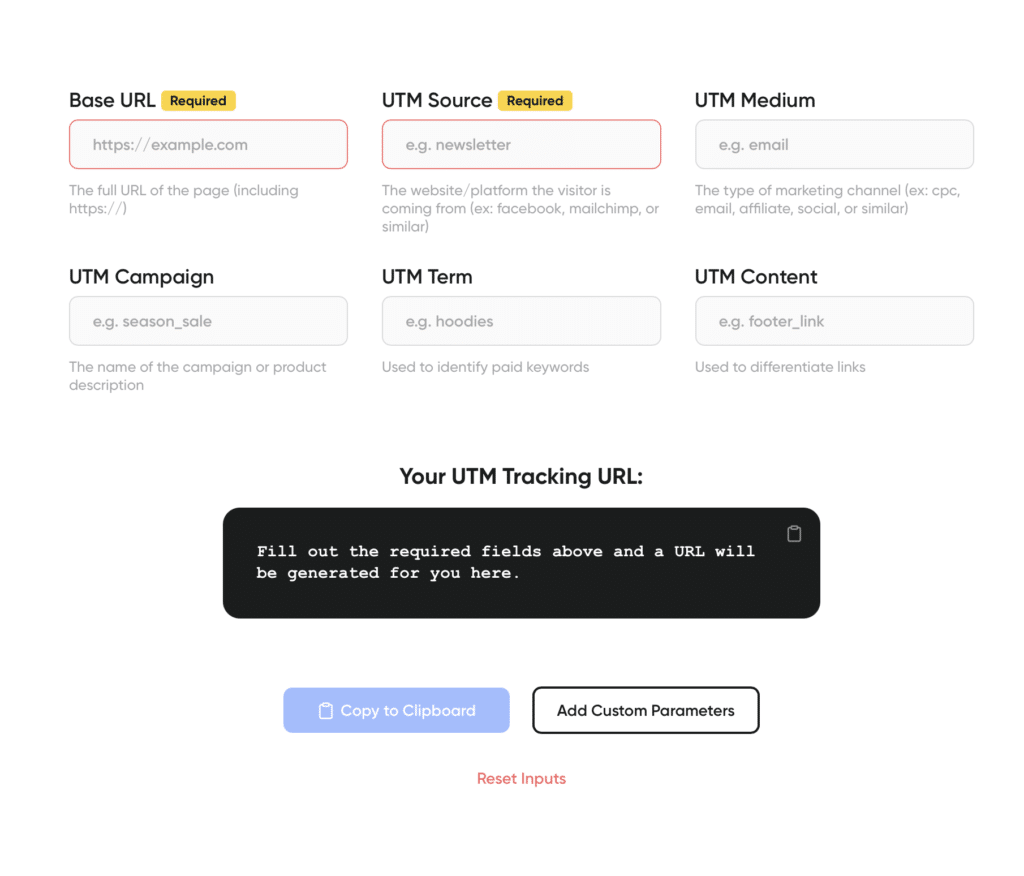
## How To Easily Create UTM Links in ClickWhale
As the premier WordPress link manager designed to streamline your marketing efforts, our latest feature allows you to effortlessly add campaign parameters to URLs, making it easier than ever to track and analyze your affiliate marketing campaigns.
In this section, we'll walk you through the simple steps to create UTM links using ClickWhale, ensuring you get the most out of your data and optimize your strategies for success.
Say goodbye to manual URL tagging and hello to efficient, automated campaign tracking because each link created with ClickWhale now includes the option for adding UTM parameters.
Did we mention how simple it is to use? Check out these five easy steps to begin using the UTM links feature in the upgraded interface.
Once you have [downloaded and activated the plugin](https://clickwhale.pro/pricing/) via your WordPress dashboard:
- Navigate to **CLICKWHALE** on the left-side navigation toolbar.
- Click **LINKS**
- Toggle to the second tab that says **UTM** **PARAMETERS**.
- Enter the UTM campaign name, medium, source, term, and content accordingly.
- Click the button action button to **SAVE LINK**.
Your screen without any details added will look similar to the one below.
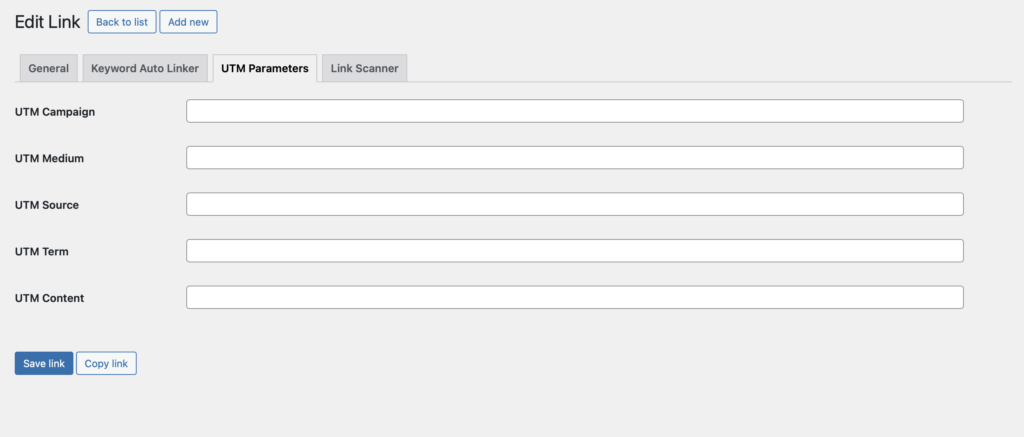utm parameters
These UTM parameters are masked and are first displayed in the browser when the link is called up. This feature ensures that your links look short and professional despite having many UTM parameters assigned to them.
If you need a crash course on UTM tracking and code, keep reading.
### What Is UTM Tracking & Code?
UTM tracking is like putting name tags on your website links. When you share these links, you can see exactly where visitors are coming from. For example, if you post a link on Facebook, the UTM tracking tells you how many people clicked that link.
In affiliate marketing, this is super important because it helps you know which ads or posts are working best. By seeing what brings in the most visitors, you can focus on the strategies that make you the most money. It's like having a map that shows you the best paths to success!
Using the newest link builder from ClickWhale, in addition to its other [link tracking features](https://clickwhale.pro/blog/unlock-the-power-of-link-tracking-a-game-changer-for-success-in-affiliate-marketing-%f0%9f%8e%af/), you can easily create UTM links that include precise tracking codes. Using ClickWhale's tool, adding these UTM parameters to your URLs is a breeze, assuring your data is accurate and actionable.
### What are UTM Parameters?
UTM parameters are special tags added to a URL to help track where your website traffic is coming from. Think of them as little bits of code that tell you a lot about your visitors. UTM stands for Urchin Tracking Module. These parameters help you see if your visitors came from a specific email, social media post, or online ad.
There are five main UTM parameters:
- **Source** (where the traffic came from)
- **Medium** (the type of link, like email or social media)
- **Campaign** (the name of your marketing effort)
- **Term** (keywords for paid searches)
- **Content** (to tell apart similar links).
**Here’s how they work**: When you add UTM parameters to a URL, data is collected when someone clicks that specific link. The data then shows up in tools like Google Analytics further helping you understand which marketing efforts work best.
### Why Are They Important For Affiliate Links?
As noted above, UTM parameters are important for affiliate links because they help track where your traffic is coming from. When you add these special tags to your affiliate links, you can see which sources are driving visitors to your site. This is super important for knowing which affiliate links are performing best.
**Here’s why they matter**: UTM parameters collect data when someone clicks on an affiliate link. This data shows up in analytics tools like Google Analytics. With this information, you can see which affiliates are generating the most traffic and sales.
By using UTM parameters, you can optimize your affiliate marketing strategy, rewarding the links that drive valuable web traffic your way.
## UTM Best Practices for Affiliates
When it comes to maximizing affiliate marketing success through link management tools, following UTM best practices is key. First, ensure consistency in naming conventions across your UTM parameters to maintain clarity in your data. Second, use descriptive campaign names that specify the promotion or event clearly. Lastly, track different traffic sources separately by creating unique UTM links for each platform or channel.
These practices empower you to analyze and optimize your marketing efforts effectively. Let’s break these down in detail.
- **Be Consistent with naming conventions**: Use clear and consistent names for your UTM parameters. For example, always use "Facebook" for your source when creating links for Facebook. This helps keep your data clean and easy to analyze.
- **Use descriptive campaign names**: Make your campaign names descriptive so you know exactly what the campaign was about when looking at your reports. For instance, instead of just "summer," use "summer_sale_2024" to specify the campaign and time frame.
- **Track different sources separately:** Create unique UTM links for each platform or channel you use. This way, you can see which platforms are driving the most traffic and conversions. For example, use separate UTM links for Facebook, Instagram, and email newsletters to track their individual performance.
By implementing these UTM best practices, affiliate marketers can refine their strategies and gain valuable insights into campaign performance. Next, let's dive into how you can effortlessly apply UTM parameters to your links using effective link management techniques.
## The Benefits of Applying UTM Parameters to Your Link Management
Applying UTM parameters to your links is easy and essential for effective link management. With the new link builder tool from ClickWhale, managing your links has never been simpler!
Using the newest link builder from ClickWhale, you can effortlessly add UTM parameters to your links. Just enter the URL and fill in the UTM details. The tool automatically creates a tagged link for you. This makes it super easy to track your links in analytics tools like Google Analytics.
With the help of UTM builder tools like [ClickWhale](https://clickwhale.pro/), you can manage all your links in one place, ensuring optimization for effective [link tracking](https://clickwhale.pro/blog/how-to-optimize-links-in-wordpress-effectively/). This helps you make smarter marketing decisions and boosts your campaign effectiveness.
Take the guesswork out of your marketing efforts and start leveraging UTM tracking today with ClickWhale's latest link builder! So you can causally say goodbye to manual link tagging and hello to seamless link management.
---
# How To Actually Use ClickWhale Analytics To Improve Revenue
Source: https://clickwhale.pro/blog/how-to-actually-use-clickwhale-analytics-to-improve-revenue/
## ClickWhale: The Ultimate Link Management Plugin for Affiliate Marketers
Affiliate marketing is a tremendous opportunity for bloggers and digital marketers alike, but it’s also an increasingly competitive landscape. The brands winning today aren’t just publishing links; they are data-driven strategists who understand which links convert, why they work, and how to use ClickWhale data to improve revenue month after month.
Enter[ ClickWhale](https://clickwhale.pro/)! A WordPress link manager that empowers affiliate marketers to simplify link management, gain actionable analytics, and strategically optimize their affiliate campaigns right inside their WordPress dashboard.
## Why Every Affiliate Marketer Needs Robust Link Management
As affiliate marketing scales, merely adding affiliate URLs to your blog posts isn’t enough. With affiliate programs contributing up to 16% of ecommerce sales globally (NewMedia) and ROI on affiliate performance surpassing traditional channels, mastering your data has never been more critical, especially when your success depends on your audience taking action on your links.
But here’s the challenge:
👉 Most affiliate marketers spread affiliate links manually across posts and social channels without a cohesive system.
👉 They lack clarity on which links are performing.
👉 They struggle to understand how marketing decisions affect real income.
That’s where ClickWhale analytics for affiliates steps in, tailored specifically as a WordPress plugin.
## What Makes ClickWhale the Best WordPress Plugin for Link Performance
ClickWhale is more than a tool; it’s[ a centralized affiliate link manager](https://clickwhale.pro/link-manager/) built with serious affiliate marketers in mind. Whether you’re producing product review posts or recommending tools in resource pages, our plugin gives you a powerful link management dashboard that makes tracking, organizing, and optimizing effortless and effective.
### All Your Affiliate Links in One Place
No more spreadsheets. No more scattered Google Docs.
With ClickWhale, affiliate links across your entire WordPress site live cleanly in one dashboard — instantly searchable and ready to optimize. [This is particularly transformational for bloggers who need to** **manage hundreds of affiliate URLs across posts, pages, and sidebars](https://clickwhale.pro/blog/unlock-the-power-of-link-click-tracking-in-wordpress-with-clickwhale/).
## How the Dashboard Helps You Use ClickWhale Data to Improve Revenue
Today’s top affiliate performers don’t guess; they know.
They leverage real-time analytics dashboard insights that reveal:
- Which affiliate link placements drive the most revenue
- Which calls-to-action generate clicks
- How seasonal content performs over time
- Where conversion opportunities are being missed
With these intuitive analytics, affiliate marketers get visibility they’ve never had before, all without leaving their WordPress site. This kind of data empowers you to boost earnings with ClickWhale data, turning insights into strategic optimization and revenue growth.
## Real-Time Analytics: The Heart of Smarter Affiliate Decisions
Successful affiliate campaigns are not static, and your tracking shouldn’t be either.
ClickWhale’s real-time analytics let you see what’s happening now, not later. This means you can:
- Understand which affiliate link placements convert best
- Improve underperforming pages with link tweaks
- Redirect users toward higher-paying affiliate programs
- Track the impact of content updates on revenue
Real-time insights like these are game-changing for optimization because they allow you to adapt *before your competitors do.*
Remember: affiliate marketers using data grow faster. According to industry benchmarks, the average affiliate marketing ROI is upwards of[ $12–$15 in revenue for every $1 spent](https://newmedia.com/blog/affiliate-marketing-statistics?), emphasizing the power of a performance-centric approach.
## Superior Link Management: From Auto Linker to Custom Paths
ClickWhale isn’t just a link tracker; it’s a complete link manager.
### Effortless Link Creation
With ClickWhale, creating an affiliate link is as simple as entering the destination URL and assigning built-in categories, tags, or campaigns. This helps you:
- Structure your affiliate ecosystem logically
- Reuse links across multiple posts
- Push updates instantly site-wide
You can even automate commonly used links with** **auto-linker functionality, reducing hours of manual formatting to seconds.
### Powerful Redirects and UTM Tracking
Need granular performance data? ClickWhale supports** **utm tracking on all affiliate links, seamlessly enabling you to track performance in tools like Google Analytics and other analytics platforms, all without developer help.
This kind of integration turns raw link clicks into valuable insights into the performance of your campaigns.
## ClickWhale vs. Manual Links (and Why It Matters)
Let’s be honest: affiliate marketers who rely on manual processes are leaving money on the table.
Manual link management leads to:
❌ Broken affiliate links
❌ Missed analytics opportunities
❌ Unclear revenue attribution
❌ Harder optimization workflows
When you centralize your link efforts with ClickWhale’s WordPress link manager, these challenges disappear. You get streamlined workflows that save time and empower confident decision-making.
## The Competitive Edge: Measure More, Optimize Better
Top affiliate marketers know that numbers tell the story. Simply knowing which blog posts attract traffic means little without understanding how affiliate links contribute to revenue.
With ClickWhale analytics:
- You see which links convert visitors into buyers
- You can compare traffic vs. revenue trends
- You can measure the impact of email and social campaigns
- You’re empowered to iterate on earning strategies
These analytics help you optimize link placement, improve conversion rates, and boost earnings with ClickWhale data, not guesses.
## Beyond the Basics: Free vs Pro Features
Every affiliate marketer has different needs. ClickWhale offers flexibility with:
### Free Version (WordPress Plugin Ready)
- Centralized link library
- Basic click tracking
- Simple auto-linking
### Pro Version
- Enhanced analytics dashboard
- UTM and campaign insights
- Priority support and advanced optimization tools
[The professional tier unlocks deeper insights](https://clickwhale.pro/blog/boost-your-digital-and-affiliate-marketing-potential-with-clickwhale-pro/) that serious affiliate marketers crave, especially those targeting aggressive revenue goals.
## Built for WordPress, Built for Growth
One of the biggest advantages of this utility is that it’s a plugin for WordPress, which means:
✔ You don’t need external dashboards
✔ You avoid third-party privacy and integration headaches
✔ All data stays where you run your business
✔ Rewards come directly back into your dashboard
This[ seamless integration with your WordPress dashboard](https://clickwhale.pro/integrations/) boosts productivity and user experience while amplifying your visibility into which links truly move the needle.
## WordPress Users: Maximize Your ROI Without Extra Tools
For affiliate marketers already using WordPress sites and blogs to host content, ClickWhale is a natural extension. You already rely on WordPress for publishing your content — now bring your affiliate operations and analytics into the same environment.
This is one of the most effective ways to reduce tool fatigue and maintain your focus on what matters: creating high-quality content that drives revenue.
## Why ClickWhale Is the Affiliate Marketing Tool You’ve Been Waiting For
Here’s the bottom line:
- Affiliate marketing is growing rapidly, and according to[ NewMedia](https://newmedia.com/blog/affiliate-marketing-statistics?), the industry continues to expand as companies increase their spending and affiliate programs account for a larger share of ecommerce revenue.
- Affiliate marketers who invest in data and analytics outperform their peers.
- ClickWhale provides a unified platform that organizes links, tracks them intelligently, and empowers optimization.
If you’re serious about scaling your affiliate blog on WordPress and using ClickWhale data to improve revenue consistently, this is your unfair advantage.
## Success Starts With Data & Not Guesswork
Digital marketing success isn’t about luck. It’s about understanding what works, repeating it, and continuously refining your strategy.
ClickWhale gives you:
✅ A comprehensive dashboard to control links across your entire site
✅ Real-time insights into link performance and revenue trends
✅ Tools like auto-linker, utm tracking, and smart categorization
✅ A foundation for affiliate optimization and smarter decisions
Whether you’re a newcomer affiliate marketer or a seasoned pro, using ClickWhale’s actionable data can transform scattershot linking into a purposeful revenue engine.
## Common Questions About ClickWhale for Affiliate Marketers (FAQs)
### How does ClickWhale compare to other link management plugins?
Unlike generic** **link management plugins, the ClickWhale WordPress plugin is built with affiliate marketing in mind. It combines streamlined link management, real-time analytics tools, and performance tracking, so managing your affiliate links across your entire website becomes simple and scalable. With ClickWhale, links become a breeze; no spreadsheets or external dashboards required.
### Can ClickWhale help prevent broken links?
Yes. One of the biggest advantages of using a dedicated link manager is protecting your site from broken links. ClickWhale lets you update a destination URL once and automatically apply the change across your entire website, ensuring link integrity and a better user experience.
### How does ClickWhale fit into a broader marketing strategy?
ClickWhale supports a holistic marketing strategy by tracking links used in blog posts, email marketing, and social media marketing.[ UTM tracking and performance analytics](https://clickwhale.pro/tracking-codes/) allow you to understand which marketing campaigns drive results across all platforms, including search traffic from any search engine.
### Can I use ClickWhale alongside tools like Triple Whale or Google Analytics?
Yes. ClickWhale complements external platforms like Triple Whale or Google Analytics by focusing specifically on affiliate link performance within the WordPress dashboard. While those tools analyze broader attribution, ClickWhale delivers precise insights at the link level, where affiliate revenue decisions are actually made.
### Is ClickWhale beginner-friendly for new affiliate marketers?
Yes. ClickWhale is intentionally user-friendly. Whether you need a link quickly or want to[ create a custom branded affiliate URL](https://clickwhale.pro/linkpages/), the interface allows you to create and manage links easily. Even if you’re new to affiliate marketing, ClickWhale’s streamlined link management ensures that managing links never feels overwhelming.
## Ready to Transform Your Affiliate Revenue?
Now’s the time to take control of your affiliate ecosystem and boost earnings with ClickWhale data the smart way.
[Download and install ClickWhale right into your WordPress dashboard today](https://clickwhale.pro/pricing/)**.**
As a plugin built specifically for marketers — with analytics, efficient link tracking, and powerful link management — it’s the smartest step you can take toward *long-term success in affiliate marketing*.
Your audience is clicking already; make every click count.
---
# The Ultimate Link Tracking Tool: Supercharge Engagement With ClickWhale
Source: https://clickwhale.pro/blog/the-ultimate-link-tracking-tool-supercharge-engagement-with-clickwhale/
Were you aware that successful affiliate marketers are increasingly using tutorials on Instagram? By creating step-by-step tutorials, affiliates demonstrate how a product or service actually works, offering followers a clear, engaging, and interactive experience. This approach helps potential customers see tangible value while building trust and driving action.
Effective link management can make all the difference for affiliate marketers. With so many social media platforms and countless posts, tracking link performance is crucial to understanding what works and what doesn’t. Enter [ClickWhale](https://clickwhale.pro/)—the ultimate link tracking tool to help affiliates boost engagement, monitor clicks, and maximize conversions.
Whether you're sharing tutorial links on Instagram or managing affiliate links across multiple platforms, ClickWhale makes it easy to track what works. Let’s dive into why this plugin is a must-have tool for marketers everywhere, along with some useful tips to get the most out of your custom affiliate links!
## Why is ClickWhale The Ultimate Link Tracking Tool?
Affiliate marketers and influencers know the struggle of balancing multiple links. Sort of a devil’s advocate to successful affiliate marketing—it’s a nuance that can’t be ignored. Through Stories, Reels, and IGTV, tutorials allow affiliate marketers to engage users visually and authentically, providing the information they need to make a purchase decision.
As the ultimate link tracking tool, what better way to boost conversions than via branded short links? Reported as [the best URL shortener for affiliates](https://clickwhale.pro/blog/the-best-url-shorteners-for-affiliates-both-free-paid/), ClilckWhale provides the easiest way for affiliates to boost conversions by engaging their audiences on social networks.
By tracking each branded link to determine which drives the most clicks and brings in the best conversions, ClickWhale helps you keep all your links organized in one place. It also tracks each click, plus shows you which links are truly performing. Did we mention that it’s incredibly easy to use, even if you’re new to link management?
## How ClickWhale Helps with Instagram Tutorials
Instagram has become a favorite platform for sharing tutorials. That’s because tutorials can help showcase how a product fits into everyday life or solves specific problems. This approach resonates with audiences who prefer visual learning and authentic recommendations from micro-influencers they trust. From beauty and cooking to tech and lifestyle tips, people love learning in bite-sized steps.
Affiliate marketers use Instagram tutorials to showcase products in their niche and drive traffic to their sites. However, with multiple tutorials across multiple social platforms, keeping track of engagement can be challenging.
Our plugin solves this by allowing affiliates to place their branded short links within tutorials. Then use the plugin’s tracking capabilities to measure which active links attract the most attention and which don’t. With these details, affiliates have a clear view of their audience's journey from start to finish, making it easy to adjust their marketing strategy or approach for better engagement and conversion.
Here’s how the ultimate link tracking tool, [ClickWhale](https://clickwhale.pro/), delivers:
### 1. Shorten and Brand Links for Better Engagement
Instagram audiences often respond better to branded, concise links rather than long, complex URLs. Turn affiliate links into short, professional-looking links that enhance your brand’s authority and make links memorable. This branded approach not only increases click-through rates but also helps build credibility with your followers by avoiding the cluttered look of traditional affiliate URLs.
### 2. Comprehensive Click Tracking and Analytics
Gain access to robust analytics that allow you to monitor exactly how each link in your tutorial performs. You can track clicks, user locations, devices, and even specific timestamps, giving you a complete view of how and when followers interact with your content. This data is invaluable, enabling you to optimize future tutorials based on what resonates most with your audience, honing in on high-performing content, and identifying areas for improvement.
### 3. A/B Testing for Links to Maximize Conversions
For an affiliate marketer, each Instagram tutorial presents a chance to test what works best. Create multiple versions of links, making it possible to A/B test different landing pages, captions, or even CTAs. By tracking the performance of each version, you can identify the highest-converting strategies and apply those insights across your entire campaign.
### 4. Seamless Integration with Instagram’s Features
ClickWhale’s custom links are designed to work effortlessly with Instagram’s swipe-up feature in Stories, link stickers, and bio links, all while maintaining tracking accuracy. Whether you’re creating a tutorial Reel with a CTA to ‘swipe up’ for more details or adding a link to your bio for a carousel post, this tool ensures every click is captured, every visit is tracked, and every conversion is maximized.
#### The Right Link Tracking Tool Can Unlock Your Affiliate Marketing Profits
## Benefits of Using ClickWhale for Link Tracking
As an affiliate marketer using tutorials to drive conversions, maximizing link efficiency and tracking is critical. That’s where our plugin becomes a game-changer. Using ClickWhale as the ultimate link tracking tool is a no-brainer because it offers powerful features that streamline the entire process of managing affiliate links in your Instagram tutorials.
- **Complete click tracking:** The interface gives you accurate data on every single click, allowing you to know exactly which tutorial steps work best.
- **Clear, easy-to-use dashboard:** The dashboard is designed for simplicity. With just a glance, you can see your most popular links, top-performing tutorials, and any areas needing a tweak.
- **Audience insights: **The plugin tracks clicks and provides insights into user behavior. For example, you can see if users drop off at certain steps in a tutorial, which helps you adjust your content for better flow.
- **Conversion boost:** By knowing which links bring the most clicks, you can focus on those that lead to higher conversions. More conversions mean more affiliate income.
- **Link management for any platform:** Though Instagram is a popular choice for tutorials, this tool works across any social media platform. Use it for Facebook, TikTok, or even on your blog.
These insights allow affiliates to supercharge engagement with your audience.
## Supercharge Engagement with ClickWhale: Practical Tips for Affiliate Marketers
For affiliate marketers, a well-crafted link strategy can turn casual viewers into loyal followers. Here are some tips on creating effective link pages and tutorials that will keep your audience clicking, sharing, and buying!
### 1. Use a Dedicated Link Page for Multi-Step Tutorials
Creating a link page for your tutorial links allows users to access all the steps in one place. With ClickWhale, you can set up a page specifically for each tutorial, complete with organized links that direct users to each tutorial step. Here’s why a link page works:
- **Easy navigation:** A single [link page](https://clickwhale.pro/linkpages/) keeps users from getting lost. They can follow each tutorial step without leaving Instagram.
- **Better tracking: **Since all links are on one page, track the clicks on each link and gain detailed marketing insights.
- **Improved engagement:** Users are more likely to complete a tutorial if they can easily access the necessary steps, increasing their chances of conversions.
### 2. Create Clear and Compelling Link Labels
On your link page, label each step with simple, descriptive titles. “Step 1: Product Setup” or “Step 2: Application Tips” are good examples. Avoid confusing labels; the clearer, the better. When your audience knows what each link will take them to, they’re more likely to engage.
ClickWhale’s platform allows you to track how effective each link title is in driving clicks. If “Step 2” gets more clicks than “Step 1,” maybe “Step 1” needs a clearer description.
### 3. Analyze Engagement and Refine Your Tutorial Links
Our plugin provides detailed data on each link, showing how many clicks it received and where drop-offs occur. If you notice fewer clicks on certain steps, it might indicate confusion or lack of interest. This information is invaluable for refining your tutorials and keeping your audience engaged from start to finish.
## Success Story: How ClickWhale Improved Engagement for an Affiliate Marketer
Consider Sarah, an affiliate marketer specializing in DIY home decor. Sarah uses Instagram to post tutorials on how to set up beautiful decor projects. Before using the ultimate link tracking tool, she found it hard to track which tutorial links worked best. After switching to ClickWhale, Sarah could see exactly which steps in her tutorials drove the most clicks. She noticed that more people clicked on steps with clearer, action-based titles like “Start Your Decor Here!” rather than vague titles like “Step 1.”
By refining her approach based on the link tracking tool’s insights, Sarah saw a 30% increase in clicks and a significant boost in her affiliate earnings. That’s right! ClickWhale’s tracking tools helped her identify what her followers liked, leading to better engagement and higher conversions.
## Why ClickWhale is the Ultimate Link Tracking Tool for Affiliate Marketers
This plugin is more than just a link management tool; it’s a partner for your affiliate marketing success. With its powerful [tracking features](https://clickwhale.pro/tracking-codes/), intuitive interface, and practical insights, it helps affiliates better understand their audience, optimize content, and drive engagement.
Remember that every link tells a story. Learn to understand that story fully, knowing which links capture attention, where users engage most, and how to convert clicks into sales. It’s the ultimate link tracking tool to boost your affiliate marketing game.
## Supercharge Engagement with ClickWhale Today!
If you’re ready to take your affiliate marketing to the next level, [try ClickWhale](https://clickwhale.pro/pricing/). From organizing tutorial links on Instagram to tracking each click across multiple platforms, it simplifies the process and brings an audience closer. With Instagram’s swipe-up links and CTA features, tutorials don’t just educate—they guide viewers directly to purchase points, streamlining the path from interest to conversion. For affiliate marketers looking to stand out, Instagram tutorials can be a powerful way to boost engagement and drive revenue.
**Make every link count, and transform each click into an opportunity.**
Instagram tutorials offer a unique, personal touch that resonates with audiences looking for authentic recommendations. Using the ultimate link tracking tool enhances that strategy, making it effortless to create branded, trackable, and optimized links that contribute to higher engagement and conversions. It’s not just a link tool—it’s an essential part of a successful, data-driven Instagram affiliate strategy.
---
# 5 Proven Pinterest Affiliate Marketing Strategies To Monetize Your Pins
Source: https://clickwhale.pro/blog/proven-pinterest-affiliate-marketing-strategies-to-monetize-your-pins/
With over 400 million monthly (active) users, Pinterest is a treasure trove waiting to be unlocked for affiliate marketers looking to expand their reach. That’s right, Pinterest affiliate marketing is brandishing some serious coin for those who have the right strategy.
Using social network platforms for marketing to a larger audience is a must for affiliate marketers. Among these platforms, Pinterest is blinding other platforms with its brightness, attracting visitors, and boosting sales with its eye-catching content.
This all-in-one guide shows you how to make the most of Pinterest for affiliate marketing. We'll cover everything from how to use Pinterest for affiliate marketing to building a successful strategy to tracking your success, so you can turn your pins into profit.
## Affiliate Marketing 101: The Basics
Affiliate marketing is when you promote someone else’s product and earn a commission if people buy it through your special link. Imagine telling your friends about a cool video game, and if they buy it using your link, you get some money. It’s like being a middleman who helps sell stuff and gets paid for it.
Affiliate marketing is a trending way for businesses to get more customers and fast. They pay people, called affiliates, to bring in visitors or buyers. Affiliates get paid each time someone clicks their designated links, buys something, or signs up for something related to specific brands.
It’s a match made in money-making heaven for both sides: businesses get more sales, and affiliates make extra money by sharing products or services they like.
## How Does Pinterest Align with Affiliate Marketing?
Pinterest is more than just a place for DIY crafts, recipes, and fashion ideas. It's a visual discovery engine where millions of people go for inspiration, advice, and product recommendations. To promote accounts and share affiliate links successfully on Pinterest, you need to understand Pinterest SEO and create a strategy, similar to promoting on Google or Bing.
With [465 million monthly users](https://www.businessofapps.com/data/pinterest-statistics/), Pinterest is a great platform for affiliate marketing. Users save 'pins,' which are visual bookmarks linked to sources like blogs or product pages, and organize them into themed 'boards.' This makes it easy for people to discover new brands and products, making Pinterest ideal for affiliate marketers to connect with active, interested shoppers. Users save and share "pins," which are images with links to websites.
Now the affiliate side of things happens when people use Pinterest to earn money by promoting products. They pin pictures and videos with links to products or services. If someone clicks on a pin and buys the product, the person who pinned it gets a commission.
This type of marketing is more focused than regular social media selling. It targets communities with shared interests, like travel, home decor, food, and other visually appealing topics.
### Benefits of Affiliate Marketing on Pinterest
Affiliate marketing on Pinterest can be a powerful tool for promoting products and services. Pinterest is a unique social media platform known for its visual appeal, which makes it perfect for catching the eye of potential customers.
**What are the benefits? **
- Pinterest is all about pictures and visuals, making it perfect for showing off products in a way that grabs attention. This can make people more interested in buying what they see.
- People on Pinterest are often looking for ideas and things to buy. This means they are more likely to click on links and buy products that match their interests.
- Pinterest pins can show up in search engine results, which helps more people find your affiliate links and brings more visitors to affiliate websites.
- Pinterest lets users interact through comments, likes, and shares. This helps affiliates connect with their audience, build trust, and expand their reach.
By using Pinterest, affiliate marketers can reach a highly engaged audience, improve their online visibility, and build a loyal community.
## Thinking of Participating in Pinterest Affiliate Marketing?
As an affiliate marketer, you can use Pinterest to get more people to see your content, like blog posts, landing pages, or YouTube videos. Just like with other programs, the more people who see your affiliate links, the better your chances of making sales and earning money.
More than just social media, Pinterest is a visual search engine. [Pinterest says 80% of users find new brands and products on the site each week](https://blog.hootsuite.com/pinterest-statistics-for-business/#:~:text=Brand%20discovery%20is%20one%20of,and%20engage%20a%20large%20audience.), making it great for marketers in affiliate programs. Ready to get started?
## Getting Started with Pinterest Affiliate Marketing
For those who need to know how to become an affiliate marketer on Pinterest, this section is for you. If you want to create a Pinterest business account to begin marketing your affiliate content, follow these simple steps to get started and make the most of your online presence.
- Go to the Pinterest website and **sign up for a business account**.
- **Fill out your profile information**. This includes adding a profile picture, writing a bio, and linking your website.
- **Rich Pins **give more details from your website on your pins, making them more attractive so be sure to enable this function.
- **Verify that your website can access Pinterest Analytics** and other useful features.
- **Start creating boards **that are relevant to your niche and interests.
Following these steps will help you build a strong Pinterest business account. This will let you connect with your audience better. With your account ready, you can use Pinterest to drive traffic and make your brand more visible. Now that you have a good start, let’s see how to use Pinterest for affiliate marketing to grow your income and online presence.
## Setting Up Your Affiliate Marketing Strategy
When you’re affiliate marketing on Pinterest it can be tough to make money-earning work in your favor. But, don’t worry; this is the part of the guide that is here to help!
Now this might not be a guide for affiliate marketing on Pinterest for beginners, per se, but we'll cover everything from building an audience to turning those views into conversions. All with the intent to help you fashion a solid marketing strategy for the platform.
### 1. Creating Engaging Pins for Success
Creating engaging pins is a critical component of a successful Pinterest affiliate marketing strategy. High-quality, visually appealing pins not only capture users' attention but also encourage them to take action, such as clicking through to your affiliate links.
Here are some tips to help you design pins that capture attention and drive clicks:
- **Choose clear, high-resolution images** that are visually appealing and relevant to your content. Bright, eye-catching colors and compelling visuals are more likely to stand out in users' feeds.
- **Consistency in your brand's color scheme, fonts, and logo** helps build recognition and trust. Make sure your pins reflect your brand’s identity, so your audience immediately knows the content is yours.
- **Use engaging titles and clear calls to action** that pique curiosity and informative descriptions that provide value. Highlight the benefits or solutions your content offers to encourage users to click through.
- **Utilize Pinterest’s built-in tools** like rich pins, which provide more context about an idea by showing extra information directly on the pin. This can include product availability, pricing, or recipe ingredients, making your pins more useful and engaging.
- **Create a variety of pins** and experiment with different formats and styles, such as infographics, step-by-step guides, and video pins. Offering a mix of content types can appeal to a broader audience and keep your profile dynamic.
Effective pins leverage strong branding, compelling calls-to-action, and relevant keywords to increase visibility and engagement. This is the first step to building a network within the platform to market your affiliate links.
### 2. Building Your Pinterest Affiliate Marketing Network
Building a profitable Pinterest affiliate marketing network requires a strategic approach. That way it’s easier to establish credibility, engage your audience, and ultimately drive higher conversions and affiliate revenue. Here are key strategies to help you succeed:
- **Identify Your Niche**: Focus on a specific niche that aligns with your interests and expertise. A well-defined niche helps attract a targeted audience interested in your content, increasing the chances of engagement and conversions.
- **Create High-Quality Content**: Produce visually appealing and valuable content that resonates with your audience. High-quality pins with engaging images, informative descriptions, and relevant keywords are more likely to be repinned and clicked, driving traffic to your affiliate links.
- **Leverage Group Boards**: Join and actively participate in group boards related to your niche. Group boards can significantly expand your reach by exposing your pins to a broader audience, increasing the likelihood of clicks and affiliate sales.
- **Engage with Your Audience**: Regularly interact with your followers by responding to comments, engaging with their content, and creating pins that address their needs and interests. Building a loyal and engaged community fosters trust and encourages repeat clicks on your affiliate links.
- **Monitor and Adjust**: Continuously monitor the performance of your pins and affiliate links using analytics tools. Identify trends, successful content, and areas for improvement. Adjust your strategy based on these insights to optimize your efforts and maximize your earnings.
By implementing these strategies, you can build a profitable Pinterest affiliate marketing network that drives consistent traffic and generates substantial income. Stay focused, adapt to changing trends, and leverage the power of Pinterest and link management tools like ClickWhale to achieve long-term success.
### 3. Optimizing Your Pinterest Affiliate Marketing with ClickWhale
To make the most out of your Pinterest affiliate marketing efforts, it's crucial to optimize your profile effectively. Further, boost your affiliate content’s visibility with good SEO practices and excellent link management with [CllickWhale](https://clickwhale.pro/), your go-to link manager for all things affiliate marketing.
Here’s how:
- **Implement UTM tags and campaigns to track the performance** of your affiliate links. This allows you to monitor which pins are driving the most traffic and conversions, enabling you to refine your strategy based on data-driven insights.
- Use a link management tool like ClickWhale to **organize and monitor your affiliate links**. This helps you manage multiple links efficiently, track clicks, and analyze performance, ensuring you stay on top of your affiliate marketing efforts.
By using these optimization strategies, you can improve your Pinterest affiliate marketing. Next, we’ll explore how to use ClickWhale’s analytics and tracking tools. These will help you boost your performance and increase your earnings even more.
### 4. Using ClickWhale’s Analytics and Tracking for Performance
Leverage ClickWhale's detailed analytics** **to gain insights into your audience's behavior and preferences. By understanding which links are performing best and why, you can adjust your strategy to focus on the most successful content and maximize your affiliate earnings.
[ClickWhale](https://clickwhale.pro/blog/digital-marketing-performance-tracking-the-benefits-of-analytic-data/) lets you track all your links in detail. This helps you see how well your pins are doing. You can check click rates, where the traffic comes from, and how users behave. With this information, you can improve your strategy and focus on what works best. This way, you can boost your Pinterest affiliate marketing and make more money.
### 5. Using ClickWhale to Expand Your Pinterest Reach
Use [ClickWhale’s link pages](https://clickwhale.pro/linkpages/) to create a centralized hub of your affiliate links that can be shared across various social networks. Sharing your link pages across these networks can drive more traffic to your Pinterest profile, enhancing your overall reach and engagement. Here are the ain benefits:
- Create a single, organized page for all your affiliate links, making it easier for your audience to find and click through your recommendations.
- Design easy-to-customize bio link pages that can be tailored to your brand, providing a seamless way to share your content and affiliate links with your followers.
Remember that link pages can be shared across various social networks. This drives traffic back to your Pinterest profile and boosts overall engagement and visibility. But if you’re new to all of this, how about a few pointers to help set yourself up for success from the beginning?
### Tips for New Affiliate Marketers on Pinterest
Starting with affiliate marketing can be overwhelming, but the right tools and advice can make a big difference. Let’s explore three key tips to get you started on the right foot.
- **Establish a business account from the start**
Firstly, sign up for a business account on Pinterest and complete your profile by adding a profile picture, a bio, and a link page. Turn on Rich Pins to make your pins more informative and attractive. Don’t forget to verify your website to unlock Pinterest Analytics and other useful features. Finally, set up boards that match your niche and interests to organize your content effectively.
- **Choose the right affiliate program**
When picking an affiliate program, start by choosing one that fits your niche and the interests of your audience. Check out the commission rates and payment terms to make sure they are fair. Finally, research the program’s reputation to ensure it is trustworthy and reliable. Start by reading reviews and testimonials from other affiliates to see if they had good experiences. Next, look into the program's payout history to make sure they pay commissions on time.
- **Leverage ClickWhale as your affiliate link manager tool**
With ClickWhale, you can efficiently manage and track all your affiliate links in one place. Additionally, [ClickWhale’s features like UTM tagging and detailed analytics](https://clickwhale.pro/pricing/) allow you to gather valuable insights about your audience’s behavior and the effectiveness of your links. This data-driven approach can help you refine your marketing tactics and boost your results right from the beginning.
With these tips and [ClickWhale’s powerful link tools](https://clickwhale.pro/tracking-codes/), new affiliate marketers using Pinterest can set a solid foundation for their affiliate marketing journey. With better organization and insightful data at your fingertips, you'll be well-equipped to maximize your success from the start.
## Ready to Start Your Pinterest Affiliate Marketing Journey?
Diving into Pinterest affiliate marketing can significantly boost your affiliate earnings. With the tips and strategies we’ve covered, you can make content that attracts more visitors and earns you commissions.
ClickWhale helps manage your links and makes things easier. This lets you spend more time making great pins and less on other tasks. Whether you’re new to Pinterest or want to improve your current strategy, [ClickWhale can make a big difference](https://clickwhale.pro/).
Ready to transform your Pinterest boards into a revenue stream? Start now, stay consistent, and watch your efforts pay off!
---
# Start Complying with Global Regulations Now and Protect Your Affiliate Business
Source: https://clickwhale.pro/blog/start-complying-with-global-regulations-now-and-protect-your-affiliate-business/
Marketers in this interconnected digital landscape operate internationally, reaching audiences worldwide. While this global reach offers immense opportunities, it also brings forth the challenge of adhering to diverse international laws and regulations. For digital marketers, especially those engaged in affiliate marketing, understanding and ensuring compliance management is not just a best practice—it's a necessity.
## Understanding the Importance of Complying with Global Compliance
Global compliance refers to the adherence to most international business laws, regulations, and standards that apply across different countries and regions. For digital marketers, this encompasses a range of areas, including:
- **Data Protection**: Regulations like the[ General Data Protection Regulation (GDPR)](https://gdpr-info.eu/) in the EU and the[ California Consumer Privacy Act (CCPA)](https://oag.ca.gov/privacy/ccpa) in the U.S. mandate how personal data should be collected, stored, and used.
- **Advertising Standards**: Ensuring that marketing content is truthful, non-deceptive, and appropriately labeled, especially when it comes to affiliate links.
- **Tax Compliance**: Understanding and fulfilling tax obligations in different jurisdictions for international expansion.
- **Labor Laws and Regulations**: If employing individuals or contractors globally, adhering to local labor laws is crucial.
Failure to comply with these reporting requirements and regulations can lead to severe penalties, including hefty fines, legal actions, and reputational damage.
## Common Compliance Challenges for Digital Marketers
Consider this a tiny compliance training because navigating the complex web of international rules and regulations presents several challenges:
### 1. Diverse Regulations Across Countries
Laws often vary by country, and what is permissible in one region might be prohibited in another. For instance, data protection standards differ between the EU, the U.S., and other regions.
### 2. Evolving Regulatory Landscape
The digital marketing industry is dynamic, with regulations continually evolving. Staying updated with these changes is essential to ensure ongoing compliance.
### 3. Managing Affiliate Links
Affiliate marketers often use tracking and link management tools. However, without proper oversight, these tools can inadvertently lead to non-compliance, especially concerning data collection and user consent.
### 4. Ensuring Transparency
Disclosing affiliate relationships and ensuring that promotional content is clearly labeled is not just ethical but also a legal requirement in many jurisdictions.
## Best Practices to Ensure Compliance Globally
To navigate these challenges, digital marketers should adopt the following best practices:
### 1. Stay Informed
Regularly monitor updates to international laws and regulations that impact digital marketing. Subscribing to legal newsletters or consulting with compliance experts can be beneficial.
### 2. Implement Robust Data Protection Measures
Ensure that data collection practices align with international standards. This includes obtaining explicit user consent, providing clear privacy policies, and securing stored data.
### 3. Transparent Affiliate Marketing
Always disclose affiliate relationships. Use clear language to inform users when content includes affiliate links, ensuring transparency and building trust.
### 4. Utilize Compliance-Friendly Tools
Leverage[ tools and plugins designed with compliance in mind](https://clickwhale.pro/). These tools can automate certain aspects of compliance, reducing the risk of human error.
## Introducing ClickWhale: Your Partner in Compliance
For WordPress users,[ ClickWhale](https://clickwhale.pro/) emerges as a powerful ally in managing affiliate links while ensuring compliance with global regulations.
**Key Features of ClickWhale:**
### 1. Link Management
The plugin for WordPress allows users to[ easily manage, shorten, and cloak affiliate links](https://clickwhale.pro/link-manager/) on their WordPress sites. This enhances user experience and ensures that links are organized and compliant with SEO best practices.
### 2. SEO and Compliance Settings
Users can[ apply SEO settings to links](https://clickwhale.pro/blog/how-to-add-nofollow-links-in-wordpress-a-step-by-step-guide/), such as "no follow" or "sponsored" attributes, aligning with search engine guidelines and advertising standards.
### 3. Click Statistics
Analyze the performance of your links with[ detailed click statistics](https://clickwhale.pro/blog/clickwhale-analytics-data-how-to-use-it-to-make-a-profit/), helping you make informed decisions while ensuring that tracking practices comply with data protection regulations.
### 4. Customizable Link Pages
Create[ branded link pages](https://clickwhale.pro/linkpages/) for social media profiles, ensuring that all shared links are compliant and consistent with your brand's messaging.
### 5. Tracking Code Integration
Embed necessary[ tracking codes](https://clickwhale.pro/tracking-codes/), such as Google Analytics or Facebook Pixel, directly through your dashboard. This ensures that all tracking is centralized and managed in a compliant manner.
## How ClickWhale Supports Global Compliance
This plugin's features are designed to address the compliance challenges faced by digital marketers:
- **Data Protection**: By centralizing link management and tracking, the plugin ensures that data collection is transparent and secure, aiding in compliance with regulations like GDPR and CCPA.
- **Transparency in Affiliate Marketing**: The ability to label links appropriately and disclose affiliate relationships directly through the plugin supports adherence to advertising standards.
- **Adaptability to International Standards**: The customizable settings allow marketers to adjust their practices to align with the specific regulations of different countries, ensuring global compliance.
## Global Compliance for Affiliate Marketers FAQs
### What is global compliance in the context of affiliate marketing?
Global compliance refers to adhering to international laws and regulations that govern areas such as protecting data, advertising transparency, tax obligations, and labor standards. For affiliate marketers, this means ensuring that marketing content, affiliate links, and user data handling meet the legal requirements of each target region.
### Why is compliance important for affiliate marketers operating internationally?
Operating across borders exposes marketers to different legal frameworks. Non-compliance can result in hefty fines, account bans, or reputational harm. Staying compliant helps build trust, ensures sustainable operations, and protects businesses from legal risks.
### What are the biggest compliance challenges for affiliate marketers?
Key challenges include navigating varying data protection laws (e.g., GDPR, CCPA), keeping up with evolving regulations, managing affiliate link disclosures properly, and ensuring transparency in advertising practices across jurisdictions.
### How can I ensure my affiliate links are compliant with international regulations?
To comply, affiliate links should be clearly disclosed (using terms like "sponsored" or "affiliate link"), not misleading, and tracked in a way that respects user privacy. Using tools like[ ClickWhale](https://clickwhale.pro/) helps manage links while ensuring proper labeling and SEO-compliant attributes.
### What are the key data protection laws I need to be aware of?
The most prominent regulations include the General Data Protection Regulation (GDPR) in the EU and the California Consumer Privacy Act (CCPA) in the U.S. These laws mandate transparency in how personal data is collected, stored, and shared.
### How does ClickWhale help with compliance?
The plugin helps by centralizing affiliate link management, providing SEO and disclosure settings, supporting tracking code integration, and offering analytics that comply with privacy laws. This ensures your affiliate strategy remains transparent, organized, and legally sound.
### Do I need user consent to track affiliate link clicks?
Yes. Under laws like GDPR and CCPA, you must obtain explicit consent before collecting user data, including tracking clicks. Tools that allow for cookie consent banners or integrated tracking permissions are essential.
### Is it necessary to disclose all affiliate relationships?
Absolutely. Most countries require full disclosure of affiliate partnerships. Not doing so can be considered deceptive advertising and result in penalties. Properly labeling links and providing clear affiliate disclaimers is both a legal and ethical necessity.
### How often should I review my compliance strategy?
You should regularly review your strategy—ideally, quarterly or whenever significant regulatory updates occur. Staying informed through legal newsletters, compliance blogs, or consultation with professionals helps ensure ongoing alignment with global standards.
### Can I automate compliance tasks to reduce manual errors?
Yes. Using compliance-friendly tools like ClickWhale can automate many aspects of link management, data tracking, and transparency, reducing human error and making it easier to stay up to date with evolving regulations.
## Do Your Links Meet Global Compliance Rules?
In digital marketing, especially affiliate marketing, compliance with global regulations is paramount. The complexities of international laws and the dynamic nature of the digital landscape necessitate tools that enhance marketing efforts and ensure adherence to legal standards.
[ClickWhale](https://clickwhale.pro/), as a WordPress plugin, offers a comprehensive solution for managing affiliate links, tracking performance, and maintaining compliance across various jurisdictions. By integrating this sophisticated plugin into your digital marketing strategy, you can focus on growth and engagement, confident in the knowledge that your practices align with global compliance requirements.
---
# Affiliate Marketers: Organize Your Affiliate Link Clutter Now
Source: https://clickwhale.pro/blog/organize-your-affiliate-link-clutter-now/
# How to Organize Affiliate Link Clutter Without Losing Your Mind (or Your Revenue)
Digital marketing moves fast—overwhelm moves faster. One minute you’re celebrating a new partnership, the next you’re staring at a monstrous pile of URLs that no longer look remotely neat and tidy. If you’re nodding along, it’s time to declutter and organize those links before the chaos capsizes your campaigns.
Below you’ll find simple steps for whipping your links into shape, why every serious affiliate marketer should care, and how the [ClickWhale](https://clickwhale.pro/), a WordPress plugin designed for digital marketing, makes the whole process feel like a trip to the Container Store for your data.
## Why “Just One More Link” Turns Into Campaign Clutter
Digital marketers love shiny objects—especially new offers promising bigger affiliate revenue. We join an affiliate program, drop a fresh affiliate link, and keep moving. Eventually, that habit becomes an unorganized web of redirects, UTMs, and half-forgotten vanity URLs. Besides looking messy, link clutter quietly erodes:
- Optimization potential (split-testing and attribution are harder).
- User trust (broken links feel spammy).
- Your own motivation (the more chaotic the dashboard, the higher the procrastination).
Keeping everything tidy is no longer optional; it’s an organizational mandate for growth.
## The Business Case for Decluttering Your Links
When you simplify the digital clutter lurking behind every campaign button and banner, you unlock a clarity that ripples through your entire marketing engine, turning scattered data into sharp insights, scattered tasks into focused action, and scattered revenue streams into one cohesive growth story.
### 1. Faster Decisions, Higher Conversions
When links live in logical folders, tagging structures, and tracking groups, you get organized data at a glance. That clarity speeds up A/B decisions, campaign pivots, and keyword bidding tweaks. Faster action equals more efficient monetization moments when visitors make a purchase.
### 2. Streamlined Compliance
Networks like [Amazon Associates](https://clickwhale.pro/blog/a-beginners-guide-how-to-become-an-amazon-influencer/) revise policies often. A well-labeled library lets you purge non-compliant links in minutes instead of days, safeguarding commissions.
### 3. Scalable Collaboration
Teams—or freelancers—rely on shared organizing systems. Decluttered dashboards mean anyone can pick up tasks without inbox sleuthing. Translation: fewer “Where’s that URL?” Slacks.
## Meet Your New Organizer: ClickWhale
This isn’t just another redirect tool; it’s a purpose-built WordPress plugin for marketers drowning in chaos. Think of it as the KonMari method for URLs—only instead of sparking joy in your closet, it sparks joy in your analytics.
### Key Features That Help You Stay Organized
- Visual Link Boards that feel like an organized home for campaigns.
- Bulk edit and search to get rid of clutter fast.
- Automatic UTM builder to streamline tracking.
- One-click migration from legacy tools (Pretty Links, ThirstyAffiliates, etc.).
- Role-based permissions so every planner on the team knows their lane.
## Organize Before You Optimize—A Four-Step Decluttering Blueprint
Tackling the organization of affiliate link clutter doesn’t have to feel like scaling Everest; break it into four laser-focused sprints. Each step below combines real-world tactics, pro tips, and quick-win metrics so you can measure progress instead of guessing.
### Step 1 – Inventory Every Affiliate Link
Start with total visibility. Pull exports from WordPress, ad platforms, email service providers, spreadsheets, and even browser bookmarks. Drop everything into one CSV, then upload that file to[ ClickWhale’s bulk-import wizard](https://clickwhale.pro/integrations/).
**Pro tip:** Toggle the “auto-detect duplicates” switch. In a recent cohort study for the brand, marketers found an average of 11 percent redundant URLs—dead weight inflating dashboards and skewing analytics. By surfacing those clones in seconds, you free brain cycles for strategy instead of detective work.
### Step 2 – Declutter Dead Weight
Now that the haystack is on the table, remove the needles that poke. Filter by last-click date, EPC, or promo-code expiry to spot links that no longer serve revenue goals. Archive or delete them in bulk.
- **Expired coupons** → delete outright.
- **Old seasonal offers** → archive; you might re-activate next year.
- **Low-converting campaigns** → tag “review” so you can revisit copy or creatives later.
Marketers who aggressively purge each quarter report a 32 percent drop in broken-link alerts—a direct boost to user trust and SEO health.
### Step 3 – Create Meaningful Folders & Tags
Think of folders as closets and tags as color-coded bins inside them. Start broad—“Podcast Traffic,” “Email Blasts,” “Paid Social”—then nest sub-folders for each affiliate program or funnel stage. [Our plugin](https://clickwhale.pro/link-manager/) lets you drag-and-drop links into place, so the structure evolves as fast as your strategy.
Stay organized by agreeing on naming conventions:
- TrafficSource-OfferName-Goal (e.g., “FB-CourseLaunch-LeadGen”).
- Use emoji prefixes (📧, 🎙️, 🛒) to visually separate channels in long lists.
A/B testing agency SplitHero credits this taxonomy for cutting new-hire onboarding time from three weeks to nine days, because rookies can “read” the dashboard instantly.
### Step 4 – Rebuild With ClickWhale’s Organizer
With clutter gone and folders ready, import the polished CSV into your CW dashboard. The organizer auto-creates branded slugs, appends UTMs, and verifies redirects in real time.
Before you click “confirm,” toggle on Smart Analytics**.** This feature attaches benchmark KPIs to every link—CTR, EPC, ROAS—so the dashboard warns you when a slug underperforms its historical average. Think of it as a fitness tracker for URLs.
Within days, you’ll watch your workspace morph from overwhelmed to uncluttered precision. Campaigns launch faster, reports fill with cleaner data, and teammates stop asking, “Where’s that link?” because everything lives in one intuitive hub.
By following these four steps, you turn the messy back-end of affiliate marketing into a streamlined profit engine—proof that organizing affiliate link clutter is less about spring-cleaning and more about future-proofing your revenue.
## From Chaotic to Clutter-Free—Real-World Wins
Recent industry surveys back up these results: marketers who adopt a centralized tool for organizing affiliate link clutter report a 32 percent reduction in broken links, a 27 percent faster campaign-launch cycle, and a 19 percent uplift in attributed affiliate revenue within the first quarter of implementation. In other words, decluttering isn’t just cosmetic—it’s a measurable performance lever you can pull today.
## The Hidden Costs of Ignoring Organizing Systems
Think of your link library the same way you’d approach a weekend home organization overhaul: every label, basket, and shelf has a purpose—because once everything is in its rightful place, you can finally optimize the flow of traffic and monetize every click with surgical precision.
- **Analytics Drift** – Mis-tagged URLs skew ROI reports.
- **Brand Dilution** – Inconsistent slugs confuse readers.
- **Revenue Leakage** – Broken redirects mean lost commissions.
Every month you postpone decluttering, you compound these losses. Take the simple steps now.
## FAQs About How to Declutter, Organize, and Dominate Your Links
### I’m already using Pretty Links. Why switch?
Pretty Links is solid, but [ClickWhale’s board-style interface](https://clickwhale.pro/), bulk actions, and deeper analytics make it the next-gen organizer for serious scaling.
### Will this help with my Amazon Associate links?
Absolutely. Tag Amazon-specific folders, auto-append tracking IDs, and run compliance scans in one place.
### How long does migration take?
Most users import everything in under ten minutes—yes, including folders.
## Ready to Get Organized? Your Next Moves
Link management isn’t sexy, but neither is cleaning your kitchen. Yet an orderly workspace fuels creativity and profit. By committing to decluttering and leveraging this link management tool, affiliates can transform messy URLs into a precision-engineered growth engine. Marketing may always have moving parts, but your links no longer have to be one of them.
- [Download the plugin](https://clickwhale.pro/pricing/) from the WordPress repo.
- Run the import wizard.
- Build your first folder structure.
- Revel in an uncluttered campaign workspace.
Remember: the sooner you organize affiliate link clutter, the sooner you free up brainspace for strategy, not URL spelunking. Go from chaos to clarity with a ClickWhale action plan! [Download ClickWhale today](https://clickwhale.pro/pricing/), declutter your affiliate links in minutes, and watch every campaign get sharper, faster, and more profitable from the very first click.
---
# Set Up Your Blog Successfully: A How To for Affiliate Marketers
Source: https://clickwhale.pro/blog/set-up-your-blog-successfully-a-how-to-for-affiliate-marketers/
Affiliate marketers should be blogging with tools that elevate their affiliate links because these tools help them create clean, clickable links that look professional and attract more clicks. The right tool saves time, increases earnings, and makes blogs more trustworthy. That tool is [ClickWhale](https://clickwhale.pro/pricing/)!
## Successfully Set Up Your Blog for Affiliate Marketing 🙌
Did you know that [affiliate marketing is growing at a rate of 10%](https://www.authorityhacker.com/affiliate-marketing-statistics/) every single year? If you haven’t embraced affiliate marketing as a genuine money-making opportunity, now is the time to consider changing your mind. We believe blogging is a powerful way to engage your audience, grow your brand, plus create a sustainable and reliable income stream.
By partnering with companies to promote their products or services, you can earn commissions when your readers make purchases through your affiliate links. This turns every blog post into an opportunity to boost your earnings!
With [ClickWhale](https://clickwhale.pro/), adding affiliate marketing to your blog strategy is super simple. This plugin for WordPress gives affiliates the tools to easily create effective, brand-enhancing affiliate links.
**With this tool, managing and tracking your links becomes a seamless part of your routine, allowing you to maximize revenue without extra hassle.**
In this post, we’ll educate you about how affiliate marketing can elevate your blog’s income potential and how ClickWhale can streamline the process for more rewarding results.
## Blogging Without ClickWhale = Missing Out Big Time ☝️
Affiliate marketers not using ClickWhale are missing out on a powerful tool to boost their income. As the[ best plugin for affiliate marketers](https://clickwhale.pro/blog/why-is-clickwhale-the-best-plugin-for-affiliate-marketers/), ClickWhale helps you easily add blog affiliate links. Thus, every post is turned into an opportunity to earn money. Why? It’s designed to make creating, organizing, and tracking links super simple. This way, affiliates spend less time on tedious tasks and more time growing your business.
Besides that, affiliates can build stronger connections with their audience by promoting products that fit their brand.
Blogging for affiliate marketers is perfect because it combines creativity and income potential letting you share helpful information with your audience while promoting products you believe in. Adding affiliate links to your blogs is a great way to make money from something you enjoy writing about! Plus, blogs can reach a wide audience, so more people see your posts, and click your links, boosting your earnings by default.
These are the top reasons why affiliate marketers should be blogging in 2024:
- **Build Trust**
Regular blogging establishes you as an expert in your niche, making readers more likely to trust your product recommendations.
- **Content Longevity**
Blog posts remain searchable and can generate income over time, even after months or years.
- **SEO Benefits**
Blogs improve your site’s visibility on search engines, driving organic traffic and attracting potential customers to your affiliate links.
- **Increased Engagement**
Blogging for affiliate marketers means connection and engagement with their target audience using long-form content, encouraging more interaction and purchases.
- **Diversify Income**
Through blogging, you can promote multiple products or services, increasing your revenue potential.
So you see, blogging for affiliate marketers is an effective way to combine content creation with affiliate marketing for lasting financial success.
## The Value of ClickWhale’s Link Management Features for Affiliates Who Blog 👇
Learning how to embed affiliate links organically with [ClickWhale](https://clickwhale.pro/) undoubtedly boosts affiliate marketing earnings. It makes links more clickable, helps track progress, and gives control over campaigns directly to the user. All these factors add up to more clicks, better earnings, and long-term success.
ClickWhale is the best tool for embedding affiliate links because it makes everything easier and more effective. Here’s how:
### 1. Branded & Shortened Links Build Trust
When you use [link manager tools like ClickWhale](https://clickwhale.pro/blog/the-fundamentals-of-wordpress-link-manager-tools/), you can create shorter, branded links instead of long, ugly ones full of random letters and numbers. A clean, branded link looks more professional and trustworthy. People are more likely to click on a link that looks familiar or easy to understand.
- **Example**: Would you rather click on “***myblog.com/go/coolproduct***” or something like “**randomsite.com/ajskd1234/affid=5678**”? The first one just feels safer, right?
### 2. Better Tracking Helps You Improve Content Strategies
One of the biggest advantages of tools like ClickWhale is tracking. You can see exactly how many people clicked on your affiliate links, where they clicked from, and even what devices they used. This data is super important because it helps you understand what’s working and what’s not.
- **Why it matters**: Let’s say you’re writing blogs about tech gadgets. If you know that most people are clicking on your links when you write about headphones, you can focus on headphone-focused content and make more money by doing so. Without tracking, you’d be guessing which content is motivating purchases.
### 3. Improved Campaign Control
When you use link shortening tools, like ClickWhale, you can also customize and control your links easily. Let’s say you need to update or change a link later on—you can do that without editing all of your blog posts. That makes managing your affiliate links way easier and helps you avoid broken links that could make you lose money.
- **Example**: If a product link goes out of stock, you can update the link to a new product instead of losing potential sales.
### 4. Better User Experience = More Clicks
People don’t like to be confused or suspicious when they see a link. Short, branded links look more trustworthy and less spammy, which means more people will click on them. A smooth, clean experience for your readers makes them feel comfortable, and that comfort leads to more clicks—and more money in your pocket.
### 5. Tracking Your Success Helps You Grow
Finally, using a tool like ours makes it easier to [learn from your mistakes](https://clickwhale.pro/blog/avoid-these-7-common-affiliate-marketing-mistakes/) and improve. You can see what types of content and links are bringing in the most clicks and adjust your strategy. It’s like having a roadmap that tells you what’s working so you don’t waste time on things that aren’t.
- **Tip**: Let’s say a specific blog post is getting lots of traffic but not many clicks on your affiliate links. With tracking, you can figure out why—maybe the links aren’t in the right place or don’t seem useful—and fix it.
With our plugin, you can shorten long, messy links into clean, branded ones that look professional and trustworthy. It also lets you track how many people click on your links and where they’re coming from, so you can see exactly what’s working. *Plus*, it helps you manage your campaigns better by giving you control over your links—you can update or change them anytime.
Don’t forget to consider using [ClickWhale PRO to boost performance](https://clickwhale.pro/blog/boosting-website-performance-with-clickwhales-pro-link-optimization-tools/), improve trust, and grow your affiliate earnings faster!
## Features That Make ClickWhale Perfect for Blogging Affiliates 🎣
Our plugin has some amazing features perfectly suited for bloggers who want to make affiliate marketing easier and more effective.
- **Link Manager**
With our [Link Manager](https://clickwhale.pro/link-manager/), you can shorten long, complicated links into clean, branded ones. This makes your links look professional and trustworthy to your readers. Plus, you can add tracking parameters, so you know exactly how many people are clicking on your affiliate links and where the clicks are coming from. It’s a simple way to keep track of your success in one place and improve your strategy over time!
- **Link Pages**
Imagine having all your best content and affiliate links on one page—your readers will love how easy it is to find everything! That’s the beauty of creating custom [Link Pages](https://clickwhale.pro/linkpages/). You can easily share these pages with your followers on social networks, and they work with all platforms! These pages are super easy to customize, and you can add things like blog posts, forms, or anything else you want.
- **Tracking Codes**
ClickWhale also makes it easy to insert [tracking codes](https://clickwhale.pro/tracking-codes/) like Google Analytics or the Facebook Pixel. These tools help you measure your success even more by tracking how your audience interacts with your content. Understanding this data can help you optimize your blog posts and social media campaigns to increase affiliate clicks and conversions.
The powerful features of our link management tool make it the perfect tool for bloggers looking to boost their affiliate marketing. You can brand your links, track performance, and create easy-to-share pages, all while keeping things simple!
## How To Add Affiliate Links to WordPress Using ClickWhale 💡
Ready to take your affiliate marketing game to the next level? Good! Adding clean, trackable affiliate links to your WordPress blog is simple and boosts your chances of earning more from every click! [Adding affiliate links to your WordPress blog](https://clickwhale.pro/blog/how-to-use-clickwhale-in-wordpress-to-add-affiliate-links/) with ClickWhale is super easy!
Here’s how you can do it step by step:
**1. Shorten and Brand Your Link**
Start by using ClickWhale’s Link Manager to shorten and brand your affiliate links. Just copy your long affiliate links, paste them into ClickWhale, and create a shorter, cleaner version. You can even add your own branding so it looks professional and trustworthy to your readers.
**2. Add Tracking Parameters**
Before you’re done, add tracking parameters to your link. This lets you track which links are getting the most attention. ClickWhale makes it easy to set up these parameters.
**3. Embed the Link in Your Blog**
Now that your link is ready, go to your WordPress blog. Find the place in your post where you want to add the affiliate link(s). Highlight the text you want to turn into a link, click the link icon, and paste your ClickWhale link into the ediotr. Your shortened, branded affiliate link will now be part of your blog!
**4. Track Your Results**
After your blog post is live, you can use ClickWhale’s dashboard to see how your affiliate links are performing. Check how many people are clicking on them, and use that information to improve your future posts!
With ClickWhale, adding and managing affiliate links on WordPress is [as easy as 1, 2, 3](https://clickwhale.pro/blog/users-guide-to-clickwhale-for-wordpress-its-as-easy-as-1-2-3/)! You get cleaner links, better tracking, and more control, all in a few simple steps.
## Closing Thoughts: Take You Blogging To The Next Level ❗️
Any affiliate that chooses to use a tool like ClickWhale to organically embed affiliate links into blog posts is on track for long-term affiliate success. By shortening and branding your active affiliate links, you make them look professional and trustworthy.
Features like the Link Manager help you track performance, while link pages allow you to create easy-to-share pages that show off all your best content in one place. Plus, with built-in support for tracking codes, you can easily measure how well your affiliate campaigns are performing.For any serious blogger, these tools can make or break your affiliate marketing efforts. ClickWhale gives you the control, customization, and data you need to succeed. Ready to boost your affiliate marketing and make managing your links easier? [Download ClickWhale today](https://clickwhale.pro/pricing/) and start growing your affiliate earnings immediately!
---
# How to Set Up & Organize Link Categories & Tags in WordPress for Smarter Campaign Insights
Source: https://clickwhale.pro/blog/organize-link-categories-tags-in-wordpress/
In this ever-undulating space of digital marketing, organizing and analyzing your website content can be the difference between a successful campaign and missed opportunities. For marketers using WordPress, managing the overwhelming amount of links, posts, and pages becomes a central challenge. Luckily, WordPress websites offer a powerful way to structure and organize your content for better navigation, SEO, and insights into your campaigns.
Today, we’d like to explore how you can organize links with categories and tags in WordPress to maximize your marketing efforts. By mastering this simple yet powerful strategy, digital marketers can streamline their campaign management, enhance their SEO, and gain valuable data-driven insights—especially with the help of[ ClickWhale, the game-changing link management tool designed specifically for digital marketers](https://clickwhale.pro/blog/).
## Why Organizing Links with Categories & Tags in WordPress Matters for Digital Marketers 📦
For digital marketers, the importance of organizing your content cannot be overstated. WordPress categories and tags allow you to structure your content in a way that improves both the user experience and search engine optimization (SEO). When implemented correctly, these taxonomies help search engines like Google better understand your site’s content, making it easier to target the right audience with the right messages.
The category and tag system in WordPress isn’t just for organizational purposes—it’s a critical element of your optimization strategy. Using categories and tags effectively ensures that your content is indexed correctly and found by the right users. Furthermore, it enhances the internal linking structure on your site, which can boost your rankings.
But simply using WordPress categories and tags isn’t enough. The true power comes from understanding how to use them strategically to organize and track your marketing campaigns. This is where tools like our plugin come in, helping you gain detailed insights into your links and their performance.
## Understanding the Difference Between Categories and Tags in WordPress ☝️
Before discussing how to organize links with categories and tags in WordPress, let’s first clarify the difference between the two.
Categories in WordPress are used to group content based on broad topics. They are hierarchical, meaning you can have parent and child categories. For example, a WordPress category could be "Digital Marketing," and under it, you could have sub-categories like "SEO" or "PPC Campaigns."
Tags, on the other hand, are non-hierarchical and specific tags are meant to describe specific details about a post. For example, if you’re writing about an optimization strategy, your tags might include "link building," "content optimization," and "on-page SEO."
While WordPress categories help organize content in broader, more hierarchical terms, tags allow you to give more specific insights into the content of a post. When used together, they create a highly effective system for organizing your content and improving the user experience.
## How to Use WordPress Categories and Tags to Organize Content 👇
To organize links with categories and tags in WordPress, the process is simple, but it requires careful planning. The key is to choose those that align with your marketing goals and optimization objectives.
### 1. Creating Categories for Your WordPress Site
When organizing your WordPress site, start by creating the main categories that define the core content of your website. These categories should be broad enough to cover your most important topics, yet specific enough to group similar content. For example:
- Digital Marketing
- SEO
- PPC Campaigns
- Content Marketing
Once you’ve created your main categories, you can begin creating sub-categories that focus on specific elements within those topics. For instance, under the “SEO” category, you might create sub-categories such as:
- On-Page SEO
- Link Building
- Local SEO
These categories will help you organize content and create an intuitive structure for your website’s navigation. Visitors will be able to find relevant content more easily, which is key for engagement and conversion.
### 2. Adding Tags for More Specific Organization
Once you’ve established categories, it’s time to add tags. Tags are used to highlight the more specific details of your content. For example, a blog post under the "SEO" category may cover link building and content optimization, so you can add tags like "internal linking," "backlink strategy," or "content SEO."
Using tags effectively ensures that your content is easily discoverable through WordPress’s built-in search function and search engines. Moreover, it helps readers navigate your content quickly, leading them to related posts on your site.
### 3. Why Categories and Tags Are Essential for Optimization
Both tools help structure your content in a way that’s easy for both users and search engines to navigate. Here’s how:
**Categories and Tags for SEO:** Properly using them improves your site’s internal linking structure, which search engines love. It makes it easier for Google’s bots to crawl and index your site, helping to boost your SEO efforts.
- **SEO Benefits of Categories**: Categories in WordPress are like directories for your content. They provide a way to group content under a specific theme, which helps search engines better understand your site’s focus.
- **SEO Benefits of Tags:** Tags help your content appear in relevant searches, enhancing keyword relevance and visibility. They also create an internal network of related posts, improving your site’s SEO.
By using tags and categories effectively, you make it easier for your audience to find content that’s relevant to them, which increases user engagement—another important SEO ranking factor.
## How ClickWhale Enhances Link Management for Digital Marketers 🐳
Now that you’ve learned how to organize everything, let’s talk about how our plugin can take your link management to the next level.
As a powerful WordPress plugin that’s specifically designed for digital marketers who want to streamline their link management and gain deeper insights into their content’s performance, this is how it complements the use of categories and tags:
### 1. Branded Short Links for Better Tracking
With it, you can[ create branded short links](https://clickwhale.pro/) that are easy to share across your marketing channels. These links are trackable, meaning you can see exactly how they’re performing across different categories and tags. Whether you're sharing links in blog posts, social media, or email campaigns, our plugin allows you to monitor which links are driving the most traffic and conversions.
### 2. Link Click Analytics
[ClickWhale provides detailed analytics for each of your links](https://clickwhale.pro/link-manager/), showing you not just how many clicks a link received, but also where the clicks came from, the time of day, and more. This data allows you to evaluate the performance of links associated with specific categories and tags, helping you make data-driven decisions about which topics and strategies are resonating with your audience.
### 3. Integration with Google Analytics and Meta Pixel
One of the most powerful features of this sophisticated plugin is[ its ability to integrate with Google Analytics](https://clickwhale.pro/integrations/) and Meta Pixel, providing even more detailed tracking and insights into your links. You can use this data to measure ROI, optimize your campaigns, and improve the performance of your WordPress site.
### 4. Campaign Performance Insights
When you’re managing a digital marketing campaign, it’s important to know which content is working and which is not. By using this plugin alongside WordPress categories and tags, you can easily segment your campaign data by category or tag, giving you valuable insights into how different types of content perform. This allows you to fine-tune your marketing strategies and improve future campaigns.
### 5. Link Categories for Better Organization and Performance Tracking
ClickWhale’s Link Categories feature allows you to seamlessly organize your affiliate links, making it easier to manage and analyze them across your marketing efforts. By grouping your links into categories such as “Electronics,” “Health & Wellness,” or “Books,” you can:
- **Enhance Link Organization**: Quickly locate and manage links relevant to specific topics or campaigns, saving time and improving workflow efficiency.
- **Boost Efficiency**: Easily modify or update links within a category without having to sift through unrelated entries, making link management smoother.
- **Track Performance by Category**: Monitor click-through rates and conversions for each category, helping you pinpoint your top-performing segments and optimize strategies for success.
With this intuitive categorization system, you can organize your affiliate links and get valuable insights into which categories are driving the most traffic and conversions. This ultimately allows you to make smarter, data-driven decisions for affiliate marketing success.
## Organizing Links with Categories and Tags for Smarter Marketing Insights 💡
Today, staying organized and leveraging data are key to successful marketing campaigns. By learning how to organize links with categories and tags in WordPress, you can improve your site’s SEO, enhance the user experience, and make smarter marketing decisions.
With the added power of ClickWhale, a WordPress plugin built for digital marketers, you can take your link management and campaign tracking to new heights. With branded short links, detailed analytics, and seamless integration with platforms like Google Analytics and Meta Pixel, our plugin gives you the tools you need to track and optimize your campaigns effectively.
Don’t miss out on the opportunity to streamline your link management and gain actionable insights into your content. Start organizing your content with WordPress categories and tags and[ leverage our plugin](https://clickwhale.pro/pricing/) to supercharge your digital marketing efforts today!
## ClickWhale + Categories & Tags in WordPress FAQs 🎣
### 1. What are the benefits of using parent categories in WordPress?
Parent categories are used to group content into broader themes, which can then be divided into more specific sub-categories. By using parent categories effectively, you can organize your posts in WordPress in a way that makes it easier for both users and search engines to navigate your site. This helps improve your SEO by creating a clear, hierarchical structure that’s easy to crawl.
### 2. How can I optimize my tag pages for better SEO?
Tag pages in WordPress can serve as useful landing pages for users interested in specific topics. By carefully selecting relevant tags and assigning tags to posts, you can improve content discoverability. Make sure the tag name reflects the content's focus, and add categories and tags to each post for better search engine visibility. Tagging pages with multiple tags also allows users to find related posts easily.
### 3. What’s the difference between a category page and a tag page?
A category page groups content under broader topics, while tag pages focus on more specific keywords or themes. Both are critical for organizing content in WordPress, but while categories are hierarchical, tags are non-hierarchical. The use of both categories and tags effectively helps structure your content and gives users multiple ways to explore related material.
### 4. How can I add new categories and tags to my posts in WordPress?
You can easily add new categories and tags from the WordPress dashboard. When creating a post, you’ll see options to select an existing category or tag, or you can create as many categories and tags as needed. Proper use of categories and tags helps manage your content and boosts SEO by categorizing your posts effectively.
### 5. Can I convert categories to tags or tags to categories in WordPress?
Yes, you can use a categories and tags converter plugin to convert categories to tags or vice versa. This can be useful if you find that your content would be better organized with different taxonomies. Keep in mind that categories are hierarchical, while tags are not, so this conversion can affect the structure of your site’s WordPress taxonomies.
### 6. How do categories and tags help organize my content in WordPress?
Categories and tags are essential for streamlining your content in WordPress. Categories group content by broader topics, while tags focus on specific topics. By using tags effectively and assigning them to relevant posts, you create a well-organized structure that helps users navigate your site and improves your site’s SEO. Both systems allow you to create a custom taxonomy for your WordPress website.
### 7. What is the default WordPress category, and how do I use it?
The default WordPress category is typically “Uncategorized,” but you should replace it with more meaningful categories. By setting up custom categories, you can create sub-categories and group your content in a more organized manner. Properly organizing your posts in categories and tags helps improve your site's structure and SEO performance.
### 8. How many categories should I use for my WordPress site?
There’s no limit to the number of categories you can use in WordPress, but it’s important not to create too many. Use categories effectively by focusing on broad themes that align with your content strategy. It’s better to have a few well-structured categories rather than many categories that overlap. This will help improve your site’s SEO and keep content easily accessible.
### 9. Can I create categories for my links in ClickWhale?
Yes, with ClickWhale, it is possible to create categories for links, just like you would for posts. This feature provides the same organizational benefits, allowing you to group related links together for better management and easier tracking. This added structure improves your link management and helps keep your WordPress site more organized, boosting your overall marketing efficiency.
### 10. Can I organize my links by tags in ClickWhale?
Yes, ClickWhale allows you to assign tags to your links, enabling you to organize and categorize them more effectively. By using tags, you can quickly sort and filter links based on specific themes, products, or campaigns. This functionality offers the same benefits as tags for WordPress posts, making it easier to manage your links across your affiliate marketing efforts.
---
# Everything You Need To Know About Affiliate Disclosures
Source: https://clickwhale.pro/blog/everything-you-need-to-know-about-affiliate-disclosures/
Affiliate marketing has become one of the most effective ways for businesses and individuals to generate revenue online. If you’re involved in promoting products or services in exchange for a commission, you’re likely familiar with the basics of affiliate marketing. However, there’s one aspect that every affiliate marketer needs to pay close attention to: affiliate disclosures.
Whether you’re new to the world of affiliate marketing or a seasoned pro, understanding how to properly disclose your affiliate relationships is critical for both legal compliance and building trust with your audience.
In this comprehensive guide, we’ll break down everything you need to know about affiliate disclosures, why they are important, and how to implement them correctly. Along the way, we’ll highlight how [ClickWhale](https://clickwhale.pro/), the best WordPress link manager, helps affiliates track and shorten their affiliate links while making sure they’re compliant with disclosure regulations.
## What Are Affiliate Disclosures? 🤔
Affiliate disclosures are statements that inform your audience that you may receive compensation (typically a commission) for promoting or recommending a product or service. These disclosures are necessary when you use affiliate links, which track clicks and purchases made through your recommendations.
[The Federal Trade Commission](https://www.ftc.gov/) (FTC) in the United States requires that affiliate marketers disclose these relationships clearly and conspicuously. The aim is to provide transparency so that consumers are aware of the potential financial incentive behind a recommendation.
As an affiliate marketer, your audience has the right to know if your recommendations are influenced by monetary gains. This transparency helps you comply with legal requirements and builds trust with your audience.
### Why Are Affiliate Disclosures Important?
Affiliate disclosures are not just about checking a legal box—they’re essential for fostering honesty and transparency in your marketing efforts. These are the main reasons why they matter:
- **Legal Compliance**: Various regulatory bodies, such as the FTC in the U.S. and similar organizations in other countries, require disclosures for affiliate marketing. Failure to include them can lead to hefty fines, penalties, or legal actions.
- **Building Trust:** When readers know that your recommendation is financially incentivized, they appreciate the honesty. This trust can translate into more conversions as consumers feel confident in your transparency.
- **Maintaining Integrity:** For affiliate marketers, especially those who build their reputation on providing honest reviews or recommendations, failing to disclose affiliations can damage credibility.
- **Improving Consumer Experience:** Affiliate disclosures ensure that your readers are fully informed and able to make unbiased decisions about whether to follow your recommendations.
Understanding the importance of affiliate disclosures is the first step towards building trust with your audience and complying with legal requirements. Now, let’s explore the necessary steps to create clear and effective affiliate disclosures that keep your audience informed and engaged.
## How to Create Clear Affiliate Disclosures 👇
Creating affiliate disclosures may seem straightforward, but it’s important to follow specific guidelines to ensure compliance. While it might appear simple to add a disclosure, adhering to the proper guidelines is critical for avoiding potential legal issues.
By following these specific rules, you not only protect yourself from penalties but also enhance your credibility and foster trust with your audience. The FTC provides the following recommendations for clear affiliate disclosures:
### 1. Be Clear and Conspicuous
Your disclosure must be easy to notice. It should not be hidden in fine print, placed at the bottom of your page, or behind a link. Users should not have to hunt for the disclosure; it should be located in a prominent spot, such as at the top of your content or immediately before an affiliate link.
### 2. Use Simple Language
The language you use should be simple and easily understood. Terms like "affiliate link" or "compensation" might not be clear to everyone, so you may want to use plain language such as "I may earn a commission if you click this link and make a purchase."
### 3. Make It Timely
Disclosures should appear before or close to the affiliate links. This ensures that users are informed before they make a purchasing decision. Placing the disclosure at the end of an article, after affiliate links, is generally not considered adequate.
### 4. Apply Across All Platforms
Disclosures are required whether you're promoting through a blog, social media, email, or video content. Each platform has its own challenges for visibility, so tailor your approach based on where you're sharing your content. For instance, on Instagram, it’s essential to include the disclosure within the first few lines of a post.
### 5. Don't Use Ambiguous Language
Avoid vague language that can be misinterpreted. Phrases like "sponsor" or "thanks to our partners" may not clearly indicate an affiliate relationship. Be direct and specific.
**Remember**: A well-placed and straightforward disclosure can significantly enhance trust and credibility in your recommendations.
Implementing effective affiliate disclosures is vital for maintaining transparency and compliance in your marketing efforts. As you work to craft these disclosures, having the right tools can make the process much smoother.
We can assist you in managing your affiliate links seamlessly, ensuring that your disclosures are integrated effortlessly while providing valuable insights into your link performance.
## How ClickWhale Helps You Manage Affiliate Links 🐳
We aren’t just [the best WordPress link manager for shortening and managing your affiliate links](https://clickwhale.pro/link-manager/)—our plugin is also designed to support affiliate marketers by making sure they meet compliance standards, including the proper use of affiliate disclosures. Here’s how we can help:
- **Custom Shortened Links Using Your Domain**
With ClickWhale, you can manage and shorten affiliate links using your own domain. This not only keeps your links branded and professional but also allows you to include the necessary disclosures with less character space. You can create easy-to-remember links while still ensuring transparency.
- **Automated Link Disclosure**s
ClickWhale understands the challenges affiliates face in keeping up with disclosure requirements. By using our advanced settings, you can automate the inclusion of affiliate disclosure text with your shortened links, ensuring that every time a user clicks on your link, they are aware of your affiliate relationship.
- **Full Analytics for Affiliate Links**
Our plugin gives you the ability to track and analyze your affiliate links. You’ll know how many clicks each link gets, which ones convert best and other valuable data. With these insights, you can optimize your affiliate strategy, all while staying compliant with disclosure regulations.
- **Simplified Link Management**
Affiliate marketers often have to manage hundreds of links, and staying organized is crucial. ClickWhale simplifies link management by allowing you to categorize, edit, and analyze your links from one dashboard. You’ll never lose track of an important affiliate link again!
It’s easy to see why [ClickWhale](https://clickwhale.pro/)** **is one of the best plugins for WordPress affiliate marketers, offering easy-to-use link tracking and powerful analytics to maximize your earnings.
## When & Where to Use Affiliate Disclosures 💡
One of the common misconceptions among affiliate marketers is that affiliate disclosures only need to appear on blogs or written articles. In reality, you need to include disclosures in any content that features affiliate links, whether written, visual, or auditory.
Let’s break down some common platforms and how to integrate disclosures effectively:
**Blogs and Websites**: Affiliate disclosures on blogs or websites should appear above the fold or before any affiliate links. Ideally, you want to mention the disclosure in the introductory paragraph or as close to the first affiliate link as possible. Tools like ours can help automate these disclosures, so you never miss a link.
**Social Media**: Platforms like Instagram, Twitter, Facebook, and TikTok present unique challenges because there’s limited space. For Instagram posts, include the disclosure in the caption, ideally in the first line or two so it’s visible without needing to click “more.” On Twitter, short and clear disclosures like “#ad” or “#affiliate” work well. TikTok and Instagram Stories can use on-screen text that states your affiliate relationship clearly.
**YouTube & Podcast Notes:** If you’re promoting affiliate products in videos, disclosures must be verbal or clearly displayed in the video itself. Adding a disclosure only in the video description is not enough. The disclosure should be included at the start of the video, so viewers are immediately aware that affiliate links are involved.
**Email Newsletters**: If you include affiliate links in email newsletters, the disclosure needs to be stated in the body of the email, ideally at the beginning. You can add a brief note explaining that you may earn commissions from the links featured in the email.
Affiliate disclosures are an essential nuance in any content featuring affiliate links, whether it’s a blog post, video, podcast, or social media post. By being transparent across all platforms, you not only stay compliant with regulations but also build trust with your audience.
### What Happens If You Don’t Use Affiliate Disclosures?
Failing to use proper affiliate disclosures can lead to serious consequences. The FTC has the authority to take legal action against individuals or companies that do not comply with its guidelines. Penalties can include fines, cease-and-desist orders, and in extreme cases, lawsuits.
But the damage doesn’t stop there. Failure to disclose your affiliate relationships can severely hurt your reputation. Consumers are becoming more aware of affiliate marketing, and they expect transparency. If they feel misled, they’re likely to stop trusting your recommendations—and once trust is lost, it’s hard to regain.
## Common Mistakes to Avoid with Affiliate Disclosures ❗️
Even well-meaning affiliates sometimes make mistakes when it comes to disclosure. Here are a few pitfalls to watch out for:
**Burying the Disclosure**: If the disclosure is at the bottom of your post or hidden in a terms and conditions link, it doesn’t count. Make sure it’s prominent and easy to spot.
**Using Misleading Language:** Don’t use ambiguous terms like “sponsor” or “collaboration” unless you clarify that it’s an affiliate relationship. Stick to straightforward language like “affiliate links” or “commissions.”
**Assuming Previous Disclosures Cover Future Content:** Just because you disclose your affiliate relationships on one page or video doesn’t mean you don’t need to repeat it on subsequent posts. Each piece of content that contains affiliate links should include a disclosure.
**Ignoring Non-Text Platforms:** Disclosures aren’t limited to blogs. You must disclose affiliate links on social media, videos, podcasts, and anywhere else you promote affiliate products.
To avoid these missteps, it's crucial to clearly disclose affiliate relationships in a visible spot and ensure it's present in every piece of content featuring affiliate links. This simple practice helps maintain transparency and trust with your audience while keeping you compliant with legal guidelines.
## Ensuring Compliance with Affiliate Disclosures 🧑⚖️
Affiliate disclosures are a vital part of maintaining transparency, trust, and legal compliance in your marketing efforts. They’re not just a box to check—they’re essential for building a lasting relationship with your audience. By clearly stating your financial relationship with the products you promote, you not only protect yourself from legal issues but also show your audience that you’re committed to transparency.
With [ClickWhale](https://clickwhale.pro/), the best WordPress link manager, you can easily manage, shorten, and analyze your affiliate links while making sure that your disclosures are always included. We understand affiliates and help them meet the requirements for affiliate disclosures, so they can focus on growing their affiliate business confidently and legally.
If you’re ready to take control of your affiliate marketing efforts and ensure you’re always compliant, [ClickWhale is the tool](https://clickwhale.pro/pricing/) that can help you streamline your processes and maintain the highest standards of transparency.
---
# How to Track QR Code Engagement Across WordPress Campaigns With ClickWhale
Source: https://clickwhale.pro/blog/track-qr-code-engagement-across-wordpress-campaigns-with-clickwhale/
## Track QR Code Clicks in WordPress: A Comprehensive Guide for Digital Marketers 👇
Today, long-term success is closely tied to understanding how your audience engages with your content. One of the most effective tools to bridge the gap between the physical world and the digital realm is the QR code. Whether you're running a QR code campaign for a product launch or linking a printed flyer to a digital landing page, QR code tracking can give you insights into the effectiveness of your marketing strategies.
When it comes to tracking QR codes and gaining real-time data,[ ClickWhale stands out as the best solution](https://clickwhale.pro/). As a sophisticated WordPress plugin, it provides seamless integration with Google Analytics, allowing you to track clicks directly from your WordPress dashboard. If you’re a digital marketer who wants to leverage QR codes to the fullest, understanding how to track these clicks is essential for optimizing your campaigns.
Allow us to discuss why QR code tracking is a game-changer and how our plugin can be the perfect tool for tracking your QR codes effectively in WordPress.
## The Best WordPress Plugin for QR Code Tracking 🧩
As a plugin, ClickWhale is the top choice for marketers who need an all-in-one solution to track QR code clicks in WordPress. With its user-friendly interface, seamless integration with Google Analytics, and robust reporting capabilities, it empowers online marketers to make data-driven decisions that maximize their campaign’s impact.
Don’t let your QR code campaigns go unmeasured. ClickWhale’s easy-to-use features ensure that you can track clicks, conversions, and user behavior seamlessly, giving you the insights you need to improve your marketing efforts. Here’s how!
## Why QR Code Tracking Is Crucial for Digital Marketing 🎯
QR codes have become a key element in modern digital marketing strategies. From event invitations to retail promotions and affiliate marketing, QR codes offer marketers a unique way to drive traffic and engagement. But just generating QR codes isn’t enough—you need to measure their impact.
When you track QR codes, you're gaining insights that help you:
- **Measure campaign performance: **Track the number of times a QR code is scanned and see where the traffic is coming from.
- **Optimize user experience**: By knowing what works and what doesn’t, you can optimize your QR code campaigns for better results.
- **Assess customer engagement: **Track user behavior post-scan, and see how many users continue on to the next step in your funnel, whether it’s filling out a form, making a purchase, or simply exploring your website.
In short, QR code tracking allows digital marketers to make data-driven decisions, ensuring that future campaigns are more targeted and impactful.
## How to Track QR Codes with ClickWhale 🐳
QR codes have become an essential tool for digital marketers, bridging the gap between the physical world and the digital space. Whether you're running campaigns for product launches, linking printed materials to digital landing pages, or integrating QR codes with affiliate marketing strategies, being able to track how users engage with these codes is crucial. [ClickWhale makes tracking QR code clicks in WordPress seamless](https://clickwhale.pro/tracking-codes/), providing a simple yet effective way to gather real-time data on how your campaigns are performing.
With this WordPress plugin, tracking QR codes doesn't *require* the complexity of third-party tools like Google Analytics (GA), although GA integration *can be used* for more detailed insights. Real talk: ClickWhale doesn’t offer the same level of complexity as GA, but it does allow you to track basic metrics such as click-through rates and the number of QR code clicks over a set period of time, all within your WordPress dashboard.When opportunities to work smarter and not harder arise, take them.
## Creating Trackable QR Codes with ClickWhale 💡
The process starts by creating dynamic QR codes for your links directly in the interface. Here’s how to get started:
- **Generate Trackable QR Codes**:
Easily create QR codes that are tied to specific affiliate links, landing pages, or marketing materials. By adding UTM parameters (such as campaign, source, or medium), you can ensure that you track the effectiveness of each QR code in real-time.
- **No Need for Google Analytics (But Integration is Possible):****
**While you don’t necessarily need Google Analytics to track QR codes, [it’s easy to integrate it with ClickWhale for deeper insights](https://clickwhale.pro/integrations/). You can simply embed the Google Analytics tracking code into your WordPress site, and ClickWhale will work alongside GA to provide you with the necessary data, such as clicks, geographic locations, and conversion tracking.
- **Track QR Code Clicks:**
Once your QR codes are embedded into your marketing materials (print or digital), ClickWhale tracks the clicks directly from your WordPress site. You can access reports that show the number of clicks, click-through rates, and where users are coming from, whether it’s through a print campaign, email marketing, or social media.
- **Real-Time Tracking for Immediate Adjustments:**
One of the biggest advantages of using our plugin for QR code tracking is real-time data. If you’re running a campaign, you can adjust your strategies mid-way based on how well your QR codes are performing. For example, if you see that a particular QR code isn’t getting the desired click-through rate, you can optimize the content or distribution to improve engagement.
### Basic Metrics and Insights You Can Track with ClickWhale:
It provides valuable data for any affiliate marketer or digital marketer working with QR codes, such as:
- **Clicks over time**: Track how many people are scanning your QR code over a specific period.
- **Click-through rate**: Measure how many of the scans translate into visitors to your landing page or website.
- **Referrals and traffic sources**: Know where your visitors are coming from—whether it’s through a printed flyer, social media, or email marketing.
- **Engagement behavior**: While more detailed insights like behavior flow may require Google Analytics, ClickWhale helps track basic actions like which users clicked through to your content.
## Why ClickWhale’s QR Code Tracking is Essential for Your Campaigns ⭐️
Whether you’re leveraging affiliate marketing, managing retail promotions, or simply trying to drive traffic to your site, knowing how to track QR code clicks in WordPress using ClickWhale provides crucial insights that help you optimize your campaigns and increase ROI.
Here’s why our plugin stands out in QR code tracking:
- **Simplicity**: You don’t need to juggle multiple tools or complex configurations. Everything happens directly within your WordPress dashboard, making it easy to track QR code engagement.
- **Real-Time Data**: Unlike other tools that might offer delayed data, ClickWhale provides you with immediate feedback on your campaigns, allowing you to adapt your strategy in real-time.
- **Seamless Integration with Google Analytics**: For those who want more detailed tracking, the plugin works hand-in-hand with Google Analytics, allowing you to take full advantage of both platforms.
One of the main benefits of tracking your QR code campaign’s performance is the ability to measure the effectiveness of each campaign. By leveraging the data from both ClickWhale, WordPress, and Google Analytics, you can:
- **Track the number of scans:** Knowing how many people scanned your QR code is the first step in measuring campaign success.
- **Identify high-performing codes:** Understand which QR codes are performing the best and why, so you can replicate that success in future campaigns.
- **Evaluate user behavior:** See how users interact with your site after scanning the code, such as how long they stay, which pages they visit, and whether they convert.
All of this data can be accessed easily from within your WordPress dashboard, giving you a centralized view of your QR code campaigns.
## QR Code Tracking with Google Analytics 4 🚀
With the recent introduction of[ Google Analytics 4 (GA4)](https://support.google.com/analytics/answer/10089681?hl=en), marketers now have even more advanced features to track QR code performance. ClickWhale fully supports GA4, allowing you to get the most out of the new features offered by Google Analytics.
- **Track multiple QR codes:** If you’re running a campaign with several QR codes, ClickWhale can help you track QR codes with Google and report on each one’s performance separately.
- **Monitor conversion rates:** GA4 offers enhanced features for tracking user conversions, allowing you to understand how many visitors who scanned your QR code went on to make a purchase or take another desired action.
This makes ClickWhale more than just a tool, but also an investment in your marketing strategy’s future.
## How to Track QR Codes with Google Analytics 👇
When it comes to tracking these codes with Google Analytics, the process is more straightforward than you might think. As a leading WordPress plugin,[ ClickWhale enables you to integrate Google Analytics seamlessly](https://clickwhale.pro/integrations/), so you can track the effectiveness of each QR code without leaving your WordPress site.
### Step 1: Setting Up Google Analytics for QR Code Tracking
Before you can start, ensure that your Google Analytics account is properly set up. Here’s how you can do that:
- **Create a Google Analytics account:** If you don’t already have one, go to the[ Google Analytics](https://analytics.google.com/) site and create a free account.
- **Set up a tracking code:** Once your account is set up, you’ll need to add a tracking code to your WordPress site. If you're using ClickWhale, this step is streamlined, allowing you to easily add your Google Analytics tracking ID.
With Google Analytics connected to your WordPress site, you can now start tracking QR codes with the plugin.
### Step 2: Generate Trackable QR Codes
Once the Google Analytics tracking code is properly installed, it’s time to generate trackable QR codes. Using ClickWhale, you can create dynamic QR codes that allow for more flexible and precise tracking.
- **Create a URL with UTM codes: **UTM parameters allow you to[ track the performance of each QR code by appending campaign-specific data to your links](https://clickwhale.pro/tracking-codes/). For example, a QR code campaign for a new product might have a UTM code that identifies the source of the traffic, medium, and campaign name.
### Step 3: Add QR Codes to Your Marketing Collateral
Once you’ve generated your QR codes, you can add them to your marketing materials, whether that’s printed flyers, posters, or digital ads. Be sure to test each one to ensure it’s linking to the correct destination before you deploy it in your marketing campaign.
### Step 4: Track QR Code Data in Google Analytics
With everything set up, you can now track your QR codes in real-time using Google Analytics. Through ClickWhale, you can access detailed reports that show you how your QR code data is performing. This includes:
- **Click-through rates:** See how many people scanned your QR code and visited your website.
- **User demographics:** Gain insights into the age, gender, and location of users who scanned your code.
- **Referral traffic:** Track where your visitors are coming from, whether it's through a print campaign, email marketing, or social media.
By accessing the data directly from your WordPress dashboard,[ ClickWhale makes it easy to understand QR code tracking](https://clickwhale.pro/tracking-codes/) and adjust your strategies accordingly.
## Ready to Boost Campaigns with Flawless QR Code Tracking? 🚀
Tracking QR codes doesn’t need to be complicated or require multiple tools. With our plugin, you can create dynamic QR codes and track their performance directly from your WordPress site. Whether you’re just looking for basic tracking or you want to integrate with Google Analytics for more advanced metrics, ClickWhale provides you with the tools needed to measure your campaigns’ success and adjust your strategies for optimal results.
If you’re looking to track your QR codes and gain detailed insights into your campaigns, ClickWhale is the plugin you need.[ Start using it today](https://clickwhale.pro/pricing/) to take your QR code tracking to the next level.
---
# Speed Matters! Fast Links = Better SEO
Source: https://clickwhale.pro/blog/speed-matters-fast-links-better-seo/
## The Link Between Speed and Success: How Increasing Link Speed Helps SEO 📈
In the digital fast lane, every millisecond counts. For digital marketers, affiliate advertisers, and SEO strategists, the truth has become crystal clear: increasing link speed helps SEO. In fact, it’s not just a tech tweak—it’s a revenue-shifting move.
In a world where competition for visibility is fierce, the speed of your website plays a pivotal role in how it ranks on Google and other search engines. From technical SEO to user experience, the page load speed of your links can be the silent force pushing your campaign forward or holding it back.
## Why Speed Matters for SEO 👇
### Think Website Speed: Why It Matters for SEO Rankings
When we talk about SEO rankings, website speed is no longer optional. Google has made it clear: site speed affects SEO. The time it takes for your web page to fully load directly impacts your position in search engine results. A slow website speed equals higher bounce rates, lower conversion rates, and ultimately, less traffic.
Your visitors don’t want to wait. And neither does Google. That’s why tools like [Google PageSpeed Insights](https://pagespeed.web.dev/) and [Google Search Central](https://developers.google.com/search) now place speed front and center in their metrics for ranking.
### Core Web Vitals and Page Speed: More Than Buzzwords
Core Web Vitals are Google’s way of quantifying website performance through real user experience signals. These vitals include:
- Largest Contentful Paint (LCP)
- First Input Delay (FID)
- Cumulative Layout Shift (CLS)
All three are intrinsically tied to page speed and site performance. If your link load time drags, so does your score—and your SEO.
## Increasing Link Speed Helps SEO: Here’s How 📖
### Speed for SEO: From Click to Conversion
Speed is one of the most underrated SEO levers. Increasing link speed helps SEO by reducing the time it takes for a page to load, which improves user interaction, keeps visitors engaged longer, and signals to search engines that your site is high-quality.
Whether you're an affiliate marketer pushing product links or a brand managing multiple campaigns, faster links = higher rankings = better visibility.
### Technical SEO and Page Speed Optimization
Technical SEO includes everything from your server response time to how your website files are structured. Improving page load time isn't just about lighter images; it's about:
- Minifying JavaScript, HTML, and CSS
- Using compression (like GZIP)
- Leveraging browser caching
- Reducing redirects
- Optimizing your WordPress setup
- Every byte matters. Faster loading is a direct ranking advantage.
### Speed and Performance: Impacts on User Experience and SEO
The user experience and SEO connection are undeniable. Google rewards websites that prioritize users. Faster loading pages reduce friction, improve engagement, and drive conversions. Faster websites create a better first impression, especially for mobile users navigating via social media or email campaigns.
## Website Speed and Performance: A Must for Digital Marketers ☝️
In the milliseconds it takes a page to load, your audience is already forming opinions about your brand. Fast-loading pages aren’t just a technical win—they create a perception of professionalism and reliability. Whether it’s a first-time visitor or a returning user, faster websites create a better emotional response, leading to more time on site, higher trust, and ultimately, better conversion rates.
This is especially critical in affiliate and digital marketing, where user attention is fleeting. A slow-loading page can feel clunky or even sketchy, deterring users from clicking further. In contrast, a seamless experience encourages exploration, and that directly benefits your SEO and revenue outcomes.
### Boost Your Website Campaigns With Faster Load Speeds
For digital marketers, especially in affiliate and content-heavy campaigns, speed affects SEO and everything downstream: traffic, engagement, and revenue.
- Improving website speed means:
- Increasing organic traffic
- Improving conversion rates
- Lowering bounce rates
- Enhancing SEO performance
### How Load Time and Website Speed Affect ROI
Your page load speed can make or break a campaign. According to studies, even a one-second delay can lead to a 7% drop in conversions. When each click is a potential sale, slow loading is a costly bottleneck.
If you’re using affiliate links, delays in loading can mean lost commission. If you’re running ads, it means wasted spend. Link speed isn’t just about SEO; it’s about the bottom line.
## Measuring Page Speed and Finding Ways to Improve 💡
### Speed Test Tools: From Google PageSpeed to GTMetrix
To improve page speed, you first need to measure it. Use tools like:
- [Google PageSpeed Insights](https://pagespeed.web.dev/)
- [GTMetrix](https://gtmetrix.com/)
- [Pingdom](https://www.pingdom.com/)
- [WebPageTest](https://www.webpagetest.org/)
These tools analyze page performance and suggest concrete ways to improve load speed. Look for issues with page content, website files, and unnecessary third-party scripts.
### Optimization Tactics for Better Link Speed
- Implement image optimization to reduce page filesize. Images are often the largest elements on a web page, and uncompressed or oversized images can drastically increase page load time. To improve website speed, you need to implement image optimization techniques that preserve visual quality while minimizing file size.
- Use lazy loading for media. Not all content needs to load at once. With lazy loading, images, videos, and other media assets are only loaded when they enter (or are about to enter) the user's viewport. This reduces the amount of data that needs to be transferred when a page first opens, greatly speeding up the initial load time.
- Streamline your WordPress plugins and theme. Excess or outdated plugins often introduce bloated code and scripts that delay page rendering. Audit your site quarterly and deactivate or replace plugins that don’t offer direct value or performance optimization.
- Use a CDN (Content Delivery Network) to distribute files efficiently. A CDN can drastically reduce load time by serving files from servers geographically closer to your user. For global campaigns, this improvement in latency can mean higher SEO rankings across regions.
Want more ways to improve your site speed and SEO performance? Here are additional tactics to fine-tune your optimization efforts:
- **Defer JavaScript loading** so scripts don’t block initial page render
- **Preload key resources** (like fonts or hero images) to reduce LCP (Largest Contentful Paint)
- **Audit third-party scripts**, like ad trackers or chatbots, that may be dragging performance
- **Host fonts locally** instead of using external services that delay rendering
- **Reduce TTFB** (Time to First Byte) by optimizing your server or switching to a faster hosting provider
Each of these can shave seconds off your page load time, helping your pages rank higher while enhancing user experience. Remember: the goal is to reduce the load time for every page on your website.
## WordPress and Click Speed: A Match Made in SEO Heaven 🌅
Data is power. Knowing why a page is slow is the first step in fixing it. That's where our plugin, [ClickWhale](https://clickwhale.pro/), shines. With performance analytics baked in, you can measure link load times, compare campaigns, and track how speed improvements impact click-throughs and SEO performance.
Traditional analytics tools often overlook the role of link redirects and structural bloat in campaign performance. [ClickWhale fills that gap, offering granular data on every click, redirect chain, and bottleneck](https://clickwhale.pro/tracking-codes/)—so you can make smarter decisions about which pages need help and where the biggest gains can be made.
### Why WordPress Users Must Pay Attention
WordPress powers more than 40% of the web. But with power comes complexity. Plugins, themes, and bloated code can slow your site down significantly.
As a result, for digital marketers seeking long-term success, ClickWhale becomes an essential element.
That’s because this sophisticated plugin is [more than a link management tool](https://clickwhale.pro/link-manager/); it’s a performance ally. Its native [WordPress integration](https://clickwhale.pro/integrations/) means you can optimize and manage affiliate or outbound links directly within your CMS, without compromising speed.
## Increasing Link Speed Helps SEO — and ClickWhale Makes It Easy 🐳
ClickWhale improves link performance by:
- Reducing unnecessary redirect chains
- Tracking load speed across campaigns
- Offering performance-focused analytics
- Helping reduce the weight of link elements
These improvements support better technical SEO, ensure a smoother user experience, and ultimately help improve your website’s position in search engine rankings.
## The Final Climb: SEO Wins With Speed 🚀
Site speed has now become a strategic advantage. Your site speed, page speed, and link load time all influence your SEO rankings, your user experience, and your revenue. Digital marketers can no longer afford to ignore how increasing link speed helps SEO. It’s the fuel behind campaign performance, visibility, and success.
Ready to boost your website performance?
With built-in analytics, easy link management, and tools to improve your website’s speed and performance, ClickWhale empowers marketers to measure and maximize every link they share. That’s right! This isn’t just a WordPress plugin—it’s your new favorite SEO optimization tool.
Start optimizing smarter. Let us help you turn every click into an opportunity. [Try it today](https://clickwhale.pro/pricing/) — because in SEO, speed isn’t just helpful. It’s everything.
---
# How to Create High-Converting Bio Link Pages in WordPress with ClickWhale
Source: https://clickwhale.pro/blog/how-to-create-high-converting-bio-link-pages-in-wordpress-with-clickwhale/
## The Ultimate Guide to Creating a Bio Link Page in WordPress with ClickWhale 🐳
Staying ahead of the game today requires both adaptability and the right tools. As an affiliate marketer or content creator, you know that every touchpoint with your audience matters because it can make or break a conversion. One of the most effective ways to connect with your followers and direct them to your content, products, or services is by creating a bio link page in WordPress.

With[ ClickWhale, a dynamic WordPress plugin designed specifically for digital marketers](https://clickwhale.pro/), you can effortlessly create a bio link page that reflects your brand, enhances user experience, and integrates seamlessly with platforms like Instagram, TikTok, and more. In this guide, we’ll explore how this plugin for WordPress enables you to build a professional bio link page that drives engagement and fuels your digital marketing efforts.
## Why You Need a Bio Link Page for Your WordPress Website ☝️
A bio link page, often seen in social media profiles, acts as a gateway to all of your most important links, whether they’re for blog posts, affiliate products, or landing pages. Platforms like Instagram, TikTok, and Twitter limit the number of links you can share in your bio, which is where a bio link page comes into play. This page consolidates multiple links into a single, easy-to-navigate location, making it simple for your audience to find exactly what they’re looking for.
### The Benefits of Creating a Bio Link Page in WordPress
- **Consolidate All Your Links**: Rather than bombarding your audience with multiple links, a bio link page in WordPress serves as a one-stop shop.
- **Track Your Performance**: ClickWhale’s built-in analytics tools give you insights into how visitors interact with your bio link page, which helps you optimize your marketing strategy.
- **Customization**: Users can[ design a bio link page](https://clickwhale.pro/linkpages/) that’s on-brand, from fonts to layout, so it matches your website’s aesthetics and keeps the user experience consistent.
- **SEO Benefits**: A well-designed bio link page with optimized content can boost your SEO rankings, making it easier for potential customers to find you online.
In the next section, we’ll dive into how our plugin helps you create a bio link page in WordPress that is both functional and visually appealing.
## How to Create a Bio Link Page in WordPress Using ClickWhale 👇
Creating a bio link page in WordPress using ClickWhale is a straightforward process. Whether you're a seasoned marketer or just getting started, this tool simplifies the entire process with its user-friendly interface. Here's how you can get started in three easy steps:
### 1. Install ClickWhale Plugin
First things first, you need to[ install ClickWhale on your WordPress site](https://app.instawp.io/launch?d=v2&ref=IZhXjaoX94&t=clickwhale-live-demo). To do this:
- Go to your **WordPress dashboard**.
- Navigate to **Plugins** > **Add New**.
- Search for **ClickWhale** and click **Install Now**.
- After installation, click **Activate** to get started.
Once it's installed and activated, you’ll have access to all the powerful features that make building a bio link page in WordPress simple.
### 2. Add Your Links

Now comes the fun part: adding your links. You can add as many links as you need, whether they’re to your blog, affiliate products, social media profiles, or a landing page. With our plugin, it's easy to:
- Add links with descriptive text that informs your audience about what they’ll find when they click.
- Embed social media icons for direct access to your Instagram, TikTok, YouTube, and more.
- Use a link in bio creator to customize the text on each button for a personalized user experience.
This flexibility ensures that your bio link page looks great and serves its purpose efficiently.
### 3. Customize Your Page for Optimal Performance

The customization options don’t stop at layout. You can also:
- **Adjust SEO settings**: Optimize your bio link page for search engines so it shows up in Google search results.
- **Track analytics**:[ Monitor click-through rates, conversions, and traffic](https://clickwhale.pro/tracking-codes/) sources using ClickWhale’s built-in analytics tools.
- **Add a logo**: Reinforce your brand identity by adding your logo to the bio link page, ensuring it feels like a natural extension of your website.
With these features, your bio link page isn’t just a link aggregator—it’s a powerful marketing tool.
## How ClickWhale Makes Your Bio Link Page Stand Out 💡
If you’ve used services like Linktree before, you’re familiar with the concept. However, ClickWhale offers several advantages over third-party tools, making it a smarter choice for serious digital marketers.
### Full Control Over Your Bio Link Page
[Unlike platforms like Linktree](https://clickwhale.pro/linktree-alternative/), which place your links within a third-party environment, ClickWhale gives you full control over the look, feel, and functionality. Your link in bio page becomes an extension of your WordPress website, which means you can:
- Maintain a consistent branding experience.
- Avoid the limitations of third-party platforms.
- Use ClickWhale’s advanced customization options to create a truly unique page.
### Built-In Analytics and Performance Tracking
Understanding how visitors interact with your links is crucial to refining your marketing strategy. The analytics tools available in this plugin help you:
- Track which links are getting the most clicks.
- Understand visitor behavior and optimize your content accordingly.
- Measure the performance of different link types and adjust your strategy in real-time.
This level of insight is invaluable for marketers who want to continuously optimize their campaigns and grow their audience.
### Integrations with Major Social Platforms
One of[ the biggest benefits of ClickWhale is its ability to integrate](https://clickwhale.pro/integrations/) directly with social media platforms. You can easily connect your new pages to your** **Instagram bio, TikTok, and other social network profiles, ensuring that all your important links are just one click away from your followers.
## Optimizing Your Bio Link Page for Success 🎨
A well-designed bio link page is more than just a collection of links—it’s a tool that drives traffic and conversions. Here are a few tips for optimizing yours:
### 1. Prioritize the Most Important Links
Your links for social network bios should highlight your most important content. Whether it’s a high-converting affiliate offer, a popular blog post, or your latest landing page, make sure these links are front and center.
### 2. Keep Your Layout Clean and Simple
User experience is crucial. A cluttered bio link page can overwhelm visitors, leading them to leave before they click on anything. With our plugin,[ you can create a clean, minimalist design](https://clickwhale.pro/linkpages/) that makes it easy for visitors to navigate your links.
### 3. Use Analytics to Continuously Improve
Once your link is live, track its performance regularly. The analytics feature will give you the data you need to identify which links are performing well and which need adjustment. Continuously testing and tweaking your custom pages will help you improve conversions over time.
## Take the Smart Step Towards Success with ClickWhale 🚀
Now you know how to create a bio link page in WordPress, and that with the right tools, it’s never been easier. ClickWhale’s intuitive plugin is designed with the needs of digital marketers in mind. Whether you're looking to increase engagement, streamline your link management, or gain valuable insights into your audience, ClickWhale offers a powerful and flexible solution that integrates seamlessly with your WordPress site.
By taking the time to create customized link in bio pages, you’re setting yourself up for long-term digital marketing success. So, why wait? [Download and install ClickWhale](https://clickwhale.pro/pricing/) on your dashboard today, and start using WordPress to optimize the traffic coming your way, boost engagement, and grow your brand exponentially.
## FAQs for Creating Your Bio Link Page in WordPress with ClickWhale
### Can I create a bio link page using ClickWhale on any WordPress theme?
Yes, making it easy to create a link in bio page without any compatibility issues. Whether you’re using a website builder like Elementor Pro or a default WordPress editor, it works well across all platforms, ensuring a smooth experience.
### How does ClickWhale help me track my site’s performance?
You get access to page analytics and Google Analytics integration. This means[ you can track how your bio link page is performing in real time](https://clickwhale.pro/tracking-codes/). You can monitor which links to your page are clicked the most, how users engage with your content, and make data-driven decisions to grow your audience. Track your site’s performance to optimize your strategy and make smarter marketing decisions.
### Is ClickWhale a good solution for WordPress users who want to create their own link in bio page?
Absolutely. It allows you to easily create your own link page in minutes using the drag-and-drop builder. You can add a link to any content you want, whether it's a blog post, an affiliate product, or a social media profile. It also offers a template library filled with customizable designs, so you can create a bio link page that fits your brand and looks like your website.
### Can I use ClickWhale to replace Linktree for my bio link page?
Yes,[ it's a powerful alternative to using Linktree](https://clickwhale.pro/linktree-alternative/). Unlike third-party platforms, ClickWhale allows you to create a bio link page using WordPress, which gives you complete control over customization and search engine optimization (SEO). You’ll also have the ability to track your visitors' behavior and get meaningful insights, so you can continually refine your strategy and bring fans to your content in a more engaging way.
### How does ClickWhale improve the design of my bio link page?
It provides advanced customization options: Choose from pre-designed templates or start from scratch to build your link in a way that’s fully aligned with your brand. You can also customize fonts, colors, link buttons, and even your logo for a more professional appearance. The flexibility ensures your page is on-brand and looks great.
### What type of content should I add to my bio link page?
Your link in bio page is your chance to share all the essential content you want your audience to find easily. Focus on including multiple bio links to your most important pages, such as your blog, latest promotions, affiliate offers, or social media accounts. With[ ClickWhale](https://app.instawp.io/launch?t=clickwhale-live-demo&d=v2&ref=IZhXjaoX94), you can add a link to any page you want, whether it’s for a landing page, an upcoming event, or other important links you want your followers to access quickly.
### How do I optimize my bio link page for SEO and attract more traffic?
ClickWhale offers several features to help you optimize your page for search engine optimization (SEO). By customizing metadata, titles, and descriptions, you can help your bio link page show up in relevant searches. You’ll also be able to[ track meaningful insights via page analytics](https://clickwhale.pro/tracking-codes/), which will allow you to monitor what content resonates best with your audience and optimize accordingly to help your fans find your content more easily.
### Can ClickWhale be used as a link in bio tool for social media platforms like Instagram?
Yes! You can easily[ use ClickWhale to create a professional link in bio for your Instagram bio or any other social platform](https://clickwhale.pro/linkpages/) that allows you to add a single link. By creating a bio link page using ClickWhale, you can connect your followers to all the content they need in one place—whether it's your latest blog post, affiliate links, or other key pages on your WordPress website.
---
# Unlock the Power of Link Click Tracking in WordPress with ClickWhale
Source: https://clickwhale.pro/blog/unlock-the-power-of-link-click-tracking-in-wordpress-with-clickwhale/
## 5 Underrated Click Tracking Reports In ClickWhale (for WordPress) That You Should Be Using ☝️
Staying ahead of the game in our modern world of digital convenience means leveraging the right tools to track and analyze every part of your marketing campaigns. One tool that has rapidly risen to[ the top in the link management space is ClickWhale](https://clickwhale.pro/), a plugin that allows digital marketers to capture in-depth click tracking reports in WordPress. Whether you're looking to optimize your content strategy, improve user engagement, or boost your ROI, understanding your link click performance is absolutely vital.
Allow us to enlighten you about five underrated click tracking reports our revolutionary plugin offers that can revolutionize how you monitor and analyze your website’s performance.
## Why Access to the Best Click Tracking Reports in WordPress Matters for Digital Marketers 💡
As a digital marketer, one of the most important aspects of your campaigns is ensuring that your links are performing well. Whether you’re running an affiliate campaign, analyzing outbound links, or tracking product clicks for an eCommerce site, understanding the behavior of your website visitors is critical to refining your strategy.
Most marketers are familiar with Google Analytics, but[ using a robust plugin like ClickWhale](https://clickwhale.pro/) allows you to dive deeper into link-specific data, making it a valuable complement to Google Analytics and other website analytics tools. The power of these click tracking reports in WordPress can't be overstated — they give you the ability to track user interactions at a granular level, enabling you to optimize your strategy in real-time. These are the underrated, but best click tracking reports in WordPress available from ClickWhale:
## 1. Track Link Clicks Across Your Entire WordPress Site 🔗
One of the primary benefits of using ClickWhale is the ability to[ track link clicks across your entire WordPress site](https://clickwhale.pro/tracking-codes/). This plugin provides detailed reports that help you understand which links are getting the most attention from your visitors. Tracking user clicks on specific links — whether they're affiliate links, internal content links, or call-to-action buttons — allows you to gain valuable insights into user behavior.

When you use ClickWhale to track these link clicks, you gain access to a wealth of analytics data that can help you determine which content or offers resonate most with your audience. For example, if a particular product page is generating a lot of clicks but not converting, you can use this information to optimize your landing page or adjust your marketing efforts.
**How ClickWhale helps:**
- Track the number of clicks on each link across your WordPress website.
- Identify which links are driving traffic and conversions.
- Gain insight into user engagement on individual pages.
## 2. Outbound Link Tracking for Enhanced Affiliate Marketing 💸
For marketers running affiliate programs or promoting third-party products, tracking outbound links is crucial.[ ClickWhale provides an easy-to-use interface](https://clickwhale.pro/link-manager/) that allows you to track how many visitors are clicking on external links, including affiliate links, social media links, and referral URLs. This is especially important for affiliates and influencers who want to understand which offers are driving the most traffic and conversions.
These click tracking reports are invaluable for identifying high-performing affiliate links and areas that may need optimization. Whether you’re using a tool like MonsterInsights or relying on Google Analytics to track broad website metrics, ClickWhale gives you the granular insight needed to evaluate the performance of individual outbound links.
**How ClickWhale helps:**
- Track the number of clicks on outbound links.
- Assess the effectiveness of affiliate campaigns.
- Optimize affiliate link placements based on click performance.
## 3. File Download Tracking: Understand What Your Audience Values 📦
If you're offering downloadable content, such as eBooks, whitepapers, or other valuable resources, knowing how many times these files are downloaded can provide powerful insights into what your audience finds valuable. Our plugin's file download tracking feature allows you to see exactly how many times a specific file has been downloaded from your WordPress website.
By monitoring download trends, you can identify popular resources, assess the effectiveness of your content marketing efforts, and adjust your offerings accordingly. For example, if a particular whitepaper is getting significant traction, you may want to create additional related content to capitalize on this interest.
**How ClickWhale helps:**
- Track the number of times a file has been downloaded.
- Determine which content is most valued by your audience.
- Optimize your content strategy based on download trends.
## 4. Event Tracking for Conversions and Engagement Metrics 🎯
Event tracking is one of the most underrated yet powerful features of ClickWhale. By setting up event tracking on your WordPress site, you can monitor specific user actions, such as form submissions, button clicks, or video plays. These events are essential for understanding how visitors are engaging with your site beyond just clicking on links.
[ClickWhale integrates seamlessly with Google Analytics](https://clickwhale.pro/integrations/), allowing you to track user actions within your WordPress site and analyze them alongside your broader site metrics. Whether you're tracking form submissions for lead generation or clicks on CTA buttons, event tracking offers a comprehensive view of how visitors interact with your content and products.
**How ClickWhale helps:**
- Track specific events on your website (form submissions, CTA clicks, etc.).
- Measure conversions and engagement metrics beyond just clicks.
- Integrate with Google Analytics for more in-depth reporting.
## 5. Tracking Code for Accurate Click Tracking and Reporting 📈
If you’re serious about link click tracking, adding a customized code for tracking purposes to your WordPress site is essential.[ ClickWhale makes it incredibly simple to insert tracking codes across different pages of your website](https://clickwhale.pro/tracking-codes/), ensuring that every click is accurately tracked and recorded. These generate a detailed report, showing you exactly which links are being clicked, by whom, and from where.
This feature is particularly valuable for marketers who want to track link clicks over time and identify any fluctuations or trends that could indicate shifts in user behavior. Whether you're tracking links for a special promotion or monitoring general website traffic, the ability to attach tracking data to specific pages ensures you have a complete picture of user interaction.
**How ClickWhale helps:**
- Easily add tracking codes to any page on your WordPress website.
- Track link clicks and other user interactions with pinpoint accuracy.
- Generate detailed reports for ongoing optimization.
## Why You Should Use ClickWhale for Your WordPress Click Tracking 🐳
When it comes to tracking clicks, many marketers rely heavily on the Google Analytics plugin for WordPress to do the trick alongside other general website analytics plugins. While these tools are useful for tracking broad visitor data, they lack the depth of insight that a dedicated click tracking tool like ClickWhale can offer.
Specifically designed to give you a more detailed and actionable view of how your links are performing, it truly is the best for Ecommerce tracking. Our plugin allows you to optimize your campaigns, increase engagement, and ultimately improve conversion rates. Here’s further proof of why this sophisticated plugin should be part of your marketing toolkit:
- **Customizable Reports:** Generate detailed,[ customized click tracking reports](https://clickwhale.pro/tracking-codes/) that are easy to understand and actionable.
- **Integration with Google Analytics:**[ Combine ClickWhale's click tracking features with your Google Analytics](https://clickwhale.pro/integrations/) data for even deeper insights.
- **Easy to Set Up:**[ Install our free version](https://clickwhale.pro/) quickly and start tracking link clicks on your WordPress site without the need for complex configurations.
## How to Get Started with Click Tracking Using WordPress Plugins 👇
Using the best click tracking reports in WordPress is super straightforward and a digital marketing no-brainer. First, download and install ClickWhale. Once installed, you'll be able to start tracking link clicks, outbound links, file downloads, and more in just a few clicks directly from the WordPress dashboard.
For those who are already familiar with Google Analytics, as a WordPress plugin, ClickWhale integrates seamlessly with your existing setup, allowing you to track link clicks alongside your broader site analytics.
Don’t miss out on the opportunity to optimize your WordPress marketing campaigns with the best click tracking reports.[ Try ClickWhale today](https://clickwhale.pro/pricing/) to take your marketing efforts to the next level and unlock actionable insights you can use to improve user engagement and drive more conversions.
## Common Questions About Click Link Tracking in WordPress, Answered
### How can I track link clicks and sales on my WordPress site using the best Google Analytics plugins?
Tracking link clicks and sales on your WordPress site is made easy with the right tracking plugin.[ ClickWhale offers seamless integration with Google Analytics right inside your WordPress dashboard](https://clickwhale.pro/integrations/). You can easily set up Google Analytics to monitor your affiliate link tracking, track user interactions, and even use enhanced ecommerce tracking features to understand your sales performance. By adding the Google Analytics tracking code to your website, you can get a comprehensive view of how users interact with your website and track conversion rates, helping you optimize your marketing campaigns.
### What’s the best way to connect my WordPress site to Google Analytics for advanced tracking?
If you're looking for the best WordPress analytics plugin to connect your website to Google Analytics,[ ClickWhale is often considered the top choice](https://clickwhale.pro/). It simplifies the process of adding the Google Analytics tracking code to your website and integrates directly into your WordPress admin area. Once connected, you’ll be able to track everything from website visitors to advanced event tracking like form submissions, outbound link clicks, and more. For users looking to explore Google Analytics 4, the plugin offers enhanced features that help you keep track of both basic and advanced metrics.
### Can I track affiliate links and outbound clicks with a free WordPress plugin?
Yes! With free WordPress plugins like MonsterInsights, you can easily track affiliate link tracking and outbound clicks directly within your WordPress dashboard. These plugins integrate with Google Analytics and offer a simple way to monitor how often visitors click on your affiliate links or navigate away from your site. Setting up Google Analytics in WordPress is straightforward, and once it’s done, you can start analyzing important metrics right away without the need for complex setups or expensive tools.
### What are the benefits of using a tracking plugin for ecommerce sales in WordPress?
Using a tracking plugin for your WordPress site can help you gain valuable insights into how customers are interacting with your products. By[ integrating Google Analytics](https://clickwhale.pro/integrations/) and utilizing enhanced ecommerce tracking features, you can track user behavior, identify which products are getting the most clicks, and optimize your sales funnel accordingly. The ability to add a tracking code to your website and track both link clicks and conversion metrics ensures you’re not leaving any sales opportunities behind. Whether you're using a paid or free WordPress plugin, this data helps you drive more effective marketing strategies.
---
# Mastering Link Tracking with Insight: A Marketer’s Guide to Conversion Tracking & Analytics
Source: https://clickwhale.pro/blog/mastering-link-tracking-with-conversion-tracking-analytics/
## Track Your Affiliate Links Or Miss The Real Money 🔎
Digital marketing is a numbers game. Every click, every conversion, every affiliate link, and every form submission tells a story. But without proper link tracking and meaningful analytics, that story becomes a mystery.
If you're using WordPress, you’re already on one of the most flexible platforms. But to unlock its full potential, you need more than just content—you need insight. Enter our sophisticated plugin,[ ClickWhale](https://clickwhale.pro/): the premier link tracking plugin that bridges the gap between conversion data and campaign performance.
Let’s explore why conversion tracking and link tracking with insight are vital for marketers—and how this plugin, designed with digital marketing in mind, makes this easier, smarter, and more powerful.
## Why Conversion Tracking Matters ☝️
### Choose Your Conversion Wisely
Whether you're running a LinkedIn ad, managing an affiliate campaign, or tracking form submissions on your WordPress site, defining your conversion action is the foundation of performance marketing.
[Conversion tracking gathers insights into the behaviors that matter](https://clickwhale.pro/tracking-codes/). Did a visitor download your eBook? Did they sign up for a newsletter? Buy a product? Each of these is a type of conversion that you can—and should—track.
With ClickWhale, you can monitor your conversion activity directly from your WordPress dashboard, allowing for easy real-time optimizations.
## Link Tracking: The Overlooked Hero of Analytics 🔗
### Why Use Link Tracking?
Most marketers spend countless hours crafting emails, blogs, and ads, but few pay enough attention to the links embedded in them. That’s where link tracking with insight becomes critical.
Using a robust link tracking tool allows you to:
- See where your clicks are coming from.
- Understand how different audiences interact with your content.
- Track affiliate link clicks and campaign performance.
- Optimize your funnels based on real data.
Plus,[ the tracking system integrates seamlessly](https://clickwhale.pro/integrations/) with Google Analytics, Google Tag Manager, and other major platforms.
## Setting Up Tracking in WordPress with ClickWhale 🐳
### You’re Using WordPress. Now Supercharge It.
If you’re a digital marketer, chances are you’re already leveraging the power of a WordPress site. But when it comes to tracking, most plugins are either too basic or overly complicated.
[ClickWhale strikes the perfect balance](https://clickwhale.pro/blog/the-best-link-building-tools-for-seo-success/): it’s simple to install, powerful to use, and tailored specifically for marketers.
- You’ll need to set your conversion goals.
- Add Google Analytics or connect your Google Tag Manager account.
- Use ClickWhale’s intuitive interface to tag links, set campaigns, and monitor performance.
- You’ll even be able to track link clicks in Google, straight from your WP dashboard.
## Integrating Google Tag Manager & Analytics 📈
### Set Up Google Analytics for Better Insights
To[ get the most out of our plugin](https://clickwhale.pro/integrations/), you’ll want to add Google Analytics tracking. Here’s how:
- Go to Insights in your GA dashboard.
- Copy the code snippet (the Google Analytics tracking code) and paste it into your ClickWhale settings.
- ClickWhale then helps you automatically send data to Google every time someone clicks a tracked URL.
You can also:
- Set up event tracking.
- Track conversions based on pageviews or custom actions.
- Use the data to optimize your campaigns and funnels.
ClickWhale even supports tracking in Google Analytics 4 for ultra-detailed reports.
## Google Tag Manager: Enhance Tracking Without the Headache 🧩
### Like Google Tag Manager? You’ll Love This Integration.
Using tools like Google Tag Manager is a great way to scale your conversion tracking setup without constantly modifying code.
ClickWhale’s architecture is built to work seamlessly with GTM, allowing you to:
- Implement the LinkedIn Insight Tag or any tracking code on your website.
- Trigger events such as form submissions or affiliate link clicks.
- Keep your tracking setup organized and version-controlled.
So, if you want to track clicks, conversions, or even LinkedIn cookies, you’re covered.
## LinkedIn Tracking: Insight Tags That Deliver 👩🔧
### Implementing the LinkedIn Insight Tag
LinkedIn offers powerful B2B advertising tools, but its real strength lies in its insight tag conversion tracking.
To implement it with ClickWhale:
- Head to your Campaign Manager.
- Navigate to Insights.
- Copy your Insight Tag and paste it into ClickWhale.
- Confirm that the insight tag is installed on your site.
This enables you to:
- Track LinkedIn conversions and LinkedIn campaign activity.
- Monitor status in Campaign Manager.
- Utilize LinkedIn conversion tracking with ease.
ClickWhale also helps you validate if your insight tag may be working or needs adjustment, right from your dashboard.
## Conversion Tracking for Affiliate Marketing 💸
### Affiliate Link Tracking Without the Hassle
Running affiliate links through your emails or blog? You need affiliate link tracking to see what works.
ClickWhale enables:
- Cloaking and shortening of URLs for branding.
- Tracking affiliate link clicks and attributing them to specific campaigns.
- Exporting link data and analyzing conversion rates.
Whether you’re driving traffic from Facebook, newsletters, or LinkedIn ads campaigns, every click is an opportunity to learn and optimize.
## Optimize Campaigns with Real Analytics 🚀
### Go Beyond the Guesswork
What separates smart marketers from the rest isn’t luck—it’s analytics.[ With ClickWhale, your data isn’t just stored; it’s actionable.](https://clickwhale.pro/blog/ultimate-guide-to-affiliate-marketing-plugins/)
Here’s what you can track:
- Link clicks in Google Analytics.
- Conversion method breakdowns.
- URL performance and bounce rates.
- Attribution models and UTM parameters.
Want to track conversions? Just define your conversion event, add the proper tracking parameters, and let the plugin sync with Google Analytics or Google Tag Manager.
## LinkedIn Conversion Tracking Simplified 💡
### Use Insight Tag to Track Conversions of Your LinkedIn Ads
Whether you’re using LinkedIn ads to generate leads or drive signups, you need LinkedIn conversion tracking to understand what’s working.
ClickWhale helps you:
- Track LinkedIn member accounts visiting your site.
- Automatically track events like downloads or purchases.
- Ensure that your LinkedIn pixel and LinkedIn tag are correctly installed.
The plugin even helps validate if the tag is installed and surfaces your tracking results in easy-to-understand dashboards.
## Track Clicks Like a Pro: Real-World Campaign Manager Benefits 👍
### Track Clicks, Conversions, and Everything In Between
Let’s say you’re running a LinkedIn campaign, a few email drips, and a blog campaign simultaneously. How do you know what’s working?
With ClickWhale:
- You get unified link tracking data from every channel.
- Use filters to segment traffic and track conversions by source.
- Export data for reporting and presentations.
This visibility gives your campaign manager team the power to adjust ad spend, test creative, or pivot strategies—fast.
## Your Most Common Tracking Questions Answered
### I want to track conversions from LinkedIn and email. Can I do both with ClickWhale?
Absolutely.[ ClickWhale supports custom tags and UTM parameters across all campaign sources](https://clickwhale.pro/link-manager/), including LinkedIn, email, and more.
### How do I track link clicks in Google?
[By syncing ClickWhale](https://clickwhale.pro/integrations/) with your Google Analytics account, your clicks are tracked and mapped automatically.
### Can I use ClickWhale for form submissions?
Yes. ClickWhale supports event-based tracking, making it easy to log form submission as a conversion event.
### What if I’m using Google Analytics 4?
ClickWhale is fully compatible. You’ll just need to set up Google Analytics with GA4 property details.
## The ClickWhale Advantage: Why It’s the Smartest Choice for WordPress Marketers
When you[ combine the power of WordPress with the sharp analytics of ClickWhale](https://clickwhale.pro/pricing/), you’re not just managing links—you’re mastering them.
With ClickWhale, you can:
- Track clicks and conversion data seamlessly.
- Integrate with Google Analytics, Tag Manager, and LinkedIn tracking.
- Shorten, brand, and optimize every URL you share.
- Get tracking features that are usually reserved for enterprise tools—right in your WordPress dashboard.
From creating clean links to pulling real-time insights, it gives you the clarity you need for success with every campaign, every time.
## Ready to Use Link Tracking with Insight?
ClickWhale isn’t just a link tracking plugin. It’s a full-fledged conversion tracking powerhouse designed for modernized digital marketers. If you’re serious about analytics, conversion optimization, and understanding what your audience truly responds to, this is your tool.
[Start using ClickWhale today](https://clickwhale.pro/pricing/). Optimize smarter, convert faster, and track everything.
---
# Boost Your Affiliate Marketing with a Custom LinkedIn URL
Source: https://clickwhale.pro/blog/boost-your-affiliate-marketing-with-a-custom-linkedin-url/
LinkedIn is a goldmine for affiliate marketers in today's hyper-connected digital world. It’s not just a social networking site; it’s a platform where you can build credibility, forge partnerships, and drive meaningful engagement. One underutilized yet powerful tool is the LinkedIn custom URL.
Let us explore how optimizing your profile with a LinkedIn custom URL can boost your affiliate marketing efforts. From how to set it up to why it matters, we’ll cover everything you need to know to make the most of this simple but effective feature.
## Importance of a Personalized LinkedIn URL ☝️
With the increase in affiliates online, successful affiliate marketers are constantly looking for ways to stand out. A LinkedIn custom URL is a simple upgrade that can significantly impact their online presence.
This is because default LinkedIn URLs often contain random characters that look unprofessional. A personalized LinkedIn custom URL cleans up your profile and shows you’ve taken the time to refine your online identity. This small change can:
- Improve how others perceive your professionalism.
- Make it easier for people to remember and find you.
- Build trust among clients and affiliate partners.
## Steps to Create a LinkedIn Custom URL 🔗
Creating a LinkedIn custom URL is quick and straightforward, but it can make a world of difference for your personal branding and affiliate marketing efforts. A custom URL makes your LinkedIn profile more professional and easier to share, enhancing your credibility. This small adjustment improves your online presence and signals attention to detail, a critical trait in professional networking. Optimizing your LinkedIn custom URL is a must for anyone serious about maximizing their online influence.
Here’s how you can set it up:
**1. Log in to Your LinkedIn Account**
Head to your profile page by clicking your name or photo at the top of the LinkedIn homepage.
**2. Access Your Public Profile Settings**
On the right-hand side of your profile, look for the option labeled “*Edit public profile & URL*” and click on it.
**3. Customize Your URL**
Under “*Edit your custom URL*,” you’ll see a pencil icon. Click it and enter your desired LinkedIn custom URL. Use your name or a professional variation that aligns with your branding.
**4. Save and Share**
Once satisfied, save your changes. Your new LinkedIn custom URL is now ready for sharing across your affiliate marketing channels!
By customizing your LinkedIn URL to reflect your name or brand, you create a memorable link that stands out, making it simpler for potential clients, employers, or affiliates to find you.
## Enhancing Your Profile with a LinkedIn Custom URL ⬆
By customizing your LinkedIn URL, you create a cleaner, more memorable link to share on resumes, business cards, or email signatures. A personalized URL reflects your brand, making it easier for recruiters and connections to find you. This change improves searchability and enhances your credibility by showing attention to detail. It's a small tweak with big professional benefits!
A LinkedIn custom URL enhances your profile in more ways than one:
**Professional Appearance**
When you share your profile with a sleek, custom URL, it communicates professionalism and polish—qualities that are essential in affiliate marketing.
**Improved Searchability**
Search engines prioritize keywords, and a LinkedIn custom URL containing your name or brand helps your profile rank higher in search results.
**Easier Networking**
Affiliate marketing is all about building connections. A custom URL makes your profile more accessible to potential collaborators, clients, and partners.
Enhancing your profile with a LinkedIn custom URL is a simple yet powerful way to boost your professional presence online. Using tools like our plugin, [ClickWhale](https://clickwhale.pro/), you can even track how many people engage with the link, helping you refine your strategies.
## Benefits of Having a LinkedIn Custom URL ⭐️
Personalizing your LinkedIn profile URL makes it easier for employers, clients, or recruiters to find you. It looks cleaner on resumes, business cards, and email signatures while enhancing your profile’s searchability on Google and other search engines. What’s more, it reflects professionalism and shows attention to detail – qualities employers often value. Why not stand out with a LinkedIn custom URL and reinforce your brand?
Let’s explore the specific advantages of having a LinkedIn custom URL for affiliate marketers:
**Enhanced Branding**
A custom URL reinforces your personal or business brand, creating a consistent image across your marketing platforms.
**Trustworthiness**
In affiliate marketing, trust is crucial. A polished profile with a LinkedIn custom URL sends a clear signal that you’re a serious professional.
**Consistency Across Platforms**
Using the same custom handle across platforms makes it easier for people to find and remember you, strengthening your online identity.
**Increased Click-Through Rates**
A clean, memorable URL encourages people to click, especially when shared on websites, emails, or social media.
**Measurable Impact**
Pair your LinkedIn custom URL with a link management tool like ClickWhale to monitor clicks and understand how your audience interacts with your profile.
## Tips for Choosing the Perfect LinkedIn Custom URL 💡
Selecting the right LinkedIn custom URL is an important step in optimizing your profile. Ideally, it should include your full brand name or a variation that reflects your professional identity, ensuring consistency across platforms. Avoid using numbers or special characters unless absolutely necessary, as they can make your URL look cluttered and harder to remember. Taking the time to craft a clean, personalized LinkedIn custom URL helps enhance your profile's visibility and credibility.
Here’s how to make the best choice:
- **Keep It Simple and Professional**
Stick to your full name or a professional variation. For example, "*JohnDoeAffiliate*" works better than "*John1234*."
- **Reflect Your Brand**
Incorporate your niche if applicable, such as “*JaneSmithMarketing*” or “*MikeTechAffiliate*.”
- **Avoid Unnecessary Characters**
Steer clear of numbers, symbols, or abbreviations that could confuse your audience.
- **Align with Other Platforms**
Use the same handle across platforms to reinforce your branding. This consistency boosts recognition and credibility.
## Personal Branding with a LinkedIn Custom URL 👩🔧
Your LinkedIn custom URL is a seemingly minor detail, but it can make a significant impact on your personal branding strategy. Taking the time to customize your LinkedIn URL boosts your credibility, helping you stand out in the competitive professional landscape.
Here’s how it ties into the bigger picture for affiliate marketers:
**Establish Expertise**
Affiliate marketing is a crowded space, and standing out requires effort. A personalized LinkedIn custom URL positions you as a serious professional.
**Build Recognition**
When your URL aligns with your brand, it makes you more recognizable and memorable to your audience.
**Drive Campaign Success**
Sharing your custom URL on platforms like ClickWhale ensures potential clients and collaborators can easily access your profile, driving engagement and conversions.
Instead of a long, random string of numbers and letters, a LinkedIn custom URL reinforces your name or brand identity.
## Optimize Your LinkedIn Custom URL with ClickWhale 🐳
Taking advantage of a LinkedIn custom URL is just the beginning. When paired with [ClickWhale](https://clickwhale.pro/), the ultimate link management tool, you can maximize its potential. It allows affiliates to track clicks, analyze performance, and manage all your links seamlessly, ensuring your LinkedIn custom URL works smarter for you. Together, these tools help you elevate your personal branding strategy, drive engagement, and stand out in the competitive digital networking landscape.
**Track Link Performance**
ClickWhale helps you monitor how many people are clicking on your LinkedIn custom URL, giving you valuable insights into your audience.
**Manage Multiple Links**
As an affiliate marketer, you’re likely juggling several campaigns. ClickWhale allows you to organize and track all your links in one place.
**Refine Your Strategy**
With data-driven insights from ClickWhale, you can optimize how and where you share your LinkedIn custom URL to achieve better results.
## Conclusion 👇
A LinkedIn custom URL is an easy-to-implement feature that can significantly enhance your affiliate marketing efforts. Improving your profile’s professionalism, searchability, and accessibility, helps you build stronger connections and establish credibility in your industry.
Pair your custom URL with a tool like ClickWhale to unlock even more potential. From tracking clicks to refining campaigns, this link management tool empowers affiliate marketers to make smarter, data-driven decisions.
Start today by creating your LinkedIn custom URL and experience the difference it can make in your affiliate marketing journey. With LinkedIn and [ClickWhale](https://clickwhale.pro/pricing/) on your side, the possibilities are endless!
---
# Unlock Social Media Success: Supercharge Your Strategy With ClickWhale
Source: https://clickwhale.pro/blog/unlock-social-media-success/
A social media presence no longer falls under the category of ‘maybe’ for businesses. It is necessary for any brand looking to secure brand identity, awareness, and longevity in sales. For this reason, having a marketing or sales strategy in play helps brands navigate and pivot as needed on social platforms.
With the increase in optimization methodologies comes the innovation of useful tools to implement them. One such tool is ClickWhale, a sophisticated plugin for WordPress made with digital marketers in mind. Creating a social media strategy with ClickWhale is a social strategy headed for success.
## Social Media Strategy Explained ♟️
For those new to digital marketing and wondering what a social media strategy is, allow us to explain. A strategy is a plan of action outlining a goal and the tracking metrics measured throughout. For social networks, these strategies often include elements to push a brand’s messaging further.
How does curating a social media strategy with ClickWhale help brands achieve this? The plugin is ripe with social media features that have brand expansion in mind. Using ClickWhale in a social marketing strategy is not for those looking for one-off success on social platforms. A strategy isn't necessary to achieve such success. It is best suited for longevity and cementing brand identity.
What are the benefits of having a social media strategy with ClickWhale? We’re glad you asked!
- Improve brand awareness through customization
- Track and analyze conversion rates through link management
- Professionally market curated content on other platforms using a bio link page
All of which serve to manage and grow a community that will eventually be converted into commerce. Y[ou should be using ClickWhale for many reasons](https://clickwhale.pro/5-reasons-why-you-need-to-be-using-clickwhale/), but a social media strategy is a great starting point. But how do you build a successful social media strategy with ClickWhale?
## Building a Successful Social Media Strategy with ClickWhale 🐳
Putting together a social media strategy with Clickwhale is the opposite of tough, it’s fun. That’s because using the plugin doesn't require massive amounts of tech-savvy. Anyone can use this user-friendly interface to curate customized content for social media and beyond.
First things first, **establish the end game**. That’s right, what is the end goal of your brand on social media? To grow the audience alone? To [convert your social network followers into profit](https://clickwhale.pro/convert-your-social-network-followers-into-profit-with-clickwhale/)? To serve as a digital business card for data only? The choice is yours.
**Research your audience and your competition**. Chances are competitors are using link bio pages as part of their digital marketing on socials, too. How detailed is their product page? Is it branded to the point that it’s clear what business you’re interacting with?
These things can be done with ease within the ClickWhale interface. Why? Because customization is ClickWhale’s bread and butter.
Decide **which social networks** your brand will have a presence upon. All social networks are not created equal nor is your niche using every single one. Figure out which platform has a hold on your niche, first, and then begin marketing on those platforms ahead of any other.
This is a perfect place to remind you about ClickWhale’s [Link Page Builder tool](https://clickwhale.pro/new-link-page-builder-tool-from-clickwhale/). A nifty tool that helps highlight the other social platforms followers can locate your brand —among other things.
In addition to the analytics data available to ClickWhale users, the analytics on each social media platform is important, too. Both will give priceless insight into what, if anything, needs to be changed about a marketing strategy or campaign.
### What’s the Point of all This Strategizing?
A social media strategy with clickWhale is a strategy that considers the importance of digital presence. But we understand that many still wonder why they [need a social media strategy](https://blog.hubspot.com/marketing/social-media-strategy-for-your-business) at all. But by this point of the blog, the arguments for a strategy vs. against have been laid out like fresh laundry to dry in the shun.
A brand’s digital presence is the sum of all digital interactions with a brand. A strong digital presence increases brand visibility and reach. Additionally, a digital presence helps establish trust and build credibility.
Managing this digital presence means consistently engaging with your audience. It means creating targeted content and staying abreast of analytics data. There are additional ways of boosting a brand’s digital presence, such as:
- Interactive posts, like polls and quizzes
- Influencer collaborations
- User-generated content campaigns
- Giveaways
- Live appearances
When brands double down their social media strategy with ClickWhale and focus on establishing a consistent digital presence, the sky is the limit. Want a few more helpful tips and tricks to enhance a brand’s digital presence?
### Enhance Brand Digital Presence with These Common Tactics
By now you understand the importance of a digital presence and how to begin to achieve it. Now, allow us to add to these common tactics to help enhance your brand’s digital presence.
Use **hashtags**. These quasi-annoying little keywords act as search engine results on digital platforms like Twitter and Instagram. That is to say that it helps potential clients find specific topics, and by default, specific brands.
**Use **strong visual content. Whether that be short-form video content or engaging graphics. Grab and hold the attention of potential followers and guide them to the caption where the meat and potatoes of your brand messaging are found.
**Optimize social profile**s with keywords, the value the brand brings, and any freebies available. Take advantage of the limited space in social network profile sections to make it clear what your brand stands for. Include how people can reach you, via email or a bio link page with additional links.
Lastly, always **prioritize the user experience**. Put yourself in a new followers device. What are they seeing first? What emotion does this trigger? Do they know where to go to take proper action to purchase, subscribe, or share?
Social media users who master these tactics and implement a social media strategy with ClickWhale will watch their digital presence skyrocket. Download, install, and [activate ClickWhale today](https://clickwhale.pro/pricing/) and start strategizing.
---
# The #1 LinkTree Alternative For WordPress Users Right Now
Source: https://clickwhale.pro/blog/linktree-alternative-for-wordpress/
If you’re an affiliate or digital marketer, you know the importance of a powerful bio link tool. While LinkTree may have been a go-to option for many, it lacks advanced features like custom domains, detailed analytics, and full control over branding. That’s where[ ClickWhale](https://clickwhale.pro/) comes in—the best LinkTree alternative for WordPress users in digital marketing.
If you're looking for a LinkTree alternative that offers more customization, better analytics, and full control over your link-in-bio tool, it's time to make the switch. In 2025, affiliate marketers, influencers, and brands need more than what LinkTree offers—they need a dedicated bio link tool that can do what LinkTree doesn’t.
Whether you're building your Instagram bio, managing multiple social links, or using it to create a standout bio link page, this guide compares the best LinkTree alternatives for 2025 and reveals why our plugin is the best LinkTree substitute for WordPress users.
Whether you want to optimize your IG bio, create a custom landing page, or like advanced analytics to track engagement across multiple social media platforms, ClickWhale provides everything you need to upgrade your link in bio page and maximize conversions.
## What Makes ClickWhale Different from LinkTree?
Unlike LinkTree, which locks essential features behind a paid plan, our sophisticated plugin offers free and premium options with powerful link management tools that users can't do on LinkTree. This is[ why ClickWhale is the ultimate dedicated LinkTree alternative for digital marketers](https://clickwhale.pro/link-manager/), content creators, and entrepreneurs:
### ✅ Full Customization & Branding
With this unique marketing tool, you’re not stuck with a generic bio page like LinkTree. Instead, you can:
- **Create a custom** link page that matches your brand.
- **Change the colors, fonts, and layout** the way you like.
- **Use a custom domain** to establish credibility (no more “clickwhale.com/yourname”).
### 📈 Advanced Analytics & Tracking
ClickWhale provides much deeper insights into your traffic with:
- **Metrics like click-through rates, geolocation tracking, and device analytics.**
- **A/B testing for bio link pages** to see what converts best.
- **Integration with Google Analytics & Facebook Pixel** for better ad targeting.
### 🔗 Unlimited Links & Embeds
Unlike LinkTree, which limits the number of links on the free plan, our plugin lets you create unlimited clickable links, YouTube videos, and Instagram feeds on your bio link page.
### 🔥 Optimized for Social Media & SEO
ClickWhale isn’t just a tool like LinkTree—it’s a fully customizable page builder optimized for search engines, helping you:
- **Improve your Instagram bio link tool **for better engagement.
- **Boost your discoverability** on Google with SEO-friendly landing pages.
- **Connect your Instagram, TikTok, and YouTube** videos seamlessly.
## Top LinkTree Alternatives Compared: Why ClickWhale Wins in 2025
If you’re looking for the 8 best LinkTree alternatives for 2025, here’s why our plugin outshines them all:
| **Feature** | **LinkTree** | **ClickWhale** |
| ----------- | ------------ | -------------- |
| **Full WordPress Integration** | ❌ No | ✅ Yes |
| **Custom Domain Support** | ❌ Paid Plan Only | ✅ Free & Paid Plans |
| **Advanced Analytics** | ❌ Limited | ✅ Detailed Tracking |
| **Unlimited Links & Embeds** | ❌ Restricted | ✅ No Limits |
| **SEO-Optimized Pages** | ✅ Yes | ✅ Yes |
| **A/B Testing** | ❌ No | ✅ Yes |
ClickWhale isn’t just another popular LinkTree alternative—it’s a fully functional WordPress bio tool that gives you total control over your bio link page.
## Who Should Use ClickWhale?
ClickWhale is perfect for:
✅ Affiliate marketers – Boost conversions with optimized link pages.
✅ Content creators – Monetize your audience with advanced analytics.
✅ E-commerce brands – Create a link in bio tool for seamless shopping.
✅ Entrepreneurs & influencers – Build a custom bio page with no restrictions.
## How to Create a Custom Bio Link Page with ClickWhale
Setting up ClickWhale as your LinkTree alternative for WordPress users is easy:
### 1️⃣ Install ClickWhale on WordPress
Download and activate the plugin directly from the WordPress repository.
### 2️⃣ Create Your Bio Link Page
Use ClickWhale’s drag-and-drop builder to design your custom bio page.
### 3️⃣ Add Links & Customize Your Branding
Unlike LinkTree, ClickWhale allows you to add links, embed videos, and change the colors to match your brand identity.
### 4️⃣ Track Performance with Advanced Analytics
Monitor your Instagram links, social media clicks, and marketing campaigns with detailed metrics.
### 5️⃣ Share & Optimize
Use your custom domain or single link across all social media platforms for better conversions.
## Upgrade Your IG Bio with ClickWhale Today!
If you're still using LinkTree, it's time to upgrade to a more powerful and customizable solution. Our plugin is the best LinkTree alternative for WordPress users, offering total customization for your bio link tool, advanced analytics that LinkTree lacks, and unlimited links with no restrictions. Unlike LinkTree pages, ClickWhale allows you to[ create SEO-optimized bio link pages](https://clickwhale.pro/linkpages/) that enhance visibility and drive more traffic. Don't settle for the limitations of LinkTree—elevate your link-in-bio strategy today and take full control of your online presence.
## FAQs: Everything You Need to Know About ClickWhale
### Can I create a replica of my LinkTree page with ClickWhale?
Yes! If you’re switching from LinkTree, you can easily create a replica of your existing bio link page using ClickWhale’s drag-and-drop page builder. Unlike LinkTree, ClickWhale lets you customize your page template fully, add social links, and even connect your own custom domain. This makes it the best LinkTree alternative for WordPress users who want more control over their bio tool.
### Is ClickWhale more advanced than LinkTree when it comes to analytics?
Absolutely! LinkTree lacks advanced analytics unless you upgrade to a paid plan, while ClickWhale provides detailed tracking for free. You can monitor Instagram post performance, email list sign-ups, and even marketing campaigns for 8-figure brands using its built-in tools. If you're serious about social media management, the analytics features are more advanced than LinkTree’s free version.
### Can I use ClickWhale to connect my Instagram or TikTok and track performance?
Yes! ClickWhale is a dedicated link in bio tool designed for social media platforms like Instagram, TikTok, and YouTube. You can connect your Instagram or TikTok, embed posts, and track engagement based on filters like location, device type, and referral source. This makes it an alternative to LinkTree that’s built for serious marketers and influencers.
### How does ClickWhale compare to the 8 best LinkTree alternatives for 2025?
ClickWhale stands out among the 8 best LinkTree alternatives because it’s designed specifically for WordPress users. Another popular LinkTree alternative like Tap.Bio lets you create a simple bio link page, but ClickWhale offers more customization, advanced analytics, and full branding control. If you want a free LinkTree alternative that integrates seamlessly with WordPress,[ ClickWhale is the best link in bio tool](https://clickwhale.pro/) to consider in 2025.
### Can I use ClickWhale for affiliate marketing and list building?
Yes! Unlike LinkTree pages, which are limited in monetization features, ClickWhale lets you add clickable links, build an email list, and track affiliate conversions directly from your bio link page. Whether you’re running marketing campaigns for 8 figure brands or promoting your own offers, ClickWhale gives you the tools to optimize your link-in-bio strategy for maximum revenue.
---
# Unlock Your Website’s Potential With These Powerful WordPress Plugins
Source: https://clickwhale.pro/blog/unlock-your-websites-potential-with-these-powerful-wordpress-plugins/
## 11 Must-Have WordPress Plugins Every Digital Marketer Should Use ⭐️
Running a successful WordPress site isn’t just about uploading content and hoping for the best. In today’s fast-moving digital landscape, powerful WordPress plugins work as tools to help shape the differences between a basic blog and a fully optimized marketing machine.
If you're a digital marketer, you're probably juggling SEO, analytics, landing pages, and campaign performance all at once. The good news? There's a plugin for pretty much every one of those needs, and choosing the best one is the key to improving performance, maximizing conversions, and making your workflows run smoother than ever.
In this post, we’re diving deep into the plugins on WordPress every marketer should have in their toolbox. Plus, we’ll introduce[ ClickWhale](https://clickwhale.pro/), one of the most powerful WordPress plugins for digital marketers that takes link management and tracking to a whole new level.
## Why These Matter More Than Ever 👇
WP plugins are like superpowers for your website. Without them, a website is more like a blank canvas. With them, it becomes a feature-rich platform that can be tailored to meet any business goal, whether you're building a personal brand, running e-commerce, or scaling your agency.
From form builders to analytics plugins, these tools save time, automate tasks, and create smarter, more strategic websites. That's right! These essential plugins do more than look pretty—they improve WordPress performance, SEO, user experience, and campaign results.
Now let’s explore the 11 must-have WordPress plugins every marketer should be using.
## 1. ClickWhale – The Link Management Tool for Digital Marketers
If you’re sharing links across email campaigns, social media, landing pages, or affiliate promotions, this is a powerful WordPress plugin you simply can’t ignore.
Why it matters: It doesn’t just shorten and beautify your links—it turns every URL into a performance asset. With built-in analytics, marketers can track CTRs, conversions, sources, and behavior directly from the WordPress dashboard.
### ClickWhale Features:
- UTM parameter customization
- [Branded links](https://clickwhale.pro/linkpages/) for trust and SEO
- Real-time[ click tracking
](https://clickwhale.pro/tracking-codes/)
- [Integration](https://clickwhale.pro/integrations/) with other popular WordPress plugins**
**
- User-friendly dashboard for non-techies
Whether you're running A/B tests or optimizing content funnels, this plugin gives you the digital marketing intelligence you need—all within your WordPress website.
*Bonus: There’s a free version available, making it accessible for small businesses or solo creators just getting started.*
## 2. Yoast SEO – The Best WordPress SEO Tool
No digital marketing campaign is complete without search engine optimization. Widely regarded as the best WordPress SEO plugin for beginners and pros alike, it walks you through SEO best practices, from keyword density to meta descriptions, readability checks, and internal linking tips.
Great for:
- Blog optimization
- On-page SEO analysis
- **WordPress blog** indexing control
## 3. Elementor – The Drag and Drop Page Builder That Delivers
Want to build high-converting landing pages without touching code? Enter Elementor, a drag and drop page builder that transforms any theme into a visual playground.
Why it matters: It’s a WordPress page builder that gives marketers full design freedom without developer dependency.
Key features:
- Responsive templates
- Inline editing
- Conversion-focused design elements
- Integrates seamlessly with lead generation plugins for WordPress
## 4. WPForms – The Best WordPress Contact Form Plugin
As a digital marketer, capturing leads is everything. This one is a WordPress form builder that makes creating contact forms, surveys, polls, and even payment forms a breeze. It’s intuitive, lightweight, and comes with a free version that covers most basic needs.
Ideal for:
- Landing page lead capture
- Contact management
- **Form builder** automation integrations
## 5. MonsterInsights – Your Analytics Tool for WordPress
Data-driven marketing is no longer optional. MonsterInsights brings Google Analytics directly into your WordPress dashboard, giving you the KPIs that actually matter.
Why it matters: Understand what’s working (and what’s not) across your campaigns, content, and funnels.
Includes:
- Traffic sources
- Behavior analysis
- Campaign performance
- eCommerce tracking (premium)
## 6. Wordfence – A Must-Have WordPress Security Tool
Cybersecurity threats are real, especially when you're collecting customer data or running an eCommerce. This tool is among the top WordPress security plugins that protect your site in real-time.
Features:
- Firewall protection
- Malware scans
- Login security features
- Alerts on suspicious activity
This is one of the essential plugins for any WordPress user managing business-critical websites.
## 7. UpdraftPlus – The WordPress Backup Plugin You Need
Imagine spending months crafting your site and losing it all in a crash. This tool is the ultimate WordPress backup plugin, helping you sleep easier at night.
Features:
- Automatic backups
- Easy site restores
- Cloud storage integration (Dropbox, Google Drive, etc.)
## 8. Smush – Great for Image Optimization
Site speed affects SEO and conversions. Smush compresses and optimizes your images without reducing quality, enhancing your WordPress performance without heavy lifting.
Perfect for:
- Blog-heavy marketers
- Visual content creators
- Agencies juggling media-rich websites
## 9. Pretty Links – A Good One for Affiliates
Affiliate marketers, listen up. Pretty Links lets you shorten, cloak, and track affiliate URLs—all while maintaining brand consistency.
Why it’s handy:
- Easy affiliate link management
- Analytics overview
- A great alternative to third-party link tools if you need simplicity
Still,[ ClickWhale brings a deeper level of control and insight](https://clickwhale.pro/blog/ultimate-guide-to-affiliate-marketing-plugins/), especially for performance tracking across multiple channels.
## 10. MailPoet – The WordPress SMTP & Email Marketing Plugin
This tool combines the power of email marketing with the flexibility of WordPress. You can send newsletters, collect subscribers, and automate sequences—all from your dashboard.
Why it matters:
- There’s a free version**
**
- Simple list management
- Integrates with WooCommerce
If you’re into plugins for creating email funnels, this one’s gold.
## 11. Insert Headers and Footers – The Code Snippet Companion
Need to drop tracking pixels, ad scripts, or custom code into your theme? Insert Headers and Footers is the go-to WordPress plugin for code placement, especially helpful for marketers working with platforms like Facebook Ads or Google Tag Manager.
Lightweight, effective, and easy for WordPress users with no dev background.
## Enhance Your WordPress Marketing Stack
With hundreds of plugins for WordPress, it can be overwhelming to know what to install. But if your goal is growth, lead capture, performance optimization, and conversion tracking, these 11 powerful WordPress plugins are a great place to start.
As you improve your WordPress website, keep in mind that the best plugins are:
- Integrate seamlessly with WordPress**
**
- Offer free versions to test
- Help you follow performance best practices**
**
- Support lead generation, SEO, and content strategy
## Common Questions About WP Plugins of Power
### What’s the best WordPress plugin for marketers?
It depends on your goal. For link tracking and analytics,[ ClickWhale](https://clickwhale.pro/tracking-codes/) is a standout. For SEO, Yoast. For forms, WPForms. Most pros use a stack of tools.
### Do I need many plugins?
Not necessarily. A well-curated number of plugins tailored to your goals will always beat having 50 plugins you never use. Prioritize performance, security, and strategy.
### Are there free versions of these tools?
Yes! Many of the best WordPress plugins have a free version that covers basic functionality. Most offer paid plans for advanced features.
## Finding the Best Plugins for Your Website
Using WordPress for your business is smart, but using the right WordPress plugins makes it genius. Whether you’re focused on SEO, leads, or conversions, the tools you install shape the success of your marketing campaigns.
[Our plugin stands out as one of the most powerful WordPress plugins available today for digital marketers](https://clickwhale.pro/). With smart link management, advanced analytics, and a simple UI, it’s the plugin for WordPress users who want to get serious about data-driven strategy.
Ready to level up your WordPress site? Don’t let valuable traffic go untracked or links go unmanaged when ClickWhale helps you control, measure, and optimize your link strategy—right from your WordPress dashboard.[ Try it today](https://clickwhale.pro/pricing/) and transform the way you manage links and campaigns. Make every click count.
---
# Boost Website Results With Expert Tracking Code Optimization – Learn How
Source: https://clickwhale.pro/blog/boost-website-results-with-expert-tracking-code-optimization/
When it comes to tracking code optimization, it’s best to look at analytics data as a living document of sorts. The information living there outlines important events and analyzes what the event means to your business's bottom line. In short, analytics data shapes a story that provides crucial details about your website’s performance.
When you’re able to grasp your analytics, you’re better able to implement the best practices needed for tracking code optimization. Why are detailed analytics so important? Because without them, your brand is feeling around in the darkness for the right door to success.
Keep reading as we outline how ClickWhale, the plugin for WordPress, is an astute tool in the tracking code optimization quest. And how with the plugin’s help, you can boost website performance.
## Best Practices for Tracking Code Optimization ☝️
The coveted "high-performing website" status is sought by many. But it's only achieved when prioritizing three things: Customization, optimization, and testing. The impact these three pillars have on a website is dependent upon execution.
The truth is that web monitoring is key. Brands must have a firm hold on the customer experience from start to finish. Collecting the specific data from individual metrics helps to identify problematic site behavior. For large brands, these results can make or break the need for server resource expansion. The latter is a protective method to prevent or reduce website crashes.
Smaller brands may not be as concerned about site crashes, but that’s not to say that small brands shouldn’t be optimizing through analytics. When it comes to web optimization, there are the common go-to strategies:
- Reducing website load time
- Focusing on user experience
- Regular SEO audits
- A/B Testing of curated content
- Collecting customer feedback
These are typically followed by a long list of to-dos that can be overwhelming at first glance. Not to mention that the quest for higher rankings never ceases. As a result, and regardless of the size of your brand, it all always comes back to the analytics.
## Revolutionize Your Analytics with ClickWhale 📈
Digital brands focusing on analytics are twice as likely to succeed with their business goals. How so? These brands are tuned into their consumer. And as a direct result of the analytics collected, they know how and when to pivot the content consumers want as needed.
The detailed analytics of ClickWhale ultimately assist brands with their optimization. The measured data gives way to product efficiency, marketing strategums, and, most importantly, profit. The webmaster with the analytics, holds the power of their business in their hand, well computer mouse.
There are some noteworthy benefits of ClickWhale’s analytics data:
- Curating marketing strategies with profitable action plans
- Identifies growth opportunities and where cost savings can come into play
- Increases engagement rate on social networks
- Profound understanding of client (and employee) needs
- The ability to make data-driven decisions vs. intuitive decisions regarding content
Turning a profit and increasing the traction of your curated content is the ultimate benefit of accessing such detailed data. But how does the app collect and measure with such accuracy? ClickWhale tracks analytics with customized links curated and categorized by users within the plugin’s interface. The software counts the volume and frequency of clicks of embedded links on blogs or link bio pages.
There are several ways to [profit using ClickWhale analytics data](https://clickwhale.pro/clickwhale-analytics-data-how-to-use-it-to-make-a-profit/). But it’s the tracking code optimization of the PRO interface of the plugin that brands need access to in hopes of fast-tracking this process.
## Tracking Code Optimization Using CilckWhale PRO
Wrapped up in analytics like the present you've always wanted is tracking code optimization. A tracking code collects and then sends that data to the analytics tracking feature. The PRO features of ClickWhale deliver these in such great detail that thousands of users have chosen to upgrade.
New to tracking codes? We can help you shed some light on the matter. A website[ tracking code ](https://clickwhale.pro/whats-the-big-deal-about-tracking-code-management/)is a snippet of macro language embedded into the source code of an HTML (or website). ClickWhale PRO subscribers can use these embedded codes (or scripts) as often as they see fit. What’s more, these codes can be embedded right into the WordPress platform without disrupting the existing code therein.
**User tip**: Take existing links and track them with ease by organizing them into categories. Doing so helps to manage the analytics data performance better. These results are assessed by ranking tools like Plausible and Google Analytics, giving ClickWhale PRO users an advantage in ranking over their competitors.
What are some additional benefits of tracking code optimization with the ClickWhale PRO plugin? We thought you would never ask!
- Control code execution within the plugin’s interface by setting user restrictions
- Control code snippet output, placing them where and how you want
- Easy placement of conversion tracking codes for crucial performance analytic data
-
Electing to use [ClickWhale PRO](https://clickwhale.pro/pricing/), means electing to manage tracking code optimization efforts with ease. Are you ready to start using ClickWhale PRO?
---
# How To Leverage Analytics And WordPress For Higher Conversions
Source: https://clickwhale.pro/blog/how-to-leverage-analytics-and-wordpress-for-higher-conversions/
## Unlocking the Power of Analytics and WordPress: Why Every Digital Marketer Needs a Plugin Like ClickWhale 🐳
If you're a digital marketer using WordPress, you're already playing in the big leagues. But if you're not tapping into the full potential of the analytics in WordPress, then you're likely flying a bit blind. That’s where tools like Google Analytics and other WordPress plugins like[ ClickWhale](https://clickwhale.pro/) come in.
Let’s be real—if you want to grow your traffic, boost conversions, and actually understand what’s happening on your WordPress website, you need insights. Not just any insights, but actionable analytics delivered right inside your WordPress dashboard.
This blog is your deep dive into the world of analytics and WordPress, how analytics plugins like ours help, and why it's the best-kept secret in link management and tracking.
## Why Analytics in WordPress Is a Game-Changer 📈
Analytics is a powerful tool, especially when it comes to WordPress-run websites. As a digital marketer, you want to be sure to know:
- Who’s visiting your **WordPress site**?
- How long are they staying?
- What pages do they love?
- What links are they clicking?
That’s where analytics shine. The data lets you see how people interact with your content, so you can double down on what works and ditch what doesn’t, bringing data and strategy together.
## Google Analytics: The Digital Marketer’s Secret Weapon 🎯
[Google Analytics is free](https://developers.google.com/analytics), flexible, and powerful. It offers detailed reports on everything from bounce rates to traffic sources. You can even track campaigns using UTM tags and see exactly what’s driving conversions.
But there’s a catch: setting it up can be tricky. That’s why most marketers use a plugin to simplify the process.
## Setting Up Google Analytics in WordPress ⚙️
There are several methods to add Google Analytics to your WordPress site. You could manually insert the tracking code, but that’s risky if you’re not a developer or webmaster.
The easier path? Use a plugin like ours, or go with the [Site Kit plugin by Google](https://wordpress.org/plugins/google-site-kit/)—the official WordPress plugin for Google services. It lets you:
- Connect to Google Analytics
- See reports in your WordPress admin area
- Link to Google Ads
- View your Google Analytics dashboard in WordPress
The Site Kit is a solid choice if you're just getting started. But for link tracking and deeper analytics about user engagement, marketers often need something more specific.
## Smarter Analytics With ClickWhale for WordPress 🕶️
This is where our plugin,[ ClickWhale](https://clickwhale.pro/link-manager/), takes things to the next level. While most analytics plugins for WordPress give you general stats, ours zeroes in on one of the most important metrics in digital marketing: link performance.
As the best WordPress plugin for managing, shortening, and tracking links, all your precious data lives right inside your WordPress dashboard, giving you an analytics dashboard that’s tailor-made for marketers.
### Why ClickWhale Is More Than Just a Plugin
- [**Custom branded links**](https://clickwhale.pro/linkpages/) – Build trust and boost clicks
- **Real-time analytics** – See how links perform as people engage
- [**Affiliate campaign tracking**](https://clickwhale.pro/tracking-codes/) – Track every promo and click
- **Google tag integration** – Easily add in Google tags**
**
- **Analytics without complexity** – Skip the clutter and get focused insights
Think of ClickWhale as a Google Analytics alternative—but one that lives and breathes WordPress. It’s an analytics solution designed with marketers in mind.
If you're running campaigns, launching new products, or managing affiliate content, you know how vital it is to track individual link performance.
**With ClickWhale, you can:**
- See what campaigns get clicks
- Know which influencer is bringing traffic
- Test different CTAs with actual data
- Connect your Google Analytics account for deeper views
- Tag, sort, and filter links easily
ClickWhale doesn’t just tell you what happened—it helps you understand why and what to do next. That’s what makes it an analytics plugin you’ll actually love using.
## Understanding the Analytics Features You Actually Need 💡
There are tons of Google Analytics features, but many of them aren’t always relevant to a marketer working in WordPress. Let’s face it, sometimes all you want is a clean, clear analytics dashboard that answers key questions like:
- What’s my top-performing link?
- What traffic source drove that click?
- Which blog post brought in the most traffic this week?
ClickWhale makes these answers easy to find—no jumping into multiple platforms or digging through Google Analytics reports. That’s why it’s not just an analytics WordPress plugin—it’s your campaign HQ.
## Best Google Analytics Plugins vs. Purpose-Built Link Tools ☝️
There are many analytics plugins on the market, but not all are built with WordPress users in mind. Here’s how they compare:
| **Feature** | **Traditional Plugin** | **ClickWhale** |
| ----------- | ---------------------- | -------------- |
| Google Analytics Integration | ✅ | ✅ |
| Campaign Link Tracking | ❌ | ✅ |
| Custom Link Shortening | ❌ | ✅ |
| Dashboard Inside WordPress | ✅ | ✅ |
| Built-in Branding Tools | ❌ | ✅ |
| Real-Time Link Analytics | ❌ | ✅ |
| Simple Setup | ⚠️ | ✅ |
The verdict? While Google Analytics plugins for WordPress are great for general traffic analysis, ClickWhale fills in the blanks with smart, link-focused features for digital marketers.
## ClickWhale + Google Analytics = Marketing Superpowers 💪
You don’t have to choose between Google Analytics and ClickWhale. In fact, the smartest marketers use both.
- Use Google Analytics for deep website data
- Use ClickWhale for campaign-level performance tracking
- Combine both for a 360-degree view of what’s working
You can even[ integrate other plugins](https://clickwhale.pro/integrations/) or your Google Analytics 4 info into ClickWhale to bring the best of both worlds together.
## Using ClickWhale with Your WordPress Hosting Environment 🌍
This sophisticated plugin is built to work seamlessly with all major WordPress hosting providers. Whether you’re on Bluehost, SiteGround, or WP Engine, installing the free plugin takes just minutes.
Once you install the plugin, you’re ready to:
- Start shortening and branding links
- View analytics in your WordPress admin dashboard
- Track performance in real-time
No extra setup. No confusing configurations. Just plug and play.
## Why Marketers Love ClickWhale’s Simplicity ❤️
Let’s face it—many analytics solutions are bloated, outdated, or overly complex. That’s[ what makes our plugin different](https://clickwhale.pro/). It’s an analytics tool that doesn’t feel like homework. Whether you’re a beginner or a seasoned pro, you’ll love:
- The clean design
- The WordPress dashboard integration
- The powerful data at your fingertips
- The ability to make smart marketing decisions instantly
Digital marketers who use ClickWhale are saving time, cutting bounce rates, and optimizing their campaigns like never before.
**Ready to see it in action?**
If you’re ready to level up your campaigns, stop guessing and start understanding that ClickWhale is your answer.
✅ **Track every click****
**✅ **View real-time analytics****
**✅ **Brand your links****
**✅ **Boost campaign performance****
**✅ **All inside your WordPress dashboard**
[Download the plugin now](https://clickwhale.pro/pricing/) or schedule a demo to see how it fits into your workflow.
## A Smarter Solution for WordPress Analytics 🤓
You don’t need ten plugins, multiple dashboards, or complex code to manage your analytics data. You need an analytics plugin that works with you, not against you.
ClickWhale combines the best of link tracking, website analytics, and WordPress plugin simplicity. Whether you’re managing a blog, a shop, or a lead-gen machine, this is the best WordPress analytics plugin for digital marketers who want results.[ Download, then install the plugin](https://clickwhale.pro/pricing/) on your WordPress backend today!
---
# How to Create a Bio Link Page in WordPress (and Why It’s Essential for Digital Marketers)
Source: https://clickwhale.pro/blog/create-a-bio-link-page-in-wordpress-and-why-its-essential-for-digital-marketers/
If you’ve ever tried squeezing multiple links into your Instagram bio, you already know the struggle. Social media platforms like Instagram and TikTok only allow one clickable URL in your profile, making it incredibly difficult to showcase all your valuable content. That’s where creating a custom bio link page in WordPress comes in.
And if you're tired of relying on third-party platforms with limited customization, branding constraints, and minimal analytics, then know that we've crafted this post just for you.
Today, we're diving deep into why digital marketers should create a link in bio page on their WordPress site, how it improves campaigns, and how[ ClickWhale](https://clickwhale.pro/linkpages/) — the ultimate link in bio creator for WordPress — makes it easy, powerful, and totally in your control.
## Why Every Marketer Needs a Powerful Bio Link Page 💡
You’re already putting in the hard work to grow your audience across social media platforms, whether you’re running ads, creating video content, writing blog posts, or promoting affiliate links — that single bio link is your conversion gateway.
Here’s what a custom bio link landing page allows you to do:
- Drive more traffic to key pages (product pages, blog content, sales funnels)
- Showcase multiple links in your bio, not just one
- Improve user experience with a clear, branded design
- Gain analytics on what links users actually click
- Stay consistent with your brand instead of using a Linktree-like page
- Retain full control of your page's design, domain, and data
In short: If you’re serious about marketing, you need more than just a one-link wonder.
## Why Use WordPress to Create This Tool? 🔨
As a platform powering over 40% of the internet, it’s no surprise that savvy digital marketers are turning to it for their link-in-bio landing pages. And the benefits are clear:
### Full Control Over Design & Branding
Unlike third-party bio link tools, a page in WordPress gives you complete control. Customize colors, fonts, logos, animations, and layouts exactly how you want using your preferred page builder (like SeedProd or Elementor) or an all-in-one plugin like ClickWhale.
### Better SEO, Analytics, and Ownership
Because you built it on WP, this bio link page lives on your own domain — boosting SEO, improving brand trust, and making it easier to track your site’s performance using tools like Google Analytics. You’ll also avoid traffic loss to third-party platforms.
### Seamless Integration with Your Existing Website
Already have a site on WordPress? Then, adding a new bio link landing page is easy and efficient.[ Use your existing assets, media library, and plugins](https://clickwhale.pro/integrations/). No need for a separate dashboard or new login credentials.
## What is a Bio Link Page in WordPress? 👧
Ultimately, it's a minimalist landing page containing buttons or cards linking to other content — think: latest blog post, YouTube video, newsletter signup, affiliate offer, or online store.
Your visitors click a single link (often placed in your Instagram bio) and land on a link page where they can choose what to engage with next.
And when you build this bio link page in WordPress, you’re not just creating a shortcut — you’re building a central hub for all your content.
## Why Marketers Are Moving Away From Linktree 🔄
Let’s be honest: Linktree and other similar platforms were great... back in 2017. But they fall short in key areas that matter for serious marketers.
- Limited customization: You can't make it look like your brand.
- No SEO benefits: All that traffic goes to their domain, not yours.
- Lack of insights: Basic analytics that don’t give you real value.
- Freemium trap: Pay to unlock the most useful features.
- No ownership: You're always at the mercy of a third-party tool.
It’s time to[ use a Linktree alternative](https://clickwhale.pro/linktree-alternative/) that gives you everything you need, without the compromises.
## Meet ClickWhale: The Ultimate Bio Link Solution for WordPress 🐳
### What is ClickWhale?
It's a powerful yet easy-to-use WordPress plugin that helps you [create bio link pages in minutes](https://clickwhale.pro/blog/how-to-build-stunning-custom-link-pages-for-instagram/), optimized for performance, analytics, branding, and growth.
Whether you're a content creator, affiliate marketer, or ecommerce entrepreneur, ClickWhale lets you build the perfect link in bio landing page tailored to your goals.
Let’s explore what makes this plugin the best link in bio creator for digital marketers.
## Create a Link in Bio Page with ClickWhale in Minutes 🔗
With ClickWhale, you can build your bio link page quickly using an intuitive interface inside your WordPress dashboard. Here’s how it works:
### Step 1: Install the Plugin
From your WP dashboard, search for and install it like any other plugin. It’s lightweight and integrates seamlessly.
### Step 2: Choose a Template
It offers a template library of pre-built bio landing pages, designed for mobile-first performance and clarity. Choose a design that fits your brand, or start from scratch.
### Step 3: Add Your Links
Add link buttons to key destinations, like your website, blog, YouTube channel, podcast, lead magnet, affiliate offers, or store. You can customize button text, colors, icons, and order.
### Step 4: Customize the Page
Make it yours with drag-and-drop page builder functionality. Add your logo, update the layout, and even include videos or carousels.
### Step 5: Track Clicks and Optimize
It also provides built-in page analytics so you can see which links are performing best. For more advanced tracking,[ integrate with Google Analytics or other analytics plugins](https://clickwhale.pro/integrations/).
## Why ClickWhale is the Best Linktree Alternative for WordPress 🏁
Let’s break down why digital marketers are ditching Linktree and choosing us, instead:
| **Feature** | **Linktree** | **ClickWhale** |
| ----------- | ------------ | -------------- |
| Custom Domain | 🚫 | ✅ (Your WordPress URL) |
| Full Page Customization | 🚫 | ✅ |
| SEO Benefits | 🚫 | ✅ |
| Integrates with WordPress | 🚫 | ✅ |
| Built-in Analytics | ⚠️ Limited | ✅ Advanced |
| Google Analytics Integration | ⚠️ Premium Only | ✅ |
| Brand Control | 🚫 | ✅ 100% |
| One-Time Setup | ✅ | ✅ |
| Own Your Data | 🚫 | ✅ |
| Price | Freemium | ✅ Free version available |
With ClickWhale, your bio link page is more than just a list of links — it’s a performance-driven landing page that reflects your brand and drives results.
## Features That Make ClickWhale Stand Out 🎯
### ✅ Advanced Link Analytics
Want to know how your link pages are performing?[ ClickWhale tracks clicks, traffic sources, and page performance](https://clickwhale.pro/tracking-codes/) — right from your WordPress site.
### ✅ Multiple Bio Link Pages
Run multiple campaigns? Create and manage multiple link pages — each with its own custom design and URL.
### ✅ Mobile-Optimized Design
ClickWhale ensures every link in bio page looks perfect on any mobile device, which is where most users are browsing.
### ✅ Unlimited Links
Add as many links as you want — no upsells or hidden fees.
### ✅ Third-Party Integrations
Connect to your favorite email tool, embed videos, and include contact forms for lead generation.
## Bonus: Use ClickWhale for More Than Just Bio Links ☝️
While it shines as a bio link page in WordPress, it's even more versatile than you might expect:
- Create landing pages for PPC campaigns
- Track affiliate link performance
- Build branded URL redirects for podcasts, blogs, or ads
- Use with any social media profile, not just Instagram
It’s a full suite of link tools, all within your WordPress website.
### How do you share your custom-made links on social media platform Stories, like Instagram?
## Start Creating Your Bio Link Page in WordPress Today 🏁
If you’re using Instagram, TikTok, Threads, or even YouTube to promote your business or personal brand, your link in bio is more than a hyperlink. It’s a marketing asset.
With a bio page in WordPress built using our plugin, you unlock a new level of strategy, customization, and analytics that simply isn't possible with other platforms.
No more restrictions. No more lost traffic. No more bland pages.
So, whether you’re looking to create a link in bio, build a bio landing page using WordPress, or simply want more control over your brand,[ ClickWhale is the solution for WordPress you’ve been waiting for](https://clickwhale.pro/pricing/).
## This Link Page is the Bridge to Your Brand
Digital marketers spend hours crafting content, writing emails, building funnels, and growing social followings. But without a high-performing bio link landing page, you’re leaving traffic — and money — on the table.
It’s time to customize your bio link page, add value, and help your fans find your content in one click.
Use WordPress. Use ClickWhale. Take control.
Ready to get started? Download ClickWhale for Free and Get Started!
---
# How Tariffs Are Reshaping the Affiliate Marketing Landscape in 2025
Source: https://clickwhale.pro/blog/how-tariffs-are-reshaping-the-affiliate-marketing-landscape/
What do the latest changes in tariffs mean for the affiliate marketing space? From rising product costs to changes in purchasing behavior and global supply chains, tariffs are reshaping the landscape for affiliate marketers, advertisers, and eCommerce brands alike. If you're an affiliate looking to maintain performance while navigating economic headwinds, it's time to rethink strategies and tools, including how you manage your links.
## What the Latest Changes in Tariffs Mean for the Affiliate Marketing World 🛂
Tariffs are taxes imposed on imported goods, and over the past few years, we've seen an escalation in trade policies, particularly between the U.S. and countries like China. The new tariffs on Chinese goods, for instance, have had ripple effects in the digital marketing space, especially in terms of promoting products via affiliate channels.
So, what do these tariffs mean for affiliate marketing?
Let’s unpack it.
## Rising Product Costs to Changes in Consumer Spending: How Tariffs Impact Affiliate Strategies ♟️
Affiliate marketing has long benefited from globalized supply chains and low-cost goods that could be promoted easily across channels. Now, with tariffs driving up prices, higher-priced goods have become the norm. As a result, affiliates promoting products that rely on imported goods are grappling with:
- Rising costs
- Shrinking profit margins**
**
- Shifting buying habits
- Slower conversion cycles
For brands that depend on overseas fulfillment, tariffs may also result in longer delivery times and higher shipping costs. It’s no surprise that affiliate marketers and brands alike are feeling the squeeze.
### The Ripple Effects on Budget and Fulfilment
Higher tariffs mean increased operational costs across industries. This translates to reduced marketing budgets, lower ROI, and revised affiliate incentives. Whether you’re an advertiser or an affiliate, adapting to this volatility requires agility and smarter tools.
[ClickWhale](https://clickwhale.pro/), for example, offers advanced link management, click tracking, and analytics — empowering participants to make informed decisions in real time, helping to pivot campaigns quickly when profit margins are impacted.
## Smart Ecom Brands Are Navigating 2025 With Agility 🧭
Most Ecom brands are managing these changes with a combination of smarter tools, data-driven insights, and leaner operations. The smart ecom brands who survive (and thrive) understand the importance of:
- Owning their data
- Testing product-market fit rapidly
- Partnering with smart affiliates**
**
- Using robust tracking platforms like[ ClickWhale](https://clickwhale.pro/link-manager/)
They’re also reevaluating their verticals, focusing on higher-margin products or services less affected by tariffs.
Platforms like Shein and Temu, for instance, are forced to adapt by reevaluating their fulfillment strategies, sourcing alternatives, or passing costs to consumers, creating challenges and opportunities for affiliate campaigns.
### Influencer Marketing Feels the Pinch
Influencer marketing, while still powerful, is also seeing disruption. As product costs increase, influencer campaigns that once touted affordability must now shift messaging or pivot to higher-priced goods. This transition isn’t always seamless, especially when purchases are tightening.
## How Tariffs Affect Affiliate Incentives and Conversions 🛂
When tariffs increase costs, advertisers are often forced to reduce commission tiers or increase performance expectations before payouts. This can cause friction between affiliate managers and partners, especially in hyper-competitive niches.
Moreover, conversion rates may drop if pricing becomes misaligned with market expectations. For example, a product previously sold at $29.99 might now cost $39.99 — a psychological threshold many consumers resist.
This is where[ tools like ClickWhale](https://clickwhale.pro/tracking-codes/) offer a competitive edge.
## Why Link Management Tools Like Ours Are More Critical Than Ever 🔗
Amid economic disruption, affiliates must be able to track, test, and optimize every aspect of their campaigns. That’s where our plugin shines:
- **Advanced redirection** to adapt link destinations in real-time
- **Conversion optimization tools** for A/B testing landing pages
- **Centralized dashboards** for performance tracking
- **Built-in** **compliance** features to adjust for geographic restrictions
If you’ve ever had to manually update hundreds of affiliate links due to a broken URL or campaign pivot, you already know the value of a powerful link management tool. In a world where tariffs affect everything from pricing to fulfillment speed, speed of response matters more than ever.
## What Affiliates and Brands Who Know Are Doing Differently 💡
At the latest Affiliate Summit, the conversation revolved around how tariffs are reshaping the affiliate marketing industry. Panelists pointed out that this is not just a temporary blip — it’s a structural shift. Successful affiliates and brands are:
- Embracing AI-generated content to scale outreach
- Running hyper-local campaigns to reduce shipping risks
- Using smart tools like ours to[ track campaign performance
](https://clickwhale.pro/tracking-codes/)
- Diversifying affiliate portfolios across less volatile product categories
The affiliate advantage is no longer about who can drive the most clicks — it’s about who can adapt the fastest.
## The Shift Toward First-Party Data and Smart Attribution ☝️
As cookie tracking becomes less reliable and tariffs force tighter marketing budgets, first-party data has become a priority. ClickWhale empowers affiliates and advertisers to:
- Own their attribution models**
**
- Map the full funnel
- Connect the dots between influencer, affiliate, and PPC channels
This unified visibility is especially vital when trade war policies can impact any touchpoint in the funnel.
### Realignment Across Industries and Verticals
The tariffs' impact is uneven — certain verticals are more affected by tariffs than others. For example:
- **Tech products** often face higher import fees
- **Beauty and personal care** may see reduced product sourcing and shipping disruptions
- **Digital products and services** are less impacted and are seeing affiliate growth
Affiliates who steer through these shifts smartly are reallocating campaigns toward less affected categories while still using[ tools like ours](https://clickwhale.pro/linkpages/) to monitor performance metrics down to the link level.
## Rebuilding Affiliate Trust in an Uncertain Economy 🙏
Trust is harder to earn when economic conditions fluctuate. Affiliates may feel uncertain about product availability, accurate pricing, and payout timelines. Advertisers, meanwhile, need to maintain affiliate confidence despite internal cost-cutting.
Clear, reliable communication and performance transparency help. That’s why brands are leaning into tools that:
- Offer real-time performance dashboards
- Provide transparent attribution tracking
- Allow dynamic updates to links based on stock, pricing, or regional changes
### Promoting Products Strategically in a Tariff-Affected World
It’s no longer enough to simply promote. Affiliates must ask:
- Is this product vulnerable to future tariffs?
- Will consumer spending trends support this price point?
- Is the advertiser prepared for delivery pipeline disruptions?
Answering these questions early helps shape campaign direction. And[ using ClickWhale](https://clickwhale.pro/pricing/) to adjust on the fly, without losing attribution, is a game-changer.
## Preparing for the Future: The Role of AI, Agile Campaigns, and Smarter Tracking 🤖
The future of affiliate marketing will be increasingly AI-driven, agile, and optimized through advanced link tracking. Tariffs may continue to create external pressure, but smart marketers will find new ways to pivot.
They’ll shift to digital advertising models that don’t depend on physical imports. They’ll reconfigure influencer marketing around local products or services. And they’ll depend on plugins like ours to turn data into decisions in real-time.
## Rethink Your Affiliate Strategy in 2025 💭
If you’ve been feeling the ripple effects of rising costs, inventory flow breakdowns, or slowing conversions, you’re not alone. From rising product costs to changes in consumer behavior, it’s all transforming at a steady pace.
But transformation brings new opportunities.
Now is the time to rethink your strategy, reevaluate your tech stack, and recommit to what works: smart tracking, smart data, and smart link management. With tools like[ ClickWhale](https://clickwhale.pro/pricing/), you gain the precision and speed to adapt to even the most volatile economic terrain.
Because** **affiliates and brands who know, know this: When margins are tight and conditions are uncertain, precision wins.
---
# The Ultimate Power Move For Affiliate Marketers On WordPress
Source: https://clickwhale.pro/blog/guide-for-link-building-with-clickwhale-on-wordpress/
## The Only Guide You Need for Link Building with ClickWhale on WordPress 🔗
When it comes to dominating the digital marketing scene, one golden rule stands tall: link management is everything. And if you’re serious about scaling your affiliate campaigns, building authority, and tracking performance, link building with ClickWhale will become your new superpower.
This meaty review is the only guide you need to transform your WordPress site into a link management machine, using[ the best plugin for WordPress on the market](https://clickwhale.pro/). Let’s dive in!
## Why ClickWhale is Changing the Game for WordPress Link Management 🔄
In the sprawling world of WordPress plugins, it’s easy to get overwhelmed. But our plugin isn’t just another link shortener — it’s an[ all-in-one link management tool](https://clickwhale.pro/link-manager/) tailor-made for today’s savvy digital marketers.
With it, users can build link pages, manage links with precision, shorten URLs, and even cloak affiliate links — all while boosting your site's SEO and click-through rates.
Whether you're managing dozens of active links or streamlining your[ tracking codes](https://clickwhale.pro/tracking-codes/) for campaigns, this powerful plugin is your ticket to simpler, smarter marketing.
## Key Features You’ll Love ❤️
Managing links efficiently is no longer optional — it’s critical for success. If you're running multiple campaigns, promoting offers, or building a brand, you need a tool that works as hard as you do. Our plugin is designed to streamline every part of your link management process, saving you time, boosting your SEO, and helping you easily track performance.
Here’s what makes link building with ClickWhale a no-brainer for marketers and affiliates alike:
### 1. Create Stunning Link Pages
ClickWhale link pages help you showcase multiple links from[ a single branded page](https://clickwhale.pro/linkpages/). Think of them as mini landing pages that are fully customizable — perfect for boosting marketing efforts and tracking clicks effectively.
### 2. Intuitive Link Management Dashboard
Manage your entire arsenal of links from one clean, intuitive dashboard. Create categories, assign a slug, and organize links seamlessly to match your marketing strategy.
### 3. Track Clicks and Analyze Performance
Thanks to its built-in analytics feature, ClickWhale gives deep insights into link activity, helping you optimize for better performance. Easily[ integrate](https://clickwhale.pro/integrations/) Google Analytics or add a tracking code to every new link!
### 4. Built-In Link Shortening and Cloaking
Forget those ugly URLs! With link shortening and cloaking, your links look professional and trustworthy, which is a must-have for any serious affiliate marketer.
## How Link Building with ClickWhale Elevates Affiliate Marketing 🏷️
Affiliate marketing success hinges on trust, precision, and speed, and every link you share needs to work overtime to deliver results. Without proper link management, you risk broken URLs, lost commissions, and a disorganized user experience that can hurt conversions.
Our plugin empowers you to create clean, branded, and trackable affiliate links effortlessly, elevating both your credibility and your click-through rates. In a competitive market where every click matters, link building with ClickWhale ensures your links look professional and perform at the highest level.
If you're relying on affiliate sales, link building is a critical nuance. Here's why:
- Organize all your links neatly in your WordPress website — no more messy spreadsheets or broken links.
- Use features like Link Pages to create stylish resource hubs for your followers.
- Customize each affiliate link to fit your brand voice while boosting SEO.
- Track clicks and conversions to fine-tune your marketing strategy.
- Link cloaking adds a professional look that builds more trust with your audience.
Affiliate marketing isn't just about pushing products — it’s about strategic presentation, and[ ClickWhale](https://clickwhale.pro/pricing/) makes it effortless.
## The Best Link Management Plugin for WordPress 🧩
Still on the fence? Let’s break down this ClickWhale review a little deeper.
It's more than a WordPress plugin; it’s a full-fledged link manager built for performance. Whether you’re a beginner trying out affiliate marketing for the first time or a seasoned pro managing hundreds of products, ClickWhale scales with you.
Plus, it's a free plugin! You can install the free ClickWhale plugin directly from your plugin page in WordPress and upgrade as needed.
[Pricing plans are flexible](https://clickwhale.pro/pricing/) too, offering premium features for those who need more advanced tools, like enhanced tracking codes, additional click statistics, and team collaboration features that let multiple members collaborate on projects.
### Using ClickWhale: A Quick Walkthrough
Getting started with ClickWhale is as easy as it gets:
- **Install the Free ClickWhale Plugin:****
**Head over to the ClickWhale plugin page in WordPress and click install.
- **Add Links:****
**Set up your new link, choose your slug, and add any relevant tracking codes.
- **Create Categories:****
**Organize links by campaign, project, or affiliate network.
- **Build Link Pages:****
**Use the link page feature to create beautiful hubs for all your important links.
- **Track Clicks:****
**Monitor your click statistics and link performance directly in the ClickWhale interface.
- **Customize:****
**Brand your links to align with your business and improve your SEO visibility.

## Why Link Management Matters for Affiliate Marketers 💡
If you think link management is just "nice to have," think again. Every link is a potential revenue stream — but only if it's properly managed. Poorly managed links can lead to broken pages, lost trust, and ultimately lost commissions. On the contrary, consistent, clean, and trackable links aren’t just a nice-to-have; they are essential for scaling your affiliate campaigns effectively.
Using a powerful tool like ClickWhale allows you to organize, monitor, and optimize your links without getting bogged down in manual work. It ensures your affiliate URLs are always performing at their best while improving your site's SEO structure. In a world where first impressions and user experience can make or break a sale, smart link management is one of the simplest ways to build a more profitable and professional brand presence.
Effective link management directly impacts:
- **Click-through rates:** Clean, branded links look safer and more appealing.
- **SEO rankings:** Structured links improve crawlability for search engines.
- **Affiliate tracking:** Every active link must be flawless to secure commissions.
- **Audience trust:** Cloaked, attractive links build credibility.
- **Campaign performance:** With real-time analytics and click statistics, you can double down on what works and cut what doesn’t.
Whether you’re promoting different types of Amazon affiliate products or digital courses, your links will impact your revenue dramatically.
## The SEO Edge: Why Link Building Improves Search Rankings 🔎
**Link building with ClickWhale** isn’t just about looks and clicks — it’s about strategic growth. Here's how it enhances your **SEO**:
- **Better link structure:** Organizing links properly boosts on-page SEO.
- **Higher dwell time:** Attractive link pages encourage users to stay longer.
By leveraging ClickWhale, you turn every single link into a strategic asset.
## Comparing ClickWhale to Other Link Management Plugins 🕵️♀️
When stacking up ClickWhale against other link management plugins, a few things are clear:
- It gives you everything you need in one clean package.
- You can manage links without extra bloatware or third-party services.
- It operates directly on your WordPress website — no need to rely on external platforms.
- The link page feature alone saves you time creating custom landing pages.
- With real-time link tracking and analytics, it's easier than ever to adjust strategies on the fly.
No more struggling with your old link management plugin — upgrade today.
## It's Time to Build Smarter Links with ClickWhale 🐳
When it comes to marketing and digital campaigns, link building with ClickWhale gives you the ultimate edge.
Whether you’re growing your audience, boosting SEO, or managing dozens of affiliate offers, this plugin is the all-in-one link management tool you’ve been waiting for.
Ready to turbocharge your affiliate marketing strategy?[ Download and install the free ClickWhale plugin today](https://clickwhale.pro/pricing/), build your first link page, and start tracking clicks like a pro!
Head over to the ClickWhale plugin page in WordPress now and experience the future of link management!
---
# How To Build Stunning Custom Link Pages For Instagram In Minutes
Source: https://clickwhale.pro/blog/how-to-build-stunning-custom-link-pages-for-instagram/
If you’ve ever found it challenging to share multiple URLs on your Instagram profile, you’re not alone! Until now, Instagram has limited users to just one link in their bio, making it difficult to direct followers to various pages, blog posts, or products.
However, Instagram has recently introduced a new link list feature, allowing users to add multiple links to their profiles. Keep in mind that this feature is rolling out gradually and may not be available to all users worldwide just yet.
That’s where our plugin,[ ClickWhale](https://clickwhale.pro/), comes in! This powerful tool helps you create custom link pages for Instagram in minutes, allowing you to showcase everything in one place.
## Why Use a Custom Link Page for Social Networking? 🌐
Instagram is a fantastic platform for creators, influencers, and small businesses, but it limits users to just one URL in their bio. This can be frustrating if you want to share multiple links to your website, online store, blog posts, or other social media profiles.

A custom landing page helps solve this problem by letting you:
- **Add multiple links** under one URL
- **Customize** your page to match your brand
- **Track clicks and engagement** with built-in analytics
- **Direct your followers** to the content that matters most
With[ ClickWhale](https://clickwhale.pro/linkpages/), you can easily design a seamless and clickable link page that keeps your audience engaged and boosts your online visibility.
## How to Create a Custom Link Page for Instagram 🔗
Setting up a custom link page is super easy! Here’s a step-by-step tutorial to get you started:
### 1. Sign Up and Connect Your Instagram Profile
Head to our website and[ sign up for a free account](https://clickwhale.pro/pricing/). Once logged in, connect your Instagram profile to start building your links page.
### 2. Add a Website and Multiple URLs
Want to share your latest blog posts, eCommerce store, or other social media pages? Custom link pages let you add a website, affiliate links, and custom URLs in a snap.
### 3. Customize Your Link Page
Make your social network profile landing page stand out with our easy-to-use design tools. Choose colors, buttons, and styles that align with your brand to create a cohesive look.
### 4. Publish and Share Your Link
Once your page is ready, publish it and update your Instagram bio with your new ClickWhale URL. Now, whenever someone follows your bio link, they’ll see all your important content on one customized page!
### 5. Track Engagement
Want to know how many people are clicking on your links? Our built-in analytics help you maximize the impact of your bio link landing page, making it easier to drive traffic and boost ROI.
## The Benefits of Using ClickWhale for Your Instagram Link Page ☝️
ClickWhale is more than just a Linktree alternative—it’s a powerful marketing tool designed for digital marketers. Here’s why you’ll love it:
- **Drive traffic** – Send people directly to your shop, blog, or portfolio.
- **Increase engagement** – Encourage your audience to interact with your content.
- **Improve SEO** – Boost your online presence with a branded link page.
- **Easy to navigate** – A user-friendly platform that makes linking a breeze.
## FAQs About ClickWhale's Custom Link Pages for Instagram ❓
### What is a custom link page for Instagram?
A[ custom link page](https://clickwhale.pro/linkpages/) is a landing page that hosts multiple links, allowing users to share more than one destination through the link in bio.
### Can I add a website and multiple links?
Yes! Add a website, social media links, affiliate links, and more, all under one easy-to-share URL.
### Is ClickWhale better than Linktree?
Absolutely! Our plugin offers more customization, branding options, and tracking to help you track activity and improve visibility.
### Do I need any technical skills to use this plugin?
Not at all is designed to be beginner-friendly, making it simple for anyone to create a branded link page without coding.
### Can I use ClickWhale for TikTok and other social platforms?
Yes! You can use our plugin to[ curate custom link pages](https://clickwhale.pro/linkpages/) for TikTok, Twitter, Facebook, and any platform where you need a single, clickable link.
## Start Creating Your Custom Link Page Today! 🏁
If you’re ready to level up your Instagram bio and direct your followers to all your important content, our sophisticated plugin for WordPress is the perfect tool for you. Whether you’re an influencer, business owner, or creator, this link in bio tool makes it easy to drive traffic, showcase your brand, and increase your interactions.
[Try ClickWhale today](https://clickwhale.pro/pricing/) and create your branded link page in minutes!
---
# Uncover The Top Affiliate Marketing Trends For 2026
Source: https://clickwhale.pro/blog/top-affiliate-marketing-trends/
Digital marketing shows no signs of slowing down anytime soon. As a result, affiliate marketing continues to be a driving force for brands looking to expand their reach and boost revenue. With [year] already taking shape, the landscape is presenting new opportunities, challenges, and strategies for marketers to consider. But successful affiliates know that the last quarter of [year] is where all the magic happens.
Keeping up with these Affiliate Marketing Trends for [year] is essential for staying ahead in the competitive marketplace. Today, we’re outlining the top trends transforming affiliate marketing and how our plugin, [ClickWhale](https://clickwhale.pro/), one of the best link management tools, can empower affiliates to ride the wave of change with educated confidence.
## Why Affiliate Marketing Continues to Dominate in [year] 🎯
Affiliate marketing has proven its staying power over the years, consistently delivering results for businesses across industries. As more brands turn to affiliate partnerships, the market has become saturated with tools, strategies, and innovations aimed at maximizing ROI. In [year], this marketing approach is expected to grow even further due to:
- **Increased online shopping:** With online sales surging globally, affiliate marketing remains one of the most effective ways to guide potential customers to e-commerce platforms.
- **Cost-effectiveness:** Paying only for performance makes affiliate marketing a budget-friendly option for businesses of all sizes.
- **Trust building:** Customers are more likely to trust recommendations from bloggers, influencers, and niche content creators, which fuels the success of affiliate marketing.
As digital marketers adapt to these shifts, our link management tool ensures affiliates manage and optimize affiliate links effortlessly, empowering them to maximize conversions and revenue. So what’s trending?
## These Are The Top 10 Affiliate Marketing Trends for [year] 📈
## 1. Rise of AI-Driven Affiliate Marketing
Artificial Intelligence (AI) is no longer a futuristic concept—it’s here and now, shaping the marketing industry in powerful ways. One of the biggest Affiliate Marketing Trends for [year] is the rise of AI-driven strategies. From AI-powered chatbots to data analytics, AI is enhancing every stage of the affiliate marketing process. Here’s how:
### AI Enhances Personalization
AI allows marketers to create hyper-personalized content by analyzing consumer behavior, preferences, and trends. This means affiliates can target their audience with relevant content at the perfect moment. AI can also streamline the process of discovering high-performing affiliates by analyzing past data, saving time and resources.
**ClickWhale’s role:** As you adopt AI-driven strategies, our plugin makes it easy to manage complex campaigns by providing a centralized platform for all active affiliate links. With seamless tracking and performance analytics, you can measure the impact of your AI efforts and adjust accordingly.
## 2. Influencer-Affiliate Marketing Integration
Influencer marketing isn’t a new concept, but in [year], it’s taking on a new role. The lines between influencer marketing and affiliate marketing are blurring as brands look for more authentic ways to connect with their audience. Many companies are now merging these two strategies by forming long-term partnerships with influencers who act as both brand ambassadors and affiliates.
### Content Creators as Affiliates
Influencers are not just promoting products—they’re also becoming direct affiliates, earning commissions on the sales they drive. This creates a more genuine connection with the audience, as followers trust the influencer's recommendations.
**ClickWhale’s role:** Link management tools like ours are perfect for influencer-affiliate integration. By providing shortened, branded URLs and tracking insights, you can monitor each influencer’s impact, optimize content strategies, and make data-driven decisions that boost ROI.
### On The Fence About Affiliate Marketing with Amazon?
Check out our [Beginner’s Guide](https://clickwhale.pro/blog/a-beginners-guide-how-to-become-an-amazon-influencer/) and save yourself a ton of time!
## 3. Increased Focus on First-Party Data
Privacy concerns and data regulations have made third-party data less reliable, shifting the focus to first-party data. Collecting first-party data will be essential for building targeted affiliate marketing strategies. This includes gathering information directly from target audiences through interactions, purchases, and other engagement metrics.
### Privacy-Conscious Marketing
With data privacy becoming a priority, affiliate marketers need to rely more on tools that offer precise tracking without infringing on user privacy. Utilizing first-party data helps build stronger customer relationships while ensuring compliance with privacy regulations.
**ClickWhale’s role:** Our advanced link tracking ensures that affiliates capture crucial data while respecting privacy laws. With in-depth insights and clear analytics, affiliates can leverage first-party data to tailor their campaigns, refine targeting, and increase conversions.
## 4. Voice Search Optimization in Affiliate Marketing
As technology continues to evolve, voice search is becoming a significant player in the world of online marketing. Optimizing for voice search is one of the hottest Affiliate Marketing Trends for [year] which means it is likely to carry over in popularity into [year]. Smart speakers, virtual assistants, and voice-activated devices are transforming how people search for products and services online. For affiliate marketers, this trend presents an opportunity to capture a new audience segment.
### Crafting Voice-Friendly Content
To stay relevant, marketers need to create content that aligns with voice search queries, which tend to be longer and more conversational. This means focusing on answering specific questions and using natural language within your content.
**ClickWhale’s role:** Create branded links that are easy to remember and share, even in a voice search context.
## 5. Diversification of Affiliate Channels
Gone are the days of relying solely on blogs and websites for affiliate traffic. Diversifying your affiliate channels is crucial to reaching a broader audience. Successful affiliate marketers are leveraging everything from podcasts and [YouTube](https://clickwhale.pro/blog/youtube-unblocked-proxy-free-sites-for-videos-and-music/) videos to social media platforms and email marketing.
### Expanding Beyond Traditional Platforms
Podcasts and video content have proven to be highly engaging mediums for affiliate marketing. Additionally, platforms like TikTok and Instagram Reels are attracting younger demographics, making them prime channels for promoting products and services.
**ClickWhale’s role:** Providing versatile link management that adapts to multiple platforms, our plugin stands out. Whether running campaigns on a blog, YouTube, or social media, the custom short links and tracking features keep campaigns organized and effective.
## 6. Enhanced Affiliate Link Management
In a landscape with so many different platforms and partnerships, managing links can become overwhelming. One of the Affiliate Marketing Trends for [year] is the increased importance of sophisticated link management. Broken links, improper tracking, or outdated links can hurt your brand’s reputation and diminish trust.
### Simplified Link Management for Maximum Impact
Using [a comprehensive link management tool](https://clickwhale.pro/link-manager/) like ours allows affiliates to stay on top of affiliate links. ClickWhale’s features let you customize, shorten, and track links across all platforms, ensuring that each campaign performs at its best. With real-time analytics and robust tracking, you can see which links drive traffic and conversions, allowing for rapid optimization.
## 7. The Impact of Social Commerce on Affiliate Marketing
Social media is no longer just a place to socialize; it’s now a full-fledged marketplace. The rise of social commerce—selling products directly through social media platforms—is one of the key Affiliate Marketing Trends for [year]. Brands are increasingly using social commerce to drive sales, making it a powerful avenue for affiliate marketing.
### Capitalizing on Social Commerce
Platforms like Instagram, Facebook, and Pinterest are enhancing their e-commerce features, allowing for seamless affiliate marketing integration. Shoppable posts, stories, and videos enable affiliates to reach audiences in a way that feels natural and non-intrusive.
**ClickWhale’s role:** Our tool empowers affiliates in social commerce with user-friendly features for generating short, memorable links that don’t disrupt the social experience. [Track clicks](https://clickwhale.pro/tracking-codes/), engagement, and conversions from a single dashboard, making it easier than ever to optimize social media campaigns.
## 8. The Rise of Micro-Influencers in Niche Marketing
While mega-influencers have been dominating the scene for years, [year] witnessed the rise of micro-influencers—content creators with smaller but highly engaged followings. These influencers are often more affordable and have a more genuine connection with their audience, making them ideal for niche markets.
### Niche Marketing Success with Micro-Influencers
Micro-influencers are experts in their niche, whether it’s fitness, tech, travel, or any other specialized area. Partnering with them can bring in targeted traffic and increase conversions.
**ClickWhale’s role:** Track micro-influencer campaigns with precision. Easily measure engagement, identify top-performing partners, and adjust strategies with the insights provided by ClickWhale’s advanced analytics.
## 9. Video Content as a Dominant Affiliate Channel
Video continues to grow in popularity, and it’s one of the leading Affiliate Marketing Trends for [year]. With platforms like YouTube, TikTok, and Instagram Stories, video content has become a dominant force in engaging audiences. Affiliates who incorporate video are seeing higher engagement rates and more conversions than traditional text-based content.
### Maximizing Video Campaigns
From tutorials to unboxing videos, video content offers a dynamic way to showcase products and drive sales. Affiliates are using video to build trust and provide value, making it a must-have strategy for [year].
**ClickWhale’s role:** Link management tools make it simple to create clickable, trackable links for video descriptions, live streams, and video ads. Analyze video performance through our intuitive dashboard to optimize each campaign.
## 10. Sustainability and Ethical Marketing in [year]
Consumers are more conscious than ever about sustainability, ethics, and the values of the brands they support. As a result, one of the Affiliate Marketing Trends for [year] is a shift toward promoting eco-friendly, sustainable, and ethically sourced products. Affiliates focusing on these values will likely see higher engagement and loyalty.
### Promoting Values that Resonate
Affiliate marketers should highlight sustainability, transparency, and ethical practices in their content to align with consumer values. This helps drive sales and builds a brand’s positive image.
**ClickWhale’s role:** ClickWhale’s analytics enable you to see which ethical and sustainable products resonate with your audience. Use the data to refine your affiliate strategies and choose partnerships that align with consumer expectations.
### Now You Know About The Affiliate Marketing Trends for [year]
Try getting the inside scoop on the [future trends in link management](https://clickwhale.pro/blog/affiliate-marketers-listen-up-future-trends-in-link-management/) to stay one step ahead of the curve going into [year]!
## Embrace [year]'s Affiliate Marketing Trends with ClickWhale
As we journey through the last quarter of affiliate marketing trends for [year], the digital marketing landscape continues to evolve with new challenges and opportunities to embrace in [year]. Staying ahead means embracing the latest trends and using cutting-edge tools that optimize your strategies. With the best link management tool for digital marketers at their disposal, affiliate marketers have everything they need to succeed.
From AI-driven personalization to diversified content platforms, our plugin helps them easily track, manage, and optimize active affiliate links. So why not make data-driven decisions, streamline their processes, and watch your affiliate revenue soar?By following these trends and leveraging powerful tools, affiliates will be well-prepared to maximize their affiliate marketing efforts every year. Whether you’re an experienced affiliate or digital marketer or just starting, the key is to stay adaptable, informed, and ahead of the curve. [Get started with ClickWhale today](https://clickwhale.pro/pricing/) and thank us later!
---
# Unlock The Power Of The Best Link Building Tool’s Approach To SEO Success
Source: https://clickwhale.pro/blog/the-best-link-building-tools-for-seo-success/
If you’ve been in the digital marketing game long enough, you know one thing: link building is no longer optional—it’s a must. Whether you're a seasoned SEO pro or a WordPress wizard looking to scale your blog or eCommerce store, a solid link building tool can be the secret weapon that transforms your SEO results from “meh” to massive.
Enter[ ClickWhale](https://clickwhale.pro/)—an all-in-one, intelligent, and downright friendly link building software designed to give digital marketers and WordPress users everything they need to build backlinks, drive more traffic, and crush the competition. Let’s unpack what makes it the best link building tool on the market and how you can use it to boost your ranking and streamline your outreach.
## Why Link Building Is More Relevant Than Ever in 2025 🔗
Google’s algorithm may be smarter than ever, but the importance of quality link building hasn’t budged. In fact, it’s arguably more crucial today. Search engines still see backlinks as a vote of confidence from one domain to another, and when you’ve got a strong backlink profile, your SEO rankings tend to follow.
But building those links? That’s where most marketers hit a wall. The manual route is a time-eater. The outreach gets ignored. And let’s not even get started on broken link frustrations.
That's exactly where link building tools like ours shine. They take the guesswork, legwork, and even a good chunk of the grunt work out of the equation.
## What Makes ClickWhale the Best Link Building Tool? 🤔
Here’s how our sophisticated plugin for WordPress stands out as the best tool for link building—especially if you use WordPress:
### Seamless WordPress Integration
Unlike generic SEO tools that feel clunky in a WP ecosystem, ClickWhale is streamlined, intuitive, and [integrates](https://clickwhale.pro/integrations/) directly with your dashboard. Think of it as your in-house link building agency without the high fees.
### Smart Link Tracking & Link Intelligence
The platform doesn’t just help you create links—it helps you understand them. It offers[ performance tracking](https://clickwhale.pro/tracking-codes/) so you know exactly which links are driving value, and which are dead weight. It’s like having your own link explorer and backlink checker rolled into one.
### Competitive Backlink Analysis
Wondering where your competitors are getting their backlinks? Our plugin lets you analyze the backlink profile of any domain, helping you uncover backlink opportunities and link to your competitors to tap into their success.
## Other WordPress Plugins for Link Management vs. ClickWhale 👇
When it comes to WordPress, there are several plugins out there aimed at managing or tracking links. These plugins can certainly help with affiliate tracking or basic link monitoring, but they don’t offer the full suite of features you need to execute a serious campaign.
Here’s how our plugin goes further as the best link building tool for WordPress users:
### Pretty Links vs. ClickWhale
[Pretty Links](https://prettylinks.com/https://clickwhale.pro/pretty-links-alternative/) is popular for shortening and cloaking affiliate links. It’s great for keeping URLs clean and brandable, but it doesn’t offer much beyond that. ClickWhale, on the other hand, combines link intelligence, customization, and performance tracking, giving you a comprehensive toolkit to manage them.
### ThirstyAffiliates vs. ClickWhale
[ThirstyAffiliates](https://thirstyaffiliates.com/) helps monetize your content through affiliate links, and it does a solid job in that niche. But if your goal is to improve SEO, attract quality link building opportunities, and grow your backlink profile, ClickWhale is in a different league. It focuses on strategies that actually help you rank higher and drive organic traffic.
### Broken Link Checker vs. ClickWhale
[Broken Link Checker](https://www.brokenlinkcheck.com/) helps identify dead links across your site—a nice feature for maintaining site health. But what if you could turn those busted links into real SEO gains? ClickWhale doesn’t just help you clean up old links—it helps you find opportunities on other sites too, so you can swoop in with your content and earn new backlinks.
## Link Building Strategies You Can Launch with ClickWhale 🐳
You’ve got the right link building tool—now what? The real magic of ClickWhale isn’t just in what it does for you, but in how many link building strategies it helps you execute without requiring a degree in SEO or hours of manual labor.
Whether you’re a blogger, eCommerce entrepreneur, content marketer, or SEO agency, here’s how ClickWhale helps you unlock high-impact, scalable link building opportunities.
### Competitor Backlink Hijacking — Turn Their Links Into Yours
Your competitors' backlink profile is a goldmine—and ClickWhale helps you tap into it with smart, ethical link tactics.
With the backlink analysis and link explorer tools built into ClickWhale, you can:
- Discover every site that links to your competitors
- Identify outdated, broken, or low-value resources
- Pitch your content as a better, more up-to-date alternative
This is what we call competitor backlink hijacking, and it’s a tactic that even experienced SEOs swear by. Best of all, ClickWhale automates much of the link prospecting, email discovery, and campaign tracking so you can focus on the win—not the admin.
### Content-Driven Link Building — Earn Links by Providing Value
Creating top-tier content is only half the battle—you still need backlinks to get it ranking.
With[ our link tracking](https://clickwhale.pro/tracking-codes/) features, users can identify which articles, pages, or downloads are already performing well and use them as link building assets.
From there, launch campaigns to:
- Build relationships with bloggers and journalists
- Promote your content through targeted outreach
- Share your content with directories and communities for more organic backlink opportunities
[ClickWhale’s integration](https://clickwhale.pro/integrations/) with your WordPress dashboard allows you to tag, track, and promote content without leaving your site. This makes it the ideal tool for link building that actually moves the needle.
### Broken Link Building — Turn Website Errors Into SEO Wins
The web is full of broken links—and every one of them is a link building opportunity waiting for the right pitch.
Our plugin helps you uncover them on high-authority websites that relate to your niche. Once identified, you can craft a personalized message offering your content as a relevant link replacement. Not only are you helping the website owner fix a bad user experience, but you're also earning a valuable backlink in return.
### Internal Link Optimization — Link to Your Site Smarter
While external backlinks drive authority, internal links play a big role in how search engines crawl and rank your site. ClickWhale's internal link tracking features help you:
- Identify orphaned pages (pages with no links)
- Optimize internal link building strategies by content type
- View analytics to determine which pages benefit most from internal linking
By improving your internal link profile, you're boosting the impact of your external link building efforts too—making your entire SEO ecosystem healthier. You want to get the most out of its features, right? Then mix and match these strategies. Start with one, build a repeatable system, and then scale it all as necessary.
## Real Talk: Is This WordPress Plugin the Best Tool for Link Building? 🎙️
We’ve tested dozens of tools and they all have their strengths. But if your top goal is to build customized links, track performance, and scale without stress, our plugin is hands-down the best—especially for WordPress users.
Its blend of insights and usability makes it effective and enjoyable to use. It’s a link builder that doesn’t overcomplicate things and supports every stage of your link building campaign.
## Get Started Today! 🏁
If you’re tired of juggling multiple link building software platforms, dealing with unresponsive service providers, or just wasting time on dead-end link building opportunities, then it’s time for a smarter solution.
ClickWhale offers:
- Streamlined outreach
- Intelligent backlink analysis
- Powerful link checker tools
- Competitor insights
- And a sleek WordPress interface
This is more than just another SEO tool. It’s your new secret weapon for building the best backlinks, finding unique link placements, and getting results fast.
## The Best Tools Evolve & ClickWhale Leads the Way 💡
Link building is hard work. But the right tools make it scalable, repeatable, and honestly? A lot more fun.
ClickWhale isn’t just another entry in the endless list of popular link building tools—it’s the smart, focused, and user-first option for marketers who are done spinning their wheels. So if you’re looking for an intelligent outreach, this plugin isn’t just worth trying—it’s a must.[ Try ClickWhale free](https://clickwhale.pro/pricing/) today and start turning every link into a growth opportunity.
---
# How To Share Custom Links On Instagram Stories (The Right Way!)
Source: https://clickwhale.pro/blog/how-to-share-custom-links-on-instagram-stories-the-right-way/
## Mastering Instagram Stories: The Ultimate Guide to Sharing Custom Links with ClickWhale 🐳
Instagram Stories have become a powerful marketing tool for businesses, influencers, and affiliate marketers alike. With the ability to share engaging, time-sensitive content, Stories provides an excellent opportunity to drive traffic, increase brand awareness, and encourage audience interaction.
However, one of the biggest challenges marketers face is the ability to add clickable links directly to Stories or their Instagram profiles. If you’re looking to share links to your latest blog post, direct users to an exclusive offer, or promote another Instagram Story effectively, having the right tool to execute it is crucial.
That’s where[ ClickWhale](https://clickwhale.pro/), a powerful WordPress plugin, comes in. Designed to help digital marketers using Instagram customize, manage, and optimize their links, this plugin enhances link-sharing capabilities, making it easier to track engagement and maximize marketing efforts.
## Why You Need This Tool for Sharing Links on Instagram Stories 🌎
Instagram’s link sticker feature revolutionized social media marketing by allowing every user to add a link to their Stories—without the previous requirement of a verified account or 10,000 followers. Simply having a link isn’t enough, though; managing multiple URLs, maintaining a strong brand presence, and tracking analytics are all essential nuances for a successful marketing strategy.
ClickWhale simplifies this process by offering:
- **A seamless way to add links to Instagram Stories** – No need for complex workarounds; just use a branded link that aligns with your content.
- **Branded links for better recognition and trust** – Enhance credibility by using custom URLs that reflect your brand name.
- **Instagram analytics to track link taps and conversions** – Gain valuable insights into audience behavior and adjust your strategy accordingly.
- **Customizable sticker text to grab attention and encourage clicks** – Personalize your call-to-action (CTA) to increase engagement.
## How to Add a Link to Your Instagram Story the Right Way ☝️
Mastering the art of sharing custom links on Instagram Stories is essential for marketers looking to maximize their online reach. Using it seamlessly drives traffic to websites, blogs, or online stores. By following the right steps and leveraging tools, digital marketers can ensure their Instagram Stories become a powerful driver of clicks and conversions.
Here’s how:
### 1. Use the Link Sticker on IG Effectively
Adding a link sticker is straightforward, but strategic placement and messaging are key. Follow these steps:
- Open the Instagram app and create a new Story by selecting an image, video, or a blank background.
- Tap the sticker icon in the top menu and select the link sticker.
- Enter the URL you want to share, ensuring it is short and easy to remember.
- Customize the sticker text with a compelling CTA (e.g., “Swipe Up for More,” “Get Your Freebie,” or “Shop Now”).
- Place the sticker strategically where it is easily noticeable, but not obstructing essential content.
### 2. Optimize Your Links for Maximum Engagement
Your Instagram link should be clear, concise, and aligned with your branding. With ClickWhale, you can also:
- **Create branded links** that enhance credibility and encourage more clicks.
- [**Customize link pages**](https://clickwhale.pro/linkpages/) by adding multiple links under one branded URL (ideal for directing followers to different resources, such as a product page, blog, or webinar signup).
- **Track link taps and monitor conversions** to determine which content resonates most with your audience.
### 3. Make Your Links More Clickable and Shareable
Since Instagram Stories typically allows one link per post in most regions of the world, optimizing it for shareability is crucial. Consider these strategies:
- **Use clear and action-oriented language** – Instead of a generic “*Click Here,*” try “*Grab Your Discount*” or “*Discover Exclusive Deals.*”
- **Incorporate urgency and exclusivity** – Phrases like “*Limited Time Offer*” or “*Only Available Today*” create a sense of FOMO (fear of missing out), encouraging users to act quickly.
- **Combined with interactive features** – Polls, quizzes, and countdown timers can make your Stories more engaging, increasing the likelihood of link clicks.
### 4. Enhance Your Marketing Strategy with ClickWhale
For businesses, influencers, and affiliate marketers, an effective link-sharing strategy can make all the difference. ClickWhale provides valuable insights through [powerful analytics](https://clickwhale.pro/blog/clickwhale-analytics-data-how-to-use-it-to-make-a-profit/), allowing you to:
- **Understand audience behavior** – See which links perform best and refine your approach.
- **A/B test different link placements and CTAs** – Experiment with different messaging to determine what drives the most engagement.
- **Schedule Instagram posts** – Maintain consistency by planning and automating your Stories, ensuring maximum reach and impact.
## Advanced Tips for Driving More Traffic Through Instagram Stories 📸
To truly maximize the effectiveness of your Instagram Stories and the links you share, consider the following advanced marketing techniques:
### Leverage Influencer Collaborations
Partnering with influencers in your niche can significantly expand your reach. Provide them with a customized link to track referral traffic and measure performance effectively.
### Utilize Instagram Highlights
Since Stories disappear after 24 hours, adding important ones to your Highlights section ensures continuous exposure. Organize them into categories such as “*Shop*,” “*Blog*,” or “*Discounts*” for easy access.
### Integrate with Email and Other Social Media Platforms
Drive additional traffic to your Stories by promoting your link in email newsletters, Facebook groups, or Twitter posts. Cross-promotion helps you reach a wider audience and enhances brand awareness.
### Monitor and Adapt Based on Performance Analytics
Regularly check your ClickWhale dashboard to [analyze link performance](https://clickwhale.pro/link-manager/). Identify trends, peak engagement times, and areas for improvement to refine your Instagram marketing strategy.
## Common Mistakes to Avoid When Using Instagram Links 😎
- **Using generic or unbranded links** – Non-customized URLs appear less trustworthy and are less likely to be clicked.
- **Placing the link sticker in an obscure location** – Ensure the link is clearly visible without obstructing the main content.
- **Failing to track analytics** – Without monitoring performance, you won’t know which strategies are working.
- **Ignoring audience preferences** – Test different link placements, CTAs, and content types to determine what resonates most with your followers.
## Start Sharing Custom Links on Instagram with ClickWhale! 🔗
Instagram Stories offer incredible engagement and conversion opportunities, but managing and optimizing your links can be challenging without the right tools. ClickWhale streamlines the process, allowing you to create branded links, track analytics, and effortlessly enhance audience interaction.
Stop struggling with ineffective link-sharing methods and start maximizing your reach today. Whether you want to promote your latest blog post, drive traffic to your e-commerce store, or boost your brand presence on Instagram, ClickWhale is the ultimate solution.
Take your Instagram account marketing to the next level by [trying ClickWhale today](https://clickwhale.pro/pricing/)! Transform the way you use links on Instagram!
---
# The Ultimate Guide to Affiliate Marketing Plugins for WordPress: Why ClickWhale is a Game-Changer
Source: https://clickwhale.pro/blog/ultimate-guide-to-affiliate-marketing-plugins/
Affiliate marketing has become a cornerstone of digital monetization, and with the right affiliate marketing plugins, website owners can maximize their revenue potential effortlessly. Whether you're an experienced affiliate marketer or just starting your affiliate marketing program, using a powerful WordPress affiliate plugin can make a huge difference in how you track and optimize your affiliate links.
Among the many options available, our plugin, [ClickWhale](https://clickwhale.pro/), stands out as the best affiliate marketing plugin for WordPress users. It simplifies affiliate management, optimizes links, and helps grow your affiliate revenue seamlessly. But what makes our plugin the top choice for affiliate WordPress plugins?
## Why You Need an Affiliate Marketing Plugin for WordPress ☝️
If you're running an affiliate website, you need an efficient way to track affiliate links, manage commissions, and optimize conversions. A WordPress plugin for affiliate marketing provides essential tools to:
- **Automate tracking** of affiliate links in WordPress
- **Create affiliate landing pages** for higher conversions
- **Manage affiliate partners** and multiple affiliate programs
- **Generate reports** to analyze performance and earnings
With so many options, choosing the best affiliate plugin for WordPress can be overwhelming. That’s where we come in.
## ClickWhale: The Best WordPress Affiliate Marketing Plugin 🧩
### 1. Easy Affiliate Link Management
Our[ plugin makes it easy to manage, track, and optimize your affiliate links](https://clickwhale.pro/tracking-codes/) directly from your WordPress dashboard. The plugin provides a user-friendly affiliate dashboard, ensuring affiliate marketers can efficiently monitor performance without hassle.
### 2. Customizable Affiliate Tracking
Unlike generic affiliate plugins, ClickWhale offers custom affiliate link structures, allowing you to brand your URLs and improve click-through rates. This feature is particularly useful for marketers promoting Amazon affiliate links or other affiliate offers.
### 3. Seamless Affiliate Program Integration
Whether you run the WP affiliate program plugin or work with networks,[ our plugin integrates smoothly with multiple affiliate programs](https://clickwhale.pro/integrations/). This makes it easier to set up an affiliate system and manage commissions effortlessly.
### 4. Powerful Affiliate Analytics
Understanding what works in affiliate marketing is critical to long-term success. ClickWhale provides affiliate dashboard insights, including click tracking, conversion rates, and earnings reports. This helps affiliate marketers optimize their campaigns effectively.
### 5. Compatible with Popular WordPress Themes and Plugins
Our plugin is designed to work seamlessly with any[ WordPress theme](https://mhthemes.com/) and other essential WordPress plugins, including WooCommerce, Easy Digital Downloads, and email marketing tools.
## Best Affiliate Marketing Plugins for WordPress Websites in 2025 🌏
While[ ClickWhale](https://clickwhale.pro/) is the ultimate solution, here are some other best affiliate marketing plugins worth considering:
- [**AffiliateWP**](https://affiliatewp.com/) – One of the most popular WordPress affiliate plugins, offering an all-in-one solution for running an affiliate program.
- [**Pretty Links**](https://prettylinks.com/) – The best affiliate link cloaking plugin to shorten and track referral links from their affiliate dashboard.
- [**ThirstyAffiliates**](https://thirstyaffiliates.com/) – A great affiliate plugin for bloggers and content creators.
- [**Ultimate Affiliate Pro**](https://ultimateaffiliate.pro/) – A feature-rich affiliate management plugin for WordPress.
- **[Affiliate for WooCommerce](https://woocommerce.com/products/affiliate-for-woocommerce/) **- For WooCommerce store owners, Affiliate for WooCommerce empowers you to set up and manage your affiliate program in-house.
## How ClickWhale Helps You Grow Your Affiliate Marketing Business 📈
[Our sophisticated plugin](https://clickwhale.pro/) goes beyond just being a plugin on the market—it’s a powerful affiliate tool designed to help you:
- **Create an affiliate program** with ease
- **Manage your affiliate** campaigns in one place
- **See which affiliate products** are performing best
- **Easily manage your affiliate** commissions and payouts
## The Best WordPress Affiliate Plugin for 2025
If you're serious about your affiliate network and business, having the right WordPress affiliate plugins is a game-changer. Our leading plugin in digital marketing offers a customizable affiliate solution that simplifies link tracking, boosts conversions, and integrates seamlessly with your WordPress site.
Are you ready to take your affiliate marketing business to the next level? Try[ ClickWhale](https://clickwhale.pro/pricing/), the best affiliate marketing plugin for WordPress, and unlock the full potential of your affiliate campaigns today!
---
# Free Affiliate Marketing Tools Every New Digital Marketer Needs
Source: https://clickwhale.pro/blog/free-affiliate-marketing-tools-every-new-digital-marketer-needs/
Affiliate marketing is one of the most popular ways to make money online. If you're just starting as an influencer or looking to optimize your affiliate campaigns, having the right tools can make all the difference. If you're a newbie, you may be overwhelmed with all the available tool options, but don't worry—we will guide you through some free affiliate marketing tools that can help you grow your affiliate business without breaking the bank.
In 2025, the affiliate marketing landscape continues to evolve. However, one thing remains constant: the need for affiliate marketing software and affiliate tracking tools that help you manage your campaigns efficiently. From tracking affiliate links to optimizing your marketing funnel, these tools will set you up for success in the competitive world of digital marketing.
Let’s dive into some of the essential digital marketing tools you’ll need to get started.
## Why You Need Affiliate Marketing Utilities in 2025 🛠️
If you're wondering whether you should use tools as an affiliate marketer or manage everything manually, let’s break it down. Affiliate tracking tools help you track your active links, monitor your performance, and optimize your marketing efforts. Without these tools, managing your affiliate program can become incredibly time-consuming and inefficient.
When you choose the right tool, you save time and provide valuable insights through analytics and SEO strategies that help you scale your affiliate marketing business for long-term success. Whether you're promoting high-ticket affiliate products or just starting with smaller affiliate offers, the right tools will help you streamline the process.
Let’s take a look at some of the best free affiliate marketing tools available that will make your journey as a successful affiliate marketer much easier.
### 1. ClickWhale: The Ultimate Tool for Affiliate Marketing 🐳

ClickWhale is a game-changing affiliate marketing platform designed for affiliate marketers who want to grow their income with ease. This affiliate software allows you to track your links and offers results in real-time, making it one of the best affiliate tracking software available today. With ClickWhale, you can easily monitor your affiliate marketing campaigns and ensure you're getting the best return on investment.
The detailed analytics and insights offered by ClickWhale will help you optimize your affiliate marketing efforts. Plus, it’s a great marketing tool for beginners and pros alike. You can try ClickWhale for free, giving you access to all its features without any upfront costs.
### 2. Google Analytics: Track Your Affiliate Campaigns Like a Pro

Google Analytics is a free tool that provides comprehensive insights into your website’s performance, which includes tracking your links. By setting up specific goals and tracking your visitors' behavior, you can measure how well your affiliate marketing program is doing.
Using Google Analytics, you can optimize your affiliate marketing campaigns by analyzing data like traffic sources, conversion rates, and user engagement. It’s an excellent tool for affiliate marketers looking to improve conversions with free affiliate marketing resources.
### 3. Bitly: Shorten Your Affiliate Links for Better Tracking

Bitly is a free and essential tool for shortening links. This tool makes it easier to track and manage your links, as it provides insights into how often your links are clicked and from which locations. The cleaner, shorter links also look more professional on social media and blogs, which can increase your credibility as an affiliate marketer.
### 4. Mailchimp: Free Email Marketing for Affiliate Marketers

If you’re looking to promote your active links directly to your audience, email marketing is one of the best strategies. Mailchimp offers a free plan that gives you access to essential email marketing features, such as automation, tracking, and performance reports.
By using Mailchimp, you can promote affiliate links to your email list while tracking how well each campaign performs. This tool allows you to scale your business by creating personalized email campaigns that resonate with your audience.
### 5. Canva: Easy Content Creation for Your Affiliate Marketing Blog

Content is king in the world of affiliate marketing, and visual content is especially important for grabbing the attention of your audience. Canva is a free tool that allows you to create stunning graphics and visual content for your website, blog, or social media posts. With thousands of templates, fonts, and images at your fingertips, you can create eye-catching designs to promote your affiliate products.
Whether you're creating infographics, banners for your website, or social media posts, Canva will help you design engaging content that boosts your affiliate marketing strategy.
### 6. Semrush: A Must-Have Tool for SEO and Keyword Research

SEO is crucial for affiliate marketers who want to increase organic traffic and grow their affiliate business. Semrush offers a range of free tools to help you with keyword research, competitor analysis, and optimizing your content for search engines. Understanding which keywords your audience is searching for is the first step toward creating content that drives more traffic to your active links.
With Semrush, you can find profitable keywords to target and even track how your affiliate marketing program ranks on search engines, helping you tweak your strategy for better results.
### 7. Linktree: Organize Your Affiliate Links in One Place

Linktree is an essential tool for affiliate marketers who want to organize their active links in a user-friendly way. It’s especially useful for Instagram, TikTok, and other social platforms where you’re limited to a single link in your bio. With Linktree, you can compile multiple affiliate offers into one simple landing page that directs visitors to your different affiliate links.
**Bonus tip: Join free affiliate programs**
One of the most effective ways to get started with affiliate marketing is by joining affiliate networks that offer free sign-up options. Networks like ShareASale, CJ Affiliate, and[ Rakuten Marketing](https://rakutenadvertising.com/) connect affiliate marketers with various brands that offer affiliate programs. These platforms allow you to find the best affiliate programs to promote, including high-ticket affiliate products, all without any upfront costs.
## How to Choose the Best Affiliate Marketing Tools for 2025 👓
When choosing marketing tools, it’s important to consider your specific needs. Are you looking to scale your affiliate business quickly? Do you need a tool for SEO optimization, or are you looking to track your affiliate links more effectively? Once you identify your goals, you can select the right tools to help you achieve them.
We recommend you start with free affiliate marketing tools to get a feel for what works best for you. Once you start seeing results, you can invest in more advanced tools to take your business to the next level.
## Ready to Start Your Affiliate Journey? 🧳
With the right tools in hand, you’re ready to take on the world of affiliate marketing. Hands down, ClickWhale is the best of the free affiliate marketing tools for tracking and optimizing your affiliate campaigns in real-time. Plus, it’s a great option for both beginners and experienced marketers who want to grow their affiliate revenue with minimal hassle.
[Sign up for ClickWhale today](https://clickwhale.pro/pricing/) and take advantage of the free trial to get started on your affiliate marketing journey. Get access to all the features you need to manage and optimize your affiliate business and watch your affiliate income grow!
---
# Unleash The Creative Potential Of Your Brand With The Features of ClickWhale PRO
Source: https://clickwhale.pro/blog/unleash-the-creative-potential-of-your-brand-with-the-features-of-clickwhale-pro/
Branding is a fundamental element of your business —it is the face of your organization. Quite simply, a brand is very much a personality of sorts. An entity that a niche seeks out for fulfillment. A recognizable, reliable, and authoritative voice they come to count on. No pressure, right?
Achieving brand identity in a digital world requires transparency in an ever-changing atmosphere. Unleashing the creative potential of a brand, then, takes having access to the right tools. The features of ClickWhale PRO, the plugin for WordPress, is that tool. For digital marketers, this sophisticated plugin helps brands maintain consistency across platforms with ease.
## The Features of ClickWhale PRO Suited for Digital Marketers 🛍️
A social media presence has proven to be the standard expectation of modern consumers. Social networks play right into brand identity from a digital marketer's perspective. The various platforms often require hours of dedication, but pay off big time when you master converting [social network followers into profit](https://clickwhale.pro/blog/convert-your-social-network-followers-into-profit-with-clickwhale/). How do the features of ClickWhale PRO help a brand unlock its creative potential? Through customized link pages curated with their Link Page Builder tool.
**Link pages** are an essential part of social media profile optimization. A customized bio link page tells followers that they’ve found the right business. The power of this link for brands is profound because of the value it delivers. And ClickWhale PRO offers users an unlimited amount of customized link pages for social networks.
**The link page builder** tool features are efficient as they are fun. Curate link pages with branded color schematics, including logo designs, icons, and more. Plus, the setting allows for the automation of the latest blog post, should your brand participate, to remain first in the lineup of chosen links.
Are you using a different link page builder tool for WordPress already, but want to switch to ClickWhale PRO? Not a problem as there is also 3rd-party link importing available. One-click and the customized links are transferred to your ClickWhale PRO plugin. Lastly, keep the brand awareness strong by removing any ClickWhale plugin credits.
### More of the Features of ClickWhale PRO You Should Know About
There’s more goodness where that came from. ClickWhale PRO is littered with powerful link features. As **the best link shortener**, the plugin also allows for the organization of branded links by way of categories. Users can cloak links by hiding the target URLs with easy-to-read links instead. And there’s even reliable and quality link tracking for stronger analytics.
ClickWhale PRO’s social media features partnered with its powerful analytics data is a recipe for digital marketing success. The plugin’s interface provides detailed insights about which links are performing and which aren’t. This allows digital markets to perform A/B testing and pivot as needed in their content creation or marketing message.
The[ **detailed analytics data**](https://clickwhale.pro/blog/clickwhale-analytics-data-how-to-use-it-to-make-a-profit/) that is measured stays on your server, where it’s safe and sound with your independent firewall settings. Within this data is the info gathered from the e-commerce conversion tracking capabilities. Another one of the features of ClickWhale PRO which helps set better parameters for marketing efficacy. Measuring engagement is part of effectively marketing digital campaigns on social network platforms. It further speaks to brand identity in the digital realm.
## The Importance of Brand Identity on Social Media Networks 🌐
Social networks are a powerful platform to expand a brand’s reach and improve its global exposure. With new platforms popping up seemingly every other quarter, knowing where to begin can be the trickiest bit.
Every platform is not for every brand. It behooves brands to do market research regarding which platform(s) appeal to the target audience first. Then choose two to three to begin building your brand awareness. After that comes the fun part, establishing a strong visual identity.
Creating a visual identity on social networks is an essential piece of the digital marketing puzzle for brands. This identity needs consistency and should be the same on every platform chosen. The features of ClickWhale PRO aim to make this easier. The customization integrated into the interface to achieve this is exquisite.
Easily create a visual identity for any social network with the features of ClickWhale PRO that cater to social media. Lean in further to the analytics data to stay ahead of trends and to continually offer value to potential clients. Each of these vital steps helps secure your brand awareness.
Then what? When visitors/followers have learned to trust the brand before them, they begin to engage. That engagement can be via conversion (clicks) or through e-commerce (sales). It is important to return the engagement, however, and build that rapport with followers. Doing so keeps them returning to learn more about the brand, events, and promotions.
Achieving brand identity on social networks isn’t impossible by any means. But it takes consistency in both content creation and engagement. Often brands default to collaborating with social influencers for further reach. But if that’s not the direction your brand wants to take, it doesn't have to be. All any brand needs is the right tool. Then unlocking the brand’s branding potential on social media networks is endless.
## The Creative Potential Of Your Brand With The Features of ClickWhale PRO 🎨
In digital marketing, success hinges on the ability to adapt. Brands do this by engaging and analyzing data regularly. Having the right tools helps brands navigate this vast digital landscape that much easier.
ClickWhale PRO is undoubtedly the key to branding success. With its comprehensive suite of social media features and analytics data, it empowers digital marketers. The features of ClickWhale PRO that cater to social media enable brands to foster their brand identity. At the same time, the plugin’s analytics data acts as the compass to guide their digital marketing efforts.
ClickWhale PRO excels in these aspects in every way. How so? By providing in-depth insights into marketing performance, audience behavior, and trends. Get your hands on the[ ClickWhale PRO ](https://clickwhale.pro/pricing/)and unlock the creative potential of your brand’s social network presence and beyond.
---
# ClickWhale v2.4.5: QR Code for Links, Code Snippets for 3rd-Party Integrations & Translations
Source: https://clickwhale.pro/blog/clickwhale-v2-4-5-qr-codes-code-snippets-translations/
We are happy to report to you today with a new update! Version 2.4.5 of our plugin introduces QR codes for your links, code snippets for third-party integrations and developers, new translations and much more.
*Let's dive in!* 🤿
## QR Codes for Your Links 🔗
You now have the great opportunity to generate a QR code for each of your links. Don't know what a QR code is? [Read it here!](https://clickwhale.pro/docs/article/how-to-create-qr-codes-for-links/)

## Code Snippets for Developers 👩💻
We added a bunch of code snippets which enable easy integration of third-party plugins such as analytics or automation plugins. This makes it even easier for you to successfully use ClickWhale in combination with other plugins or services!

You can [find all available hooks here](https://github.com/fdmedia-io/clickwhale-hooks).
## New Translations 🎤
Global demand makes it unavoidable! We added translations for the most popular languages used with WordPress.
ClickWhale is now fully translated into: 🇬🇧 English, 🇪🇸 Spanish, 🇩🇪 German, 🇵🇹 Portuguese, 🇫🇷 French, 🇷🇺 Russian, 🇯🇵 Japanese, 🇮🇹 Italian, 🇳🇱 Dutch & 🇨🇳 Chinese.
## Changelog 📋
The update also brings many other improvements, which we do not mention in detail here out of consideration. If you are keen to know more, [check out the changelog](https://clickwhale.pro/changelog/)!
---
# The Ultimate Guide To Link Manager Plugins For WordPress
Source: https://clickwhale.pro/blog/the-ultimate-guide-to-link-manager-plugins-for-wordpress/
Managing links on your WordPress website might not seem like a big deal at first, but as your site grows, so does the need for better organization and tracking. Think about it—how many links do you share on your site every day? Whether you’re guiding visitors to another page, sharing affiliate links, or optimizing for SEO, having a solid system in place can make a world of difference.
A link manager plugin for WordPress is like having a personal assistant for your links. It keeps everything neat and organized, tracks performance, and ensures visitors get the best experience possible. In this guide, we’ll dive into why link management matters, explore some of the best link manager plugins for WordPress, and highlight why our plugin, [ClickWhale](https://clickwhale.pro/), is the ultimate choice.
## Why Link Management is a Game-Changer 🎯
Think of your website as a bustling city–links are the roads that guide visitors from one destination to another. Now, imagine if those roads were full of dead ends, detours, and confusing intersections. That’s what happens when you don’t manage your links properly.
A link manager plugin helps you:
- **Stay organized:** No more searching through pages of content to find a link.
- **Boost SEO:** Clean, well-structured links help search engines understand your site better.
- **Improve user experience:** Visitors can navigate easily without hitting broken links.
- **Track performance:** See which links are performing well and optimize accordingly.
- **Maximize affiliate earnings:** Cloak and track affiliate links for better conversions.
Now that we understand why link management is crucial, let’s explore some of the top link manager plugins for WordPress and see how they compare.
## The Best Link Manager Plugins for WordPress
### ClickWhale - The All-in-One Powerhouse
If you want a link manager plugin for WordPress that does it all—without the hassle—this plugin is the answer. Designed for bloggers, businesses, and affiliate marketers alike, it offers an intuitive way to manage, track, and optimize your links.
**Why ClickWhale stands out:**
- **Easy to use:** Even if you're new to WordPress, the interface is simple and intuitive.
- **Shorten & brand links:** Create custom, professional-looking short links.
- **Track every click:** Get detailed insights on where your traffic is coming from.
- **Redirects made simple:** Set up 301, 302, and 307 redirects with ease.
- **SEO-friendly:** Improve your search engine rankings with optimized links.
- **Affiliate link cloaking:** Keep your affiliate links clean and professional.
- **Lightning fast:** Designed to keep your site running smoothly without slowing it down.
With this sophisticated plugin, you get the perfect balance of power and simplicity. No need for extra add-ons or complicated setups—just install and start managing your links like a pro.
### Pretty Links - A Strong Contender
Pretty Links is a well-known link manager plugin for WordPress, especially popular among affiliate marketers. It allows users to shorten, brand, and track links, making it a solid choice for those looking to clean up their URLs.
**Strengths:**
- Great for affiliate marketers
- Basic click tracking
- Custom redirect options
**Weaknesses:**
- Limited free features
- Advanced tracking requires the premium version
### ThirstyAffiliates - Best for Affiliate Marketers
ThirstyAffiliates is another excellent option, specifically designed for affiliate link management. It allows users to cloak links, categorize them, and even add automatic keyword linking.
**Strengths:**
- Perfect for affiliate marketing
- Auto keyword linking feature
- Good reporting tools
**Weaknesses:**
- Advanced features require add-ons
- Not ideal for general link management
### Broken Link Checker - Fixing the Cracks
If your primary concern is fixing broken links, Broken Link Checker is a lifesaver. It continuously scans your site for broken links and alerts you so you can fix them before they impact SEO and user experience.
**Strengths:**
- Helps prevent SEO penalties
- Finds broken links fast
**Weaknesses:**
- Can slow down your site
- Doesn’t offer link shortening or branding
## Choosing the Best Link Manager Plugin for Your Needs
With so many options available, choosing the right link manager plugin for WordPress depends on your specific needs. Consider the type of website you run, whether it’s a blog, an e-commerce store, or a business site, as different plugins cater to different functionalities. What’s more, think about your long-term goals—whether you need simple link tracking or a robust solution with advanced analytics and SEO features.
Here are a few key factors to consider:
- **Ease of use:** Look for a plugin with an intuitive interface that doesn’t require technical expertise.
- **SEO benefits:** Ensure the plugin helps optimize your links for search engines.
- **Tracking & analytics:** Find one that provides detailed insights on link performance.
- **Affiliate link cloaking:** Essential for marketers who use affiliate links.
- **Speed & performance:** Some plugins can slow down your site, so opt for a lightweight solution like [ClickWhale](https://clickwhale.pro/).
- **Price & features:** Compare free vs. premium versions to see which provides the best value.
## Common Link Management Mistakes and How to Avoid Them
Many website owners make common link management mistakes that hurt their SEO and user experience. Failing to audit links regularly can lead to outdated or broken URLs, which frustrate visitors and decrease trust in your site. Additionally, not using a link tracking system means missing valuable insights that could help improve your content strategy and conversions.
Here’s what to watch out for:
- **Not checking for broken links:** Regularly scan your site to fix broken links before they impact your rankings.
- **Using long, messy URLs:** Shorten and brand links to make them more appealing.
- **Failing to track clicks:** Use [ClickWhale’s built-in analytics](https://clickwhale.pro/blog/digital-marketing-performance-tracking-the-benefits-of-analytic-data/) to monitor link performance.
- **Improper redirects:** Ensure all redirects are set up correctly to avoid losing traffic.
## Why ClickWhale is the Best Link Manager Plugin for WordPress in 2025
While other plugins focus on specific aspects of link management, ours delivers an all-in-one solution. It simplifies link tracking, SEO optimization, and affiliate link management without requiring multiple plugins or premium add-ons. Unlike other options, our plugin is designed to work seamlessly with WordPress, keeping your site running smoothly while enhancing its functionality.
**ClickWhale vs. other link manager plugins:**
| **Feature** | **ClickWhale** | **Pretty Links** | **ThirstyAffiliates** | **Broken Link Checker** |
| ----------- | -------------- | ---------------- | --------------------- | ----------------------- |
| Easy to Use | ✅ | ✅ | ✅ | ✅ |
| Shorten & Brand Links | ✅ | ✅ | ✅ | ❌ |
| Affiliate Link Cloaking | ✅ | ✅ | ✅ | ❌ |
| Redirect Management | ✅ | ✅ | ✅ | ❌ |
| SEO Optimization | ✅ | ✅ | ✅ | ✅ |
| Click Tracking & Analytics | ✅ | ✅ | ✅ | ❌ |
| Broken Link Monitoring | ❌ | ✅ | ❌ | ✅ |
**Who should use ClickWhale?**
- **Bloggers & Content Creators** – Easily manage outbound links and optimize SEO.
- **Affiliate Marketers** – Cloak, track, and organize affiliate links effortlessly.
- **E-commerce Stores** – Create branded links for products and promotions.
- **Businesses & Agencies** – Streamline link management for better marketing and analytics.
Speaking of [ClickWhale’s analytics tools](https://clickwhale.pro/tracking-codes/), they go above and beyond basic click tracking with an intuitive dashboard that can:
- Identify top-performing links
- Track referral sources
- Optimize based on user behavior
### Getting Started with ClickWhale
Setting up [ClickWhale is as easy as 1-2-3](https://clickwhale.pro/blog/users-guide-to-clickwhale-for-wordpress-its-as-easy-as-1-2-3/):
- **Install & activate** – [Download ClickWhale](https://clickwhale.pro/pricing/) from the WordPress plugin directory and activate it.
- **Set up your links** – Start adding, shortening, and organizing links effortlessly.
- **Analyze & optimize** – Use built-in analytics to track clicks and improve your strategy.
## Managing Your Website’s Links Shouldn’t Be a Headache
With the right link manager plugins for WordPress, you can streamline your workflow, boost SEO, and ensure your audience enjoys a seamless browsing experience. If you’re looking for a powerful, user-friendly, and all-in-one solution, then our plugin, [ClickWhale](https://clickwhale.pro/), is the way to go.
Ready to supercharge your link management? Don’t let messy links hold back your website. [Try our plugin today,](https://clickwhale.pro/pricing/) and take control of your links like a pro! Download now to experience effortless link management.
---
# How To Add Nofollow Links In WordPress: A Step-by-Step Guide
Source: https://clickwhale.pro/blog/how-to-add-nofollow-links-in-wordpress-a-step-by-step-guide/
If you’re managing a WordPress site, you’ve probably heard the term nofollow links before. Nope, not a follow link, a nofollow link. What exactly are they, and why are they important? Whether you’re a blogger, an affiliate marketer, or a business owner, knowing how to add nofollow links in WordPress can help protect your site’s SEO while keeping search engines happy.
Allow us to walk you through the what, why, and how of adding nofollow links in WordPress, step by step. Plus, we’ll introduce you to our plugin, [ClickWhale](https://clickwhale.pro/), as the easiest way to manage and customize your links without any hassle!

## What Is a Nofollow Link?
A nofollow link is a hyperlink with a special HTML tag that tells search engines not to pass link authority (or "link juice") to the linked page or post. This means that when Google crawls your website, it won’t consider these links as endorsements.
### The HTML Behind a Nofollow Link
`html
CopyEdit
Check this out
A nofollow link, however, includes a small change:
html
CopyEdit
Check this out`
A **regular link** looks like this:
`html
CopyEdit
Check this out
A nofollow link, however, includes a small change:
html
CopyEdit
Check this out`
That rel="nofollow" tag tells search engines, "Hey, I’m linking to this post or page, but I don’t vouch for it!"
## Why Should You Use Nofollow Links?
Search engines like Google want websites to use nofollow links in certain situations. Here’s why you might need them:
### 1. To Avoid Passing SEO Value to Paid or Sponsored Links
If you're running an affiliate marketing site or posting sponsored content, Google requires you to use a nofollow or sponsored tag to prevent manipulation of search rankings.
### 2. To Prevent Spammy or Low-Quality Links from Hurting Your SEO
If you link to a site that Google considers spammy or untrustworthy, your own website’s credibility might suffer.
### 3. To Keep Your Site’s SEO Strategy Balanced
A good mix of dofollow and nofollow links makes your website look more natural in Google’s eyes, helping you avoid penalties.
## How to Add Nofollow Links in WordPress (Step-by-Step)
If you manage a WordPress website, you may need to control how external and affiliate links interact with search engines. The good news is that WordPress allows you to easily add the "nofollow" attribute to all external links, including those in WordPress posts or pages. This is especially useful for websites that use internal links on their site strategically while avoiding issues related to selling links on your site. The process for adding nofollow is straightforward—you can manually add the external link with the attribute or use a plugin for WordPress that automates the process.
Many site owners prefer plugins because they simplify the process of adding the attribute to all comment links and certain links on a new page or post. Since search algorithms now use nofollow to determine link value, managing this setting properly ensures compliance and optimal SEO performance for every link on a website. Now that you know why nofollow links matter, let’s go through the easiest ways to add the nofollow attribute in WordPress.
### Method 1: Manually Add Nofollow Links in the WordPress Editor
If you prefer doing things manually, follow these steps to easily add nofollow links:
**Step 1: Add the Link in the WordPress Block Editor**
- Open the post or page you’re editing.
- Highlight the text you want to turn into a link.
- Click the link button (🔗) and insert your URL.
**Step 2: Switch to HTML Mode**
- In the top-right corner of your editor, click on the three-dot menu and select Edit as HTML (or switch to the “Text” tab in Classic Editor).
- Find the link you just added and modify it to include the rel="nofollow" attribute, like this:
`html
CopyEdit
Example`
**Step 3: Save and Update**
Once done, switch back to the Visual Editor, check your link, and publish or update your post!
### Method 2: Add Nofollow Links Using a WordPress Plugin
If manually editing HTML feels too tricky of a way to add nofollow links, a plugin is your best bet for discovering the easiest way to add nofollow links. Here’s how you can do it effortlessly with our plugin, [ClickWhale](https://clickwhale.pro/), a powerful link management tool for WordPress.
**Step 1: Install and Activate ClickWhale**
- Go to your WordPress Dashboard.
- Click on Plugins > Add New.
- Search for ClickWhale and hit Install Now.
- Once installed, click Activate.
**Step 2: Create or Edit a Link in ClickWhale**
- Open the ClickWhale dashboard inside WordPress.
- Click Add New Link or edit an existing one.
- Enter the destination URL and customize the link settings.
**Step 3: Enable the Nofollow Attribute**
- In the link settings, find the “Rel Attributes” option.
- Check the box for Nofollow to automatically add the correct tag.
**Step 4: Copy and Use the Shortened Link**
ClickWhale generates a clean, trackable link that you can use anywhere on your site without worrying about SEO issues!
✅ **Bonus**: ClickWhale also lets you track clicks, customize redirects, and [manage all your links](https://clickwhale.pro/link-manager/) from one simple dashboard.
### Method 3: Use the Classic Editor Plugin (For Older WordPress Versions)
If you're using the Classic Editor, adding a nofollow link is still simple:
- Highlight your anchor text and click the link icon.
- Add your URL and click the pencil/edit icon.
- Click the gear icon (⚙️) for link options.
- Check the box that says “Add rel=nofollow” and save.
That’s it! Your nofollow link is ready to go.
## Common Mistakes When Adding Nofollow Links
Even seasoned website owners make mistakes when handling nofollow links. Here are some common pitfalls to avoid:
❌ Forgetting to use nofollow on paid or sponsored links – Google penalizes sites that don’t use rel="sponsored" or rel="nofollow" for paid links.
❌ Adding nofollow to internal links – Your own pages need SEO authority! Avoid nofollowing links to your own content.
❌ Overusing nofollow links – Not every external link needs to be nofollow. Use it wisely, or your site might look unnatural to Google.
❌ Not checking links after updating them – Always inspect links to ensure the nofollow attribute is correctly applied.
## How Nofollow Links Affect SEO in 2024
Google’s approach to nofollow links has evolved over the years. Initially, nofollow links completely blocked link juice, but since 2019, Google has treated them as “hints” rather than strict directives.
So, do nofollow links still matter?
✅ Yes! Even though Google may still crawl nofollow links, they help maintain a healthy link profile and prevent SEO penalties.
✅ Nofollow links can still drive traffic to your site, even if they don’t directly boost rankings.
✅ Using a balanced mix of dofollow and nofollow links ensures your SEO strategy looks natural.
## Alternative Link Attributes: When to Use Sponsored & UGC Tags
Besides rel="nofollow", there are two other important link attributes you should know:
### 1. rel="sponsored" (For Paid Links)
Use this for:
- Affiliate links
- Sponsored posts
- Any paid promotions
### 2. rel="ugc" (For User-Generated Content)
Use this for:
- Comments
- Forum posts
- Guest posts from unverified contributors
Using these attributes correctly helps Google understand your links better and keeps your site compliant with SEO guidelines.
## How ClickWhale Helps with Link Tracking & SEO
Managing links manually can be time-consuming—that’s where our plugin, [ClickWhale](https://clickwhale.pro/), comes in!
✅ One-click nofollow settings – Easily apply nofollow, sponsored, or UGC tags to your links.
✅ Track clicks & performance – See how many people are clicking your links.
✅ Shorten & brand your links – Make your URLs look clean and professional.
✅ Organize & manage links in one place – No more hunting through old posts!
## How to Check If a Link is Nofollow?
Want to double-check that your nofollow links are working? Here’s how:
### 1. Inspect Element (Chrome/Firefox)
- Right-click on the link and select Inspect.
- Look for rel="*nofollow*" in the link’s HTML code.
### 2. Use a Browser Extension
Tools like [NoFollow Chrome Extension](https://chromewebstore.google.com/detail/nofollow/dfogidghaigoomjdeacndafapdijmiid?hl=en) highlight all nofollow links on a page instantly.
### 3. Check with an SEO Tool
SEO tools like [Ahrefs](https://ahrefs.com/), [Moz](https://moz.com/), or [SEMrush](https://www.semrush.com/) can analyze your site’s links to confirm nofollow status.
## When Not to Use Nofollow Links
While nofollow links are useful, you should not overuse them. Keep these rules in mind:
🚫 Don’t nofollow internal links – Your own content deserves SEO credit!
🚫 Don’t add nofollow to trusted sites – If you’re linking to high-quality sources like Google, Wikipedia, or industry blogs, there’s no need to block SEO value.
🚫 Avoid excessive nofollow usage – Google prefers a natural mix of both dofollow and nofollow links.
## Manage Your Links Easily with ClickWhale
Adding nofollow links in WordPress is essential for keeping your SEO strategy strong and compliant with search engine guidelines. Whether you do it manually, use the Classic Editor, or take the easy route with our sophisticated plugin, protecting your site’s credibility is just a few clicks away.Want to simplify link management? [Get started with ClickWhale today](https://clickwhale.pro/pricing/) and take control of your links like a pro!
---
# Want To Increase Organic Traffic? Strengthen Your SEO With ClickWhale
Source: https://clickwhale.pro/blog/want-to-increase-organic-traffic-strengthen-your-seo-with-clickwhale/
For affiliate marketers, increasing organic traffic through SEO is one of the smartest ways to drive consistent, high-quality traffic without relying on expensive ads. Organic visitors often come with a clear intent, which leads to higher conversions and more affiliate earnings. Plus, once your SEO is dialed in, the traffic keeps coming, offering sustainable growth with less ongoing investment. Strengthening SEO remains the goal for any brand with a digital presence.
Whether the focus is on growing organic traffic for affiliates or boosting affiliate earnings, knowing how to strengthen your SEO is vital to ranking success. In short, a high SEO ranking is how a website retains visibility. Increasing organic web traffic for the sake of converting visitors into clients is what brands are looking for. Keep reading as we uncover how to better optimize your website for SEO optimization with the help of [ClickWhale](https://clickwhale.pro/).
## Unfamiliar with the Term SEO? 🚀
We all start somewhere, and the fundamentals are always a great go-to for beginners or if you need to go back to basics. That being said, allow us to remind you that the abbreviation SEO stands for search engine optimization. It refers to the methods webmasters initiate to increase their website's search engine ranking capabilities.
Ultimately, these methods work toward improving the appearance, user experience, and positioning of a website. These practices are blanket methods used across the digital marketing spectrum. That means that the choice to implement these practices has nothing to do with a chosen niche.
Strengthening your SEO is easier when a brand has niched down its content creation tactics. Nor are these practices restricted to the written content within a blog. They apply to image and video media, too.
## The Benefits of Having ClickWhale for Affiliate Marketers to Strengthen Your SEO 💹
Organic traffic provides a stable, diversified source of visitors. SEO also scales well, helping you rank for more keywords as your site gains authority. This gives you a competitive edge in crowded niches, allowing you to capture attention and sales before competitors do. The result? Steady affiliate revenue growth over time.
For digital marketers, learning to strengthen your SEO is much more than matching keywords to a niche. This is not to insinuate that keywords aren’t super important to SEO. We wish to point out that it’s not the *only* nuance affecting a brand’s earning potential.
Fundamentally, search engines want to deliver relevant results. They do this by crawling websites and indexing web pages. If your webpage is missing the keywords pertinent to your niche *and* fails to speak to any type of authority, expect your website to be overlooked in this process.
As Affiliate Marketers, having ClickWhale in your corner when creating content fast tracks success. The sophisticated plugin for WordPress helps brands optimize web content. It also helps to categorize and track [affiliate links](https://clickwhale.pro/blog/how-to-use-clickwhale-in-wordpress-to-add-affiliate-links/), all while delivering customization that is second to none.
The bottom line is that SEO is an essential tool for affiliate marketers. It lowers costs, boosts conversions, and future-proofs your business against platform changes or ad costs. By investing in SEO, you’re building a long-term traffic engine that pays dividends and gives your affiliate business a clear edge. If you haven’t done so already, download, install, and activate ClickWhale for WordPress and begin optimizing your web content for better rankings.
## Strengthen Your SEO with ClickWhale ⚓
Search engines are looking for five things when crawling a website to determine its ranking capabilities:
- Context
- Meaning
- Quality
- Relevance
- Usability
These nuances strengthen your SEO optimization: keyword research, on and off-page SEO practices, and technical SEO. With the help of ClickWhale, brands get the opportunity to improve optimization seemingly overnight. How?
Let’s begin with the on-page SEO best practices. On-page SEO speaks directly to the content on the website. Additional tools exist on WordPress to assist with this. YOAST SEO or Semrush SEO are great examples.
Each plugin provides a grid of qualifying steps during the content creation process for an approved (or green color) status for on-page SEO. ClickWhale can help in this capacity minus the checklist. Here’s how:
ClickWhale helps optimize customized link pages with SEO and Open Graph settings. The [Link Page Builder tool](https://clickwhale.pro/blog/new-link-page-builder-tool-from-clickwhale/) is popular with Affiliate Marketers for this purpose. Further, with ClickWhale, users can sort links and link pages by specific parameters.

If you want to track the number of views or clicks to a particular link or link page, you can, allowing brands to optimize their website performance by tracking which links inspire action and which do not.
SEO optimization means increasing the search engine ranking. Doing so becomes unattainable if a brand is unfamiliar with how visitors move around a website and what elements encourage action.
### Applying SEO Optimization Settings to Links
Optimizing links, affiliate or otherwise, is a key element of overall optimization. The detailed analytics data as part of the PRO features of [ClickWhale](https://clickwhale.pro/) take a closer look at link progress. Letting users know which links are generating the traffic needed and which links aren’t. This info allows digital marketers to adjust their content messaging or methodologies for better success.
Take a look at how it all works below:

## Boost Affiliate Earning With ClickWhale’s SEO Capabilities
SEO doesn’t just improve traffic—it builds trust and credibility. When your content ranks high on search engines, users perceive it as reliable and valuable. This positions you as an authority in your niche, making it more likely for users to engage with your affiliate links. At the same time, strengthening your SEO with ClickWhale will improve user experience, creating happier visitors who stick around longer and who come around more often.
Ready to take your affiliate earnings to the next level? With ClickWhale, you get the tools and insights you need to optimize your traffic, skyrocket conversions, and maximize your affiliate revenue. From advanced SEO strategies to performance tracking, ClickWhale is built to help you turn clicks into commissions. Don’t leave your success to chance—[let ClickWhale help you](https://clickwhale.pro/pricing/) dominate your niche and crush your earning goals.
---
# Better Link Sharing Strategies: Smart Redirects By Gravatar Or Branded Link Pages By ClickWhale?
Source: https://clickwhale.pro/blog/better-link-sharing-strategies-smart-redirects-by-gravatar-or-branded-link-pages-by-clickwhale/
Sharing links effectively is a critical nuance to any digital marketing campaign today. Whether you're a creator, business owner, or marketer, how you present your links impacts engagement. Gravatar’s Smart Redirects and ClickWhale’s Branded Link Pages are two popular link sharing strategies taking affiliate marketing by storm. But which one truly helps you maximize reach and engagement? Well, let’s explore both options in detail, comparing their features, benefits, and limitations to determine which brand comes out on top.
## Understanding Link Sharing Strategies 🔗
Link sharing strategies range from simple URL shortening to custom-branded pages that enhance engagement. So they’re more than just copying and pasting a URL. It’s about optimizing how your audience interacts with your links. A strong link sharing strategy can boost visibility, improve user experience, and even drive more conversions.
### The Importance of Effective Link Sharing
Having an effective link sharing strategy helps build credibility and drives more traffic to your desired destination. Whether you are promoting a personal brand or basic affiliate content, a well-structured approach ensures your audience can easily find and interact with your links. Poorly managed links can result in lost opportunities and disengaged audiences.
## Common Link Sharing Challenges
Many users struggle with link management. Some common challenges include:
- **Broken links** – URLs that no longer work can frustrate visitors and decrease trust.
- **No analytics** – Without tracking data, users cannot measure the effectiveness of their shared links.
- **Updating multiple platforms** – Keeping links updated across multiple social media profiles can be time-consuming.
- **Lack of branding** – A generic URL does not convey a strong brand presence or build credibility.
Thankfully, our brand, [ClickWhale](https://clickwhale.pro/), addresses these issues by providing a streamlined, customizable solution.

## What is Gravatar Smart Redirects? ♾️
Gravatar is widely known for its globally recognized avatars. Recently, they introduced Smart Redirects, a feature that allows users to redirect their profile link to a preferred website or social media page. This can help maintain a consistent online presence.
### How Gravatar Smart Redirects Work
When a user sets up Smart Redirects, their Gravatar profile link automatically sends visitors to a preset destination. This means that instead of linking to a Gravatar profile, users can redirect traffic to their business website, portfolio, or social media.
### Benefits of Gravatar Smart Redirects
- **Ease of use** – If you already have a Gravatar profile, setting up a redirect is simple.
- **Profile consistency** – Ensures that visitors are always directed to the right destination without updating multiple bios.
- **Free to use** – This feature is available to all Gravatar users without additional cost.
### Limitations of Gravatar Smart Redirects
- **Lack of customization** – Users cannot modify the appearance or content of their redirected page.
- **Single-link restriction** – The feature only allows redirection to one destination, making it less useful for those needing multiple links.
- **No tracking or analytics** – Users have no insights into how often their links are clicked or where the traffic is coming from.
While Gravatar’s Smart Redirects offer a basic link sharing strategy, they lack the depth and versatility that some users need.
## What is ClickWhale’s Branded Link Pages? 🎯
ClickWhale offers a more comprehensive solution for link sharing strategies by providing fully [customizable branded link pages](https://clickwhale.pro/linkpages/). Unlike Gravatar’s simple redirect, ClickWhale allows users to create personalized landing pages featuring multiple links, social media icons, and branding elements.

### How ClickWhale Branded Link Pages Work
ClickWhale users can create a unique landing page with their branding elements and can include multiple affiliate links. Instead of sharing separate links across different platforms, a user can direct visitors to their custom [ClickWhale link page](https://clickwhale.pro/blog/easily-update-your-instagram-bio-link-page-with-clickwhale/), which serves as a hub for all their important content.
### Benefits of ClickWhale Branded Link Pages
- **Full branding control** – Users can customize their page with logos, colors, and layout styles.
- **Multiple links in one place** – Unlike Gravatar, ClickWhale allows multiple links on one branded page.
- **Click tracking & analytics** – Users get valuable insights into traffic and user behavior.
- **Enhanced user experience** – A visually appealing and well-structured link page improves engagement and credibility.
### Limitations of ClickWhale Branded Link Pages
- **Initial setup required** – While the process is user-friendly, some setup is needed to customize a page.
- **Premium features cost extra** – Some advanced analytics and customization options require a paid plan.
[Branded Link Pages from ClicWhale](https://clickwhale.pro/linkpages/) provide a more dynamic way to share links compared to Gravatar Smart Redirects, offering users greater flexibility and insights.

## Use Cases for Each Strategy
Reviewing use cases and testimonials for each brand provides real-world insights into how these link sharing strategies perform in practice. While feature lists and comparisons offer theoretical advantages, actual user experiences highlight practical benefits, limitations, and unique applications.
Testimonials showcase credibility, building trust by demonstrating how individuals or businesses successfully leverage a product. By analyzing these firsthand accounts, potential users can make informed decisions based on proven success rather than just marketing claims, ensuring they choose the right tool for their link-sharing strategy.
### When to Use Gravatar Smart Redirects
- Freelancers who want a simple way to direct clients to a portfolio.
- Individuals who maintain a Gravatar profile and need a static redirect.
- Users who only need to link to one primary website.
### When to Use ClickWhale Branded Link Pages
- Social media influencers who need a central hub for multiple links.
- E-commerce businesses promote different products and services.
- Marketers and brands looking for analytics-driven insights on link performance.
## SEO Benefits of ClickWhale’s Branded Link Pages
Unlike simple redirects, branded link pages from ClickWhale can provide some major SEO benefits. By using a custom domain and optimizing the page with relevant keywords, ClickWhale users can improve their search rankings. What’s more, the ability to[ track link performance](https://clickwhale.pro/tracking-codes/) helps refine link sharing strategies for better engagement.
## Head-to-Head Comparison
| **Feature** | **Gravatar Smart Redirects** | **ClickWhale Branded Link Pages** |
| ----------- | ---------------------------- | --------------------------------- |
| Custom Branding | No | Yes |
| Multiple Links | No | Yes |
| Click Analytics | No | Yes |
| User Experience | Basic Redirect | Engaging Link Page |
| Free to Use | Yes | Yes (with premium upgrades) |

## Why ClickWhale is the Better Choice
When it comes to link sharing strategies, ClickWhale’s Branded Link Pages offer more advantages than Gravatar Smart Redirects. While Gravatar’s tool is useful for simple one-link redirection, it lacks the customization, branding, and analytics that ClickWhale provides.
For businesses, influencers, and marketers, ClickWhale’s ability to present multiple links in a visually appealing and branded format is a game-changer. With analytics, users can track engagement and optimize their strategies effectively.
If you’re serious about making the most of your shared links, [ClickWhale is the clear winner](https://clickwhale.pro/pricing/). Its comprehensive features make it the ultimate solution for modern link sharing.
## Step-by-Step Guide to Setting Up ClickWhale
- **Sign up for ClickWhale** – [Register for a free or premium account](https://clickwhale.pro/pricing/).
- **Customize your link page** – Add branding elements, colors, and logos.
- **Add multiple links** – Include website links, social media, and calls to action.
- **Optimize for SEO** – Use relevant keywords and metadata to enhance search visibility.
- **Track performance** – Use ClickWhale’s analytics tools to monitor clicks and engagement.
## Get Started with ClickWhale Today
Why settle for a basic redirect when you can create an engaging and branded link page? ClickWhale’s Branded Link Pages give you full control over your links, helping you boost engagement and track performance. [Download ClickWhale today](https://clickwhale.pro/pricing/) and start optimizing your link sharing strategies!
---
# Unleashing Your Brand’s Potential with ClickWhale’s Powerful Customization Features
Source: https://clickwhale.pro/blog/unleashing-your-brands-potential-with-clickwhales-powerful-customization-features/
Let’s be honest about one thing. Unleashing your brand’s potential means embracing ClickWhale’s powerful customization features. An interface curated for digital marketers, ClickWhale is the best customizing plugin available. If you haven’t yet discovered [ClickWhale](https://clickwhale.pro/pricing/), now is the time to get yourself in the loop of greatness.
This blog will outline and highlight these powerful features and spark intrigue. Cementing why ClickWhale is the plugin your brand has been waiting for.
## The Power of Customization in a Competitive World 📌
Competition in digital marketing is steep, with no decline on the horizon. As a result, branding has become much more crucial when establishing brand awareness. As more brands flock to social networks to partake in the booming brand visibility, don't allow your brand to be left behind.
When it comes to digital visibility, it’s all about consistency – building a loyal community of followers that can be converted into commerce. Social network channels are booming in this regard, which brings us back to the point. ClickWhale’s powerful customization features feed directly into brand visibility. How? Well, we’re glad you asked.
Within every social network profile is a place for brands to share a singular link. Those inexperienced in bio link pages may place their company website in this spot. It’s not a bad start, but it’s not optimized.
The best thing to do is to create a bio link page using ClickWhale’s powerful customization features like the page builder tool. The brilliance of [customized bio link pages](https://clickwhale.pro/blog/how-customized-link-bio-pages-can-increase-blog-earnings/) is the branding. Or have you forgotten that brand identity is the quest at hand?

To be fair, it’s a fact that there isn’t one proven method of achieving brand identity success. But there are proven steps that when followed, over time, can align a brand’s long-term success. Here’s a brief list of steps brands can implement to build brand identity without being swallowed by the competition. And you guessed it, ClickWhale is with you every step of the way on the journey.
## ClickWhale’s Powerful Customization Features for Establishing Brand Identity 🚨
As promised, let’s get into the heart of it all by diving into the deep end, shall we? Each of the paragraphs below outlines strategies brands should take to help achieve brand identity in a digital world.
But more importantly, we will outline how ClickWhale’s powerful customization features can help along the way. Are you ready?
### Performing Brand Audits
Auditing for digital marketing is likened to a routine doctor’s checkup. That is to say that they are a compulsory and healthy habit to implement. An audit evaluates your brand positioning, notifying you where it ranks against competitors. It also helps highlight any strengths and weaknesses for marketing campaign adjustments.
ClickWhale comes to the rescue here with its powerful analytics data and link tracking capabilities. Brands using the customized link page builder tool within the interface have a leg up on this. Why? Because the links housed on the bio link page(s) are being monitored.
Monitored for what exactly? Perfomance! Brands leaning into ClickWHale’s powerful customization features for link management have likely categorized these links for tracking. They have shortened them for optimization, too.
But that’s not all. ClickWhale analytic data helps brands stay in profit mode. How so? By providing critical information on customer movement on *and* around web pages and websites (links). Performing a brand audit is the best way to eventually[ convert your social network followers into profit](https://clickwhale.pro/blog/convert-your-social-network-followers-into-profit-with-clickwhale/). With a solid grip on how your brand is seen, and engaged with, brands have a better outlook on how they stack up to their competitors.

### Consistency is Key
Another element of achieving brand identity is consistency of content. This is something that brands here day in and day out when it comes to digital marketing. Whether it’s blogging, publishing video content, or graphics, consistency is key. Why is this?
The more followers or potential clients that can see your content, the more they come to expect it. Now, the more they come to expect it, the more they rely on your brand as an authority in the niche. When that happens, converting that follower into a paying client is within reach.
Consistency also speaks to transparency in the eyes of followers. Nothing is more transparent than a regularly updated bio link page curated with ClilckWhale’s powerful customization features for social media. For bloggers, this feature is ace because the recently published blog is consistently rotated into the first link spot on the page. As a result, visitors can access the blog riddled with affiliate links right away and with ease.
### Advanced Customization
Customization is the name of the branding game. On social networks, branding is tricky to nail, but not impossible. For example, platforms like Meta responded well to logos as profile images. But after long, the logos were replaced with branded images.
Branding, however, is still visible on graphics used for elements like Highlights, stories, and bio link pages. Link pages curated using ClickWhale’s powerful customization features for branding can be customized with logos, branded colors, and icons, too.
What’s more, the PRO version of the interface allows users to create as many bio link pages as they would like. And the advanced customization features in the PRO version mean removing ClickWhale's watermark. making your brand’s logo the only logo visible.
### Want to Learn More About ClickWhale’s Powerful Customization Features?
Why wouldn’t you after verifying how these features can help your brand a dozen times over? Truthfully, ClickWhale’s powerful customization features are what makes the plugin so popular.
Did we mention that the customization only increases with the [PRO](https://clickwhale.pro/pricing/) features of the interface? Visit our website today to learn more about this sophisticated plugin.
---
# What Are The Biggest Advantages of ClickWhale Over Other Products?
Source: https://clickwhale.pro/blog/what-are-the-biggest-advantages-of-clickwhale-over-other-products/
With hundreds of free plugin options available on WordPress, it’s no wonder many get deterred from understanding what makes one plugin better suited than the other. The easiest way to determine this fact is to understand the advantages of one plugin to your business or brand over another.
In this blog, we break down the five biggest advantages of ClickWhale compared to other products on the market. This way there’s no confusion or hesitation as to what and how ClickWhale can help your brand achieve the desired level of digital success.
## What Are the Advantages of ClickWhale? 🫵
In the wake of the recent rise of digital content, brands with an online presence need to stay connected to their audiences. Especially since consumers have become more educated and decisive about the content they want to digest.
ClickWhale, the free plugin for WordPress, has everything any digital brand needs to increase web traffic and easily promote branded links. But, for the sake of tangibility, here is a short but concise list of the advantages of ClickWhale over other products.
### Advantage 1: Branding and Shortening Links with ClickWhale
Take advantage of the ability to customize URLs. Adding slugs with keywords when creating customized links on ClickWhale amplifies SEO performance. This makes it easier to track analytics for the keywords that might become/are your brand’s calling card among your targeted audience.
Shortened links are great for resharing or populating rich content, i.e., thumbnail images on platforms like Facebook. When marketing digital content, these elements are crucial for business best practices.
Not to mention that many social network platforms implement a maximum character count for caption copy. When using a shortened, branded link, there’s more space to communicate the marketing message to a niche. And all of it is available to you when using [ClickWhale](https://clickwhale.pro/), the plugin for WordPress.
image
### Advantage 2: Customization
Any successful business will tell you that branding is the key to longevity in any market. And when it comes to branding, customization is king. This is what makes ClickWhale so special — the ability to customize.
Customize what exactly? **Everything!** That’s one of the biggest advantages of ClickWhale compared to other products.
Lean into this advantage of great branding features within the plugin by using your branded colors, logo, and icons when creating link pages within the ClickWhale interface. And that’s only the tip of the iceberg regarding the customization available.
### Advantage 3: Organization
Successful business owners typically have one thing in common, prime organization skills. Not only does organizing make toggling tasks doable, but it also breeds a sense of empowerment. Leaving space for trends and emergencies is one thing, but having content, links, analytics, and more all organized in one place is the dream.
Although the ClickWhale interface is well-organized, that isn’t what we’re referencing. We’re talking about the chance to categorize *and* track codes. The *Categories* feature in the ClickWhale interface helps track specific or frequently used links easily, including adding links to web copy or blog posts.
These advantages are something else, right? But that’s nothing when compared to one of the biggest advantages of ClickWhale compared to other products, tracking codes.
### Advantage 4: ClickWhale Tracking Codes Feature 🏅
To work, tracking codes *must* be integrated directly into the website’s code. ClickWhale provides users with the *Tracking Codes Feature *to make this easy. The feature is perfect for helping content creators [become even more successful with ClickWhale](https://clickwhale.pro/blog/how-your-podcast-videos-become-even-more-successful-with-clickwhale/) because of the analytic data it provides.
Analytics plays an important role in content strategy building, and the tracked performance of embedded codes can help reveal topics your targeted audience craves information about. With this function, users can easily embed code to improve performance tracking.
Why are tracking codes relevant? Tracking codes are important to better evaluate overall web performance. One of the advantages of Clickwhale compared to other products is that users can Integrate code snippets without having to intervene in any existing code.
image
### Advantage 5: Leveraging WordPress
Another of the advantages of ClickWhale compared to other products is the ability to leverage WordPress as a platform. We don't mean the hundreds of free plugins available to users, although that is a brilliant fact to highlight.
What we *are* talking about is the fact that ClickWhale is available as a free plugin for WordPress. It’s one of the best things about this for new users. As the most popular web builder on the market, any brand curating content looking to enhance their business performance on the web should consider using WordPress.
As an open-source framework, WordPress developers work tirelessly to stay at the top. Consistent updates to the platform and the plugins therein are another example of how leveraging WordPress can benefit your brand or business in the long run.
What’s more, ClickWhale is data protection compliant. That means that all data is stored on the user's server. This convenience is not granted to all link page builders, which is further proof that ClickWhale, as a WordPress plugin for digital marketers, is the best choice.
As a result of the above advantage, the published link appears more professional, branded, and, by default, trustworthy. With other platforms, like Linktree, bio links always bear the name of the creative brand vs. your domain name.
## The Advantages of ClickWhale and Your Brand
Branding is the singular means of long-term success. The biggest advantage of ClickWhale compared to other products lies in the ability to emphasize branding. The ability to organize aside, the customization available to users in the ClickWhale interface speaks for itself.
Brands that rely on weaving their Affiliate Marketing resources into their digital frameworks need a plugin like ClickWhale. Categorize, manage, and track embedded code snippets with a few clicks of the mouse.
What business doesn't want to embrace the concept of working smarter vs. harder? Do the right thing by setting your brand up for success from the start. Download, install, and activate [ClickWhale ](https://clickwhale.pro/pricing/)to fast-track your brand’s success in a digital world.
---
# Mastering Link Management: Understanding What is an Affiliate and How It Works
Source: https://clickwhale.pro/blog/mastering-link-management-understanding-what-is-an-affiliate-and-how-it-works/
Affiliate marketing has revolutionized the way digital entrepreneurs, brands, and content creators develop their marketing strategies and earn income. By becoming an affiliate, you can generate revenue when visitors click on links that promote products and make purchases.
Not only does this help you build passive income, but it can also boost your brand reputation and online presence, optimizing your earning opportunities. Ultimately, whether you run a blog, manage social media, or operate an e-commerce store, affiliate marketing can diversify and boost your income streams.
However, managing your links comes with its challenges, especially as your affiliate marketing strategy grows. That’s where leveraging [specialized plugins for WordPress, such as ClickWhale](https://clickwhale.pro/link-manager/), can help you keep your links in check and optimize your marketing efforts.

In this guide, we’ll cover everything you need to know about leveraging affiliate marketing to supercharge your brand.
## Understanding Affiliate Marketing Programs ⛓️💥
Let’s start by covering the key definitions you need to keep in mind. At its core, affiliate marketing programs are partnerships between businesses and marketers, also known as affiliates. Generally, companies pay affiliates a commission for driving traffic or sales to their products or services.
As we’ll see below, this can happen in multiple ways. However, typically, affiliates incorporate links to promoted products on their websites, blog posts, social media accounts, promotional materials, performance reports, or YouTube videos. The links are used as unique tracking links, which allow the affiliate to act as intermediary between the business that created the product and the consumer.
Every time someone makes a purchase through your link, you earn a commission. The commission is usually a percentage of the sale, which can vary widely between 5 and 30%.
These rates are agreed beforehand, and they vary depending on a number of factors, including how big the affiliate’s audience is and how well established its online presence is. Rates may also be influenced by the size and budget of the business looking to promote its products or services.
This marketing strategy is particularly advantageous for bloggers, influencers, and people who have an online presence because it allows them to monetize their platforms.
Below, we’ll answer some of the most commonly asked questions.
**FAQs**
- **What is an affiliate?**
An affiliate is an individual or organization that promotes a company's products or services in exchange for a commission on sales generated via their referral links.
- **What is affiliate marketing?**
Affiliate marketing is a marketing strategy where individuals earn a commission for promoting and selling another company's products or services.
- **What is an affiliate program?**
An affiliate program is a system that companies establish to manage, track, and reward their affiliates for driving traffic and sales to their websites.
## Affiliate Marketing Strategies 🛜
Affiliate marketing can be extremely lucrative - if you use the right strategies! Because of this, it is important to get started by understanding the various types of affiliate marketing and select the one that makes sense for your unique needs and niche.
Some of the most common forms of affiliate marketing include:
- Content marketing
- Social media promotions
- Email marketing
- Pay-per-click campaigns.
Each has its pros and cons, so selecting the ones that align with your goals is crucial.
For instance, if you're a blogger, you’ll need to know what an affiliate website is. Simply put, this type of site is designed specifically to promote affiliate products. It can do so through articles, reviews, and tutorials, which carry affiliate links to products and services from the business the blogger is collaborating with. In this case, being able to deliver valuable content that drives organic traffic to the website is critical! In fact, the larger your number of visitors is, the more likely you’ll be to generate sales and earn commissions from your links.
Another strategy is becoming a brand affiliate. Brand affiliates have a special relationship with specific companies. This allows them to promote exclusive offers, and in turn, earn higher commissions from each sale. This method works well if you have a loyal audience engaged with your niche - be it through your website, social media pages, or YouTube account.
Ultimately, when it comes to getting started with affiliate marketing, it is crucial to evaluate your online presence and areas of strength, and determine the best approach for your needs.

## Benefits of Being an Affiliate
Becoming an affiliate comes with multiple advantages, regardless of whether you run a website, represent a brand, or promote products. Among others, one of the benefits you should not miss out on is the potential for passive income.
How much you can make from affiliate marketing a year or per month will depend on how large your audience is, the commission you’ve agreed with link providers, and how valuable your content is. According to estimations by Glassdoor, affiliate marketers can make an average of [$65,575 per year](https://www.glassdoor.com/Salaries/affiliate-marketing-salary-SRCH_KO0,19.htm), but this can be as high as $126,000 a year for expert marketers.
The cherry on top of the cake? Affiliate marketers have the opportunity to top up their salary with additional income through cash bonuses, commissions, tips, and profit sharing strategies.
Plus, once you set up your affiliate links, you can earn money without continuous effort. It’s a perfect strategy for bloggers or website owners who want to monetize their content and build a passive income stream!
Below, we’ll look at some of the benefits of affiliate marketing and the reasons why you should consider incorporating this strategy unto your marketing efforts:
- **Passive Income**: With affiliate links, you can earn money regularly with minimal effort. Once your affiliate links are established and well-incorporated within your content, they keep generating income through clicks and conversions. This creates a steady revenue stream that doesn’t require constant upkeep, making it perfect for maintaining a balanced lifestyle.
- **Flexibility**: with affiliate links, it doesn’t matter where you are working from! Whether you're at home, in a cafe, or traveling the world, affiliate marketing allows you to earn on-the-go.
- **Boosted Credibility**: By promoting quality products that truly align with your personal and brand values, you can build up the reputation of your business and establish trust among visitors. When you recommend reliable products or services, your audience learns to value your opinions, which can help increase their loyalty and engagement. This trust translates to higher traffic and more sales for your website or brand.
- **Enhanced Traffic and Sales**: If you are looking to increase the organic traffic to your website, you may consider affiliate marketing options. This strategy allows you to build trust among your visitors and attract a broader audience, which, in turn, translates into increased visibility and sales.
- **Diverse Revenue Streams**: With affiliate marketing, you can partner with different companies, promoting several products or services. This diversity ensures you aren’t dependent on a single source of income, providing financial stability and growth potential.
- **Wide Product Range**: Affiliates have access to a vast range of options, allowing them to select offerings that best align with their brand and resonate with their audience. This ensures higher engagement and conversion rates, improving sales and earnings.
- **Simplified Operations**: Affiliate marketing allows you to focus only on promotion, without the need to manage inventory or customer service. The company you partner with handles the logistical aspects, such as shipping and customer support. This allows you to concentrate on creating effective marketing campaigns and content, which can help streamline your workflow, especially if you don’t have a large team to rely on!
- **Low Financial Risk**: Becoming an affiliate allows you to experiment with strategies without facing a significant financial burden. You can test different marketing approaches to see what works best for your audience, without a substantial upfront investment. This flexibility allows you to grow without putting your hard work at stake.
## How to Start an Affiliate Website ⚓
Starting an affiliate website is a straightforward process within the reach of any creator or brand. However, the journey to setting up your links correctly and negotiating commissions and rates may require careful planning - especially if you are a first-time affiliate marketer!
The first step is selecting a niche that interests you and has market potential.

Below, we’ll look at a few steps to help you get started and tips to avoid common [affiliate marketing mistakes](https://clickwhale.pro/blog/avoid-these-7-common-affiliate-marketing-mistakes/?_gl=1*1kd7rd4*_up*MQ..*_ga*NDQxNDcyMDA2LjE3MjE5ODcyNTM.*_ga_8TGH4WNWSG*MTcyMTk4NzI1My4xLjAuMTcyMTk4NzI1My4wLjAuMA).
### Steps to Start an Affiliate Website
- **Choose a Niche**: The first step is to select a specific area of interest with market demand. Your niche should be something you're passionate about and knowledgeable in, but also have sufficient market potential. To get an idea of what’s out there, you can use tools like Google Trends and market research reports to identify niches with high audience interest and low competition. However, you should also make sure that your chosen niche aligns with your brand values and field. For example, if your blog or YouTube channel is about hiking, you may consider sponsoring affiliate links about hiking gears, events, and services.
- **Content Creation**: After setting up your website or social media page, you’ll need to build an audience. To do so, focus on creating high-quality content that provides real value to your users. Content types can vary depending on your preferences - you can experiment with written content, videos, photos, tutorials, courses, or reviews - you’ll be sure to find affiliate links no matter your preferred platform!
- **Affiliate Partnerships**: Next up, join affiliate programs relevant to your niche. Research and select programs that offer competitive commission rates and reliable payout processes. Platforms like Amazon Associates, ShareASale, and Commission Junction could be a great starting point.
- **Integrate Links**: When adding links to your website, make sure that they make sense within the context and you can personally guarantee on the quality and ethics of the product sponsored. After all, your audience will associate you and your brand with the products you decide to sponsor!
- **Manage Your Links**: As your reach and number of partnerships grow, tools like the ClickWhale plugin for WordPress make it easy to manage links. With these tools, you can also create short and branded URLs that enhance click-through rates.
- **Promote Your Site**: Use complementary marketing strategies like social media marketing, influencer marketing, SEO, and email marketing to promote your online presence. Remember, a larger audience means more possibilities of closing a sale!
- **Analyze Performance**: As your marketing campaign begins to reel in results, use analytics tools to track the performance of your affiliate links and content. Monitor metrics such as click-through rates, conversion rates, and overall traffic. This knowledge can help you enhance performance and adjust your strategy as you go.
## Exploring Digital Affiliate Marketing
Digital affiliate marketing refers to all of those affiliate marketing strategies that are carried out through digital tools, including social media pages, websites, and more. Today, most of the affiliate marketing strategies out there are digital.
## Maximizing Affiliate Program Revenue
[Maximizing revenue](https://clickwhale.pro/blog/double-your-affiliate-revenue-with-link-opportunities/?_gl=1*1kd7rd4*_up*MQ..*_ga*NDQxNDcyMDA2LjE3MjE5ODcyNTM.*_ga_8TGH4WNWSG*MTcyMTk4NzI1My4xLjAuMTcyMTk4NzI1My4wLjAuMA) from affiliate programs may require some strategic planning. After you are comfortable with the definitions of affiliate marketing, affiliate marketing programs, and affiliate marketers, you can start testing different strategies, as you become more knowledgeable and confident, you can start implementing a few tools to optimize your revenue. These include:
- **Bundle Offers**: Promote related products together for higher value bundles.
- **Seasonal Content**: Create content around holidays and events and offer seasonal promotions that make sense in that context.
- **Exclusive Discounts**: Negotiate special affiliate discounts to attract more buyers.
- **Interactive Elements**: Use quizzes or surveys to engage users and recommend products.
- **A/B Testing**: Test different calls-to-action to find what converts best.
- **Retargeting Ads**: Implement retargeting to capture audience interest after they leave your site.
- **Use a Link Manager**: As your reach grows, use tools like [specialized link manager plugins](https://clickwhale.pro/blog/why-is-clickwhale-the-best-plugin-for-affiliate-marketers/?_gl=1*1f1qdlt*_up*MQ..*_ga*NDQxNDcyMDA2LjE3MjE5ODcyNTM.*_ga_8TGH4WNWSG*MTcyMTk4NzI1My4xLjAuMTcyMTk4NzI1My4wLjAuMA) to optimize your links and streamline your affiliate marketing strategy.
- **Webinars**: Host live webinars to showcase products and answer questions in real-time.
- **High-Quality Images**: Use professional images to make product promotions more appealing.
- **User Reviews**: Showcase authentic user testimonials to build trust and drive conversions.
- **Mobile Optimization**: Ensure your site is mobile-friendly to capture traffic from all devices.

## Using a Specialized Link Manager for WordPress
Especially when your reach or online presence grows, you are likely to find yourself managing hundreds of links, which can be challenging if you are also trying to run a successful business!
That’s where using a specialized link manager like ClickWhale for WordPress is critical to maximize efficiency and productivity. Here are some of key features to look forward to:
- Short & branded URLs that are professional and easy to remember.
- Tools to organize links by categories.
- Import your links seamlessly and migrate data from other plugins.
- Analyze your links and monitor performance.
By incorporating ClickWhale into your WordPress setup, you can optimize your earnings, as well as your visitors’ experience. [Book a demo to get started](https://clickwhale.pro/pricing/?_gl=1*sc1g0x*_up*MQ..*_ga*NDQxNDcyMDA2LjE3MjE5ODcyNTM.*_ga_8TGH4WNWSG*MTcyMTk4NzI1My4xLjEuMTcyMTk4NzM2MS4wLjAuMA..).
---
# The Trouble with Instagram: A Warning for Affiliate Marketers
Source: https://clickwhale.pro/blog/the-trouble-with-instagram-a-warning-for-affiliate-marketers/
Affiliate marketing remains a popular strategy for monetizing online content. And, Instagram, with over a billion active users, presents an alluring platform for this venture. However, navigating Instagram's complex ecosystem can be fraught with challenges.
So we constructed this blog to discuss the troubles that affiliate marketers often encounter there. From the stringent platform rules to the unpredictable whims of algorithm changes. Keep reading as we peel back the layers and uncover the trouble with Instagram for affiliate marketers.
## The Trouble with Instagram for Affiliate Marketers 🖇️
Instagram used to be simple and fun. Now, it's a tough platform for marketers to get regular conversions. There are indeed tons of influencers and brands on Instagram, making it even harder for affiliate marketers to do well.
The trouble with Instagram for affiliate markets lies in the ever-changing rules in addition to the stiff competition. Let’s discuss these troubles in detail:
**The Challenge of Rules and Regulations**
First and likely the most frustrating, the trouble with Instagram for affiliate marketers begins with the platform's strict guidelines regarding promotional content. For example, Instagram requires all posts with commercial intent to be clearly identified. This is to say that the inclusion of hashtags like #ad or #sponsored is obligatory.
However, the platform goes further by placing restrictions on where affiliate links can be posted. Currently, links can only be included in one’s bio or on published Instagram Stories. What’s more is that many features on the platform are reserved for accounts with a minimum of 10,000 followers or that are IG verified. Considering that verification now requires a membership subscription, this severely limits the potential for driving traffic directly from posts to affiliate products.

**The Character Conundrum**
Another significant issue with the platform is the limit on character space. Instagram captions are capped at 2,200 characters, and only the first two lines of text appear in the user’s feed without clicking to expand. Affiliate marketers must craft their messages succinctly and engagingly to ensure the key points are visible upfront.
This restriction makes it challenging to convey detailed product benefits or complex offers. But the kicker is that both of these are often crucial for [converting followers](https://clickwhale.pro/blog/convert-your-social-network-followers-into-profit-with-clickwhale/?_gl=1*126x1v9*_up*MQ..*_ga*MTA1OTYyNTQwMC4xNzEzNDM4MTYx*_ga_8TGH4WNWSG*MTcxMzQzODE2MC4xLjAuMTcxMzQzODE2MC4wLjAuMA..) into customers. Even more frustrating for affiliate marketers, the platform's unpredictable algorithm.

## The Trouble with Instagram’s Algorithm
The trouble with Instagram also extends into its core functionality - the algorithm. Instagram’s algorithm, which dictates what content users see in their feed, prioritizes engagement and relationships. Now engagement means likes, comments, shares, and views. While relationship-building nuances fall under interactions with other users.
For affiliate marketers, this means constant uncertainty with the content provided. A post that performs well one day might not get any visibility the next. It solely depends on how the algorithm assesses user engagement at that time.
**The Impact on Organic Reach**
Over the years, marketers have observed a significant decline in organic reach on Instagram. The platform’s shift towards promoting paid advertising means that organic promotional strategies are often overshadowed. For affiliate marketers relying on organic reach to push their [affiliate links](https://clickwhale.pro/blog/how-to-use-clickwhale-in-wordpress-to-add-affiliate-links/?_gl=1*pz1cjf*_up*MQ..*_ga*NTI5MDA4ODY3LjE3MTM0Mzg2NzI.*_ga_8TGH4WNWSG*MTcxMzQzODY3MC4xLjEuMTcxMzQzODY3Ni4wLjAuMA..), this setback creates an unstable and repeatedly frustrating environment.

**Finding Your Niche is Harder Than Ever**
Another facet of the trouble with Instagram is how crowded it is. Every second, countless users and brands are posting content. This flood of content means it's super hard to stand out, especially for new affiliate marketers who are new to the platform.
The challenge isn't only the number of posts but the quality. This situation forces affiliate marketers to either spend a lot on creating top-notch content or risk being lost in the crowd of those who do.
**The Impact of Influencer Fatigue**
On Instagram, more and more users are becoming skeptical of influencers and questioning their motives. This doubt is part of something called influencer fatigue, which is becoming a bigger and bigger issue as time marches on. People are getting pickier about the content they like and interact with, especially if it feels like someone is trying to sell them something.
For affiliate marketers, this skepticism means it's tougher to get likes and comments, and it's harder to build trust with potential customers. When users are cautious, it's not as easy to convince them to buy products based on personal recommendations. This can make the usual affiliate marketing strategies less effective.
## Practical Tips for Navigating Instagram’s Troubles as an Affiliate Marketer 📌
Now that we’ve achieved a better understanding of the trouble with Instagram from an affiliate’s perspective, it’s time to offer the assistance we promised. Navigating the various issues of being an affiliate marker on Instagram is easier than ever with these practical tips:
**1. Leveraging Stories & Highlights **
Despite the string of aforementioned challenges, there are strategies to mitigate the trouble with Instagram. Utilizing Instagram Stories and the Highlights feature can be particularly effective. For those with access to the swipe-up feature in Stories, linking directly to affiliate products bypasses many of the restrictions found in regular posts.
Even without this feature, creatively using Highlights to save and categorize affiliate product stories can direct followers to where they can find the links you want them to.
**2. Optimize Your Link Bio**
Since the bio is one of the few places all users can share a clickable link, optimize this space as much as possible. Tools like ClickWhale allow you to create [customized link bio pages](https://clickwhale.pro/blog/how-customized-link-bio-pages-can-increase-blog-earnings/?_gl=1*1vy0czt*_up*MQ..*_ga*NjA4NTEyMzE3LjE3MTM0NDA1MjU.*_ga_8TGH4WNWSG*MTcxMzQ0MDUyNC4xLjEuMTcxMzQ0MDc2Ni4wLjAuMA..) further allowing marketers to expand beyond the one-link limitation.

This one link can provide followers with a gateway to multiple affiliate products at once.
**3. Engaging Content that Beats the Algorithm**
The secret weapon to “beating the algorithm” is creating high-quality, engaging content. To increase your visibility on the platform, you should focus on crafting posts that naturally encourage user interactions. This means asking open-ended questions as CTAs that encourage comments, shares, and likes.
Furthermore, regularly interacting with your followers is more than a nicety—it’s a strategic move. When you consistently respond to comments, participate in conversations, and even like and comment on your followers' posts, you’re building a stronger community. This further increases the likelihood that your content will appear in their feeds more often.
This ongoing engagement helps maintain your presence and visibility, keeping your content front and center in the crowded Instagram environment.
## Staying Agile Amidst The Trouble with Instagram
Looking ahead, the landscape of Instagram affiliate marketing continues to evolve. The trouble with Instagram for affiliate marketers is significant, involving tight regulations and an unpredictable algorithm.
However, with the right strategies in place, there are ways to navigate these waters successfully. So, while Instagram poses distinct challenges for affiliate marketers, it also offers unparalleled access to a large and engaged audience. The key to success lies in understanding and adapting to the platform’s rules and learning to use its features to your advantage.
---
# 6 Reasons Why You Should Use a WordPress Link Manager Plugin for Your Online Magazine!
Source: https://clickwhale.pro/blog/6-reasons-why-you-should-use-a-wordpress-link-manager-plugin-for-your-online-magazine/
Having an online magazine with a blog about start-ups and self-employment featuring plenty of written content, images and links requires effective management skills to maintain. As a passionate owner of such a platform, I am very grateful when I discover any helpful tool that makes it easier for me to balance it all.
Link management, in particular, can be a real challenge because they have to be set, regularly monitored and clearly defined. For example, when a target URL is no longer online, there are a lot of steps to perform on the back end to replace it on various pages.
Thankfully, I discovered the link management plugin, ClickWhale. With the help of this super easy-to-use software, the backend work for link management is much easier. It allows me to manage all links centrally and also replace link targets for existing links with just one click - no matter where these links are stored on my backend.
Keep reading because, in this article, I show you how I manage the links on my blog: [bloggiraffe.de](http://bloggiraffe.de) with this sophisticated tool.
## Versatility in Linking: More Than Just Articles 📍
Online magazines thrive because of their variety of content. From in-depth articles and engaging interviews to multimedia content such as videos and podcasts.
ClickWhale makes it possible to support all these different forms of content through effective link management.
With the ability to categorize and manage links, as a blogger I can ensure that readers can effortlessly navigate through the wide range of content available, greatly improving the user experience.
## Improving Reader Loyalty Through Structured Linking 🔗
Keeping readers engaged is a crucial factor in the success of my online magazine.
ClickWhale contributes to this by allowing me to seamlessly embed links to related articles, external sources or affiliate products without the need for coding skills.
This strategic linking keeps readers on the site longer and encourages engagement by adding value through additional information or product recommendations.
## Optimization of the Internal Link Structure for SEO ℹ️
A well-thought-out internal link structure is not only beneficial for the user experience but also plays a crucial role in search engine optimization (SEO).
ClickWhale helps me as an online magazine owner to build a structured internal linking structure that helps search engines to better understand and index the content found there.
This leads to improved visibility in search results and thus attracts more readers.
**Practical example: **
A link manager such as ClickWhale not only makes it possible to manage links, but also to have the links output via the existing domain/URL (masking).
This means that the actual target URL is replaced by a separate "slug" (part of a URL) - i.e. your own URL/domain structure.

**So if you create a new link in ClickWhale, it will look like this: **
- Enter your title, which is displayed in the link management in the backend for this link.
- Enter your slug, which will be appended to your domain. In our example, we have already defined in ClickWhale that we want outgoing links to automatically have the slug "link". We are therefore only attaching the slug for this specific link here, i.e. "example-link".
- This is where you store the actual link target or the link URL.
In other words, this means that the link in our example would be as follows:
https://bloggiraffe.de/link/example-link
The beauty of this is that this does not look like a "foreign" link to visitors to my blog, because my URL plus the slug is displayed as a singular link. I therefore gain significantly more trust from my visitors. As a result, visitors not only stay longer on individual pages, but they also click on the links much more often.
Of course, Google also thanks me for this, which has enabled me to increase my rankings in SERPS (results lists in Google). In summary, you can personalize and define your sensible link structure for all outgoing links.
## Saving Time and Increasing Efficiency
Managing an online magazine is a time-consuming task, especially when it comes to updating links. ClickWhale automates many of these processes and ensures that all links are up to date.
If I want to change something, I can do so with just one click in the settings. This works just as easily as creating a new link (see practical example). This action increases efficiency and gives me more time to focus on what matters: creating high-quality content.
## Analysis and Adaptation 📈
Once you have created your links via ClickWhale and integrated them into your pages and/or posts, you can also monitor them.
You can use the detailed statistics to see how often individual links are clicked. Knowing this helps you better strategize which links to feature and which links to do away with.

I have set the statistics filter to the last 7 days for the screenshot above (it was a little quieter over Easter). You can also filter by year, month or day.
With ClickWhale, you can also add or remove individual links from the analysis.

Below this beautiful diagram, you have a view of the "Total clicks" for the selected period.

Such an evaluation is incredibly helpful for evaluating and analyzing links,** i.e. which link works well, and which doesn’t. **Based on the evaluation and analysis, I can test different links and simply replace them if and when necessary.
---
# Social Media Platforms: The Best Options For Affiliate Marketers
Source: https://clickwhale.pro/blog/social-media-platforms-the-best-options-for-affiliate-marketers/
In the ever-changing world of affiliate marketing, finding the right social media platforms can make all the difference between a thriving business and a quiet one. The good news is that many social media platforms are perfectly suited for affiliate marketers, each offering unique benefits to grow your audience and boost your earnings.
Today, we’ll explore the best social media platforms for affiliate marketers and how to use them effectively. Plus, we’ll show you how [ClickWhale](https://clickwhale.pro/), the best plugin for affiliate marketers, can help maximize your efforts across these platforms!
## Why Social Media is Important for Affiliate Marketers
Affiliate marketing is all about sharing products, services, and ideas with an audience that trusts your recommendations. Social media platforms are the perfect tools to do just that! They allow you to reach large audiences, share content creatively, and engage with followers who are genuinely interested in what you have to offer.
The right social media platforms for affiliate marketers make it easy to build relationships and, in turn, create a loyal customer base. By choosing the right platform for your niche, you can attract more followers, earn their trust, and turn clicks into profits. Let’s dive into the top social media platforms that every affiliate marketer should consider.
### 1. Instagram: A Visual Wonderland for Affiliate Marketers
[](social-media-platforms-1)
Instagram is a powerful platform, especially for affiliate marketers in fashion, beauty, travel, and lifestyle. It is highly visual, making it the ideal place to showcase products through high-quality photos, reels, and stories. If your target audience loves visual content, Instagram could be the best platform for you!
With over a billion monthly active users, Instagram gives you access to a large audience. You can use affiliate links in your bio, stories, and swipe-up links if you have over 10,000 followers. Plus, Instagram's shopping feature allows you to tag products directly in your posts, making it easier for followers to shop using your affiliate links.
ClickWhale, the leading plugin for affiliate marketers, makes managing these links a breeze. With [ClickWhale](https://clickwhale.pro/tracking-codes/), you can easily track which links get the most clicks, see how followers interact with your content, and optimize your strategy for better conversions. It’s a game-changer for anyone looking to make the most out of their Instagram marketing efforts.
### 2. YouTube: Share Long-Form Content and Build Trust
[](social-media-platforms-2)
YouTube is another goldmine for affiliate marketers, especially if you enjoy creating long-form video content. This platform allows you to connect with your audience on a deeper level through product reviews, tutorials, unboxings, and how-to guides. Video content helps to build trust because it shows your followers that you’ve personally experienced the products you recommend.
One of the best parts of using YouTube for affiliate marketing is that you can place affiliate links directly in the video description. This means viewers can easily access the products you discuss. With YouTube’s massive reach and the potential for your videos to go viral, it can be a key driver of traffic and sales.
For affiliate marketers on YouTube, [ClickWhale](https://clickwhale.pro/link-manager/) helps track which video links drive the most conversions, making it easier to understand what type of content resonates with your audience. With ClickWhale, you can optimize your links and turn more video views into clicks and earnings.
### 3. TikTok: The Fast-Paced Platform with Huge Potential
[](social-media-platforms-3)
TikTok has taken the world by storm, and it’s a fantastic option for affiliate marketers who want to reach a younger audience. TikTok allows you to create short, engaging videos that can quickly go viral. Whether you’re sharing quick product demos, unboxing videos, or funny clips related to your niche, TikTok can be a great place to promote your affiliate links.
One unique aspect of TikTok is its algorithm, which makes it possible for even new accounts to reach thousands (or even millions) of viewers if the content resonates with users. While TikTok doesn't allow direct affiliate links in video captions, you can include them in your bio or direct users to a Link Page.
ClickWhale can help streamline your TikTok strategy by offering a [customizable link page](https://clickwhale.pro/linkpages/) where you can display all your affiliate links in one place. This way, you can direct your TikTok followers to your Link Page and increase your chances of converting those views into sales.
### 4. Facebook: A Trusted Platform for All Audiences
[](social-media-platforms-4)
Facebook remains one of the most reliable social media platforms for affiliate marketers. With its vast user base across different age groups, it offers the opportunity to reach a wide audience. On Facebook, you can share affiliate links through posts, groups, and even Facebook Marketplace.
Facebook Groups are particularly useful for affiliate marketers because they allow you to create a community around your niche. By joining and contributing to groups related to your field, you can build authority and share affiliate links in a natural, helpful way. Facebook also supports live videos, where you can discuss products and answer questions in real-time.
Using [ClickWhale](https://clickwhale.pro/linkpages/), you can keep track of which Facebook posts or links perform best, helping you refine your content and boost earnings. With detailed insights, you can see exactly what drives engagement and clicks, ensuring you focus on what works best.
### 5. Pinterest: Perfect for Niches with Visual Appeal
[](social-media-platforms-5)
Pinterest is a must-try platform for affiliate marketers, especially those who work with products that have a strong visual appeal like home decor, food, fashion, or DIY projects. Pinterest allows users to share images or "pins" that can link directly to blog posts or products. This is great for driving traffic to your affiliate links and boosting sales.
Unlike other platforms, Pinterest content has a longer lifespan. A pin can continue to drive traffic to your affiliate links for weeks or even months after being posted. By using keywords effectively, you can ensure that your pins show up when users search for related topics.
With [ClickWhale](https://clickwhale.pro/tracking-codes/), you can track the performance of your pins and see which ones generate the most clicks. This way, you can adjust your pinning strategy to maximize your reach and earnings. ClickWhale’s detailed reports make it easy to see which products are resonating with your Pinterest audience.
### 6. X: Short and Sweet Affiliate Marketing
[](social-media-platforms-6)
X might not be the first platform that comes to mind for affiliate marketing, but it can be surprisingly effective if used right. With short, concise posts, X allows you to share quick product recommendations, links to blog posts, and updates about special deals.
X is particularly good for sharing time-sensitive affiliate deals or flash sales because of its fast-paced nature. You can also engage with industry leaders, join trending conversations, and create a following around your niche.
By using [ClickWhale](https://clickwhale.pro/tracking-codes/) to shorten and track your X links, you can keep tabs on which tweets get the most clicks and adjust your strategy accordingly. It’s the perfect way to ensure that even your brief X posts are working hard for you.
### 7. LinkedIn | Professional Connections with a Business Focus
[](social-media-platforms-7)
LinkedIn may seem like an unlikely platform for affiliate marketing, but it’s actually a great option for those in business, finance, education, or B2B niches. With LinkedIn, you can reach a professional audience and share insights, articles, and product recommendations that appeal to this crowd.
LinkedIn's long-form content feature allows you to write in-depth posts or articles where you can include affiliate links. This can be particularly useful if you promote high-ticket items or services that require more explanation.
If LinkedIn is part of your strategy, [ClickWhale](https://clickwhale.pro/) can be a valuable tool to track which posts drive the most engagement and clicks, helping you refine your LinkedIn marketing plan for better results.
## Choosing the Right Social Media Platform for Your Niche
[](social-media-platforms-8)
There are plenty of social media platforms for affiliate marketers to choose from, each with its unique strengths. Whether you prefer creating beautiful photos for Instagram, engaging videos on YouTube and TikTok, or detailed posts on LinkedIn, there is a platform out there that’s perfect for your niche.
By using [ClickWhale](https://clickwhale.pro/pricing/), the best plugin for affiliate marketers, you can manage and track your affiliate links more effectively across all these platforms. ClickWhale helps you see what’s working and where your audience is most engaged, giving you the data you need to make smarter marketing decisions.
So, what are you waiting for? Find the platform that suits you best, start sharing valuable content, and watch your affiliate marketing efforts soar! With the right social media strategy and a little help from ClickWhale, you’ll be well on your way to boosting your earnings and reaching new heights in affiliate marketing.
---
# Are Your Affiliate Links Performing At Their Best?
Source: https://clickwhale.pro/blog/are-your-affiliate-links-performing-at-their-best/
Affiliate marketing is all about connecting with the right audience and driving valuable traffic toward active affiliate links. But here’s the catch: even the best affiliate program won’t perform well if your links aren’t optimized. That’s where our plugin, [ClickWhale](https://clickwhale.pro/), comes in. This plugin is the ultimate link management tool for affiliates, designed to help you get the most from your links.
**It’s more than just a link shortener; it’s your partner in maximizing clicks and conversions**.
Today, we’ll explore why affiliate link management matters and how our plugin can help you transform your link strategy.
## What Are Affiliate Links? 🔗
Affiliate links are special URLs that allow brands to track the traffic or sales generated by affiliates. These links are usually unique to each affiliate, making it possible to see exactly who’s driving results. You earn a commission every time someone clicks your link and takes action. Sounds simple, right? But there’s more to it.
To make these links work in your favor, you need to manage and optimize them. That's where a tool like ClickWhale can make all the difference.
## Why Link Management Matters for Affiliates
Affiliate marketing isn’t just about posting links and waiting for the money to roll in. Effective link management is essential for high performance. Poorly managed affiliate links can lead to missed opportunities, lower engagement, and fewer conversions. Here’s why managing links matters:
- **Improves click-through rates:** Clean, branded links are more likely to attract clicks because they look professional and trustworthy.
- **Tracks performance:** You can’t improve what you can’t measure. Link management tools give you data on clicks, traffic sources, and user behavior.
- **Boosts SEO:** Optimized affiliate links can enhance SEO by reducing link spam and enhancing link relevance.
With the right link management tool, affiliates can streamline their operations and increase their revenue. ClickWhale specializes in all of this and more.
## How ClickWhale Simplifies Affiliate Link Management 📌
Managing dozens or even hundreds of affiliate links can be a challenge. Here’s where our plugin shines. It provides powerful tools that make affiliate link management easy and effective. Here’s what it offers:
- **Link shortening and branding:** Create short, clean, and branded links that are easy to share. Long URLs can be a turn-off, but a neat, memorable link is a click magnet.
- **Advanced analytics:** See which links perform best, understand your audience, and optimize accordingly. ClickWhale tracks clicks, geographical locations, devices, and more.
- **Custom redirects:** Send users to different destinations based on their location or device. This ensures that every click leads to the most relevant landing page.
- **Dynamic URLs:** Adjust links in real time to test different affiliate offers without changing the original URL.
By using our plugin, affiliates can manage all their links in one place, simplify workflows, and increase click-through rates and conversions.
## Are Your Affiliate Links Getting Enough Clicks?
So, how do you know if your affiliate links are performing at their best? The answer is in the numbers. Click-through rates (CTR) are one of the best indicators of link performance. If your CTR is low, it could be due to:
- **Link appearance:** Long, unbranded links often look untrustworthy.
- **Irrelevant landing pages:** Make sure every link directs to a relevant page. Users are more likely to convert if they land on a page that matches their expectations.
- **Lack of optimization:** Without proper link tracking, it’s tough to know which links work and which don’t.
Our analytics feature helps you spot and solve these issues. You’ll get insights into each affiliate link’s performance, allowing you to make informed decisions to boost clicks.
## Boosting Affiliate Link Conversions with ClickWhale 🔋
Clicks are important, but conversions are the ultimate goal. A click is just the first step; the real magic happens when a user takes action. Our plugin helps affiliates increase conversion rates by:
- **Targeting the right audience:** With geo-targeting, affiliates can direct users to the most appropriate landing page based on their location.
- **Tracking conversion paths:** ClickWhale lets you see which links lead to conversions, helping you understand what works and what doesn’t.
- **Split testing:** Test different versions of links to see which performs best. Split testing helps you refine your strategy and boost conversions.
With ClickWhale, every click becomes a data point, helping you fine-tune your approach and maximize results.
## The Power of Branded Affiliate Links
Branded links have been shown to increase click-through rates by up to 34% compared to generic URLs. Why? Because they look professional and inspire confidence. Instead of a long, complicated link, branded links are short, memorable, and often contain keywords related to your brand or niche. This makes them more appealing to users.

With [ClickWhale](https://clickwhale.pro/), affiliates can create custom-branded links that stand out. The tool allows you to use your own domain, which gives links a consistent and professional appearance. For example:
**Instead of**:
https://affiliatewebsite.com/ref?id=12345
**Try**:
https://yourbrand.com/product
The difference is clear. Branded links look better and perform better. And the best part? Our sophisticated plugin makes creating branded links a breeze.
## Say Goodbye to Broken Affiliate Links 🎟️
Broken links can hurt your affiliate marketing efforts and damage your reputation. They lead to lost commissions, missed opportunities, and frustrated users. That’s why [ClickWhale](https://clickwhale.pro/) includes a feature to monitor your links regularly, ensuring that none are broken or lead to 404 pages. With our link monitoring, affiliates receive alerts if a link goes down, allowing you to fix it quickly and prevent revenue loss.
This feature is a game-changer for affiliates with multiple links across various platforms. By keeping your affiliate links functional, This link management tool helps you maintain trust and keep the clicks—and commissions—coming.
## Data-Driven Decisions with ClickWhale Analytics
One of the most valuable features ClickWhale offers is its in-depth analytics. Successful affiliates rely on data to make strategic decisions, and this tool makes this easy. With detailed analytics, you can see:
- Which affiliate links get the most clicks
- Where does your traffic come from
- What devices does your audience use
- How conversion rates vary across links
This data helps you understand your audience and their behavior. You can identify which links resonate most and which need improvement. Affiliates can refine their strategy and optimize their campaigns with confidence using this amazing tool.
## The ClickWhale Advantage: Features You Can't Miss
ClickWhale isn’t just a tool; it’s an affiliate’s secret weapon. Here’s a rundown of some standout features that make [ClickWhale](https://clickwhale.pro/) the best choice for link management:
- **Real-time tracking: **Get up-to-the-second data on your affiliate links’ performance.
- **User-friendly interface:** Our intuitive design makes it easy for anyone to manage links effectively.
- **Automatic link rotator:** Rotate links automatically to test different offers, ideal for affiliates promoting multiple products.
- **GDPR compliance: **It’s built with privacy in mind, making it a safe and compliant choice.
These features make this tool more than just a link tool; it’s a full link management system that supports every aspect of affiliate marketing.
## A Solution for Every Affiliate Marketer 🎯
Whether you’re a seasoned affiliate or just starting, [ClickWhale](https://clickwhale.pro/) has something for everyone. Beginners will appreciate its simplicity and user-friendly design, while experienced marketers will benefit from its advanced tracking and optimization features.
Affiliate marketing doesn’t have to be complicated. With the right tools, it can be rewarding and straightforward. Our plugin takes the guesswork out of link management, allowing you to focus on what really matters: driving traffic and earning commissions.
## Start Your Free Trial Today!
Ready to take your affiliate marketing to the next level? [ClickWhale offers a free demo](https://clickwhale.pro/pricing/) to let you experience its powerful features without any commitment. During the trial, you’ll have access to the full suite of link management tools, allowing you to see firsthand how the plugin can boost your affiliate links’ performance.

The trial is a perfect opportunity to explore its features, test your affiliate links, and witness the difference optimized links can make. Don’t wait—start your free trial today and unlock the full potential of your affiliate marketing efforts!
## Maximize Your Affiliate Links with ClickWhale
Effective link management can be the difference between a successful affiliate campaign and a missed opportunity. With our plugin, affiliates have everything they need to optimize, track, and scale their links. From branded URLs to in-depth analytics, [ClickWhale](https://clickwhale.pro/pricing/) empowers you to take control of your affiliate links and maximize your earnings.
Affiliate marketing is competitive, but with the awesome tool that is ClickWhale, affiliates have the tools to succeed. Don’t let your affiliate links fall short. Take charge with ClickWhale and see the results for yourself.
---
# Explode Your IG Reels Reach With ClickWhale’s Short Links
Source: https://clickwhale.pro/blog/explode-your-ig-reels-reach-with-clickwhales-short-links/
If you're a digital marketer or an affiliate, you know how important it is to make every piece of content count. In a world where attention spans are shrinking, Instagram Reels have become a powerful tool to capture eyeballs and keep your audience engaged. Reels allow you to connect with your followers in fun, creative ways, and, best of all, they provide high reach on social media.
But what’s the secret to turning that reach into clicks, traffic, and conversions? It’s simple: short, memorable, and trackable links. That’s where our plugin, [ClickWhale](https://clickwhale.pro/) comes in. As the best link management tool for digital marketers, this plugin can help you explode your IG Reels reach and turn those views into valuable engagement.
## What Are Instagram Reels and Why Are They Important? ⛓️💥
Instagram Reels are short, snappy videos that can currently be up to 60 seconds long. They’re all about quick, attention-grabbing content, and the Instagram algorithm loves them. The platform’s currently pushing them out to a wider audience than ever before—even to people who don’t follow you yet. That means more chances for your content to be seen, liked, and shared.
But there’s a catch: high reach doesn’t always mean high conversion. You can have thousands, even millions, of people watching your Reels, but how do you make sure they take the next step? Whether you’re promoting a product, sharing a blog post, or inviting viewers to sign up for a newsletter, you need a way to guide them from the video to your link.
## The Power of Short Links in Driving Conversions
Imagine you’re watching an Instagram Reel about the latest tech trend, and you’re super interested. The creator tells you to “check the link in the caption” or mentions a long, complicated URL that’s impossible to remember. Will you follow it? Probably not. That’s why short links are a game-changer. A short link is simple, memorable, and easy to type or click, which makes it more likely for users to engage. And for digital marketers and affiliates, short links are crucial because they keep your branding front and center.
ClickWhale makes it easy to create these perfect short links for Instagram Reels. With it, users can transform long, messy URLs into short, branded links that your audience can easily remember and click. This can help you explode your IG Reels reach because when people find your links easy to use, they’re more likely to follow them!
## How ClickWhale Can Help Explode Your IG Reels Reach ‼️
Here’s the thing: anyone can create a short link, but our plugin takes it to the next level. Our short links aren’t just about being brief—they’re about being powerful. Create branded links that include your name or business name, making it super clear where the link is going. This builds trust with your audience, making them more likely to click on your link, even if they just stumbled across your Reel.
The plugin also offers features that are perfect for digital marketers and affiliates.:
- **Customize each link** to match your brand.
- **Track link performance** to see which Reels are getting the most clicks.
- **Retarget audiences** by using the data you collect to refine future Reels.
- **Create QR codes** that link to your branded URLs for even more sharing options.
By making it easy to track and understand which Reels are performing best, this tool helps you focus your energy on the content that’s getting results. It’s all about working smarter, not harder and making sure your IG Reels reach is at its maximum potential.
## Boosting Your IG Reels Engagement with ClickWhale’s Short Links ⛓️💥
To explode your IG Reels reach, you need more than just great content—you need the right tools. [ClickWhale’s short links](https://clickwhale.pro/blog/the-best-url-shorteners-for-affiliates-both-free-paid/) are designed to make sharing easy and engaging. Here’s how you can take your Instagram strategy to the next level using it:

### 1. Use Branded Short Links for Better Recall
The internet is full of content, and it’s easy for your Reel to get lost in the mix. That’s why having a branded short link is so important. A branded link is a link that includes your brand’s name or something related to your niche, so it’s easy for people to recognize. For example, instead of a generic, random link like “*bit.ly/3xYz8A,*” you could have “*yourbrand.click*” or “*myproduct.link.*” These are links your audience can quickly associate with your content.
Branded short links also look cleaner in captions or comments, encouraging users to click without hesitation. It’s a simple step that can make a huge difference in your IG Reels’ performance.
### 2. Track What Works & What Doesn’t to Explode Your IG Reels Reach
One of the biggest benefits of using ClickWhale is that it allows you to [track your link performance](https://clickwhale.pro/tracking-codes/). You can see which Reels are generating the most clicks and which ones might need a little tweaking. This data is pure gold for any marketer. Instead of guessing what your audience likes, you’ll have clear insights into what works best. With this knowledge, you can create even more engaging content and explode your IG Reels reach.

It provides detailed analytics that shows how many people clicked your link, where they’re from, and what devices they’re using. You can even set up A/B testing for different links to see which ones get the best results. It’s like having a secret weapon for your Instagram strategy.
### 3. Optimize Links for Captions and Comments
On Instagram, space is limited, and every character counts. Your audience doesn’t want to see a long, ugly URL cluttering up your captions or comments. A short link, especially a branded one, looks neat and professional, encouraging clicks without being overwhelming. Plus, since Instagram doesn’t allow clickable links in captions, keeping your link short and simple makes it easier for people to remember and follow later on.
With ClickWhale, you can create customized short links that fit seamlessly into any caption or comment, ensuring that you don’t waste precious characters on bulky URLs. This allows you to explode your IG Reels reach by keeping your content clean and engaging.
## Step-by-Step: How to Use ClickWhale to Boost Your IG Reels Strategy
Are you ready to take your Instagram Reels to the next level with our nifty plugin? Here’s a simple step-by-step guide:
**Step 1: Create Your ClickWhale Account**
First things first, head to our [ClickWhale](https://clickwhale.pro/) website and download the plugin. It only takes a few minutes, and you’ll be ready to start creating awesome short links.
**Step 2: Choose Your Long URL**
Pick the URL you want to shorten. This could be a product page, a blog post, a sign-up form, or anything else you want to share with your followers.
**Step 3: Customize Your Short Link**
This is where the magic happens. Use ClickWhale to customize your link. Choose a branded domain if you have one, or add words related to your content to make the link memorable. It’s a small detail, but it makes a big impact.
**Step 4: Share the Link in Your IG Reels**
Include your short link in the caption or comments of your Instagram Reel. You can also add the link to your Instagram bio if you want a central place for all your links. And remember, always give your followers a clear call to action: “*Click the link in the caption to learn more!*”
**Step 5: Track the Results**
Keep an eye on how your links are performing using the plugin’s analytics dashboard. This will show you how many people are clicking your links and give you valuable insights into your audience’s behavior. Use this data to tweak your future content and explode your IG Reels reach even further.
## Why ClickWhale Is a Must-Have for Digital Marketers
Affiliate marketers know that the key to success is driving traffic through links that convert. ClickWhale is the perfect tool for affiliates because it does more than just shorten links. It lets you track every click, customize links to match your brand, and even add tracking pixels to gather more data. This means you can see which products are performing best and optimize your IG Reels to focus on the top sellers.
Imagine posting a Reel that shows off a cool gadget, using a ClickWhale short link in the caption, and watching the clicks roll in. You’ll know exactly which Reels are converting and which ones need a little more work. That’s the power of ClickWhale!
## Explode Your IG Reels Reach Today!
If you want to turn your IG Reels into powerful tools that drive traffic and sales, ClickWhale is the way to go. It’s simple to use, packed with features, and it can help you transform how you share links on Instagram. With short, memorable links that fit perfectly into your captions and comments, you’ll engage your audience like never before. Plus, with powerful analytics at your fingertips, you’ll be able to fine-tune your strategy and focus on what works.
Don’t let long, messy links get in the way of your success. [Download ClickWhale today](https://clickwhale.pro/pricing/) and see for yourself how it can help you explode your IG Reels reach. Your audience is waiting—make sure they have the perfect link to click!

---
# Instagram Algorithm Updates: What You Need To Know For Better Engagement
Source: https://clickwhale.pro/blog/instagram-algorithm-updates-what-you-need-to-know-for-better-engagement/
Social media is constantly changing. Instagram, one of the world’s biggest platforms, often updates its algorithm. These changes can affect how users see and engage with your content. If you want to keep your audience’s attention, understanding Instagram’s algorithm updates is key. In this blog, we’ll break down what you need to know to stay ahead and boost your engagement.
## What Is the Instagram Algorithm?
First, let’s talk about what the Instagram algorithm is. Simply put, it decides what content users see on their feeds. Instagram can’t show everything to everyone. So, it uses an algorithm to sort and display posts based on what it thinks users will like most. If your content aligns with what the algorithm favors, you’ll get more views, likes, and comments.
The algorithm isn’t a fixed thing. Instagram is always tweaking it to improve the user experience. These updates can be tricky to keep track of, but they’re important for anyone who wants to grow on the platform.

## Why Does the Instagram Algorithm Update?
Instagram wants users to have a great experience. If people enjoy what they see, they’ll spend more time on the app. To keep users engaged, Instagram updates its algorithm. It studies what users like, and what they don’t, and makes changes accordingly.
For example, if more people start watching videos instead of looking at photos, Instagram may change its algorithm to prioritize video content. This means that if you’re not adapting to these updates, your content might not perform as well. By staying on top of these changes, you can ensure your content keeps reaching the right audience.
## IG Algorithm: The Rules of Engagement 🚀
When it comes to Instagram, engagement is everything. The more engagement your posts receive, the more likely they are to be seen by a larger audience. But how does the Instagram algorithm define engagement?
Let’s take a closer look at the key rules you should follow to improve your reach.
### 1. Quality Over Quantity
It’s not just about how many likes or comments you get, but the quality of those interactions. The Instagram algorithm favors meaningful engagement. This means comments that show real interest, rather than quick emojis, will boost your post more. Encourage your audience to share their thoughts and start conversations.
### 2. Early Engagement Matters
The faster your post gets engagement, the better it will perform. Instagram tracks how quickly people like, comment, or share your content after it’s posted. If your post gets a lot of attention early on, the algorithm will push it to more people. This is why posting at the right time, when your audience is most active, is crucial.
### 3. Saves and Shares Are Gold
Likes are great but saves and shares are even better. The algorithm sees these actions as stronger indicators that your content is valuable. Encourage your followers to save posts they want to return to later or share them with friends. You can do this by creating posts that offer useful tips, inspiring quotes, or interesting facts.
### 4. Consistency Builds Trust
Instagram rewards accounts that post regularly. Consistent posting helps keep your account active in the eyes of the algorithm. While it’s important not to overwhelm your audience, a steady flow of content keeps you on their radar and increases the chance of engagement.
By understanding these rules of engagement, you’ll be better equipped to work with the Instagram algorithm and boost your visibility. Focus on creating content that encourages real interaction, and the algorithm will reward you with better reach.
## Key Factors the Instagram Algorithm Considers 🗝️
Instagram uses several factors to decide which posts to show. Let’s break down some of the most important ones.
### 1. Engagement
Engagement is crucial. This includes likes, comments, shares, and saves. When people engage with your posts, Instagram sees it as a sign that your content is valuable. The more engagement you get, the more Instagram will show your posts to others. This means if you want better engagement, focus on creating content that encourages interaction.
### 2. Relationships
Instagram cares about who you interact with the most. If you often engage with certain users, Instagram will prioritize showing their posts to you. Likewise, if your followers regularly engage with your content, Instagram will show your posts to them more often. Building strong relationships with your followers can boost your visibility.
### 3. Content-Type
Instagram looks at what kind of content users interact with most. If someone watches a lot of videos, they’ll likely see more videos on their feed. If they spend more time liking photos, photos will be prioritized. The lesson here? Pay attention to what types of posts your audience engages with most and create more of that content.
### 4. Recency
Timing is everything. Instagram favors newer posts. This means it’s important to post when your audience is most active. If you post at the right time, your content is more likely to appear in your followers' feeds.
### 5. Time Spent
Instagram also looks at how much time people spend on each post. If users stop to read your caption or watch your video for a while, Instagram will recognize your content as engaging and show it to more people. Focus on creating content that captures attention.
## How Instagram Algorithm Updates Impact Your Strategy 🌟
Now that you know what the algorithm looks for, let’s dive into how Instagram algorithm updates can impact your strategy. Changes to the algorithm may require you to adjust your content and posting habits.

### More Focus on Reels
Instagram has been pushing Reels recently. Reels are short videos, and Instagram’s algorithm updates are giving them more priority. This means if you’re not using Reels yet, now is the time to start. Reels get more visibility, and they can reach new audiences who don’t already follow you.
### Original Content Is King
Instagram has been rewarding creators who post original content. Sharing memes or reposting other people's content won’t get the same reach as it used to. Instead, create your own videos, graphics, or photos. This will help the algorithm favor your posts and increase engagement.
### Hashtags and Keywords Still Matter
Hashtags have always been a part of Instagram’s strategy. Using the right ones can help your content be found by more users. But now, keywords are also important. Instagram’s algorithm can search for relevant keywords in captions. This means that the text you write under your post is just as important as the hashtags. Use clear, descriptive language that matches what your audience is searching for.
## Tips for Beating the Instagram Algorithm 🪄
Navigating Instagram algorithm updates can be tricky, but there are ways to improve your chances of success. Here are some practical tips to help you get better engagement.
### 1. Post Consistently
Consistency is key. Posting regularly shows Instagram that you are an active user. It helps keep your content fresh and more likely to appear in people’s feeds. Plan a posting schedule that works for you and stick to it.
### 2. Engage With Your Audience
Don’t just wait for people to engage with your posts. Take the initiative by engaging with your audience too. Reply to comments, like your followers' posts, and even share user-generated content. When you build strong connections with your followers, Instagram is more likely to boost your content.
### 3. Create Interactive Content
Instagram loves content that gets people talking. Ask questions in your captions, use polls in your stories, and encourage followers to tag friends. The more interaction you get, the better your engagement will be.
### 4. Leverage Stories
Stories are another tool that can help you stay visible. Stories don’t rely on the same algorithm as feed posts. They appear at the top of your followers’ screens, so they’re a great way to stay on their radar. Use polls, questions, and other interactive features to keep your audience engaged.
### 5. Use Insights
Instagram provides valuable data through its Insights feature. It shows you which posts are performing well and when your audience is most active. Use these insights to fine-tune your strategy. If you notice that certain types of content get more engagement, double down on that style.
**Want to learn more? Keep reading:** ⬇️
### Are Social Media Link Pages Worth The Fuss?
## Staying Ahead of Future Instagram Algorithm Updates 📈
Instagram algorithm updates can feel overwhelming, but they don’t have to be. By understanding how the algorithm works and keeping up with the latest changes, you can improve your engagement and grow your audience.
The truth of the matter is that Instagram isn’t going to stop updating its algorithm anytime soon. The platform is always looking for ways to improve and provide the best experience for its users. This means that you need to stay informed and adaptable. Focus on creating content that encourages interaction, stays fresh, and fits the algorithm’s priorities.
Keep an eye on what types of content Instagram is prioritizing, and be ready to adjust your strategy. A good rule of thumb for this: Stay connected with your audience and remain flexible. Trends on social media change quickly, and so does the IG algorithm. Brands that succeed on the platform are those that quickly pivot to keep up with these changes.
By staying informed and flexible, you can make sure your content always reaches the right people. Keep these tips in mind, and you’ll be well on your way to mastering Instagram’s algorithm updates for better engagement.
If you need help navigating the constantly changing world of social media, check out more of [our blogs](https://clickwhale.pro/blog/).
---
# Easily Update Your Instagram Bio Link Page With ClickWhale
Source: https://clickwhale.pro/blog/easily-update-your-instagram-bio-link-page-with-clickwhale/
Did you know your social media presence can make or break your brand’s online success? Platforms like Instagram are a central hub for connecting with audiences, driving traffic, and converting leads. However, with just one clickable link in your bio, the real challenge is how you make the most of your Instagram bio link page.
Enter [ClickWhale](https://clickwhale.pro/), the ultimate link management tool designed to supercharge your digital marketing strategy.
From creating a dynamic Instagram Bio Link Pag**e** to managing multiple campaigns seamlessly, This tool helps affiliates and digital marketers stay ahead of the curve. Keep reading to uncover more about how it can transform your Instagram marketing efforts into a streamlined and impactful operation.
## Why Your Instagram Bio Link Page Matters 🔗
Your Instagram bio link is prime real estate for driving traffic. Whether you’re an influencer, business owner, or content creator, this single link acts as a bridge between your audience and your larger digital ecosystem. But here’s the catch: updating this link every time you launch a new campaign or share new content can be time-consuming and clunky.
Affiliate and digital marketers alike using social media networks like IG to expand their reach must prioritize keeping their bio link pages updated for several crucial reasons:
### 1. Maximize Revenue Opportunities
Affiliate marketing thrives on timely promotions and active engagement. Outdated or broken links in a bio can lead to missed clicks, lost commissions, and a lack of trust from followers. Keeping links current ensures that potential earnings are not left on the table.
### 2. Cater to Dynamic Campaigns
Affiliate offers frequently change, with limited-time discounts, product launches, or seasonal campaigns being common. An up-to-date bio link page ensures your followers always have access to the most relevant and enticing deals, increasing the likelihood of conversions.
### 3. Enhance User Experience
Updating your Instagram bio link page ensures that followers have a seamless and frustration-free experience when trying to access affiliate content. If links lead to outdated pages or irrelevant offers, users may disengage and even lose trust in your recommendations.
### 4. Improve Analytics Accuracy
Monitoring performance metrics like click-through rates or conversions is essential for affiliate marketers. Having outdated links can skew analytics, making it harder to determine which campaigns are working and which aren’t.
### 5. Stay Competitive
Social media is a crowded space, and affiliate marketers must stand out. A well-maintained, [customized bio link page](https://clickwhale.pro/blog/are-social-media-link-pages-worth-all-the-fuss/) that reflects the latest offers or value-added content keeps your profile looking professional and trustworthy, giving you an edge over competitors who might neglect this detail.

### 6. Build Credibility with Followers
Your followers rely on you for accurate and relevant recommendations. Regularly updating your bio link page shows you’re active, committed, and genuinely invested in providing value, which fosters stronger relationships and loyalty.
### 7. Increase Cross-Platform Traffic
Affiliate marketers often juggle multiple platforms. A centralized, updated bio link page can serve as a hub, directing followers from Instagram to other social media, websites, or affiliate platforms, boosting overall reach and engagement.Keeping an Instagram bio link page updated isn’t just good practice—it’s a critical strategy for affiliate marketers looking to maximize their impact and income on social media. With [ClickWhale](https://clickwhale.pro/linkpages/), you can easily build your Instagram Bio Link Page that consolidates multiple links into one visually appealing, user-friendly hub. This means you’ll never have to choose between promoting your latest blog post, YouTube video, or e-commerce store—your followers can access it all in one click.

## What Sets ClickWhale Apart? 🖱️
This plugin isn’t just another link management tool. It’s a comprehensive platform tailored for modern digital marketers looking to maximize efficiency and results. Here’s why it’s a game-changer:
### 1. Effortless Customization
ClickWhale makes creating and updating your Instagram Bio Link Page a breeze. Its drag-and-drop interface allows you to personalize your page with your branding, colors, and logos, ensuring it aligns perfectly with your aesthetic.
### 2. Mobile-Friendly Design
With most users accessing IG on mobile devices, having a mobile-optimized link page is crucial. Your Instagram Bio Link Pages curated with ClickWhale are designed to load quickly and look stunning on any device.
### 3. Advanced Analytics
Understanding your audience is key to success. This tool provides detailed insights, showing you which links perform best and where your traffic comes from. Use this data to fine-tune your strategy and boost conversions.
### 4. Seamless Integration
Whether you’re linking to your Shopify store, TikTok profile, or latest podcast episode, ClickWhale integrates effortlessly with various platforms. Updating your links is as simple as a few clicks, ensuring your audience always has access to your freshest content.
## The Power of a Dynamic Instagram Bio Link Page ⚡
Gone are the days of constantly swapping out links in your bio. A dynamic [Bio Link Page](https://clickwhale.pro/blog/bio-link-page-for-wordpress-for-free/) serves as a living portfolio of your most important content, making it easier for your audience to engage with you. Here’s how ClickWhale enhances this concept:

### 1. All Your Links in One Place
Create a single destination for all your links—think of it as a mini website within your Instagram profile. From product launches to free resources, your audience can quickly find what they’re looking for.
### 2. Visual Appeal That Converts
Add images, icons, and customizable buttons to make your Instagram Bio Link Page functional and visually captivating. A well-designed page can increase clicks and keep users engaged longer.
### 3. Instant Updates, No Hassle
When you need to update your links, you don’t have to worry about disrupting your bio flow. With ClickWhale, changes are instant, keeping your profile fresh and relevant without any downtime.
**Want to learn more? Keep reading:** ⬇️
### The Right Link Tracking Tool Can Unlock Your Affiliate Marketing Profits
## How ClickWhale Boosts Social Media Marketing Success 🟩
With this plugin, it isn’t just about links—it’s about creating meaningful connections with your audience. By optimizing your Instagram Bio Link Page, you’re opening doors to better engagement, higher click-through rates, and improved ROI. Here are a few ways it directly supports your marketing goals:
### 1. Streamlined Campaign Management
Managing multiple campaigns across different social platforms can be overwhelming. ClickWhale lets you centralize your links, making it easy to track performance and switch gears without losing momentum.
### 2. Enhanced User Experience
A cluttered bio or broken links can frustrate users and drive them away. Ensure your Instagram Bio Link Page is intuitive and reliable, creating a seamless experience for your followers.
### 3. Building Trust and Credibility
With consistent branding and professional presentation, your link page reflects your brand’s quality and attention to detail. This builds trust with your audience and encourages them to click with confidence.
### Real-Life Success Stories
Now, let’s look deeper at how this link management tool has helped users revolutionize their social media strategies:
### 1. Small Business Owners
ClickWhale simplifies the process for small business owners who must manage social media, email marketing, and online sales. By creating a centralized Bio Link Page, they’ve boosted traffic to their e-commerce stores while saving hours of manual updates.
### 2. Influencers
Influencers often need to share affiliate links, sponsored content, and personal projects. With ClickWhale, they’ve seen increased engagement and conversions thanks to the tool’s visually appealing and easy-to-navigate link pages.
### 3. Nonprofit Organizations
Nonprofits rely on effective communication to drive donations and spread awareness. With ClickWhale, they’ve showcased multiple calls to action—donate, sign up for newsletters, volunteer—all on one compelling page.
**Want to learn more? Keep reading:** ⬇️
### Why is ClickWhale the Best Plugin for Affiliate Marketers?
## Tips for Optimizing Your Instagram Bio Link Page 🪄
To maximize the impact of your link page, follow these best practices:
### 1. Prioritize Your Links
Focus on the most relevant and timely content for your audience. Too many links can overwhelm users, so keep it concise.
### 2. Use Strong CTAs
Each button or link should have a clear and compelling call to action, such as “Shop Now,” “*Watch the Video*,” or “*Join the Webinar*.”
### 3. Monitor Performance
Use [ClickWhale’s analytics tools to track link performance](https://clickwhale.pro/tracking-codes/) and make data-driven decisions. Regularly update your page based on what resonates most with your audience.
### 4. Refresh Your Design
Keep your page visually fresh by updating images, colors, or layouts to align with seasonal campaigns or branding updates.
## Get Started With ClickWhale Today 💥
Your Instagram bio link is more than just a URL—it’s a gateway to your brand’s universe. Take full control of your Instagram Bio Link Page by making it a powerful tool for growth and engagement.
Ready to transform your Instagram marketing? [Download ClickWhale today](https://clickwhale.pro/pricing/) and unlock the potential of your bio link. It’s time to swim above the competition—let ClickWhale guide you to success.

---
# Make Good Money In Freelance Affiliate Marketing
Source: https://clickwhale.pro/blog/make-good-money-in-freelance-affiliate-marketing/
Freelance affiliate marketing offers one of the easiest ways to make money online, but knowing the right approach can make all the difference in your success. With the ability to work on your own terms or balance affiliate work with client projects, do you need to choose between independent and freelance affiliate marketing?
Each path has its benefits, but both offer sustainable earning potential—especially when you have the right tools in place. With tools like [ClickWhale](https://clickwhale.pro/) to manage, shorten, and analyze links, you can boost conversions and grow your income, no matter which approach you take.
We’ll walk you through everything you need to know to succeed in freelance affiliate marketing. We’ll also highlight how ClickWhale, the best WordPress link manager for affiliates, makes it easy to manage, shorten, and analyze your affiliate links to boost conversions.
## Independent vs. Freelance Affiliate Marketing 🈚
At first glance, independent and freelance affiliate marketing may seem like the same thing, but there are a few important differences to understand.
#### 1. Independent Affiliate Marketing
Independent affiliate marketers typically work for themselves with no external clients or commitments. They create content, build websites, and promote products purely for their own profit. Everything—from the niche selection to content creation—is done at their discretion, and the revenue they generate comes solely from the success of their affiliate links.
Independent affiliate marketers are often focused entirely on building their own brand or online business. Their primary goal is to create passive income streams that generate revenue without much day-to-day involvement once the content is created.
**Pros**:
- Full control over content and strategy.
- Potential for high passive income over time.
- Can build a lasting personal brand or niche authority.
**Cons**:
- Requires time and effort upfront without immediate returns.
- Income can fluctuate based on market trends and SEO performance.
This ability to generate income over time with minimal ongoing effort makes this an appealing option for those seeking long-term, scalable earnings. Here are several advantages of being independent:
- **Full Control Over Your Strategy:** As an independent affiliate marketer, you have complete control over the products you promote and the content you create. This freedom allows you to tailor your strategy to fit your interests and audience without having to balance client needs.
- **Passive Income Potential**: Once you’ve created content with affiliate links, it can generate income long after it's published. This allows you to earn passive income as your content continues to attract clicks and sales over time.
- **Flexible Schedule**: Independent affiliate marketing lets you work on your own time, with no client deadlines or fixed hours. You can manage your business whenever it suits you, giving you total flexibility.
#### 2. Freelance Affiliate Marketing
On the other hand, freelance affiliate marketers often balance promoting their own affiliate products with working on behalf of clients. In addition to running their own affiliate marketing campaigns, freelancers may be hired by businesses to manage affiliate programs, create affiliate-related content, or even act as consultants to help companies optimize their affiliate strategies.
**Pros**:
- Multiple income streams (personal projects + freelance work).
- Flexible working hours and freedom to choose clients.
- The ability to learn from working with different brands and industries.
**Cons**:
- Requires juggling client needs with personal affiliate goals.
- May not have as much time to focus on building a personal brand.
One of the most attractive nuances of freelance affiliate marketing is its potential for passive income. Once your content is live, it can keep generating revenue long after you’ve created it and it offers several advantages, including:
- **Flexibility**: As a freelancer, you can work on affiliate marketing whenever you want, from wherever you want.
- **Low Risk:** There’s no need to invest in inventory, develop products, or manage customer service. Your job is simply to promote products you believe in.
- **Scalability**: You can start small, with just a few products, and scale your affiliate efforts as your audience grows.
With all of this in mind, is affiliate marketing for you?
## Should You Pursue Freelance Affiliate Marketing? ♾️
If you're on the fence about becoming an affiliate marketer, now is the perfect time to jump in! With more people shopping online than ever, there's a huge opportunity to earn money by promoting products you believe in.
You don’t need to create your own product or deal with shipping and customer service—you just share links and get paid when someone buys through them. Plus, affiliate marketing is flexible, so you can work from anywhere and on your own schedule. With the right strategies and tools to track and optimize your links, you can start seeing real results and build a steady income over time.
Not only is affiliate marketing a great way to earn money, but it also allows you to explore your interests and share what you love with others. Imagine writing about your favorite books, gadgets, or hobbies while earning commissions for every sale you help generate! It’s a fun way to combine your passions with a potential income stream.
Plus, the digital world is always evolving, which means there are endless opportunities to learn and grow. As you gain experience, you can refine your skills and even branch out into new niches. With dedication (and the right tools), you can turn your affiliate marketing efforts into a thriving business!
### Common Challenges in Freelance Affiliate Marketing and How to Overcome Them
Affiliate marketing is a great opportunity, but it’s not without challenges. Both new and experienced freelance affiliate marketers are prone to rookie mistakes. These mistakes can hurt your long-term success as an affiliate marketer or be the reason why many quit the game. There are tens of thousands of affiliate marketers out there. Don’t get lost in the fray. Instead, [avoid these common affiliate marketing mistakes](https://clickwhale.pro/blog/avoid-these-7-common-affiliate-marketing-mistakes/).

Other common issues you may face in freelance affiliate marketing—and how to solve them:
- **Saturated markets:** Some niches are highly competitive, making it hard to stand out. **Solution**: Choose a micro-niche or focus on providing unique, in-depth content.
- **Choosing the wrong programs:** Not every affiliate program is a good fit.
**Solution**: Test multiple programs to find the ones that convert best for your audience.
- **Tracking problems**: Without proper tools, tracking your links is difficult.
**Solution**: [Double your affiliate revenue](https://clickwhale.pro/blog/double-your-affiliate-revenue-with-link-opportunities/) with ClickWhale by effectively managing and optimizing active affiliate links.
Managing affiliate links across multiple platforms and programs can get messy quickly. By simplifying link management and providing analytics, tools like ClickWhale make sure affiliates never miss out on a conversion opportunity.

## Manage Affiliate Links Like a Pro with ClickWhale 🔄
Freelance affiliate marketing is a fantastic way to earn passive income, but only if you have the right tools to track and optimize your efforts. ClickWhale is designed for affiliate freelancers who want to simplify their affiliate marketing journey, offering link shortening, tracking, and analytics all in one place.
**Why is tracking affiliate links so important? **Because if you’re not tracking, you’re guessing.
You might have content generating tons of traffic, but without proper link management, you’ll never know which of your affiliate links are performing best. This is where ClickWhale shines, providing detailed insights into link performance. This allows affiliates to make data-driven and not random content and marketing decisions.
What’s more, ClickWhale’s link shortening feature makes your affiliate links look clean and professional, which increases trust with your audience and boosts click-through rates.
Here’s a brief summary of the features that are ideal for freelance affiliate marketing link management and tracking:
- **Link Shortening:** Easily shorten long affiliate links for cleaner, more user-friendly URLs.
- **Link Management:** Organize and categorize links for easy access and tracking.
- **Analytics Dashboard:** Access detailed analytics to track clicks, conversions, and performance metrics.
- **Customizable Links: **Create branded links to enhance trust and improve click-through rates.
- **Performance Tracking: **Monitor which links perform best to optimize your marketing strategy.
- **Integration Capabilities**: Seamlessly integrate with your website or blog for streamlined use.
- **User-Friendly Interface:** A simple and intuitive design makes managing links easy, even for beginners.
Ready to take your freelance affiliate marketing to the next level? [Try ClickWhale](https://clickwhale.pro/pricing/) today and see how easy it is to manage, track, and grow your affiliate revenue! How else can you expect to curate a reliable side hustle in freelance affiliate marketing if not by using sophisticated tools like this?

## The Starting Point: The Where & The How ➰
If you're ready to dive into freelance affiliate marketing, knowing where to start is critical for your success. With countless opportunities available, it can be overwhelming to figure out the best path forward.
**But don’t worry! **
By following a few straightforward steps, you can set yourself up for a thriving affiliate marketing career. Here’s a step-by-step guide to show you how you can kickstart your journey and unlock the potential of affiliate marketing in today’s digital world!
#### Step 1: Choose a Niche
The first step is to pick a niche you’re passionate about. Whether it’s tech gadgets, fitness gear, or home décor, finding the right niche ensures you can create content that resonates with your audience. The more targeted your niche, the more likely you are to attract clicks and sales.
#### 2. Join Affiliate Programs
Research and sign up for reputable affiliate programs that align with your niche. Popular options include [Amazon Associates](https://affiliate-program.amazon.com/), ShareASale, and CJ Affiliate.

#### 3. Create Quality Content
Start producing valuable and engaging content, such as product reviews, tutorials, or informative articles. Use your affiliate links naturally within this content to drive clicks.
#### 4. Join Freelance Job Boards
Check freelance job boards like Upwork, [Fiverr](https://www.fiverr.com/), and Freelancer. Look for gigs related to affiliate marketing, content creation, or social media management.

#### 5. Research Affiliate Program Websites
Visit the websites of brands you love. Many companies have dedicated affiliate programs and often look for affiliates to help promote their products.
#### 6. Build Your Online Presence
Create a blog, website, or social media account(s) to share your content. A dedicated platform or two helps establish your brand and reach your audience.
#### 7. Start Networking
Connect with other affiliate marketers and industry professionals. Attend webinars, online events, or local meetups to build relationships and learn about potential opportunities. Join Facebook groups or LinkedIn communities focused on affiliate marketing. These groups often share job opportunities and valuable resources.
#### 8. Promote Your Content
Share your articles or posts on social networks, forums, or relevant communities to attract traffic. Engage with your audience and build relationships.
#### 9. Track and Optimize Your Links
Use a link management tool like [ClickWhale](https://clickwhale.pro/link-manager/) to shorten, track, and analyze your affiliate links. This helps you understand what’s working and where to improve.
#### 10. Learn and Adapt
Stay updated on industry trends and continue learning about affiliate marketing strategies. Adapt your approach based on what you discover to maximize your success.
By exploring these avenues, you can uncover various freelance affiliate opportunities and start building your career! Each of these platforms and networks offers unique benefits, allowing you to connect with different brands and audiences. As you apply for gigs or join affiliate programs, you’ll gain valuable experience that enhances your skills and boosts your confidence.
What’s more, networking with fellow marketers can lead to collaborations and referrals, opening even more doors. Remember, every small step you take can lead to bigger opportunities down the road. Embrace the journey, stay curious, and be ready to adapt as you carve out your niche in the freelance affiliate marketing world.
### A Few Extra Tips for Freelance Affiliate Marketing
- Join affiliate marketing communities to learn from others.
- The world of affiliate marketing changes fast, so always be learning.
- Keep testing different strategies and analyze your results to see what works best.
## Ready to Make Your Side Hustle Pay Up?
Freelance affiliate marketing is one of the best ways to make money online. Whether you’re a full-time freelancer looking to add a steady income stream or someone interested in monetizing your blog or social media channels, freelance affiliate marketing can be incredibly rewarding. All you need are the right strategies and tools to turn clicks into conversions.
With the freedom to choose your niche and the potential for passive income, it’s a path that many find rewarding. By leveraging tools like [ClickWhale for link management and tracking](https://clickwhale.pro/pricing/), you can enhance your efficiency and boost your success. Whether you decide to go independent or freelance, the key is to stay committed, continuously learn, and connect with others in the field.
With determination and the right strategies, you can build a thriving freelance affiliate marketing career that aligns with your goals and interests. Happy selling!
---
# Learn How To Enhance Your Brand Identity & Build Client Trust
Source: https://clickwhale.pro/blog/learn-how-to-enhance-your-brand-identity-build-client-trust/
A strong brand identity is the ticket to standing out and building lasting trust with your audience. Our plugin, [ClickWhale](https://clickwhale.pro/), is designed to enhance your brand identity plus supercharge your digital marketing efforts. With ClickWhale, you can seamlessly integrate cutting-edge tools that elevate your online presence, ensuring your brand remains recognizable and compelling.

Go ahead! Ask any digital marketer, and they will tell you that client trust is the foundation of success!
Therefore, building rapport and client trust doubles as a foundation for digital marketing. By fostering authenticity and consistency, this powerful plugin helps digital marketers connect with their target audience and strengthens client trust, a cornerstone of sustainable growth. Whether creating captivating visuals, streamlining customer interactions, or optimizing content for maximum impact, ClickWhale equips digital marketers with everything needed to leave a lasting impression.
There are several ways to enhance brand awareness and build rapport with target audiences to sustain long-term earning potential. Discover how our powerful plugin can transform your brand and take your marketing strategies to the next level.
## Brand Awareness and Building Client Rapport ⚓
When it comes to digital marketing, the journey to client trust begins with a crucial foundation: enhancing your brand identity to establish strong brand awareness. Brand awareness reflects how easily potential customers recognize your products or services based on your brand's unique identity.
This is all about your brand identity—how consistently and transparently your brand appears across digital platforms. Elements like your logo, color palette, font choices, tone of voice, and even custom icons are key components that collectively define and enhance your brand identity.
Effective branding highlights why customers should choose you over competitors. Consider the counterfeit market as proof—companies spend millions to mimic reputable brands, leveraging their strong identities to trick consumers. In response, top brands amplify awareness, ensuring loyal customers can distinguish them from imitations.
Icons like Amazon, Netflix, and Sephora showcase this principle perfectly. Their consistent brand identity builds trust, ensuring clients know exactly what to expect. Want to learn how your brand can enhance its identity to strengthen client trust?
## The Power of Good Branding: Enhance Your Brand Identity 🪝
The power of good branding lies in a brand’s ability to show up positively and consistently across its digital marketing spectrum, reaping the rewards of dependability. This dependability fosters brand loyalty—the ultimate indicator of a successful brand identity. But how does a brand know it has achieved this? When it becomes a household name. Think about how easily you can recommend a trusted cellphone provider or airline—that’s brand loyalty in action.
With [ClickWhale](https://clickwhale.pro/), brands can enhance their brand identity and client trust using embedded customization features. This innovative WordPress plugin simplifies the path to achieving brand awareness, the cornerstone of brand loyalty. Authenticity, consistency, and a relationship-focused strategy build the foundation for marketing success.
By curating valuable, niche-specific content and engaging with audiences on social media, you can strengthen your brand authority. The plugin takes it further with its link page builder, offering [customizable bio links](https://clickwhale.pro/blog/how-customized-link-bio-pages-can-increase-blog-earnings/) that showcase accessibility and trustworthiness.
Now, let’s discuss how ClickWhale transforms branding efforts and builds client trust.
### A Quick Introduction to ClickWhale

## How ClickWhaleHelps Enhance Your Brand Identity 🔗
ClickWhale empowers you to enhance your brand identity and foster client trust with its robust customization features. Designed as the ultimate WordPress plugin, it offers advanced tools for shortening, tracking, and analyzing links, making it a must-have for any marketing strategy.
Whether you’re establishing a new brand or refining an existing one, ClickWhale’s powerful customization options ensure your branding efforts are impactful and aligned with your goals. By delivering tailored solutions that highlight your brand’s uniqueness, this plugin helps you create a cohesive and recognizable identity that resonates with your audience
### Tips to Enhance Your Brand Identity & Client Trust
The increase in global capitalism has brands consistently competing for the competitive edge. With information available in the palm of our hands, consumers are all too aware of mixed messaging where brands are concerned. As a result, it’s simple for consumers to spend their money elsewhere at the drop of a pin.
Here is a short list of tips to help your brand navigate and thrive in this unavoidable pitfall.
- **Focus on brand loyalty.** Brands that prioritize consumer experiences will thrive here. Customer service is everything in this regard. If a loyal customer has a bad experience with a trusted brand, those brands that go above and beyond with customer service retain that customer’s business.
- **Don’t underestimate the power of word-of-mouth marketing.** How many new products, restaurants, or television series have you checked out because a trusted source recommended it? Probably too many to recall. Now reverse that and consider how many products or services you have sidestepped for the same reason. That’s the power of word-of-mouth marketing.
- **Recognize there’s growing brand distrust among consumers.** Blame the pandemic, or blame the counterfeiters. It doesn't change the truth that there’s steady growth in consumer mistrust. Brands that build trust in everything they do have a better chance of combatting this element of digital business.
The competitive edge aside, it’s brands like ClickWhale that make the difference.
## How ClickWhale Enhances Your Brand Identity and Builds Client Trust for Digital Marketers 🌐
Brilliant plugins like ClickWhale are game-changers in the world of digital marketing. This powerful tool is designed to enhance your brand identity, ensuring your audience connects with your message and remembers your name. By leveraging its cutting-edge features, you can not only increase brand awareness but also cement trust and loyalty across your digital platforms.
Digital marketing is a multifaceted field, and this tool streamlines several key strategies, including SEO, email campaigns, and Affiliate Marketing. The latter, with its unmatched earning potential, is especially effective when combined with ClickWhale’s features.Many are deterred by misconceptions about Amazon Affiliate Marketing, yet this plugin simplifies the process, making it an accessible and profitable venture. With [ClickWhale](https://clickwhale.pro/pricing/), enhancing your brand identity and unlocking new opportunities has never been easier.

---
# Leveraging User-Generated Content: Track And Reward Engagement With ClickWhale
Source: https://clickwhale.pro/blog/leveraging-user-generated-content-track-and-reward-engagement-with-clickwhale/
Successful digital marketers always look for fresh ways to connect with their audience. The same goes for affiliates, who leverage social network platforms like Instagram to boost community engagement and, by default, link conversion. Remember that the more your audience knows you, the more they’re likely to trust and buy from you when it comes to social networking. One powerful strategy gaining momentum is leveraging user-generated content (UGC).
For brands using social networks like Instagram, UGC can be a game-changer—it creates authentic connections, encourages brand loyalty, and expands your online presence.
However, the challenge lies in managing and tracking which pieces of UGC drive the most traffic and conversions. The best link management tool designed for affiliate marketers, [ClickWhale](https://clickwhale.pro/), enables you to track the performance of user-generated content with precision, making it easy to engage your audience. So let's get into how this plugin for WordPress can help affiliates like you harness the power of UGC effectively.
#### Read more: How to become an Amazon Influencer
## Why User-Generated Content Matters 🌐
User-generated content is any type of content—photos, videos, reviews, social media posts—created by your audience rather than your brand. This kind of content is highly effective because it feels real and relatable. When a follower sees someone like themselves using and loving your product, it makes a more genuine impact than traditional ads.
According to recent studies, 79% of consumers say [UGC highly impacts their purchasing decisions](https://www.hearts-science.com/how-authenticity-drives-the-trend-of-user-generated-content/). When a brand leverages user-generated content, it shows a commitment to the community, and people are more likely to engage when they feel their voices matter. Whether it’s a shoutout, a review, or a post featuring your product, UGC is social proof that adds trustworthiness to your brand.

But how do you track this engagement? How do you measure which posts generate the most excitement and lead to clicks or conversions? This is where ClickWhale’s advanced features come into play, allowing brands to track and analyze every piece of content, ensuring maximum reach and results.
## Leveraging User-Generated Content with the Right Tools 🎯
Leveraging user-generated content (UGC) is a powerful strategy for brands looking to build trust and engage with their audience authentically. UGC adds credibility because it comes directly from customers who genuinely love the product or service. When brands showcase real-life experiences, they create a sense of community and encourage others to join in.
However, to truly maximize the impact of UGC, having the right link management and tracking tools is crucial. These tools help brands monitor the effectiveness of their UGC campaigns by tracking clicks, conversions, and engagement rates. With precise tracking, brands can identify which pieces of content drive the most traffic or generate the highest sales. This data allows for better decision-making and optimization of future campaigns.
What’s more, a robust link management tool can simplify sharing across multiple platforms, ensuring that UGC remains accessible and relevant. This increases the reach of user-generated content while keeping track of its performance in real time. By leveraging user-generated content with the help of efficient link management and tracking, brands can create more impactful, data-driven campaigns that foster genuine connections and loyalty with their audience.
## Setting Up A UGC Campaign with ClickWhale 🚩
To create a successful UGC campaign, you need an organized approach to manage the influx of content and track its performance. Here's a step-by-step guide on how to set up and run a UGC campaign using ClickWhale:
### 1. Create and Manage Link Pages for UGC Content
One of the standout features of this link management tool is the ability to create customized bio link pages that you can share directly on your social media profiles. A well-designed link page makes it simple to direct your audience to specific products, promotions, or any UGC campaign you are running. This page acts as a hub for all the content you want to promote, providing a seamless journey from interest to action.
With ClickWhale’s custom [Link Pages](https://clickwhale.pro/linkpages/), you can add multiple links to a single, shareable bio link that you can update anytime. This makes it easy to highlight UGC campaigns that feature your brand. Whether you're running a contest or asking followers to share their experiences using a specific hashtag, a branded link page helps you centralize all content and give followers easy access.

### 2. Shorten and Brand Your Links
Managing dozens or even hundreds of links can be overwhelming. With the plugin’s [Link Manager,](https://clickwhale.pro/link-manager/) you can shorten, brand, and add tracking parameters to your affiliate links effortlessly. This step is crucial for keeping your UGC campaign organized and ensuring that your links are memorable and trustworthy. A clean, branded link also encourages more clicks and adds professionalism to your campaign.
For example, instead of a long, clunky link, you could have something like yourbrand.com/contest or yourbrand.com/favorites. These branded links are simple for followers to remember and share, enhancing your UGC campaign’s effectiveness.
### 3. Use Tracking Codes to Analyze Performance
ClickWhale allows you to seamlessly integrate [tracking codes](https://clickwhale.pro/tracking-codes/)—like Google Analytics or Facebook Pixel—into your WordPress site. This means you can monitor the behavior of your audience right from the dashboard. By attaching tracking parameters to your UGC links, you can see which user posts are getting the most clicks, leading to more conversions, and contributing to your goals.
Tracking codes help you identify your top-performing UGC contributors, making it easier to reward them and encourage more high-quality content. It’s like having a magnifying glass over your campaign, letting you fine-tune your strategy for maximum impact.
### 4. Leveraging User-Generated Content & Detailed Statistics to Drive Strategy
With the detailed statistics, you get access to valuable data showing the traction of every link. This information lets you understand what content drives engagement and which links are most effective at converting followers into customers. Detailed statistics are particularly useful when leveraging user-generated content since they provide concrete numbers to support your marketing decisions.
The ability to analyze this data helps you make informed decisions, enabling you to reward your most engaged users and inspire others to participate. The better you understand your audience, the more successful your UGC campaigns will be.
#### 5. Incentivize UGC with Contests and Giveaways
A great way to kick off a UGC campaign is by hosting a contest or giveaway. Encourage followers to create content featuring your products for a chance to win a prize. With our plugin’s link tracking capabilities, you can track each entry through individual links, seeing which posts get the most attention and drive the most traffic.
Using its detailed analytics also helps pinpoint top contributors and announce winners based on performance metrics. This level of transparency makes the contest fair and motivates participants to produce the best content they can.
### 6. Use Affiliate Links for Top Contributors
If some of your followers consistently create high-quality content that drives traffic, consider inviting them to join an exclusive affiliate program. This makes it simple to identify your most valuable partners to collaborate UGC with.
By leveraging user-generated content, you can create a community of loyal followers who are excited to promote your brand because they feel seen by you. This sense of belonging can transform casual followers into enthusiastic brand ambassadors.
### 7. Optimize Your Bio Link Pages
To ensure your followers can easily access and engage with your content. Curate custom Link Pages to optimize the presentation of your UGC. Regularly update the links to highlight fresh campaigns, top-performing user posts, or any seasonal promotions. Keeping your custom Link Page up to date is crucial for maintaining interest and maximizing engagement.
When we say custom, we mean that you can customize the entire look and feel of your Link Pages, aligning them with your brand’s identity. A visually appealing page encourages followers to explore, increasing the chances that they’ll click through to your featured content housing active affiliate links.
### 8. Maximize Conversions with Keyword Auto-Linker
The Keyword Auto Linker is a handy tool for saving time and increasing efficiency. Define keywords that will automatically be replaced with links throughout your content, including UGC posts. This feature is perfect for affiliate marketers who want to streamline their workflow and ensure that their most important links are always front and center.
By leveraging this tool, you can ensure that the right products or services are highlighted consistently, making it easier for followers to find what they’re interested in and increasing the likelihood of conversions.
#### Read more: Welcome to the World of WordPress Digital Marketing
image
## Leveraging User-Generated Content with ClickWhale
In a world where authenticity matters more than ever, leveraging user-generated content can set your brand apart. Link management tools like [ClickWhale](https://clickwhale.pro/link-manager/), make it simple for serious affiliates to track and manage their UGC campaigns, allowing them to engage with their audience in a meaningful way. From creating customized bio links to tracking detailed analytics, ClickWhale gives you everything you need to succeed.
Ready to take your UGC campaigns to the next level? Start using our plugin today to make the most out of your social media user-generated content and watch your brand's reach soar! Click below to download and install the WordPress plugin to start optimizing your UGC strategy today.
#### Download ClickWhale now 🐳 - The Ultimate Link Management Tool for Affiliate Marketers!
---
# How To Master Instagram Reels: Tips For Going Viral In 2026
Source: https://clickwhale.pro/blog/how-to-master-instagram-reels-tips-for-going-viral/
Instagram Reels have become one of the best ways to grow your audience, connect with new followers, and go viral on social media. Some of us have taken to mastering these short videos while others haven’t. If you’re ready to master Instagram Reels in [year], we’ve got you covered!
This helpful guide shows you everything you need to know about creating, remixing, and optimizing Reels so you can share engaging content that reaches thousands—or even millions—of viewers.
**Bonus tip:** Our plugin, [ClickWhale](https://clickwhale.pro/), is the top tool for link management and shortening. With it, you’ll have the perfect way to make your Reels even more powerful by sharing custom, easy-to-click links that drive engagement.

## Why Mastering Instagram Reels Matters 🪢
If you want to stand out on Instagram in [year], learning to master Instagram Reels is an important nuance. Not only can Reels help you gain more followers, but they’re also perfect for boosting your brand or personal page by showcasing your unique style and message.
Instagram Reels are short, engaging videos that allow creators to share anything from tutorials and tips to personal moments and fun trends. They appear in the *Explore* tab or on your follower's feed, allowing you to reach audiences far beyond your follower base.
## How to Create and Remix Instagram Reels: A Step-by-Step Guide ❄️
Creating and remixing Reels is easier than you might think! Just five simple steps stand between you and that badge of honor. Here’s a quick guide on how to make your first Reel and how to remix others’ Reels for a fresh take on creating trending content.
### Step 1: Access the Reels Camera
Open Instagram, tap the "+" icon at the bottom of your screen, and select “Reel.” You’ll enter the Reels camera, where you can record or upload video clips.
### Step 2: Record or Upload Your Clips
Hold the record button to capture a video or upload clips from your gallery. To master Instagram Reels, focus on short, high-quality video clips that will quickly grab your viewers’ attention.
### Step 3: Choose Audio and Effects
Tap the music icon to add popular audio clips or trending music. A well-chosen song or sound is a major key to going viral. Instagram also has a variety of effects and filters, allowing you to add creativity to your video.
### Step 4: Use Text, Stickers, and Hashtags
Add text overlays, stickers, and relevant hashtags to improve engagement and make your content discoverable. This is where [ClickWhale’s custom shortened links](https://clickwhale.pro/blog/the-best-url-shorteners-for-affiliates-both-free-paid/) can help! Add a neat, memorable link to your Reel’s caption or profile to drive traffic to your website or products effortlessly.

### Step 5: Share Your Reel
Once you’re happy with your Reel, click “Share” to publish it. You can also remix popular Reels by selecting “Remix” from the options, adding your personal twist to the original. Remixing trending Reels is a great way to master Instagram Reels by reaching a larger audience with content that’s already popular.
## Tips for Creating Viral Instagram Reels 🥏
The secret to going viral on Instagram Reels lies in the type of content you create and how you present it, among other things. Creating a viral video every time is nearly impossible, so try to avoid holding yourself to any unreasonable standard.
Here are some tips to help you create Reels that your followers will love.
- **Stay on top of trends:** Keep an eye on the Explore page for trending sounds, challenges, and effects. Adding your unique twist to trends can boost your visibility and help you master Instagram Reels faster.
- **Capture attention quickly:** The first few seconds of your Reel are critical. Start with an interesting shot, vibrant color, or surprising moment to hook viewers right from the start.
- **Use visual storytelling:** Tell a quick story with your Reel. It could be a behind-the-scenes look, a “how-to” demonstration, or even a mini vlog. Stories create a stronger connection with viewers, helping your content spread further.
- **Engage with viewers in comments don’t just post and leave:** Reply to comments and engage with your audience. Increased engagement helps push your Reels into more feeds and signals to Instagram that your content is worth sharing.
- **Include relevant hashtags:** Hashtags can make or break your Reels’ reach. Use popular hashtags like #HowToMasterInstagramReels, #ReelTips, or ones that relate specifically to your niche. This makes it easier for people to find your content in search.
## Editing Tools to Master Instagram Reels 🚨
Mastering Instagram Reels also involves understanding which tools to use for creating smooth, high-quality content. While Instagram’s built-in tools are great for beginners, using extra editing tools can give your Reels a polished, unique look that helps them stand out.
#### 1. Instagram’s In-App Editing Tools
The Reels editor has options to trim clips, adjust audio levels, add filters, and include fun text overlays. It’s convenient and perfect for quick edits without leaving the app.
#### 2. CapCut
CapCut is popular for adding creative effects and transitions, which can give your Reels a professional feel. It’s user-friendly and makes it easy to experiment with fun animations or clip edits.
#### 3. InShot
InShot is excellent for adjusting video speeds, adding text effects, and managing layers in your Reels. Many creators use InShot to master Instagram Reels because of its versatility.
#### 4. Adobe Premiere Rush
For those looking for advanced options, Adobe Premiere Rush has pro-level tools for adding special effects, adjusting colors, and more. It’s ideal for creating eye-catching Reels that stand out.
## Creative Strategies to Master Instagram Reels ⚓️
To truly master Instagram Reels, you need to go beyond basic edits and learn creative techniques that help you stand out. Remember that this platform is always changing, as are its algorithms. Work diligently on your content strategy and stay flexible in the face of this undulating platform.
Here are some strategies to get your creative juices flowing:
- **Educational Reels and “How-To” Content **
People love learning something new in a short time. Try creating quick tutorials, sharing interesting tips, or showing how you accomplish a unique skill. Teaching moments can turn your Reels into shareable, valuable content.
- **Show Authentic, Behind-the-Scenes Moments **
Behind-the-scenes (BTS) content is highly relatable. Show viewers the process behind your work, share a day in your life, or give a sneak peek of something new. BTS Reels make people feel connected to you, which is great for engagement.
- **Use Creative Transitions **
Transitions to add a dynamic element to your Reels. Try switching locations, outfits, or scenes in a single Reel. Smooth transitions keep viewers watching longer, which can help boost your reach.
- **Collaborate with Other Creators **
Partnering with friends or other creators can introduce your Reels to new audiences. Look for opportunities to collaborate, share perspectives, or even try fun challenges together.
- **Add Engaging Text Overlays **
Use text overlays to add context or even humor to your Reels. A call-to-action (CTA) like “Tag a friend who needs this tip!” can also increase engagement and attract new viewers.
## Optimizing Your Reels with ClickWhale’s Custom Shortened Links 🪝
To master Instagram Reels fully, you’ll also need to know how to optimize them for traffic and engagement. This is where our sophisticated plugin, the ultimate link management tool, comes in handy. Using [ClickWhale](https://clickwhale.pro/pricing/), you can create custom shortened links to drive viewers from Instagram to other valuable content, like your blog, shop, or other social media profiles.
image
- **Drive Traffic with Custom Links**
ClickWhale allows you to create unique links for each Reel, helping you keep viewers engaged beyond Instagram. You can add a custom shortened link from ClickWhale in your bio or captions to guide viewers to promotions, product pages, or any other destination.
- **Track Engagement with Link Analytics**
[ClickWhale’s link tracking feature](https://clickwhale.pro/tracking-codes/) lets you see which Reels are driving the most traffic. Knowing which content resonates most with your audience is essential to mastering Instagram Reels.
- **Share Across Multiple Platforms**
Custom shortened links are especially helpful for sharing Reels on other social media platforms. ClickWhale’s custom links are not only visually appealing but also easy for followers to remember and revisit.
By using ClickWhale, you can make your Reels even more engaging and action-oriented, helping you master Instagram Reels and achieve your social media goals with ease.
## Ready to Master Instagram Reels?
Mastering Instagram Reels is an exciting way to grow your audience, share your story, and even go viral. By following these step-by-step creation tips, using helpful editing tools, getting creative with storytelling, and optimizing your content with ClickWhale as your go-to tool for [custom shortened URLs](https://clickwhale.pro/blog/the-best-url-shorteners-for-affiliates-both-free-paid/), you’ll be ready to create Reels that stand out. Remember, the journey to mastering Instagram Reels involves practice, creativity, and a little bit of strategy—but most of all, it should be fun.
So grab your phone, start recording, and let’s see what you can create. Your path to viral Reels starts now—happy creating!
---
# Building A Strong Brand On Instagram: Best Practices For Small Businesses
Source: https://clickwhale.pro/blog/building-a-strong-brand-on-instagram-best-practices-for-small-businesses/
In this social media-driven world, Instagram has become a powerhouse for small businesses looking to grow their brands. It’s a place to connect with audiences, showcase products, and build trust through an engaging online presence. But it can be challenging to stand out with so much content in the feed.
We’ll explore the best practices for building a strong brand on Instagram that small businesses can use to capture attention, engage followers, and ultimately grow their business. We’ll also introduce how tools like [ClickWhale](https://clickwhale.pro/), a powerful WordPress plugin, can help maximize the impact of your links and amplify your brand presence on social media.
### The Benefits of Building a Strong Brand on Instagram⏰
A strong brand on Instagram helps people know exactly what you’re all about. Think of it like this: your brand is the personality you present to the world. It includes everything from your logo and color scheme to the tone of your captions and the style of your photos. By keeping these elements consistent, your followers will know what to expect and will feel connected to your content.
Building a strong brand on Instagram can make a big difference for affiliates who want to reach a wider audience. Instagram is one of the most popular social media platforms in the world, with over a billion users. When you establish a solid brand on a platform with this kind of reach, you’re creating a memorable image that people recognize and trust. This trust can lead to more followers, greater engagement, and ultimately, success.
Having a clear and powerful brand also makes it easier for people to find and follow you. When someone stumbles across your profile, they’re more likely to stick around if your content looks professional and well-thought-out. This can lead to growth as people start to share your posts with friends and family. In addition, Instagram’s algorithm tends to favor accounts that get consistent engagement, which helps get your posts in front of even more people.
So, building a strong brand isn’t just about looking good; it’s a smart way to grow and succeed on one of the world’s largest social network channels!
## Building a Strong Brand on Instagram: A Guide 💹
Building a strong brand on Instagram is a key step for small businesses looking to grow their reach and effectively engage audiences. Tools like ClickWhale enhance this by creating customizable short links and [link pages](https://clickwhale.pro/linkpages/), making it easy to guide followers to important pages. Through regular engagement, strategic use of Instagram features like Stories and Reels, and tracking results, small businesses can build a loyal community, establish their brand identity, and make lasting connections on Instagram.

Here’s how you can successfully start building your brand on IG:
### 1. Understanding the Importance of Branding on Instagram
Instagram isn’t just a place to post pretty pictures—it’s a platform to express your brand’s unique voice and style. Strong branding means having a clear, consistent message that resonates with your audience and keeps them coming back for more.
Small businesses often rely on social media to level the playing field with larger competitors. By building a strong brand on Instagram, you can connect directly with followers, creating a community around your business. Whether you’re a local bakery, an online clothing store, or a digital marketing expert, effective branding on Instagram can help you establish trust and attract new customers.
**Quick Tip:** Make sure you have a recognizable profile picture, preferably a logo, and a short bio that tells visitors exactly what your business offers. This creates a professional first impression and invites people to explore your page.
### 2. Defining Your Brand’s Voice & Visual Style
Branding on Instagram goes beyond just posting random content; it’s about establishing a cohesive look and feel that represents your business. Consider your brand's colors, tone of voice, and types of posts that best tell your story.
For example:
- **Color palette: **Stick to a color palette that aligns with your brand identity. Using the same colors in posts and stories helps create a consistent look that people can recognize instantly.
- **Tone of voice**: Is your brand humorous and laid-back, or professional and educational? Decide on a tone that matches your business values and audience expectations.
- **Content themes:** Choose themes or categories for your content. You might post customer testimonials, product highlights, behind-the-scenes looks, and educational posts regularly.
**Using ClickWhale for Links**: Instagram only allows one clickable link in the bio, so make the most of it! With our plugin, you can [create customized short links](https://www.youtube.com/watch?app=desktop&v=7CDxCDo5jBY) that are easy to remember and share. Additionally, ClickWhale’s link pages allow you to feature multiple links, giving your audience access to various content, from your shop to your blog and promotions, all in one place.
### 3. Create Valuable, Engaging Content
The content you share on Instagram should offer value to your followers. Rather than using every post to promote your products, think about ways to educate, entertain, and engage your audience. Remember, building a strong brand on Instagram means becoming a go-to resource in your industry.
#### Ideas for Engaging Content:
- **Tutorials:** Show how your product can be used, like styling tips for a clothing brand or recipe ideas for a food business.
- **Q&A sessions**: Use Instagram Stories to answer common questions about your product or service.
- **Customer spotlights:** Share photos or reviews from satisfied customers. Social proof builds trust and encourages new customers to try your products.
**Using ClickWhale for Calls-to-Action (CTAs)**: Each post is a chance to guide followers toward taking action, whether that’s visiting your website or signing up for a newsletter. Adding your branded [ClickWhale short links](https://clickwhale.pro/blog/the-best-url-shorteners-for-affiliates-both-free-paid/) to your bio allows you to update CTAs easily, making it simple for users to access the content they’re interested in.

### 4. Utilizing Instagram Stories, Reels & IGTV
Instagram is much more than just the grid. With Stories, Reels, and IGTV, you can explore new ways of sharing content that goes beyond static images. Here’s how each feature can help build a strong brand on Instagram:
- **Stories:** Perfect for behind-the-scenes content, flash sales, or day-in-the-life posts. With Stories, you can show a more personal side of your brand and connect with followers in real-time.
- **Reels:** Quick, engaging videos are a great way to showcase products, demonstrate their use, or even share humorous, relatable content that gets people to stop scrolling.
- **IGTV: **This is great for longer videos, like tutorials, interviews, or customer testimonials.
**Pro Tip**: Use hashtags and location tags in your Stories and Reels to increase reach. With ClickWhale, you can create a link page to gather all your video content in one place, making it easier for followers to explore your videos outside of Instagram.
### 5. Building Relationships Through Comments & Direct Messages
Social media is meant to be social! Engaging with followers through comments and DMs creates a two-way conversation that strengthens relationships and builds loyalty. Respond to comments on your posts, answer questions, and thank users who tag you in their content.
**Tip for Building Relationships**:
- **Hold regular Q&A sessions:** Use the “Ask me a question” sticker on Stories to gather questions from followers, and answer them in real time.
- **Run contests or giveaways:** Encourage followers to engage with your brand by tagging friends or sharing posts for a chance to win a prize. This not only increases engagement but also brings in new followers who are interested in your brand.
Using ClickWhale’s customizable links, you can direct followers from your bio to contest pages, product features, or feedback forms, making it easier for them to participate and stay engaged.
### 6. Optimize Post Timing & Frequency
Knowing when your audience is most active on Instagram is key to ensuring your content reaches them. Experiment with different posting times to find what works best. Generally, early mornings, late evenings, and weekends tend to be peak times on Instagram.
Also, try to post consistently. Whether that’s once a day, three times a week, or weekly, having a regular posting schedule keeps your brand top-of-mind for followers.
[**Boost Your Clicks with ClickWhale**:](https://clickwhale.pro/blog/boost-your-digital-and-affiliate-marketing-potential-with-clickwhale-pro/) For each new post, consider updating the link in your bio to lead followers to relevant pages. ClickWhale’s short links make it easy to keep your bio fresh, so followers always have access to your latest and most relevant content.

### 7. Tracking Your Success & Adapting
Regularly reviewing your Instagram performance helps you understand what’s working and what isn’t. Insights from Instagram's analytics (available for business accounts) can show you which posts are getting the most engagement, the times your audience is online, and follower demographics.
**What to Look For**:
- **Engagement rates: **Which posts, Stories, or Reels are receiving the most likes, comments, and shares?
- **Follower growth:** Are you gaining followers steadily? If not, consider refreshing your content strategy or boosting engagement efforts.
- **Link clicks:** Track how many followers are clicking on the link in your bio.
Using [ClickWhale’s analytics](https://clickwhale.pro/blog/digital-marketing-performance-tracking-the-benefits-of-analytic-data/), you can take this a step further by tracking each customized short link. This lets you know which links are the most popular, helping you refine your strategy and provide even more value to your audience.

### 8. Collaborating with Influencers & Partners
Influencer marketing can be a powerful way to reach a wider audience. Partnering with influencers or other small businesses with complementary audiences can introduce your brand to new potential customers.
**Steps to Successful Collaborations**:
- Research influencers: Look for influencers whose followers align with your target market.
- **Start small:** Micro-influencers (with 1,000-10,000 followers) often have highly engaged audiences, and working with them can be cost-effective.
- **Create shared content:** Invite influencers to try your product, create content around it, and share it with their followers.
As one of the most popular [link shortener](https://clickwhale.pro/blog/boosting-website-performance-with-clickwhales-pro-link-optimization-tools/), ClickWhale’s link customization allows users to easily create dedicated links for influencer campaigns. This way, you can track how much traffic each influencer drives to your site, helping you evaluate the effectiveness of each partnership.
## Building Your Brand for the Long Run
Building a strong brand on Instagram is not an overnight process. It requires consistency, creativity, and an understanding of what your audience wants to see. By investing time in creating valuable content, engaging with your followers, and using tools like ClickWhale to maximize the effectiveness of your bio links, you’ll set yourself up for long-term success on Instagram.
Remember, the goal isn’t just to gain followers—it’s to create a community that values your brand, trusts your expertise, and supports your business. By following these best practices, small businesses can unlock Instagram’s potential and build a brand that thrives.
**Ready to take your Instagram game to the next level?** [Try ClickWhale](https://clickwhale.pro/pricing/) to make the most of every link you share and turn clicks into meaningful connections. Happy branding!
---
# How Micro-Influencers Benefit from ClickWhale’s Simple Tracking & Link Management
Source: https://clickwhale.pro/blog/how-micro-influencers-benefit-from-clickwhales-simple-tracking-link-management/
Being a micro-influencer today can be both exciting and powerful. Even without millions of followers, you can still have a strong, loyal community that trusts what you have to say. But with so much online content, how do you ensure your followers are listening and then clicking on your active links, discovering your content, and, most importantly, engaging with it?
That’s where [ClickWhale](https://clickwhale.pro/) comes in. Micro-influencers benefit from ClickWhale because it’s a smart link management tool that helps micro-influencers understand and boost their engagement with simple tracking. We’ll explore how micro-influencers benefit from our plugin’s easy-to-use features, track their progress, and make the most of every link they share.
## What Is ClickWhale? 🎯
ClickWhale is a powerful yet simple link management and tracking tool designed to help influencers and creators get real insights into how their audience engages with their content. This sophisticated plugin allows you to create custom links for any platform—Instagram, TikTok, [YouTube](https://clickwhale.pro/blog/protips-to-supercharge-your-youtube-affiliate-marketing-earnings/), and more. These links look professional and give you data, so you can see how many people are clicking, when, and which links work best.

For micro-influencers, this plugin is like a personal assistant for your links. Why would micro-influencers want that? Because it helps them see which posts and platforms drive the most engagement. Imagine being able to know exactly how your followers respond to each piece of content you create. This knowledge gives you the power to grow your reach and impact!
## Why Do Micro-Influencers Need Link Tracking? 🧰
As a micro-influencer, your goal is to build trust and engagement with a specific audience. Often, brands and followers pay close attention to engagement rates, which reflect how involved your followers are with your content. Simply put, engagement is what sets you apart!
Here’s why link tracking is especially valuable for micro-influencers:
- **Know what works:** Instead of guessing, link tracking shows you which links get the most clicks.
- **Prove your impact on brands:** When you have data to show brands, they see you as a valuable partner.
- **Increase engagement:** By understanding your audience, you can create content that people love to interact with.
ClickWhale offers micro-influencers these advantages by giving them the power to track their links in a way that’s easy to understand and use. Let’s take a closer look at how micro-influencers benefit from ClickWhale.
## Creating Custom Short Links with ClickWhale 🧲
One of the best features ClickWhale offers is the ability to [create short, custom links](https://clickwhale.pro/blog/how-to-create-custom-urls-for-affiliate-marketing-success/). These links are perfect for micro-influencers because they’re:
- **Eye-catching:** Short links look cleaner and are more likely to get clicks.
- **Easy to share:** Whether it’s on Instagram, Twitter, or in a bio, short links make sharing simple.
- **Brandable:** You can customize links to reflect your brand, so your audience knows they’re coming from you.
By customizing your links, you make each one unique and personal. Imagine how your followers feel when they see a branded link from you—it’s like you’re talking directly to them! And this connection encourages them to click.

## Tracking Link Performance with Real-Time Data 🔧
ClickWhale goes beyond creating links; it provides real-time tracking, so you know exactly how your links are performing. For example, let’s say you post a link in an Instagram story. With our plugin, you can see:
- **How many people clicked** on the link
- **When they clicked**
- **Which posts** or content got the most clicks
This real-time data is invaluable because it helps you make quick decisions. Real-time tracking also means you can immediately tell which campaigns are working well, allowing you to repeat those successful strategies.
This way micro-influencers benefit from ClickWhale by saving time and gaining valuable insights they can immediately act on, improving their content over time.
## Using Analytics to Boost Engagement and Grow Your Following 🔗
One of the coolest features of our plugin is its [analytics feature](https://clickwhale.pro/blog/clickwhale-analytics-data-how-to-use-it-to-make-a-profit/), which helps micro-influencers dig deeper into their performance. With easy-to-read reports, you can learn more about your audience’s behaviors and preferences.
ClickWhale’s analytics help answer questions like:
- What type of content gets the most clicks?
- Which platforms drive the most engagement?
- Are followers more interested in product recommendations or personal stories?
When you understand these patterns, you can create content that resonates with your audience. Let’s say you notice that links to certain types of content, like how-to guides or product reviews, get more clicks. You can focus on making more of that content to increase engagement further.
By using ClickWhale’s analytics, micro-influencers greatly benefit from making data-driven decisions, which helps them grow their followers and keep their current audience engaged.

## Attracting Brand Partnerships with Strong Link Data 🌡️
For micro-influencers, brand partnerships can be a huge opportunity to earn income and grow credibility. Brands love working with influencers who have a strong understanding of their audience and who can demonstrate real engagement. ClickWhale makes it easy for micro-influencers to collect and present link data to brands.
Here’s how micro-influencers benefit from ClickWhale when working with brands:
- **Showcase clicks and engagement:** Brands are interested in more than just follower count—they want to see engagement. With ClickWhale, you can share click data that proves your audience’s interest.
- **Highlight top-performing content:** By sharing which types of content get the most clicks, you can show brands that you know what your audience loves.
- **Stand out from the competition:** When you can show brands detailed link tracking and analytics, you become a more attractive partner.
For example, if a skincare brand wants to know how many followers clicked on a product review, you can [use ClickWhale’s data](https://clickwhale.pro/blog/whats-the-big-deal-about-tracking-code-management/) to show exactly how many people were interested. This gives you a clear edge over other influencers who might not have the same level of tracking insights.
## Time-Saving and User-Friendly Features for Busy Micro-Influencers 🔓
Managing a social media presence is time-consuming, and the last thing micro-influencers need is a complicated tool. Luckily, our plugin is designed to be user-friendly and efficient, so you can focus on creating content rather than getting stuck in endless menus.
Some of the ClickWhale’s top time-saving features include:
- **Quick link creation:** Creating a new link takes just seconds so that you can add it to your posts instantly.
- **Easy dashboard navigation:** ClickWhale’s dashboard is intuitive, allowing you to check your data and create links without any hassle.
- **Reports:** With reporting, you can get regular updates on your performance without lifting a finger.
With these user-friendly features, micro-influencers benefit from ClickWhale by being able to spend more time doing what they love—creating content and engaging with followers.
## Affordable Link Management for Every Budget 🎶
One of the biggest challenges for micro-influencers is finding affordable tools that still deliver high-quality features. Many professional link management tools can be expensive, but our plugin offers an affordable option that doesn’t skimp on quality. It’s perfect for micro-influencers who are just starting or for those who want to keep costs down without sacrificing tracking abilities.
The [affordable pricing](https://clickwhale.pro/pricing/) means that more micro-influencers can access the same professional features that larger influencers and brands use. And this affordability makes it easier for micro-influencers to focus on their growth without worrying about high costs.
image
## Why do Micro-Influencers Benefit from ClickWhale
Strong link management and tracking can make a big difference in your success as a micro-influencer. With our plugin, micro-influencers get the tools they need to track links, improve engagement, and attract brand partnerships.
To recap, micro-influencers benefit from ClickWhale’s powerful yet simple-to-execute features, which include:
- Customizable short links that make sharing easy and professional
- Real-time tracking to stay on top of your content’s performance
- Detailed analytics that help you make data-driven decisions
- Affordable pricing and a user-friendly design for any skill level
So if you’re a micro-influencer looking to boost your impact, grow your audience, and make the most of every link, [give ClickWhale a try](https://clickwhale.pro/pricing/). It’s a tool designed to help you succeed, no matter the size of your following.
Take control of your content and start making every click count!
---
# Will AI Alter Your Affiliate Marketing Brand Growth?
Source: https://clickwhale.pro/blog/will-ai-alter-your-affiliate-marketing-brand-growth/
Affiliate marketing has changed a lot over the years. As more people turn to online shopping, affiliate marketers always look for new ways to grow their brands. One exciting change on the horizon is artificial intelligence (AI). But, how will AI affect your affiliate marketing brand growth?
This blog will explore how AI can help you, the potential challenges, and how [ClickWhale](https://clickwhale.pro/), the plugin for WordPress ideal for all things link management, can make your journey easier.

## The Role of AI in Marketing ⏰
AI, as we know, is a technology that enables machines to learn and make decisions. In marketing, AI can analyze data to better understand customer behavior. That is to say that It helps businesses figure out what their customers want so they can create better products and services.
Where does AI come into play for affiliate marketing brand growth?
With AI tools, marketers can automate tasks, improve targeting, and even personalize customer experiences. This technology is already changing the way businesses operate, and affiliate marketers need to pay attention!
## How AI Can Enhance Your Affiliate Marketing Brand Growth 💹
AI enables brands to streamline their marketing efforts, boost conversions, and reach their target audiences more effectively. As a result, leveraging AI can be a game-changer for achieving affiliate marketing brand growth. Continue reading to discover how integrating AI into your strategy can elevate your affiliate marketing success.
### 1. Better Data Analysis
One of the most powerful things AI can do is analyze huge amounts of data quickly. As an affiliate marketer, you deal with a lot of information about your audience, like their interests, age, and location. AI tools can help you make sense of all this data.
By using AI, you can learn which products your audience likes the most, what content they enjoy, and how they behave when they visit your site. This knowledge can guide your marketing strategies and improve your affiliate marketing brand growth.
### 2. Personalized Recommendations
Have you ever noticed how Amazon suggests products based on what you’ve bought or looked at? That’s AI at work! By using AI algorithms, you can create personalized recommendations for your audience. If someone visits your blog looking for tech gadgets, AI can help you suggest related products they might be interested in.
This personalization makes it more likely that they will click on your affiliate links, increasing your chances of earning a commission.
### 3. Enhanced Content Creation
Creating high-quality content is critical for affiliate marketers. AI tools can assist you in generating ideas, writing blog posts, and even optimizing your content for search engines. With AI, you can save time and focus on other essential aspects of your business. Plus, well-optimized content will attract more traffic to your site, helping you grow your affiliate marketing brand.
### 4. Improved Customer Engagement
AI can help you engage with your audience more effectively. For instance, chatbots powered by AI can answer questions from your visitors 24/7. This means your audience gets instant responses, improving their experience on your site. People who feel valued are more likely to trust your recommendations and click on your affiliate links.
### 5. Smart Marketing Automation
Marketing automation is all about streamlining your processes to save time. AI can enhance this automation by analyzing data and adjusting your campaigns in real time. For example, if an email campaign isn’t performing well, AI can help you change the subject line or send it at a different time. This means you can focus on creating great content while AI handles the optimization.
With all this focus on how AI can help your affiliate marketing brand growth, we would be remiss if we did not highlight several challenges affiliates may face while incorporating AI into their marketing strategies. Let’s get into this now.
## Potential Challenges of AI in Affiliate Marketing 🤖
As AI continues to transform the affiliate marketing landscape, it's important to recognize that this innovation isn't without its complexities. Understanding the potential hurdles is just as important to ensuring sustainable brand growth while harnessing the power of AI.
Consider the following challenges AI might bring to your affiliate marketing brand growth strategies:
### 1. Dependence on Technology
As you rely more on AI tools, you may become overly dependent on technology. While AI can help with many tasks, it’s important not to forget the importance of a personal touch in your marketing efforts. People connect with people, so maintaining a genuine connection with your audience is essential.
### 2. Cost of AI Tools
Many AI tools can be expensive, especially for newcomers to affiliate marketing. While some tools offer free versions, they may not have all the features you need for effective brand growth. It's essential to research and find the right tools that fit your budget and offer the best value for your needs.
### 3. Learning Curve
Using AI tools can come with a learning curve. If you’re not tech-savvy, it might take time to understand how to use these tools effectively. However, many platforms offer tutorials and support to help you get started. With a little patience, you can learn to harness the power of AI for your affiliate marketing brand growth.
The tool that all affiliates should know about and be using is ClickWhale. Curated with digital marketing in mind, this sophisticated plugin for WordPress helps affiliates manage, organize, and customize affiliate links. Allow us to elaborate!
## ClickWhale: Your Partner in Affiliate Marketing 🖖
As you explore the world of AI and affiliate marketing, having the right tools is crucial. [ClickWhale](https://clickwhale.pro/link-manager/) is the best WordPress link manager, perfect for affiliate marketers. It helps you manage your affiliate links efficiently, so you can focus on growing your brand.

### Link Management Made Easy
ClickWhale simplifies link management by allowing you to create, edit, and organize your affiliate links in one place. You can track clicks and performance, so you know which products resonate with your audience. This information is invaluable as you strategize your marketing efforts and grow your affiliate marketing brand.
### Optimize for SEO
With ClickWhale, you can create clean, SEO-friendly links that help improve your search engine rankings. By [optimizing your links](https://clickwhale.pro/blog/the-fundamentals-of-wordpress-link-manager-tools/), you can drive more organic traffic to your site, increasing your chances of earning commissions.
### Boost Your Conversion Rates
This plugin offers features that help you improve your conversion rates. For example, with smart link redirection, you can send visitors to the best-performing offers based on their behavior. This way, you can maximize your earnings and grow your affiliate marketing brand faster.
ClickWhale has proven to be an invaluable tool for affiliate marketers, offering insights and features that drive brand growth and optimize marketing strategies. By simplifying analytics and enhancing campaign performance, it empowers marketers to stay ahead of the competition.
As we look to the future, how will evolving technologies continue to shape the path of affiliate marketing brand growth? Let’s explore what's next on the horizon.
## The Future of Affiliate Marketing Brand Growth & AI ✨
As we look ahead, it’s clear that AI will reshape the landscape of affiliate marketing in exciting ways. With its ability to analyze data, predict trends, and enhance user experiences, AI can provide affiliate marketers with powerful tools to optimize their marketing and growth strategies.
Here are some ways affiliates are using AI to increase their efficiency and revenue in the future:
- **Automated Content Creation**: AI tools can help generate blog posts, social media content, and email newsletters. This saves time for affiliate marketers, allowing them to focus on building relationships with their audience.
- **Predictive Analytics**: By analyzing historical data, AI can predict which products are likely to sell well in the future. This helps affiliates choose the right products to promote, maximizing their chances of earning commissions.
- **Enhanced Targeting**: AI algorithms can segment audiences based on behavior, preferences, and demographics. This enables affiliates to target their marketing efforts more effectively, ensuring that the right products reach the right people.
- **Personalized Marketing Campaigns**: AI can tailor marketing messages to individual users, making them feel more valued. Personalized emails and recommendations can lead to higher conversion rates and increased revenue.
- **Performance Tracking**: AI can automate the process of tracking affiliate links and measuring their performance. This means affiliates can quickly identify what works and what doesn’t, allowing for faster adjustments to their strategies.
- **Smart Chatbots**: Chatbots powered by AI can assist customers on affiliate sites 24/7. They can answer questions, recommend products, and guide users through the purchasing process, enhancing the user experience and increasing sales.
- **Dynamic Pricing Models**: AI can help affiliates adjust prices based on market demand and competitor pricing. This flexibility can lead to better sales opportunities and increased profits.
As AI technology continues to evolve, these tools will become even more accessible, empowering affiliate marketers to work smarter and more efficiently.
## Best Affiliate Marketing Programs Embracing AI 🚀
Businesses are constantly seeking new ways to stay ahead of the curve. Artificial intelligence has emerged as a powerful tool and is reshaping the landscape of affiliate marketing. Many affiliate marketing programs are starting to incorporate AI to improve their offerings and help affiliates succeed.
Here are some of the best affiliate programs today that embrace the nuances of AI in digital marketing:
### 1. Amazon Associates
Amazon Associates is one of the largest and most popular affiliate programs. They utilize AI to personalize product recommendations based on customer behavior. This means affiliates can promote products that are more likely to convert, increasing their chances of earning commissions.
### 2. Shopify Affiliate Program
Shopify has embraced AI to provide affiliates with powerful tools for promoting their products. Their platform includes AI-driven analytics that helps affiliates understand their audience and improve their marketing strategies.
### 3. ClickBank
ClickBank is known for its vast selection of digital products. They use AI to analyze sales data and identify trends, helping affiliates choose the best products to promote. This data-driven approach enhances affiliate marketing brand growth.
### 4. eBay Partner Network
eBay’s affiliate program leverages AI to provide real-time insights into customer behavior. Affiliates can access valuable data that helps them tailor their marketing efforts for better results.
### 5. FlexOffers
FlexOffers offers a wide range of affiliate programs and uses AI to optimize campaigns. Their platform provides affiliates with advanced analytics and reporting tools, allowing them to track performance and make data-driven decisions.
### 6. Rakuten Marketing
Rakuten Marketing incorporates AI into its affiliate program to improve targeting and personalization. They provide affiliates with tools to analyze audience behavior and create tailored marketing campaigns that drive conversions.
These programs not only embrace AI technology but also offer valuable resources and support to help affiliates thrive in the competitive world of affiliate marketing.
## Is AI a Help or a Hindurance for Affiliate Marketing Brand Growth?
You decide! We’ve given you the information you need to make an educated decision. The truth is that AI has the potential to alter your affiliate marketing brand growth in many positive ways. Whatever your choice, remember to incorporate ClickWhale as the best plugin for affiliate marketing.
By using AI tools for data analysis, personalized recommendations, content creation, customer engagement, and smart marketing automation, you can take your affiliate marketing efforts to the next level.
As you navigate the exciting world of affiliate marketing and AI, remember that partnering with tools like ClickWhale can make your journey smoother and more successful. Otherwise, always stay authentic and do your best to execute the right strategies to achieve remarkable growth for your affiliate marketing brand. Embrace the future that is AI in digital marketing and watch your brand thrive!
---
# A Beginner’s Guide: How To Become An Amazon Influencer
Source: https://clickwhale.pro/blog/a-beginners-guide-how-to-become-an-amazon-influencer/
Do you love sharing your favorite products with friends, family, or even your online community? Do you enjoy influencing others and helping them make smart choices? Learning how to become an Amazon influencer might be the perfect opportunity for you.
Whether you're just starting or looking to grow your online presence, the Amazon Influencer Program allows you to earn commissions by recommending products you already love. And if you’re using a platform like WordPress with the [ClickWhale plugin](https://clickwhale.pro/), your journey to becoming an Amazon influencer can be easier and more profitable than ever.
In this guide, we’ll break down everything you need to know about how to become an Amazon influencer, step by step. We've got you covered from getting started with the program to maximizing your affiliate earnings. Plus, we’ll show you how the ClickWhale plugin for WordPress can help boost your reach and affiliate income.

## What Is the Amazon Influencer Program? 👥
The[ Amazon Influencer Program](https://affiliate-program.amazon.com/influencers) is a special affiliate program that allows influencers, bloggers, and social media personalities to recommend products on Amazon and earn a commission for every sale made through their personalized storefront.
Unlike the standard Amazon Associates Program, which provides affiliate links for individual products, the Influencer Program gives you a custom storefront on Amazon. This makes it easier for your followers to shop directly from your recommendations.
Imagine curating a list of your favorite books, tech gadgets, beauty products, or fitness gear—all in one place—*plus* earning money when people make purchases. That’s the beauty of being an Amazon influencer.
## Who Can Become an Amazon Influencer? 🌒
Becoming an Amazon influencer isn’t just for people with millions of followers. In fact, Amazon doesn’t set strict requirements for follower count for influencer qualification. Anyone can apply as long as they have an active presence on social media platforms such as:
- Instagram
- YouTube
- Facebook
- TikTok
Amazon does consider the size of your following, however, as well as the level of engagement with your audience, and the quality of your content. So if you are brand new to either platform, spend some time growing your account before deciding to apply. Even if you have a small but loyal fan base that trusts your product recommendations, you have a good chance of being accepted.
[**Affiliated with Amazon but want to improve your sales?**](https://clickwhale.pro/blog/affiliated-with-amazon-but-want-to-improve-your-sales/)
image
## How to Become an Amazon Influencer: Step-by-Step Guide 👣
Becoming an Amazon Influencer is easier than you think! With the right steps, you can build a personal brand, connect with your audience, and earn commissions while sharing your favorite finds. Ready to get started?
Here’s how to become an Amazon influencer, one step at a time:
### 1. Build Your Social Media Presence
Before you can apply for the Amazon Influencer Program, you need an active social media presence. This means regularly posting content that engages your audience and showcases your personality. If you’re passionate about beauty, create makeup tutorials or skincare routines. If you love fitness, post workout videos, tips, and advice.
Focus on creating value for your audience. When people see that you’re authentic and trustworthy, they’ll be more likely to follow your recommendations.
### 2. Apply to the Amazon Influencer Program
Once you have an engaged audience, it’s time to apply to the Amazon Influencer Program.
Here’s how:
- Go to the[ Amazon Influencer Program](https://affiliate-program.amazon.com/influencers) page and click “Sign Up.”
- Log in with your existing Amazon account or create a new one.
- Connect your social media accounts (Instagram, YouTube, Facebook, or TikTok) to your application.
Amazon will review your social media presence, and if you meet their criteria, you’ll be approved for the program. This process can take anywhere from a few hours to a few days.

### 3. Create Your Amazon Storefront
After your application is approved, you’ll be able to create your Amazon storefront. This is where you’ll curate your favorite products and categorize them for your followers.
Here’s what you can do with your storefront:
- Add product recommendations for different categories (beauty, tech, fitness, etc.).
- Organize your recommendations into Idea Lists.
- Customize your storefront with a profile picture and banner.
Make sure your storefront reflects your personal brand, as this is where your followers will come to find the products you recommend.
### 4. Promote Your Storefront on Social Media
Once your storefront is set up, it’s time to share it with the world! Promote your Amazon storefront across your social media channels.
You can:
- Include the link in your bio on Instagram or TikTok.
- Share the link in YouTube video descriptions or Facebook posts.
- Create content that highlights the products on your storefront.
Remember, the more you promote your storefront, the more potential customers you’ll reach. Be creative and find ways to incorporate your recommendations into your regular content.
[**Convert your social network followers into profit with ClickWhale**](https://clickwhale.pro/blog/convert-your-social-network-followers-into-profit-with-clickwhale/)

## How the ClickWhale Plugin Can Help Amazon Influencers 🔗
Now that you’ve learned how to become an Amazon influencer, you’re probably wondering how to maximize your earnings. That’s where [ClickWhale](https://clickwhale.pro/), our powerful plugin for WordPress, comes in.
This plugin is designed to help Amazon affiliates like you increase their reach and earn more commissions. Here’s how its feature can help:
**1. Streamlined Link Management**
As an influencer, managing affiliate links can get overwhelming. Our plugin simplifies this by allowing you to manage all your Amazon affiliate links from one place. This saves you time and ensures that your links are always up to date.
**2. Easy Integration with WordPress**
If you have a blog or website hosted on WordPress, [the plugin integrates](https://clickwhale.pro/integrations/) with them seamlessly. You can embed your Amazon storefront directly onto your site, making it easier for your visitors to shop your recommendations without leaving your website.
**3. Boosting Your Reach with SEO**
ClickWhale’s advanced SEO tools help you optimize your content, so it’s easier for people to find your blog and product recommendations. This means more eyes on your content and, ultimately, more clicks on your affiliate links.
**4. Conversion Tracking**
Want to know how well your affiliate links are performing? The plugin provides detailed analytics that shows you which links are generating the most clicks and sales. This information can help you refine your strategy and focus on what’s working best for your audience.
**5. Custom Link Pages**
Create a custom [link page](https://clickwhale.pro/linkpages/) and connect it to all your social media platforms. Showcase your affiliate links, product recommendations, and curated content in one easy-to-access hub, driving more traffic and conversions from your followers!

## How to Make Your Amazon Storefront Stand Out ♾️
Your Amazon storefront is the heart of your influencer business, so it’s important to make it stand out. Here are some ways that we recommend to make your storefront more attractive:
- Group products by themes, like, “My Morning Routine Essentials” or “Top Picks for Fitness Lovers.” This helps your followers easily find what they’re looking for.
- High-quality photos are key to grabbing attention. Use professional images or create your own high-resolution product shots.
- Go beyond the basic product info. Share why you love each item and how it has helped you. Personal stories and detailed reviews make your recommendations more relatable.
## Common Mistakes to Avoid as an Amazon Influencer ➰
Stepping into the world of Amazon influencers opens up exciting opportunities for creativity, growth, and connection with a vast audience. As you embark on this journey, staying informed can make all the difference. Even though becoming an Amazon influencer is exciting, there are some common pitfalls to avoid.
Here’s what NOT to do:
- **Over-promoting:** It’s tempting to constantly promote products, but overdoing it can come off as pushy. Balance promotional content with value-driven posts to keep your audience engaged.
- **Ignoring analytics:** Don’t just post links and hope for the best. Use tools like ClickWhale to monitor performance and adjust your strategy based on what works.
- **Choosing products that don’t fit your brand: **Stick to products that align with your personal brand and interests. Recommending things that don’t fit your niche can confuse your audience and hurt your credibility.
## Top Tips for Success as an Amazon Influencer ✳️
Success as an Amazon influencer takes time, effort, and consistency. While the road may have its challenges, every step forward brings you closer to achieving your goals. Remember, success doesn't happen overnight—it’s built through dedication, perseverance, and passion.
Here are some tips to help you along the way:
**1. Be Authentic**
People follow you because they trust your recommendations. Always be honest about the products you promote. If something doesn’t work for you, don’t be afraid to say so. Authenticity builds trust, and trust leads to long-term success.
**2. Create High-Quality Content**
Whether you’re posting on Instagram, YouTube, or your blog, make sure your content is high-quality. Invest in good lighting, clear audio, and thoughtful editing. Quality content grabs attention and keeps your audience coming back for more.
**3. Engage with Your Audience**
Respond to comments, answer questions, and engage with your followers. Building a strong connection with your audience will make them more likely to support you by purchasing through your Amazon storefront.
**4. Leverage ClickWhale for Better Earnings**
If you’re serious about growing your Amazon influencer business, consider using the [ClickWhale plugin](https://clickwhale.pro/pricing/). With its powerful tools, you can manage your links, track performance, and boost your SEO, all while reaching more people.

## Ready to Turn Your Social Media into Income? 🎯
Becoming an Amazon influencer is a great way to share your favorite products with the world while earning a commission. It doesn’t require a huge following or years of experience—just passion, consistency, and a little bit of strategy.
By following the steps outlined in this guide, you’ll be well on your way to building a successful Amazon influencer business. If you’re looking to take things to the next level, our plugin for WordPress, ClickWhale, can help you streamline your affiliate links, boost your SEO, and increase your earnings.
[Download the ClickWhale plugin](https://clickwhale.pro/pricing/) for WordPress today and start growing your influencer business!
Now that you know how to become an Amazon influencer, what are you waiting for? Start building your social media presence, sign up for the Amazon Influencer Program, and get ready to turn your passion into profit!
### FAQs About How To Become an Amazon Influencer
### How many followers do I need to become an Amazon influencer?
There’s no specific number, but Amazon looks at your engagement and content quality, not just your follower count.
### Can I become an Amazon influencer if I have a small audience?
Yes! Even with a smaller audience, you can succeed if your
### Do I need a website or blog to become an Amazon influencer?
No, a website isn't required. You can apply with an active social media account on platforms like Instagram, YouTube, TikTok, or Facebook.
### How much commission can I earn as an Amazon influencer?
Commissions vary by product category, typically ranging from 1% to 10% of the sale price. The more high-demand products you recommend, the more you can earn.
### Can I promote products from other platforms while being an Amazon influencer?
Yes, you can promote products from other platforms, but always check the terms of each affiliate program to avoid conflicts or breaches of agreement.
---
# Welcome To The World Of WordPress Digital Marketing
Source: https://clickwhale.pro/blog/welcome-to-the-world-of-wordpress-digital-marketing/
Welcome to the exciting world of WordPress digital marketing. Whether you're new to affiliate marketing with WordPress or an experienced pro, there's always something new to learn.
You might be asking yourself: what exactly is WordPress digital marketing? Simply put, it’s the art of using the WordPress platform to grow your online presence, promote products, and generate income—especially through affiliate marketing. But it’s not just about setting up a WordPress site and throwing in a few links. It’s about creating valuable content, using the right tools, and optimizing everything for your website to thrive.
The creators of ClickWhale, a WordPress plugin specifically designed for shortening, tracking, and organizing affiliate links, have seen the struggles that affiliate marketers face. That’s why we’re here to guide you through the essentials of WordPress digital marketing.
By the way, the sophisticated plugin [now has integrations](https://clickwhale.pro/blog/clickwhale-now-has-integrations/), making it easier than ever to work with other WordPress plugins!

But for now, we’re going to cover everything you need to know, from maximizing your SEO strategies to making the most out of social media, and much more. Let’s get started!
## 1. Maximizing SEO Strategies 🚀
Having a strong online presence is a necessity for affiliate marketing, as it drives traffic and increases visibility. Optimizing your WordPress site for search engines is one of the most effective ways to achieve this.
Search Engine Optimization (SEO) is a huge part of WordPress digital marketing. The better your site is optimized for search engines like Google, the more traffic you can drive to your affiliate links.
These are a few tried and true means of maximizing your SEO strategies for WordPress digital marketing success:
### Remember That Keywords Matter
When writing blog posts, choosing the right keywords is critical to SERP success. Think of the terms people would type into Google when looking for the products or services you’re promoting to get started. Then, begin drafting quality content playing into those keywords to drive traffic to your website.
**As an affiliate marketer, you aim to connect your audience with the best solutions.**
Tools like [Yoast SEO](https://yoast.com/), another popular WordPress plugin, help you optimize content by analyzing how well posts are structured for search engines. Yoast lets you know if you're using your keywords effectively, plus it offers suggestions to improve readability.

### Use Internal and External Links
Linking is important in SEO. You’ll want to link internally between posts on your WordPress blog and also use external links to reputable sources. This helps your readers navigate your site and signals to Google crawlers that your content is trustworthy.
**If you’re new to link management in this capacity, try these **[**link building tips for WordPress beginners**](https://clickwhale.pro/blog/7-exclusive-link-building-tips-for-wordpress-beginners-2/)**.**
As an affiliate marketer, you’re also using links to generate income making link management and organization a necessity. We simplify the process of managing your affiliate links by shortening, tracking, and organizing them in one brilliant platform. This helps you track which links perform best and which aren’t getting any traction, allowing you to fine-tune your content.

### Mobile Optimization is King
Google now prioritizes websites that are optimized for mobile devices. Most people browse the web on their smartphones, so your WordPress site should look great on all screen sizes. WordPress makes it easy to select responsive themes that automatically adjust to different devices, but always double-check using the mobile preview option before publishing your content.
By applying these simple SEO strategies, you can ensure that your WordPress site is set up for success and, as a result, your affiliate marketing will be more profitable.
## 2. Enhancing User Experience 📉
As you may have guessed, a great website isn’t just about keywords and links; it’s about providing an enjoyable experience for your visitors. When users land on your WordPress site, they should be able to navigate easily and find value in your content. These are the elements of the UX experience that affiliates should pay close attention to:
### Fast Loading Times
A slow site can seriously hurt your SEO rankings. If your website takes too long to load, visitors are likely to leave before they even see your affiliate links, let alone click on them.
Luckily, WordPress has plenty of plugins to help you optimize your site’s speed. Working with these available tools can help improve your load times by caching content, compressing files, and optimizing images.
### Clear, Simple Design
A cluttered design can be overwhelming. Visitors should be able to immediately understand the purpose of your site. Choose a clean, professional WordPress theme that reflects your brand and makes navigation simple.
Also, consider using headers and bullet points to break up your content into easily digestible sections. This makes it easier for readers to skim through and find the information they’re looking for.
### Intuitive Affiliate Links
The links on your website should be obvious without being intrusive. That’s where [ClickWhale](https://clickwhale.pro/) shines. By organizing and shortening your affiliate links, you can seamlessly integrate them into your blog posts without interrupting the user experience. In WordPress digital marketing, providing a great user experience will keep visitors coming back, which is crucial for your long-term success as an affiliate marketer.
## 3. Social Media Integration ⛓️💥
Don’t let the idea of WordPress deter you from social networking because social media is a powerful tool. As an affiliate marketer using WordPress, you can [promote affiliate links on social media](https://clickwhale.pro/blog/promoting-affiliate-links-on-social-media-a-how-to-for-affiliate-marketers/) via marketing new blog posts featuring active affiliate links. Actively engaging with your audience on social networks only further boosts your community of potential buyers.
### Share Buttons and Widgets
ClickWhale makes social media integration simple. With the ability to curate custom [link pages](https://clickwhale.pro/linkpages/), affiliates can get the important links in front of their audience with one personalized link. Drop this link into the profile section of your active social networks and watch the clicking begin.
Don’t forget to add social media widgets to your WordPress sidebar, too. Widgets allow visitors to follow your social media profiles with a single click, making it easier for you to stay connected with your audience.

### Create Shareable Content
To make the most of social media, focus on creating content that people want to share. Blog posts that solve a problem, offer valuable advice, or entertain are more likely to go viral. And of course, your affiliate links will get more exposure as your posts are shared across platforms.
By combining WordPress digital marketing with social media, you can amplify your content’s visibility and attract more traffic to your affiliate links.
## 4. Email Marketing Tips 📮
Email marketing is one of the most effective ways to keep your audience engaged. It allows affiliates to share important updates, special offers, and personalized content directly to their follower's inbox. By consistently staying in touch, you can build stronger relationships and keep your brand at the forefront of their thoughts.
As an affiliate marketer, building an email list is essential for long-term success. Here’s some tips for:
### Building Your List
WordPress offers many plugins, like [Mailchimp for WordPress](https://wordpress.org/plugins/mailchimp-for-wp/) or OptinMonster, which help you create sign-up forms and grow your email list. You can place these forms in strategic areas of your website, such as your sidebar, footer, or at the end of blog posts. Don’t hesitate to include a link to the sign-up page on your custom ClickWhale link page.

### Crafting Engaging Emails
Once you’ve built a list, it’s important to send out regular, high-quality emails. Focus on providing useful content in your emails, and don’t bombard your audience with too many affiliate offers. Instead, offer helpful tips, recommendations, or updates related to your niche.
By using email marketing in your WordPress digital marketing strategy, you’ll build a loyal audience who trust your recommendations—leading to more affiliate sales in the long run.
## 5. Analytics and Tracking Tools ⚒️
Success in WordPress digital marketing is all about knowing what works and what doesn’t. To do that, you have to track your link performance. Without tracking your performance, you’re flying blind. Fortunately, WordPress offers several tools to help you monitor your website’s success.
### ClickWhale’s Tracking Features
Analytics are the backbone of WordPress digital marketing. With our plugin, you can go one step further and [track the performance](https://clickwhale.pro/tracking-codes/) of individual affiliate links. Not all affiliate links will perform equally, so knowing which ones generate the most clicks (and commissions) will allow you to focus on the most profitable partnerships. Our plugin simplifies this process, giving you valuable insights to improve your strategy.

### Google Analytics
Google Analytics is another tool for tracking blog performance. It allows you to see which posts are attracting the most visitors, how long they’re staying on your site, and where they’re coming from. This data helps you understand what type of content resonates most with your audience, allowing you to tailor your future posts accordingly.
## 6. Content Creation Essentials 📊
At the heart of WordPress digital marketing is content creation. Great content helps attract visitors to your website and keeps them interested. It also improves your website's ranking on search engines, making it easier for people to find you. The more useful and interesting your content, the better your chances of building a strong online presence.
As an affiliate marketer, your blog posts are the gateway between your readers and the products or services you’re promoting. Focus on curating blog content that:
### Solves Problems
People visit blogs to search for answers—be the one to provide them. Your content should always aim to help your audience solve a problem. Whether it’s reviewing a product, offering tips, or providing step-by-step tutorials, make sure your posts are valuable.
### Is Consistent
Consistency is key to maintaining an audience. Regularly posting new content keeps your readers engaged and signals to search engines that your website is active. Aim to create a content schedule that you can realistically stick to, whether that’s posting once a week, biweekly, or monthly.
### Use Compelling Headlines
A great blog post begins with a catchy headline. If your headline doesn’t grab attention, people won’t click on your post—no matter how good the content is. Use action words and make it clear what the reader will get out of reading your post. Try running your titles through free tools like [Monster Insights](https://www.monsterinsights.com/headline-analyzer/) to make sure it’s both engaging and clickable.
By mastering the art of content creation, you’ll be well on your way to becoming a successful affiliate marketer in the WordPress digital marketing landscape.

## Concluding Thoughts 🤑
Affiliate marketing and WordPress digital marketing go hand-in-hand, offering endless opportunities for those willing to put in the time and effort. With WordPress, you can easily create a website or blog to promote affiliate products and reach a wide audience. By combining the right tools and strategies, you can build a successful online business that grows over time.
Plus, we’re here to support you on your journey by making affiliate link management easier and more efficient.With the right SEO strategies, a focus on user experience, social media integration, email marketing, tracking tools like [ClickWhale](https://clickwhale.pro/pricing/), and consistent content creation, you can turn your WordPress blog into a profitable affiliate marketing machine.
---
# How to Create Custom URLs for Affiliate Marketing Success
Source: https://clickwhale.pro/blog/how-to-create-custom-urls-for-affiliate-marketing-success/
As popular as it is to earn income online as an affiliate marketer, it's not as simple as placing a link and watching the money roll in. If it isn't a lack of strategy for marketing, it’s making one (or all) of the [most common affiliate marketing mistakes](https://clickwhale.pro/blog/avoid-these-7-common-affiliate-marketing-mistakes/). One of which involves using branded short links. Those newest to affiliate marketing often struggle with creating custom URLs to boost conversion via brand identity – particularly those managing multiple campaigns. But the experts here at ClickWhale know the importance of this and have drafted this blog to help you avoid the pitfalls.

More than just a way to make your links look cleaner—custom URLs curated with [ClickWhale](https://clickwhale.pro/) are a powerful tool for boosting your affiliate marketing success. They can help you better track your links, make your marketing efforts more effective, and ultimately, earn more from your affiliate partnerships.
But what if you don’t know how to create custom URLs or why they’re so important? Do not worry; we are going to clarify and explain it all to you. But first, let’s break down the benefits of this strategy.
## Benefits of Branded Short Links as an Affiliate Marketer 🎯
Before diving into the "how-to" of creating custom URLs, it's essential to understand why they are so important. There are several benefits of branded short links (custom URLs) a few of which we will discuss in a moment. But what’s pressing is that you understand that when done correctly, custom URLs can make your affiliate marketing efforts more efficient and effective.
That is to say, you will be working smarter, not harder! Here’s the list of benefits we referenced earlier:
- By creating custom URLs, you can ensure that your branded short **links look clean and trustworthy**, which builds brand identity. Instead of a long string of random characters, the URL is simplified to include your brand name and a keyword related to the product or service you’re promoting.
- [ClickWhale’s customizing features](https://clickwhale.pro/blog/boost-your-digital-and-affiliate-marketing-potential-with-clickwhale-pro/) allow affiliates to **maintain consistent branding** across all active campaigns reinforcing your brand image every time someone sees your link. This consistency helps build brand recognition and strengthens your overall marketing strategy.
- One of the biggest advantages of custom URLs from ClickWhale is the ability to **include tracking codes or UTM parameters**. These small bits of data attached to the URL provide valuable insights into how the affiliate links perform. Track everything from the number of clicks to the conversion rate to optimize your campaigns and improve your results.
- Create custom URLs that are **optimized for search engines and user experience**. This can lead to better visibility in search results, higher click-through rates, and more conversions. Tailoring URLs to a specific audience and/or marketing goals makes your affiliate marketing efforts more effective and profitable.
Now that you understand the importance of custom URLs and how they can solve some of the common pain points in affiliate marketing, it’s time to learn how to create them. The process is simpler than you might think, and you don’t need to be a technical expert to get started.
## How to Create Custom URLs with ClickWhale 🔗
The good news is that learning how to create custom URLs isn’t as complicated as it might seem. Once you understand the basics, you’ll be able to use these links to [enhance your campaigns](https://clickwhale.pro/blog/how-to-effectively-market-digital-campaigns-using-clickwhale-pro/), improve your tracking, and increase your earnings.
In this section, we’ll walk you through the process of creating custom URLs and explain why they are crucial for affiliate marketing success. This is how you can create a custom URL with ClickWhale:
### Step 1: Customize Your URL
Once you’ve [downloaded and activated ClickWhale](https://clickwhale.pro/pricing/) in your WordPress backend, the next step is to begin customizing your URLs. To do this:
- Select **LINKS** on the left navigation toolbar and then select **ADD NEW**
- Once on the blank screen, make sure you are on the tab titled **GENERAL**
- Enter the details there paying extra attention to the **SLUG**.
It is in this line that you can customize your URL. See the screenshot with an example slug highlighted below:
CustomizeURLs ClickWhale
Don’t forget to click **SAVE** at the bottom of the page when done.
To customize your URL, start by choosing a keyword or phrase that relates to the product or service you’re promoting. This keyword should be something that your audience will recognize and that reflects the content of the link. If possible, include your brand name in the URL to reinforce your branding.
For this example, we will use janedoe.com, plus the chosen keywords for this brand, *active sportswear*. To customize this URL, add the dash symbol (/) and those keywords as the **SLUG**.
**Example slug:** janedoe.com/active-sportswear
Users can **add multiple slugs by separating them with the dash symbol (/)**, for example, active-sportswear/women.
Pretty nifty, right?
### Step 2: Add Tracking Parameters
If you want to track the performance of your links in detail, you can add UTM parameters to your custom URL. To do this, select **LINKS** on the left navigation toolbar and toggle to the second tab on the main screen titled **UTM PARAMTERS**. Your screen will look like this:

Fill in each relevant line of data and click on the blue **SAVE LINK** action button before closing the screen. Now, you can see where the traffic for this link will come from, and how your audience is interacting with the content.
### Step 3: Test Your URL
Before you start sharing your custom URL, it’s important to test it. Make sure the link works correctly and leads to the intended destination. You should also check that your tracking parameters are functioning as expected. Testing your URL ensures that you won’t run into any issues once you start using it in your campaigns.
### Step 4: Use Your Custom URL in Your Campaigns
Once your custom URL is ready, you can start using it in your affiliate marketing campaigns. Whether you’re sharing the link on social media, in an email, or on your website, a custom URL will make your marketing efforts more effective and professional.
Now that you know how to customize a URL with ClickWhale, here are a few tips to make them stand out.
## Tips for Creating Eye-Catching Custom URLs 👁️🗨️
Custom URLs can make your links look professional and inviting. With ClickWhale, you can turn long, messy URLs into short, branded ones that stand out. Here are five tips to help you create eye-catching custom URLs:
- **Keep It Short and Sweet****
**Try to keep your custom URLs under 10 characters if possible. The shorter, the better!
- **Use Your Brand Name****
**For example, instead of using a random link like bit.ly/123abc, you could use yourbrand.com/sale.
- **Make It Descriptive****
**For example, if you’re sharing branded short links to a blog post about summer fashion tips, you could use something like yourbrand.com/summer-style.
- **Avoid Unnecessary Characters****
**Stick to letters and numbers. Avoid using special characters like @ or % since they can make your URL harder to read and remember.
- **Capitalize Each Word****
**To make your custom URL easier to read, capitalize the first letter of each word. For example, yourbrand.com/SummerSale is much easier to read than yourbrand.com/summersale.
With these simple tips, you can create custom URLs with ClickWhale that not only look great but also help your brand shine. Keep reading for some best practices to implement along the way. Use these as a checklist for each customized URL you curate.
## Best Practices for Using Branded Short Links From ClickWhale 💯
With [ClickWhale](https://clickwhale.pro/), you can easily shorten your links, customize them with your brand name, and track how well your links are performing. It’s a simple way to take control of several important nuances of successful affiliate marketing.
But to get the most out of your customized URLs, there are some best practices you should follow. Let’s go over these now to help you maximize the benefits of using branded short links in your marketing.
- **Keep Your Links Simple and Relevant**
When creating branded short links, simplicity is key. Your links should be easy to read and understand.** Recommended action step**: Choose keywords that are directly related to the product or service you’re promoting.
- **Always Include Your Brand Name**
This not only helps with branding but also builds trust with your audience. When people see your brand name in the link, they know it's coming from a reliable source – increasing the likelihood that they’ll click on it.
- **Test Your Links Before Sharing**
Make sure they work correctly by testing them regularly and across smart devices. Be sure they lead to the right page before you start sharing them. Broken or incorrect links can frustrate your audience and hurt your reputation.
- **Track and Optimize Your Links**
You need to know how many people are clicking your active links and whether they’re converting into sales. With ClickWhale, you can track all your links in one place. By tracking and optimizing your links, you can make [your marketing efforts](https://clickwhale.pro/blog/4-clickwhale-pro-features-essential-for-optimizing-your-marketing-efforts/) more effective and profitable.
- **Update Your Links as Needed**
Sometimes, the content you’re linking to might change, or you might want to update your link to reflect a new promotion. With branded short links from ClickWhale, it’s simple to edit your links as needed.
ClickWhale is the leading link shortener and link tracker for WordPress. It’s perfect for creating and managing your branded short links – the game-changer for affiliate marketers looking to maximize marketing efforts.
## Leveraging Custom URLs for Affiliate Marketing Success 🤑
Custom URLs are a simple yet powerful tool that can significantly improve your affiliate marketing success. They help build trust with your audience, maintain consistent branding, improve tracking and analytics, and optimize your campaigns for better performance. By taking the time to create custom URLs, you can overcome many of the common pain points that affiliate marketers face and set yourself up for greater success in your marketing efforts.
Using branded short links is a best practice in affiliate marketing, and having the right tool makes all the difference. Now, we’re a bit biased, but we feel that [ClickWhale is the best plugin for affiliate marketers](https://clickwhale.pro/blog/why-is-clickwhale-the-best-plugin-for-affiliate-marketers/). The sophisticated plugin is designed to help affiliates curate, manage, and track branded short links (customized URLs) with ease.
Whether you’re new to affiliate marketing or a seasoned pro, ClickWhale gives you the tools you need to succeed. With its user-friendly interface and powerful tracking features, ClickWhale ensures that your affiliate links are working for you and not against you. Ready to [get started using ClickWhale](https://clickwhale.pro/pricing/) today?
---
# Affiliate Marketers Listen Up: Future Trends in Link Management
Source: https://clickwhale.pro/blog/affiliate-marketers-listen-up-future-trends-in-link-management/
If you're ready to take your affiliate marketing game to the next level, this blog post is for you. The world of link management is changing fast, and if you want to stay ahead, it's time to tune in. Your link shortening, management, and tracking professionals at [ClickWhale](https://clickwhale.pro/pricing/) have so much to share with you.
In this post, we’re diving into the future trends in link management that you need to know about. Whether you’re looking to optimize your strategies, boost your earnings, or simply keep up with the latest tools and techniques, understanding these trends will give you the edge you need.
It started with simple links on early websites, but now it’s grown into something much bigger. Truthfully, link management has changed a lot over the years. Now there are branded and trackable URLs to consider as they play a huge role online – among other things. This blog will take you through the trends in link management and what the future might look like.
Let’s explore how to make the most of these shifts and keep your affiliate business thriving!
## Link Management: The Current Status of Things 💡
Right now, we know link management is more important than ever for affiliate marketers. It’s not just about creating links anymore; it’s about managing them smartly. You need to track how your links perform, make sure they’re branded to build trust, and keep them organized so you don’t lose track.
Affiliate marketers should know that good link management helps you see what’s working, where you’re getting clicks, and how you can improve. By staying on top of trends in link management, you can boost your success and make sure your links are doing the most for your business.
Understanding the history, present, and future of link management is super important. Over the past few years, trends in link management have grown a lot, with new tools and platforms popping up to meet different needs.
### Modern Link Management Tools & Their Benefits
Modern trends in link management include tools like [ClickWhale](https://clickwhale.pro/). This plugin for WordPress offers lots of benefits that help affiliates succeed online. This tool does more than shorten URLs—it also boosts branding, makes content easier to share, and gives powerful insights through real-time analytics.
The detailed analytics of [ClickWhale PRO subscriptions](https://clickwhale.pro/pricing/) show affiliates things like click-through rates, where clicks are coming from, and what devices people are using when they click on them. In today’s world, where data is everything, this information helps affiliates see how people are engaging with their content and how they can make their marketing efforts even better.
Here are the main benefits of modern link management tools like ClickWhale PRO:
- **Better Branding**
The plugin offers tons of customization, including options to add branded backgrounds, images, and other elements. Enhance brand identity with customized short links to improve visibility and trust.
- **Improved Analytics**
Filter and analyze clicks on your embedded affiliate links and active link pages. Real-time tracking gives you instant insights so you can tweak your marketing strategy on the go.
- **Easy Sharing**
Add your social media profiles to your link page to get more followers on your favorite networks. Short, simple links are perfect for sharing, especially on social media, where every character counts.
- **Boosted SEO**
Good link management can have a big impact on your Search Engine Optimization (SEO), helping your content rank better online. Keep your branding optimized by removing ClickWhale’s logos from anything curated.
By tracking how and where people click your affiliate links, you can improve your marketing strategies and reach more people. This will be an important skill to master to keep up with the recent trends in link management and marketing.
## What Are The Recent Trends in Link Management? 💹
Recent trends are changing how we manage links, making them more exciting and useful than ever! Today, link management tools like ClickWhale are packed with cool features like advanced analytics, customization capabilities, and so much more.
Additionally, customizable short links let you match URLs with your brand, and new security features keep your links safe from threats. Plus, these tools communicate across platforms allowing users to import any existing affiliate links from other WordPress plugins, like PrettyLinks.
Still, link management continues to evolve rapidly, influencing everything from SEO strategies to user experience improvements. Before we explore the future of link management, let's take a look at the recent trends that are transforming this essential part of the online landscape.
- **Branded & Short Links**
Brand identity is becoming more important, and link management is following this trend. Recently, there’s been a big rise in using unique URLs, or “branded links,” instead of generic shortened ones. This shift supports the idea that every interaction is an opportunity for marketing and brand consistency.
Branded links don’t just look better; they also build trust. Users are more likely to click on links that include a familiar brand in the URL, leading to higher click-through rates and better engagement.
- **QR Codes**
The COVID pandemic led to a massive increase in the use of QR codes. These bridge the gap between the physical and digital worlds without requiring any physical contact. In a world where space was king, the QR code thrived. As social distancing and touch-free interactions became more common, QR codes offered a simple solution to stay connected.
Today, QR codes are everywhere, from restaurant menus to event tickets. This trend highlights how handy they are for linking offline ads with online content, making the experience smoother for users. It also gave brands a new way to engage with people and drive them to digital channels.
- **Analytics and Data Integration Capabilities**
In today’s world of big data, relying only on intuition isn’t enough. Companies need solid data to make smart decisions, and link management tools are stepping up with advanced analytics. These tools track important details like user demographics, devices, and engagement times to give you a clear picture of how people interact with your links.
This shift towards data-driven decisions helps brands use their resources more effectively, refine their strategies, and improve their return on investment.
- **AI & Machine Learning**
We're entering a new era where artificial intelligence (AI) and network management come together. Thanks to AI and machine learning, companies can now use predictive analytics to forecast link performance based on past data.
This allows affiliate marketers to be proactive, adjusting their strategies for the best results. AI also helps automate link optimization, like figuring out the best times to post for more engagement or finding the most effective channels.
If you’re new to affiliate marketing, check out the [7 exclusive link building tips](https://clickwhale.pro/blog/7-exclusive-link-building-tips-for-wordpress-beginners-2/) for beginners we laid out in a previous blog. They will undoubtedly tie into the future trends in link management.
## Prediction of Future Trends in Link Management 📊
As the world continues to evolve into this digital age, the future trends in link management are bringing exciting opportunities *and* new challenges. Imagine what the next era of managing links will look like as technology evolves and new ideas emerge. From smarter [marketing tools](https://clickwhale.pro/blog/19-affiliate-marketing-tools-for-successful-bloggers/) that help us keep track of links more easily to fresh ways of organizing and sharing information online, there’s a lot to look forward to.
However, with all these advancements, there may also be some tricky parts to figure out, like keeping your affiliate links secure and working smoothly. The future of link management is all about adapting to these changes and finding the best ways to connect and share in a rapidly changing digital world. Here are the trends we foresee taking the lead soon.
### Enhanced Security Features
As the internet keeps growing and becoming more complex, it's also becoming more dangerous. We are seeing more online threats, like phishing scams, where scammers use fake links to trick people. That's why making links safer is going to be a big focus in the future.
In the coming years, we could see new features like trust badges, which are symbols that show a link has been checked and is safe to click. There might even be links verified by blockchain technology, which is a super secure way of confirming information. These improvements would make sure that when people click on a link, they know it's real and safe. This would not only make users feel more confident but also help stop hackers and scammers from tricking people with fake links.
By focusing on these security features, link management will help create a safer online experience for everyone. So, in the future, when you see a trust badge or a blockchain-verified link, you'll know you're clicking on something trustworthy!
### Decentralized Link Management
With the rise of technology that allows information to be shared across many computers or servers, managing links using blockchain has become a real possibility. Blockchain technology is like a digital ledger that stores information in a secure and unchangeable way. This kind of link management could help ensure that links stay active and don’t get broken or lost over time. It also reduces the risks that come with using third-party link-shortening services, which sometimes can be unreliable or even harmful.
Plus, since blockchain records can't be altered or deleted, the links and the content they point to would be safely preserved, ensuring that the information remains trustworthy and intact. This means you can count on these links to always work and take you to the correct content without worrying about them being tampered with or removed.
### Personalized Link Experiences
In the future, web links might become even more personalized and adaptable. Imagine clicking on a link that changes its content based on who you are, where you are, or what device you're using. This means that a single link could lead to different web pages for different people, making the experience more enjoyable and tailored to each person's interests.
For instance, a company could use these smart links to show content in your local language or feature products that are popular in your area. This is all thanks to clever algorithms working behind the scenes. If you're using WordPress and want a strong link management tool that can do this, you might want to check out [ClickWhale](https://clickwhale.pro/). It can improve your visitors' experience and keep your affiliate links organized.
### Sharing Across Different Devices
Nowadays, people use all sorts of devices, like phones, tablets, and computers, to look at the same content. Because of this, we need ways to share content that works well on all of these devices. That's where smart links come in. Smart links are special links that automatically adjust to fit the needs of whatever device or platform someone is using. These could be the future of sharing because they make it super easy to share content across different platforms.
As new tools and technologies come out, there could be even more ways for brands to share their content more efficiently on various platforms. For example, Instagram uses the "link in bio" method, which is just one way to share content. In the future, there could be even better solutions that work seamlessly with the specific features of each platform, making it easier for people and brands to share what they want, wherever they want.
Will there be challenges with link management in the future too? Likely!
## The Foreseeable Challenges for the Future Trends in Link Management 🍭
As link management evolves and becomes more personalized, several challenges are likely to emerge. These challenges highlight the need for careful planning and consideration as link management continues to evolve with future trends.
### Staying Relevant on Evolving Platforms
Every digital platform, like websites for managing content or social media sites like Facebook and Instagram, has its own special rules for how links and connections work. These rules might involve things like how links are tracked, how they look when shared, how long they can be, or how to make sure they provide the best experience for users. People who manage links, called link managers, need to keep up-to-date with these changes.
They have to be ready to make adjustments quickly whenever these platforms change their designs or how their systems work. This helps make sure that links are always working well and giving users a smooth experience.
### Balancing Data Collection & User Privacy
People’s right to privacy online is becoming more and more important, and this makes it tricky for companies when they collect data. There are strict rules around the world about how data should be collected and used. For example, in Europe, there’s a law called the General Data Protection Regulation (GDPR), and in the United States, there’s the California Consumer Privacy Act (CCPA). These laws are there to protect people’s privacy and make sure their information is handled properly.
When it comes to tools that manage links and often collect data to understand how people use websites, they need to be extra careful. These tools must get clear permission from users before collecting any data. They should also explain exactly what kind of data they are collecting and why. This way, people can make informed choices about what they are comfortable sharing online.
### Maintaining Link Integrity
Another big problem in managing links on the internet is something called "link rot." This happens when a link that used to work becomes unusable over time. It’s like when you click on a link expecting to find something useful, but instead, you get a “404 error” page that says the link doesn’t go anywhere anymore. That can be super annoying for anyone trying to find information.
Link rot isn’t just annoying for users; it also causes problems for websites. If a website has a lot of broken links, it can hurt its search engine rankings. This means the site won't show up as high on search results, which makes it harder for people to find it. This is especially bad for websites that rely heavily on links to other sources, like research sites or those that collect and organize information from around the web.
Keeping links working properly is mega important, but it’s not easy. The internet is always changing, with pages being moved, deleted, or updated. This makes it a real challenge to keep every link working perfectly. It’s kind of like trying to keep track of all your friends when they’re constantly moving to new houses or changing their phone numbers! So, managing links and making sure they still work over time is a big job that needs a lot of attention.
To help you stay ahead of the curve with these challenges, try implementing these business best practices.
### Professional Business Tips to Prepare for the Future Trends in Link Management
Looking ahead, managing affiliate links in the future might be tricky, but if we know what to expect, we can handle it better. By spotting possible problems and getting ready in advance, affiliate marketers can move confidently through the digital world. It’s all about being prepared and staying ahead!
- **Invest in ClickWhale **
As the go-to link management tool, investing in top-notch link management tools like ClickWhale can make all the difference. With the excess of the [PRO features](https://clickwhale.pro/blog/4-clickwhale-pro-features-essential-for-optimizing-your-marketing-efforts/), managing links can be tricky but doing so is important. Using such strong software does more than just shorten links, you also get access to link tracking and customization. Imagine how awesome it would be to handle your shortened links right from your WordPress dashboard using the ClickWhale plugin!
- **Analytics Are Your Bestfriend**
In the huge world of the internet, it’s like having a map to guide you, and that map is made of data. To make the most of your affiliate links, you need to understand how people use them. See what times they’re most active and which websites are sending the most visitors your way. Then, use that info to make your links even better. It’s not a one-time fix—it’s something you should keep doing as you get new information.
That’s where ClickWhale comes in. It’s a powerful tool that helps affiliate marketers keep track of their links and make smart decisions based on real-time data. With [ClickWhale](https://clickwhale.pro/tracking-codes/), you can easily see what’s working and what’s not, so you can always stay on top of your digital marketing game.
- **Remain Open & Adaptable**
Things are always changing, and what’s important today might not be tomorrow. This means you need to keep up if you’re an affiliate wanting to reach more people while building your brand. One way to do this is by joining groups or forums that talk about SEO (search engine optimization) and link management. You can also go to webinars and [read blogs](https://clickwhale.pro/blog/) about digital marketing.
To help manage your links and stay on top of these changes, using a tool like ClickWhale is a no-brainer. It’s a powerful link management tool that helps you keep track of all your links and make sure they’re working for you. In the fast-paced world of digital marketing, having the right tools and staying informed are the keys to success.
## The Future of Link Management Awaits ⤵️
Link management is always evolving, kind of like the way threads weave together to make a fabric. As we prepare ourselves for these changes in link management, being smart about how we handle links isn’t just a good idea—it’s a must. Stay ready as an affiliate marketer and lean into the future trends in link management.
And don't forget that [ClickWhale](https://clickwhale.pro/pricing/) is the perfect tool for managing your affiliate links effectively, helping you stay organized and on top of things as everything keeps changing. So, embrace the changes, plan well, and let ClickWhale ensure your links are always under control.
---
# YouTube Unblocked – Proxy, Free Sites For Videos And Music
Source: https://clickwhale.pro/blog/youtube-unblocked-proxy-free-sites-for-videos-and-music/
Affiliate marketers cater to a global audience and don't have time to get stuck behind YouTube error messages that read” This video is unavailable in your country”. Especially when amidst a new campaign that they need to reach worldwide and back on the platform.
Receiving this type of notification typically means that your access to YouTube is restricted thanks to network filters, geo-blocks, or other barriers. That’s where your favorite affiliate’s plugin, [ClickWhale](https://clickwhale.pro/), comes in. We have pieced together this helpful post to guide you on the easiest ways to unblock YouTube for your viewing pleasure.
Covered in the article:
- Why YouTube blocks video content
- How to unblock YouTube at school
- Understanding YouTube’s unlock proxy
- Uncovering Coxy Proxy on YouTube
It’s a lot to cover, but let’s get started at the beginning by covering why the platforms block videos from viewers at all.

## Reasons Why YouTube Videos Get Blocked 📹
While worrying about YouTube unblocked videos, we forget to educate ourselves on why videos get blocked in the first place. Some might even wonder why censorship exists for platforms like YouTube in the “digital age” at all. We know we have on more than one occasion. Considering that the affiliate users of [ClickWhale](https://clickwhale.pro/) repeatedly encounter or are barred because of blocked content, we felt this article could be useful.
There are actually several valid reasons why people are unable to watch YouTube videos. Here are several of the most common reasons this happens:
### Network-Level Blocks
YouTube has tons of educational videos, so it's often called a "free university." While this is helpful for students and workers, it can also distract them and expose them to inappropriate content. That's why schools, colleges, and workplaces sometimes block YouTube to prevent access across the whole network.
### Age Restrictions
Age restrictions are used to stop younger viewers from watching content that may not be appropriate for them. YouTube's guidelines say that videos with topics like child safety, dangerous activities, nudity, violence, or bad language may have age limits, even if they don't break YouTube's rules. This is to protect kids from seeing things they shouldn’t.
### Copyright Infringement
YouTube has strong rules about copyright. If a video breaks these rules, it might get removed or blocked to protect the original creator's rights. This prevents people from sharing copyrighted content without permission.
### Inappropriate Content
YouTube also blocks videos with inappropriate material like hate speech, violence, or explicit content. This includes things like scams, harmful content, violent acts, and false information. Any video that breaks these rules can be taken down or blocked.
### Regional Restrictions
Sometimes, video creators limit where their videos can be watched because of licensing agreements. This is called "geofencing." YouTube doesn't control these limits; the video owner sets them, so some videos might only be available in certain regions.
### National Censorship
Some countries have banned YouTube completely, like China, Iran, North Korea, and Turkmenistan. Other countries have blocked YouTube at different times for political or religious reasons. This is often done to control what people can see and stop access to content the government finds inappropriate, such as criticism of officials, violence, or hate speech.
### Why is YouTube Blocked at Schools?
We mentioned early about age and geo-restrictions on the site. The former is the main reason many academic institutions block the use of YouTube on school campuses. But for adult learners, the reason shifts in the direction of distraction.
Schools usually block YouTube for a few important reasons:
- **Inappropriate Content:** Schools worry that students might accidentally find videos with violent, explicit, or other unsuitable content.
- **Distractions**: YouTube can easily take students' attention away from their schoolwork.
- **Internet Speed**: Watching videos uses a lot of internet data, which can slow down the school's internet for everyone.
- **Misuse**: Schools are concerned that students might use YouTube for fun, like watching non-educational videos or taking part in inappropriate discussions.
Even though these reasons make sense, it can be annoying when you want to watch YouTube at school. Luckily, there are ways to unblock YouTube sites at school to watch videos during your free time.
## How To Use YouTube UnBlocked for School ⚠️
Sometimes when you're at school and want to watch YouTube, you might see that the site is blocked. Schools usually do this to help students stay focused and not get distracted. But, there are ways to get unblocked YouTube for school so you can watch your favorite videos without any problems.
Let’s discuss the simple methods to find unblocked YouTube sites for school, so you can have fun during your free time.
So how do you watch unblocked YouTube music videos?
## How To Watch YouTube Unblocked 📼
There are several ways that viewers can get their YouTube music unblocked. Each method below will assist with this issue, but choose wisely.

### Approach No. 1: Using a VPN
One easy way to manage blocked YouTube videos is by using a VPN (Virtual Private Network). A VPN works by hiding your real internet location and making it look like you're browsing from somewhere else. This helps you get around the geographic internet blocks so you can watch YouTube music unblocked.
Popular VPNs like [NordVPN](https://clickwhale.pro/link/nordvpn/) and [ExpressVPN](https://clickwhale.pro/link/expressvpn/) are often used for this. They offer strong security, fast connections, and lots of servers to choose from. Besides you unblock YouTube proxy for free when you use one, making it easier to watch YouTube videos at your leisure.
**Steps for using a VPN:**
- Download and install a VPN app, like NordVPN or ExpressVPN, on your device.
- Create an account and log in to the VPN app.
- Open the app and pick a server that’s outside your school's network.
- Once connected, you should be able to access YouTube at school.
However, there are some downsides to using a VPN. Some servers (like academic institutions) might block VPNs, making it harder to use this method. Also, using a VPN can sometimes slow down your internet, and there is even a small risk to your personal information and privacy.

### Approach No. 2: Using a Proxy Server
Another way to unblock YouTube is by using a proxy server. A proxy server works like a middleman between your device and the internet. When you connect to a proxy, it sends your requests to the website you want to visit, helping you get around restrictions.
Some popular unblock YouTube proxy sites are [Hide.me](https://clickwhale.pro/link/hideme/) and KProxy. These sites are easy to use and don't require installing any software, so you can start quickly.
Here’s how to use a proxy server to watch YouTube content unblocked:
- Open your web browser and go to a proxy site.
- In the proxy’s search bar, type in the YouTube website address.
- The proxy will connect you to YouTube, allowing you to watch videos without blocking you.
Super simple! But be warned, most proxies don’t hide your private data. What’s more, free proxies might collect your data for marketing purposes or push ads into your viewfinder, which could further affect your privacy and slow your connection.
Another proxy workaround is Croxy Proxy for YouTube. A free online tool that helps you access websites and apps that are blocked, Coxy Proxy keeps information safe and private while you browse the internet. There are lots of web proxies out there, but [Croxy Proxy](https://www.croxyproxy.com/) is special.
Here’s how to use it for unblocking YouTube:
- Open your web browser and go to the Croxy Proxy site.
- On the Croxy Proxy homepage, find the text box and type in** www.youtube.com**.
- Press the ‘Go’ button after entering the URL to connect to YouTube through Croxy Proxy.
- You can now watch YouTube videos without anyone knowing your real IP address because the site will see the proxy’s IP instead (something like coxyproxyyoutube.com).
Be aware that the free version of Croxy Proxy is slower and has ads. For a better experience, you might want to try the premium or paid version.
### Approach No. 3: Downloading YouTube Videos
If you can't access the YouTube video you want at a certain place (like school), downloading videos ahead of time is a good way to watch them later. When you download YouTube videos to your device, you can watch them offline anytime.
One great tool for this is [VidiCable](https://www.vidicable.com/). VidiCable lets you download YouTube videos in MP4 format, with quality up to 8K, for free. It’s quick and easy to use, and it works with over 20 other websites too. With VidiCable, you can save videos to your device and watch them at school without needing the internet.

### Approach No. 4: Using Tor Browser
Another great way to unblock YouTube is by using the [Tor Browser.](https://www.torproject.org/download/) Tor helps keep your internet activity private by sending your data through different servers around the world. This makes it hard for networks to track what you're doing online, so you can access blocked sites like YouTube.
Tor Browser is made to give you privacy and hide your identity, which makes it perfect for getting around restrictions. Why? Unlike regular browsers, Tor hides your IP address and encrypts your internet traffic several times, allowing you to unblock YouTube.
Here's how to use Tor Browser:
- Go to the official Tor Project website and download the Tor Browser for your device.
- Open the browser, and it will automatically connect to the Tor network.
- Once connected, just type in YouTube's URL, and you'll be able to watch videos without any limits.
### Approach No. 5: Using a Browser Extension
Browser extensions are small programs you can add to your web browser, which help you get around internet restrictions and visit blocked sites like YouTube. Many extensions work by changing how your internet traffic is sent or by hiding your IP address. This way it looks like you're browsing from a different location.
Here’s how to use a browser extension to unblock YouTube:
- Go to your browser’s extension store (like the Chrome Web Store) and search for an extension that will unblock websites.
- Pick one and install it.
- After it’s installed, you’ll see an icon for the extension in your browser’s toolbar. Click on it to turn it on.
- Once the extension is active, visit YouTube, and you should be able to watch videos without restrictions.
But be careful—some free extensions might not be safe. They could track what you do online or even harm your computer. We recommend doing your due diligence by researching the extension before you install it to make sure it's secure.
### Method 6: Using a Wireless Hotspot
Using a wireless hotspot is an easy way to unblock YouTube music videos. By connecting to your phone’s mobile data through a hotspot, you skip the current network’s internet connection, so you can access YouTube minus the blocks. To set up a hotspot, you can use your mobile phone to share its data with your laptop, tablet, or other devices.
**How to set up a wireless hotspot:**
- Go to the settings on your phone and find the option for setting up a mobile hotspot.
- Turn it on.
- On your laptop or tablet, look for Wi-Fi networks and connect to the hotspot you just made.
- Once connected, open a web browser and go to YouTube. You should now be able to watch videos without any restrictions.
Another user warning: Watching YouTube can use up your mobile data quickly and drain your phone’s battery, so keep an eye on your data usage and have a charger ready.
### Approach No. 7: Changing the YouTube URL
Changing the YouTube URL is a quick trick that might help you get around blocked YouTube content. Making this small change to the URL sometimes allows you to watch videos without restrictions.
Here’s how it works: Places that usually block "**www.youtube.com,**" might catch on to similar URLs. But, by changing the URL a bit, you can often get past these blocks and watch YouTube.
Try these three ways to change the YouTube URL:
- Instead of typing "www.youtube.com," try "youtube.com" or "m.youtube.com" (the mobile version).
- Start the URL with "https://" to make it secure, which sometimes helps get around blocks.
- Use a URL shortener like "[ClickWhale](https://clickwhale.pro/)" to make a new link for a YouTube video, which might not be blocked.
### Approach No. 8: Using Google Translate
Google Translate is another smart way to unblock YouTube videos. Who knew, right? It’s mainly for translating languages, but it can also help you get around website blocks. When you use Google Translate to translate a YouTube URL, it opens the page in its own window, bypassing restrictions. Nifty, no? We thought so too!
Here’s how to use Google Translate to unblock YouTube:
- Open Google Translate in your browser.
- Type "**www.youtube.com**" into the text box.
- Choose a different language (like English to Spanish).
- Google Translate will give you a clickable link to YouTube.
- Click on it, and you should be able to watch YouTube without any blocks.
With all of these workarounds, is anyone else starting to get suspicious of the legality?
## Is Unblocking YouTube Media Legal? 📺
The truth is that unblocking YouTube can be tricky and, yes, might even have legal consequences. Only the scenario dictates whether or not that’s good or bad.
- If students or employees try to get around their school or workplace’s rules to access YouTube, they could face disciplinary actions.
- In some countries that restrict YouTube, using methods like VPNs to bypass these rules is against the law.
When it comes to unblocking YouTube, security and privacy are important. So it’s a good idea to check YouTube’s rules and copyright laws to make sure you’re not breaking any laws before trying to unblock a video.With the many different ways to unblock YouTube, the professionals at [ClickWhale](https://clickwhale.pro/pricing/) think that using a VPN is the best choice. Depending on the quality of the VPN chosen, it can keep your information safe. Remember that free or low-quality VPNs might not protect your data well and could let hackers access your personal information. This is especially true if the VPN keeps track of what you do online. This also applies to web browsers and add-ons that track your activities. To stay safe affiliates, pick a trustworthy VPN that provides strong security and privacy and enjoy YouTube unblocked whenever you want.
---
# The Best URL Shorteners For Affiliates: Both Free & Paid
Source: https://clickwhale.pro/blog/the-best-url-shorteners-for-affiliates-both-free-paid/
Are you an affiliate marketer looking for an easy way to shorten in addition to managing and tracking your affiliate links? Let’s face it, long and messy URLs are hard to remember. Not to mention they look unprofessional too. That’s where [ClickWhale](https://clickwhale.pro/) comes to the rescue!
Known as the best URL shortener for affiliates, ClickWhale helps you create a short URL in seconds, making your affiliate links look neat and clean.
But it doesn’t stop there. With this custom URL shortener, you can use your domain to make your links even more personalized. Whether you're sharing affiliate links or directing traffic to your latest product review post littered with active affiliate links, ClickWhale is the short link service and short URL generator you need to easily shorten, manage, and track all your links like a pro!
Before we jump into the details of why ClickWhale is the ultimate tool for affiliate marketers, let’s revisit why link shortening came to be.

## URLs: Looking Back 👀
A URL (Uniform Resource Locator) is basically a web address that helps you find things on the internet. Think of it like a map showing you where a website is located. When the internet first became popular, websites usually had simple URLs. However, as websites grew and became more complex, their URLs started to get longer and longer, sometimes filled with random numbers, letters, and symbols. Imagine trying to remember or share something that looks like this: ***www.example.com/articles/23498jkd-0983-*****!**
Next to impossible these days, right?
This is where URL shortening comes in. Some clever people thought, "*Why don’t we just **shorten links** to make them easier to share and remember*?" So, they created link shortener** **tools. These tools take a long URL and turn it into a short link, which is way easier to manage and share.
Short links save space (especially on platforms with character limitations) and make tracking who clicks the link easier. This way, people who own websites can learn more about their audience.
So, in short (pun intended!), URL shortening services became a handy solution for the growing complexity of web addresses, making it easier for everyone to share links without the hassle of super long URLs.
So, what are the leading link shorteners in 2024?
## Get Custom Short URLs with These Leading Short Link Generators 🔗
In 2024, finding the right tool to create tiny URLs is super important, especially when sharing links online. A good URL shortener can make long, messy links into neat, easy-to-share ones. There are many services out there. From the classic Google link shortener to other popular options, each tool helps you create a shortened URL that looks cleaner and is easier to manage.
Let’s take a look at the top 10 custom link shortening services that make sharing links a breeze!
### 10 Leading Link Shorteners to Consider ⤵️
- [**ClickWhale**](https://clickwhale.pro/) - A powerful tool for affiliate marketers, ClickWhale offers seamless integration with WordPress. It’s ideal for creating, shortening, and tracking links, all under your own domain, making it highly customizable for your brand.
- [**Bitly**](https://bitly.com/) - One of the most popular link shorteners, Bitly provides advanced analytics, and branded links, and is widely used across various industries for its ease of use and reliability. Is Bitly free? There is a free version, yes, but a paid one with more features, too.
- [**TinyURL**](https://tinyurl.com/) - A classic choice, TinyURL creator offers quick and easy URL shortening with customizable aliases, making it a go-to for personal or basic business needs.
- [**Short.io**](http://short.io) - Known for its user-friendly interface and ability to create branded links, Short.io also offers powerful analytics and password-protected links for added security.
- [**T2M**](https://t2mio.com/) - Designed for teams, T2M offers bulk link creation, dynamic QR codes, and advanced analytics, making it ideal for large-scale operations.
- [**Capsulink**](https://www.capsulink.com/) - This free link shortener service focuses on smart links that can change destinations based on rules such as location or device, along with detailed analytics and branding options.
- [**Ow.ly (Hootsuite)**](http://ow.ly) - A popular choice for social media marketers, Ow.ly integrates directly with Hootsuite to create short links for posts, with detailed tracking and performance insights.
- [**Cutt.ly**](http://cutt.ly) - Offers customizable short links, basic analytics, and QR code generation, making it perfect for small businesses and casual users.
- [**ShortURL**](https://www.shorturl.at/) - Simple and effective, ShortURL provides a no-frills approach to URL shortening, ideal for those looking for a minimalist, easy-to-use service.
- [**Come.ac**](http://come.ac) - This innovative platform emphasizes link security, offering features like password protection and link expiration, along with comprehensive analytics.
These services offer a range of features from simple URL shortening to advanced analytics and branded links, ensuring that there’s a solution for every need, from personal use to full-scale marketing campaigns.
One of these link shortening services stands out among the rest, and that’s [ClickWhale](https://clickwhale.pro/).
## Why ClickWhale is The Winning Choice to Shorten URLs for Affiliates ️️️📢
ClickWhale stands out as the best URL shortener for affiliate marketers in 2024 because it combines powerful link management with advanced analytics, specifically designed for WordPress users. At its core, ClickWhale takes a long, complicated URL and transforms it into a shorter, more manageable link. One of the main benefits of this is that shorter links are easier to share.
For example, if you're creating an ad to find a new roommate, you could take a URL like ***http://www.example.com/my-super-awesome-blog-about-squirrels/2022/10/23/live-with-a-squirrel-fan--they%27re-awesome/?utm_source=zapier&utm_medium=paid-social&utm_term=squirrels&utm_content=big-banner-a*** and turn it into something simple like [**https://clickwhale.com/live-with-me**](https://clickwhale.com/live-with-me). This shortened link is much easier for users to type into their browser, without worrying about making mistakes or omitting important tracking parameters.
image
And it’s not just for ads. ClickWhale is perfect for creating links that are easy to share across social network channels, YouTube videos, podcasts, or any platform where hyperlinks can’t be directly clicked.
While shortening long URLs for social media was the original purpose of URL shorteners, many platforms now handle this automatically. For example, X (formerly Twitter) uses its t.co service to shorten links, while iMessage creates link preview cards. If you're just sharing links with friends, you may not always need URL shortening, unless you're using something like SMS.
However, URL shorteners like [ClickWhale](https://clickwhale.pro/) truly shine when you need to add tracking parameters, create deep links to specific app sections, or even direct users with different devices to different destinations. Even though URL shorteners primarily focus on making long links shorter, the best ones, like ClickWhale, come with additional features that elevate their functionality.
Here's why it's a true game-changer:
### 1. Seamless WordPress Integration
ClickWhale is the ideal URL shortener for affiliate marketers leveraging WordPress sites. It works directly within WordPress, allowing you to easily manage, shorten, and analyze links without switching between different platforms. Plus, using your own domain adds a professional and trustworthy touch to your affiliate links, boosting your credibility.
### 2. Robust Link Management
Affiliate marketers thrive on well-managed links, and [ClickWhale’s link manager](https://clickwhale.pro/link-manager/) is tailored for this. You can shorten as well as brand links, adding critical tracking parameters for performance insights. Whether it's UTM codes or other campaign-specific identifiers, ClickWhale makes sure you're always aware of how each link performs. This means more effective campaign optimization and improved conversions.

### 3. Advanced Tracking Capabilities
Affiliate marketing success depends heavily on data. ClickWhale lets you embed [tracking codes ](https://clickwhale.pro/tracking-codes/)directly within your links, giving you unparalleled control over your tracking efforts. With this functionality, you can track visitor behavior, analyze your audience’s engagement, and retarget effectively to maximize ROI. Basic link shortening services may offer limited tracking, but premium options like ClickWhale give in-depth insights that are crucial for improving your marketing strategies.

### 4. Detailed Performance Analytics
Data-driven decision-making is essential for affiliate marketers, and ClickWhale provides detailed link statistics. You can dive deep into granular data on every click, referral source, and user interaction. This helps you optimize your campaigns by understanding what's driving conversions and fine-tuning your approach to maximize profitability.
### 5. Customizable Bio Link Pages
ClickWhale offers [bio link pages](https://clickwhale.pro/linkpages/), a simple but effective way to share multiple pieces of content in one short link. For affiliate marketers, this is perfect for sharing products, promotions, and resources all in one place, making it easier for followers to engage with your content and boosting conversion rates.

### 6. Customizable URLs
ClickWhale allows full URL customization, meaning you can tailor your shortened URLs to be more relevant and branded. This helps with marketing campaigns by enabling you to test different links across ads and social media to compare performance. Basic plans might only let you tweak the URL ending—boosting credibility and brand awareness.
### 7. Streamlined Monetization
ClickWhale helps affiliate marketers monetize better by turning analytic data into profits. The statistics provided by ClickWhale give insights into client movement, helping you identify the best-performing content and affiliate offers. With this information, you can adjust your strategies to focus on what works best, increasing revenue potential.
### 8. Standalone Application
There are many URL shortening tools available, but ClickWhale stands out as a standalone, easy-to-use solution. It integrates seamlessly with WordPress, making it a perfect fit for affiliate marketers and website owners. While some self-hosted solutions require technical know-how, ClickWhale is designed to be intuitive and accessible. Unlike URL shorteners built into other apps, ClickWhale offers more advanced features, making it a go-to tool for affiliate marketers and businesses.
### 9. Value for Price
When comparing pricing, [ClickWhale delivers excellent value](https://clickwhale.pro/pricing/), with free plans offering robust features that outshine many paid alternatives. If you're looking for basic click tracking, the free plan should suffice, but ClickWhale PRO options offer advanced analytics and more extensive tracking options for serious marketers.

ClickWhale combines ease of use with advanced functionality. URL shortening isn’t a complex task, but having extra features like analytics and tracking makes a huge difference. ClickWhale excels at this, making it a top choice for affiliate marketers who need more than just simple link shortening. Apps that provide more advanced features, like custom tracking or geo-targeting, require deeper exploration, but ClickWhale strikes the right balance between simplicity and advanced marketing capabilities.
ClickWhale is more than just a URL shortener—it’s a [powerful affiliate marketing tool](https://clickwhale.pro/blog/why-is-clickwhale-the-best-plugin-for-affiliate-marketers/) that enhances link management, tracking, and optimization. Its deep integration with WordPress and advanced analytics give marketers a competitive edge, making it an essential tool for any serious affiliate marketer in 2024.

## The Best URL Shortener is Clear 🫧
As long as you're creating a shorter link, your audience won't be concerned with how you do it. Most tools available can take a long URL and condense it into something shorter. What sets ClickWhale apart is that it offers the most seamless, user-friendly, and feature-rich experience for affiliates managing active links.
The best tool for you depends on how frequently you need to shorten URLs and the level of customization and analytics you require. [Try ClickWhale](https://clickwhale.pro/pricing/), and see how it fits into your workflow—it’s designed to be a top choice for serious affiliate marketers.
---
# How To See And Recover Deleted Messages On Instagram In 2026
Source: https://clickwhale.pro/blog/how-to-see-and-recover-deleted-messages-on-instagram/
Affiliate marketers using [ClickWhale](https://clickwhale.pro/), a WordPress plugin perfectly suited for affiliates, might need to learn how to see and recover deleted Instagram messages. They may need to do this for several reasons, but all are centered around security and networking.
Firstly, affiliates often connect with potential customers and influencers to promote products on the platform. Sometimes, important messages or deals get accidentally deleted, and recovering them could save valuable business opportunities. Second, knowing how to recover deleted messages on Instagram allows affiliates to keep track of conversations for future reference. This is important for maintaining potential business relationships and following up on leads.
Recovering deleted Instagram messages can help affiliates avoid misunderstandings or disputes. It gives them a clear record of what was discussed. By learning how to manage Instagram messages better, affiliate marketers can have more control over their marketing on the platform and become more successful.
## How To See Deleted Messages on Instagram 🛑
Is there a way to see deleted messages on Instagram? The short answer is that once a message is deleted, it’s generally gone for good. However, there are a few methods (that we will discuss shortly) that you might consider to potentially retrieve those lost messages.
For affiliate marketers, understanding how to navigate this limitation is a massive benefit to networking capabilities. Effective communication with clients, partners, and followers is essential for managing successful campaigns. Losing important messages can disrupt your workflow, lead to missed opportunities, or even damage relationships.
Knowing alternative methods can help you recover lost information to maintain seamless communication best practices on social media platforms– vital for building trust and driving conversions in affiliate marketing.
**What About Instagram’s “Recently Deleted” Feature?**
Even most avid social media users don't know about Instagram’s “Recently Deleted” feature. But it exists! Users can retrieve their deleted Instagram stories for up to 24 hours and deleted profile posts, reels, and videos for up to 30 days. Unfortunately, it doesn’t work for chats or individual messages.
To retrieve deleted messages on Instagram, you’ll need to use an Insta recovery tool or another workaround.

## Steps To Recovering Deleted Instagram DMs ❤️🩹
For [affiliate marketers using ClickWhale](https://clickwhale.pro/blog/why-is-clickwhale-the-best-plugin-for-affiliate-marketers/) who have accidentally deleted an IG message, perhaps without thinking or understanding the consequences, recovering it from the depths of the internet is possible. There are a few methods you can try depending on the type of mobile device you have *and* your willingness to use third-party apps.
Now you can recover deleted messages on Instagram in a snap with these four steps:
### 1. Recover Messages from Instagram Data
Even if your messages are no longer visible in your direct message inbox, Instagram’s servers may still have a copy. You can request a download of your data from Meta, which can be done on both iPhone and Android devices. Here’s how to do it:
- Open the Instagram app.
- Go to your profile page and tap the menu in the top right corner.
- Select “Your activity.”
- Scroll down and choose “Download your information.”
- Tap “Request a download.”
Meta will send you a file containing your entire Instagram history, including posts and messages. You’ll have four days to download the deleted files once it’s ready. While the messages won't be restored to your original chat, this method allows you to access old messages for reference.
### 2. Use a Third-Party App to Recover Deleted Messages
Third-party apps like U.Fone and [FoneLab](https://www.fonelab.com/) can help retrieve deleted messages on Instagram by accessing cached files on your iOS or Android device. These apps can recover Instagram messages, files, texts, and audio with user-friendly interfaces and straightforward instructions.
image
Be cautious when downloading third-party software, however, because some apps may be malicious and compromise your personal data. Always research and verify the credibility of any app before installing it on your device.
### 3. Check Notification History on Android
If you are using Android (11 or later), you might be able to recover deleted messages by checking your **Notification History** – provided that you had Instagram notifications and Notification History enabled when the messages were received.
To access Notification History:
- Go to your device settings.
- Tap on “Notifications,” then select “Advanced settings.”
- Choose “Notification History.”
This feature allows you to view all original messages received via Instagram notifications, even if the sender has deleted them. Note that this only works for messages you received and if notifications were enabled at the time.
### 4. Request a Copy of the Deleted Messages from Recipients
If you're looking to recover deleted Instagram messages from your clients, a practical approach is to ask the recipient directly. You can send them a direct message (DM) requesting screenshots, or ask if they can copy, paste, or forward the deleted conversation to you.
While this method isn't perfect, it can be effective. To do this, check your client’s Instagram messages or use the Search feature to find the relevant user and explain what you need.
By following these four steps, you can recover deleted Instagram messages and ensure that your communication channels remain intact. Now that you're equipped with this knowledge, let's move on to some final thoughts to keep your affiliate marketing efforts on social networks smooth and successful.
[**Are Social Media Link Pages Worth All the Fuss?**](https://clickwhale.pro/blog/are-social-media-link-pages-worth-all-the-fuss/)
image
## Do Affiliate Marketers Benefit From Knowing This? 🎯
Recovering deleted Instagram messages is something affiliate marketers looking to maintain seamless communication with clients and partners would care about. Whether you’re managing campaigns or addressing customer inquiries, keeping track of your Instagram interactions is vital.
By following the steps outlined in this guide, you can easily recover and locate lost messages, ensuring you never miss a critical conversation. Digital marketing tools like [ClickWhale](https://clickwhale.pro/pricing/) further enhance affiliate marketing efforts by streamlining your link management and workflow. Stay connected, stay organized, and continue growing your digital presence with confidence.
## FAQs About Recovering Deleted Messages on Instagram 💁
### Can you recover deleted Instagram messages?
Yes, you can sometimes recover deleted Instagram messages, but there are limitations. If your Instagram is connected to Facebook, you might also find them in Facebook Messenger. Be cautious of third-party apps that claim to recover deleted Instagram messages, as they may compromise your privacy.
Lastly, you can contact Instagram support for assistance, but there's no guarantee they will recover your messages. Regularly backing up important conversations is the best way to prevent data loss.
### Can you see deleted messages on Instagram?
No, once Instagram messages are deleted, they cannot be recovered or viewed again. Instagram does not provide a feature to see deleted messages, so if you delete a message, it is permanently removed from your account. While you might find third-party apps claiming to retrieve Instagram deleted messages, these are generally unreliable and could compromise your privacy and security.
### How to find deleted messages on Instagram
To find deleted messages on Instagram, you can use the Instagram message recovery process by requesting your data directly from Instagram. To do this, go to your Instagram profile, tap the three lines in the top right corner, select "Your activity," then "Download your information." From there, enter your email address and request the data download.
Instagram will email you a file containing your account data, including deleted messages, within 48 hours. Keep in mind that Instagram itself does not have a direct feature for recovering deleted messages within the app, so this data download is the most reliable method for accessing deleted content.
### Can Vanish Mode messages be recovered?
No, vanish mode messages cannot be recovered once they have disappeared. Vanish mode is a feature designed for sending temporary messages that automatically disappear after they are viewed and the chat is closed. These messages are not saved on the device or servers, so once they vanish, they are permanently deleted and cannot be retrieved. If you need to keep a record of certain information, it's best to use the regular messaging mode instead of vanish mode.
### Can I recover deleted Instagram messages from a backup, like I can with photos or videos?
While Instagram itself doesn’t provide a direct way to recover deleted Instagram messages from a backup as you can with photos or videos, there are a few workarounds. If you've enabled data download via Instagram's settings, you might retrieve your message history as part of that archive. Third-party apps or tools may claim to help, but be cautious, as these can pose security risks. Always back up your data regularly to avoid losing important messages.
---
# Learn How To Turn Off Active Status On Instagram (2026)
Source: https://clickwhale.pro/blog/learn-how-to-turn-off-active-status-on-instagram/
Were you aware that your followers can see your active status on Instagram? Picture this: You’re finally enjoying a moment to yourself in the busy day to scroll as you see fit vs. purposefully engaging with other accounts for analytics. Suddenly, a slew of incoming DMs start happening from fan followers eager for your attention. In some scenarios, this is flattering, but while you’re trying to relax or work on specific tasks, it might not be welcome!
It’s not rude or unnecessary should you want to learn how to turn off your active status on Instagram. Lots of people do it for their sanity and their security. On deck, for discussion this week from [ClickWhale](https://clickwhale.pro/) is your Instagram online status and how to either hide or turn it off when you want to.
Learning how to turn off your active status on Instagram is helpful for affiliate marketers like you because it allows you to focus. Turning it off allows you to manage your time more effectively and concentrate on important tasks, like creating useful content or analyzing your campaign efforts. It also sets healthy business boundaries, clarifying when you’re available to communicate with your community.
Let’s get started with learning, shall we?
## Who Can See My Active Status on Instagram? 🔋
Believe it or not, your active status on IG is only seen by those you follow and who follow you back. While followers can't see when you were last active, they may notice a green dot next to your name. This green dot indicates you're currently online.
However, your active status is only shown to people you've interacted with directly—those you've exchanged direct messages with. This means that for someone to view your active status on Instagram, you must have had prior interaction with the account. This tidbit is good to know and speaks to the extra layers of privacy on the platform.
Otherwise, the people browsing your profile or commenting on posts, etc. won't be able to tell if you're online. Some people prefer not to share their active online status on Instagram, and that’s completely understandable. If you'd like to try doing this yourself, keep reading to discover how you can do it.
image
## How To Turn Off Online Status on Instagram 📴
There are a couple of options to manipulate your Instagram active status: hiding, quiet mode, and inactive. Let’s start with the latter, turning off your active status.
**From your desktop:**
- Go to Instagram’s web version.
- Click your **profile** icon.
- Select the **settings** gear icon.
- Choose “**Privacy and Security**” from the menu.
- Under the “Activity Status” section, **uncheck the “Show Activity Status**” option or toggle it off.
**From your iPhone or Android:**
- Open the Instagram app.
- **Tap your profile picture** in the bottom-right corner.
- **Tap the three horizontal lines** (menu icon) in the top-right corner.
- Select “**Settings**” from the menu.
- Tap “**Privacy**.”
- Choose “**Activity Status**.”
- **Toggle off “Show Activity Status” **and/or “Show When You’re Active Together.”
Can Instagram turn off your active status without your permission? Absolutely not! The app requires your permission to do almost everything. So if you wish your online status to change, you will need to follow one of the steps above.
## What About Being Hidden & Using Quite Mode? 🌙
If you’re looking to silence the disruptions of alerts while active on Instagram, this next feature is truly ideal. What’s cool about this feature is the automation built-in. Quiet Mode is an option to temporarily silence all notifications from the app. If someone sends you a DM while Quiet Mode is active, they’ll receive an automated response: "*The user wasn't notified about this message because they're in Quiet Mode.*"
Pretty awesome, right? This is how to control your Instagram online status with Quiet Mode:
- Open the Instagram app on your phone.
- **Tap your profile picture** in the bottom right corner.
- Select the **menu** **button** in the top left.
- Go to **Settings**.
- Tap **Notifications**.
- Select **Quiet Mode**.
- Toggle it on.
And just like that, your active status on Instagram goes quiet!
### Does Turning Off My Instagram Active Status Affect How I Use The App? 🏢
Turning off your active status on IG simply means that people who follow you or have been chatting with you won’t be able to see if you're currently active. Additionally, if you disable the setting that shows when you’re in the same chat as someone else, they won’t know you’re online, even if you're actively typing.
However, by turning off your IG active status, **you’ll lose visibility into the status of other users.** So you’ll no longer notice the green dot and the “Active now” label next to their names.
What’s more, the only information you’ll see in your DMs is the last message exchanged. If you were the one who sent it, you’ll still be able to see when the recipient last viewed it, so that’s manageable.
**Are there alternative options to quiet mode, hiding, or turning off my active status?**
Yes, there are!
If you're not quite ready to switch off your active status on Instagram but still want a break from notifications, consider these three options:
- **Block a user:** If someone’s bothering you with spam or unwanted messages, blocking them is an option. They won’t be notified, and their likes and comments on your posts will be removed. Plus, they’ll no longer have access to your profile.
- **Customize your notification**s: To step away without fully logging out, disable notifications for messages, likes, and other interactions. This way, you're less likely to be drawn back in by alerts.
- **Mute a user: **Muting someone stops their posts, stories, and DMs from appearing on your feed without them knowing. They can still interact with your content, but you won’t see theirs.
Disabling your active status on Instagram is an effective way to safeguard your privacy and browse without letting others know you're online. However, if you ever want to restore this feature, you can easily do so by following the same steps— only in reverse!
## You Have The Control Over Your Active Status on Instagram
The experts at ClickWhale have successfully taught you how to turn off your active status on Instagram or hide your online status while using the popular app. For affiliates serious about staying focused on their affiliate marketing tasks, turning off your active status on Instagram can be a game-changer.
When your status is on, people see when you're online. By turning it off, you can work without interruptions and keep your focus where it matters most—on building your affiliate marketing business.
[ClickWhale](https://clickwhale.pro/) recommends this to help you stay productive on social network channels. We know how easy it is to get sidetracked, so managing your time and attention is important. Turning off your Instagram activity status is a quick and simple solution to affiliate time management, but it can make a big difference in your day.
Stay focused, and you’ll see better results in your affiliate marketing efforts.
image
---
# Joining The Adidas Affiliate Program: Everything You Need To Know
Source: https://clickwhale.pro/blog/joining-the-adidas-affiliate-program-everything-you-need-to-know/
Adidas is known worldwide for making cool, high-quality sportswear like shoes, clothes, and accessories. They’ve been around for a long time and are equally popular among athletes and everyday people who like to stay active and look stylish. With products available in 160 countries, the Adidas affiliate program is a way for people to make money by promoting Adidas products.
Here’s how it works: if you become an Adidas affiliate by joining the affiliate program, you’ll get assigned Adidas affiliate links or ads for Adidas products to put on your website, blog, or social network channels, and when someone clicks on those links and buys something from Adidas, the brand awards you with a commission.
What’s not to like, right?
## How To Become an Adidas Affiliate 💁
The leading name in the sports world, Adidas, has a great affiliate program. Earn money by promoting their quality sports gear and clothing.
To become a member of the Adidas influencer program, the** first step** is to sign up for their affiliate program. You’ll need to fill out an application with the basic details about your business and audience to do so. Simply [follow the instructions on the website](https://www.adidas.com/us/help/us-company-information/what-is-our-affiliate-program) to complete and send in your application. The main page looks like this:

After submitting, Adidas usually takes a few days to decide whether to approve or deny your request. If you get accepted, you’ll get access to your affiliate dashboard, where you can find and copy your unique Adidas.com referral link.
The **second step** of the signup process is to look for places in your content where mentioning Adidas makes sense for your readers. Add these Adidas affiliate links to the content in your blog posts, YouTube and Podcast notes section, and social media. If you’re not sure how best to optimize these links for performance, learn how to [double your affiliate revenue with link opportunities.](https://clickwhale.pro/blog/double-your-affiliate-revenue-with-link-opportunities/)
After that, just keep creating great content and wait for your audience to click on your active Adidads affiliate links. When they buy something, you’ll earn 13.05% of the sale!
With the Adidas affiliate program sign-up completed and submitted, you can start earning income!
## How to Promote Adidas And Get Paid 🪧
Once you have completed and submitted your Adidas affiliate program application, now you can focus on getting paid! Here are some tips to help you promote your Adidas links and earn more:
- **Write Exciting Blog Posts:** Share stories or reviews about your favorite Adidas products. Tell people why you love them and how they can use them. The more interesting and helpful your posts are, the more likely people will click on your links.
- **Use Social Media:** Post pictures and videos of you using Adidas gear on platforms like Instagram, TikTok, or Facebook. Make sure to include your affiliate links in your bio or in the post so people know where to buy!
- **Create Comparison Charts:** People love to see side-by-side comparisons of products. You can compare different Adidas shoes or outfits to help your audience decide which one is best for them.
- **Add Call-to-Action (CTA) Buttons:** Use big, bold buttons that say things like "Shop Now" or "Get Yours Today" to encourage your readers to click your affiliate links.
- **Use Email Newsletters:** Send out emails to your subscribers about new Adidas products or special deals. Include your affiliate links in the emails so readers can easily shop right from their inbox.
By using these strategies, you’ll have more people clicking on your affiliate links, and the more clicks you get, the more money you can earn!
## Boost Your Adidas Affiliate Earnings with ClickWhale 🔋
Once you've started adding a few of your Adidas-assigned affiliate links to your content and social channels and have begun earning some Adidas referral commissions, it's time to think about ways to make even more money.
To do this, try adding eye-catching product images, comparison tables (think this vs. that), and clear call-to-action (CTA) buttons in your posts. These tools can help grab your readers’ attention and encourage them to click.
The simplest way to boost your affiliate earnings and make the most of the Adidas program, however, is by using [ClickWhale](https://clickwhale.pro/). It helps you easily monetize your website and increase your affiliate income.

---
# How to Become an Amazon Affiliate in 3 Easy Steps
Source: https://clickwhale.pro/blog/how-to-become-an-amazon-affiliate-in-3-easy-steps/
When you think of earning money online, do you naturally affiliate Amazon to the root of how it’s done? You’re not alone considering it’s the first affiliate program in the world, and continues to lead the charge with global participation.
It offers an unmatched selection of affiliate products across every imaginable niche, making it the perfect platform to introduce any audience to those must-have essentials they can't live without.
Most people curious about affiliate marketing with Amazon Associates have two main questions: How do I become an Amazon affiliate and can someone truly make money as an affiliate marketer? As [the leading link shortener, tracking, and management tool](https://clickwhale.pro/) for affiliates, our passionate staff at ClickWhale can tell you the answer is yes without hesitation**!**

We know you have other pressing questions like:
- How do I get started?
- How much does it cost?
- Is it difficult to do or time-consuming to commence?
- Can you teach me how to become an Amazon affiliate without a website?
- Is it difficult to know where to find my Amazon affiliate links once I have begun?
Questions are healthy, and we have the answers for you. Remember that there’s no shame in wanting to up your knowledge game, and this guide will help you do just that.
Learn what it takes to build and sustain a successful Amazon affiliate marketing business, and how to effectively use and shorten Amazon links across social networks, blogs, podcasts, and YouTube content to maximize reach and earnings!
## Affiliate Marketing: A Brief Recap 🙋
Affiliate marketing is a commission-based strategy that has become a popular online earning method for countless individuals worldwide. Marketers earn commissions by promoting products through affiliate links on platforms like blogs, YouTube channels, social media networks, and even podcasts.
Wondering what an affiliate link is in the grand scheme of things? To put it simply, it’s the main character of this money-making story. An affiliate link is a special URL linked to a product or service that includes a unique identification number (UIN). When someone clicks this link and makes a purchase, the marketer earns a percentage of the sale.
Before we get too technical, too quickly, let’s lay out the fundamentals of the Amazon Associates program. This program is one of the most accessible and trusted ways to dive into affiliate marketing. Plus, it allows you to promote millions of products and earn commissions on every sale made through your unique affiliate links.
## Amazon Affiliate Marketing Program Explained 🔑
The Amazon Affiliate Program (aka [Amazon Associates](https://affiliate-program.amazon.com/)) started in the late 1990s as a simple but brilliant concept. Individuals earn a predetermined commission on Amazon products advertised on their website, podcast, or social network channels.

Every person who clicks on an active affiliate link is redirected to the Amazon Affiliates product link. The hope is that the visitor is motivated to purchase the product – and/or others – so that the assigned affiliate earns a commission.
How does the program know which affiliate to pay and how much?
Each product has a unique identifier linked to the participating affiliate. So whenever and wherever the affiliate marketer uses an assigned affiliate link, they are the ones to reap the rewards. We say all of that to say that it is this identifier that distinguishes how commissions are tracked and calculated by the platform for payout.
Why Amazon Affiliates? As the leading affiliate program, it's popular not only because the program is free to join, but also because it’s user-friendly, and one of the most trusted brands for Affiliate Marketing. For those interested in the program but are wondering how to sign up for the Amazon affiliate program without a website, it is possible. Thanks to social network [bio link pages,](https://clickwhale.pro/linkpages/) podcasters, and even YouTubers are essentially affiliates without active websites, but can still embed active links to turn a profit.
Does this sound like something that you would like to learn more about? Great! Keep reading to learn how the Amazon affiliate program sign-up can be done in three easy steps.
## How to Become an Affiliate Marketer with Amazon Associates 🚀
Imagine promoting products from the world’s biggest online store and getting paid for it! It’s exactly why millions of people have flocked to the Amazon Associates program over the years. It’s free, it’s easy, and you can sign up in minutes.
Plus, with millions of products to choose from, you can find the perfect match of products for your chosen niche. And here’s the best part: you earn on every item they buy, not just what you recommend!
Those interested in building a successful Amazon affiliate marketing business, however, must first become an Amazon Associate. Thankfully, joining the program is simple. Here's what it takes to get started:
- Sign up or [register](https://affiliate-program.amazon.com/) on the Amazon Associates login site and fill in the vital details.
- Complete your profile and add your payment method, then it’s time to wait for approval – this is often immediate but can take up to 48 hours.
- Start generating and embedding Amazon affiliate links on your website (blog), podcast, or social network channels.
Super simple! Once set up as a participant, take your affiliate marketing up a notch by giving your active Amazon links a polished and professional touch with ClickWhale, an [affiliate marketing tool](https://clickwhale.pro/blog/19-affiliate-marketing-tools-for-successful-bloggers/) for the ages!

Shorten Amazon links with one of ClickWhale’s many link features, transforming them into sleek URLs that are easy to embed on blogs, social networks, and podcasts. Say goodbye to sharing lengthy and confusing links and hello to how to add Amazon affiliate links to YouTube and podcast episode notes to increase your earning potential.
## ClickWhale: The Best Plugin for Affiliate Marketers 🔌
If you haven’t yet discovered [the best plugin for affiliate marketers](https://clickwhale.pro/blog/why-is-clickwhale-the-best-plugin-for-affiliate-marketers/) from WordPress, then get ready for the positive shift your affiliate earnings have been waiting for. As an affiliate marketing tool, ClickWhale has software designed to cater to convenience and customization with just a few clicks. Why is this relevant? Optimizing your affiliate marketing efforts saves you time and money, making ClickWhale an obvious choice.

ClickWhale helps affiliates manage links, track progress, and analyze results with ease. Why wait to improve your affiliate marketing strategy? [Start using ClickWhale today](https://clickwhale.pro/pricing/) to manage active affiliate links, track their performance, and increase your potential earnings. You don't even have to be a tech expert to participate. The easy-to-use interface makes it easy enough for anyone to use successfully.
ClickWhale is a brilliant tool for any affiliate marketer who wants to tackle detailed analytics. Providing clear, easy-to-understand information, making their website useful for everyone who visits. Check out ClickWhale’s top features for Amazon Associates to maximize their link efforts:
- Increase the traction of your content by **consistently analyzing relevant links** in detail.
- Easily place **conversion tracking codes** to track e-commerce performance.
- Add your social profile links to a **customized link page** to increase followers organically on social networks.
- Track** UTM campaigns** with better parameters for campaign efficacy.
- Curate and** publish as many tracking codes**, customized link pages, and branded links as needed.
With ClickWhale, Amazon affiliates can shorten, track, and manage links effectively, plus get detailed insights into an audience’s behavior. This helps you make better decisions and increase affiliate earnings as you shape your business.
## Amazon Affiliate Marketing As A Business 🈺
The Amazon Associates program has an easy setup, provides high-commission payouts, and remains the most trusted retail brand in the world. Even an Amazon affiliate minimum payout can excite an affiliate marketer new to the game. Especially if they take advantage of increasingly popular features like the Instagram mobile app URL for Amazon affiliates.
Instagram is an excellent platform for an Amazon affiliate without websites. It hosts millions of users who enjoy shopping and acts like a search engine in many ways for people on the hunt for new and innovative products. Did we mention that it’s a snap to learn how to get a link from the Amazon app and add an Amazon affiliate short link to your customized link page from ClickWhale, too?
Using social media to boost your reach is a surefire way to accumulate recurring income. Speaking of recurring income, most assume that Amazon affiliates make money on the products they provide affiliate links to alone. Not true. The money is in the extra commissions Affiliates have access to.
What extra commission? The commissions from additional products purchased by visitors after being navigated to the Amazon Affiliates page from one of your links. That’s right! They don't have to buy the product you've linked, but if they buy anything during their visit to the site via your active link, the affiliate makes a commission.
There is truly unlimited earning potential with Amazon Associates.
## The Benefits of Being an Amazon Associate 🍯
There is a growing list of benefits of being associated with Amazon as an affiliate: it’s free and easy to join, there’s unlimited earning potential and plenty of products across various niches are available to market. Here are a few more noteworthy benefits:
- **Earn on Extra Purchases**: When someone clicks your shortened affiliate link to buy one thing, and they add more items to their cart, you earn commissions on everything they purchase.
- **Smart Reporting Tools:** Amazon gives you detailed reports. Track your clicks, sales, and earnings. Use this info to improve your strategies and focus on what works best.
- **Flexible Promotion Options:** Promote products your way. Create different links—text, images, or even cool widgets—to engage your audience.
Amazon is one of the biggest online stores, offering millions of products. This means you can always find something that fits your audience's interests. Plus, you earn commissions on everything people buy after clicking your link, not just the product you promote.
Amazon also gives you helpful tools to track your success and improve your strategy. For beginners in the world of affiliate marketing, it’s a smart and straightforward way to start passive earning online.
In a world where adding to the cart is seemingly second nature, partnering with the most trusted brand in e-commerce is just a no-brainer. If you have any more questions about what it takes to become an Amazon affiliate or about ClickWhale’s sophisticated link tracking, shortening, and management features, [reach out and ask us](https://clickwhale.pro/contact/).
---
# How To Join the Lego Affiliate Program: The Details
Source: https://clickwhale.pro/blog/how-to-join-the-lego-affiliate-program-the-details/
Lego, a well-known and trusted brand in the toy world, has an affiliate program that lets people earn money by promoting their favorite Lego products. If you weren’t aware that you could review Lego products for money when you become a Lego affiliate, consider yourself informed!
As a result, Lego influencers are on the rise thanks to [the Lego affiliate program](https://www.lego.com/en-us/page/affiliate-program).

People love buying Lego sets for fun, education, and even collecting, so there's always a demand. This makes the Lego affiliate marketing program a great choice for affiliate marketers in 2024 because Lego is a hugely popular brand that appeals to all ages. The Lego affiliate program also offers decent commissions, meaning affiliates can earn a cushy income just by sharing something people already love.
So if you would like to l[earn more about the program itself](https://www.lego.com/en-us/page/affiliate-program), how to become a Lego affiliate, and whether or not a Legoland affiliate program is worked into the fun, keep reading!
## Joining The Lego Affiliate Program: 2 Simple Steps 🎯
Do you love toys and want a fun way to make money from your passion? The Lego affiliate program could be just what you need. As we’ve discovered, Lego affiliates stand to earn good money by participating in the Lego review program (Affiliate program).
Here’s how you can become a Lego affiliate marketer in two simple steps:
### Step 1: Registering For The Lego Affiliate Program
Sign up for the affiliate program by providing some basic details about your affiliate business and who your audience is. Fill out and send in your application. After it’s submitted, Lego responds in a few days to approve or deny your application.
If you get accepted, you'll get access to your Lego affiliate dashboard, where you can find and copy your assigned affiliate links.
### Step 2: Adding Lego Affiliate Links
You can start making money from your content immediately when you add your Lego affiliate links directly to your blog posts. Follow [this guide to optimizing affiliate links](https://clickwhale.pro/blog/how-to-optimize-links-in-wordpress-effectively/) with ClickWhale before publishing them.

Insert these customized affiliate links organically throughout your blogs or social media marketing channels. After that, just keep creating consistent content on the topic and wait for your readers to click your links. When they buy something, you'll earn 2.4% on each sale.
Many ask whether or not an affiliate payout program exists for Legoland – a family attraction filled with two million+ LEGO bricks, a 4D cinema, rides, and a souvenir shop for the ages. The short answer is yes, but it varies by Legoland location. The professional at [ClickWhale](https://clickwhale.pro/) recommends Googling the location you wish to participate in for the details of the program.
### Legos Analytic Data: The ClickWhale Compatibility
To be successful in affiliate marketing, it's important you know how to comprehend and analyze your Lego affiliate data. This in-depth link management helps affiliates see what’s working well, what isn’t, and where you can make changes in your marketing strategy to earn more money.
Lego’s affiliate program offers analytic data about referrals, conversions, and earnings, but for a bigger picture, affiliates [should be using ClickWhale](https://clickwhale.pro/blog/why-your-brand-should-be-using-clickwhale-the-best-link-shortener/) for link management. ClickWhale, a plugin for WordPress, is compatible with many existing affiliate programs, including Lego and Amazon, plus gives affiliates detailed insight into link performance.

Here's how affiliates can [use ClickWhale](https://clickwhale.pro/pricing/) to analyze and understand your Lego affiliate data:
**Track Performance:** Keep an eye on all your Lego affiliate links in one place. ClickWhale provides detailed analytics about click-through rates, conversions, plus total earnings.
**Understand Earnings:** Easily find out which content is making you the most money. This helps you figure out what type of content your audience likes best and what leads to sales.
**Identify Opportunities for Improvement:** Spot content that isn't performing well and make changes to improve it. Maybe a post needs better keywords, or a Lego affiliate link would work better in a different spot.
**Optimize Strategy:** ClickWhale shows you how you're doing and helps you plan for the future. By knowing what's working, you can use those successful tactics in new content.
Now, let’s get into the meat and potatoes, the reason why any of us began affiliate marketing in the first place, making money!
## How To Make Money With The Lego Affiliate Program 🤑
The Lego product review program (aka the Lego affiliate program) has always been booming. This program is great for content creators, bloggers, and affiliate marketers looking to incorporate Lego affiliate commissions into their affiliate earning potential.
They offer a 2.4% commission rate on each sale and a 30-day cookie duration, which means you have a whole month to earn from each Lego.com referral. With these competitive rates, the Lego affiliate program is a popular choice. So, if you want to make some extra money, consider adding a few Lego affiliate links to your blog!
By joining the Lego influencer program, you can share the joy of building and creativity while making extra cash from your website or social network marketing efforts. Many affiliates, however, join the Lego program to review products honestly and in the best interest of other users. Let's keep exploring how affiliate marketers can take advantage of this growing opportunity, learn about the terms Lego offers, and get some tips for success.
## Pro Tips For Being Successful in The Lego Affiliate Program
To succeed in the Lego Affiliate Program, there are a few key factors to keep in mind. First, **know your audience**. Think about the people who visit your blog or social media page. Are they parents looking for fun toys for their kids, or maybe adult fans who love collecting Lego sets? Understanding who you're talking to will help you choose the right Lego sets to promote.
Next, **create engaging content**. People love seeing cool things they can do with Lego sets, like building unique designs or learning new building techniques. Consider curating content that showcases creative ways to use Lego products, share Lego building tips, or review new releases. This makes your content more interesting and increases the chances that people will click your Lego affiliate links.
**Be honest and genuine** in your product recommendations. Your audience trusts you, so make sure to only promote Lego sets that you truly believe in and think your followers will enjoy. When you're authentic, people are more likely to trust your suggestions and buy through your links.
Finally, **use your ****Lego affiliate links**** wisely**. Don't just place them randomly; think about where they will be most effective. Add them to parts of your content where it makes the most sense, like when you talk about a specific Lego set or recommend it for a particular activity. This way, people are more likely to click and make a purchase.
By knowing your audience, creating great content, being honest, and using your links smartly, you can do well in the Lego Affiliate Program and start earning commissions from your recommendations.
## Perhaps Being a Lego Affiliate is in Your Future
Becoming a Lego affiliate marketer is a great way to earn money by sharing something many people love. Signing up for the Lego Affiliate Program is snap with the steps we laid out for you above plus you can start earning immediately after approval. Make sure to be honest about the products recommended and use the Lego affiliate links thoughtfully throughout your content.
Don’t forget to step up your link management game, too, because healthy link management is key! Tools like [ClickWhale](https://clickwhale.pro/link-manager/) help keep your Lego affiliate links organized, short and sweet, and customized to help build your brand identity. Build a strong Lego affiliate marketing strategy that brings in regular commission earnings and keeps your audience engaged and coming back for more.

---
# The Right Link Tracking Tool Can Unlock Your Affiliate Marketing Profits
Source: https://clickwhale.pro/blog/the-right-link-tracking-tool-can-unlock-your-affiliate-marketing-profits/
Undoubtedly, the right link tracking tool unlocks the secrets to success for affiliate marketers. Link tracking allows affiliates to monitor and assess published affiliate links. Why is this a key to marketing success? There's a simple answer. An affiliate needs to know which links are underperforming and vice versa.
Think about it. Without the ability to measure which links steadily bring them business, how can they make projections for income?
The right link tracking tool provides this direction for affiliate (and digital) marketers. With the tracking links tool from [ClickWhale PRO](https://clickwhale.pro/), an affiliate marketer’s chances for long-term success are more likely.

## ClickWhale PRO is the Right Link Tracking Tool for Affiliates 🔓
This sophisticated WordPress plugin stands out as the right link tracking tool for digital marketers for several reasons. Chief among them is its link management and tracking capabilities. What’s the big deal about [tracking codes](https://clickwhale.pro/blog/whats-the-big-deal-about-tracking-code-management/)? We’re glad you asked!
ClickWhale PRO users can embed tracking codes directly into their WordPress website. What’s more, users of the interface get to enjoy this feature without disrupting existing code snippets. Pretty cool, right?
Want an insider user’s tip? Take existing links, organize and track the codes as a category to better manage their analytic performance. You’re probably wondering what other benefits to link tracking codes are available to ClickWhale PRO users, right? Well, we’ll gladly tell you:
- Control code snippet output and place codes only where you want them
- Control code executions by setting or establishing user restrictions
- Easy management and placement of conversion tracking codes for crucial performance analytic data
Eager to give it a try? To use the link tracking codes feature from ClickWhale PRO, you have to first[ download](https://clickwhale.pro/pricing/) the plugin within WordPress.
## Need More Proof to Justify Why ClickWhale PRO is The Right Link Tracking Tool? 👉
In addition to the tracking code features above, ClickWhale PRO has much more to offer affiliates. That’s why we’re confident that it’s the right link tracking tool for you. The point of digital marketing as an affiliate marketer is to [add affiliate codes](https://clickwhale.pro/blog/how-to-use-clickwhale-in-wordpress-to-add-affiliate-links/) to WordPress blogs for readers to click. When readers click on the link, ClickWhale PROs analytics get to work.
Conversion tracking capabilities are critical to an affiliate marketer’s success. Let’s say that as a new affiliate marketer, you opt to create five affiliate links to include in your latest blog. Of those five links, two are converting into revenue. The other three get clicks but don’t seem to warrant a purchase. Do you want to continue to use those three affiliate links in future blogs?
The answer should be no. Instead, you can now pivot to embed three different affiliate links to track for conversion. Different tools exist to help affiliate markers track their commission earnings. To date, this feature isn’t yet available within the ClickWhale PRO interface.
A handful of tools for commission tracking as an affiliate marketer exist, but the best choice is [AffiliateWP](https://affiliatewp.com/). Another easy-to-use WordPress plugin, AffiliateWP allows users to track commissions, amongst other things.

In addition to the greatness referenced above, ClickWhale PRO users can take advantage of the link shortener feature. Why should digital marketers care about shortened links? Optimization is the answer. Ease of use is another valid answer. A shortened link is customized, and customization screams optimization in digital marketing.
Here’s why shortened links are helpful to digital marketers:
- An enhanced user experience
- Higher click-through rates
- For streamlined analytics and conversion tracking
- Customization for SEO ranking
- Brand identity
Can shortened links benefit affiliate marketers outside of blogging? You bet they do!
## Link Tracking & Social Media Networks 🪡
Affiliate marketers in it for the long haul, understand the importance of extending their efforts to social networks. As the best link shortener, ClickWhale users can carry over the link tracking into social media. How? With ClickWhale’s social media features.
Not only can affiliates market the latest blog full of affiliate links, but they can also use shortened links to market other products and services. Users don’t require a PRO subscription to take advantage of these features, though, the PRO version allows for more customization. The PRO version also allows for an unlimited amount of bio link pages designed with the interface’s [Link Page Builder tool](https://clickwhale.pro/blog/new-link-page-builder-tool-from-clickwhale/).

As if there weren’t enough tangible examples of why ClickWhale PRO is the right link tracking tool for digital marketers, there’s more. That’s right, the Link Page Builder tool is ClickWhale’s most appealing feature for those seeking a more consistent social presence. That’s because users can customize bio link pages for social media profiles.
A bio link page is another opportunity for affiliate marketers to share access to their blog, newsletter, or any lead magnets. A hub for multiple links, a bio link page acts as a digital business card aiming to provide measurable data and convert followers into commerce. ClickWhale’s link tracking features bleed into the bio link pages, too. Measure which links on the bio link page are generating engagement and those that aren’t.
In summation, the use of a customized bio link page means promoting affiliate links across various platforms. The easier it is for new customers to find you, the easier it is to convert sales. Sounds easy enough, right?
## Are You Ready to Unlock Your Affiliate Marketing Potential? 🗣️
As a lucrative form of generating income online, affiliate marketing shows no signs of slowing down in popularity. As a result, finding and utilizing the right link tracking tool can make all the difference.
The link tracking and social media features from ClickWhale continue to prove to be the right choice. For digital marketers that are also affiliates, and those who are affiliates using digital marketing to boost sales.
Don’t miss your opportunity to increase your bottom line. Choose [ClickWhale](https://clickwhale.pro/) as the right link tracking tool to unlock your affiliate marketing potential for profits.
---
# ClickWhale v2.3.0: New Keyword Auto Linker Feature & New Layout for Blog Post Feeds on Bio Link Pages
Source: https://clickwhale.pro/blog/clickwhale-v2-3-0-keyword-auto-linker-blog-post-feeds-layout/
We are back with another update. Once again, we were busy working on our WordPress plugin and released a new update.
Version 2.3.0 of our plugin introduces our keyword auto linker, a game-changing feature for the link manager. Besides that, there's a new layout for blog post feeds on bio link pages, we fixed some bugs and improved several things under the hood.
*Let's get started!* 🐳
## Keyword Auto Linker {{pro}} 🔗
The [link manager](https://clickwhale.pro/link-manager/) gets a game-changing new feature: When you create a ClickWhale link, you now have the option to access a new tab: “Keyword Auto Linker”.
Here, you have the option to define keywords to which this link will be automatically applied. This means that you no longer have to manually insert a link for these keywords in your posts and pages – the keyword auto linker will do it for you, saving you a lot of time.

Want to know how to use the Keyword Auto Linker ? 👉 [Read the documentation here.](https://clickwhale.pro/docs/article/how-to-use-the-keyword-auto-linker/)
## New layout for Blog Post Feeds {{pro}} 🗞️
From now on, you have the possibility to display blog posts on your bio link page in a clear and compact link list.

## Changelog 📋
The update also brings many other improvements, which we do not mention in detail here out of consideration. If you are keen to know more, [check out the changelog](https://clickwhale.pro/changelog/)!
---
# Discover How to Choose the Right SMTP Port (Port 25, 587, 465, or 2525)
Source: https://clickwhale.pro/blog/discover-how-to-choose-the-right-smtp-port-port-25-587-465-or-2525/
There’s a lot of talk about SMTP ports recently, so, the professionals at [ClickWhale](https://clickwhale.pro/) thought it best to construct a blog educating our audience more about them. These unseen pathways are directly responsible for our ability to communicate via email, which is to say that they affect everyone. These abbreviations can seem intimidating, but we’re going to explain the purpose of SMTP ports in plain language throughout this blog. But first, to better digest the idea, let’s imagine we’re sending a letter to a friend.
To ensure the letter gets to the right person or place, we need to get it into the right mailbox. How do we do this? We address it plainly with their name, mailing address, and postal codes. Now, let’s apply the same thought process to sending an email. Like we address the envelope to drop it in the mail, our computer does something similar. Instead of a mailbox, however, it uses something called an SMTP port.
image
## What is an SMTP port? 🔐
It stands for,** Simple Mail Transfer Protocol**. It's a fancy way of saying "*the rules for sending emails*." The "port" is like a special door on your computer that the email goes through to reach the internet. And you guessed it, there are different doors (or ports) for different tasks.
Sometimes, people opt to manually choose their own SMTP port vs. trusting standard technology default settings. They would opt to do this primarily for security purposes. Think big businesses that need to protect internal and external email communication that may harbor sensitive client data.
Choosing the right SMTP port is important for these businesses because it helps ensure emails get delivered safely via an SMTP secure port. Using the wrong port might result in an email getting lost, being blocked, or unsecured. So, picking the correct port is like choosing the best route to ensure an email gets to where it needs to go!
So, what is an SMTP port, what port is SMTP, and what port does SMTP use? We’re going to discuss this and the other common ports like SMTP port 25, port 2525, port 465, and SMTP port 587, too. Let’s get started!
## SMTP’s: How Do They Work?
Simply put, every email app talks to an SMTP server port number when you send an email. This server helps move an email from your computer to the recipient’s inbox. The email app, also known as a Mail User Agent (MUA), gets the email ready and sends it to a Mail Transfer Agent (MTA). The MTA's job is to pass an email through networks to the recipient’s MTA.
This works in two ways:
**Sending Emails:** The email sending process involves a back-and-forth conversation between your email app and the server. Your email is made up of two main parts: the header and the body. The header includes details like who’s sending the email, who’s receiving it, and what it’s about. The body is the actual message you're sending.
**Receiving Emails:** On the other end, the recipient’s email port checks for new emails regularly. When a new one shows up, it alerts the user. The recipient can then open their email app and read the message.
Now that you know how SMTP ports help send and receive emails, let’s discuss the different types of ports used for different purposes. Would you believe us if we told you that each type of port has its specific job in managing the flow of data across the internet? Keep reading to understand these differences better.
## What Are The Different SMTP Ports Available ⤵️
Having options means you're never stuck—there's always a path forward, and that’s the true beauty of variety. The beauty of having multiple SMTP port options lies in their flexibility and adaptability. Like a well-stocked toolbox, each port has its unique purpose, allowing you to choose the one that best fits your needs.
Whether you prioritize security, reliability, or compatibility, there's an SMTP server port tailored for every situation. This variety of ports for SMTP ensures that your email communication remains smooth, secure, and efficient, no matter the circumstances.
There are a few different ports, each has its specific job. But if you’re still confused wondering things like what is port 587, or what is port 25 and what is port 25 used for? – here’s the breakdown:
- **Port 25:** This is the original port for sending emails. It’s been around forever and the port 25 protocol is still used for sending emails between servers (like from Gmail to Hotmail). But because it's so old, it doesn’t have much security. That's why many email providers block it now.
- **Port 587**: The 587 port is the default SMTP port for sending emails today. It’s like the new and improved version of Port 25. It’s reliable, safe, and a secure SMTP port, which means your email is less likely to get hacked or blocked.
- **Port 465**: This port was originally used as a secure mail port, and though supported by most servers, it’s not as popular anymore.
- **Port 2525**: An unofficial and uncommon port that some email services use.
But which SMTPs port is best to use? How do you know which one to choose?
## Choosing the Right SMTP Port 🤏
Now that you know there are different types of ports, it's important to understand how to pick the right one for your needs. Choosing the correct port can ensure your email gets delivered safely and efficiently.
- Port 587 is usually **the best choice** for sending emails. Because of the limitations and security issues with port 25, port 587 was introduced. This change suggests separating the roles of sending and relaying emails to boost security and make rules easier to enforce. Port 587 is a safe and reliable choice for sending emails securely.
- Port 465 is like **a backup to Port 587**. Originally set up for secure email transmission using SSL encryption, known as SMTPS, port 465 failed to become the official standard and was eventually replaced by port 587. Even though port 465 is no longer the preferred choice, some services still use it, especially for older systems.
- Port 2525 is another **alternative**, but it's less common. Port 2525 is handy when the more commonly used ports are blocked by ISPs or hosting providers. Port 2525 supports TLS encryption, making it a popular choice in situations where other SMTP ports can't be used.
- Port 25 was set up as **the** **standard** channel for sending emails. Specifically designed to help email servers pass messages to one another, but over time became linked with spam and malware. As a result, many Internet Service Providers (ISPs) and hosting companies started blocking or limiting their use for sending emails from regular mail servers.
If you're wondering which one of the following port numbers is used for email traffic? We recommend that you stick with Port 587 for most situations—it’s like using the safest, most reliable route to deliver your emails!
## Factors to Consider When Choosing the Right SMTP Port 🈺
When picking the right SMTP port for sending emails, you need to think about a few key things. These include how secure the port is, whether it works with your email provider, any restrictions your Internet Service Provider (ISP) might have, and what you specifically need for sending emails.
Let’s break down these factors:
### Security Considerations
Some ports offer encryption, which is important for keeping your emails secure. For example, port 465 uses SSL/TLS encryption, making it more secure than other options. What’s more, different SMTP ports offer different levels of security:
- Port 25 is the old standard for sending emails but is often blocked by ISPs to prevent spam. It doesn't support encryption, making it less secure.
- Port 465 was originally used for secure SMTP connections (SMTPS) using SSL/TLS encryption. While it's less common now, some servers still support it.
- Port 587 is now the go-to port for sending emails securely. It supports StartTLS, which starts as an unencrypted connection but can upgrade to a secure one.
- Port 2525 is another option that supports TLS encryption. It's not officially recognized but can be a good backup if other ports are blocked or unavailable.
### Compatibility
The port you choose must be compatible with your email client and server settings. Some older systems might not support the more secure ports. Some email service providers might suggest or need you to use certain ports. For example, port 80 works with many systems, but the SMTP port number doesn’t offer built-in encryption, so it’s not a good choice for sending emails. What’s more, some networks block certain ports for security reasons (think firewalls and network restrictions). If a port is blocked, you won't be able to send emails using that port.
### Speed & Reliability
Some ports might give you better performance when it comes to sending emails. This means they can work faster and be more reliable. How well a port performs depends on the secure email server it's connected to and the setup of the network. For example, certain ports of SMTP might be less crowded with traffic or better optimized for handling email, leading to quicker delivery and fewer issues. Also, if a port is set up well on the server side and not blocked or slowed down by network rules, it can provide a smoother experience for sending and receiving emails.
### Testing & Configuring the Right SMTP Port
Before you settle on the right SMTP port, you should test it to ensure emails are sent properly. Check that your mail server supports the port you chose and that it has the right security features like SSL/TLS. This will help ensure your emails are routed correctly and securely.
Now that you know what factors to consider when choosing an SMTP port, let’s cover why it’s important for email security.
## The Right SMTP Port Makes Email Delivery More Secure 📧
Choosing the right SMTP port for your email takes a bit of effort, but it’s worth it for security. Port 587 is the top choice because it’s like having a high-quality alarm system. It uses TLS to keep your emails safe by putting them in a secret code that only you and the recipient can read.
Using port 587 also helps emails avoid flagging as spam or being blocked by internet providers. It’s like having a VIP pass that lets you get in without any trouble. Plus, it keeps you off blacklists that can stop your emails from getting through. If you can’t use port 587, port 2525 is a good backup option, like having a spare key if you get locked out.
Keep reading if you require guidance on configuring SMTP ports to Windows software programs. Configuring the right SMTP port correctly will help ensure your emails are sent smoothly and securely.
## Configuring SMTP Ports for Gmail 🔗
Getting the right SMTP port for Gmail has a lot of benefits. It helps make sure your emails are delivered reliably, keeps your email service up and running smoothly, and makes managing your email easier. Plus, it makes your emails look professional. Setting up the Gmail SMTP port on Windows is easy and only takes a handful of simple steps.
Start by opening the email app or program you use to send emails.
- **Go to Settings**: Look for the settings or account setup section in your email app. This is where you can adjust how your email is sent and received.
- **Find SMTP Server Settings**: You’ll need to locate the section for SMTP server settings. This is where you enter information about the Gmail server.
- **Enter Gmail’s SMTP Server Information**:
SMTP Server Address: Type in smtp.gmail.com.
- SMTP Port Number: Use port 587 for secure connections with StartTLS or port 465 for SSL/TLS encryption. Port 587 is usually the recommended one.
- **Use Your Gmail Credentials:** Enter your Gmail email address and password in the required fields. This lets the email app log in to your Gmail account to send emails.
- **Set Up Security**: Make sure that the security settings are set to use StartTLS (for port 587) or SSL/TLS (for port 465). This keeps your emails safe and encrypted. If you already have ‘2-Step Verification’ turned on, you can skip this step. But if you don’t, just click on the ‘2-Step Verification’ option and follow the next steps.
- **Save Your Settings**: After entering all the information, save your settings. Your email app should now be set up to send emails using Gmail’s SMTP server.
If everything is set up correctly, you should be able to send emails through Gmail without any issues!
## Which SMTP Port Will You Choose?
Remember, choosing the right SMTP port and setting it up correctly ensures your emails are sent securely and efficiently. It’s a simple process, but it’s important to make sure your messages get where they need to go without any problems.
The link management experts at [ClickWhale](https://clickwhale.pro/) hope you found this blog helpful! Feel free to share your thoughts on SMTP ports in the comments below.
---
# ClickWhale now has Integrations!
Source: https://clickwhale.pro/blog/clickwhale-now-has-integrations/
Great news: ClickWhale now has a bunch of integrations to work with other WordPress plugins. In this post, we'll introduce you to a few of them and explain how you can benefit from it.
## Collect leads and feedback on bio link pages with form integrations
We have developed integrations for the most popular form plugins, such as [Fluent Forms](https://clickwhale.pro/integrations/fluent-forms/) and [WPForms](https://clickwhale.pro/integrations/wpforms/). This makes it easy for you to place your existing forms on your bio link page to collect leads or feedback from your social media followers.

You can now easily add forms from your favorite form builder plugin to ClickWhale's [bio link pages](https://clickwhale.pro/linkpages/) using drag and drop.
Check out all the [integrated form plugins](https://clickwhale.pro/integrations/) and let us know in case yours is missing.
## Import Links to ClickWhale with our Third-Party Migrations
Still using a third-party [WordPress link manager](https://clickwhale.pro/link-manager/) plugin and want to switch ClickWhale? No problem! With our migration wizard, you can easily import your existing links from e.g. [Pretty Links](https://clickwhale.pro/integrations/pretty-links/) or [ThirstyAffiliates](https://clickwhale.pro/integrations/thirstyaffiliates/) to ClickWhale without having to manually edit your site. All settings for your links (whether follow, sponsored and so on) as well as the link categories will be transferred.

This makes switching to ClickWhale effortless. 💪
Check out all the existing third-party migrations and let us know in case yours is missing.
## That was just the beginning!
We are already working on integrating other popular WordPress plugins and services. Our mission is to make your online marketing workflow as easy as possible.
You are welcome to browse through [all ClickWhale integrations](https://clickwhale.pro/integrations/) and [let us know](https://clickwhale.pro/contact/) if your favorite plugin is missing. 🙏
---
# The Fundamentals Of WordPress Link Manager Tools
Source: https://clickwhale.pro/blog/the-fundamentals-of-wordpress-link-manager-tools/
WordPress continues to reign as the leading website developer and CRM. With thousands of user-friendly and free themes, it’s a beginner’s paradise. Unlocking the myriad of tools and useful plugins available can seem a daunting quest. But this blog is here to remind you that when it comes to digital marketing success, it’s always about the links.
As a result, we have crafted this detailed guide outlining the fundamentals of WordPress link manager tools. Keep reading to learn which tools have staying power and how the predictions of these tools might affect your business.
image
## The Fundamentals of Link Management ⚓
Over the last handful of years, link management has shown significant market growth. Originally, link management tools focused on link-shortening capabilities. With the masses now able to shorten a URL with a variety of link-shortening plugins, link management tools have branched out.
What can you expect from modern link management tools? The short answer is analytics. Data measuring click-through rates, geographical clicks, and even the type of devices the clicking happens on. This is to say that link management tools provide critical details about consumer experience, and where optimization is needed.
## It All Comes Back to SEO 🔙
Digital marketers understand that long-term success is achieved when SEO best practices are in play. Why is that? Optimizing the website, the content copy, or media content shared with a niche requires consistent adjustments. The analytics data that link management tools provide brands, as a result, is priceless. Besides, link building is one of those aspects of SEO that are ongoing.
Whether embedding internal or external links, tracking their performance reveals much. Though an external link carries more ranking weight than an internal link, both are necessary for optimization. But what are the benefits of such tools to your business's bottom line?
## Benefits of WordPress Link Management Tools ⚒️
Link management tools of any kind are designed to streamline workflows. Business owners juggle multiple time-consuming projects in a day. This makes link management a priority implementation. Thankfully, WordPress provides these management capabilities via the software (plugins) available therein.
Therefore, WordPress users get easy access to tools that improve their business while saving them time. How? Offering thousands of plugins at no cost to users aimed to organize, measure, and secure websites across the board. This is achieved by way of security checks, backups, and automation, just to name a few.
Does that all sound intimidating? It is not our intention, though understandable. Suffice it to say that WordPress, in general, is a user-friendly interface. So there’s no need to know everything or to be a self-proclaimed tech wizard to use them to your advantage.
What’s more, the platform routinely notifies users of updates, system failures, or maintenance. This makes sure that your visitor’s experience isn't interrupted, or if it is, not for long. It’s an amazing feeling to create on a platform that cares and shows it. These sentiments overlap when we get into the WordPress link manager tools that have brought users the most success this year.
image
## Trending WordPress Link Manager Tools 🔗
In the wake of the pandemic, many people have turned to remote working or taking their chances with digital marketing. WordPress has undoubtedly seen unprecedented increases in users as a result. Ripples, doing what they do, undulate outward into the innovation and creation of link management tools. Here’s a brief list of the WordPress link manager tools that saw the most traction this year:
[**WordPress Links Manager** ](https://blog.templatetoaster.com/wordpress-links-manager/)- Create and manage sets of links from an admin panel. This tool can be added to a sidebar as a widget to display links at will around a website. But it falls short for serious affiliate marketers.
[**ClickWhale**](https://clickwhale.pro/) - Best for affiliate marketers, social media influencers, and bloggers. Professional level customization, link management, tracking, and conversion. Categorize, shorten, and embed links with ease.
[**Lasso**](https://getlasso.co/) - Customize link displays while monetizing unused links or keywords. Users also can organize and sort links into a display grid and create vanity links. Great for affiliate marketers and bloggers.
**ShortLink Analytics** - shorten links and track unique and repeat visitors to a website. Customize tracking capabilities by geolocation or time stamp. Great for digital marketers.
[**ShortyPro**](https://www.shortywp.com/?lcid=LCID_8efa4d7b-6128-44e0-a792-373ee617e2d9) - Automate and optimize links by clicks. Great for conversion tracking in the e-commerce realm of affiliate marketing or online sales.
Although these WordPress link manager tools lead the pack, who’s to say which tools take the lead tomorrow?
image
## WordPress Link Manager Tool Predictions & Trends 🚨
The amazing WordPress link manager tools featured in this blog all have one thing in common, your success. That being said, the predictions and trends for link manager tools remain feature-based.
The expected features like analytics data, customization, and user-friendliness still apply. Brand identity and unique URLs lead the charge. Branded links have stronger click-through rate results. This proves that customers expect this level of transparency. Proving how useful it is to connect offline ads with online content, QR codes are also high on the list of trends.
Expect to see more AI and machine learning enhancements in the WordPress link manager tools next year, too. These advancements will likely bleed into analytics. Further allowing digital marketers to predict click performance based on past performances. Another plausible possibility is block-chain-based link management tools. What else can we expect?
Personalized link experiences for users where they are navigated to multiple landing pages from a single link. These landing pages will be catered to the purchasing profile and preferences of the visitor, of course. There will also be enhancements in security features. This is in direct response to the increases in hacking and phishing scams in digital marketing campaigns. Anticipate an increase in the presence of trust badges as a result.
Flexible connection formatting remains a priority, too. Each device uses a different operating system that can make automatic formatting difficult. Fingers crossed, developments here make all of our lives that much easier.
All of these positive predictions are great, but what about the setbacks?
## Link Manager Tools Challenges & Setbacks 🟰
Progress for progress's sake never gets anyone anywhere they truly want to be. The same goes for WordPress link manager tools. All of the advancements aside, challenges remain. Are you curious as to what those challenges are?
- Balancing user privacy and data collection
- Link rot and link integrity
- Platform-specific requirements
Despite the world we live in, full of security and firewalls, privacy remains a concern for digital users. Data collection walks a fine line of strict rules laid out globally. As a result, there are plenty of pop-ups or disclaimers embedded into websites to be sure of user consent.
Link rot and integrity refer to the gradual inaccessibility of a specific link over time. When a user consistently receives a ‘404 Error’ it can be frustrating. This harms SEO, too, because the link doesn't redirect the user back to your website. Instead, it stalls them in place.
Each digital platform possesses unique criteria for foreign connections. Link manager tools are forced to stay up to date and pivot quickly if necessary to adapt to these interfaces.
Despite this, WordPress link management tools remain highly sought-after. As a result, they will continue to morph and change to meet user expectations. We would be remiss, though, if we didn’t reflect on our excitement for the changes to come.
Now that you have a solid grip on what’s to come for WordPress link manager tools, which tool fits your digital marketing business needs?
---
# How To Clear Instagram Cache
Source: https://clickwhale.pro/blog/how-to-clear-instagram-cache/
Instagram, like many other apps, uses a cache to store temporary data on your device. A cache is a storage place that keeps copies of data or files you use often. The purpose of caching is to make it quicker and easier to get information for users. But is clearing Instagram caches easy enough to do and is it worth it?
We’ve all been in a place where we need to know how to clear Instagram caches. Whether it be for ourselves or our clients, the know-how is quickly becoming a necessity.
In the blog you’ll learn:
- How to clear cache on Instagram
- How to clear Instagram cache without deleting the app
- What does clearing Instagram caches do
- How to clear the cache on Instagram on iPhone & Android vs. in the app itself
If you would like to know the answers to these questions, plus how to free up space on Instagram, read on!
image
## How Instagram’s Cache Works 🎦
Instagram is a media-rich app with lots of images, videos, and stories. When you view these, Instagram saves them in the cache on your device. This means that if you look at the same content again, it loads faster because the app can retrieve it from the cache instead of downloading it from scratch.
Instagram might also save certain user preferences or settings, like how you like your feed sorted or the last account you logged into. Sometimes, Instagram might even start loading content before you view it, like images in a carousel, so they show up almost instantly when you scroll through your feed. Additionally, some cached content can be accessed even when you're offline, like posts or stories you recently viewed.
What’s the value of having clear Instagram data?
## What’s The Value of Clearing Instagram Caches? 🎯
Clearing an Instagram cache is helpful to users for several reasons. Primarily, it frees up storage space on your device. Deleting an Instagram cache gets rid of files Instagram stores, like images and videos, which can take up a lot of room over time.
Here’s a breakdown of why doing this is valuable:
- Over time, the cache can grow significantly, taking up a lot of space on your device. This is especially true with Instagram, where images and videos are the primary content. Clearing the cache frees up this space, which can be especially valuable if your device has limited storage.
- Sometimes, the cache can become corrupted or outdated, leading to glitches, crashes, or other performance issues within the app. Clearing the cache can help resolve these issues by forcing Instagram to fetch fresh data.
- If the app is showing outdated content or isn’t reflecting recent changes (like updated profiles or the latest posts), clearing the cache can ensure that Instagram pulls in the most current data.
- Regularly clearing your cache can be a good practice from a privacy standpoint. Cached data may include personal information or browsing history that you may not want stored on your device indefinitely.
If the app is running slowly, crashing, or not showing the latest posts, clearing the cache can help fix these issues by making the app load fresh data. Regularly clearing the Instagram cache can also keep the app working smoothly.
What’s more, a clear cache on Instagram can remove your browsing history, which is useful if maintaining privacy is a priority.
## How To Clear Instagram Cache on iPhone or Android 📱
Clearing the Instagram cache is generally easier on Android than on an iPhone because Android provides a built-in option to clear the cache directly from the settings. On iPhones, however, the process is a bit different since there's no direct option to clear the cache from the settings. Here's the breakdown of how to clear the IG cache on each:
**Clearing Cache on Android**
- On Android, you can clear the Instagram cache directly by going to **Settings > Apps > Instagram > Storage > Clear Cache.** This is a quick and straightforward process that doesn’t affect other data on your app, like your account information or saved settings.
- You can clear just the cache without deleting the app or any of its data, making it a convenient way to free up space or solve performance issues.
**Clearing an Instagram Cache on an iPhone**
- iPhones don’t have a direct way to clear the cache for individual apps from the settings. To clear the Instagram cache, you usually need to delete the app entirely and then reinstall it. This process removes all cached data but also means you'll need to log back into your account and reconfigure any settings after reinstalling.
- Since you have to delete and reinstall the app, it’s a bit more involved compared to Android. However, this method still effectively clears the cache and can help resolve any issues caused by cached data.
The truth of this is that it's generally easier to clear the Instagram cache on Android due to the built-in option. On iPhone, while still possible, it requires a more involved process of deleting and reinstalling the app.
image
## How To Clear The Cache on the Instagram App (tips) 🔍
As it stands, the only way to clear data on Instagram is to delete the app. When you do this, all of your data is wiped clean from the app. If you choose to reinstall Instagram, you can do so easily, but the app will likely load slower than before as a result of the wipe.
Here’s a tip or two for those interested in regularly clearing IG cache data:
**Offload the App on iPhone**: This option removes the app but keeps your data intact. Here’s a step-by-step to show you how to do this:
- Go to Settings > General > iPhone Storage
- Find and tap on Instagram
- Select Offload App
- Reinstall Instagram via the same menu or the App Store
**Log Out and Back In**: Logging out and back in can clear some temporary files without disrupting your app setup. Here’s how you do this:
- Go to your profile on Instagram
- Tap the menu (three lines) in the top right corner
- Select Settings > Log Out
- Log back in after a few minutes
**Use Third-Party Cache Clearing Apps**: On Android, there are apps like [CCleaner](https://www.ccleaner.com/) or [Files by Google](https://play.google.com/store/apps/details?id=com.google.android.apps.nbu.files&hl=en) that can help clear the cache of multiple apps, including Instagram, in one go.
**Regular Maintenance:** Check and clear the cache to maintain optimal app performance, especially if you use Instagram frequently.
**Be Cautious with ****Instagram Data****:** Clearing cache does not delete your account or media, but avoid clearing "data" unless necessary, as it can log you out and reset some settings.
Clearing your Instagram cache is a simple way to keep the app running smoothly. For more tips on optimizing your social media experience, check out our other blogs on managing app performance and smartphone storage.
---
# ClickWhale v2.2.0: Forms Block for Bio Link Pages and Statistics for Link Categories
Source: https://clickwhale.pro/blog/clickwhale-v2-2-0-forms-block-bio-link-pages-statistics-link-categories/
Once again, we were busy working on our WordPress plugin and released a new update.
This release includes new features for our bio link pages and statistics. Besides that, we fixed some bugs and improved several things under the hood.
## Forms Block for Bio Link Page 📇 {{pro}}

You can now easily add forms from popular WordPress form plugins to your link page. This allows you to collect leads or feedback from your social media followers.
Simply drag and drop the form to the desired location and there you go!
We currently support the following form plugins:
- Contact Form 7
- Fluent Forms
- Ninja Forms
- WP Forms
Sounds interesting? Check out further [ClickWhale integrations](https://clickwhale.pro/integrations/) or the related [forms block doc article](https://clickwhale.pro/docs/article/linkpages-forms-block/).
## Statistics for Link Categories 📈 {{pro}}

Now you can find out which link categories are the most popular ones!
You can see the number of clicks that have been made on the corresponding links within this category.
## Changelog 📋
The update also brings many other improvements, which we do not mention in detail here out of consideration. If you are keen to know more, [check out the changelog](https://clickwhale.pro/changelog/)!
---
# Promoting Affiliate Links On Social Media: A How To For Affiliate Marketers
Source: https://clickwhale.pro/blog/promoting-affiliate-links-on-social-media-a-how-to-for-affiliate-marketers/
If you're an affiliate marketer, you know how important promoting affiliate links on social media is. Social networking, in general, for businesses has become a necessary evil to success. For affiliate marketers, advertising links on social network offerings expand reach, increasing the chances of regularly earned income.
Without doing so it’s impossible to get your affiliate links seen by as many people as possible. The thing is, jumping onto any trending network isn't enough to secure success.
That’s because each social network has its own distinct atmosphere and attracts different demographics. Facts that can significantly impact the effectiveness of your promotional posts. Whether you're sharing links on top trending networks like Instagram, or YouTube, the success of your promotional strategies depends on your understanding of where your audience spends their time and the type of content they prefer.
Today, we'll discuss the advantages of promoting affiliate links on social media and identify the best platforms to target for success. We'll also offer practical advice on how to effectively use [ClickWhale](https://clickwhale.pro/) to promote your affiliate links on socials, helping you increase your earnings through social networking.
image
## Things to Consider Before Choosing the Best Social Media Platforms for Affiliate Marketing 🐳
Before you start promoting affiliate links, it's important to pick the right social media platforms. Because the platforms you select can significantly influence the visibility and success of your affiliate link promotions. Avoid [common affiliate marketing mistakes](https://clickwhale.pro/blog/avoid-these-7-common-affiliate-marketing-mistakes/) and consider the following factors when choosing social network platforms for promoting your affiliate links:
- **Audience Demographic**
Know who your audience is and which platforms they use. This is consistently changing, so it behooves you to stay up to date on which platforms are attracting your audience. For example, younger audiences might be on TikTok and Instagram, while older audiences might prefer Facebook.
- **Type of Content **
Different platforms favor different types of content when it comes to algorithm support. Instagram and Pinterest might be great for images, but YouTube and TikTok are perfect for long or short video content. If you love writing longer captions, consider promoting affiliate links on social media platforms like Facebook or LinkedIn.
- **Engagement Levels**
Some platforms have higher engagement rates than others. Instagram and TikTok are known for high engagement, which is crucial for getting clicks on your affiliate links. Is your demographic on either of these platforms?
- **Platform Rules**
Make sure to read the rules of each platform regarding sharing affiliate links. Some platforms have stricter guidelines than others, and you don't want to get your account banned.
Selecting a platform that aligns with your audience, not only simplifies your work efforts but also enhances your connection with your audience, leading to more successful affiliate promotions.
## 5 Reasons Why You Should Promote Affiliate Links on Social Media 🤑
Promoting affiliate links on social media is an easy way to turn your everyday online interactions into profitable ventures. Nowadays, there are more than[ 5.4 billion people](https://www.statista.com/statistics/617136/digital-population-worldwide/#:~:text=As%20of%20April%202024%2C%20there,population%2C%20were%20social%20media%20users.) globally active on social media, engaging in activities from sharing viral memes to generating a steady income.
Still with us? Then you’re likely interested in earning money. So, let’s talk about why promoting affiliate links on social media is a great idea:
- **Widened Reach**: Social media platforms have billions of users. This means your affiliate links have the potential to reach a vast and global audience.
- **Cost-Effective Marketing Platforms**: Promoting on social networks is often cheaper than other forms of advertising considering the majority of social channels are free.
- **Organic Engagement**: Social networks allow for direct interaction with your targeted audience. Answer questions, provide additional information, and build an unshakeable trust, which ultimately leads to more clicks on your active affiliate links.
- **Direct Targeting**: Many platforms allow you to target specific demographics with your posts via ads. When affiliate marketers establish the right parameters, the content they publish can ensure your affiliate links reach the right people.
- **Diverse Content Formats:** Social media platforms offer remarkable versatility. This means promoting affiliate products through various content formats. Whether it's a video tutorial, a photo gallery, or a listicle blog link, each platform provides unique methods to engage your audience and showcase products appealingly.
Using different content formats, you can promote affiliate links on social media, reaching more people without needing to pay for ads. This builds trust with your followers and [motivates conversions](https://clickwhale.pro/blog/convert-your-social-network-followers-into-profit-with-clickwhale/).
### Already Trying to Promote Your Affiliate Links on Social Media? ⏺️
If you’re already adept at using social media, why not turn that skill into a real source of income? By promoting your affiliate links correctly and with the right tools, you can establish a business on the platforms you frequent daily.
How? With the help of [ClickWhale](https://clickwhale.pro/), a professional link manager tool perfect for affiliate marketers.
### Why not turn your engagements into profitable opportunities? 🪟
ClickWhale makes it easier to manage and track affiliate links on social media. It helps organize links and gives useful analytics to improve promotions. Here’s how:
- **Short & Branded URLs**
ClickWhale simplifies affiliate link management by providing short and branded URLs. These concise links not only enhance professionalism but also increase memorability. This makes it easier for audiences to recognize and remember links, ultimately boosting click-through rates and improving overall engagement.
- **Link Categories**
Categorization helps marketers manage many links by grouping them by product types, campaigns, or target audiences. This makes it easier to track and improve each category for better results.
- **Import Your Links**
ClickWhale makes managing links easier by letting you quickly import them from other WordPress plugins. This saves time and ensures you can set up affiliate links on social media fast, without any manual work. It helps marketers launch campaigns quickly and take advantage of new opportunities without any delays or technical issues.
- **Analyze Your Links**
ClickWhale offers robust analytics tools for optimizing affiliate marketing strategies. Marketers can track metrics such as click-through rates, conversion rates, and engagement levels to assess the effectiveness of each link. Easily refine promotional tactics, enhance targeting, and maximize ROI.
- **Link Pages**
By putting all your links in one easy-to-find place, you make it easier for your audience to find you on different platforms. This helps affiliate marketers match their promotions to what their audience likes, boosting their success and making a bigger impact on social media.
ClickWhale empowers affiliate marketers to effectively promote affiliate links on social media through intuitive link management and insightful analytics. With [ClickWhale](https://clickwhale.pro/pricing/), achieving success in affiliate marketing through strategic social media promotion is within easy reach.

## The Best Social Media Platforms for Affiliate Marketing 👀
Not all social media platforms are created equal when it comes to promoting affiliate links. That’s because, as we have established, not all social media platforms work the same for affiliate marketing.
Let’s examine several key social media platforms to see how their special features can enhance your affiliate marketing efforts. This will help you find the best platform(s) for promoting your links effectively.
We've mentioned a few popular ones earlier, but now let's take a closer look. Here are some of the best ones:
- **Instagram**: With its visual focus, Instagram is perfect for showing off products. Use stories, posts, and reels to share your affiliate links. Don’t forget to use hashtags on feed posts to reach a broader audience.
- **YouTube**: If you enjoy making videos, YouTube is the place for you. Create product reviews, tutorials, or unboxing videos, and include your affiliate links in the description.
- **Facebook**: Facebook is great for community building. Share your links in posts, groups, and on your page. Engage with your audience to build trust and encourage clicks.
- **Pinterest**: Pinterest is ideal for visually appealing products. Create attractive pins that link back to your affiliate products. Make sure your pins are searchable by using the right keywords.
- **Twitter**: Twitter allows you to share quick updates and links. Use it for timely promotions and to engage with your followers in real-time.

Remember that countless social media platforms exist and more are being designed and launched regularly. With so many options, you're sure to find the perfect fit for your affiliate marketing needs. Explore different platforms, stay updated on new ones, and choose the best for your earning goals.
## Tips for Successful Affiliate Marketing on Social Media 🚀
As a trusted source for affiliate marketing tips, we want to offer more valuable insights to help you succeed. Whether you're a beginner or an expert, these [pro tips](https://clickwhale.pro/blog/protips-to-supercharge-your-youtube-affiliate-marketing-earnings/) will guide you in making the most of your social media efforts.
- **Be Authentic**
Only promote products you truly believe in. Your audience will trust you more if they know you’re genuine.
- **Provide Value**
Don’t just post your affiliate links into the ether. Offer valuable content that shows how the product can help your audience.
- **Engage with Your Audience**
Reply to comments and messages regularly. Build relationships with your followers and create a loyal audience.
- **Use Eye-Catching Visuals**
Whether it’s images, videos, or graphics, make sure your visuals grab attention. Don’t forget to use your keywords in the content copy and the videos you post to better your positioning.
- **Track Your Performance**
Use the detailed analytics of ClickWhale to track your affiliate links. Analyze the data to see what’s working and what’s not, and adjust your strategy accordingly.
By applying these straightforward tips, you can effectively promote affiliate links on social media and see your efforts pay off. Remember, stay engaged with your audience and adapt your strategies based on what works best for your followers.
Correctly promoting affiliate links on social media can be a game-changer for your affiliate marketing efforts. By choosing the right platforms, creating engaging content, and [using tools like ClickWhale](https://clickwhale.pro/pricing/), you can maximize your reach and increase your earnings.
Which social networking platforms are you currently promoting your affiliate links on social media?

---
# 7 Exclusive Link Building Tips For WordPress Beginners
Source: https://clickwhale.pro/blog/7-exclusive-link-building-tips-for-wordpress-beginners-2/
Are you on the hunt for some solid link building tips for WordPress blogging? Well, congratulations because you’ve come to the right place! WordPress, the leading open-source content management system in the world, is our stomping grounds. As industry leaders in link building, we at ClickWhale, have compiled an exclusive list of seven tips for WordPress beginners.
## What is Link Building & Why is it Relevant to WordPress Users? 👥
A better question might be, why have I taken this long to uncover the importance of link building? But why is irrelevant at this point since you've come for the how. How to gain knowledge about link building tips for WordPress to be precise.
Let’s start with the basics, shall we?
Link building is the action of securing links to your web page on another web page. What does that mean? Imagine, if you will, that you’ve navigated to your favorite blogger's website. There you find a short paragraph in a blog that mentions your website and provides a link to it for their readers. Providing this link on their website boosts your website's authority.
Why would this matter? The higher the authority your website carries, the higher Google will think to rank it in search results. That’s right, it always manages to circle back to SEO. We bet you’re wondering what your webpage’s authority is, aren’t you? There are ways to check, of course.
Here are some trusted link building sources for you to verify your authority ranking:
- Ahrefs
- BuzzStream
- Moz
- Semrush
All of this is relevant to WordPress users who prioritize reach. The farther your brand/website is carried up the rankings, the easier it is for people to locate it. The more people that find your site, the higher the likelihood of new clientele.
One additional means of analyzing statistics of link performance is the WordPress plugin, [ClickWhale](https://clickwhale.pro/). With ClickWhale, users can access detailed analytics data on curated links with ease. Not to mention that this unique plugin is perfect for all things link management.
Now might be a great time to introduce the exclusive link building tips for WordPress beginners we promised.
image
## Link Building Tips for WordPress Beginners 🖇️
Webmasters regardless of whether they partake in affiliate marketing, should prioritize learning these link building tips for WordPress. We hope that by the close of this blog, brands will be armed and ready to take action to strengthen their authority, and by default, their ranking.
1. Set realistic but flexible goals for link building. Even if that goal is as small as learning about link building tips for WordPress— we all start somewhere.
2. Curate relevant and quality content consistently. This not only provides you with more opportunities to improve your authoritative voice within a niche but attracts more link building possibilities.
3. Continue to educate yourself about algorithm changes, WordPress updates, and improvements. These nuances of digital marketing consistently undulate. Staying up on these changes is crucial to long-term digital marketing success.
4. Lean into social network platforms to raise brand awareness. Content that keeps audiences in your niche engaged, sharing, and coming back for more builds a trusted community space. This space opens your brand up to collaboration opportunities with influencers and other bloggers, which by default opens up the door for chances at backlinks (link building).
These four link building tips for WordPress beginners are a starting point. Keep reading for more exclusive tips.
## Link Building Tips for All WordPress Users ⚓
Beginner users aside, every webmaster seeking longevity needs to know the following link building tips for WordPress.
5. Embrace anchor texts. These texts are how search engines like Google read or interpret the content on a web page. These need to be keyword-rich as they are the words housed within the clickable link displayed. Anchor texts speak directly to SEO and enhance the value and likelihood of backlinking.
6. Expand a brand’s online presence by guest blogging. This is when bloggers produce content to be published on a different blog (website). Guest blogging is great for link building because it gets your brand voice and message in front of wider audiences. It’s best to personalize the outreach here. Produce compelling pitches that emphasize your expertise and value to their readers.
7. Pay attention to broken links and prioritize link replacement when needed. When you can correctly identify authoritative websites with broken links, you can correctly identify an opportunity for your brand to offer content as a replacement link.
To further assist WordPress beginners with this last tip, here are some tools to use to locate broken links:
- Broken Link Checker
- [UPQODE](https://upqode.com/broken-link-checker-tools/)
- Sitechecker
- Dead Link
- Google Webmaster
Great tips, right? Now that you’ve got a better grip on the idea, implementing these link building tips for WordPress websites should be your next action step.
image
## What Are You Waiting For? ⏳
Take action sooner rather than later by developing a link building strategy to watch the results begin to flood in. Remember that SEO requires patience and pivoting. Because there are consistent changes to algorithms and resources, for that matter, it takes a strong mental game.
Continue to curate engaging content while networking within your niche or social media community. A healthy combination of both keeps you abreast of trends while keeping your brand identity in play.
Never underestimate the power of a well-placed backlink on the SEO performance of your website. Like magnificent digital bridges, they connect your content with wider audiences. Who is going to complain about increased web traffic as a result?
The more traffic the website receives, the higher the chances are for conversion. And monetization is the name of the game, is it not?
---
# 19 Affiliate Marketing Tools for Successful Bloggers
Source: https://clickwhale.pro/blog/19-affiliate-marketing-tools-for-successful-bloggers/
Affiliate marketing success requires a lucrative digital marketing strategy. Why? Because the presence or lack of one directly impacts earnings. Like most anything in life, having a strategic direction is always beneficial.
Having a solid strategy that allows affiliate marketers to continuously earn income, however, can be a tad tricky to establish - especially for those new to digital or affiliate marketing in general.
So how can you better strategize as an existing or new affiliate marketer? By leveraging the right affiliate marketing tools. To be part of the solution, we have drafted this blog to be of direct assistance in this regard. So keep reading as we explore 19 essential tools that every affiliate marketer should consider when formulating a strategy.
## What Are Affiliate Marketing Tools? 🛠️
They’re the answer that affiliates have been looking for, to say the least! But in all honesty, affiliate marketing tools are software or platforms that help marketers run and improve their affiliate campaigns. These tools can do things like keyword research, SEO optimization, tracking data, and making visual content.
Basically, affiliate marketing tools are programs and websites that help affiliates do their job better. These tools help in various ways, including:
- Finding the best words to use (keyword research)
- Making websites show up higher in search results (SEO optimization)
- Keeping track of important information like how many people visit a site (tracking data)
- Creating cool pictures or videos (making visual content)
Using these tools makes it easier for marketers to attract more visitors and sell more products, which means they can earn more money. And who doesn't want that as an affiliate marketer?
But as promised, let's get into the list of 19 affiliate marketing tools to help you stay relevant and successful as an affiliate marketer. To make it easy to digest, we categorized these essential tools by their function including SEO, analytics, design, and email marketing. You're welcome!
## SEO Tools for Affiliate Marketers 👥
When it comes to blogging and affiliate marketing, mastering search engine optimization (SEO) is vital for success. SEO tools designed for affiliate marketers can significantly elevate your website's visibility and ranking.
These tools aid in keyword research and competitor analysis, both essential for drawing organic traffic and boosting affiliate sales. Here, we explore the top SEO tools every affiliate marketer should consider to gain a competitive edge and achieve better results. Which one fits your affiliate marketing needs?
### 1. Ahrefs
image
Ahrefs is indispensable for affiliate marketers focusing on SEO. It provides robust tools for keyword research, competitor analysis, and backlink tracking. Both are vital for improving search engine rankings.
A few key tools within Ahrefs can greatly enhance your affiliate marketing efforts:
**Keyword Explorer** is essential for discovering lucrative keyword ideas. It provides detailed insights like traffic estimates, search volumes, click metrics, and CPC rates. The latter indicates the competitive monetary value of keywords.
**Site Explorer** offers comprehensive competitor analysis. With it, you can examine a competitor’s backlink profile, identify link-building opportunities, and view their top-performing pages and keywords they rank for organically.
Additionally, Ahrefs' "paid search" feature is invaluable for PPC campaigns, allowing you to see the keywords your competitors are bidding on to enhance your own paid strategies. These are just a few of the many features that make Ahrefs a vital part of your affiliate marketing tools collection.
image
### 2. SEMRush
image
SEMRush excels in competitive analysis and SEO auditing. It helps affiliates understand their competition and identify opportunities in keyword strategies and backlinking. How so? This tool analyzes competitor websites, conducts detailed keyword research, and identifies new backlink opportunities.
It also provides in-depth site audits and tracks competitors’ keyword strategies. If you're looking for an all-in-one SEO tool that also supports Google Ad campaigns, SEMRush could be the perfect choice for enhancing your affiliate marketing efforts.
image
### 3. Yoast SEO
image
For WordPress bloggers, Yoast SEO helps ensure that content is SEO-friendly. This plugin enhances your site in various ways. For starters, it guides you through optimizing your posts with practical suggestions for improving on-page SEO.
It also ensures your site uses canonical URLs to prevent duplicate content issues. There are no index/nofollow options for individual pages available, too. Additionally, Yoast adds[ schema.org](http://schema.org) data to help search engines understand your content better.
Understanding these metrics can enhance your post's on-page SEO and boost organic traffic. Although not guaranteed, focusing on these aspects increases your chances of success.
## Analytics Tools for Measuring Success 🗝️
Having a clear understanding of your campaign's performance is majorly important. To develop this understanding, it's best to embrace analytic tools. Analytics tools provide valuable insight by tracking various metrics such as traffic sources, user behavior, and conversion rates.
This section introduces essential analytics tools that every affiliate marketer needs to accurately measure success, optimize strategies, and drive better results. In other words, these tools help you see what's working and what needs improvement. Which analytics tool gets you pumped?
### 4. Google Analytics
image
Google Analytics is crucial for tracking website traffic and user behavior. It helps affiliates understand where their traffic comes from and how users interact with their content. In our discussion on affiliate marketing tools, particularly those focused on analytics, it's important to understand the depth of data you can access from both websites and apps.
The information you gather is extensive and it includes:
- The top referring websites driving traffic to your site
- The sources of your website traffic (Google, Bing, or YouTube)
- What parts of your blog content resonate most with your audience
- The total number of visitors coming to your website
- The performance of your web pages in terms of conversion rates
- Suggestions for enhancing your page speed
- The mobile-friendliness of your website
For larger enterprises, Google offers a premium version known as Analytics 360. This can be a valuable step up for those needing more detailed data to steer their affiliate marketing strategies.
### 5. ClickWhale
image
Next on this list of affiliate marketing tools for success is ClickWhale, a plugin from WordPress centered on links. Link management, tracking, and analytics to be precise. These nuances help affiliates understand how people visit and use their affiliate links.
This affiliate marketing tool has software designed to cater to convenience and customization with just a few clicks. Optimizing your affiliate marketing efforts saves you time and money, making ClickWhale an obvious choice. For those who appreciate concrete evidence, here is a list of ClickWhale top features along with tips on how to maximize each one:
- **Detailed Statistics** - Increase the traction of your content by consistently analyzing relevant links in detail.
- **E-Commerce Conversion Tracking** - Easily place conversion tracking codes to track e-commerce performance.
- **Social Profiles** - Add your social profile links to a customized link page to increase followers organically on social networks.
- **UTM Campaign Tracking **- Track UTM campaigns with better parameters for campaign efficacy.
- **Blog Posts Feed **- Automatically show the latest blog posts on customized link pages for further reach.
- **No Limitations** - Curate and publish as many tracking codes, customized link pages, and branded links as needed.
Overall, ClickWhale is a brilliant tool for any affiliate marketer who wants to tackle detailed analytics. Providing clear, easy-to-understand information, making their website useful for everyone who visits.
### 6. Tableau
image
Tableau is a great tool for affiliate marketers who want to increase their earnings using data. That’s because its strong features help marketers use their data effectively. Using Tableau helps uncover insights, leading to smart decisions and better campaigns.
Here are some of the key features:
- **Cool Data Visuals** - Tableau turns data into easy-to-understand charts and graphs. Marketers can see important info like click rates and earnings, helping them spot trends and make smart choices.
- **Live Data Updates** - With Tableau, you get real-time data updates. This means you can quickly adjust your campaigns to get better results.
- **All Data in One Place** - Tableau connects with many data sources like Google Analytics and social media. This makes it easy to see all your data together and track how your campaigns are doing.
- **Custom Reports** - You can create reports that show exactly what you need. This helps you keep an eye on the most important numbers and see how your campaigns are performing.
- **Future Predictions** - Tableau can predict future trends based on past data. This helps you plan your marketing strategies ahead of time.
- **Easy Sharing** - You can share Tableau dashboards and reports with your team. This makes it easier for everyone to work together and make better decisions.
By using Tableau, affiliate marketers can understand their data better. This helps them improve their marketing strategies and make more money. Tableau's powerful features make data analysis easy. They also help marketers make smart, strategic decisions, which is crucial in the competitive world of affiliate marketing.
Using the right analytics tools is one of the keys to success in affiliate marketing. These tools help you understand what's working and what's no by giving you the information you need to make smart choices. Make sure to use these tools regularly to track your progress and keep getting better.
## Design Tools for Attractive Content 🎨
Moving right along to affiliate marketing tools for designing content. We hope this list has been informative thus far. But back to the design tools. Creating eye-catching content is yet another key to grabbing your audience's attention.
Design tools help affiliate marketers turn simple ideas into stunning visuals. Lets explore tools that make it easy to create attractive graphics and edit images.
### 7. Canva
image
Canva is a user-friendly graphic design tool that is perfect for creating high-quality visuals needed for product promotion in affiliate marketing. Not only can affiliates access popular designs for inspiration, but their step-by-step tutorials show affiliates how to create what’s needed. Here’s the breakdown of benefits:
- Canva is a great affiliate marketing tool that helps streamline workflow.
- It offers popular designs for inspiration, which saves you time.
- You can use their how-to video guides to learn new skills quickly.
- They provide step-by-step tutorials that are simple to follow.
- Canva also has a wide range of free templates, making it easy to create business cards, Instagram posts, flyers, and more.
With Canva, you can make professional designs without spending hours. This helps you focus on your marketing and less on creating visuals.
### 8. Adobe Spark
image
Adobe Spark is another excellent choice for affiliate marketing tools for creating web and mobile graphics, short videos, and web pages that look professional with minimal design expertise. Here’s why we recommend Adobe Spark:
- **Easy Design Creation** - Adobe Spark lets you create stunning visuals quickly. You don’t need to be a design expert. The tool offers simple drag-and-drop features, saving you time and effort.
- **Professional Templates** - Spark provides many professional templates to make ads, social media posts, and more. This helps keep your marketing materials looking top-notch.
- **Custom Branding **- With Adobe Spark, you can easily add your logo and colors. This keeps your brand consistent across all materials. Consistent branding helps build trust with your audience and brand identity.
- **Quick Edits** - Need to update your designs? Adobe Spark makes it easy to make quick edits. You can change text, images, and layouts in minutes. This flexibility is great for timely promotions.
- **Accessible Anywhere **- Adobe Spark works on both computers and mobile devices. So you can create and edit designs wherever you are. This makes it convenient to work on the go.
Using Adobe Spark as a marketing tool simplifies design tasks - helping affiliates to create professional and consistent marketing materials quickly. This streamlines your workflow, making your marketing efforts more efficient and effective.
### 9. PicMonkey
image
For photo editing and graphic design, PicMonkey offers robust tools that are useful for creating compelling visuals for your affiliate marketing campaigns. These tools ensure your content stands out, attracting more clicks and conversions.
Using PicMonkey as one of your affiliate marketing tools can improve your visuals and branding. Over time, this leads to more clicks, better conversions, and higher earnings, and here’s how:
- PicMonkey makes creating eye-catching images simple. Good visuals attract more clicks and conversions, leading to higher earnings.
- With PicMonkey, you get access to professional templates. These templates make your promotions look polished and trustworthy, which can increase your sales.
- The tool offers quick and easy photo editing. This saves you time, allowing you to focus more on your marketing strategies.
- PicMonkey helps you maintain consistent branding. Strong branding builds trust with your audience, which can lead to repeat customers and more income.
- PicMonkey has features to optimize images for social media. Better social media posts mean more engagement and clicks, boosting your affiliate sales.
Even if you're not a trained designer, this tool can help you appear professional. Additionally, the tool helps ensure your marketing message stands out, attracting more clicks and conversions.
## Email Marketing Tools to Engage and Convert 📨
Affiliate marketing tools for email marketing are majorly important for affiliate success. It lets marketers connect directly with their audience sharing backlinks to active blogs or social media posts highlighting affiliate links in play.
With the right tools, affiliates can send personalized emails that promote products effectively. In this section, we explore top email marketing tools that help convert subscribers into customers.
### 10. MailChimp
image
Moving right along with MailChimp, a popular tool among affiliate marketers for managing email campaigns. Here’s how it helps affiliates connect with their audience and boost sales:
- MailChimp is user-friendly. It lets you create emails quickly, even if you're not a tech expert.
- With MailChimp, you can send personalized emails. This means you can write messages that feel more personal to your subscribers.
- You can schedule emails to be sent at the perfect time. This keeps your subscribers engaged with your content regularly.
- MailChimp provides reports on how your emails are doing. You can see who opened your emails and clicked on links. This information helps you understand what works and what doesn’t.
- Over time, as people receive more emails and learn about the products you recommend, they are more likely to buy. MailChimp helps you guide them from being curious readers to buyers.
Using MailChimp in your affiliate marketing efforts means you can connect organically with your audience. It helps turn your subscribers into sales by keeping them interested and informed.
### 11. ConvertKit
image
ConvertKit is another top choice for affiliate marketing tools for email marketing. Here's how it helps affiliates:
- ConvertKit makes it simple to create emails that look great. You don't need to be a tech whiz to design them.
- This tool helps you gather more email subscribers. More subscribers mean a larger audience to pitch your affiliate products to.
- ConvertKit allows you to send personalized emails. This means you can send messages that resonate with each subscriber, making them feel valued.
- Set up email sequences that send themselves. This automation saves you time and keeps your audience engaged.
- ConvertKit shows which emails get opened and clicked. This info helps you understand what your audience likes, so you can do more of it.
- Regular, relevant emails create trust between you and your subscribers. Over time, this trust turns subscribers into buyers.
Using ConvertKit as your email marketing tool can make a big difference in how you connect with your audience and convert them into sales over time.
### 12. AWeber
image
AWeber provides comprehensive email marketing services including a range of tools for campaign management, subscriber segmentation, and email design. It’s a great marketing tool that helps affiliates connect naturally with their audience.
Here's how it works:
- Aweber lets you send emails that feel personal. This helps you build trust with your subscribers.
- You can set up emails quickly and start talking to your audience immediately.
- You can see who opens your emails and what they click on. This info helps you understand what your audience likes.
- With Aweber, you can set up automatic emails. This means you can send the right messages at the right time without extra work.
- The more you use Aweber, the more you learn about your subscribers. This helps you refine your emails to better meet their needs.
- As you build trust and learn more about your audience, you can start recommending products they like. This helps you make sales naturally.
Using Aweber, you can connect with your audience, learn what they like, and turn subscribers into sales over time. It's a powerful tool for anyone in affiliate marketing.
All of the tools above also provide analytics to track each campaign's success. Need more suggestions?
### Additional Affiliate Marketing Tools for Consideration 🧠
Didn’t uncover the tools you were hoping for on the extensive list above? Keep reading, then, because there are plenty more affiliate marketing tools that can help you do well. Let's look at some of these additional tools that can take your affiliate marketing to the next level.
### 13. ThirstyAffiliates
image
ThirstyAffiliates is another great affiliate marketing tool for bloggers. As a WordPress plugin, bloggers can manage and cloak affiliate links with ease, ensuring security and better click-through rates. ThirstyAffiliates helps you turn your subscribers into sales. Here's how:
- ThirstyAffiliates makes your affiliate links shorter and neater. This means your links look clean and trustworthy to your readers.
- You can add links to your blog posts quickly. This saves time and keeps your focus on creating content.
- This tool keeps track of who clicks on your links. You can see which links work best and adjust your strategy accordingly.
- ThirstyAffiliates helps prevent others from stealing your commissions. It keeps your earnings safe.
- Clean, cloaked links can improve your SEO. Better SEO means more visitors and potentially more sales.
By using ThirstyAffiliates, blogging affiliate marketers can more effectively convert subscribers into sales. This tool simplifies managing affiliate links while boosting your blog's earning potential.
### 14. Pretty Links
image
Pretty Links is another WordPress plugin that allows you to easily manage your affiliate links while making them clean and readable which enhances trust with your audience. It’s a popular affiliate marketing tool that helps bloggers turn subscribers into sales. Here's how it works:
- Pretty Links shortens long affiliate links into neat, manageable links. This makes them easy to share on your blog or social media.
- This tool keeps track of every click on links. Monitor which links your readers are clicking on the most to better understand what they are interested in.
- Short and clean links look more trustworthy to readers. When subscribers trust links, they are more likely to click on them and make a purchase.
- Pretty Links makes it simple to share your links anywhere; whether it’s on your blog, email, or social media.
- Set up Pretty Links to automatically add affiliate links to certain keywords in blog posts. This saves you time and helps you make money from old and new posts.
By using Pretty Links, blogging affiliate marketers can effectively convert their subscribers into sales through organized, trustworthy links that are easy to share and track.
### 15. OptinMonster
image
OptinMonster is a powerful lead-generation tool designed to help you create effective opt-in forms and pop-ups that convert visitors into subscribers and customers. OptinMonster is a popular affiliate marketing tool. It helps bloggers turn visitors into subscribers and sales. Here’s what you need to know:
- OptinMonster lets you create attractive forms. These are easy to set up on your blog.
- You can show the right messages to the right people. This means visitors see offers that match their interests.
- This feature catches users before they leave your site. It shows a special offer to keep them engaged.
- With OptinMonster, you can test different messages to see what works best. This helps you improve your approaches over time.
- OptinMonster provides detailed reports that show you what's working. Using this data, you can make smart choices to boost sales.
In short, OptinMonster is one of the many affiliate marketing tools that are truly powerful. It helps you convert visitors into buyers, all from your blog.
### 16. BuzzSumo
image
BuzzSumo assists in content research by revealing which content is most successful in any niche, aiding affiliates in crafting effective content strategies. It’s a great tool for affiliate marketers, especially those who blog. Here’s how it helps turn readers into sales:
- BuzzSumo shows you what's trending in your niche. This helps you write about hot topics that draw more readers to your blog.
- By seeing which posts are popular, you learn what your subscribers like. This helps you create content that they're interested in, which keeps them coming back.
- BuzzSumo lets you peek at what other bloggers are doing. You can see what works for them and adapt it to your blog to attract more subscribers.
- With BuzzSumo, you can find influencers in your niche. Partnering with them can get more people to your site who may become subscribers and later, buyers.
- BuzzSumo helps you see which type of content gets more shares and likes aka engagement. Use this info to make posts that people want to share. More shares mean more visibility and, by default, more potential sales.
By using BuzzSumo, bloggers can better understand their audience, create content that resonates, and effectively convert subscribers into sales.
### 17. Trello
image
Trello is a versatile project management tool that helps affiliate marketers organize their tasks, collaborate with team members, and track project progress. It’s easy to see why Trello is a popular tool among affiliate marketers. It helps them stay organized and increase conversion rates, among others.
Here’s how Trello can be a game changer for those using affiliate marketing tools:
- Trello organizes active affiliate campaigns on different boards. Tack every part of a campaign from one place to stay neat and focused.
- With Trello, you can plan your marketing steps ahead of time. You set the deadlines and checklists, which help you hit your goals without missing a beat.
- Trello makes it easy to work with others. Share active boards with team members or partners. This way, everyone stays updated and can contribute ideas to boost sales.
- Track progress for each campaign, moving cards from one list to another. This helps affiliates see what works best and what needs more attention.
- Trello is accessible from anywhere, on any device. This means affiliates can manage campaigns even when on the go. Quick checks and updates keep your campaigns active and productive.
Using Trello as an affiliate marketing tool helps you organize better, plan effectively, and track your progress. All these lead to higher conversion rates, making your affiliate efforts more successful.
### 18. Hootsuite
image
For those leveraging social media, Hootsuite manages multiple social media profiles, schedules posts, and tracks social network performance. As another powerful tool for affiliate marketers, Hootsuite can help boost conversion rates. Here’s what you need to know as an affiliate marketer:
- With Hootsuite, affiliates can schedule their posts in advance. This means content goes live at the best times to reach more people.
- Hootsuite tracks how well posts are doing to determine which posts get the most clicks and engagement. This feeds an affiliate's understanding of what their audience likes.
- Manage all social media accounts from one place. This saves time and lets affiliates focus on creating great content.
- Hootsuite makes it easy to keep up with comments and messages. Quick responses to an audience can lead to more trust and higher conversion rates.
- Hootsuite provides analytics tools that provide detailed reports. Affiliates can see trends and adjust their strategy to better target potential buyers.
Using Hootsuite as your affiliate marketing tool can make your affiliate campaigns more effective. This means seeing more clicks, more engagement, and ultimately, more sales.
### 19. Leadpages
image
Leadpages is a tool for building customized, responsive landing pages that help in lead generation. Lead Pages is a great affiliate marketing tool that helps affiliates boost their conversion rates. Here's how it works:
- Lead Pages make it simple to create attractive landing pages to grab visitors' attention and make them want to take action.
- This tool offers a variety of templates proven to work well for marketing. Affiliates can choose one that fits their campaign and start using it right away.
- Lead Pages allow affiliates to test different versions of their pages to see which one performs better. This means they can always use the best version to get more conversions.
- It easily integrates with other affiliate marketing tools and email services. This makes managing campaigns a breeze.
- All pages made with Lead Pages look great on phones and tablets. This is important because many people use their mobile devices to browse the internet.
Using Lead Pages, affiliates can create web pages that really speak to their audience, leading to higher conversion rates for affiliate campaigns.
With these additional tools at your disposal, you can enhance every aspect of your affiliate marketing efforts. Whether it's managing links, creating engaging content, or organizing projects, the right affiliate marketing tools empower you to be more efficient and effective. Start using these tools to see a real difference in your marketing strategy and watch your results improve.
## Which Affiliate Marketing Tools Will You Choose? 🙋
In the largely competitive world of digital marketing, using the right affiliate marketing tools can greatly improve strategy and increase profits. A well-crafted strategy enables affiliates to select suitable products, target the right audience, and utilize effective promotions. This not only boosts visibility and traffic but also improves conversion rates, leading to higher commissions.
Carefully planning and executing a strategy with the use of affiliate marketing tools can maximize these earnings and ensure ongoing success. The tools discussed in this blog support managing and optimizing affiliate campaigns and more.
By incorporating these tools, you can streamline operations and enhance earnings. Does this sound good to you? We thought so! Explore and try these affiliate marketing tools sooner rather than later and discover how to tailor them to your affiliate marketing efforts. We cannot wait to hear about how successful you were in the comments once you do!
---
# Why is ClickWhale the Best Plugin for Affiliate Marketers?
Source: https://clickwhale.pro/blog/why-is-clickwhale-the-best-plugin-for-affiliate-marketers/
Affiliate marketing continues to be a great way to earn money online. But to succeed in the long term, you need the right tools. One of the best tools available is [ClickWhale](https://clickwhale.pro/). If you haven't already heard about this sophisticated plugin from WordPress, get ready to discover the shift your affiliate earnings have been waiting for.
ClickWhale is a compatible plugin for affiliate marketers. Why? Where do we begin to explain the brilliance...? For starters, it helps affiliates manage links, track progress, and analyze results with a few easy clicks of a computer mouse. Eager to learn more? We don't blame you.
Let's explore in more detail why ClickWhale stands out as the top choice for successful affiliate marketers. But first, here's a brief introduction to the interface.
## What is ClickWhale All About? 🐳
ClickWhale is more than just a tool; it is the best WordPress link manager available for affiliates. This incredible plugin for affiliate marketers allows you to manage, shorten, and analyze your [affiliate links](https://clickwhale.pro/blog/4-clickwhale-pro-features-essential-for-optimizing-your-marketing-efforts/) effortlessly. By using ClickWhale, you can keep all your links organized and ensure they are working properly.

Here are the main features proving this point:
- **Manage Your Links with Ease**
ClickWhale simplifies link management. You can easily add new links, edit existing ones, and delete outdated links. This makes it easy to keep your affiliate links current and functional. Managing links has never been this simple.
- **Shorten Your Links for a Cleaner Look**
Long, messy URLs can look unprofessional and deter clicks. ClickWhale allows you to shorten your links, making them look cleaner and more appealing. Shortened links are easier to share and more likely to be clicked by your audience.
- **Analyze Your Links for Better Performance**
Understanding how your links perform is crucial for success in affiliate marketing. ClickWhale provides powerful tools to effectively analyze your links. You can track clicks, see where your traffic is coming from, and gain valuable insights into your audience's behavior.
- **Use Your Own Domain**
One of the standout features of ClickWhale is the ability to use your own domain. This means you can brand your links with your own domain name, making them look even more professional and trustworthy. Using your own domain also helps with SEO and building your brand’s credibility.
- **Optimize Your Affiliate Links with ClickWhale**
ClickWhale is the best plugin for affiliate marketers because it offers comprehensive tools for [optimizing affiliate links](https://clickwhale.pro/blog/how-to-optimize-links-in-wordpress-effectively/). Its advanced optimization features ensure links are always functional and optimized for the best performance. By using ClickWhale, affiliate marketers can streamline their operations and maximize their earnings effectively.
- **Curate Customizable Link Pages for Social Networks**
Make your own Link Page and connect it to your social media profile bio section. Show your followers everything they need to know in one branded location. Use your branded colors and logos to make it cohesive with your digital image.
By incorporating the ClickWhale plugin into your WordPress, you take control of your affiliate links and maximize your earnings. Don’t wait—[get started with ClickWhale now](https://clickwhale.pro/pricing/) and experience the benefits for yourself.
## Why Good Link Management Matters for Affiliate Marketers 🗳️
Good link management is a must for successful affiliate marketers. How else can you ensure your links are always up-to-date and working? Broken or outdated links can cost you money. ClickWhale helps you avoid these problems by making it easy to keep track of all your links.
As the best plugin for affiliate marketers, ClickWhale makes it simple to organize all your links in one place. With ClickWhale’s Link Manager, you can easily add, edit, and delete links. This saves time and keeps your links tidy.
## The Benefits of Detailed Tracking and Affiliate Marketing 📃
ClickWhale’s detailed statistics are a valuable tool for any affiliate marketer. Knowing which links get the most clicks helps you focus on what works best. This can increase your earnings by directing traffic to the most profitable links.
ClickWhale provides Detailed Statistics that show you how well your links are performing. You can see how many clicks each link gets and where the clicks are coming from. This information helps you understand what works and what doesn’t.
## Why Customization is Important to Branding 📈
A professional-looking link attracts more clicks because it looks trustworthy. ClickWhale’s customization options help you create links that look great and get more clicks. What’s more, ClickWhale allows you to create [Customized Link Pages](https://clickwhale.pro/blog/new-link-page-builder-tool-from-clickwhale/). These pages are a necessity nowadays on social networks.
Branded using the customization features, a bio link page provides clients/followers with the links they need in one place. This helps build trust and brand identity with your audience.
## How Does Tracking Codes Help Boost Affiliate Earnings? 💲
Tracking codes give you detailed insights into your audience's behavior. Correctly tracking these codes, you can see which links are most popular and which sources drive the most traffic. ClickWhale’s Tracking Codes provide even more detailed data about your link movement, including how users interact with your links. This information can then be used to improve your marketing strategies.
## Boost Your Affiliate Earnings with the Best Plugin for Affiliate Marketers 🚀
This WordPress plugin for affiliate marketers provides everything they need to succeed. From managing your links to tracking your progress, ClickWhale has it all. Don’t wait to improve your affiliate marketing strategy. Start using ClickWhale today to manage your links, track your performance, and increase your earnings. The easy-to-use interface makes anyone a successful affiliate marketer.
Using ClickWhale, you can manage your links effectively, track your performance, and get detailed insights into your audience's behavior. This helps you make better decisions and increase your earnings.
So are you ready to experience the benefits of ClickWhale for yourself? Start your free trial today and discover why ClickWhale is the best plugin for affiliate marketers. Don’t miss out on the opportunity to boost your affiliate earnings with this powerful tool.
---
# Double Your Affiliate Revenue With Link Opportunities
Source: https://clickwhale.pro/blog/double-your-affiliate-revenue-with-link-opportunities/
Affiliate marketing can be a fantastic way to earn money passively. And truthfully, many people who get started find they can turn a profit rather quickly. The problem is that the majority of affiliate marketers struggle to grow beyond their initial success.
Learning a process for improving affiliate link clicks is the key if you seek to double your affiliate revenue. How so? We're glad you asked! By using smart link placements and optimizations, you can greatly increase your click-through rates. Sounding like something you would like to learn more about?
Additionally, strategic link placement and optimization not only increase the chances of earning commissions but also enhances the overall user experience on your site. The easier it is to navigate and find relevant links, the more likely your visitors will stick around and click on them.
When affiliates use these techniques regularly, they will see steady growth in their earnings.
Learning this process is key to making more money with affiliate marketing. If you are looking to double your affiliate revenue, you need to focus on link management, optimization, and opportunities. This guide will show you how.
## Understanding Affiliate Marketing 🤑
Affiliate marketing is when you promote products or services from other companies. You earn a commission for every sale made through your unique affiliate link. This can be done through a blog, YouTube channel, social media, or even email marketing. The entire aim being to drive traffic to the embedded affiliate links to generate passive income earnings.
But how do you manage a massive amount of affiliate links, some of which have limitations on longevity? The answer lies in the right tool. When affiliate marketers choose the right link management tool, they can focus their attention in the places it’s needed most. Crafting engaging blogs littered with niche-friendly affiliate links, for example. We know there are an endless array of link management tools available, but the best tool for link management is hands down,[ ClickWhale Pro](https://clickwhale.pro/pricing/).
ClickWhale Pro is the best tool for affiliate marketers looking to double their earnings. It’s a multi-tool for online marketers, combining powerful features with an affordable price. With its robust analytics and link optimization capabilities, ClickWhale Pro helps you to both maximize and double your affiliate revenue. Plus, it comes with a 30-day money-back guarantee, so you can try it risk-free!
## Why Should You Focus on Links? ⚓
Links are the lifeblood of affiliate marketing. The more people click on your links, the higher your potential earnings. High-quality, well-placed links can significantly increase your revenue. This is why finding and using link opportunities is so important. But first, it starts with proper link management and placement.
ClickWhale Pro excels in this area by offering affiliates advanced link management functions. The sophisticated plugin for WordPress allows you to shorten, track, and optimize affiliate links, ensuring they're placed effectively to maximize clicks. By using ClickWhale Pro, you can gain insights into which links perform best, helping you refine your strategy and further double your affiliate revenue.

## Optimizing Your Links With ClickWhale Pro 🐳
To double your affiliate earnings, we recommend optimizing your links. ClickWhale PRO makes this process easy as one of the smartest, and solid choices for affiliates looking to double their earnings. Its intuitive interface makes link management a breeze, while its powerful optimization tools ensure your links perform at their best.
Here are some tips:
- **Link Shortening Capabilities**
Long, messy links look unprofessional. Using the link shortener function in ClickWhale Pro makes them look clean, professional, and easy to remember.
- **Strategic Link Placement**
Place affiliate links where they are most likely to be clicked on by visitors. This could be in the introduction, conclusion, or within the content where it is most relevant.
- **Always Input a Call to Action (CTA)**
Encourage readers to click your links with persuasive messaging. Use phrases like "Click here to learn more" or "Don't miss out" to prompt swift action.
- **Link tracking & Management**
Combine the detailed analytic data from ClickWhale PRO with compatible tools like Google Analytics to see which links get the most movement. This can help you understand what works and what doesn’t.
To see if your efforts to double your affiliate revenue are working, you also need to monitor your progress. With advanced tracking and analytics, ClickWhale Pro helps you understand and improve your strategy effortlessly. Choose ClickWhale Pro to streamline your link management and optimization and watch your affiliate revenue soar.
## Double Your Affiliate Revenue With Internal Links 🌐
Another strategy to double your affiliate earnings is to embrace internal and external links in your blogging technique. Internal links are links that connect to other pages on your website while external links are links that take readers to other websites.
Both are helpful in doubling affiliate revenue. How so? By keeping visitors on your site longer, for one. The longer they stay, the more likely they are to click on your affiliate links. And while it might seem counterproductive, linking to high-quality external sites does actively help you double your affiliate revenue.
Here’s how to use internal links effectively:
- **Link to Related Content:** If you have a blog post about fitness, link to other fitness-related posts. This keeps readers engaged and on your site.
- **Use Descriptive Anchor Text:** The clickable text of your link should describe what the reader will find. This helps with SEO and improves the user experience.
- **Create a Link Hierarchy: **Your most important content should be easy to find. Use internal links to guide readers to your top posts.
Here’s how to use external links effectively:
- **Build Relationships:** Linking to other bloggers or influencers can help build relationships. What's more, they might return the favor, driving more traffic to your site.
- **Boost Credibility:** Linking to authoritative sources can make your content more credible. This can increase reader trust and the likelihood of clicking on your affiliate links.
- I**mprove SEO:** Search engines like Google consider external links when ranking your site. High-quality external links can boost your SEO, driving more organic traffic to your site.
Using both internal and external links can significantly boost your affiliate earnings by enhancing SEO and keeping visitors engaged. By strategically placing these links, you drive more traffic and clicks. Now, let’s explore the final step of finding link opportunities to further your reach and increase your earning potential.
## Finding Link Opportunities 😁
To double your affiliate revenue, you need to find new link opportunities. The philosophy behind this involves consistently seeking out new places to share your affiliate links. Try embracing a mindset that every interaction presents a potential link opportunity. You never know which one could double your affiliate earnings.
Here are five ways to do that:
- Content Upgrades: Add links to your existing content. If you have a popular blog post, update it with new affiliate links. This can help boost your earnings without creating new content.
- Guest Posts: Write articles for other blogs. Include your affiliate links in these posts. This can expose your links to a new audience.
- Social Media: Share your affiliate links on platforms like Facebook, Twitter, and Instagram. Use engaging posts and stories to attract clicks.
- Email Marketing: Send newsletters that include your affiliate links. Make sure your emails provide value, so readers are more likely to click on those presented.
- Review Posts: Write reviews of products or services you are promoting. People often look for reviews before making a purchase. Make sure your review is honest and includes your affiliate link.
By expanding your reach and tapping into diverse audiences, you increase the chances of clicks and conversions. Stay proactive and creative in your approach to uncover every possible link opportunity.
## Closing Thoughts
Doubling your affiliate revenue is possible with the right strategies. With the correct strategy and tools, significant growth in your affiliate revenue is within reach. With comprehensive solutions for managing and optimizing affiliate links, ClickWhale Pro easily becomes one essential element of this process. Start implementing the tool along with the tips we've shared with you today and watch your affiliate earnings grow!
With a little time, dedication and effort, you can easily double your affiliate revenue.
---
# More Conversions: With the Link Manager Plugin, ClickWhale for WordPress!
Source: https://clickwhale.pro/blog/more-conversions-with-link-manager-plugin-clickwhale-for-wordpress/
**Here is an experience report from one of our customers. Thank you for this detailed feedback!**
As a passionate blogger, I always try to create valuable content for my readers. This can be stressful while trying to earn income from it. Despite this truth, the reader and the added value of my content are always in the foreground of my thoughts.
That's why I'm always on the lookout for tools that help me increase my income from affiliate marketing and simplify the placement of affiliate links.
This is where ClickWhale came into play last year - a WordPress plugin that has become indispensable for me. Even for blogs like mine, affiliate marketing is a tool that makes the time I dedicate to creating consistent and relevant content lucrative.
It’s worth noting that I also actively use the AAWP plugin to automatically manage these links. But in this article, I would like to show you how I manage my affiliate links from third-party programs with a link manager like ClickWhale and how valuable such a tool is for me.

## The Challenge: Effective Link Management & Monetization
The challenge for every blogger is managing links (outgoing, internal or affiliate-related) as effectively and easily as possible. However, the larger the blog, the more time-consuming it becomes to manage them all. This goes double for affiliate links from third-party programs.
That’s because if an affiliate link URL changes or needs to be replaced, I would have to independently search through all of the posts and pages the link was featured to be able to swap it out. This is not only time-consuming but also annoying and could cost me income as a result.
So finding a solution that allows me to do all of this in one place without having to click through every post or page was perfect.
## The Solution: ClickWhale
With ClickWhale I was able to manage my affiliate links in one place in no time.
linkmanager
**I currently manage around 244 affiliate links in ClickWhale, which makes my affiliate marketing much easier. **
The brilliant thing for me is that no matter where I have placed this affiliate link on my blog, I can change the URL behind the link with just one click of my mouse using ClickWhale.

This allows me to focus more on generating new content than on setting or exchanging affiliate links throughout my website.
## More Than Just a Link Manager: Increasing Conversions
The Link Manager features in ClickWhale have become incredibly valuable for me and my blog. The plugin not only makes link management easier, but the clear statistics also allow me to see exactly which links are working well or badly.
statistics
Of course, this also means that I was able to increase my conversion and therefore my revenue by **more than 75% **with the help of ClickWhale.
sheet
In the screenshot above, you can see an affiliate network that I completely switched over to ClickWhale in February 2024. I had generated almost 0 conversions here in the previous months. **But now there’s a clear increase - HUGE in my opinion!**
**What I particularly appreciate about ClickWhale:**
- **Affiliate links: **By improving the management and organization of my links, I was able to place them in a more targeted and strategic way, resulting in higher click-through rates.
- **User experience: **Having well-placed links naturally leads to my visitors staying on my blog for longer.
- **SEO: **The efficient management of internal links also contributes to the SEO of my blog, improves visibility in search engines and attracts more traffic.
## Why Every Blogger and/or Affiliate Marketer Should Use ClickWhale
ClickWhale is much more than just a link management tool. For me, it has proven to be a crucial factor in monetizing my blog. It does this by not only simplifying affiliate link management but also helping to increase my conversion rate. Both of which have simultaneously led to more affiliate marketing revenue.
## Manage "Normal" Links with ClickWhale: Is That Possible?
With ClickWhale you can not only manage affiliate links as the link manager tool is available for **all** types of links. In other words, my affiliate links as well as separate pages for my social media channels.
You can also manage outgoing links and internal links. In other words, if the structure of your website or the URL of a specific page changes, you can easily change it via the Link Manager feature so that existing links point directly to the new URL.
If you also offer e-books or other media for download, you can use ClickWhale to manage the download link, which refers to G-Drive, Dropbox or similar cloud services.
ClickWhale is versatile and simple at the same time!
Another big plus as a blogger is the customizable link pages for social media, where I can also place affiliate links. This means I can do without other apps like Linktree and manage everything important in just one plugin: ClickWhale.
This is what my link page currently looks like, for example:

## Concluding Thoughts on ClickWhale
My blog has developed considerably thanks to ClickWhale. From the efficient management of my affiliate links to the increase in the conversion rate and income in affiliate marketing. I truly have ClickWhale to thank.
For anyone who runs their blog with WordPress and wants to monetize it as efficiently as possible, there's no way around a link manager like this. The plugin offers numerous features in addition to what I’ve mentioned thus far. Many that you probably wouldn't have expected in such a [sophisticated link manager](https://clickwhale.pro/link-manager/).
This tool has not only made it easier for me to use affiliate links, but I‘ve also been able to replace several plugins with one - ClickWhale.
---
# Avoid These 7 Common Affiliate Marketing Mistakes
Source: https://clickwhale.pro/blog/avoid-these-7-common-affiliate-marketing-mistakes/
Affiliate marketing is a great way to earn income despite how saturated the industry might appear. However, new and experienced affiliate marketers alike are prone to rookie mistakes due to a variety of reasons. The thing is that these mistakes can hurt your long-term success as an affiliate marketer or be the reason why many quit the game.
Knowing that these missteps wait around every corner, today's blog is aimed at enlightening affiliates about these rookie mistakes. What's more, we offer stellar tips for avoiding these common affiliate marketing mistakes to maximize your success.
## 7 Common Affiliate Marketing Mistakes to Avoid 👀
Making these mistakes can seriously hurt your long-term success as an affiliate marketer. We said it before, there are thousands upon thousands of affiliate marketers out there. Don't get lost in the fray. Instead, heed our simple warnings and avoid as many of these common affiliate marketing mistakes as possible.
## 1. Promoting the Wrong Products 🛍️
One of the most common mistakes is promoting the wrong products. It’s easy to get excited about high commissions, but if the products you're marketing don't fit your audience, you’ll struggle to make sales.
The main reason to choose a product is because it helps your audience. No other reason should influence your decision. For example, technology and gaming are great niches that come with large commission payouts. But if these topics don't genuinely interest you, you're not likely to do well writing about them to inspire action.
**How to Choose the Right Products**
- Understand what your audience needs and wants.
- Try the products yourself before promoting them.
- Look for positive reviews and feedback.
With so many products out there, being selective is an asset. Choose products that match your niche, that you're passionate or educated about, and that your audience will love.
## 2. Failing to Optimize Links Regularly ⛓️💥
Another of the more common affiliate marketing mistakes is failing to optimize affiliate links regularly. We're talking about that fun word that haunts everything digital businesses do, SEO. The "O" in that abbreviation stands for optimization and it's an ongoing concern for digital marketers worldwide.
Optimizing involves tweaking your strategies for better ranking performance overall. But optimizing your affiliate links is a necessary step, too. Without it, you miss out on potential affiliate earnings. Nobody wants that!
**Here are our link optimization tips:**
- Regularly check the analytics for your affiliate links to see which ones are performing well and which need improvement.
- Periodically review and update your older links to ensure they are still relevant and pointing to the best offers. Replace any broken or outdated links to keep your content fresh.
- Experiment with different link placements, anchor texts, and calls to action (CTA) to see what drives the most clicks and conversions. This is referred to as A/B Testing. Continuously test and tweak the links with the test results to find your optimal setup.
We told you that optimization is an ongoing process and concern and using the wrong link management tool doesn't help. But we also know that there's a quick, free, and easy remedy and that's [ClickWhale](https://clickwhale.pro/link-manager/). The WordPress plugin that's curated with digital marketing in mind, ClickWhale's best features include link optimization.
With ClickWhale, optimizing your affiliate links has never been simpler or more effective. Users can easily manage, analyze, and optimize affiliate links, ensuring you get the best results. Want to know more?

## 3. Using the Wrong Link Management Tool 🛠️
Efficient link management is vital when it comes to affiliate marketing. Using the wrong link management tool can spell disaster for your long-term earning potential. If you're not using a tool designed specifically for managing links then you're wasting valuable time.
This is where ClickWhale shines. ClickWhale is designed specifically for affiliate marketers. It helps you stay organized, improve link performance, and ultimately, increase your earnings.
**Link Management features of ClickWhale**
ClickWhale simplifies the process of **importing links**. With just a few clicks, you can effortlessly import all your affiliate links into one centralized dashboard, saving you time and hassle.
ClickWhale provides powerful **analytical tools** to track and analyze the performance of your affiliate links. With detailed insights into click-through rates, conversion rates, and more, you can make informed decisions to optimize your [strategies to boost your affiliate potential](https://clickwhale.pro/blog/boost-your-digital-and-affiliate-marketing-potential-with-clickwhale-pro/).
Moreover, ClickWhale offers a convenient **link shortening** feature, allowing you to create short, user-friendly links that are easy to share and track. This not only improves the aesthetics of your affiliate content but also enhances the overall user experience.
Lastly, ClickWhale includes robust **link categorization** capabilities, enabling you to organize your affiliate links into specific categories for better management. Whether you're promoting multiple products or targeting different audiences, ClickWhale makes it easy to keep your links organized and accessible.
Using [ClickWhale](https://clickwhale.pro/pricing/), you avoid common affiliate marketing mistakes surrounding ineffective link management. Other link management tools might not provide accurate analytics, making it difficult for affiliates to track which links are performing well and which ones need improvement. But almost none of the link tracking will matter without targeting the right audience.
## 4. Lacking a Targeted Audience 🎯
Another common affiliate mistake is trying to appeal to everyone. You get started, you see the amount of money that’s possible and then you start marketing everything under the sun. Shockingly, after a few months, you realize you’re not generating much income - if any at all.
But it’s because you’re without a targeted audience, that your efforts will be scattered and less effective. Instead, focus on a topic you’re passionate about and share that knowledge and the corresponding products with a group of like-minded folk.
**Here’s how you can build a targeted audience:**
- Identify your niche by finding a specific area of interest.
- Create and produce relevant content that addresses the needs and interests of your niche.
- Interact with your audience through comments, emails, and social media.
Remember, that if your audience doesn't care about the products you're promoting, they won't buy them, and you'll waste time and effort. First, focus on finding the right audience who will be excited about your affiliate offerings. When you target the right people, they are more likely to trust your recommendations and make a purchase. And when they buy, you earn. Don't go overboard, though, because quality is always better than quantity.
## 5. Sacrificing Quality for Quantity 💡
Common affiliate marketing mistakes often include overdoing the content in hopes of boosting their affiliate earnings. That’s because some marketers think that more content means more success. This is not true.
High-quality content is more likely to attract and retain an audience. Your audience will notice if your content isn't helpful, or well-made and they might stop trusting you. This can lead to fewer clicks on your affiliate links and less money earned. High-quality content takes more time to create, but it's worth it because it keeps your audience engaged and builds trust
**Here are our quality content tips:**
- Provide valuable information backed by research.
- Regularly publish well-crafted content.
- Ensure your content is free from errors and easy to read.
In the long run, quality content will attract more visitors and help you make more sales. So, always aim for quality over quantity to be successful as an affiliate marketer.
## 6. Relying Solely on Affiliate Income 🐳
Putting all your eggs in one basket is risky. That’s why relying solely on affiliate income can be dangerous. Doing this means you have no financial backup plan. With different [ways to make money](https://clickwhale.pro/blog/best-ways-to-make-money-using-clickwhale/), you protect yourself. This way, even if your affiliate income source stops, you still have others to keep you going. Instead, diversify your income streams to safeguard against market changes.
**How can you diversify your income?**
- Create your own products for sale like eBooks, courses, or merchandise.
- Provide consulting or freelance services.
- Don’t limit yourself to one affiliate program.
Diversifying your income helps make sure you stay successful and secure in the long run. That way, if the affiliate program changes or ends, you could suddenly lose all your earnings. Our final suggestion in this list of common affiliate marketing mistakes to avoid is relying in a singular traffic source. Let’s discuss it in more detail.
## 7. Using a Single Traffic Source 🛣️
Using only one traffic source is another common marketing mistake. Because if that one source stops bringing visitors to your site, you could lose all your traffic and potential sales. For example, if you only use social media to get visitors, and your account gets banned, you’ll have no more traffic. Diversify your traffic sources, instead, to ensure steady and reliable website visitors.

**Here’s how you can diversify your traffic sources:**
- Focus on organic search traffic.
- Use platforms like Facebook, Instagram, and Twitter.
- Build and maintain an email list.
- Invest in PPC and social media ads.
It's better to use different sources like search engines, social media, email lists, and paid ads. This way, if one source stops working, you still have others to keep your business going. Diversifying your traffic sources helps ensure steady and reliable traffic to your site.
## Closing Thoughts 💭
Avoid these common affiliate marketing mistakes to do better and earn more money. Remember, it's important to promote the right products, improve your strategies, focus on a specific audience, prioritize quality, have different sources of income and traffic, and use a good link management tool like ClickWhale.
By following these tips and using [ClickWhale's great features](https://clickwhale.pro/blog/5-reasons-why-you-need-to-be-using-clickwhale/), you can make your affiliate marketing work easier and reach your earning goals faster. Happy marketing!
---
# 7 ProTips To Supercharge Your YouTube Affiliate Marketing Earnings
Source: https://clickwhale.pro/blog/protips-to-supercharge-your-youtube-affiliate-marketing-earnings/
Are you ready to boost your YouTube affiliate marketing earnings? We're glad to hear it! And as your go-to link manager for all things affiliate marketing, [ClickWhale](https://clickwhale.pro/) is back with another informative blog. This time we're providing practical advice to help boost your YouTube affiliate marketing earnings.
As we know, using ClickWhale allows you to focus more on creating unique content while handling the affiliate marketing side with efficiency. If you're ready to see bigger earnings, here are seven tips to help you make more money from your YouTube videos.
## Tips to Supercharge Your YouTube Affiliate Marketing Earnings 🤑
Creators are skyrocketing their income by incorporating affiliate links in their YouTube videos. Yes, in their videos! It’s true! You can make money from affiliate marketing on YouTube, and it's totally okay to use affiliate links on the platform!
It doesn't matter if you're making inspirational, fitness, or niche interest videos; all types of content can be a great fit for YouTube affiliate marketing. Whether you're discussing the latest tech gadgets or demonstrating yoga poses, there's always an opportunity to include relevant affiliate links that enhance your content and increase your earnings.
There are various methods used to accomplish this including integrating affiliate links into their video descriptions, pinned comments, and other strategic spots. If you're ready to ramp up your YouTube affiliate marketing earnings, keep reading! Cause we're about to go head first into seven practical steps to help you boost your income.

### 1. Pick Aligning Products 🔨
Your YouTube channel has a special style and favorite topics, right? Start by picking products that match what your YouTube channel is about. If you talk about books, link to books. If you talk about cooking, share links to kitchen gadgets. The point is to stick to products that align with your niche.
Why does alignment matter? By choosing products that align with your YouTube channel’s content, you create a seamless link between your videos and the affiliate marketing efforts. This not only enhances the authenticity of your endorsements but also increases the likelihood that your viewers will make purchases, directly boosting your YouTube affiliate marketing earnings.
Where does ClickWhale come into play? We’re glad you asked. ClickWhale users can update product links, track which products your audience is clicking on the most, and even see your earnings in real time. This not only saves time but helps you optimize your promotional strategies based on real data.
### 2. Use Clean and Attractive Links 🔗
One of the simplest yet most effective ways to boost your YouTube affiliate marketing earnings is to use clean and attractive [affiliate links](https://clickwhale.pro/blog/how-to-use-clickwhale-in-wordpress-to-add-affiliate-links/?_gl=1*shmgjl*_up*MQ..*_ga*Mjk1ODE2ODExLjE3MTUxNTkyNDE.*_ga_8TGH4WNWSG*MTcxNTE1OTI0MC4xLjEuMTcxNTE1OTMwMS4wLjAuMA..). A neat, short link not only looks better but, also encourages viewers to click. In contrast, a long, cluttered URL can be confusing and off-putting. Ultimately making viewers hesitant because they might look spammy or untrustworthy.
ClickWhale provides a powerful solution here. It allows you to shorten and customize your affiliate links. That means that instead of a long string of characters that mean little to your viewers, you can create a short, memorable link that relates directly to the product discussed in your video. For instance, if you're promoting a new coffee maker, your link could be something like “clickwhale.com/coffeelove” instead of a long, generic URL.
**Benefits of Using ClickWhale for Your Affiliate Links:**
- **Trust and Professionalism- **Short, branded links appear more professional and trustworthy compared to long, generic affiliate URLs.
- **Easy Tracking-** With ClickWhale, you create and track these links. You’ll be able to see how many clicks each link receives, which helps you understand your audience's interests.
- **SEO Benefits-** Using clear and descriptive links also contributes to better SEO. Search engines can more easily understand what your link is about, which might boost the visibility of your videos.
- **Higher Click-Through Rates-** Attractive links are more clickable. This influences your click-through rates.
**ProTip:** Always place your links at the top of your video description to ensure they are easy to find. Viewers won't always expand the description box, so putting links at the beginning increases visibility. Make sure the link is associated with a compelling call to action, such as "Check out this awesome coffee maker!" to maximize engagement.

### 3. Offer Genuine and Helpful Product Reviews ➕
Creating honest and helpful product reviews builds trust with your audience. It also enhances your reputation as a reliable source of information. This trust, over time, translates into higher click-through rates on your affiliate links. And, ultimately, better YouTube affiliate marketing earnings across the board.
People love honest reviews! Make videos where you show how you use the product and what you truly think about it. Tell your viewers what you like and what you don’t. This honesty makes people trust you more, and they are more likely to buy the product.
Use clear and direct calls to action, too. If your viewers are interested in the product, make it easy for them to find it. A clear call to action like "Check out the link in the description to buy this blender at the best price!" directs your viewers exactly where they need to go to purchase the product.
Use [ClickWhale](https://clickwhale.pro/link-manager/?_gl=1*1le2m2k*_up*MQ..*_ga*MTI5NTgxOTg4NS4xNzE1MDc3MTcy*_ga_8TGH4WNWSG*MTcxNTA3NzE3MS4xLjAuMTcxNTA3NzE3MS4wLjAuMA..) to manage and display your affiliate links in the video description. Remember, with the help of the WordPress plugin, managing and tracking your links becomes seamless.
### 4. Keep Track of What Works ✍️
To supercharge your YouTube affiliate marketing earnings, you must understand which of your strategies are hitting the mark. This is where tracking what works becomes invaluable. By using the right tools, you can monitor which affiliate links and products are getting the most attention and generating the most revenue.
With ClickWhale, you have access to advanced [link tracking](https://clickwhale.pro/blog/unlock-the-power-of-link-tracking-a-game-changer-for-success-in-affiliate-marketing-%f0%9f%8e%af/?_gl=1*1v91nxp*_up*MQ..*_ga*NDI5ODIyMzAwLjE3MTUxNTk1Mjg.*_ga_8TGH4WNWSG*MTcxNTE1OTUyNy4xLjEuMTcxNTE1OTUzNS4wLjAuMA..) features. These tools allow you to see detailed statistics about how many clicks each link receives, where these clicks are coming from, and how much money each click is earning you. This kind of data is powerful because it shows you directly what your viewers are interested in.
ClickWhale also makes it easy to experiment with different types of content and marketing approaches. You can track the performance of each experiment in real time and see what works best. Allowing users to continuously refine their strategy based on actual performance data. Additionally, this data can help you adjust your marketing tactics. If some products are not performing well, you can try changing the way you present them or even decide to focus on other products that resonate better with your audience. All while using ClickWhale to keep track of it all.
### 5. The CTA Has The Power 🚀
A "call to action" (CTA) is a crucial part of any YouTube affiliate marketing strategy. It's where you guide your viewers on what to do next after watching your video. A clear, compelling CTA can drastically improve the number of viewers who click on your affiliate links and make purchases.
Here’s how to make the most out of your CTAs:
- **Be Clear and Direct****
**When crafting your CTAs, use straightforward language like "Click the link in the description to buy now". This direct approach removes confusion making it easy for viewers to follow instructions.
- **Position Your CTAs Strategically****
**Place your CTAs both verbally within your video and in your video description. Remember, the easier it is for viewers to find and follow your link, the more likely they are to click it.
- **Use Urgency and Excitement****
**Creating a sense of urgency encourages viewers to act. Use phrases like "while supplies last" to instill that sense of urgency. Additionally, show your excitement about the offer; if you're excited, your viewers are likely to feel the same.
- **Incorporate Visuals****
**Use visual elements like buttons or arrows in your video pointing to the link location in the description. This can help guide them right to your affiliate links.
- **Test Different CTAs****
**Not all CTAs will work the same way for every audience or product. Switch it up to see what resonates best with your viewers and analyze their performance.
- **Verbally Remind Them****
**Always include a final reminder of your CTA - a simple reference stating what action viewers should take next to reinforce your message and increase the likelihood of conversions.
With these tips, your calls to action can become more persuasive and effective, leading to higher YouTube affiliate marketing earnings. Remember, a strong CTA is not just about telling viewers what to do; it's about making it irresistible for them to take action.
### 6. Keeps Links Updated ⛓️💥

Why is this so important? Because affiliate links expire. Imagine a viewer who clicks on a link to a product you recommended, only to find that the product is no longer available or the link is broken. This appears tacky and untrustworthy from the visitor's perspective, ultimately, leading to a loss in potential earnings.
Make use of ClickWhale's auditing features to systematically review and update your affiliate links. The marketing tool provides a dashboard view of all active links, alerting you to any that are broken or leading to discontinued products. With this information at hand, you can quickly make the necessary updates.
Stay informed about product release cycles in the industries relevant to your YouTube content. By knowing when new products are launching, you can preemptively update your links and provide your audience with the latest options. Regular link updates are a best practice that all serious YouTube affiliate marketers should adopt, and with ClickWhale, this task becomes straightforward and hassle-free.
### 7. Always Be Learning 📑
One of the best ways to improve your YouTube affiliate marketing strategy is by observing what successful YouTubers do. This doesn’t mean copying them! But rather, understanding the techniques that make them successful. Doing so allows you to adapt these strategies to fit your unique content and personality.
Start by identifying a few top YouTubers who are doing well with affiliate marketing. These creators should be in your niche to see how they integrate affiliate links into their content. For instance, if a creator uses humor to introduce products and it works well, and you have a knack for humor, try incorporating that into your presentations.
Remember, the goal is not to lose your voice but to enhance your delivery by integrating successful tactics from others. Your audience follows you for your unique take and personality, so keep that at the forefront while you apply what you've learned from others.
Use ClickWhale to experiment with different affiliate link strategies based on your observations. Track which adaptations lead to more engagement and sales, and refine your approach as needed. By leveraging ClickWhale's analytics, you can make data-driven decisions to maximize your YouTube affiliate marketing earnings.
### Video Ideas to Boost YouTube Affiliate Marketing Earnings 📸
When it comes to enhancing your YouTube affiliate marketing earnings, the content of your videos plays a critical role. Engaging video content not only attracts more viewers but can also significantly increase the likelihood of clicks on your affiliate links. Here are several creative video ideas that can help boost your affiliate marketing efforts:
- **1. Product Reviews and Demonstrations****
**This is a classic but highly effective way to engage your audience. Show the product in action, discuss its features, pros, and cons, and provide genuine feedback based on your experience.
- **2. Top 10 Lists****
**People love lists because they offer condensed information in an easy-to-digest format. Create videos like "Top 10 Tech Gadgets of the Year" depending on your niche. These lists can naturally include affiliate links to the products discussed.
- **3. How-To Guides and Tutorials****
**Teach your audience something useful while incorporating relevant products. This type of content adds value to your viewers' lives and can effectively promote products.
- **4. Comparison Videos****
**Comparison videos help viewers make buying decisions by directly contrasting similar products. These videos can be extremely persuasive, especially if you offer a balanced view that helps users understand which product suits their needs best. Be sure to include affiliate links for each product to maximize your earnings.
- **5. Seasonal or Event-Driven Content****
**Align your video content with seasonal events, holidays, or trending topics. For instance, create gift guide videos before Christmas or special content around Black Friday. These videos can attract viewers who are already in a buying mindset, which leads to higher click-through rates on your affiliate links.
- **6. Behind-the-Scenes and Vlogs****
**Offer your viewers a peek behind the curtain of your life or production process, incorporating products that you use daily. It helps personalize the experience and can make product recommendations seem more genuine.
- **7. Interactive Content****
**Engage your audience with Q&A sessions or live streams where you interact directly with them. During these sessions, you can conversationally promote products. This interaction builds a stronger connection with your audience.
## Ready to Start Earning More on YouTube as an Affiliate Marketer?💰
Creating engaging and relevant video content is the key to boosting your YouTube affiliate marketing earnings. Once you find and implement the right strategy, affiliate marketing on YouTube can be both fun and rewarding. With strategic video content and the right tools at your disposal, you're well on your way to significantly boosting your YouTube affiliate marketing earnings.
Use these seven tips to make better videos and earn more from the products you love to share. Always remember that [ClickWhale](https://clickwhale.pro/pricing/?_gl=1*1xz30kd*_up*MQ..*_ga*NDI5ODIyMzAwLjE3MTUxNTk1Mjg.*_ga_8TGH4WNWSG*MTcxNTE1OTUyNy4xLjEuMTcxNTE1OTkwMy4wLjAuMA..) can assist you in managing and tracking these links efficiently, ensuring you get the most out of your affiliate marketing efforts.
Now go out there, make awesome videos, and boost your YouTube affiliate marketing earnings with the help of the greatest affiliate marketing tool on the market!
---
# 4 ClickWhale PRO Features Essential for Optimizing Your Marketing Efforts
Source: https://clickwhale.pro/blog/4-clickwhale-pro-features-essential-for-optimizing-your-marketing-efforts/
Optimizing your marketing efforts is one of the fundamental parts of the inbound digital marketing process. This method of marketing encompasses strategies to attract clients through creative content. That’s organic content that resonates with an ideal client visually and in print without using ads to funnel them.
As a result, optimizing your marketing efforts requires a litany of processes. The majority of these are centered around pivoting to the targeted audience's needs. These pivots are most evident in marketing strategies that aim to maximize effectiveness without breaking the budget.
## The Benefits of Optimizing Your Marketing Efforts 🚀
Ultimately, optimizing your marketing efforts saves time *and* money. This is one solid example of the benefits of doing so. Another is relevancy by staying in touch with the target audience or niche.
By analyzing and adjusting different elements of existing marketing strategies, a brand can better ensure its content message hits its target. In a way, optimizing your marketing efforts equivocates to bettering the customer’s experience with your brand.
Remember, the three Cs of digital marketing are content, community, and commerce. The content is the foundation of this pyramid. It should be engaging, relevant, and delivered with consistency. Foster the engagement from this content to build the community aspect. From the community comes commerce when a brand converts them into clients.
Here’s how you can use ClickWhale PRO to achieve the sought-after results.

## 4 Ways of Optimizing Your Marketing Efforts With ClickWhale PRO 👇
With the benefits of optimizing marketing efforts under your belt, let’s tackle **four essential ways to optimize your marketing efforts** with ClickWhale PRO:
- **Lead nurturing** is one of those essential nuances of optimizing digital marketing efforts for B2B brands. Especially those catering to a smaller audience or focused on growing a client base. A solid way to implement this strategy is through Email Marketing. ClickWhale PRO can help B2B brands build this audience with its detailed statistics. Something we will go into more detail about below.
- **Social Media Marketing **goes hand in hand with B2B brand marketing strategies. Some might argue that brands sans a social media presence are irrelevant. Millions of people who shop online might even suspect a brand as farce if they cannot locate it on a social media network. The social media features of ClickWhale PRO can help brands with that, too.
- **Audience Segmentation** is another means of optimizing your marketing efforts. ClickWhale PRO helps with this through the extensive customization options. When brands expand product lines or have built a community of loyal users, the brand’s message and awareness have got to be crystal clear. The branded links and curated link pages available to users of ClickWhale PRO help brands stay consistent with branding.
- **Omnichannel Communication** is the final example of how to optimize your digital marketing effort. This is when brands do whatever it takes to reach their audience on every marketing platform. Using ClickWhale PRO’s customized [Link Pages](https://clickwhale.pro/linkpages/) helps brands do this with ease. In addition to providing links to the brand’s social media networks, consider including a link to a survey for customer feedback. Feedback on what exactly? New releases, existing product reviews, customer service, or quality control are great examples.

## The ClickWhale PRO Advantage💡
The ClickWhale PRO advantage is buried in its analytic data. The interface provides detailed insights about which links or link pages work well and which do not. We mentioned that optimizing your marketing efforts is a series of pivots. [ClickWhale PRO’s analytic data](https://clickwhale.pro/blog/clickwhale-analytics-data-how-to-use-it-to-make-a-profit/) helps you do that with ease.
With this collected data, users can gain insight into a brand’s audience and, more importantly, their journey as a customer. Remember that optimization is equal to analyzing user experience. Therefore, understanding the customer’s journey from arrival to the website or blog to purchase is essential.
### ClickWhale Pro Streamline Data Analysis and Targeted Audience Insights 📉
With ClickWhale PRO, users can perform A/B testing for a target audience. They can then analyze the content (branded short links or affiliate links) based on clicks. Further, users can use the analytic data to verify which links work best and those that are regularly underperforming. All of this is to pivot content as needed to optimize the digital marketing efforts of the brand.
With these A/B tests, ClickWhale PRO users can also test which content webpages perform better. The point is that with the PRO features comes the ability to analyze content, links, and web pages in more detail. Watch the analytics as they fluctuate over time for comparison of progress.
### ClickWhale PRO's Best Features 📋
The features of [ClickWhale PRO](https://clickwhale.pro/pricing/) are phenomenal for those in digital marketing. One obvious reason is that the plugin was designed with digital marketers in mind. Who wouldn’t want convenience and customization available to them within a couple of clicks of the mouse?
Remember, optimizing your marketing efforts is intended to save you time and money. As a result, using ClickWhale PRO to help achieve this goal becomes a no-brainer. For those who prefer tangible evidence, here’s a list of ClickWhale PRO's best features with a little tip about how best to use each:
- Detailed Statistics. Increase the traction of your content by consistently analyzing relevant links in detail.
- E-Commerce Conversion Tracking. Easily place conversion tracking codes to track e-commerce performance.
- Social Profiles. Add your social profile links to a customized link page to increase followers organically on social networks.
- UTM Campaign Tracking. Track UTM campaigns with better parameters for campaign efficacy.
- Blog Posts Feed. Automatically show the latest blog posts on customized link pages for further reach.
- Advanced Customization Options. Customize link pages to add branded backgrounds, images, and more.
- No Limitations. Curate and publish as many tracking codes, customized link pages, and branded links as needed.
- Remove Plugin Credits. Keep the branding personal with the ability to remove the ClickWhale logo.
As it stands, [ClickWhale](https://clickwhale.pro/) for WordPress is free to download, install, and activate. But the possibilities for optimizing your marketing efforts with ClickWhale PRO are endless. Especially when you dig into the detailed statistics.
**Want To Learn More About ClickWhale PRO?** 🐳
It’s an exciting plugin, so we don’t blame you. We recommended reviewing existing content. Like this one that reveals educational[ ways to make money with ClickWhale PRO](https://clickwhale.pro/blog/best-ways-to-make-money-using-clickwhale/).
Other great titles to review:
[How Your Podcasts & Videos Become More Successful ](https://clickwhale.pro/blog/how-your-podcast-videos-become-even-more-successful-with-clickwhale/)
[How To Add Affiliate Links To WordPress](https://clickwhale.pro/blog/how-to-use-clickwhale-in-wordpress-to-add-affiliate-links/)
[5 Reasons Why You Need to be Using ClickWhale ](https://clickwhale.pro/blog/5-reasons-why-you-need-to-be-using-clickwhale/)
---
# Why You Might Need a Bio Link Page on Your WordPress Website?
Source: https://clickwhale.pro/blog/bio-link-page-for-wordpress-for-free/
## What is An Instagram Bio Link Page ⁉️
A bio link page is an active URL added to the bio section of a social media account. A bio landing is a specific type of bio link page designed for social media profiles, focusing on creating landing pages that complement these profiles by highlighting important links and customizations. The presence of this useful tool helps to simplify the appearance of a profile, streamlining it for aesthetic consumption and acting as a bio landing page by hosting important links, highlighting specific goals, and utilizing emojis to draw attention to the call to action.
As the majority of social media platforms act as digital business cards, having a bio link further justifies the validity of a brand in the eyes of consumers. And for many is a starting point for gathering details about a brand’s products or services.
A bio page personalizes your social media profiles, allowing you to add multiple links, customize the design, and direct your followers to various online destinations.

This is what a link page could look like!
## Why Use A Free Bio Link Landing Page ☝️
To put it bluntly, using a free bio link page means staying relevant in this digital age. As B2B social media platforms like Instagram and TikTok continue to be powerful networking tools, providing an easy way for potential clients to locate information on goods and services is paramount.
Inputting a free bio link page does exactly that. It’s the most efficient means of directing people where you would like them to go, and incorporating a bio link page can drive more traffic to a website. Using one can also increase web traffic and is a great way to navigate followers to additional social media platforms your brand is featured. How so? Allow us to explain.
Most link in bio tools are multi-faceted, which is to say that they provide the most important information a new visitor should/would want to know, and allow for the consolidation of multiple links in one place. Now the trick is the majority of social media platforms grant space for one link in the bio section. And every social media platform provides different character spacing and functionality for bio sections.
A bio link is usually the last item listed under a brand or business bio blurb, which includes essential data such as the brand name, what they do for customers, and a possible physical location.
While some brands opt to input a link to their reserved spot on the world wide web, others get personal. Choosing instead to customize bio links that include not only a link to the designated website but to exclusive promotions or events, too. This customization option is also an excellent opportunity to promote a blog post as a destination for redirected traffic from social media platforms like Instagram and TikTok.
Now is a great time to share the how and where of creating free bio link pages. Of course, there are options when it comes to where to create free bio links. But, we are partial to WordPress around these parts. Keep reading if you would like to uncover why.
## Why Should You Choose WordPress To Create One? 🕵️♀️
A better question might be, why not create a free bio link on WordPress? Now, we would be remiss if we didn’t acknowledge that a basic Google search about free bio link pages warrants several results: Linktree, Milkshake, and Komi are chief among them.
Each of these options can assist you in creating a free bio link page but aren’t all created equal. As the world’s leading content management system (CMS), WordPress allows users to create and host customized websites.
Currently, [14% of the world’s](https://www.manaferra.com/wordpress-statistics/#:~:text=In%202023%2C%20WordPress%20has%20a,which%20is%20still%20over%20half.) top-performing websites were designed on WordPress. Now, these businesses (your brand, too) can use the famed platform to create customized bio link pages for free. How? With ClickWhale.
An evolutionary WordPress plugin, ClickWhale allows WordPress users to easily create a free bio link page. As the most flexible link in bio tool available, users can customize a link page with existing web links or by creating new web links using the plugin directly.
Further, this nifty plugin (unlike its competitors) is designed with SEO in mind, making it easy for brand consistency. Choose the URL for the link page as it aligns with the brand name or message, and preview the link before publishing.
The advantages don’t stop there. When building a link page with ClickWhale in WordPress, the link page is within the owned domain. This helps boost the visibility of the page for Google ranking and builds profound trust with customers. How so? All of this data is housed on your own server directly eliminating the majority of customer concerns for privacy.
Want to know more? ClickWhale, as a plugin for WordPress, can also provide analytic data on the active bio link and is prime to embed right into your WordPress website. The created bio link can then be shared or used on any social media platform of your choosing.
The most recent version of the plugin is live and waiting for you.
## How To Make A Link Page on WordPress With ClickWhale 🚀
First things first, congratulations on deciding to create a free bio link page. It’s the right choice for your business. Bio link pages are essential for business owners and brands with a social media presence. And let’s face it, almost every successful brand or business today reserves entire budgets or corporate positions designed especially for social media platforms.

If that fact alone doesn’t serve as motivation, then perhaps the ease of which it takes to create a customized bio link page will do it. And that’s because creating a customized bio link page with ClickWhale on WordPress is as easy as 1,2, 3:
- **Install the free plugin to your WordPress dashboard**. This installation can be done right on WordPress or via the ClickWhale website.
- **Create a bio link page in a few clicks.** Link to whatever products, videos, or podcasts you’ve created, anything you want to show your followers.
- **Customize the bio link accordingly with the brand logo, colors, etc.** This step is great for influencers because they can represent the brand's vision, message, and personality with the customization options available.
It truly is that simple!
## How Much Time Do You Need To Create A Free Bio Link Page? ⏰
Creating your free bio link page on WordPress with ClickWhale is easy and doesn't require much time at all. Depending on how many links you would like to create and customize, having those designated tabs open for easy access is all the extra work needed.
What exactly do we mean by that? The more organized you are when you begin, the faster this process will be. If your brand has yet to formally generate the essentials such as a name, a color scheme, or a logo, creating a bio link page may require more time.
If your brand or business is fully operational with these things, however, customizing and creating a free bio link on WordPress with ClickWhale takes roughly fifteen minutes. And you don't need to be an expert at WordPress or technology for that matter.
Anyone can create a free bio link on WordPress with ClickWhale in no time.
## How To Use The Free Bio Link Page Across Social Media Platforms Once Created 👇
Once you have created your free bio link page with ClickWhale on WordPress, it’s time to spread the word. How do you do that? Market this bio link page everywhere your brand is featured using a bio. Adding a link to your Instagram bio and utilizing the TikTok bio link are crucial steps in directing followers to your bio link page, as they serve as gateways for your audience to discover more about your brand.
Creating a bio link page helps brands connect with their audience. After all, the hard work that goes into providing your goods and services deserves to be shared. Spread the word so that the masses can discover them, too. Mentioning 'link in bio' in your Instagram posts is a strategic way to guide your audience to this centralized platform, where they can access all your content links through a single URL found in your Instagram profile.
Any active social media space will suffice, but remember, this bio link can be embedded into your WordPress website as well. Take advantage of this privilege to market the goods, services, events, and/or sign-ups your business offers clientele in a way that’s easily accessible by all that visit your website. Using the same link across other social media platforms ensures consistency in your marketing efforts and simplifies tracking audience engagement. This approach addresses the limitation of platforms like Instagram and TikTok, where only a single link can be included in the bio, by consolidating multiple links into a single link on your bio link page.
Bio link tools are great for networking events, too. Digitally share the meat and potatoes of your business by offering the bio link vs. a physical business card. The unspoken benefit of reducing our eco-impact as business owners in a digital age is a bonus.
Learn more about creating a free bio link page on WordPress with ClickWhale by watching the free demonstration below.
[View Live Demo](https://clickwhale.pro/links/)
---
# Boost Your Digital And Affiliate Marketing Potential With ClickWhale PRO 🚀
Source: https://clickwhale.pro/blog/boost-your-digital-and-affiliate-marketing-potential-with-clickwhale-pro/
Some people are still learning the differences between digital and affiliate marketing. There’s no shame in seeking out education as a new business owner. Especially if the field is new-ish to a brand. Both marketing angles, however, are critical nuances to a successful online business.
Boosting your digital and affiliate marketing potential starts with understanding these differences. Long-term success depends on implementing the correct strategies and using the right tools. Read on to learn the essential differences between both marketing angles. And, most importantly, how [ClickWhale PRO](https://clickwhale.pro/) can help your brand achieve its marketing goals.
### Differences Between Digital and Affiliate Marketing 🔎
Though both are necessary, there are differences between the two. **Digital marketing** is the kind of marketing in which a brand promotes and sells its products and services. While **affiliate marketing** is the promotion and sale of other brand’s products.
Another difference is the reach each marketing method possesses. **Affiliate marketing** is viewed as digital advertising and requires a commission payout. **Digital marketing,** on the other hand, is a series of advertising strategies to market products in digital spaces.
**Digital marketing** is also rooted in SEO and analytics. **Affiliate marketing **relies on relationship building and the gift of gab. The latter is also strict about where products can be marketed, i.e. on websites only. Whereas product promotions can happen on various platforms with **digital marketing**.
Lastly, **affiliate marketing** has three essential parts: the customer, the product, and the affiliate marketer. **Digital marketing**, however, involves various moving parts and can be trickier to master as a result.
No written rule states the two marketing types can’t be intertwined, however. Take a blogger, for example. They may choose to digitally market their products while participating in affiliate marketing. Therein lies the beauty of it.
Let’s get into the strategies that boost both digital and affiliate marketing potential for brands and digital businesses.
## Strategies to Boost Your Digital and Affiliate Marketing Potential 📈
Affiliate marketing has not only arrived but cemented itself in the digital marketing arena. An enticing means of generating passive income, hundreds of thousands of people are now participating.
It’s estimated that [the affiliate marketing industry will be worth $27.78 billion by 2027](https://www.demandsage.com/affiliate-marketing-statistics/#:~:text=It%20is%20estimated%20that%20affiliate,a%2091%25%20increase%20from%202020.). How much of that income will be yours? A decent chunk of it if you apply the following strategies to boost your digital and affiliate marketing potential:
- **Select the right affiliate program** for you. Investigate the fine print of the contract, the products available, and the payout structure before you get started.
- **Work with quality promotional materials**. This can include banner ads, social media content, and the descriptions and product images used.
- **Take part in affiliate training programs**. Stay up-to-date on product trends, and knowledge in addition to sales and marketing techniques.
- **Adopt tools that help track and monitor affiliate link performance**. A perfect tool for this is ClickWhale PRO, which we will outline in detail later.
Digital marketing strategies to boost your earning potential include:
- **Mastering your ideal client avatar**. Dive so deep into your niche that you create a persona to market your brand message directly to.
- **Stay abreast of SEO optics.** Everyone talks about it, but few know what it is. As a digital marketer, you should know your SEO ranking and analytics.
- **Embrace brand partnerships.** When working with other brands, your brand is placed in front of more potential clients. It also adds value and builds trust with your niche.
- **Get onto and utilize social media**. Social media networks are B2B platforms and should be used as such. Build a community of clients within this space to carry your brand message and products further into the world.
Let’s talk about the power of social media and boosting your digital and affiliate marketing potential for earnings.
## Using Social Media To Enhance Your Digital and Affiliate Marketing Potential 💡
Social media networks are a wonderful place to experiment with different types of content. Video, written, or even graphically-designed messages make their way to active feeds everywhere.
Despite assumptions about what it is to market products on social media, warm leads abound there. That means that the better the brand message is, the stronger the digital and affiliate marketing potential.
The best way to enhance that brand message is by marketing it with the right tools. This means optimizing social networks with a bio link page. There are various applications and plugins available for this. We recommended, however, beginning with ClickWhale PRO.
## How ClickWhale PRO’s Social Media Features Align With Digital Marketing 🐳
ClickWhale PRO is the best place to start for boosting digital and affiliate marketing potential on social media networks. Unlike its competitors, ClickWhale PRO offers an array of features that cater to digital and affiliate marketing. Add in the customization features that are second to none, and this WordPress plugin becomes a no-brainer.
ClickWhale PRO is most popular for its [link page builder tool](https://clickwhale.pro/blog/new-link-page-builder-tool-from-clickwhale/) allowing users to create customized link pages for social media profiles. Customize these link pages with your brand’s logo, color scheme, and more.

What’s the benefit of a bio link page? For starters, it validates a brand from the followers' perspective. Often, potential customers who discover a brand’s social media page are looking for transparency. They want to see that the brand they heard about is the brand before them.
[Customized link bio pages](https://clickwhale.pro/?p=3558) can increase blog earnings by increasing web traffic, navigating followers to the web pages you want them to see, and helping them locate your brand on other social networks.
There are plenty of other [reasons why you need to be using ClickWhale](https://clickwhale.pro/blog/5-reasons-why-you-need-to-be-using-clickwhale/) PRO. But allow us to explain a few of them for you below.
### Additional ClickWhale PRO Features to Boost Digital and Affiliate Marketing Potential
URL length doesn’t matter as much as the complexity that goes into link structuring. The ClickWhale** link shortening **feature creates links that are easier for clients to remember. And the easier it is to remember how to find your website, the better.
ClickWhale PRO further boosts digital and affiliate marketing potential with **link management **tools. Links, especially for affiliate marketing, are essential. As important as the ability to manage and organize them. With ClickWhale PRO, users can categorize and track links as needed.
We would be remiss if we failed to mention ClickWhale PRO’s top-notch [analytics data](https://clickwhale.pro/blog/clickwhale-analytics-data-how-to-use-it-to-make-a-profit/). Brands that prioritize analytic techniques are twice as likely to boost their digital and affiliate marketing potential. Further, brands that do so can make critical business decisions faster than their competitors. Keeping them ahead of trends, therefore opening up their earning potential.

Lastly, is the ClickWhale PRO **link conversion tracking** capabilities. The PRO version of the ClickWhale interface is full of advanced customization options and link-tracking functions. PRO users can place conversion tracking codes within WordPress with ease.
With ClickWhale PRO, webmasters can curate and publish as many tracking codes, link pages, and branded links as necessary. Download, install, and activate [ClickWhale PRO](https://clickwhale.pro/pricing/) today to start boosting your digital and affiliate marketing potential.
---
# ClickWhale: The Pretty Links Alternative for Better Link Shortening & More
Source: https://clickwhale.pro/blog/clickwhale-the-pretty-links-alternative-for-better-link-shortening-more/
The masses have spoken, and finding a Pretty Links alternative is what they’re calling for! Luckily, the ClickWhale plugin for WordPress has landed just in time for influencers and businesses alike to make the switch and to do it with ease.
As the [Pretty Links alternative](https://clickwhale.pro/pretty-links-alternative/), ClickWhale is the best choice for better link shortening and much more. Plus, it makes it all available to users for free. That's not a misprint, it’s fact!
## Why ClickWhale is the Pretty Links Alternative 🐳
ClickWhale is the best alternative for various reasons. The exciting one is that the plugin is completely free. Additionally, ClickWhale has features that double down on user experience; prioritizing things like convenience and customization as a result. How?

The plugin is a single tool housing the elements any creator needs to curate, manage, and track link performance. Whether you are a professional or an amateur, ClickWhale delivers without needing to be tech-savvy.
With ClickWhale, users can customize, shorten, import, and track links for branded link pages. Can Pretty Links do all of that? Better yet, does it do it all free of charge? Uncover more truths and why ClickWhale is the Pretty Links alternative, plus [why you need to be using ClickWhale](https://clickwhale.pro/blog/5-reasons-why-you-need-to-be-using-clickwhale/) for your digital marketing presence in the paragraphs to come.
### The Better Link Shortening Tool 🔗
For starters, ClickWhale is the Pretty Links alternative because it is the better link shortening tool. Pretty Links markets itself as the all-in-one affiliate link management plugin, but ClickWhale begs to differ. ClickWhale for WordPress *also* allows users to shorten, manage, and analyze links, but it *additionally* allows users to customize bio link pages for social media. Now* that *sounds more like* *an all-in-one solution for affiliate link management.
With ClickWhale, creators can curate shortened yet readable URLs as branded links with just a few clicks. Further still, the ClickWhale plugin analyzes those URLs, too. Depositing the data directly into your WordPress dashboard.

### The Importing Capabilities 📋
What would be the point of bragging about ClickWhale as the Pretty Links alternative if it wasn't designed to make switching from one plugin to the other easy? And this convenience isn’t restricted to Pretty Links. It works for WordPress plugins like Better Links and Thirsty Affiliates, too. These existing links are better branded when imported to ClickWhale.
Importing links from other plugins is, you guessed it, mega easy and done with a single click within the ClickWhale interface. The same goes for migrating important fields. Both can be done as part of the free version of the ClickWhale plugin for WordPress.
### The Link Page Builder Tool 🚀
Further proof that ClickWhale is the Pretty Links alternative is the ability to create customized link pages with [the link page builder tool](https://clickwhale.pro/blog/new-link-page-builder-tool-from-clickwhale/). A feature not found on Pretty Links. A link page builder provides the ability to curate complex customized links with little time or tech knowledge.
A stand-alone web page highlighting links from announcements to giveaways. A hub for anything a business creates or sells, a link page made with ClickWhale is a fully customized list of active links. A list that you can rearrange, stylize, and track the progress of in one place.
### ClickWhale’s Analytic Data 📉
The ClickWhale plugin comes built with the wherewithal to analyze the traction of links, too. This is to say that the analytic data gathered allows businesses to focus on practicing interpreting the data collected. Why is that beneficial to modernized businesses?
There are various benefits of the [ClickWhale analytic data](https://clickwhale.pro/blog/clickwhale-analytics-data-how-to-use-it-to-make-a-profit/) in modern business practices:
- Easily identify growth opportunities and areas for cost savings and/or improvement.
- Gain a deeper understanding of customer *and* employee wants and demands.
- Create marketing strategies with profitable action plans.
- Increases engagement on social media platforms and website locations.
- Leveraging analytics means making data-driven decisions vs. leaning on intuition.
ClickWhale does this by counting frequently clicked links or the frequency of link page views plus the clicks each page warrants. This data is used to determine what type of published content works well vs. those that don’t.
With this data, users control which pieces of content to remove or optimize for further reach. They also gain insight into what kind of new content existing and new clients might be interested in.
### ClickWhale’s Free Features 🆓
As stated, the ClickWhale plugin is totally free software to download, install, and activate within WordPress. Beyond that, the plugin is the Pretty Links alternative because of the extra features users get access to within that free version.
As it stands, the features that ClickWhale and Pretty Links have in common are:
- **Link management:** Create, categorize, and analyze branded links within the interface.
- **Cloaking affiliate links**: Hide target URLs with clean, easy-to-read links.
- **Click tracking**: Reliable and quality tracking of all engagement (clicks).
Not bad, but take a look at the extra features users of ClickWhale have access to:
- **Links categorization: **Organize branded links into categories for better organization. It’s worth noting this feature is available on Pretty Links but only for paying patrons.
- **Link pages:** Create beautiful link pages that immediately boost social media rankings.
- **Visual customizer**: Customize link pages with existing branded color schematics and logo designs.
- **GDPR compliant: **Analytic data is safe and housed on your personal server.
- **Import 3rd-party links**: Import all links from other plugins like Pretty Links with one click.
That’s five extra *free* features when using ClickWhale as the Pretty Links alternative to creating, customizing, and analyzing branded links. And now, the PRO version of the plugin is live and available for those users interested in taking customization up a notch.
## How to Get the ClickWhale Plugin Today 👇
With ClickWhale comes the ability to organize, customize, and create links to add to blogs or web copy for affiliate marketing management. Getting access to the free plugin is simple. Download the software by visiting the [ClickWhale website](https://clickwhale.pro/) to register an email of your choice.
After registering, an auto-populated email arrives with instructions to complete the software download. Once the download is complete, open the file and complete the setup. All that's left to do now is activate the plugin in WordPress.
Do this by logging onto the WordPress administrative access point to activate the plugin to your dashboard. Now the ClickWhale plugin is available to use whenever necessary. Simple as that.
In light of the knowledge you now possess, wouldn’t you agree that the time for hesitation is over? Go on, download the ClickWhale plugin for free. Start getting acquainted with the best Pretty Links alternative around.
---
# Are Social Media Link Pages Worth All The Fuss?
Source: https://clickwhale.pro/blog/are-social-media-link-pages-worth-all-the-fuss/
If expanding brand reach and increasing profits are vital to your business, then social media link pages are most certainly a necessity. And there’s zero reason to fuss about them when ClickWhale PRO for WordPress is part of your plugin setup.
ClickWhale PRO, a free plugin for WordPress users, is outfitted with a unique page builder tool that allows users to curate customized social media link pages in minutes. Want to learn more?
## The Link in Bio Tool / Link Pages From ClickWhale PRO 🐳
Let us start by stating that the [new link page builder tool](https://clickwhale.pro/blog/new-link-page-builder-tool-from-clickwhale/) from ClickWhale PRO is second to none. Of course, we’re biased! But it’s also the truth! Why? Because creating social media link pages with ClickWhale PRO is easy and requires little of your precious time.
Social media link pages curated with ClickWhale PRO mean customization at your fingertips. Include branded logos, color schematics, and icons during the design process making your link in bio page as aesthetically pleasing as desired.

Link in bio tools help brands connect with their audience while controlling the content that that audience has access to— the perfect digital business card. Want some more good news? ClickWhale PRO users also can embed curated social media link pages (or bio links) directly into their WordPress websites.
Taking advantage of this privilege means marketing your product offerings easily and accessibly to all who visit your website.
## What are Social Media Link Pages? 🤔
Social media platforms like Facebook and Instagram provide a profile or bio section for each handle or account. Within this profile space, users display their name, a photo, and a line or two explaining what or who their brand is.
At the close, a designated space to add a web link exists. Sometimes called a bio link, these social media link pages help brands direct followers or new visitors to a website of their choice. It is this link that is known as a link page.
In this digital world, social media link pages are the most efficient means of directing people where you want them to go and a necessary evil. Except we don't find them to be evil at all. Just the opposite because customizing social media link pages with ClickWhale PRO can be wicked amounts of fun.
In fact, there are plenty of noteworthy benefits of having a customized link page to chat about.
### The Benefits of Social Media Link Pages
There are several benefits to having a social media link page for your brand or business. The most obvious is the ability to share tons of information in one place. Imagine if every user on Instagram, for example, only inputted their foundational website in the bio link section. It would drive traffic to the home or products page of the website, but then what?
With a customized link page, multiple links are compiled into a list form, all of which get housed in one clickable link. This means that followers can see more than just how to get to your company website. They can also see shortcuts to registering for your newsletter, announcements on clearances, or upcoming sales.
Other immediate benefits include:
- Increased traffic to websites or additional social media platforms
- Personalized user experience with customization
- The ability to promote new or time-sensitive products, service offerings
- Highlighting affiliate links and brand collaborations or announcements
Proof enough of the validity of having social media link pages inputted into your social media profiles? It should be! Now, there is, of course, more than one way to skin a cat. Let’s discuss it.
## Are There Link in Bio Alternatives? 🔗
Of course, more options are available for curating social media link pages. We live in a digital and information age. Anything that anyone wants to know can be searched for at any time on the World Wide Web. The same goes for link in bio alternatives.
Most people default to trending link page builders such as Linktree or Milkshake. ClickWhale PRO for WordPress, however, is the best alternative around, and here’s why:
- ClickWhale PRO is the better link shortening tool
- ClickWhale PRO offers five additional features at no additional charge
- ClickWhale PRO built-in analytic capabilities
- ClickWhale PRO is a FREE WordPress plugin
ClickWhale PRO has features that double down on user experience, prioritizing professional nuances such as customization and convenience. It’s a tool that houses elements necessary for every brand to create, oversee, and record link performance. All without needing to be tech-savvy.
For more details on the benefits of having a link in bio tool and what the ClickWhale PRO page builder for social media link pages can do to help you curate one for your brand or business, [visit the website](https://clickwhale.pro/linkpages/). Gather the valuable information there and make your own choice.
Remember, downloading and installing the ClickWhale PRO plugin for WordPress is completely free!
---
# Affiliated With Amazon But Want To Improve Your Sales?
Source: https://clickwhale.pro/blog/affiliated-with-amazon-but-want-to-improve-your-sales/
Are you part of Amazon's affiliate program but wish you could make more money? If yes, you're in the right place. Being an Amazon affiliate means you recommend Amazon products, and when people buy them through your link, you earn money.
In the landscape of digital marketing, being affiliated with Amazon can be a golden ticket to earning a passive income. But sometimes, it's not as easy as it sounds. Today, we're diving into how the WordPress plugin, [ClickWhale PRO](https://clickwhale.pro/pricing/), is your golden ticket to ramping up your affiliate marketing game with Amazon.

Whether you're a newbie or a seasoned pro in the world of Amazon affiliate marketing, this is something you won't want to miss. Let's talk about how you can improve and make more sales.
## Being Affiliated with Amazon: Understanding The Basics 📋
First things first, let's talk about what it means to be affiliated with Amazon. In simple terms, Amazon allows people like you and me to promote their products on our websites or blogs. Every time someone clicks on one of your Amazon links and buys something, you earn a commission.
It's a neat way to make some extra cash, especially if you have a website or blog with a good number of visitors.
However, the challenge here is actually getting people to click on your links and buy products. This is where affiliate marketing with Amazon gets a bit tricky, but don't worry, we've got you covered. If you're already affiliated with Amazon but looking to improve your sales significantly, it's time to refine your strategies for affiliate marketing with Amazon.
covered. If you're already affiliated with Amazon but looking to improve your sales significantly, it's time to refine your strategies for affiliate marketing with Amazon.
## Enter The Solution: ClickWhale 🐳
Imagine having a magic wand that could help increase your Amazon affiliate marketing sales. That's essentially what [ClickWhale](https://clickwhale.pro/) is, but instead of a wand, it's a super useful plugin for WordPress-run websites.
Why should you consider ClickWhale as your go-to solution for boosting sales? There are several reasons, but we’ll break down a few important ones for you:
- **Ease of Use**: One of the best things about ClickWhale is its user-friendly interface. You don't need to be a tech wizard to use it. If you can navigate your WordPress dashboard, you can easily get the hang of ClickWhale.
- **Effective Link Management**: Keeping track of all your Amazon affiliate links can be a headache. ClickWhale simplifies this by providing a central place to manage and organize your links. This means less time fussing over links and more time focusing on creating great content for your audience. be a tech wizard to use it. If you can navigate your WordPress dashboard, you can easily get the hang of
- **Boosted Visibility**: ClickWhale uses smart techniques to make your affiliate links more noticeable to your visitors. Whether it's through eye-catching buttons on your Link page or the insane customization options available, the plugin ensures your links get the attention they deserve.
- **Analytics at Your Fingertips**: Understanding what's working and what's not is crucial in affiliate marketing. ClickWhale comes equipped with detailed analytics features, allowing you to track link performance. This insight helps you make informed decisions on how to tweak your strategy for better results.
- **Increased Conversion Rates** : At the end of the day, it's all about getting those clicks to turn into purchases. ClickWhale is designed to optimize your links for higher conversion rates. This means that visitors are more likely to buy after clicking on your affiliate links.
ClickWhale is designed specifically for digital marketers, making it ideal for folks affiliated with Amazon. The sophisticated plugin makes any affiliate marketing journey as smooth and profitable as possible. Want to learn how you can get started using this plugin?

## Getting Started with ClickWhale ✅
Getting started with ClickWhale can significantly boost your Amazon affiliate marketing efforts. How? By streamlining the management of your affiliate links, and making them more attractive and visible to your audience.
With its powerful analytics tools, ClickWhale provides invaluable insights into link performance, enabling you to make data-driven decisions to increase your conversion rates and maximize earnings.
Setting up ClickWhale on your WordPress site is a breeze. Here's a quick rundown:
- Purchase and install the plugin by heading over to the ClickWhale website. There you can download and/or purchase the plan that suits your business needs. Then, go to your WordPress dashboard, navigate to the *'Plugins'* section, and activate the newly acquired plugin.
- Begin to activate and configure links within the interface. Once uploaded, activate ClickWhale, and jump into its settings. Here, you'll link it to your Amazon affiliate account and tweak settings to fit your needs.
- With everything set up, you're ready to start embedding Amazon affiliate links into your posts and pages. ClickWhale will take care of the rest, from displaying them attractively to tracking their performance.
This plugin is the perfect ally for anyone looking to enhance their affiliate marketing strategy with minimal effort and maximum impact. Review the detailed [guide to ClickWhale](https://clickwhale.pro/blog/users-guide-to-clickwhale-for-wordpress-its-as-easy-as-1-2-3/) and start improving your affiliate sales immediately.
### Affiliated With Amazon: A Success Story
Let's talk real quick about Jamie —a fictional character for illustrative purposes. Jamie had been affiliated with Amazon for over a year but wasn't seeing much in terms of sales. After installing and using ClickWhale within his marketing strategy, Jamie noticed a significant uptick in clicks and, more importantly, in commissions. The plugin's ease of use and powerful features turned Jamie's Amazon affiliate marketing efforts around.
Don’t you think it’s your time to shine like Jamie, too?
So you see, being [affiliated with Amazon](https://affiliate-program.amazon.com/) is just the beginning of your increased earnings. With ClickWhale, you have the opportunity to take your affiliate marketing with Amazon to new heights. It's about working smarter, not harder, and letting ClickWhale do the heavy lifting.
Remember, the world of Amazon affiliate marketing is vast and full of potential. By leveraging the right [tools](https://clickwhale.pro/blog/20-digital-marketing-tools-trending-this-year-for-wordpress/) and strategies, you can transform your affiliate marketing endeavors into a lucrative aspect of your online presence.
## Your Own Success Story Is Waiting 🏆
If you're affiliated with Amazon but want to boost your sales, ClickWhale is the solution you've been searching for. It's easy to use, effective, and specifically designed to help you succeed in Amazon affiliate marketing.
Making [more money](https://clickwhale.pro/blog/best-ways-to-make-money-using-clickwhale/) as an Amazon affiliate takes some work, but it's totally doable. It's all about trying different things and seeing what works best. Be patient and keep at it, and you'll start seeing better results, especially with the addition of ClickWhale.
---
# Boosting Website Performance with ClickWhale’s PRO Link Optimization Tools
Source: https://clickwhale.pro/blog/boosting-website-performance-with-clickwhales-pro-link-optimization-tools/
When boosting website performance, many assume that implementing SEO best practices is all it takes. They think it best to double-check meta descriptions, and request backlinks. Or they focus primarily on pumping out consistent content, hoping for the best. It’s a great place to start, but it’s not the only thing to focus on to boost website performance.
Boosting website performance means analyzing the user experience. If an organic visitor finds that a website loads slowly and is difficult to navigate, chances are you’ve lost them. And along with them, the possibility to convert their visit into a sale. Instead, focus on boosting website performance where and how it matters most.
## Boosting Website Performance With ClickWhale PRO 🚀
WordPress, in general, offers a slew of amazing plugins to assist with boosting website performance. Take some time to look into which plugins align with your website optimization goals and then hit the ground running.
One such plugin is ClickWhale PRO. The customization alone is reason enough to invest time and energy into this interface. But when it comes to boosting website performance, ClickWhale PRO steps up to the plate with features profound enough to swing a home run. How so?
For starters, Google crawlers are consistently looking for URLs that are readable. As the leading link shortener, ClickWhale PRO helps brands optimize the length of a URL. As a result, these shortened links have a better chance of ranking higher in search engine results.
Want to know more about ClickWhale’s PRO link tools and [why your brand should be using ](https://clickwhale.pro/blog/why-your-brand-should-be-using-clickwhale-the-best-link-shortener/)the plugin to help boost website optimization?
### Exploring ClickWhale's PRO Link Optimization Tools
ClickWhle PRO’s link optimization tools are here to help and here’s how:
**Link shortening **is only the tip of the iceberg, Though, it’s not the length of the URL that matters as much as the structure and complexity therein. Shorter links are also easier to remember. The easier it is for potential clients to find the website, the better, right?
ClickWhale PRO further delivers optimization with its **link management **tools. Links, especially for participants in Affiliate Marketing, are essential. As is the ability to manage them in an organized fashion. With ClickWhale PRO users can categorize, and track links as needed.
The ClickWhale PRO [**link page builder tool**](https://clickwhale.pro/blog/new-link-page-builder-tool-from-clickwhale/) boosts website performance by extending your brand’s visibility. How so? By curating a customized bio link. These bio links are used on social media network profiles and house multiple links. Links to new blog posts, events or campaigns, and even additional social media profiles.
Last, but certainly not least, the ClickWhale PRO **link conversion tracking** capabilities. The PRO version of the ClickWhale interface is chock-full of advanced customization options. One such adaptation of the plugin pertains to link tracking. Now users can easily place conversion tracking codes and track the performance of eCommerce stores linked to the website.
With ClickWhale PRO webmasters can curate and publish as many tracking codes, link pages, and branded links as necessary. Are you looking for [**ways to optimize your marketing efforts**], too? ClickWhale PRO is prime to assist you with that as well. A digital marketer's dream come true, elect to boost web performance with the brilliance of ClickWhale PRO. You won't regret it.
## The Importance of Boosting Website Performance 🌟
A website’s performance wholly determines the success and longevity of a brand in digital marketing. It speaks to conversion and how likely it is to transform a new visitor into a potential client. Basically, a brand or business's livelihood.
When a website performs to its full potential, visitors can begin interacting with the content immediately. Better still, a positive experience, regardless of purchase, equivocates return visits. New visitors may also practice positive word-of-mouth. Sharing their excitement about your website with others.
When a website’s performance is subpar, the following reactions undoubtedly follow:
- Abandoned shopping carts
- Damaged branding (reputation)
- Dissatisfied customers or poor reviews
- Low search engine results page (SERP) ranking
Luckily, there are methods to avoid these pigeonholes and, instead, work toward boosting website performance. We have compiled a few tips below to help.
### Tips for Website Performance Optimization
Several nuances go into website performance optimization. One way is through **speed testing**. There are dozens of free tools available for this like Uptrends, or [Pingdom](https://tools.pingdom.com/). These free tools are incredible and true lifesavers. They not only test your web speed but offer suggestions for increasing the optimization.
Research shows that websites should load in two seconds or less to keep visitors’ attention. However, it’s worth noting that speed test outcomes differ by geographical location.

Another tip for website performance optimization is **compressing images**. Images are what visitors are waiting to load in the first place. When images exceed 3MB, they tend to slow a website down significantly.
Besides compressing the image with free tools like [TinyPNG](https://tinypng.com/), consider cropping the image to include only what’s necessary. Another trick is to minimize photo media usage entirely. The fewer images added to a page, the less likely it is to slow as a result.

Our third tip for boosting website performance also speaks to load time, **reducing the page weight.** As if one’s weight wasn’t mentally exhausting enough, it matters when it comes to web pages, too. A website page weight refers to the overall size. This includes media, graphics, and documents.
The suggested page weight maximum is 1MB though that has been steadily increasing over the years. Are you wondering what your website’s page weight might be? Try using searchenginereports.net. They offer a [website page size checker](https://searchenginereports.net/website-page-size-checker) allowing you to check the page weight of up to ten URLs.

The good news is that any of the steps we’ve already covered will aid in reducing a website’s page weight. Additional steps include combining multiple assets into one file, ridding a site of unnecessary plugins, and combining CSS and Java Script where able.
### More Tips for Website Performance Optimization
The fourth tip we’ll share with you for boosting website performance is to **reduce HTTP requests and redirects**. An HTTP request is the language one server uses with another to request information.
When you visit a website, that URL or HTTP sends a request to the website’s server. The server then delivers this information (or data) back to the HTTP before it’s able to load the web page. To keep the web speed high, these requests should be limited. Additionally, consider merging multiple JS files, or using a [Content Distribution Network ](https://wordpress.com/go/website-building/what-is-cdn-how-does-it-work/)(CDN).
Limiting redirect requests helps boost website optimization because it limits the amount of dead pages connected to the site. Instead, remove old redirects, or try tools such as [Gift of Speed](https://www.giftofspeed.com/broken-requests-test/) to check for broken links.

The fifth and final tip for boosting website performance through optimization is finding a way to **overcome geographical location limitations**. We bet you're wondering how geographical limitations can be put on websites at all. It is the World Wide Web, after all.
Sadly, it’s simple physics, the closer a website and a visitor are, the faster web pages load. That makes sense, right? As a result, there isn’t much to be done about this issue outside of the CDN as mentioned above.
To make up for that last tip, here’s a bonus tip for website optimization, **change the hosting site**. Everyone needs a hosting site for their website. Perhaps the original choice no longer suits them. Especially as web traffic and content increase. A new hosting site might be the ticket to optimizing your website's performance.
This may be as simple as upgrading an existing plan. It may require more due diligence, however, to find a new hosting site that will support your website's current and future performance goals.
## Ready to Get Started Boosting Website Performance with ClickWhale PRO? 👍
Now you understand there’s more to boosting website performance than SEO best practices. We’ve shared the best tips for optimizing websites with useful tools such as TinyPNG and Pingdom.
We’ve also outlined the brilliance of boosting website performance with ClickWhale PRO. Highlighting the WordPress plugins link optimization tools. At this point, you should be ready to begin taking the steps necessary to optimize your website.
Download, install, and activate [ClickWhale PRO](https://clickwhale.pro/) today and begin boosting website performance as early as tomorrow!
---
# Digital Marketing Performance Tracking & The Benefits of Analytic Data
Source: https://clickwhale.pro/blog/digital-marketing-performance-tracking-the-benefits-of-analytic-data/
In today's hyper-connected world, digital marketing has become the heartbeat of business growth and brand visibility. Whether you're a seasoned marketer or only dipping your toes into the digital waters, harnessing the insights derived from data analytics is no longer optional—it's essential.
Imagine having the ability to decode the intricate web of user behavior. To optimize your advertising strategies and boost your ROI with pinpoint accuracy. This is the promise of digital marketing performance tracking and the treasure trove of insights that analytics data offers.
Whether you're a digital marketer seeking to elevate your digital game or a business owner looking to maximize the impact of your online presence, you must learn to navigate the ever-changing tides of the digital world.
Those who keep reading will emerge with the knowledge and insights needed to steer the ship toward the shores of success. Prepare to be inspired, informed, and empowered by the world of digital marketing performance tracking— a space where data-driven dreams become reality.
## Digital Marketing Performance Tracking & KPIs 📊
We can’t discuss performance tracking without talking about KPIS. Key Performance Indicators (KPIs) are like your digital marketing compass. How do these three letters offer such guidance?
They help you know if you're going in the right direction and how well you're doing on that route. They can be different for each business, depending on what you want to achieve, but it helps to think of them as marketing goals.
KPIs are super relevant to digital marketing performance tracking because they keep marketing efforts on track. They show what's working and what's not. For example, if your website traffic KPI is low, it tells you that something needs fixing.
Like digital marketing superheroes, KPIs help set goals, track progress, and guide changes for better results. So, don't forget to pay attention to them – they could be the secret sauce to your digital marketing performance tracking success!
## The Benefits of Monitoring and Analyzing Data 🕵️♂️
In the world of digital marketing, data is like a treasure map in the hands of an acclaimed pirate. It might seem like a foolish analogy. But monitoring and analyzing this data is the key to unlocking a chest full of benefits.
- **Optimized campaigns**. By fine-tuning digital marketing campaign efforts brands notice when an ad is underperforming. Based on this information, the brand can pivot, tweaking the marketing strategy while saving money and boosting ROI.
- **Measuring ROI** further allows brands to track the return on investment (ROI). This way brands can see how to better divide a budget.
- **Staying competitive**. Digital marketing performance tracking data keeps brands informed about competitors. Further allowing a brand to stay one step ahead.
- **Trendspotting** means brands can adjust their approach in real time to assist with staying ahead of the competition.
- **Understanding an audience**. Brands can see what their target audience likes and how they navigate to, from, and around a website.
Monitoring and analyzing data is like having a digital superpower in marketing. Because the insights within that data help brands make smarter decisions and achieve greater success.
## Strategies to Track Your Digital Marketing Performance 📈
Digital marketing performance tracking is there to help keep your digital marketing efforts on track. Much like life, without a direction, it’s easy to lose focus. That’s where using the right strategies comes into play.
Here are some solid strategies to put in place to make sure your brand is tracking its digital marketing efforts correctly:
**Leverage platforms** like Google Analytics and Facebook Insights to track your campaign performance. These tools provide valuable data on user behavior, engagement, and conversions.
**Track your KPIs**. Identify the key metrics that align with your goals. Click-through rates (CTR), conversion rates, cost per acquisition (CPA), and return on investment (ROI) are common KPIs to track.
**Experiment **with different ad copies, visuals, and landing pages to see what resonates best with your audience. Known as A/B testing, this method helps optimize digital marketing campaigns for better results.
Create regular reports to **assess your campaign progress**. Analyze the data to identify trends, areas of improvement, and growth opportunities.
Install **conversion tracking** codes to measure actions like form submissions, purchases, or sign-ups. This helps you understand which channels are driving the most valuable conversions.
Keep an eye on your competitors. Analyze their strategies, keywords, and audience engagement to adapt your tactics as needed. Remember that digital marketing is constantly evolving. **Stay updated and adaptable** to maintain high-performance levels.
Incorporating these strategies will help track performance effectively and optimize campaigns for better results. Especially when incorporating effective tools like[ Clickwhale PRO](https://clickwhale.pro/blog/how-to-effectively-market-digital-campaigns-using-clickwhale-pro/pricing/). This plugin for WordPress is exactly what digital marketers need to make implementing the strategies above a breeze.
## Digital Marketing Performance Tracking With ClickWhale PRO 🐳
ClickWhale is a free plugin for WordPress that had digital marketers in mind during the design process. The features of this utility are astounding and prioritize customization and efficiency. The PRO version entices professional users to the interface and offers even more features. Features that directly benefit digital marketing performance tracking efforts.
The noteworthy [PRO features to boost digital ](https://clickwhale.pro/blog/how-to-effectively-market-digital-campaigns-using-clickwhale-pro/)marketing performance tracking efforts lie within the detailed **analytics data** the interface provides. Since the digital world centers around links, there isn't a better link-focused plugin to compete with ClickWhale PRO.
The ClickWhale PRO **link conversion tracking** capabilities allow users to place conversion tracking codes easily within WordPress. And KPIs aside, the [**tracking code management**](https://clickwhale.pro/blog/whats-the-big-deal-about-tracking-code-management/)** **capabilities of ClickWhale PRO play an important role in performance tracking.
The **link management** features give users the ability to manage, organize, and track custom links. Links that can be compiled into one well-branded link page to share on social media networks. And that’s only the beginning of the **advanced customization options** available.
The **UTM campaign tracking** and **E-Commerce conversion** features help make digital marketing performance tracking that much easier. Establish stronger campaign parameters and easily track e-commerce performance tracking codes.
Not convinced of the brilliance of ClickWhale PRO’s features for performance tracking yet? Discover more about the plugin and [how to effectively market digital campaigns using ClickWhale PRO](https://clickwhale.pro/blog/how-to-effectively-market-digital-campaigns-using-clickwhale-pro/?p=3574). Better yet, try the [free demo](https://app.instawp.io/launch?t=clickwhale-live-demo&d=v2&ref=IZhXjaoX94&) and see how user-friendly the interface is.
---
# How To Effectively Market Digital Campaigns Using ClickWhale PRO
Source: https://clickwhale.pro/blog/how-to-effectively-market-digital-campaigns-using-clickwhale-pro/
Marketing campaigns are what help make brands household names. Don’t believe that? If I started to sing the lyrics, “Give me a break! Give me a break! Break me off a piece of that…” Could you finish the last three words of the lyrical sentence? How about another example? What comes to mind when I say the words* just do it*!
Each of these brands was successful in its efforts to market a message to the masses. A message that withstands the test of time and knows no geographical borders. That is what it is to have a successful marketing campaign. It’s also this kind of strategizing and implementation required to effectively market digital campaigns on social media networks.
Keep reading to learn about the powerful social media features and analytics data of ClickWhale. A smart WordPress plugin ideal for digital marketers to effectively market digital campaigns on social media platforms.

## Using ClickWhale PRO to Effectively Market Digital Campaigns 🐳
Before we dive into this abyss, allow us to clarify the difference between marketing and advertising campaigns. Marketing raises awareness, while advertising is the persuasive messaging that pushes a brand’s goals. The two often intertwine, as advertising can be one piece of a single marketing strategy.
Both need a solid grasp of the target market, sales message, and branding. And both advertising and marketing are part of a successful digital marketing campaign on social media. Now that we’ve cleared that up, we’re back to the point of this blog.
To effectively market digital campaigns, it helps to know a few tricks of the trade. The best trick, though, isn't a trick at all, but a plugin called [ClickWhale](https://clickwhale.pro/). This WordPress plugin is free to download, install, and activate. It also provides digital marketers with a plethora of features:
- **Cloaking affiliate links**: Hide target URLs with clean, easy-to-read links.
- **Click tracking**: Reliable and quality tracking of all engagement (clicks).
- **GDPR compliant: **Analytic data that is safe and housed on your server.
- **Import 3rd-party links**: Import all links from other page building plugins with one click.
- **Links categorization: **Organize branded links into categories for better organization.
- **Link management:** Create, categorize, and analyze branded links within the interface.
- **Link pages:** Create beautiful link pages that immediately boost social media rankings.
- **Visual customizer**: Customize link pages with existing branded color schematics, logo designs, and more.
That’s a list of features available for *free*. Pretty astonishing, right? The [PRO version](https://clickwhale.pro/pricing/) of the software, though, helps brands effectively market digital campaigns on social media networks with ease.
## ClickWhale PRO Social Media Features To Effectively Market Digital Campaigns 👍
Modern digital marketing campaigns include a social media strategy eight times out of ten. In fact, if your brand isn’t on social media these days, it might as well not exist. Consumers look to social media networks as brand validation. And brands who elect *not* to take part on social media are missing out big time.
Building an organic community is equal to converting followers into profit. A goal that is achieved when brand trust is established. For this reason, having a tool like CickWhale PRO that helps boost a brand’s social media marketing efforts is a plus.
ClickWhale PRO’s social media features align well with social network B2B brand marketing strategies. How? The link page building capabilities.
Link pages have become an essential part of social media profile optimization. And ClickWhale PRO offers users an unlimited amount of customized [link pages for social networks](https://clickwhale.pro/blog/clickwhale-1-3-0-new-link-page-builder/). A link page is the singular weblink allotted to most social network profile sections.

The value of this link for brands runs deep because of the power it grants. A customized bio link page tells followers that they’ve found the right business. And the shortened links you choose to highlight on the page empower the brand to know what intrigues this audience's engagement.
ClickWhale PRO’s social media features partnered with its powerful analytics data is a recipe digital marketers want to put to memory. Keep reading to discover why.
## The Power of ClickWhale PRO’s Analytic Data For Measuring Campaign Progress 📈
The ClickWhale PRO advantage to effectively market digital campaigns on social media is its analytics data. The plugin’s interface provides detailed insights about which links on your customized link pages work well and which do not.
With this treasured data, PRO users gain insight into their digital campaign from the consumer’s perspective. Plus, they can perform A/B testing for target audiences based on the clicks captured. Measuring engagement is part of effectively marketing digital campaigns on social network platforms.
Further, ClickWhale PRO users can lean into the [analytics data](https://clickwhale.pro/blog/clickwhale-analytics-data-how-to-use-it-to-make-a-profit/) to verify which links work and those that don’t. With the PRO features users increase their digital marketing success.
- ***E-Commerce Conversion Tracking****.*Place conversion tracking codes to track e-commerce performance with ease.
- ***Social Profiles***. Add your social profile links to a customized link page to increase followers organically on social networks.
- ***UTM Campaign Tracking.*** Track UTM campaigns with better parameters for campaign efficacy.
- ***Blog Posts Feed.*** Automatically show the latest blog posts on customized link pages for further reach.
- ***Advanced Customization Options***. Customize link pages to add branded backgrounds, images, and more.
- ***No Limitations.*** Curate and publish as many tracking codes, customized link pages, and branded links as needed.
- ***Remove Plugin Credits***. Keep the branding personal with the ability to remove the ClickWhale logo.
ClickWhale is free to download, install, and activate. However, the possibilities for optimizing your marketing efforts with PRO features are endless.
## Effectively Market Digital Campaigns With the Power of ClickWhale PRO 💡
In the fast-paced world of digital marketing, success hinges on the ability to adapt, engage, and analyze data effectively. Navigating this landscape requires powerful tools that can unlock their branding potential.
ClickWhale PRO is the key to branding success. Offering a comprehensive suite of social media features and analytics data that empowers digital marketers to thrive. The social media features enable brands to foster brand recognition and engagement with their audience.
The plugin’s analytics data is the compass that guides these marketing efforts, and ClickWhale PRO excels in this aspect. It provides in-depth insights into campaign performance, audience behavior, and trends. Further allowing digital marketers to make informed decisions and refine their strategies.
Get your hands on the[ ClickWhale PRO plugin for WordPress](https://clickwhale.pro/pricing/) and unlock the brand potential to thrive in the competitive world of digital marketing.
---
# Digital Marketing Essentials: How To Choose The Perfect Tools For Your Business
Source: https://clickwhale.pro/blog/digital-marketing-essentials-how-to-choose-the-perfect-tools-for-your-business/
The information age has its pros and cons. The pro is that we can access information almost anywhere in the world. The con is that the sheer amount of information can sometimes be too overwhelming.
When the latter happens, many fail to acknowledge that the best starting point is to familiarize oneself with digital marketing essentials. That includes staying abreast of the various tools available to assist campaigning efforts.
It is said that knowledge is power, but in actuality, *applied* knowledge is power. This is to say, that inundating yourself with the myriad of tools out there means nothing if you cannot choose the right one.
Choosing the right tools as a digital marketer is one of those essential elements to success. The truth is that with the correct assets, professional marketers hold the longevity of their success in the palm of their hands.
## Starting With The Digital Marketing Essentials💡
Before a brand begins to hunt for the tools essential to its success, it needs to have a clear vision of its end game. Not in business per se, but with the tool itself. Why is this the first step? The answer is simple. Because there are dozens of options out there. And depending on what platforms your brand uses to market its products and services, there might be a tool better suited over the others.
Where does one begin then? Right here with this blog! Keep reading for resourceful suggestions on tools that are best for digital marketers. Trial and error regarding software is one thing, A/B testing curated content is another. But there are tools to cater to each. Do you know which tool to use?
## The Digital Marketing Essentials of Social Media 👨💻
The tools for social media continue to thrive and innovate as the market grows. Marketing on social networks is no longer a consideration for businesses but a necessity. A brand without a digital presence on social networks succumbs to the competition.
Why do digital marketers need tools to help them navigate social networks? Because there are *so many *of them to manage, for starters. For those new to marketing on social platforms, that overwhelm we mentioned earlier is waiting around every corner.
For this reason, part of a healthy social network marketing strategy is to minimize the platforms a brand is visible. This might sound backward, considering the idea of reach. But trust us when we tell you that being everywhere but converting nowhere is a complete waste of time and resources.
Instead, brands should do more than a little due diligence when researching their niche to know which platforms to pursue. For example, if your target market is tweens, platforms like Snapchat and TikTok are wiser decisions.
The majority of brands understand that a presence on Meta platforms like Facebook and Instagram is a must. But other platforms like TikTok, LinkedIn, and X (formerly known as Twitter) also offer high conversion.
So, which social network platforms should your brand be marketing products on as part of its digital marketing essentials? And, more importantly, which tools will you look to to help manage and optimize your efforts there?
### Digital Marketing Essentials: Social Media Tools
Here’s a helpful list of the digital marketing essentials for social media management and optimization.

[**ClickWhale PRO**](https://clickwhale.pro/pricing/): A WordPress plugin with social media features catered to digital marketers. The SM features are only the tip of the customization iceberg in this SaaS. Curate customized bio link pages, as well as, track and manage the links displayed therein. Adapt marketing efforts based on detailed analytic data tracked within the interface to increase and optimize digital marketing campaigns.
No need to subscribe as the original interface is free to use. The PRO features available to digital marketers, however, are a no-brainer. Prices are based on how many websites you need to manage and start as low as $49 a year. This software is the go-to choice for affiliate marketers and bloggers.

[**Hootsuite**](https://www.hootsuite.com/): A social media-friendly tool. With 16 Million global users, this is a solopreneuers tool of choice. Publish created content and plan a calendar of content to publish with ease. Hootsuite keeps brands organized across various social platforms. It also offers dozens of nich-oriented features throughout.
Subscription prices begin at $99 and on an annual basis. This tool is best suited for content creators, digital and affiliate marketers, brand managers, and businesses of all sizes.

[**Canva**](https://www.canva.com/): The online graphic design tool of champions. A free, theme-rich platform for content creation, Canva is a tool that adapts well to this list of digital marketing essentials. Create visually appealing video and graphic content for social media feeds or story shares. With team collaboration capabilities, photo filters, email editors, and more, Canva earned its place on this list.
Using the tool is free, but the PRO subscription price is $119.99 annually and best suits non-tech savvy content creators and pro creators alike.
### Digital Marketing Essentials: Tools for Analytics & More
Analytics and marketing are practically synonyms these days. As a result, the same mentality of success is applied to the right tools. Here are a few tools for analytics, organization, and email market campaigns. All of which should be wrapped up in your digital marketing essentials.

[**Google Analytics**](https://analytics.google.com/analytics/web/#/provision): The most trusted and widely used analytics system. And a perfect tool for those leaning heavily into social networks for campaigning. Google Analytics is popular not only because it’s free but also because it’s great. Monitor website traffic, learn the flow of your audience around your website, and figure out where to tweak and optimize content.

[**Mailchimp**](https://mailchimp.com/): The leading email marketing software as a service at the moment. A complete interface that allows for automation, templates for guidance, plus omnichannel settings. Create and market aesthetically pleasing emails to market affiliate links, blogs, you name it. Another great selling point is that Mailchimp is Hootsuite compatible. Free to use, but upgrades are available for a monthly fee starting at $17.80.

[**Slack**](https://slack.com/): The communication tool for brands or solopreneurs that hire a team of people. Communicate on public or private channels with easy video or voice call capabilities. Did we mention that it's mobile-friendly? This tool is a go-to for tons of professionals because of its convenience and how integrated it is with other tools like Zoom and Google Drive. No longer free to use, there’s now a per-user minimum cost for the platform of $7.25 per month.
Not a bad start!
## Which Digital Marketing Tool Will You Choose? 🛠️
That was a ton of great information that we hope sheds some light on the digital marketing essentials for pros and amateurs alike. Believe it or not, this list is a short version of all that is truly available. Plus, innovative software programs and tools are in the works every day. Still, this is a solid jumping-off point and we hope that you’ve found it valuable.
So, which tool(s) will you choose to better manage and optimize your brand's marketing efforts?
---
# 20 Digital Marketing Tools Trending This Year For WordPress
Source: https://clickwhale.pro/blog/20-digital-marketing-tools-trending-this-year-for-wordpress/
In this day and age, if you’re running a digital business, then you have encountered or are using WordPress, too. As the most popular CMS, WordPress continues to power at least 40% of websites around the globe.
As a result, there are plenty of digital resources trending this year for WordPress. Thoughtfully, we have compiled a list of seven plugins or themes to help take your digital business to the next level in 2024.
## Digital Marketing Tools Trending This Year For WordPress 🚀
As the leading content management system (CMS), plenty is trending this year for WordPress users, old and new. Trends in digital marketing, in general, continue to hover around social media, AI writers, and SEO. There’s also much to be said about privacy rules and the classic notion that the customer comes first. Which is to say that the focus remains on the user experience when it comes to marketing.
The majority of those trends come back to one thing, an engaging website. The beauty of WordPress is the oodles of free themes, plugins, and resources found there. Let’s chat about a few, shall we?
### 20 Plugins Trending This Year For WordPress
The leading plugins for digital marketers using WordPress vary depending on the ecosystem needed. If you’re new to the term, allow us to explain a tad further about what a WordPress ecosystem is and why it matters.
The WordPress ecosystem refers to the fundamental functions, functionalities, and functonaries of the platform. The term “Powered by WordPress” is a philosophy for the website giant because of the due diligence consistently happening behind the scenes.
But from the perspective of users, these ecosystems refer to the lead functions of the platform for web use. When it comes to plugins for digital marketing, there are four primary ecosystems:
- **Content creation**
- **E-Commerce **
- **Lead generation**
- **SMS & email**
Plugins trending this year for WordPress in the **content creation ecosystem** help users with management, planning, scheduling, and optimization. Some of the leading plugins in this ecosystem are:
- 1. [Elementor](https://elementor.com/)
- 2. [Yoast SEO](https://yoast.com/)
- 3. [Grammarly](https://www.grammarly.com/)
- 4. [PublishPress Planner](https://publishpress.com/planner/)
- 5. [WP Forms](https://wpforms.com/)

**E-commerce ecosystem plugins** trending this year for WordPress integrate with websites, allowing users to target campaigns, track buyer behavior, plus optimize sales. They even assist with marketing strategies when needed. Some trending plugins for E-Commerce participants include:
- 6. [ClickWhale PRO](https://clickwhale.pro/pricing/)

- 7. [WooCommerce](https://woo.com/pt-br/)
[Affiliate for WooCommerce](https://www.storeapps.org/product/affiliate-for-woocommerce/) is increasingly popular for easing affiliate management directly within WordPress.
- 8. [WP Simple Pay](https://wpsimplepay.com/)
- 9. [SchemaPRO](https://wpschema.com/)
- 10. [OptinMonster](https://optinmonster.com/)
**Lead generation plugins** help users set up pop-ups and branded forms for mailing list sign-ups. These work best as action buttons for lead magnets. Trending this year for WordPress in lead generation plugins are:
- 11. [SeedProd](https://www.seedprod.com/)
- 12. [Hustle](https://wpmudev.com/project/hustle/)
- 13. [MC4WP](https://www.mc4wp.com/) | Mailchimp for WordPress

- 14. [Hubspot](https://www.hubspot.com/)
- 15. [Thrive Leads](https://thrivethemes.com/leads/)
Lastly, **SMS and email marketing plugins** on WordPress create and manage marketing campaigns via email or short messaging services. Additionally, these handy plugins allow for personalization via direct messaging to clients. Some of the plugins leading the pack for this ecosystem include:
- 16. [Brevo | formerly Sendinblue](https://landing.brevo.com/products/?utm_source=adwords_brand&utm_medium=lastclick&utm_content=SendinBlue&utm_extension=&utm_term=brevo%20email%20marketing&utm_matchtype=p&utm_campaign=20035168739&utm_network=g&km_adid=660340698362&km_adposition=&km_device=c&utm_adgroupid=149273508900&gclid=Cj0KCQiAn-2tBhDVARIsAGmStVlaVYCc0e4aGwGpJkNXv3hoaSRuwnMV_BluAi8XUUawQgIWKy3rGSIaAlhkEALw_wcB)
- 17. [Constant Contact](https://www.constantcontact.com/landing4/partner-offer/pt?pn=shspbrasilservicos)
- 18. [Newsletter Glue](https://newsletterglue.com/)
- 19. [MailerLite](https://www.mailerlite.com/?source=google&medium=cpc&campaign=1.%20Brand%20-%20Exact%20[USA]%20tCPA&content=MailerLite%20Brand%20EXT&term=mailerlite&ml_campaignid=1934853296&ml_adsetid=71004315112&gad_source=1&gclid=Cj0KCQiAn-2tBhDVARIsAGmStVkBkChEgtogxsgd-1Jdcan_5_u6IgV2X8Sl5xQ6n6tmavqMP5zZvScaAuxoEALw_wcB)

- 20. [Mailster](https://mailster.co/)
Now, let’s discuss our top choices within each ecosystem to help you better understand their value to your digital marketing business.
## Top Plugin Trending This Year For WordPress for Digital Marketers 💡
Our pick for plugin of the year for content creators is WP Forms—an easy-to-use forms builder with drag-and-drop features. Users of this nifty plugin can easily embed forms in blog posts, pages, sidebar widgets, and footers. Create subscription forms and connect them with your email marketing service. Another notable feature, WPForms is 100% responsive, meaning it works on mobile, tablets, and desktops.
Leading the pack for E-commerce plugins is [ClickWhale PRO](https://clickwhale.pro/pricing/). A sophisticated plugin seemingly designed for all things digital and affiliate marketing. Those who find themselves neck-deep in affiliate marketing should know about this plugin already. But, in case it has slipped that far under the radar, we are happy to bring it to light in more detail below.
Trending this year for WordPress in lead generation is MC4WP, better known as Mailchimp for WordPress. This plugin makes it easy for web visitors to subscribe to your emailing list powered by Mailchimp. Users do this by creating signup forms that can be integrated right into the website’s theme. With over 2 million active users on WordPress sites, it’s popular for a reason.
MailerLite is what’s trending this year for WordPress in SMS and email marketing. This plugin not only provides customization but automation, too. Lead magnets are a breeze with the automated system, allowing users to build separate lists for mailing as needed. Plus, it delivers a diverse selection of newsletter templates.
### Want to Learn More About ClickWhale PRO For WordPress? 🔍
Great choice! This practical plugin does wonders for digital marketers. It doubles down for affiliate marketers, too. If your brand is looking for one plugin that delivers more than you hoped, look no further.
ClickWhale PRO is the way to go for customization, link management, shortening, and tracking. The WordPress plugin also packs a punch with useful social media features like [link pages](https://clickwhale.pro/blog/whats-the-real-difference-between-a-link-page-and-a-landing-page/), while providing enhanced analytics for stronger campaign efficacy.
Remember this plugin is free to download, install, and activate, though the PRO version of the interface requires a subscription. Watch the live demo below for a clearer display of the genius that is ClickWhale for WordPress.

---
# How To Optimize Links in WordPress Effectively
Source: https://clickwhale.pro/blog/how-to-optimize-links-in-wordpress-effectively/
Congratulations on the decision to learn how best to optimize links in WordPress. Doing so means supporting the consistent SEO efforts required to maintain a high ranking on search engine results. As webmasters well know, each web page is beholden to a link, and optimizing those links is necessary to the success of the website as a whole.
In case this is your first time creating and managing a website, then learning how to optimize links for WordPress might be a first, too. As a result, let’s discuss the relevance of link optimization and management.
## The Difference Between Link Management & Optimization 💡
Link management involves the consistent testing of both the quality and quantity of inbound and outbound links to a website. What’s the difference between inbound and outbound links? It’s almost exactly as it sounds: inbound links are links that lead people to a website while outbound links navigate visitors away from a website.

*Source: [juniortoexpert](https://juniortoexpert.com/en/inbound-link-and-outbound-link/)*
Link optimization ensures existing links on a published website are providing the maximum value. Sometimes referred to as [link building](http://7-exclusive-link-building-tips-for-wordpress-beginners), it’s a crucial part of SEO best practices. Why? Because optimized links help improve search engine rankings. These link titles include targeted keywords responsible for telling search engines what the corresponding webpage is about. It’s optimizing this keyword placement that catches the attention of search engine crawlers.
Link management is important to webmasters because it allows them to track and analyze inbound *and* outbound links. Why is that relevant? Without the data generated from the analytics, webmasters aren’t privy to information about failing or underperforming links. Which is to say that they’d be feeling around in the dark to know whether or not they are on the correct path to success.
Thankfully, there’s a solution! A tool that allows webmasters to manage, organize, and optimize links in WordPress effectively. It’s a plugin available on the platform for free. That’s right, free.
## Effectively Manage & Optimize Links in WordPress with ClickWhale 🐳
ClickWhale is a plugin for WordPress that hones in on link features required for digital marketing success. That is to say, the interface allows users to organize, manage, track, and analyze all links connected to a website. It’s almost as if the tool was designed specifically for affiliate marketers and bloggers. Wink, wink!

The plugin known as [ClickWhale](https://clickwhale.pro/) isn’t just for those webmasters with extensive WordPress knowledge. It is perfect for first-time bloggers and affiliates, too. How so? Because it's mega easy to use and customize. And let’s face it, when it comes to branding, customization is key. Did we mention that the download is free?
We could go on because the truth is that there are dozens of reasons [why your brand should be using ClickWhale](https://clickwhale.pro/blog/why-your-brand-should-be-using-clickwhale-the-best-link-shortener/). We would be remiss, however, if we didn't outline a few of those reasons for you. With the free version of the software, users can:
- [Curate customized bio link pages](https://clickwhale.pro/linkpages/)
- [Gain access to trackable analytic data ](https://clickwhale.pro/link-manager/)
- [Gain the ability to embed code directly into WordPress ](https://clickwhale.pro/tracking-codes/)
- [Shorten links quickly and efficiently](https://clickwhale.pro/link-manager/)

In 2023, the PRO adaptation of the plugin was released. With it came the addition of eight new features, six of which pertain to link tracking. With the power of [Clickwhale PRO](https://clickwhale.pro/pricing/), users gain access to more detailed statistics and UTM Campaign tracking with better parameters for campaign efficacy. What’s more, the PRO version has no limitations. Curate and publish as many tracking codes, link pages, and branded links as needed.
Grab more details about how best to [use ClickWhale in WordPress to add affiliate links](https://clickwhale.pro/blog/how-to-use-clickwhale-in-wordpress-to-add-affiliate-links/) and start optimizing those links to benefit your efforts.
## Why Should You Optimize Links in WordPress? 🔗
Website management has long surpassed the notion of set it and forget it. Thanks to SEO, this mentality no longer warrants lasting success. SEO is a constant and requires consistent attention as a result. Think about it. How relevant is a link that doesn’t ever get clicked? It isn’t, which is the point.
Webmasters must put in the effort to optimize the appearance and function of links to excite engagement. This means paying attention to internal *and* external links. Although internal links navigate visitors to other web pages on the site, internal links are not singularly responsible for the SEO of the website.
External links, as previously mentioned, direct visitors away from your website and to relevant, nich-friendly web pages. These links, too, add value or provide additional resources for visitors and play an equal role in SEO.
Links not only help visitors know how and where to navigate, but they also expose the visitor to the fundamentals of your brand. This fact proves to be extra evidence of the relevance of link optimization. There are several ways to optimize links in WordPress effectively, a small handful of which we will share with you.
## How to Optimize Links in WordPress 👇
There are dozens of suggestions to optimize links in WordPress effectively. As promised, though, here are a handful of how-tos:
- Customize or brand your web links
- Use target keywords in slugs, the part of the URL that describes the webpage
- Avoid using special characters and use hyphens to separate keywords
- Avoid changing slugs so as not to confuse visitors about the content found there
- Shorten links whenever possible with [ClickWhale’s link shortener](https://clickwhale.pro/) capabilities
That’s a great headstart. Armed with the knowledge of the importance of *and* the benefits of proper link optimization, you’re well on your way to improved rankings. Utilizing tools like ClickWhale makes it simple to optimize links in WordPress effectively. Making webmasters proud to be WordPress users and to deliver the best content, products, or services to their audience.
You’re one click away from downloading the free software that will make the world of difference in your link optimization efforts. What are you waiting for? Watch the free demo of the plugin below.

---
# A User’s Guide to ClickWhale for WordPress: It’s as Easy as 1, 2, 3! 🚀
Source: https://clickwhale.pro/blog/users-guide-to-clickwhale-for-wordpress-its-as-easy-as-1-2-3/
Are you interested in using the unique plugin, ClickWhale for WordPress? Then you’ve come to the right place! And that’s because *this* blog will educate and empower you on the easy steps to accessing the free plugin on WordPress.
## All About ClickWhale for WordPress 🐳
ClickWhale is a uniquely designed, free plugin for WordPress users that places value on convenience. With ClickWhale comes the ability to organize, customize, and create links to add to blogs or web copy. The plugin comes with the wherewithal to analyze the traction of links, too.
Oh, that’s not all! Using ClickWhale for WordPress allows users to shorten links, curate link pages with its link page builder, and customize bio link pages for social media. Why do you [need a bio link page](https://clickwhale.pro/blog/bio-link-page-for-wordpress-for-free/)? The simple answer is to stay relevant in this digital age, but more importantly than that having a bio link page helps to generate conversion.
Generating income is what it’s all about, right? It is if you are a digital business or utilizing social media as a B2B platform for digital marketing. Influencers adore ClickWhale link bio pages, and now you will too.
Not convinced about the brilliance of ClickWhale as a plugin yet? What if we told you that the free plugin also manages tracking codes within its interface? Or that you can easily import existing links that you’ve been using on alternate plugins?
## How to Use ClickWhale 💡
Using ClickWhale is a breeze! Whether it's to shorten URLs or to customize links with the [new link page builder](https://clickwhale.pro/blog/new-link-page-builder-tool-from-clickwhale/), the interface of the plugin is extremely user-friendly. After following the steps above to install ClickWhale as a plugin on WordPress, you’re ready to get started creating.
- A good rule of thumb is to begin in the ***settings*** for access to the general and tracking options for customized links as well as the link pages. Don’t forget to click *save*!
- If you have existing links on other plugins, navigate to the ***tools*** section to import them into the ClickWhale interface.
- The ***categories*** section is perfect for keeping links organized. Create a category, for affiliate links as an example, to batch links together for easier tracking.
- The [***links***](https://clickwhale.pro/blog/how-to-use-clickwhale-in-wordpress-to-add-affiliate-links/) section is the icing on this delicious cake. Here, users can customize links to be used in the Block Editor or customize a bio link page to use on social media platforms (or websites).
- Speaking of ***link pages***, this section is one of the newest features in ClickWhale for WordPress. Customize as many link pages as you’d like.
- To begin ***tracking codes***, select the section from the left-hand navigation menu and then select *Add New*. Fill in the required fields and click on *save* on the bottom right of the screen.

Pretty awesome, right? The court rests. Now allow us to guide you in the process of getting started with ClickWhale.
## How to Get Started 👩💻
To get started with ClickWhale for WordPress, you must **first download the software**. To do this, visit the [ClickWhale website](https://clickwhale.pro/) to register an email of your choice.

After registering, an auto-generated email response will arrive in your inbox with instructions to follow to complete the software download. Take care to check all spam or junk folders should you not see the email in your inbox within 1-3 minutes.
Please note that a total of two emails with access to the free download will be sent during this process:
- The first verification email received will have a blue highlighted action button that says, “*Click to Confirm Your Email Address.*” Clicking on that takes you to a separate window presenting the option to “*Click Here to Download ClickWhale for FREE*”.

- The second verification email will be auto-generated the moment you click on the action button to verify your email in the first email. This is to be thorough, and so that users get easy access to downloading the software.

The ClickWhale software can be downloaded to your laptop or computer from either location. Once it’s complete, open the file and follow the instructions to complete the setup.
### Installing ClickWhale to Your WordPress Backend
The final step is to log onto your WordPress backend (administrative access point) to activate the plugin to your dashboard. Plugins on WordPress are like applications on your smartphone or laptop; using them adds convenience to creating content and web development.
A plugin cannot function within WordPress unless it is activated. Downloading the software is not enough to access it within the CMS. From the *Add New* screen, locate the ClickWhale plugin and select **Activate**. That’s it! Easy peasy, lemon squeezy!
Now whenever you are logged into the backend, you will see ClickWhale as a plugin visible on the left-side navigation menu similar to the screenshot below.

And now, there’s a [PRO version of ClickWhale available!](https://clickwhale.pro/pricing/) That’s all there is to it! Easy as 1, 2, 3 just like we told you it would be.
## Ready to Get Started Using ClickWhale for WordPress? 🚀
With ClickWhale, users get the convenience of customization with the proper attention to SEO, all for free and in one easy-to-manage location. Now it’s your turn.
Follow the step-by-step outlined above to get ClickWhale for WordPress downloaded and installed on your laptop or computer today. Activate the plugin, and then you can immediately get started customizing, categorizing, and tracking links with ease today.
Check out this live demo of ClickWhale in action (below) and find out what [ClickWhale PRO](https://clickwhale.pro/pricing/) can do to enhance your user experience tenfold.
---
# A Comprehensive Guide to Boosting Conversion Rates & Maximizing ROI With ClickWhale 🐳
Source: https://clickwhale.pro/blog/comprehensive-guide-to-boosting-conversion-rates-maximizing-roi-with-clickwhale/
Boosting conversion rates and maximizing ROI are goals that live near the top of every marketing strategy. For bloggers or Affiliate Marketers, these principles directly affect how and which topics they put their energy into.
But why work harder when you can work smarter?
This comprehensive guide explains why ClickWhale is the secret WordPress weapon to achieving both.
## Why is Boosting Conversion Rates Relevant to Bloggers 📈
Imagine you click on a link to a website that is immediately overwhelming with ads or action steps. What would you do? Close out of the website, right? Look for the next option on the search results and so on.
If you’re struggling to convert visitors into clients, it may be because you need to focus more on the user experience. That’s right, boosting conversion rates means simplifying the user experience. How can you simplify a user’s experience on your website?
Here are five suggestions:
- Get creative with your aesthetics: headers, web copy, CTAs, etc.
- Track how visitors interact with the website
- Test available offers for yourself to verify functionality
- Optimize mobile settings because most people view websites on their mobile devices
- Improve web speed to ensure it doesn’t load too slowly
Professional bloggers understand the impact of a call to action (CTA) regarding conversion. Without an enticing CTA visitors may exit the web page and likely the entire website. It’s the CTA that’s supposed to motivate visitors to stay on the website and explore.
When done well, a CTA increases the likelihood for visitors to click on and read through another blog or visit another page on the website. For Affiliate Marketers, a motivating CTA can result in visitors making a purchase. Both actions are necessary for boosting conversion rates, and ClickWhale can help users achieve them.
## Boosting Conversion Rates with ClickWhale 🚀
Bloggers using ClickWhale to aid in boosting conversion rates have a leg up on the competition. Why is that? Because the comprehensive interface of this WordPress plugin is second to none.
With powerful link management tools that help track and analyze embedded links, it’s no wonder. Not to mention the brilliance of the link shortener that allows users to customize and optimize short links to share.
Taking it one step further, the ClickWhale [link page builder tool](https://clickwhale.pro/blog/new-link-page-builder-tool-from-clickwhale/) pairs perfectly with social media networks. Curate customized link pages to share new blog posts highlighting affiliate products for sale. Then, plug them into social media profiles for visitors to find whenever.
This way, you can track the conversion of followers to your website. All while helping your target market easily locate your blog. How else does ClickWhale aid in boosting conversion rates?
### ClickWhale Conversion Optimization Tools
ClickWhale is the secret weapon to boosting conversion rates and maximizing ROI for bloggers in digital marketing. How does it deliver this? With its powerful Link Manager tools for WordPress.
This tool is incredibly powerful for digital marketers because:
- Bloggers and Affiliate Marketers can analyze link traction. Learning to profit from analytic data is the privilege of the data. ClickWhale available [analytic data](https://clickwhale.pro/blog/clickwhale-analytics-data-how-to-use-it-to-make-a-profit/) helps boost conversion rates because users learn to understand client movement on and around the web pages on the website.
- Double down with code management via easy-to-follow tracking methods. ClickWhale grants the opportunity to embed tracking codes or code snippets directly onto a website. Track as many codes as needed and embed codes in peace without having to intervene in any existing code on the website.
The more digital marketers can convert blog visitors into clicks on embedded [affiliate links](https://clickwhale.pro/blog/how-to-use-clickwhale-in-wordpress-to-add-affiliate-links/), the better the possibility of maximizing return on investment.
## Understanding ROI For Bloggers 🤓
The ability to measure and define the return on investments (ROI) for bloggers in the early days of blogging was next to impossible. But thanks to developments in analytic technologies, measuring and defining the impact of blogs is now not only possible but a part of a blogger's workflow.
Nowadays, we regularly measure blog performance via SEO, web traffic, and conversion. All of which help guide content creators when deciding if a topic is worth the energy to publish. As a result, maximizing ROI depends heavily on the quality of content and how well that content gets marketed.
A well-written blog should inspire action. What that action is depends on the webmaster. But if the revenue generated by well-executed SEO campaigns is higher than the cost of publishing the blog, that’s a positive ROI. Learn more about how to go about maximizing ROI with ClikWhale in the next section.
## Maximizing ROI With ClickWhale 🏄♂️
Queue [ClickWhale](https://clickwhale.pro/pricing/). The plugin for WordPress is curated for digital marketers on blogging platforms. A relatively new interface, ClickWhale, is the ideal tool for bloggers participating in digital marketing. Specifically, for those bloggers also participating as Affiliate Marketers.
Two ways of maximizing ROI with ClickWhale:
- **Optimize SEO** with short links.
- **Engage audiences** with customized link pages for better brand awareness.
With ClickWhale, curated link pages maximize reach by strategically leaning on social networks. You can structure the content readers have access to, which ultimately helps maximize ROI. Further, a link page is a perfect action step for CTAs in social copy.
Choose a CTA that directs audiences to click on the link in your bio (the link page). The links found there navigate visitors exactly where you want them to go. Perhaps that’s the latest blog with a list of affiliate products on sale. Or maybe it’s to the brand new shop launched the same month.
The choice is yours. But don’t just take our word for it.
### ClickWhale Case Studies and Success Stories 🏆
Though a new brand, ClickWhale has made decent traction among the professionals of WordPress. Below are a few examples of valid case studies and success stories for the brand.
These examples are further evidence that boosting conversion rates and maximizing ROI with ClickWhale is the right choice for digital marketers.
---
# What’s the Real Difference Between a Link Page and a Landing Page? 🤷
Source: https://clickwhale.pro/blog/whats-the-real-difference-between-a-link-page-and-a-landing-page/
Do you need a link page or a landing page? What is the benefit to your business if you use one vs. the other? And is there any difference between them anyway? You’ve got questions, we’ve got the answers, and we’re here to break it all down in this week’s post.
First things first, let’s define each one. Then we can better understand the difference between the two.
## What Is A Link Page? 🔗
A link page is a website that acts as a hub for other websites and active URLs. You’ve seen link pages more often than you might think. For example, search engine results appear on a link page. What is a search engine results page, after all? A hyperlink that can be shared with others to navigate to the same search results. Ergo, a link page.
The entire purpose is to provide other links to be clicked or selected. Presented as a list of other links, it’s a great example of a link page everyone has encountered. Another example is the link inserted into social media profiles. Commonly referred to as a bio link, these hyperlinks direct inquisitive visitors to various links for products, blogs, or promotional campaigns.
But then what’s a landing page? Great question, let’s discuss it.
## What Is A Landing Page?
Another stand-alone website, a landing page is constructed for a specific marketing campaign or angle. For example, to collect data for a mailing list a brand may curate a landing page solely for this purpose. Landing pages are highly beneficial to influencers and Affiliate Marketers because they can be tailored.
Landing pages act exactly as a link page, providing links to be selected. In fact, most refer to a landing page as a link page and vice versa because of how similar they perform. Both act as a URL hub for other links. Both can be utilized to expand brand reach via social media. And both offer long-term benefits to brands.
So, then what’s the difference?
## What’s The Difference Between The Two? 🤔
The main difference between a link page and a landing page is branding. Or the ability to customize the page for a specific marketing angle or campaign. The idea is that a landing page can be altered at any time to reflect the marketing campaign of choice. For example, a brand wants to focus on growing its email mailing list.
Though similar and often interchangeable in social media settings, the customization of a landing page is the kicker. Take Linktree as a further example. Users can brand a landing page while highlighting the active URLs relevant to the marketing campaign of choice.
How customized can landing or link pages be? That depends on the link page builder chosen.
## How To Create A Branded Link Page
Creating a link page nowadays is easy and can be done in a matter of minutes. Depending on how customized the page is intended to be, the decision of which link page builder tool to use is individual. Hands down the best link page builder tool is [ClickWhale](https://clickwhale.pro/blog/are-social-media-link-pages-worth-all-the-fuss/).
A popular WordPress plugin, the ClickWhale interface allows users to curate as many customized link pages as desired. And when it comes to branding, the user capabilities this plugin delivers are second to none. Not to mention it’s a breeze to install and activate.
The social media features of ClickWhale are brilliant and designed with digital and affiliate marketers in mind. For digital marketing strategies, a social media presence is a no-brainer. Link pages act as the most efficient means of directing visitors exactly where you want them to go.
Link in bio tools, help brands connect with their audience while controlling the content that that audience has access to— the perfect digital business card. And the [benefits of social media link pages](https://clickwhale.pro/blog/are-social-media-link-pages-worth-all-the-fuss/?p=3297&preview=true) customized with ClickWhale speak for themselves.
Social media link pages curated with ClickWhale mean customization at your fingertips. Build link pages with branded logos, color schematics, and icons during the design process. Want some more good news? Getting access to the free plugin is simple. Download the software by visiting the [ClickWhale website](https://clickwhale.pro/blog/are-social-media-link-pages-worth-all-the-fuss/) to register an email of your choice.
### Learn More About Building A Link Page & How To Use ClickWhale

---
# Unlock The Power of Link Tracking a Game-Changer for Success in Affiliate Marketing 🎯
Source: https://clickwhale.pro/blog/unlock-the-power-of-link-tracking-a-game-changer-for-success-in-affiliate-marketing-%f0%9f%8e%af/
Anyone searching for the master key to success as an affiliate marketer is searching to unlock the power of link tracking. It is the game changer for success for digital marketers in general. But for affiliate marketers, the power of link tracking as it pertains to their success, is essential.
Link tracking as an affiliate marketer means tracking the performance of affiliate links and the conversion therein. This includes tracking not only link clicks but also the buyer’s process from start to finish. With a solid grasp on how, why, and when a target audience engages with affiliate content, marketing campaigns can better succeed.
This blog is going to discuss a few strategies to assist you with this reader. Then we will shed some light on how [ClickWhale](https://clickwhale.pro/), a digital marketer’s secret weapon, is the plugin of all plugins.
## Strategies to Unlock the Power of Link Tracking 🔗
As promised, there are a couple of noteworthy strategies best suited to unlock the power of link tracking. Whether you participate in pay-per-click (PPC), pay-per-lead (PPL), or pay-per-sale (PPS) affiliation, these strategies will help. Of course, it is important to choose the right program to participate in as an affiliate marketer. But regardless, a strategy is a necessity.
Those strategies include audience mapping and affiliate automation.
- **Audience mapping**, simply put, is knowing your audience through and through. It’s identifying and analyzing that audience to improve conversion. To do this, digital marketers employ different techniques such as surveys, focus groups, and our favorite, data analysis. All of which brings clarity to the customer journey.
Affiliate automation is no easy feat. As a result, we’re going to backtrack to a few fundamental facts. Affiliate marketing is a performance-based model wherein participants earn commissions on products and services belonging to various brands. Participation, for the most part, is free but requires consistency and, you guessed it, strategy to be successful. Those who can master their marketing strategy as an affiliate, however, stand to earn passive income. Thus the excitement of hundreds of thousands to partake in the fun.
- **Affiliate automation **is a means of streamlining marketing efforts while scaling revenue. It also leaves more time for relationship building, and campaigning vs. staying on the marketing hustle. To automate, affiliate marketers need a tool that will automate repetitive marketing actions. Which actions are we referring to? Such actions as emailing, lead nurturing, and social media posts.
Examples of affiliate automation tools:
- PartnerStack
- Post Affiliate Pro
- [Upfluence](https://www.upfluence.com/)
- TapFiliate
- Everflou
- Tune
Affiliate marketers that use automation tools work with ease and a coveted synergy. One tool that we haven't yet mentioned to automate is ClickWhale for WordPress.
### The Power of Link Tracking Features Found on ClickWhale 🚀
To unlock the power of link tracking with ClickWhale, one only needs to get to know the software. As an interface, ClickWhale was curated with digital marketers in mind. From link management to social media features, ClickWhale sets affiliate marketers up for success.
As [the best link shortener](https://clickwhale.pro/why-your-brand-should-be-using-clickwhale-the-best-link-shortener/) around, ClickWhale helps with affiliate automation, too. Shorten affiliate links to better mask an affiliate ID. Consider the rules on social media networks where long links aren’t prohibited but profoundly frowned upon. In these instances, a trusted link shortener is a handy resource.
On the topic of social media, this popular WordPress plugin helps brands with their brand identity across social networks. How so? With the famous ClickWhale Link Page Builder tool. Curate a customized link page for the profile sections of the social networks your brand partakes in. Customize the page with your brand’s logo, color aesthetics, and icons, too.
How do bio link pages play into link tracking? We’re glad you asked. ClickWhale’s detailed analytics measures the popularity of the links housed there. By tracking which links on the bio link page are underperforming, digital marketers can pivot accordingly. This resource makes it easier to provide engaging content the target audience thirsts for.
The [tracking codes](https://clickwhale.pro/tracking-codes/) the interface gives users access to are equally powerful. Track, manage, and categorize affiliate links within the ClickWhale interface with ease. Embed as many links as needed without disrupting existing code, too. Not to mention the conversion code tracking available to PRO users.
### Want to Learn More About The Power of Link Tracking using ClickWhale PRO? 🏄♂️
We don’t blame you. The free version of ClickWhale is amazing and provides an abundance of resources. However, the [PRO version ](https://clickwhale.pro/clickwhale-pro-is-now-available/)of the plugin takes the power of link tracking to another level. Double down on detailed analytics data, advanced customization options, and unlimited access to the link page builder tool for social media.
Did we mention the ability to use UTM campaign tracking? Well PRO users get access to that too! What affiliate marketer serious about their success doesn't want stronger parameters for exceptional campaign efficacy? PRO users also get to keep the branding personal by removing any ClickWhale branded watermarks. Are you ready to unlock the power of link tracking with ClickWhale?
---
# Increase Your Earning Potential on WordPress with AI and ClickWhale 🚀
Source: https://clickwhale.pro/blog/increase-your-earning-potential-on-wordpress-with-ai-and-clickwhale-pro/
Artificial Intelligence (AI) in content creation has taken the world by storm lately. The technology isn’t new, but recent innovations in the software, as it pertains to content creation, are disrupting the industry.
For Amazon Affiliate Marketers, the concept of writing AI may sound far-fetched. But considering how the tech can save businesses time, it’s worth taking a decent look. Writing AI plugins for WordPress, now sprouting up like weeds, is tempting bloggers everywhere to learn more details.
Common inquiries include how writing AI benefits bloggers and if an artificial source can generate genuine content that inspires readers to action. It is possible, especially implementing AI and ClickWhale as WordPress plugins.
The combination packs a one-two punch for Amazon Affiliate Marketers seeking to increase their earning potential.
## AI Writing Tools and Blogging 📝
Bloggers are excited by this technology because of its ability to generate human-like responses in print. The quick creation of SEO-friendly blog content means more published blogs regularly. The consistency therein means better chances for higher search engine rankings over time.
Amazon Affiliate Marketers lean heavily on blogging to embed affiliate links. A plugin that writes engaging content for you sounds heavenly, does it not? The more words the AI writes, the less creative energy you need to expel.
Besides, the more access to niche-friendly Amazon products readers have, the more likely they’ll buy. And, by default, the more likely you are to increase your earning potential.
The most commonly referenced AI writing tool these days is ChatGPT. A natural language processing smart-tech that generates various types of written content. Not a WordPress plugin on its own, it offers plugins within its ChatBot umbrella that *are* WordPress compatible.
### Trending AI Writing Plugins for WordPress
Responsible bloggers recommend proofreading or copyediting content written by AI writing tools. The content generated is engaging and on target with programmed keywords, but it can also lack human finesse and often makes small mistakes.
That said, the increase in AI writing plugins for WordPress continues to gain traction. Here are three of the most widely used AI writing plugins available:
#### Hostinger AI Assistant

A free AI writing plugin that increases the speed of content generation. The key feature of this plugin is the seamless one-click content integration.
#### AI Engine

Integrates with AI services like Open AI’s ChatGPT or Microsoft Azure. The key features of this plugin for WordPress are image generation and tracking abilities.
#### Elementor AI

A short copy AI writing tool that generates content in 26 languages. The key feature here is the custom HTML and CSS generation available to users.
These three are only the tip of the content-generating AI iceberg. There are even plugins that cater to customer service and others that are voice-operated. Avoid diving too deep into the abyss, but try to prioritize some due diligence for the AI writing plugin that best suits your business.
#### Additional AI Writing Plugins For WordPress
There are an alarming number of AI writing plugins available for WordPress users. We don’t say that to deter you but to reiterate the importance of doing your due diligence about which plugin is suited for your Affiliate Marketing and blogging needs.
Other AI writing plugins worth investigating for WordPress include:
- Reword
- GetGenie AI
- Bertha AI
- CopyMatic AI
- Content Bot AI Writer
- QuillBot
With the correct AI writing plugin in place and a steady workflow, the missing piece of this content jigsaw puzzle is customization. And when AI and ClickWhale come together, marketing magic is made.
## ClickWhale and Customized Content 🐳
ClickWhale brings much to the table as a WordPress plugin. For Affiliate Marketers, the AI and CllickWhale combo becomes unstoppable with the customization features of each plugin.
With ClickWhale, this customization lies in the ability to brand shortened links and categorize, manage, and track affiliate links on WordPress. That means that when drafting a new blog, users can embed affiliate links more easily and with intent.
ClickWhale takes it one step further with the [Link Page Builder tool](https://clickwhale.pro/blog/new-link-page-builder-tool-from-clickwhale/) that allows users to expand their Affiliate Marketing reach via social media. How so? By creating branded link pages for social network profiles.
As B2B platforms, social networks serve as another verification point for new clients. How often have you searched for a brand online to be directed to a Facebook or Instagram page for details? Businesses looking to make a global impression turn to social media marketing, and your brand should, too.
With ClickWhale's social media link pages comes the chance to better market your affiliate status. Want an example? Consider plugging in links to specific blogs featuring lists of active affiliate links. How about promoting a monthly newsletter or membership for early access to new affiliate links? The options are endless, and with the [PRO version](https://clickwhale.pro/pricing/) of the interface, you can create as many link pages as needed.
Is it becoming clear how the AI and ClickWhale combo can take your Affiliate Marketing earning capabilities to the next level yet?
## The AI and ClickWhale Combo For The Win 🏆
Staying relevant in an ever-changing digital marketing landscape is easier than it seems. This is especially true if combining AI and ClickWhale to achieve Affiliate Marketing brilliance. The convenience of an AI writing tool and the customization of ClickWhale speak directly to those in Affiliate Marketing.
Want a more concrete example? AI writing tools can help create the text for a specific post that you place in the ClickWhale link shortener or affiliate link categories. In other words, you can let the AI write your ad text and use ClickWhale to place your affiliate links in this text.
Increase earnings on your WordPress website with features like code tracking, categorizing, and link pages with [ClickWhale](https://clickwhale.pro/) in conjunction with the ever-popular AI writing plugins for WordPress to generate engaging, well-branded content faster.
Both tools make working smarter vs. harder a priority. And both plugins for WordPress bring with them the opportunity to dominate a niche with authority. Keep your brand at the forefront of the options available to your ideal client for affiliate purchases by ensuring it’s your brand and website they trust.
---
# Can I See Who Viewed My Instagram Story?
Source: https://clickwhale.pro/blog/who-viewed-my-instagram-story/
The short answer is yes, usually you can.
Instagram lets you see who viewed your Instagram Story. However, there can be **exceptions **to this rule – and it’s **not always possible**.
**But, there are far more powerful metrics than just Story views.**
In fact, if you can use some of these metrics properly, you can **grow your audience**, drive **higher engagement**, and even **increase revenue**.
In this post, you’ll learn everything about Instagram Stories and how to grow your account.
## The Impact of Instagram Stories 📈
[**Over 500 million Instagram users use Instagram Stories every day.**](https://backlinko.com/instagram-users#)
Instagram Stories are one of the most effective ways to engage with your audience, get attention, and improve brand awareness.
That’s why **Instagram Stories are used by **[**36% of businesses to promote their products.**](https://crowdriff.com/resources/instagram-stories-to-drive-conversions/#:~:text=Instagram%20has%20announced%20that%2036,to%20find%20products%20and%20services.)

Source: [Gitnux](https://blog.gitnux.com/instagram-stories-statistics/)
And the results speak for themselves –** **[**15% to 25% of people swipe the links in branded Stories**](https://www.kontentino.com/blog/ig-stories-best-practices/#:~:text=With%20a%20%E2%80%9Cswipe%20up%E2%80%9D%20feature,links%20in%20branded%20IG%20Stories.)!
If you aren’t already using Instagram Stories to promote your business and products, **now is the best time to do so**.
## The Limitations of Instagram Analytics ✋
**Instagram provides a range of analytics for businesses and creators**. However, Instagram has its limitations, especially with tracking Story views.
### Anonymous Viewing
You can usually **see who viewed your Story on Instagram by checking Story views.**

But, there are online services that can allow users to **view your Stories anonymously**.
For instance, you can use the tool InstaDP and view an Instagram Story of any public profile from their website.

This means that, as a business which created a Story, you **won’t be able to see the person who viewed your Story **via these services.
Plus, some people create fake profiles to view Stories, too.
### The Most Basic Data
**Instagram's built-in analytics primarily offer aggregate data**, such as:
- The total number of views
- The interactions
- The reach
These metrics give you only a **bird's eye view of your Story's performance** – you won’t see more details such as the gender, age, source of traffic, or nationality.
### No Historical Data on Viewers
**Instagram doesn't provide historical data on who viewed your Stories either.** If you go to the Archive tab in your profile, you can see the history of all Stories you posted.

Source: [The Verge](https://www.theverge.com/2020/10/6/21503818/instagram-stories-map-calendar-archive-anti-bullying-comments-warning-hide-offensive-posts)
You’ll be able to see the people who liked or engaged with your Story. However, **viewer lists and view counts will be deleted after 48 hours.**
## The Biggest Instagram Limitation for Affiliate Marketers 🙈
These missing analytics are also only part of the problem for affiliate marketers though. Because there's also the bio.
It can be challenging, if not impossible, to **summarize your affiliate business in 150 characters. **Yet, this is what you get when you’re trying to create your bio on Instagram – a 150-character limit, which **is only around 21 - 38 words.**

Plus, you** can include ONLY one link in your bio.**
If you’re like most creators and small businesses, it’s simply not enough – since [**most creators offer around 11 different products**](https://www.podia.com/articles/how-creators-would-spend-2000-survey) on average.
**And that’s why you need to use ClickWhale.**
ClickWhale is a link in bio tool for every affiliate marketer**. **It will empower you to **create a link in bio page** where you can share all your links with your audience.
Plus, you’ll get **tons of customization options**, including:
- Match the colors of your website
- Design CTA buttons
- Add every link
Additionally, you can **host the link in bio page on your own domain** and look more professional – unlike with most other tools where you have to use the tool’s domain (linktr.ee/katyperry).
[**Get ClickWhale for FREE now**](https://clickwhale.pro/) and drive more traffic to all your products.
## Third-party Applications 🧩
**Third-party apps can be helpful for getting more data out of Instagram.** For instance, these tools can provide additional metrics, such as:
- Top posts based on engagement during specific timeframes.
- Viewing which influencers are interacting with your posts.
- Comparing how your IGTV views and comments stack up with the rest of your feed.
However, you have to be very careful when using such tools.
This is because when you use third-party apps, **you usually grant these tools access to your Instagram account. **
This can potentially **expose sensitive information **and **compromise your account**.
If you’re looking to use these third-party tools anyway, we recommend choosing **reputable **and **trusted **tools and reviewing their privacy policies. This is also important for making sure you **don’t violate **[**Instagram’s terms of service**](https://help.instagram.com/581066165581870).
*(If Instagram detects the use of unauthorized third-party tools, it can lead to penalties.) *
## Utilizing Instagram Insights 🕵️
While Instagram doesn’t offer in-depth data, you can still **take advantage of the data they provide** to help **maximize your online presence**.
If done properly, it will ensure you’re tailoring content to your target audience to help drive higher engagement.
### Accessing Insights
To access Instagram Insights, **you must have a Business or Creator account. **
After you’re done setting your account up, you can find insights by **navigating to your profile**, **tapping the three horizontal lines** in the top-right corner, and selecting **‘Insights’.**

You will now be able to see **all available insights** from Instagram.
### Overview of Key Metrics
There is a range of different metrics that Instagram offers. Some are very similar, such as **impressions **and **reach**. However, it’s essential you **know the differences between each of the metrics**, so you can make the right decisions.
In the table below, you’ll see the **common Instagram metrics, with a brief description of each.**
| **Impressions** | The total number of times your content is viewed. This includes multiple views by the **same **user. |
| --------------- | ---------------------------------------------------------------------------------------------------- |
| **Reach** | The number of **unique **accounts that have seen your content. It measures the actual audience size of your post. |
| **Engagement** | A measure of how your audience **interacts **with your content. This includes likes, comments, shares, and other forms of interaction. |
| **Exits** | The number of times users **exited **your Story before it ended. |
| **Swipe-ups** | The number of times users have **swiped up **on your Story to access an external link. |
| **Story interactions** | The total **interactions **(e.g., taps, replies) within your Stories. |
| **Story completion rate** | The percentage of viewers who watched your **entire **Story. |
| **Taps forward** | The number of times users tapped to **move forward** to the next frame in your Story. |
| **Taps backward** | The number of times users tapped to **go back** to the previous frame in your Story. |
Now you know precisely what each of these metrics means, so you can rely on the right data and create a winning strategy.
### Optimizing Content Strategy
Based on Instagram’s Insights, experiment with different content formats, captions, and visuals to see what resonates best with your audience.
You should especially **pay closer attention to the data on follower demographics:**
- Age
- Gender
- Nationality
This will help you **tailor your content strategy specifically to this type of audience** – leading to higher engagement and better results.

Source: [Startup Bonsai](https://startupbonsai.com/personalization-statistics/)
Also, you should **look at the times when your audience is most active. **
This can help you schedule your Instagram Stories and post them at the right time – maximizing your reach and engagement.

### Tracking Progress and Iterating
You should also **regularly monitor Insights to track the progress of your content strategy.**
This will allow you to identify trends and make adjustments. For instance, if you are a fitness influencer you might be posting a lot of different types of content, such as:
- Q&A
- Quick workouts
- Polls about preferred exercise types
If you check your data, you might notice that **the ‘quick workouts’ get the most engagement.**
Based on this data, you can then decide to **focus more on creating short workout Stories** and maybe even Reels that feature similar types of content.
As your audience grows, **the hours when you get the most engagement can change** too. For instance, you may attract audiences from different parts of the world in different timezones. **That’s why it’s essential to regularly monitor the data** – so you can make the necessary adjustments.
## Encouraging Engagement and Interaction 🚀
Looking to maximize your engagement with your Instagram Stories and posts?
We’ll now go over some of **our proven tips** we’ve used to **maximize our reach, views, and engagement **with Instagram Stories, and every other type of content.
### Consistency and Frequency
The most powerful way to boost engagement and build an audience is to **post regularly – and ideally at the same time.** This will show your audience that you’re active, and also let them know when to expect new content from you.

Source: [Pepper Content](https://www.peppercontent.io/blog/best-time-to-post-on-social-media/)
To do that, we recommend** scheduling content directly with tools such as Facebook Business Suite**.
It’s as simple as clicking the arrow beside the ‘Publish Story’ button and setting up the scheduling options. You can do the same with your posts and Reels too.

### Use Interactive Features
Leverage interactive features like **polls**, **quizzes**, **questions**, and **sliders**.

**Instagram users love to interact with their favorite brands** and feel like they’re part of the community. Make sure you include at least one type of the content mentioned above and post it regularly – at least once a week.
### Call-to-Action (CTA)
Incorporate clear and compelling CTAs in your Stories.
Whether you’re asking a question or want a user to swipe up to learn more, **adding a clear call-to-action button will massively increase your click-through rate.**

### Engage with Your Audience
Respond promptly to comments, messages, and interactions.
**It’s vital you show your audience that you value their opinions and input** – which will also encourage them to continue engaging with your content.

## Ready to Build a Solid Online Presence? 🐳
**Instagram Story views make up only a small part of the metrics** you can use to grow your audience and build a profitable online following.
However, that’s only a **tiny fraction of what Instagram can do** for your affiliate sales.
Tools such as [ClickWhale](https://clickwhale.pro/) can help you create beautiful link-in-bio pages where you can **share products with your audience and drive massive traffic to your website.**

Without these tools, you’re left alone with **just one link and a 150-character bio limit.**
**That’s not enough!**
[**Get ClickWhale for FREE now**](https://clickwhale.pro/), create stunning link in bio pages, and maximize your brand awareness and affiliate sales.
---
# How Customized Link Bio Pages Can Increase Blog Earnings 🤑
Source: https://clickwhale.pro/blog/how-customized-link-bio-pages-can-increase-blog-earnings/
In today’s digital world, customized link bio pages are all the rage. They’re also the most efficient means of directing target audiences to specific digital destinations. Your blog or website is a perfect example of one of these preferred digital destinations.
That’s right, these handy little links pack a mean right hook. And quite arguably, they are a necessary evil for brands marketing products or services on social networks. To some, bio link pages may seem like an obvious means of sharing tons of information in one place.
But we dodge that jab and counter with a one-two sequence of digital marketing fun facts because that’s exactly why we love them.
## Customized Link Bio Pages Are A Digital Gold Mine ⛏️
Nothing excites us more than brilliant organization skills, and customized link bio pages are a gold mine of organization. A link bio page will have relevant links housed in one aesthetically pleasing location. Making the link available in the bio section of social media profiles means people can find and share it with others whenever necessary.
Surely, the brilliance of that as a digital marketer isn't lost in translation. Just in case, we’ll explain the fundamental benefits. Bio links help bloggers connect with their audience while overseeing the content audiences have access to.
In other words, customized link bio pages act as the perfect digital business card.
Another noteworthy benefit of link bio pages is that they help increase web traffic. What's more, they help visitors locate your brand anywhere it can be found. Perhaps the brand was featured in a recent press release highlighting an industry win or a new product launch on the horizon. Add a link to each on your link bio page, that’s exactly what it’s for.
For Affiliate Marketers, link bio pages should include links to brand collaborations or blog posts with active [affiliate links](https://clickwhale.pro/blog/how-to-use-clickwhale-in-wordpress-to-add-affiliate-links/). Increase blog earnings as a result of an increased reach all because of customized link bio pages and social media.
## Increase Blog Earnings with Customized Link Bio Pages From ClickWhale PRO ⤴
If you are an Affiliate Marketer and you’re not using [ClickWhale PRO](https://clickwhale.pro/) for WordPress yet, we forgive you. But as we just outlined above, increasing blog earnings equivocates to increasing your reach.
The best place to do that is on social media networks like Instagram and Facebook. And the best way to market the affiliate product blogs you’ve spent hours curating on social media is via a bio link page.
When it comes to customized link bio pages, there truly is no other choice than ClickWhale PRO. The amazing nuances of the plugin’s interface are many, but the prize function is the [link page builder tool](https://clickwhale.pro/blog/new-link-page-builder-tool-from-clickwhale/). It’s this tool that allows users to curate customized link bio pages for social network profiles.
These link bio pages can be color-coded to match the brand’s aesthetic and can include logos and icons, too. Creating customized link bio pages with ClickWhale PRO is super easy, lightning-fast to complete, and loads of fun to boot.
As followers find and share your social media account with others, everything you would want them to know about is now easily accessible. No, it’s absolutely not tacky to link several blogs on a bio link page. We encourage you to do so
The more traffic you increase to the blog, the more possibilities for affiliate link clicks. The more clicks you get, the higher the chances of a purchase and commission payout. That's not all! Plug the blog further by adding a link to register for a newsletter or upcoming event the brand will be covering in print.
As PRO subscribers, users can curate as many customized link bio pages as they want, plus have access to additional social media features. Modifications are simple, too. As your brand undulates with revamps, so, too, can your customized link bio pages.
### Alternative Link Bio Options
Where there’s one good thing, there’s another, right? The same goes for alternative link bio page plugins. The truth is there are several WordPress plugins available to create customized link bio pages.
And though there are fewer differences between the majority of competitive plugins, there are significant similarities, too. Despite that, each bio link tool is designed to assist with increasing engagement and web traffic.
A few familiar brands besides ClickWhale Pro include:
- Pretty Links
- Linktree
- Shorby
- Milkshake
- Campsite
Despite the capabilities of competitors, ClickWhale PRO stands out with the five additional features available to users. And that’s not all. the WordPress plugin delivers import capabilities and detailed [analytics data](https://clickwhale.pro/blog/clickwhale-analytics-data-how-to-use-it-to-make-a-profit/) to aid in increasing blog earnings. With ClickWhale PRO, users can customize, shorten, import, and track links for branded link pages. Wow!
### The Personal Touch of Customized Link Bio Pages
A personal touch in customer service is always a good thing. Remember customers keep coming back when they’re treated well and satisfied with the product or service. Digital Marketers can lean into that personal touch via social networks. By adding customized link bio pages to a social profile you enhance the user experience making it feel more personal from the start.
With customized link bio pages, brands can display multiple links compiled into one place. Presented in list form, followers can navigate to more than your latest blog post. Share branded short links for memberships, newsletter registration, or upcoming sale announcements.
It’s worth noting that ClickWhale PRO subscribers are able to highlight the latest blog on customized link bio pages. This is one of many additional social media features available in the WordPress plugin’s interface.
Social media link pages curated with ClickWhale PRO mean customization at your fingertips. With features that prioritize user experience with professionalism and convenience. The Link Page Builder tool houses elements necessary for every brand to create customized link bio pages without needing to be tech-savvy.
Are you interested in uncovering more [ways to make money using ClickWhale PRO](https://clickwhale.pro/blog/best-ways-to-make-money-using-clickwhale/)? Visit our website to learn more about our unique plugin for WordPress.
---
# Convert Your Social Network Followers into Profit With ClickWhale
Source: https://clickwhale.pro/blog/convert-your-social-network-followers-into-profit-with-clickwhale/
Gone are the days of posting a perfectly polished picture on social networks like Instagram or Facebook. This is especially true if that post fails to include a sales message in the caption or directly on the posted image. If you’re wondering why that is, please allow us to explain.
Many fail to realize that the majority of social media networks are business-to-business (B2B) platforms. That’s right! It’s an e-commerce space where businesses talk to other businesses. Meaning the conversations happening there are meant to inspire productivity by way of sales.
This is precisely why brands are investing hundreds of thousands of dollars into social media marketing. It’s also why there’s been a steady increase in Social Media Managing positions. Luckily, you don't need to invest thousands of dollars or hire an additional member of your team. All you need is the right plugin for the job.
Keep reading to learn how to organically convert your social network followers into profit with ClickWhale PRO, a plugin for WordPress that’s here to save the day.
## ClickWhale PRO's Social Media Features 🐳
The social media features ClickWhale PRO users have access to are there to motivate conversion. That is to say that converting a social network of followers into profit with ClickWhale PRO is built into the foundation of the plugin’s interface.
The current social media features of ClickWhale PRO speak to branding and reach. The customization of bio link pages speaks to the branding element. The curated bio links that can be inserted into most popular social media profiles speak to the reach.
But what makes social media network audiences valuable in the first place?
## The Power of Social Networks in Digital Marketing
Social networks have taken the globe by storm since they hit the mass market in the late 1990s. And contrary to those who thought the trend wouldn’t catch on, as of 2010, there were a recorded [1 billion users worldwide](https://www.statista.com/statistics/278414/number-of-worldwide-social-network-users/). And still, people doubt the earning potential of marketing products to this global audience.
It’s true, it took some time for people to feel comfortable purchasing items online. The early days of identity theft loomed over the ideal like pregnant clouds in a digital hail storm. But it didn’t take long for banks to countermeasure theft with extra walls of consumer protection.
Nowadays, if your brand isn’t on social media, it’s almost like it doesn’t exist. That’s, right, people look to social media networks as brand validation. In truth, brands that elect *not* to participate in marketing on social media are missing out big time.
It is a competitive market, yes, but one worthy of the time and effort it takes to build an organic community of followers. A community that converts into commerce when the trust established warrants the purchase of your products and services.
## How To Convert Social Network Followers into Profit With ClickWhale PRO 🤑
The most efficient way to convert social network followers into profit with ClickWhale PRO is through its [Link Page Builder](https://clickwhale.pro/blog/new-link-page-builder-tool-from-clickwhale/) tool. Use this feature to curate customized link pages to insert into your social network profiles. Why customize a bio link?

Brand recognition is one answer. Credibility is another. Often, social network followers use a brand’s social media profile to verify the legitimacy of the brand itself. Much like dating, if a person cannot locate a social media profile aesthetically aligned with the brand in question, they rule it out. Meaning, they elect not to follow, engage with, or purchase anything.
With a customized bio link from ClickWhale PRO, the aesthetic, the logo, and the tonality are all right there for followers to see. Furthermore, [ClickWhale PRO](https://clickwhale.pro/blog/clickwhale-pro-is-now-available/) subscribers can create as many bio links as they want.
Perhaps the bio link for the brand’s Instagram page includes links to exclusive offers not being shared with audiences on other platforms. Having the capability of creating multiple branded bio links for campaigns becomes an asset.
### Tips for Expanding Social Network Followers With ClickWhale PRO
Expansion of a social network aligns perfectly with converting followers into profit with ClickWhlae PRO. How so? The social media features of the WordPress plugin are all the rage with influencers and bloggers alike. And that’s because the use of [link pages](https://clickwhale.pro/linkpages/) helps brands to connect with audiences on any social media network they utilize.
Link Pages increase web traffic and help an audience know how to locate your brand wherever it markets itself. Take it one step further and **analyze the clicks** the links attached to the link page receive. As a result, users gain a deeper understanding of what motivates their audience to action.
Using a different link page builder tool on WordPress? Not a problem. Decide to **make the switch to ClickWhale** **PRO** as your bio links alternative of choice without a hitch. ClickWhale PRO allows users to import data from other plugins with ease.
Expanding a social media network takes time and consistency. But above all else, it requires creativity. Learning to say the same message repeatedly but with enthusiasm or empathy is no easy feat. But it isn’t impossible.
### Continue Converting Followers into Profit With ClickWhale PRO
With some pre-planning, a ton of creativity, and the right tools, converting followers into profit with ClickWhale PRO is inevitable and fun! Customizing link pages to the likeness of your brand to impress and inspire followers always is.
Sharing those curated link pages with the followers you’ve built on different social networks may seem tedious. But when you watch the increase in web traffic, and by default, sales begin to happen, it’s all worth it.
Focus on expanding your brand reach on social media networks with the help of ClickWhale PRO using the tips above. Leverage the power of the organic community and watch your revenue increase before your eyes.
Are you curious to discover more ClickWhale PRO features for optimizing your marketing efforts? Watch this free demonstration about the ins and outs of this unique plugin for WordPress below.
---
# Responsible Travel in the Digital Age: Balancing Adventure and Preservation 🌎
Source: https://clickwhale.pro/blog/responsible-travel-in-the-digital-age-balancing-adventure-and-preservation/
Balancing adventure and preservation in the world of travel is more important than ever. That’s because now, more than ever before, the world is waking up to ideas of sustainability. Adapting our needs for overconsumption in a post-pandemic world hasn’t been easy, but it has been humbling.
As the masses have become more accustomed to terms like responsible travel, the trend has made its way to technology, too. Thanks to technology-enabled sustainable travel methods, travel in the digital age is fun vs. daunting. Some would argue it's more adventurous, too.
Regardless of how we classify it individually, responsible travel is here to stay.
## Why Does ClickWhale PRO Care? 🐳
The sustainable efforts in travel have not been lost on our brand. As eco-conscious individuals, we felt inclined to introduce our audience to the idea of balancing adventure and preservation while traveling. And most importantly how to use ClickWhale PRO as travel creators or Amazon Affiliate Marketers to push the awareness of responsible travel in their curated content.
## What is Responsible Travel?🗺️
Sustainable travel differs from responsible travel. The former addresses social, economic, and environmental impacts. While the latter is more behavior-based. The two do intertwine, though, and often. Choosing to be a responsible traveler looks different to everyone. However, every responsible traveler incorporates sustainable practices.
For example, choosing accommodations recognized by the [Global Sustainable Tourism Council](https://www.gstcouncil.org/for-travelers/#:~:text=Defining%20Responsible%20Travel&text=Responsible%20Travel%20is%20a%20term,and%20by%20the%20tourism%20industry.). These hotels, hostels, etc. will have all been certified by the council to practice, not just market, sustainable methods. This translates to tourism companies as well.
Not sure if your accommodations or tour company are GSTC certified? Ask them! If it’s not clearly advertised on their website, then it’s as simple as inquiring about it.
Responsible travel can also look like balancing adventure and preservation by carrying a water tumbler while on safari in Africa. Or packing reusable utensils for dining out in nations plagued by single-use plastic waste.
How about using responsible travel applications such as[ Native Land?](https://native-land.ca/) This app helps educate travelers about the indigenous lands they’re adventuring on. These types of technological advancements make responsible travel in the digital age trendy.
## Balancing Adventure and Preservation in Travel 🧳
The first step to balancing adventure and preservation is awareness. Understanding that it's a necessary and individual step that we all must eventually take. Especially those who enjoy sharing travel experiences with their children, nieces, nephews, etc.
Without this precious balance, there might not be a tourism industry for the next generation of explorers. Sound far-fetched? It isn’t.
Consider the impact consistent tourism has on locations unable to manage that level of density. Increased tourism affects the logistics, prices, and availability of goods, and creates a slew of challenges for locals.
Imagine your favorite place to travel or the place you’ve always wanted to witness with your own two eyes. Now imagine you can’t return or witness it for the first time at all. In a way, popular tourism destinations should be viewed as endangered species. If we do not collectively do what it takes to sustain them, they’ll be gone before we know it.
How can you do your part in balancing adventure and preservation?
- Support conservative efforts
- Bring sustainable and reusable gear
- Reduce waste, water usage, and energy consumption
- Respect natural habitats
- Use eco-friendly methods of transportation
Choose to take responsible travel to new heights. Educate yourself about the different innovative technologies available in this digital age.
## Travel in the Digital Age ✈️
Balancing adventure and preservation when traveling in the digital age is getting easier and easier. New applications aimed at educating people about sustainable travel methods are seemingly released every week. What’s more, is that technological advancements in travel are being implemented even now.
These technological advancements in travel are a saving grace for the travel industry. As the masses adapt to a post-pandemic world, many are empowered to go vs. stay. Hundreds of thousands were thrust into remote working lifestyles while thousands more now covet it. This means there are more bodies taking to the skies to travel, either for pleasure or as digital nomads.
### Technology-Enabled Sustainable Travel Methods
Thankfully, technology-enabled sustainable travel methods have made a dent in aviation. Airlines around the world now implement fuel monitoring systems and route optimization software powered by AI. This and dozens of other strategies are being implemented behind the scenes.
Cruise ships are getting in on it, too. The negativity of aviation as the leader of harmful pollutants has dripped onto cruises as of late. With an increase in case studies about waterway traffic and its impact on marine life, it’s no surprise. Cruise lines are beginning to adopt a “green” or more sustainable approach to food, electricity, and plastic waste regulations as a result.
Of course, the biggest technology-enabled sustainable travel method is travelers. Especially those who use social media networks to share their journey.
## Balancing Adventure and Preservation in a Digital Age 🌱
Travel bloggers are leading the pack with this method of awareness using the power of words to inspire change. As the majority of bloggers use WordPress to publish these stories, the ability to further spread awareness using social media networks is common practice.
Travel bloggers on WordPress typically use innovative plugins like ClickWhale PRO to help. What is ClickWhale PRO? We’re glad you asked!
ClickWhale PRO is a uniquely designed, free plugin for WordPress that places value on convenience. With [ClickWhale PRO ](https://clickwhale.pro/linkpages/)comes the ability to organize, customize, and create links to add to blogs or web copy. Using the WordPress plugin allows users to shorten links, curate link pages with its link page builder, and customize bio link pages for social media.
### Balancing Adventure and Preservation With ClickWhale PRO’s Social Media Features
ClickWhale PRO has features that double down on user experience, prioritizing professional nuances such as customization and convenience. It’s a tool that houses elements necessary for every brand to create, oversee, and record link performance.
Spread awareness of responsible travel on social media networks with a bio link curated with ClickWhale PRO. Consider it as part of your efforts to balance adventure and preservation. Educate followers about the importance of interconnectedness. Introduce them to [sustainable travel methods](https://bagladymeredithsandiego.com/travel-methods-for-solo-travelers-in-2023-embrace-sustainability/) that you implement while adventuring on a perfectly branded bio link.
What’s more, ClickWhale PRO is not only free to download and activate, but it’s ideal for Affiliate Marketers, too.
ClickWhale PRO is ideal for Affiliate Marketers because the plugin supports all things links. Brand them, categorize them, shorten them, embed them, and track them all within the ClickWhale PRO interface.
---
# What’s The Big Deal About Tracking Code Management?
Source: https://clickwhale.pro/blog/whats-the-big-deal-about-tracking-code-management/
Have you got code snippets coming out of your ears or up to your neck in knee-deep water while attempting to manage it all? Believe it or not, you’re not alone. And you’ve come to the right place for guidance regarding tracking code management.
Here at ClickWhale, we prioritize user experience, which begins with convenience. This convenience transcends all our features, including tracking codes and tracking code management.
## A Tiny Recap About Tracking Codes on Websites 🔍
It all begins with a website HTML. Website tracking code is a small code snippet (macro or scripting language) that gets embedded as JavaScript directly into the source code of the HTML.
What are these code snippets, and why are they crucial to digital marketing? Great question!
The answer is analytics. And the collected data therein translates to money-making opportunities, amongst other things. That’s because the embedded code script is how advertisers and affiliate marketing companies begin conversations about brand collaboration with webmasters.
Now, let’s break down how to properly track and manage codes within ClickWhale, the free plugin for WordPress.
## Tracking Code with ClickWhale 🐳
As the world’s leading CMS, WordPress offers an array of free plugins for users to make the most out of their websites. Amongst these free plugins is ClickWhale, the best link shortener and Pretty Links alternative to link page building, links, and tracking code manager.
Why? Because ClickWhale grants the ability to embed as many tracking codes or code snippets as they’d like directly into a website. Further, users can do this without disrupting existing code snippets.
Take these existing links, then organize and track the codes embedded within them as a category to better manage their analytic performance. Clickwhale’s analytical data is evaluated in tools like Google Analytics and Plausible and will give you a leg up on the competition.
Additional benefits of tracking code with the ClickWhale plugin:
- Control code snippet output, placing them where you want and only where you want
- Control code execution within the ClickWhale interface by setting user restrictions
- Easy placement of conversion tracking codes for crucial performance analytic data
When you elect to use ClickWhale, you elect to easily manage tracking codes within the WordPress interface.
## How To Track Codes Within the ClickWhale Interface 🕵🏾♂️
To begin tracking codes within the ClickWhale interface, you must first download, install and activate the plugin within WordPress. Opt to expedite the installation process by searching for the plugin via the WordPress Plugin Library, then activate it. Once activated, navigate to the plugin on the dashboard menu on the left-hand side of your WordPress backend.
Click on *Tracking Codes*, then select the option to ***Add New*****.**
When creating a new tracking code, add a title that is easy to associate with the campaign. Copy and paste (or create) the code snippet and then select the code positioning using the drop-down options available.
Next, select whether you want the code snippet tracked, either on the entire website or a specific page. Then decide if the code should be included in *ClickWhale Link Pages, Posts, pages, or Categories*.
And with the new PRO version of ClickWhale, users can incorporate integrated conversion tracking that outlines what happens after a client or visitor takes action on or with an active link.
Lastly, add a brief but detailed description of the code, check the box to *enable tracking*, and then click the blue *Save* button at the bottom of the screen. When the screen reloads, a word bar that starts with a skinny, vertical green highlighted block will appear, alerting you that your “*Tracking Code was successfully saved*”.

Create as many new tracking codes within your ClickWhale interface as needed.
## Tracking Code Management with ClickWhale PRO 📈
Those who elect to use ClickWhale PRO to track code management are on to something good. Because ClickWhale PRO supports various code sources such as Facebook Pixel, Google Analytics, and Conversion Tracking, too.
Users can specify the destination the codes are outputted, whether that’s on the entire website, on specific web pages, or to support the precise content therein. Keep the control in your hands by controlling who can execute code snippets on your website.
Further, placing conversion tracking codes is a breeze making tracking the performance of any WooCommerce or Easy Digital Downloads stores you may partake in. This part is a new feature and belongs to the newly released PRO version of the plugin.
The ability to organize is endless when you put your trust in ClickWhale. Try the [PRO version](https://clickwhale.pro/) today and discover for yourself how these new features can enhance your link creation and tracking capabilities on WordPress.
---
# Why Your Brand Should Be Using ClickWhale, The Best Link Shortener
Source: https://clickwhale.pro/blog/why-your-brand-should-be-using-clickwhale-the-best-link-shortener/
New to digital marketing or using a website to extend the reach of your brand or business? As part of the ever-growing digital world, any brand with an online presence should be using ClickWhale PRO, the best link shortener, to keep a leg up on the competition.
## Get To Know The ClickWhale PRO Plugin 🐳
ClickWhale PRO, the free plugin for WordPress, launched in 2022 and is crushing the market. The customization alone is reason enough to invest time and energy into this interface. The link shortening tool is the icing on top of an already lush chocolate cake.
With ClickWhale PRO, you can build customized link pages, manage and track the links therein, as well as track the coding embedded in a website. Additionally, migrate existing links from other WordPress plugins you might be using to customize and repurpose in the ClickWhale PRO interface with a few clicks.
And with only three simple steps to get started, it’s no wonder the popularity of this plugin continues to grow.
## Why Does Your Brand Need ClickWhale PRO, The Best Link Shortener?🏆
Google is consistently on the hunt for search engine-friendly URLs. What are Google crawlers looking for? They’re looking for a URL that is readable and understandable. The latter refers to the keywords used within a URL.
Brands that optimize the length of a URL have a better chance of ranking higher in search engine results. Further, a shortened URL is easier for users to physically type when searching for targeted keywords.
Admittedly, it’s not the length of the URL, as much as it is the structure and complexity therein. Not to mention that shorter URLs are simpler for visitors to remember. The longer the URL, the easier for visitors to mess it up upon entry and be accidentally navigated to the wrong place.
Shortened links also make posting on various social media platforms much easier. Twitter, as an example, significantly restricts character count. With a shortened link, say more of your marketing message with the characters available vs. wasting precious space with a long URL.

Curate branded, shortened links with the ClickWhale PRO plugin in moments. But the brilliance of the plugin doesn't stop there.
## Additional Benefits of the ClickWhale Plugin 👇
The free version of the plugin is ace, but the [PRO version](https://clickwhale.pro/pricing/) is even better! Of course, the PRO version comes with a subscription cost, but if money is a deterrent, the free version is a great place to start.
Not only does the free adaptation of the ClickWhale PRO plugin deliver enough resources, but it also does it with class. There are five main reasons why your brand needs to be using ClickWhale PRO in a digital world:
- **The customization** is undeniable. Online users are constantly accosted with visual images and advertisements. With branded marketing materials, followers and potential clients will recognize your brand from the start.
- **The SEO capabilities** of the plugin are astounding. Anyone who is blogging should be blogging with authority and with the hopes of ranking well on search engines like Google.
- **The convenience** of a plugin that was designed with users in mind. The ClickWhale PRO plugin makes organizing, managing, and tracking branded links with a team or as a sole webmaster a breeze.
- **The ease of use** the plugin offers is always an exciting factor for new and experienced users. Not into or deterred by software and tech-related things? No worries! ClickWhale PRO is simple to use.
- **The cost point** is exquisite, it’s free! As the best link shortener on the market, the features available to users in the ClickWhale PRO interface make it the best alternative to Pretty Links or LinkTree any day of the week.
Let’s touch on a couple more reasons why your brand should be using ClickWhale, the best link shortener, or the new ClickWhale PRO to double down on success.
### The ClickWhale Plugin Link Management Capabilities 💡
For brands utilizing social media as part of their marketing efforts, link management is certainly a top priority. Considering that social media platforms act as digital business cards for brands, parlaying the ClickWhale PRO link management tools into success is simple.
Starting with the link page builder, push your brand’s visibility further with a bio link. Why does your brand need a bio link? An increase in website traffic for one, an efficient means of navigating followers or potential clients exactly where you would like them to is number two.
Choosing to customize a bio link with ClickWhale’s PRO link management features means customizing not only a link to a website but to exclusive promotions or networking events, too. Digitally share the goodness of your business by offering the bio link vs. a physical business card.
Include this bio link page anywhere your brand is featured using a profile or bio page. Connect with your audience and spread the word far and wide so that the masses can discover your brand, too. Learn more about [how to use the Link Page Builder Tool](https://clickwhale.pro/blog/new-link-page-builder-tool-from-clickwhale/) and get started customizing your link page asap.
### The ClickWhale PRO Conversion Tracking 📉
ClickWhale PRO, the best link shortener, also offers users the chance to embed [tracking codes](https://clickwhale.pro/blog/v1-2-1-release-tracking-codes-feature/) or code snippets onto a WordPress website without intervening in any existing code found there. Place all the codes and snippets you need wherever you need them without disruption.

The new PRO adaptation of the plugin comes with eight new features, six of which pertain to tracking, the new E-commerce conversion tracking capabilities, as an example. Now users can easily place conversion tracking codes and track the performance of WooCommerce or Easy Digital Download stores.
What’s more, the UTM Campaign tracking comes with better parameters for campaign efficacy. There are more detailed statistics offered, too. Better filter, track, and analyze link page views and clicks.
The PRO version of the ClickWhale interface is chock-full of advanced customization options including the ability to remove ClickWhale watermarks in the footer sections of web pages. Even better than that, the PRO version has no limitations. Curate and publish as many tracking codes, link pages, and branded links as needed.
After digesting all of that we have one question for you: Why isn't your brand using ClickWhale, the best link shortener and link tracker on the market?
---
# InstaWP Has Simplified Plugin Development & Live Demos for ClickWhale
Source: https://clickwhale.pro/blog/instawp-has-simplified-plugin-development-live-demos-for-clickwhale/
While the world of WordPress development sounds impressive to many, the challenges it throws to developers are highly daunting, especially when it comes to [plugin development](https://instawp.com/how-to-create-a-wordpress-plugin-explained/). This process needs multiple tests to surface incompatibility, security, and functionality issues before thinking that the plugin is all set for personal use or launch in the market.
To cut down the struggle, [ClickWhale is using InstaWP](https://instawp.com/how-clickwhale-uses-instawp/) these days. It has emerged as a groundbreaking tool for our team. From seamless plugin development to mesmerizing live demos or [WordPress Sandboxes](https://instawp.com/wordpress-sandbox/), InstaWP has set a new standard for excellence in the WordPress community.
This ingenious plugin has revolutionized the way we (or any developer) create and showcase creations, simplifying the entire process with its cutting-edge features.
Considering the above, we thought, why not share our experience and knowledge with everyone? So, in this article, we'll delve into the remarkable capabilities of InstaWP and explore how it has transformed the way developers build, test, and present their plugins to the world. 🙂
## InstaWP - Bringing WordPress Development Revolution 🚀
[InstaWP](https://instawp.com/) is a great WordPress development tool that developers can use to build and migrate WordPress sites. It offers a bunch of fully optimized templates for WordPress development; select a preferred template, enter the details, and have a gripping site ready in no time.
The great part is that you’re allowed to share this just-ready site with clients of your choice and migrate it to any hosting service. When WordPress development is so extensive, how InstaWP’s offering could be so restrictive?
It offers extended helping hands with other features and facilities like:
- Creating staging live sites without the help of APIs
- Push the migration site changes to the live site without any changes
- Fully automated QA using Git integration
- Managing the hosting and live site from a centralized place
- Facility to monetize your WordPress development designs using the hosting packages
- Activation of SFTP or SSH for any designed site
- A fully functional code editor permitting multiple-tab editing
- A highly powerful Adminer database editor that allows you to export the database as SQL or CSV file
- Fully customized PHP configuration
- Multiple connections per template so that you can simplify the development by all means possible
- A wide range of webhooks for connecting sites & templates
The list is long, and we have a word limit here. So, cut down to the chase and talk about how InstaWP is a blessing in disguise for developers who want to create flawless and feature-rich plugins with the least possible effort.
## How ClickWhale Uses InstaWP? 🐳
We needed a solution for creating instant demos for people willing to have a sneak peek into our product. And that’s when our research made us learn about InstaWP.
Our CEO and Founder, Florian, loved the product and decided to start demonstrating [ClickWhale](https://wordpress.org/plugins/clickwhale/) using InstaWP. We created a white-labeled plugin demo flow using this tool, and it worked like a charm. Have a look at the landing page of our plugin demo:

Now, when a prospect clicks on the **Launch Demo **link, this tool lets us capture his/her email address (optional), acting as an amazing lead magnet for us.

And finally, the prospect has access to the demo site (with ClickWhale installed and configured) for 8 hours in less than 10 seconds. Isn’t it amazing?

Have a look at the dashboard we have configured for our users:

By adding InstaWP to our toolkit, we are finally able to avail of numerous benefits, such as:
- Better experience for prospects
- Higher conversion rate
- Time-saving (we were manually showing demos to our potential customers previously)
- Simplified live plugin testing and development
[Check ClickWhale’s Live Demo Here >>](https://app.instawp.io/launch?t=clickwhale-live-demo&d=v2&ref=IZhXjaoX94))
*Let’s talk about how your team can also use InstaWP to expand its user base and capabilities. That’s what the next sections are all about.*
## InstaWP For Plugin Development 👩💻
InstaWP is a feature-rich tool that you must have understood from the above list. Along with website development, it’s an amazing assistance for those involved in plugin development.
Plugin development is a tedious task with multiple challenges. For instance, developers have to experiment with the design and layout of the plugin to make it stand out from the crowd. They have to design an impressive user interface that will keep the users hooked and impressed.
To make things worse, there are a bunch of technical specifications that developers have to check out during the process. Even when the design is completed, a plugin has to go through rigorous testing before getting a final nod.
All this consumes extreme energy, time, and resources. But, InstaWP can trim down all of these in one go. **You need no hosting environment, no domain, and no editor when developing your plugin in the InstaWP dashboard. **
Wondering how? Scroll down to know.
### Design quickly
Create a testing site for your plugin development process from scratch with the help of free and paid templates that the InstaWP store offers.
With these templates, the production time is very low, as developers only have to tweak them. Each of its templates offers PHP configuration to make development a bit more simplified.
### Manage the development from beginning to end.
InstaWP offers you tools like code editor, DB editor, logs views, PHP configurations, and many more to ease down the development struggle. For example:
- Code editor permits multi-tab editing, viewing of live changes, and search and replace actions. You can easily tweak the codes, make them perfect, and eliminate redundancy from them.
- Database editor offers a highly viable Adminer database editor that allows you to manage access privileges at multiple levels while you’re developing a plugin along with a huge team.
- You have an inventive logs viewer, so troubleshooting is easier than ever. Using it, one can view error logs, access logs, and IP addresses. It also has the facility to search the access and error logs over a single click.
### Coding is a kid’s Play.
Fed-up with extensive coding of the entire process? Just plan to use InstaWP as this tool offers PHP configurations, webhooks, API integrations, team-wise configurations, and multiple slugs for plugins and themes.
### Effortless testing and debugging
Let’s talk about the most labor-intensive aspect of WordPress plugin development, testing, and debugging. Developers have to engage in multi-layer testing so that the final product comes as a flawless tool.
During the entire development process, the under-construction plugin remains under threat of being bugged. Developers often take the help of staging sites for plugin testing, which is another headache.
InstaWP offers a one-click staging site creation facility. Pick the preferred template, enter the website details, and test as many plugins as you want. You can check the compatibility issues and potential conflicts with other plugins or themes and validate the performance and security of the beta version of a plugin.
### Easy pushing of changes from the staging site to the production site
Not only InstaWP helps you develop the plugins seamlessly, but also it’s a great help to make sure that the changes you’ve made in under-construction plugins are visible on your live or production site as well.
### Demo with pride
If you were developing the plugin, you would be happy to hear that InstaWP has a Live Demo feature. Using this feature, developers can conduct an impressive live demo of the beta version of the plugin and take the feedback of the clients and customers – [just as ClickWhale does](https://app.instawp.io/launch?t=clickwhale-live-demo&d=v2&ref=IZhXjaoX94)).
The feature is so helpful that it boosts client-developer engagement in no time and increases the sale possibilities for the plugin.
If you’re able to understand the gravity of all these features, you must also know what InstaWP offers to developers engaged in plugin development is one of a kind. It’s really hard to ignore.
## How To Develop Staging Or Live Demo Site For Plugins? ☝️
Impressed with InstaWP’s capabilities? You certainly should be, as the toll does a commendable task here. Now, if you’re planning to use it, let’s tell you that the process is super simple as long as you stick to the below-mentioned steps.
### Steps #1 - Sign Up for InstaWP
Go to the InstaWP website and click the "Try for Free" button. Or, [register using this link](https://app.instawp.io/onboard).
Fill in the asked details to get started for free. Once registered, log in to the InstaWP dashboard.

### Step #2 - Launch a WordPress Website
Launching a WordPress staging site is easy as InstaWP automatically sets up default configurations for your site.
For any changes or customization, you need to click on "Add New" and make changes.
Click on the "Create Site" option to [generate your demo website](https://docs.instawp.com/docs/create-site). You can even preinstall WordPress plugins to it.
To access the WordPress Admin dashboard, just simply click on the "Magic Login" button. Now, you’re all set to preview your demo site by clicking the URL link.

### Step #3 - Install the Concerned Plugin
To begin the demo of your plugins, you need to install them on the staging site. For this, you need to go to "Appearance" => "Plugins" on the WordPress Admin dashboard and click "Add New." Upload your plugin and click "Install," then activate it to start using its features.
Alternatively, you can [develop your plugin from scratch](https://instawp.com/how-to-create-a-wordpress-plugin-explained/) within your InstaWP dashboard using its advanced Code Editor.
### Step #4 - Create a Plugin Demo
To set up a public demo, you must first save your WordPress site as a [Shared Template](https://docs.instawp.com/docs/create-shared-templates).
For this, go to **Templates > Shared > Add a Template** and select the site to be added as a template.

Next, work on [the template’s settings](https://docs.instawp.com/docs/shared-template-setup), [branding](https://docs.instawp.com/docs/shared-template-branding), and [advanced options](https://docs.instawp.com/docs/shared-template-advance-options) to craft a white-labeled demo for your prospects. You can add your logo, text, and a lot more in InstaWP for this.
You can also decide to send your visitors to a particular URL in the WordPress dashboard (e.g., your plugin’s settings page), collect their email addresses, and send them an email to improve your chances of a successful conversion.
### Step #5 - Share the demo with others
Now that your template is ready, go to the **Templates** page > **Shared** tab, and click on the **Shared** link placed next to your template to copy the plugin demo URL.
This URL can be used on your **Live Demo **button or in multiple other ways to drive traffic to your demo setup.

See how easy it is to arrange and set up a demo for your plugin and showcase your creation to the world!
If you still have any concerns or troubles in accessing this demo process or creating a staging site, the team at InstaWP is all set to help you. [Don’t hesitate to reach out to them. ](https://instawp.com/contact/)
## The Final Word 💡
WordPress developers have a chance to play with their imaginations and creativity by designing multiple plugins. If they manage to develop a wide range of plugins that are feature-rich, compatible, and have unmatched functionalities, no one can stop them from being a WordPress Star.
However, the job itself is not easy. There are challenges like incompatibility and security concerns of the plugins that can pull down a developer’s success. To avoid this, ClickWhale’s suggestion, on the basis of its experience, is to take the help of InstaWP. This is one of the most revolutionary WordPress development and plugin demo tools.
From development to testing, this platform offers a bunch of features and functionalities. Get this tool today and start unfolding new development opportunities for you. Don’t worry about the investments, as InstaWP has both paid and free versions. Its [pricing plans](https://instawp.com/pricing/) are super cost-effective considering the purposes it solves for you.
---
# 3 Best Ways to Make Money Using ClickWhale PRO
Source: https://clickwhale.pro/blog/best-ways-to-make-money-using-clickwhale/
ClickWhale PRO, one unique plugin for WordPress, is turning heads left and right in the digital world. And as more and more businesses scramble to secure a stronghold on their digital presence, ClickWhale continues to deliver convenience in spades.
A plugin of convenience, ClickWhale, takes the earning potential for users one step further. Read on to uncover the three ways to make money using ClickWhale PRO.
## Can I Honestly Earn Money with a Plugin? 🤑
Businesses that generate online income do so primarily via well-branded websites, which all require plugins to operate. The chances that that website was developed using WordPress are extremely high, considering the global popularity of the content management system.
The truth is that with the increase in popularity of B2B social media spaces and the influx of blogging on websites, there have been more ways to market products and services than ever before. That is to say that the opportunities to extend a brand’s reach to convert sales are becoming exponential.
But can you honestly earn money using a WordPress plugin? Considering the array of free plugins available for WordPress users, we understand the hesitation to grasp this concept, but we assure you that the answer is yes!
And there is one plugin in particular that will help you achieve this goal, [ClickWhale](https://clickwhale.pro/) PRO.
## 3 Ways to Make Money Using ClickWhale {{pro}} 💸
The potential for earning income online is enormous in this day and age. The world didn’t need a global pandemic to prove it, but, as a result of one, plenty of people are now doing just that. There are plenty of online careers that don’t even require formal degrees. As a result, the masses are continually hunting for ways to increase their profits from their digital platforms of choice.
Right on time for similar inquiries is ClickWhale PRO, the plugin for WordPress, which offers three solid ways to make money with your website. Read on as we break down those three ways for you below.
### 1. Make Money Using ClickWhale {{pro}} Passively
The most logical way to earn money online these days is via residuals. When you have a passive income, you have a consistent flow of income from one past action. For example, your favorite TV show or song title both earn residual income every time it is played or watched anywhere in the world.
The best way to use ClickWhale PRO in this regard is via affiliate links. You see, ClickWhale PRO users can customize as many links as they would like. They can even categorize those links for easy access and tracking.
Leaning into affiliate marketing, ClickWhale PRO users can insert and embed their customized links into the Block Editor while drafting a blog on WordPress. Including affiliate links in blogs that bring loads of traffic (visitors) increases the opportunity for affiliate earnings.
How can affiliate earnings lead to passive income? Remember, to earn passively is to make money from past actions. Publishing one well-written blog, correctly infused with affiliate links, spells earnings in your sleep. How? Every time a visitor clicks on the links or purchases a product or service from the company supporting the affiliation, you earn money.
Don’t believe us? Try it and see for yourself.
### 2. Make Money Using ClickWhale {{pro}} with Conversion
A second way to make money using ClickWhale PRO is via conversion. Allow us to explain further. Converting website visitors into potential clients is the best form of conversion there is. And that’s whether on a digital platform, as a result of an advertisement, or an in-store exchange. But it isn’t the only form of conversion available for ClickWhale PRO users.
The beauty of ClickWhale PRO is its [new link page builder](https://clickwhale.pro/blog/new-link-page-builder-tool-from-clickwhale/) that allows users to create a customized bio link page. This is the popular link in bio tool that has taken over social media profiles. A bio link is a delightful tool that acts as a stand-alone webpage highlighting the important links that potential clients should have immediate access to.

Deliver the goods to everyone interested by housing all relevant links in one customized location. Have a newsletter? Add a link to allow people to register to receive it. Launching a brand new product or service? Include a link on your customized bio link page curated with ClickWhale PRO
These bio link pages help conversion tenfold by delivering visitors convenience in an aesthetically pleasing way. And that’s all thanks to ClickWhale PRO.
**3. Make Money Using ClickWhale {{pro}} Because of the Savings**
It’s often said that you have to spend money to make money. But what about saving money to make money? Anytime an opportunity for savings presents itself, take it! And when it comes to ClickWhale PRO, the savings are good.
How so? Because the plugin is free for starters! Anyone who downloads, installs, and activates this plugin in WordPress gets access to a delicious handful of useful features. Each feature was designed with the user in mind and leans into curating convenience and ease of use.
Amongst these are the aforementioned money-making features like customized affiliate links and the link page builder tool. All of this is available in one incredible plugin saving you time and money. That’s right, no more pro subscriptions to various plugin tools to make a singular blog post to generate passable income.
ClickWhale PRO has all you need conveniently located in one unique plugin.
The earning potential referenced above is proof enough of why you should be using ClickWhale PRO when using WordPress, but don't take our word for it. Download, install, and activate ClickWhale PRO on your WordPress backend today to start testing out our claims.
And now, the PRO version of this convenience-packed plugin is available for users. Feel free to share in the comments section of the blog about how right we were in the end.
---
# How To Use ClickWhale in WordPress to Add Affiliate Links
Source: https://clickwhale.pro/blog/how-to-use-clickwhale-in-wordpress-to-add-affiliate-links/
The desire to learn how to monetize WordPress-powered blogs is a constant conversation. There are, of course, the usual round-up of questions: Can my blog make me money? What is the best way to take advantage of affiliate marketing? And finally, which plugins should be installed to help add affiliate links to WordPress blogs?
When WordPress offers thousands of plugins for free, that last question is justifiable. Thankfully, this blog is going to clear the air on all of that and much more.
## Can You Actually Monetize a Blog? 🤑
The answer is an absolute yes! There are several ways to monetize not only a blog but a website in general. There are obvious ways, such as converting visitors into direct sales or registering for Google Ads and being paid per ad click.
But it’s no secret that one of the leading ways of monetizing blogs is through affiliate marketing.
That’s right! The art of strategically embedding affiliate links within a text (sometimes a banner ad or graphic) that navigates readers to a third-party website. Once there, a visitor can elect to purchase an item – often at a discount – and the owner of the blog/website receives a bonus as a result.
What type of bonus, you wonder? Well, that depends on the agreement. But suffice it to say, the bonus is worth it, and exactly how thousands of businesses are monetizing their websites around the world.
Eager to discover how you can add affiliate links to your blog or website in WordPress to start earning, too?
## Introducing ClickWhale 🐳
One whale of a plugin, ClickWhale is the answer to how you can add affiliate links in WordPress with ease. ClickWhale is a multi-faceted bit of software that acts as the best link shortener and link tracker you’ll ever need.
As the hottest [new link page builder tool](https://clickwhale.pro/blog/new-link-page-builder-tool-from-clickwhale/), the free WordPress plugin continues gaining popularity among the masses. With ClickWhale, users get access to a smorgasbord of features including:
✅ Creating and shortening URLs (links)
✅ Creating and connecting customized link pages to social media
✅ Embedding snippet codes into WordPress websites
✅ Importing links from other plugins like Pretty Links or ThirstyAffiliates
✅ Tracking and analyzing link page data with SEO settings
Business professionals and influencers flock to this plugin. It truly does provide users with a ton of convenience and is completely free to download and use, too. Now that you discovered the brilliance of ClickWhale, allow us to assist you with what it takes to get ClickWhale installed on your computer or laptop.
## How to Add Affiliate Links Using ClickWhale 🔗
Now that the software is installed and activated in your WordPress backend, it’s time to start creating those affiliate links. But first, let’s **create a category** to house them.

From the left-side navigation menu, select on *ClickWhale*, and then click on *Categories*. Select ***Add New ***next to the word Categories on the screen. **Title the category** *Affiliate Links*, create a worthy slug (or keyword), and add a brief description of the category before hitting **Add in the title, choose the slug, and add the corresponding referrer URL**.
By default, newly added links are set to include *no follow *and *sponsored* options. Don’t overlook the option to select the [Redirection Type](https://developers.google.com/search/docs/crawling-indexing/301-redirects) for any link. Simply uncheck the corresponding box if it is not applicable. Add a brief description of the link, then add it to the Affiliate Links category you just created before selecting the ***save link*** action button at the bottom.
Repeat these steps to create the desired amount of affiliate links before drafting a new blog on WordPress. That way, you can work smarter and not harder when drafting the next bit of content for your readers.
Now comes the fun part. From the left-side navigation menu, select *Links*. Then select the ***Add New**** *button to the right of the word *Links* in the window. A new screen will appear requesting the details necessary to create a customized affiliate link with ClickWhale.
**Remember that you can create as many of these links as you desire.**
## Adding Affiliate Links to WordPress Blogs ➕
Adding affiliate links to WordPress with ClickWhale is as simple as it was to download and activate the plugin. That is to say that a few simple clicks of the mouse is all it takes. Follow the steps below to learn how to do it quickly and efficiently.
Before beginning a new draft or editing an existing blog draft, **navigate to the *Links *section of the *ClickWhale* menu**. With the customized links you’ve curated displayed before you, notice the tiny clipboard assigned to each, located to the far right of the link itself (as shown in the image below).

This clipboard acts as the copy icon for the associated link. Hover over the clipboard with the mouse or click on it to **copy the link**. Navigate back to the (or begin a new) blog draft, and insert the link into the written copy.
Alternatively, click on the customized link, as if to edit, to reveal the *copy link *action button near the bottom of the screen. Click on the action button to copy the link to your clipboard and repeat the last two steps mentioned above to add the link to a WordPress blog draft.

Already have published blogs but want to add affiliate links to them now that you know how with ClickWhale? Great! Follow the steps outlined above as many times as needed in any given blog draft to encourage readers to click on activated affiliate links.
Tracking affiliate codes or links is even more integrated with the new {{pro}} version of the plugin.
Now that you know how easy it is to start earning income with Affiliate Marketing using ClickWhale for WordPress, surely you want to get involved. If you need to know how to get started earning income online by first installing CklickWhale, read on for those details.
## How to Install ClickWhale as a Plugin on WordPress 🚀
Installing ClickWhale for WordPress is super simple. Surely, readers hear this phrase often, but when it comes to installing this particular software, it’s utterly true. To get started, you’ll first need to [**download the software**](https://clickwhale.pro/free-download/) by entering an email address to request it.
An auto-generated email to** verify the email account **used to request the download arrives in less than a minute. Once in your inbox, open the verification email and click the blue highlighted action button that says, “*Click to Confirm Your Email Address*”.
The action button navigates you to a separate window, which presents you with your **free ClickWhale download**. Please note that a second email with access to the free download will also be sent to the email address provided during the original request. The ClickWhale software can be successfully downloaded from either location.
**The final step **is to log onto your WordPress backend (administrative access point) to activate the plugin to your dashboard. Do this by selecting *plugins* on the left navigation bar, and locate then select *ClickWhale*.
We told you it would be easy! Now you’re ready to start creating links within the plugin to be used for building a bio link page or to be embedded as affiliate links into a WordPress blog.
Certainly, now do you believe us when we say how super simple and fun it is to use ClickWhale? How about when we emphasize that it’s the plugin everyone should choose to add affiliate links to WordPress blogs or web pages?
Start monetizing your website today through affiliate marketing with the assistance of ClickWhale, the dreamiest new plugin for WordPress.
## Get more power with ClickWhale{{pro}}
Among other things, our {{pro}} version additionally brings you:
✅ Detailed Statistics
✅ E-Commerce Conversion Tracking
✅ Social Profiles for your Link Pages
✅ Blog Posts Feed for your Link Pages
✅ Advanced Customization Options
...and much more.
---
# ClickWhale PRO is now available!
Source: https://clickwhale.pro/blog/clickwhale-pro-is-now-available/
## At a Glance 👓
- **Detailed Statistics: **Detailed statistics which allow you to filter and analyze link clicks and link page views.
- **Conversion Tracking:** Easily place conversion tracking codes to track the performance of your WooCommerce or Easy Digital Downloads store.
- **Social Profiles:** Add your social profiles to your existing link page in order to gain more followers on your favorite social networks.
- **UTM Campaign Tracking:** Gain the ability to track UTM campaigns with better parameters for exceptional campaign efficacy when you upgrade to ClickWhale {{pro}}.
- **Blog Posts Feed:** Automatically show the latest blog posts directly on your link pages for further reach.
- **Advanced Customization Options:** Additional features from the plugin to customize link pages include options to add branded backgrounds, images, and more.
- **No Limitations:** Limitations be gone! Curate and publish as many tracking codes, link pages and branded links as needed when upgrading to ClickWhale {{pro}}.
- **Remove Plugin Credits:** Keep the branding personal with the ability to remove ClickWhale credits like the logo from footers and more.
## Detailed Statistics 📈
With {{pro}} you can evaluate your clicks on links, views and clicks of your link pages much more precisely - over time periods, specific content and more.
Filter by specific links, categories or days and compare the traction of your content with each other!

## Ecommerce Conversion Tracking 🛒
The pre-built conversion tracking for Easy Digital Downloads and WooCommerce makes your work even easier.
In the conversion tracking setting, simply choose between the tracking you want to set up:
- Standard Code Tracking
- WooCommerce Conversion
- EDD Conversion
and here we go!
This way you can track sales in the context of various marketing and analysis campaigns. And this knowledge is worth its weight in gold!

## Social Profiles 👥
Now add your social media profiles as icons to your link page and enable even easier sharing with your followers.
This feature - over all these years - is extremely convenient, and thus: indispensable!

## UTM Campaign Tracking 🕵🏾♂️
UTM parameters are added to URLS to evaluate how effective a marketing or sales campaign is. But we are sure you already know that. With ClickWhale {{pro}} you now have the possibility to easily add these parameters to your links.

## Blog Posts Feed ✍️
What do we have here? Something that will make your landing page even more attractive and effective!
With ClickWhale {{pro}} you get the possibility to display blog posts directly on your link page. You can choose between different display variants for the postings. You can also decide, for example, that only posts of a certain category should be displayed.
Users visiting your link page will be able to read the latest or most relevant blog posts.

## Advanced Customization Options 🎨
With {{pro}} you can make your link pages versatile. Add gradients, backgrounds, or patterns. Or customize the colors and fonts of your link page in a very granular way. All adjustments are shown to you in a live preview, so that you can easily and quickly get the representation that you want.

## No Limitations 🪽
All limitations that apply to the free plugin will be removed. That means, for example; you can create as many link pages with as many links as you want.
## Remove Plugin Credits ❎
To make your link page fit your brand even better and look more professional, you can remove all plugin credits with the {{pro}} plugin.
A feature that every real marketer will appreciate.
So let's get started! Become captain of your own ship - with ClickWhale {{pro}}
---
# How Your Podcast & Videos Become Even More Successful With ClickWhale
Source: https://clickwhale.pro/blog/how-your-podcast-videos-become-even-more-successful-with-clickwhale/
Sometimes the hardest thing to do when it comes to any project or task is to start. Whether it’s curating a new digital business idea, finally committing to a killer fitness routine, or implementing what it takes to move your podcast or content videos to the next level.
The paralysis of analysis, often a direct result of the sheer amount of helpful options available today, can serve as a deterrent to implementing what’s necessary for our business to succeed.
Well, have no fear because the ClickWhale plugin is here! ✨
A **free** plugin for WordPress that is exactly what your podcast or content videos need to go to the next level. To uncover three ways your podcast brand and video content can become more successful with the help of ClickWhale, read on.
## How Your Podcast & Videos Become More Successful with ClickWhale 🏅
It’s becoming an undeniable fact that to expand brand awareness and reach, ClickWhale is precisely what’s needed. Especially in a digital world that warrants consistent digital marketing to keep business (or followers/viewers) booming.
ClickWhale, the free plugin, delivers podcast and video curators everything necessary to become even more successful. How so? With its easy setup and activation for starters. But when a podcast or content video creator uses ClickWhale, their success is inevitable, and here’s how.
### Creating Link Pages with ClickWhale 🔗
The reality for business owners today is that a social media presence, despite one’s opinion of them, is a necessary evil. And what goes hand in hand with a social media presence? A brand’s profile or bio section.

This section brings to life the brand’s vision, offerings, customer promises, and of course, a bio link tool. Unsure about the latter? Not a problem because we will explain it further to you.
### Building Bio Link Pages with ClickWhale 👷♀️
A bio link tool is what is needed to curate a bio link page. A [bio link page](https://clickwhale.pro/blog/bio-link-page-for-wordpress-for-free/) is an active URL added to the bio section of a brand’s social media profile. When you create a bio link page using ClickWhale, the ability to customize it to the branding of your content creations is what will help validate your podcast and streamed videos in the eyes (and ears) of your valued listeners and subscribers.
How often do we hear podcasters reference useful products or affiliate websites during an episode? Or what about watching a content video online discussing an organization that interests you greatly? How, then, do you find the affiliated information that was discussed as a listener/watcher?
Here’s how! Any relevant affiliate or informative links to accounts or digital stories referenced in podcast episodes or curated video recordings can be conveniently housed on the customized bio link page you built on ClickWhale. Add the customized link page to the notes section of the published podcast or in the video link page at the close of the recording to give easy, organized access to the information followers will come looking for.

Further, adding this element to the social media accounts linked to the brand enables you to share much more than the latest recording. Add customized links to previous and underperforming podcasts or content videos.
Are you planning to launch a newsletter? Provide the link to access the registration website on the bio link page. With ClickWhale, you can customize and create as many versions of a link page as you want.
With ClickWhale, users get access to even more features; see them all displayed for you [here](https://clickwhale.pro/).
### Monetization & Affiliate Marketing with ClickWhale 🤑
Monetizing a website or a brand’s digital presence is a no-brainer for business owners. So last, but certainly not least, the third and final reason your podcast and created content videos need to consider using the ClickWhale plugin is the ability to make money.
If it costs money to put out there, you might as well be making some money from it, right? We agree wholeheartedly! There are two main ways to monetize your podcast or content videos using the ClickWhale plugin.
The first of these methods is affiliate marketing. Expanding the reach of your podcast and content videos by learning how to easily add affiliate links for specific products or services using the ClickWhale plugin is the best way to begin monetizing.
In addition to adding these links by category to the podcast notes section and video link pages to help drive traffic in the direction of associated affiliate links/codes, you can also add them to the curated link page to start earning passive income as a result.
How can affiliate earnings lead to passive income? To earn passively is to make money from past actions. Publishing one well-recorded podcast, correctly infused with affiliate links, spells earnings in your sleep. How? Every time a visitor clicks on the links or purchases a service from the company supporting the affiliation, you earn money. It’s as simple as that!
## Ready to Make Your Podcast & Content Videos More Successful With ClickWhale? 🚀
The reasons outlined above show how using the ClickWhale plugin helps your podcast and content videos become even more successful. What’s in your way of downloading, installing, and activating this WordPress plugin today?
Get the first-hand experience you’ve been craving with the convenience, customization, and monetization of your podcast and content videos by using ClickWhale. The world is waiting to discover the brilliance that is your branded message, and the ClickWhale plugin is ready to help you achieve your wildest goals.
The best part is that the ClickWhale plugin is available for download at no cost. That’s right, FREE! So what are you waiting for? Your podcast/videos are worth it! [Download the ClickWhale plugin](https://clickwhale.pro/blog/how-your-podcast-videos-become-even-more-successful-with-clickwhale/#download-for-free) today and help fast-track your brand’s long-term success.
🐳
---
# ClickWhale Analytics Data: How to Use It To Make A Profit
Source: https://clickwhale.pro/blog/clickwhale-analytics-data-how-to-use-it-to-make-a-profit/
**Brands that prioritize analytic techniques have been known to be twice as likely to increase profits. What’s more, these brands are also able to make critical business decisions faster than their peers. **
Why? Because they know their client like the back of their hand. They’re able to pivot, often ahead of trends, as a direct result. All of this is because of the data they collect from analytics.
Admittedly, decoding and taking action on your ClickWhale analytic data is only one of the ways to make money with ClickWhale. There are several other ways this convenient plugin for WordPress can help your business stay in the black.
For those users familiar with analytics, we ask for your patience as we explain the odds and ends to users that may be both new to ClickWhale and analytics in general. But keep reading to uncover how the analytics data on ClickWhale can help your business consistently make a profit.
Let’s backtrack to the beginning.
## What is Analytics? 🤔
Get ready for a bit of technical jargon. But once we get past the boring part, we can get to the fun part, promise. Analytics are processes of analyzing automated data into mechanical algorithms. These techniques gather raw data and then measure it so that it is easier to understand for human brains.
We told you it would be a little technical. But suffice it to say, that analytics help us make sense of the who, the where, and the why of the digital data or content that we curate and publish. Starting to make a bit more sense now?
## Why Analytics Are Relevant to Success 📉
Analytics are highly relevant to a brand’s success because the derived data helps maximize optimization. Helps how? By way of performance and profit. The data that is measured is directly responsible for marketing stratagems, product efficiency, and the main goal for any business, profit.
Basically, whoever has the analytics, has the power. What do we mean? Because of analytics, professionals can access, interpret, and quantify data. This ultimately gives them the power to control the longevity of the success of a business or brand.
Pretty beneficial, wouldn’t you agree? There are plenty more benefits to using analytics for your brand, allow us to explain.
### The Benefits of Analytics 🏆
They say practice makes progress. When businesses prioritize practicing the interpretation of the analytic data collected, naturally, the business's success progresses. As a result, there are various benefits to analytic data in modern business practices:
- Leveraging analytics means making data-driven decisions vs. intuition
- Easily identify growth opportunities and areas for cost savings and/or improvement
- Implement marketing strategies with profitable action plans
- Gain a deeper understanding of customer *and* employee wants and demands
- Increases engagement on social media platforms and website locations
Oh, the wonder of analytics, right? Now, as promised, let’s get into the details of decoding your ClickWhale analytics data and, most importantly, how to use them to make a profit.
## Decoding ClickWhale Analytics Data 🕵️♀️
We understand that decoding analytics, in general, might be a tough ask for some of you. But we encourage you to embrace a different mindset when it comes to analytic data. See it as a practice like mindfulness or meditation. The more you do it, the easier it gets and the better you'll become at it.
ClickWhale tracks analytics via the customized links created and categorized within the plugin’s interface. The plugin does this by counting frequently clicked links or the frequency of link page views and the clicks that page warrants. This data is used to determine what type of published content works well vs. those that don’t.

With this data, users can dictate which pieces of content to remove, optimize for further reach, or what kind of new content followers/clients might be interested in. What’s better is that even more comprehensive analytics tools are on the horizon with the ClickWhale PRO version, currently in production.
Are you wondering how best to make a profit? Keep reading to uncover the information that brought you to this blog.
## How to Make a Profit Using ClickWhale Analytics Data 🤑
Turning a profit from analytic data is the benefit of having access to the data. The ClickWhale analytic data available to users can help them make a profit by providing critical information on client movement on and around web pages and websites.
Without this knowledge, users wouldn’t be able to understand the success of certain links over others, the impact of slugs on their SEO rankings, or track the movement of embedded codes.
Here are the other ways that users can make a profit with ClickWhale analytic data:
- Tracking customized links for a deeper understanding of which affiliates are having success and vice versa.
- An in-depth evaluation of data gathered from published content helps optimize or sort out content performance (good and bad).
- The focus that can be given to content engagingly delivered to your audience increases earning longevity.
This knowledge ultimately leads to more powerful, consistent, and profitable content. And the more loyal followers catch on to this, the better behaved your brand can be. All this, thanks to ClickWhale analytics data.
Armed with these details tips, you can become even more successful with ClickWhale simply by decoding the analytic data therein.
🐳
---
# 5 Reasons Why You Need to be Using ClickWhale
Source: https://clickwhale.pro/blog/5-reasons-why-you-need-to-be-using-clickwhale/
**Branding is everything in marketing and that goes double for marketing in digital spaces. **
This is precisely why it has become an undeniable fact that digital businesses should be using a link page to market their products or services.
What’s a link page? It’s a no-brainer option for customizing the curated content followers or potential clients need to know about. And what’s more, all that perfect content can be featured in one organized and well-branded location.
The real question is, where to build such a useful and highly desired link page? The answer is undeniably ClickWhale for WordPress.
## 5 Reasons ClickWhale for WordPress is the Correct Choice ☝️
There are dozens of reasons why you should be using ClickWhale for WordPress. But for the sake of clarity, we have pinpointed five points that go without saying. Keep in mind that ClickWhale is not only intended for building link pages.
The plugin also shortens and tracks links on the leading open-source management system powering over 43% of active websites to date, WordPress. Why is ClickWhale becoming so popular? It meets the needs of the market.
Influencers fell in love with bio link pages because they recognized the increase in website traffic having one. Not only does a link page easily navigate users, but a customized link page from ClickWhale also gathers necessary analytics.
What’s more, ClickWhale makes it mega easy to create beautiful and readable links to add to your customized bio link page. Continue reading to discover more about why a [bio link page on your WordPress website](https://clickwhale.pro/blog/bio-link-page-for-wordpress-for-free/) is essential to your business's success.
## 1. It’s Easy to Use 👶
Undeniable reason number one for choosing to use ClickWhale for WordPress is that it’s easy. How easy? You can install the software in minutes and begin customizing links and link pages in three easy steps.
For those who are mildly intimidated by technology, the aforementioned point is a massive one. Especially if you are already using WordPress to create and publish digital copy online. We all want our business to soar, but what we *don’t* want is to use more of our precious and fleeting amounts of time to do so.
It’s ClickWhale to the rescue on all fronts in that regard.
## 2. The Customization 🧩
Undeniable reason number two for installing ClickWhale for WordPress is the ability to customize. Why is customization important? We live in a digital age where we are constantly bombarded and overstimulated by content. How else will a marketing message stand out if it’s not customized to its targeted audience?

With ClickWhale, customization is king. From the color scheme to the background color, create branded links with just a few clicks that include:
- Custom URL slugs
- Different Link Types
- Link Categories
- UTM parameters
All of that helps brands or businesses unite action steps coherently and in one location to better sell products, and increase profits.
## 3. It’s SEO-Friendly 🔍
ClickWhale is smart and designed to incorporate the most important aspect of an online presence, the Google ranking. Let’s face it, if your website isn’t incorporating a blog to increase its visibility on Google, then now is the time to adopt the practice.
If your website is fully functioning with a blog, then you understand that search engine optimization (SEO) is like oxygen or water; it’s needed to survive. ClickWhale users get this kind of analytic insight shared directly in their WordPress dashboard.
ClickWhale also offers the chance to embed [tracking codes](https://clickwhale.pro/blog/v1-2-1-release-tracking-codes-feature/) or code snippets onto a website without having to intervene in any existing code found there. Place all the codes and snippets you need wherever you need them without disruption.
## 4. The Convenience 🏄♀️
Undeniable reason number four is the convenience of it all. As if tons of convenient points weren't already outlined above, ClickWhale has even more to offer users. With a bio link page built on ClickWhale, you get the following additional conveniences:
- Connect with a targeted audience sharing everything they need to know in one singular link.
- Create as many link pages as needed to get the attention you deserve across multiple channels.
- Exclude User Roles as necessary by establishing roles accordingly on the back end.
- Import existing links from other plugins with ease.
As a recap of important conveniences we’ve already covered, remember that with ClickWhale for WordPress, you get the chance to:
- Curate as many customized bio link pages as needed.
- Easy-to-use software that can be downloaded and installed in minutes.
- Trackable analytic data.
- The ability to embed code directly into WordPress and control over who has code snippet access.
- Shorten links quickly and efficiently.
We, of course, saved the best undeniable reason to use ClickWhale for WordPress for last.
## 5. It’s Free 🤑
The best part and the most undeniable reason of all is that this plugin is available to download at absolutely no cost. That’s right, FREE! It’s the alternative to competitors like LinkTree, Later, and Milkshake that we’ve all been waiting for.
Deliver the goods, services, giveaways, and newsletter announcements targeted audiences have come to expect in one customized place. Do yourself the favor of choosing to use ClickWhale for WordPress to do so.
Have you heard the comical phrase, *if it’s free, then it’s for me*? Because ClickWhale *is* free, and *it is *for you! With ClickWhale, you can easily manage, shorten and analyze customized links all within an existing WordPress site.
Now is the time to start creating a free bio link page with [ClickWhale](https://clickwhale.pro/) 🐳 from WordPress.
---
# Curious About The New Link Page Builder Tool From ClickWhale?
Source: https://clickwhale.pro/blog/new-link-page-builder-tool-from-clickwhale/
Recently, our popular WordPress plugin, ClickWhale, launched its latest update that introduces a new link page builder for users. Exciting right? We knew it would be, and rightly so. The new link page builder tool from ClickWhle is exactly what you've been waiting for.
But before we get ahead of ourselves with excitement, allow us to break down the fundamentals for you. Let’s start at the beginning, shall we?
## What is a Link Page Builder Tool? 🏁
A link page builder tool is a theme component that acts as a saving grace for brands or businesses that wish to build easy-to-operate landing pages in minutes. As a tool, a link page builder provides the ability to curate complex customized links with little time or tech knowledge.
Especially when utilizing the user-friendly link page builder from ClickWhale for WordPress to create it. Create a stand-alone web page highlighting links to everything from social media to giveaways, to announcements, and, of course, the business’ website.
As a hub for anything your business curates or sells on the web, a link page constructed with ClickWhale is a fully customized list of active links — a list that you can rearrange, stylize, and track the progress of in one place.
Pretty awesome, right? Wait until you read more about the features that make building a link page with ClickWhale quick and easy. But first, please allow us to formally introduce ourselves.
## Welcome to ClickWhale 🐳
Known as the best link shortener and click tracker for WordPress, [ClickWhale](https://clickwhale.pro/), a new plugin software for WordPress, burst onto the scene with version 1.0.0 in December of 2022. It wasn't long until the online community began to take notice and use the plugin for their business needs.
A short time later, the upgraded version 1.1.0 was released featuring the addition of link page creation and the software has only gotten better since. With ClickWhale you can build customized link pages, manage the links therein, and track the coding embedded in the website, too.
And with only three simple steps to get someone started, it’s no wonder people continue to flock to the plugin to build link pages for themselves or digital marketing clientele on a global span. Especially since migrating existing links from a different plugin source to use on ClickWhale is a breeze.
## Curious About the New Available Features? 💡
Well, if we have your curiosity, then we have your attention. And as humble thanks for that, we will be purposeful in our explanation. As it stands, ClickWhale 1.3.0 now allows users to:
- **Customize content **by** **using titles, description texts, branded logos, colored backgrounds, and branded font colors.
- **Determine and choose the URL** (or slug) under which the link page is accessible on a website.
- **Test out the optimization** for SEO via a preview link.
- **Embed any tracking codes or code snippets directly onto a website** without having to intervene in the coding of said website.
The **latest update** that includes the use of the new link page builder means the ability to add multiple types of content including, but not limited to, emojis, icons, and media images. These are in addition to written copy, logos, and branded color schemes.
And as the most flexible link manager on the market, ClickWhale 1.3.0 users can also:
- **Apply SEO attribute settings to links**, “no follow” or “sponsored” as examples.
- **Get detailed statistics **to analyze conversion rates by way of the clicks links receive.
- **Manage and create links with ease **to better track and organize them into categories.
- **Place and share created links** anywhere your content is featured on social media.
Did we mention that users get access to all of these features for **free**? [](https://clickwhale.pro/)
## How to Use the New Link Page Builder Tool 👷♀️

After following the three easy steps to install ClickWhale as a plugin on WordPress, using the new link page builder tool is simple. From the administrative backend of your WordPress, navigate to the lefthand sidebar, select *Link Pages* under *ClickWhale, *then follow the steps below.
- Click on* ****Add Link Page*** to get started. Start by filling in the allotted spaces for the brand/business name, a brief description, customize the slug (using keywords when possible), and upload the brand’s logo.
- **Add customized or existing links** to the link page by dragging and dropping the preferred choice to the design. ***New feature alert!*** The choice to add an emoji, a photo, or an icon to the design is now in place.
- **Select the formatting type** desired for the link page and use them as often as needed in the customization process. Use a separator between each category and add as many headings as you’d like. It’s your link page! Get as creative as you want to be.
- **Customize the color scheme** for everything from the page text to the background color. Once set, branded colors can be added quickly to every new link page built or when modifying existing link pages within the plugin.
- **Set the SEO **title, description as well as meta description. Take care to check the appropriate boxes to ask Google *not to track* specific SEO movements in analytic data. Fill in any applicable **Open Graphs Options**. Doing so enables the link page to be viewed as a “rich” (or complex in code description) object in a social graph aka loading as a thumbnail on social media pages like Facebook, for example.
Don’t forget to click the blue highlighted *save* at the bottom left-hand side of the screen, and just like that, you’ve created a new link page.

### Additional Tips For Building a New Link Page with ClickWhale 👇
The drag and drop is the funnest part of building a link page with ClickWhale. Want to change the order of appearance for the content featured on the link page? No problem! Select and hold down the mouse on the section you want to move, then slide the mouse up or down to change the positioning.
Have you made a mistake and want to remove a section? Simply select the tiny trashcan in the top right-hand corner of the block.
At the close of any changes, remember to click save. Users can then opt to preview the page or return to the list of existing link pages built.

Here are a few more helpful fun facts to consider when building a new link page builder on ClickWhale for WordPress.
- A logo can be dragged and dropped or uploaded directly from your computer or media files within WordPress.
- Don’t forget to add alt text and a brief description when uploading logos or images to increase SEO reach.
- For a link to be categorized as “*existing”* it has to first be added to the *Links* section of your ClickWhale plugin.
- To customize a link, you will be asked to add the URL, a title, and an icon.
We told you the new features would be exciting!
Don't forget to rate ClickWhale by following the prompts on the yellow banner at the top of your screen once you've completed building your new link page.
We love getting feedback from our users, whether negative or positive because all of it goes into helping us provide the best that ClickWhale can offer.
## ClickWhale Delivers Customization & Then Some 🚀
When you choose to use ClickWhale’s new link page builder, you're choosing the best way to share everything your followers want to find out about your brand with one click.
It’s free to use and even easier to set up. What are you waiting for? [Download now!](https://clickwhale.pro/?p=1949&preview=true#download-for-free)
---
# ClickWhale 1.3.0 – New Link Page builder with New Content Elements
Source: https://clickwhale.pro/blog/clickwhale-1-3-0-new-link-page-builder/
## At a Glance 👓
- **New Link Page Builder:** Creating your link page is now even more comfortable and offers you even more possibilities!
- **Adding new Link Page elements: **From now on, you can add headings, seperators, images, icons and emojis to your link page!
- More tweaks and fixes
## Individual and great Link Pages with the Link Page Builder 🧩
Imagine being able to customize your link pages even more closely to your brand! Imagine you can easily add and arrange all kinds of content to your link page. Ok, you don't have to close your eyes to imagine that, because with the new update, that's exactly what's possible! Eyes Up! 👀 Here comes the new Link Page Builder.

It's so super easy to manage your link page now. The new Link Page Builder allows you to add and manage content simply by drag'n'drop. Goodbye to the days of annoying dropdowns and inflexible handling! 🌊
## You will also find new Content Types for your Link Page 🐳
- **Headlines ✍️** **-** Add headings between individual links and give your visitors even more clarity!
- **Separators 〰️** **-** With separators you can add separator lines, e.g. to separate individual headings from others.
- **Emojis, images and icons 😊** **-** Add funny emojis, stylish icons or an image of your choice to your link.
The update also brings many other improvements, which we do not mention in detail here out of consideration. If you want to know more, [check out the changelog](https://wordpress.org/plugins/clickwhale/#developers)!
---
# ClickWhale Update 1.2.1 brings New Tracking Codes Feature!
Source: https://clickwhale.pro/blog/v1-2-1-release-tracking-codes-feature/
## Tracking Codes are important to evaluate the Performance of specific Content or an entire Website.
For tracking codes to work, they must be integrated directly into the website's code. To make this very easy, we provide you with our Tracking Codes Feature. Integrate the code snippets without having to intervene in the code of your website. Manage all tracking codes and keep a good overview!
## Place all the Codes and Snippets You Need! 📈
For example: Google Analytics, Facebook Pixel, Google Conversion Tracking and specify where your codes should be output. On the entire website? All posts? Or only on certain content? Determine yourself – and very granular!

## Limit Code Calls to specific User Roles 👮♀️
It is understandable that you would not want to run certain tracking codes for users who are working on the website. Means: administrators, editors and so on. Because that distorts the statistics. ClickWhale gives you exactly this option: exclude certain users from running the codes!

---
# Version 1.1.0 brings SEO and Open Graph Optimizations
Source: https://clickwhale.pro/blog/version-1-1-0-released-brings-seo-and-open-graph-optimizations/
## At a glance 👓
- **Link Page SEO and Open Graph settings:** Optimize your link page with the new SEO and Open Graph settings. Preview the result directly.
- **Adding custom links, posts, pages, custom post types to Link Page**: From now on you can add many more contents directly from your wordpress to the link page
- **Sort Link Pages by views and clicks:** Sort the link pages by success parameters!
- **Sort Links by clicks:** With more overview, you can now find out which links are the most popular!
- More tweaks and fixes
## First things first: SEO settings for your link page 🔍
So that your link page performs even better on the Internet and also looks great in the link preview, we provide you with advanced functions especially for this purpose.
**And the most practical:** You can view the link preview directly via a button❗️

## Add to your link page all the content you like! 📋
Where before you could only use ClickWhale links, now you can choose which content types to add to your link page. Whether it's pages, posts, custom post types - any content you have available in your WordPress website! 🐳

## Sort Clicks and Views
From now on you can sort your links and link pages by certain parameters. E.g. the number of views or clicks. This gives you a quicker insight into which links / pages perform really well - and which not.

---
Generated by RankReady v1.1.3 (https://github.com/adityaarsharma/rankready)